

^open diskmgmt.msc, right click the partition/dvd, change drive letter and path...
This post has been edited by lee_what2004: Aug 9 2011, 12:41 AM
HP Pavillion DV6-6XXX series Owners Lounge V3, -130 owners. Refreshed! Aww Yeah!!
HP Pavillion DV6-6XXX series Owners Lounge V3, -130 owners. Refreshed! Aww Yeah!!
|
|
 Aug 9 2011, 12:41 AM Aug 9 2011, 12:41 AM
|
 
Elite
14,813 posts Joined: Nov 2006  
|
^open diskmgmt.msc, right click the partition/dvd, change drive letter and path...
This post has been edited by lee_what2004: Aug 9 2011, 12:41 AM |
|
|
|
|
|
Aug 9 2011, 12:43 AM
|
 
Senior Member
2,021 posts Joined: Jun 2011 From: Shah Alam
|
QUOTE(lee_what2004 @ Aug 9 2011, 12:41 AM) ^open diskmgmt.msc, right click the partition/dvd, change drive letter and path... Erm sifu lee, that thing is what? Open at? |
|
|
Aug 9 2011, 12:43 AM
|
|
Elite
14,813 posts Joined: Nov 2006
|
type on startmenu..
|
|
|
Aug 9 2011, 12:45 AM
|
|
Senior Member
2,021 posts Joined: Jun 2011 From: Shah Alam
|
QUOTE(lee_what2004 @ Aug 9 2011, 12:43 AM) type on startmenu.. Oh, ok, opened. But cant find the optical drive wor... can only see the hdd ones.... |
|
|
Aug 9 2011, 12:47 AM
|
|
Elite
14,813 posts Joined: Nov 2006
|
Should be just below the hdd...
your optical drive got turned off ? On device manager, it detected ? |
|
|
Aug 9 2011, 12:49 AM
|
|
Senior Member
2,021 posts Joined: Jun 2011 From: Shah Alam
|
QUOTE(lee_what2004 @ Aug 9 2011, 12:47 AM) Should be just below the hdd... Erm.. yeah, it is detected. Under the DVD/CD-ROM there got the hp BDDVDRW drive.... your optical drive got turned off ? On device manager, it detected ? But it is not in the diskmgmt.msc window... Edit: found already, when i enlarge the windows, can see already, at the bottom of the hdd  So sifu lee, lets say my drives are C, D, F, G with the E bd rom if i want to rearrange the sequence, i need to rename the BDrom to H first, then only rename the others and in the end, rename back the H to G is it? This post has been edited by rurushu: Aug 9 2011, 12:52 AM |
|
|
|
|
|
Aug 9 2011, 12:52 AM
|
|
Elite
14,813 posts Joined: Nov 2006
|
No cd-rom 0 like this ?
Attached thumbnail(s) 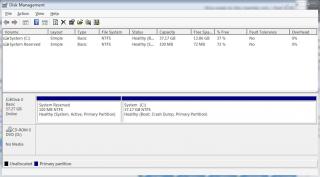
|
|
|
Aug 9 2011, 12:55 AM
|
|
Senior Member
2,021 posts Joined: Jun 2011 From: Shah Alam
|
QUOTE(lee_what2004 @ Aug 9 2011, 12:52 AM) No cd-rom 0 like this ? got got, saw already, so if i need to rename, do i do like what i've posted earlier? |
|
|
Aug 9 2011, 12:58 AM
|

Junior Member
132 posts Joined: May 2008
|
phew i managed to do it guys thanks
lol i took the easy way out and uninstalled my Ultra-Iso and just renamed all the drive letters to my liking |
|
|
Aug 9 2011, 12:59 AM
|
|
Elite
14,813 posts Joined: Nov 2006
|
QUOTE(rurushu @ Aug 9 2011, 12:55 AM) got got, saw already, so if i need to rename, do i do like what i've posted earlier? Yup.QUOTE(faridz7 @ Aug 9 2011, 12:58 AM) phew i managed to do it guys thanks I like use the Ultra-Iso portable version, just need to run it to mount ISO, after finish, close then all gone.lol i took the easy way out and uninstalled my Ultra-Iso and just renamed all the drive letters to my liking |
|
|
Aug 9 2011, 01:07 AM
|
|
Senior Member
2,021 posts Joined: Jun 2011 From: Shah Alam
|
QUOTE(lee_what2004 @ Aug 9 2011, 12:59 AM) Yup. ok, just now i tried to rename the drives, but when i wanted to rename the G:HP_Tools, it popped up a warning window that said it is current in use, if you change it, some programs may not run, do you wanna continue? So i didnt touch the G:HP_Tools and leave it be.So in the end, my drives are C: drive, D: drive, E: drive and F: BD-ROM drive + the original unchanged G:HP_Tools drive Thanks for your help sifu lee  |
|
|
Aug 9 2011, 01:09 AM
|
|
Junior Member
132 posts Joined: May 2008
|
QUOTE(lee_what2004 @ Aug 9 2011, 12:59 AM) I like use the Ultra-Iso portable version, just need to run it to mount ISO, after finish, close then all gone. yup yup...phew all allright already with the partitioning...thanks lee for the help !can go off to sleep in peace now lol..nights everyone |
|
|
Aug 9 2011, 01:37 AM
|

Junior Member
257 posts Joined: May 2008
|
actually hp_tool partition wat use?? when i bought my laptop, the stupid promoter help me delete it @@
|
|
|
|
|
|
Aug 9 2011, 01:46 AM
|

Junior Member
58 posts Joined: Jul 2009 From: Somewhere in Nendoroidian land...
|
who here have already changed their thermal paste for dv6-6114xt...? easy arr...?
|
|
|
Aug 9 2011, 01:53 AM
|
|
Senior Member
2,021 posts Joined: Jun 2011 From: Shah Alam
|
QUOTE(louisfjh @ Aug 9 2011, 01:37 AM) actually hp_tool partition wat use?? when i bought my laptop, the stupid promoter help me delete it @@ I also dunno what is its use... but when i tried to rename it, it said some programs may not be running if i do so, so i leave it be lo.... better not do it than sorry later... louis, why you keep going into bumps when dealing with your lappy? First the auto-switching thing(now solved, though you dont need it anymore), then the video codec thing(i think you finally solved it with sifus' help), then the recovery discs(i assume you not yet solve) and now the missing HP_Tools partition.... QUOTE(zarakiken @ Aug 9 2011, 01:46 AM) who here have already changed their thermal paste for dv6-6114xt...? easy arr...? Me still not yet, couldnt find the courage to do so.... scare will hurt my baby girl |
|
|
Aug 9 2011, 01:56 AM
|
|
Elite
14,813 posts Joined: Nov 2006
|
|
|
|
Aug 9 2011, 03:23 AM
|
|
Junior Member
257 posts Joined: May 2008
|
QUOTE(rurushu @ Aug 9 2011, 01:53 AM) I also dunno what is its use... but when i tried to rename it, it said some programs may not be running if i do so, so i leave it be lo.... better not do it than sorry later... bad luck louis, why you keep going into bumps when dealing with your lappy? First the auto-switching thing(now solved, though you dont need it anymore), then the video codec thing(i think you finally solved it with sifus' help), then the recovery discs(i assume you not yet solve) and now the missing HP_Tools partition.... Me still not yet, couldnt find the courage to do so.... scare will hurt my baby girl Added on August 9, 2011, 3:27 am QUOTE(lee_what2004 @ Aug 9 2011, 01:56 AM) the stupid promote help me delete cus wan help me make another new partition for me = =... so it just use to go in bios from window... so no effect for me la.....hmmm Added on August 9, 2011, 3:29 amhttp://h10025.www1.hp.com/ewfrf/wc/softwar...011366&sw_lang= i can dl here to get back the hp tool partition??? This post has been edited by louisfjh: Aug 9 2011, 03:29 AM |
|
|
Aug 9 2011, 03:37 AM
|
|
Senior Member
2,021 posts Joined: Jun 2011 From: Shah Alam
|
QUOTE(lee_what2004 @ Aug 9 2011, 01:56 AM) Whoa~~~ now that's damn informative!!!! Thanks for the info sifu lee!!! Man, you really helpful!!! Owed alot to your help  QUOTE(louisfjh @ Aug 9 2011, 03:23 AM) bad luck LOL.... the promoter.... hmm.... Added on August 9, 2011, 3:27 am the stupid promote help me delete cus wan help me make another new partition for me = =... so it just use to go in bios from window... so no effect for me la.....hmmm Added on August 9, 2011, 3:29 amhttp://h10025.www1.hp.com/ewfrf/wc/softwar...011366&sw_lang= i can dl here to get back the hp tool partition??? Can download back the partition?  |
|
|
Aug 9 2011, 05:13 AM
|

Senior Member
6,612 posts Joined: Jan 2003 From: Tomorrow
|
damn screamyx really did it this time.. cannot connect to internet since evening.
 got bored while waiting.. i plugged in my old CRT and play some balls @1920x1440. Fifa 11 | High Details, 4xMSAA, 8xAF » Click to show Spoiler - click again to hide... « PES 2011 | High Settings, 4xMSAA, 8xAF » Click to show Spoiler - click again to hide... « Grid | High Settings, 2xMSAA, 8xAF » Click to show Spoiler - click again to hide... « Tried some newer games.. but not really playable.  Added on August 9, 2011, 5:21 am QUOTE(louisfjh @ Aug 9 2011, 03:23 AM) http://h10025.www1.hp.com/ewfrf/wc/softwar...011366&sw_lang= This is the correct link for 6001TXi can dl here to get back the hp tool partition??? HP System Diagnostics UEFI This post has been edited by Acid_RuleZz: Aug 9 2011, 05:21 AM |
|
|
Aug 9 2011, 05:27 AM
|

Junior Member
361 posts Joined: Jun 2007
|
QUOTE(zarakiken @ Aug 9 2011, 01:46 AM) who here have already changed their thermal paste for dv6-6114xt...? easy arr...? Only Acid (6001TX - self), me (6108TX - self) and rurushu (6114TX - HP Technician).How would I said it. It's not as easy as desktop assembling, but it is achieavable as most part especially the wiring are all in place save some were hold with salophone tape. The prying part and motherboard removal will require more courage and determination. The 3 critical parts you'll need is a reasonable large workspace for placing your disassembled component and for screw placing (so you can remember it's location), screwdriver (thin long and magnitised) and a thin piece of metal (like nail file) to pry open some parts like the backplate, keyboard and front cover, and lastly an air-conditioned or at least with some well place fan to control the room temp (you'll sweat a lot if the workplace is hot). Maybe I'll write a step by step guide this weekend (while I can still remember it) and post here. p/s: If I post the guide, it will only be a guidance/recollection of what I did and do it at your own risk if you decide to go through with it. I'll take no responsibility for any damages that you cause to your precious "baby".  |
|
Topic ClosedOptions
|
| Change to: |  0.0299sec 0.0299sec
 0.78 0.78
 6 queries 6 queries
 GZIP Disabled GZIP Disabled
Time is now: 4th December 2025 - 02:16 PM |
 Quote
Quote


