Welcome Guest ( Log In | Register )

102 Pages « < 88 89 90 91 92 > » Bottom

Outline · [ Standard ] · Linear+

Hardware Hackintosh Thread V2.0, The Official OSX86 Thread (Hardware)

views
     
Anonymous34
post Feb 4 2016, 01:13 PM

Look at all my stars!!
*******
Senior Member
3,176 posts

Joined: May 2013
From: Petaling Jaya


QUOTE(xds @ Feb 4 2016, 10:36 AM)
Hi there, sorry to bump such an old question, but answer you gave is incorrect, and misleading. There is a way to dualboot in uefi mode both windows and osx, in a single drive, but the way to acomplish is tricky.

OSX uses hybrid GPT, windows needs full GPT, sorry, but what I'm stating is just the opposite that you stated.

Correct way to dualboot:

1. Boot with Gparted and create a GPT partition table (this completely erases your hd/ssd, do it just in case your disk is in mbr, if already gpt, skip)
2. Boot OSX install from USB, then use diskutil to create osx partition in hfs+, and windows partition in FAT32, this will result in your disk being converted to mixed MBR-GPT, and the reason windows cannot be installed in UEFI mode)
3. Finish OSX installation
4. Install clover in UEFI partition, using multibeast (if installation fails, mount first EFI partition using EFIMounter app
5. Boot with Gparted once again, and convert the disk back to full GPT using the terminal, with this comand: sudo gdisk /dev/sdX or hdX/  Please change sdX or hdX with your correct disk id.
6. Once in gdisk type x to enter advanced mode, then n to create a new gpt entry, then w to save changes, then Y to confirm.    Then using gparted delete windows partition (leave the space as unassigned, windows will reclaim that space later) your disk is now full GPT, congrats.
7. Launch Windows install in UEFI mode
8. Install windows normally, selecting the unasigned space as target, and then finally in your BIOS select the UEFI boot of the disk, from now on, clover can boot both OSX and Win in UEFI mode
If you happen to have OSX already installed, then just continue from 5, only if disk already in GPT, if not, start from 1

Forgot to mention, sometimes windows when installing has the nasty habit of unallocating the EFI partition, in the case of not being able to select after windows install the UEFI mode of the hd from BIOS (because it doesn't exist), just go to point 5 and 6, and execute ONLY the gdisk part, do not erase by any means the windows partition, just recreate the GPT, and fear not, as clover will still be in place, no need to reinstall wink.gif
*
Thanks for your clarification smile.gif
xds
post Feb 4 2016, 04:25 PM

New Member
*
Junior Member
5 posts

Joined: Dec 2015


QUOTE(ikan_semilang @ Feb 4 2016, 12:57 PM)
Guys, any tutorial how to make usb boot using windows? If can will unibeast together
*
Sorry, can you explain a little better what you need?
Make a bootable windows installer in an USB?
Make a bootable OSX installer using windows?
Boot your windows from a bootloader installed in an USB?

Sorry I'm still not proficient in Manglish lah.
ikan_semilang
post Feb 4 2016, 07:08 PM

Look at all my stars!!
*******
Senior Member
4,504 posts

Joined: Jan 2003
From: Setapak


QUOTE(xds @ Feb 4 2016, 04:25 PM)
Sorry, can you explain a little better what you need?
Make a bootable windows installer in an USB?
Make a bootable OSX installer using windows?
Boot your windows from a bootloader installed in an USB?

Sorry I'm still not proficient in Manglish lah.
*
Want to make usb bootable Yosemite or El Capitan with bootloader using mode windows.

This post has been edited by ikan_semilang: Feb 4 2016, 07:09 PM
xds
post Feb 5 2016, 10:04 AM

New Member
*
Junior Member
5 posts

Joined: Dec 2015


QUOTE(ikan_semilang @ Feb 4 2016, 07:08 PM)
Want to make usb bootable Yosemite or El Capitan with bootloader using mode windows.
*
Never done it myself, as I have 2 real macs and hackintosh is just a hobby for me, but as far as I can read on the internet, can.

Just follow this link, and then check the first video...
Bootable El capitan from windows

Now if you want to use Unibeast... you're out of luck, as Unibeast will only run from a mac or hackintosh. Also, I cannot help in the installation process, as I've always made my installation usbs with Unibeast from a proper mac.

This post has been edited by xds: Feb 5 2016, 10:09 AM
hairi.ariff_11
post Feb 9 2016, 06:43 PM

Getting Started
**
Junior Member
229 posts

Joined: Feb 2011
can I know what's the problem with my hackintosh

The problem starts when i try to update to OSX 10.10, the computer keeps reboot during loading at the apple logo.

Is there any solution to solve this problem?

Currently using clover
El Capitan version 10.10
gtx 750ti

This post has been edited by hairi.ariff_11: Feb 9 2016, 07:29 PM
xds
post Feb 9 2016, 10:59 PM

New Member
*
Junior Member
5 posts

Joined: Dec 2015


QUOTE(hairi.ariff_11 @ Feb 9 2016, 06:43 PM)
can I know what's the problem with my hackintosh

The problem starts when i try to update to OSX 10.10, the computer keeps reboot during loading at the apple logo.

Is there any solution to solve this problem?

Currently using clover
El Capitan version 10.10
gtx 750ti
*
boot in verbose mode with clover using -v and check what does it say, then post that info, otherwise cannot help unless I use a crystal ball...
xds
post Feb 9 2016, 11:03 PM

New Member
*
Junior Member
5 posts

Joined: Dec 2015


QUOTE(xds @ Feb 9 2016, 10:59 PM)
boot in verbose mode with clover using -v and check what does it say, then post that info, otherwise cannot help unless I use a crystal ball...
*
Also have you installed nvidia Web drivers? If not, also try to boot with the nv_disable=1 flag from clover... If that doesn't work, please share the info I requested you in the previous post
hairi.ariff_11
post Feb 11 2016, 12:32 AM

Getting Started
**
Junior Member
229 posts

Joined: Feb 2011
QUOTE(xds @ Feb 9 2016, 11:03 PM)
Also have you installed nvidia Web drivers? If not, also try to boot with the nv_disable=1 flag from clover... If that doesn't work, please share the info I requested you in the previous post
*
its okay, problem solved. I just found out the problem with my hackintosh due to the failed installation of gprahic driver. thanks btw smile.gif
bfu9278
post May 23 2016, 09:06 AM

Getting Started
**
Junior Member
137 posts

Joined: Nov 2007
From: HeartOfSilverState


just a bump/report...
10.11.5 working great for p8z68 v pro and dell 7537 with clover....
dual boot win10 same drive much more easier this days with efi and clover rclxm9.gif

p8z68 v pro no need dsdt and dell 7537 got complete dsdt patching (rehabman repo) to work with...
zenix
post May 23 2016, 09:10 AM

Pirate Captain
*******
Senior Member
6,249 posts

Joined: Jul 2006
win10 is as terrible as w8
i might jump full time to using macs
Anonymous34
post May 23 2016, 08:53 PM

Look at all my stars!!
*******
Senior Member
3,176 posts

Joined: May 2013
From: Petaling Jaya


QUOTE(bfu9278 @ May 23 2016, 09:06 AM)
just a bump/report...
10.11.5 working great for p8z68 v pro and dell 7537 with clover....
dual boot win10 same drive much more easier this days with efi and clover  rclxm9.gif

p8z68 v pro no need dsdt and dell 7537 got complete dsdt patching (rehabman repo) to work with...
*
Not every laptop has DSDT patching man. Many require manual patching. I can patch DSDT once, but thats about it because of the errors popping up
bfu9278
post May 24 2016, 10:17 AM

Getting Started
**
Junior Member
137 posts

Joined: Nov 2007
From: HeartOfSilverState


QUOTE(Anonymous34 @ May 23 2016, 08:53 PM)
Not every laptop has DSDT patching man. Many require manual patching. I can patch DSDT once, but thats about it because of the errors popping up
*
What I mean when saying using repo was manual patching our self..not ready made dsdt....there are few available other laptops patch on that repo also. During my patching I didn't face any error yet...just make sure using suggested tools version from tutorial we follow to avoid error appear...
Lucky me my dell 7537 still got support/actively discuss on El Capitan...

Sorry...If I mislead anybody else...

Anonymous34
post May 24 2016, 03:45 PM

Look at all my stars!!
*******
Senior Member
3,176 posts

Joined: May 2013
From: Petaling Jaya


QUOTE(bfu9278 @ May 24 2016, 10:17 AM)
What I mean when saying using repo was manual patching our self..not ready made dsdt....there are few available other laptops patch on that repo also. During my patching I didn't face any error yet...just make sure using suggested tools version from tutorial we follow to avoid error appear...
Lucky me my dell 7537 still got support/actively discuss on El Capitan...

Sorry...If I mislead anybody else...
*

What I meant was DSDT patches on RehabMan's repo. Like for my cheap Haswell laptop, hardware wise it should be fully compatible, but due to the lack of experiencne in coding, I am unable to modify the DSDT myseelf
Anonymous34
post Jul 23 2016, 03:36 PM

Look at all my stars!!
*******
Senior Member
3,176 posts

Joined: May 2013
From: Petaling Jaya


Thread is dead AF haha.

Anyways here's a new one in the Hackintosh family.

Acer E5-471G
Intel Core i3 4005U
8GB 1600MHZ DDR3
Intel HD Graphics 4400
NVIDIA GeForce 820M (Cannot be used)
Intel 530 Series 80GB SSD

Works Fine
All USB Ports/USB 3.0
Webcam
Sound/ Microphone
QE/CI
Keyboard/Trackpad
HDMI
DVD Drive
Ethernet

Not working
Sleep (Conflict with Optimus GPU)
HiDPI

Semi Working
Rigged Apple Airport Extreme (BCM94321MC) - Sometimes Low Speed due to it disconnecting from the logic board. Planned to replace soon with Half PCIE Mini Wifi
Battery - Drains quickly due to Optimus GPU constantly on

Attached Image
TSwiraone
post Jul 23 2016, 04:06 PM

Who cares about all the stars?
*******
Senior Member
3,892 posts

Joined: Jan 2003
From: Back on earth!
Probably because it is so easy to build one now, there is no more thrills smile.gif Anyway, my build I did 4 years ago still working great and has gone many OS upgrades and updates without much hassle.
wanna be hi-tech
post Jul 23 2016, 04:53 PM

Any self respecting GEEK, certainly owns more than a single rig
******
Senior Member
1,598 posts

Joined: Jan 2010


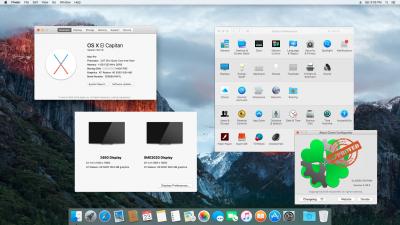
Ok...finally had time to finish this Clover built sweat.gif sweat.gif . Same old hardware though.... laugh.gif

Everything is working, dual screen, shut down and cloning was an issue---sorted now, just in time for another OS release !! mega_shok.gif

Attached Image Attached Image
allvin
post Jul 24 2016, 02:36 AM

......
*******
Senior Member
4,506 posts

Joined: Aug 2005

Since it happens to bump this thread up. Just quick question (lazy to google around and read back old posts) laugh.gif

I not been in Hackintosh for quite long, since got macbook and imac.

So for now, currently can just use the default mac osx installer (without mod) to install in normal pc? I know you have to do some partitioning and etc stuff.

**In the past, you have to download a specific installer that is modded in order to install. I remember the first gen hackintosh, which is hdd image. Restore from it and mod from there. Good old times laugh.gif

This post has been edited by allvin: Jul 24 2016, 02:40 AM
zenix
post Jul 25 2016, 01:15 PM

Pirate Captain
*******
Senior Member
6,249 posts

Joined: Jul 2006

TSwiraone
post Sep 21 2016, 11:24 AM

Who cares about all the stars?
*******
Senior Member
3,892 posts

Joined: Jan 2003
From: Back on earth!
Anybody dare to update to macOS Sierra? smile.gif
TSwiraone
post Sep 21 2016, 08:21 PM

Who cares about all the stars?
*******
Senior Member
3,892 posts

Joined: Jan 2003
From: Back on earth!
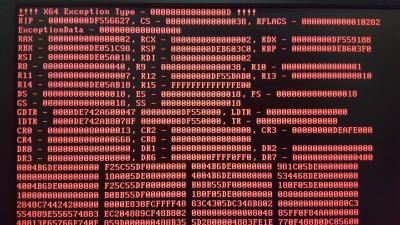
Tried to upgrade to Sierra and failed big time and screwed up the boot-up for el-cap too. Luckily managed to downgraded the Clover to -1 release. Anyone using Clover Legacy, do not upgrade to the latest release or you'll get a red screen of death.

Attached Image

102 Pages « < 88 89 90 91 92 > » Top
 

Change to:
| Lo-Fi Version
0.0280sec    0.45    6 queries    GZIP Disabled
Time is now: 15th December 2025 - 09:58 AM