

QUOTE(lee_what2004 @ Jul 22 2011, 03:42 PM)
GPU-Z, not CPU-Z.

OOps, sorry for the mistake. MEaning if i get the GPU-Z can detect even though it is auto-switching one?HP Pavillion DV6-6XXX series Owners Lounge V2, - 91 owners!! FUUUUUUUUUUUUU!!
|
|
 Jul 22 2011, 03:44 PM Jul 22 2011, 03:44 PM
|
 
Senior Member
2,021 posts Joined: Jun 2011 From: Shah Alam  
|
QUOTE(lee_what2004 @ Jul 22 2011, 03:42 PM) GPU-Z, not CPU-Z. OOps, sorry for the mistake. MEaning if i get the GPU-Z can detect even though it is auto-switching one? |
|
|
|
|
|
Jul 22 2011, 03:45 PM
|

Junior Member
56 posts Joined: Jan 2005 From: Pee Jay
|
^ If your 6770M is not running then the value will be 0 for HWMonitor and GPU-Z..
no fix on this yet. but doesn't seems to matter.  how to know if your 6770M is running? when there is value in HWMonitor/GPU-Z/MSI Afterburner or any other monitoring tools out there.. This post has been edited by RiverDrifte: Jul 22 2011, 03:46 PM |
|
|
Jul 22 2011, 03:45 PM
|
 
Elite
14,813 posts Joined: Nov 2006
|
Should be,
but fan speed most likely cannot detect, which is normal for laptop... |
|
|
Jul 22 2011, 03:49 PM
|
|
Senior Member
2,021 posts Joined: Jun 2011 From: Shah Alam
|
QUOTE(RiverDrifte @ Jul 22 2011, 03:45 PM) ^ If your 6770M is not running then the value will be 0 for HWMonitor and GPU-Z.. Yeah, mine it appears as 0 even though im running crysis 2.... no fix on this yet. but doesn't seems to matter. how to know if your 6770M is running? when there is value in HWMonitor/GPU-Z/MSI Afterburner or any other monitoring tools out there..  QUOTE(lee_what2004 @ Jul 22 2011, 03:45 PM) Should be, OKay, so now. I need both CPU-Z and GPU-Z to monitor all of the hardware right? Since the fans cannot be detected and HWmonitor is not responding on the HD6770m but fan speed most likely cannot detect, which is normal for laptop...  |
|
|
Jul 22 2011, 03:53 PM
|
|
Junior Member
56 posts Joined: Jan 2005 From: Pee Jay
|
Crysis 2 also no 6770M?!?!?!
high performance (in Power Option) + switchable graphic setting and set crysis 2 to High Performance (in CCC).. if not then plug in AC adapter? |
|
|
Jul 22 2011, 03:54 PM
|
|
Elite
14,813 posts Joined: Nov 2006
|
CPU-Z is just for info, it isn't for temperature...
and don't check HD6770M temp all the time, you wouldn't want it keep ON and OFF every seconds just to check its temp, it would defeats the purpose of switchable GPU.. |
|
|
|
|
|
Jul 22 2011, 04:08 PM
|

Junior Member
257 posts Joined: May 2008
|
QUOTE(Bboy4Life @ Jul 22 2011, 10:18 AM) Most users using cm u2 or u3..but u3 is highly recommended as im using it too wat price is the u3 cooler?? Wow..i nv knew they offer such warranty like dell does..  |
|
|
Jul 22 2011, 04:08 PM
|
|
Elite
14,813 posts Joined: Nov 2006
|
Around RM100..
|
|
|
Jul 22 2011, 04:12 PM
|
|
Newbie
1 posts Joined: Apr 2011
|
ALL IT has it for RM89
|
|
|
Jul 22 2011, 04:18 PM
|
|
Senior Member
2,021 posts Joined: Jun 2011 From: Shah Alam
|
QUOTE(RiverDrifte @ Jul 22 2011, 03:53 PM) Crysis 2 also no 6770M?!?!?! Nono, what i mean is, the HWmonitor didnt detect even though my hd6770m is running crysis 2. The left palm rest is so hot and i was puzzled why the HWmonitor is showing "0" for the hd6770m.high performance (in Power Option) + switchable graphic setting and set crysis 2 to High Performance (in CCC).. if not then plug in AC adapter? QUOTE(lee_what2004 @ Jul 22 2011, 03:54 PM) CPU-Z is just for info, it isn't for temperature... I see... i ddnt on it and off it just to check the temp. i just checked once before i start the game, and once after i game. To monitor the temp difference, so that i doesnt go to a worrying state. While i game, i didnt exit and check the temp, then go back to game, i scared it would damage the card i on it and off it like that.... but because yesterday when i played, the left palm rest is so hot that my hands are basically soaked in water.... when i exited the game, i go check the HWmonitor and it showed "0" on hd6770m, that is why i asked this question in the first place. I was thinking "it was so freaking hot and there is no way, just no way it would be "0" reading!!!! " and don't check HD6770M temp all the time, you wouldn't want it keep ON and OFF every seconds just to check its temp, it would defeats the purpose of switchable GPU.. Sifu lee, i just wanna check once after i game, the temp is around what range, and may i ask what range is consider safe? Im playing in a non-airconditioned environment, set the coolsense to coolest and using a U2 cooler pad.  |
|
|
Jul 22 2011, 04:21 PM
|
|
Elite
14,813 posts Joined: Nov 2006
|
Its better to leave the temp apps running during the games, then check the max temp it got. If you start it after done gaming, it won't be accurate..
When you exit the game, the HD6770M is turned off, hence the 0 temp.. Best if can below 80C, 90C still acceptable.. |
|
|
Jul 22 2011, 04:36 PM
|

Senior Member
1,615 posts Joined: May 2005 
|
rurushu, try download openhardwaremonitor from lee's signature and try. I got it working to check my temp. Got it on wit maplestory and the temp around 51.5 . Not bad cause im putting the lappy on a wooden table, i think that would increase the temp abit. Wait till i get the U3 then should get very nice temperature for gaming
 |
|
|
Jul 22 2011, 04:37 PM
|
|
Junior Member
56 posts Joined: Jan 2005 From: Pee Jay
|
QUOTE(lee_what2004 @ Jul 22 2011, 04:21 PM) Its better to leave the temp apps running during the games, then check the max temp it got. If you start it after done gaming, it won't be accurate.. +1 yup.. i does that which not really eat any notice-able memory and or speed.. and can also use to calculate your maximum temp.When you exit the game, the HD6770M is turned off, hence the 0 temp.. Best if can below 80C, 90C still acceptable.. |
|
|
|
|
|
Jul 22 2011, 05:26 PM
|

Junior Member
137 posts Joined: May 2009
|
what the h***?? since when hp offer onsite warranty?? that means my carepack is useless??
hypermarket is selling u3 at rm79 and a free memorycard reader. Its just opposite AllIT store. just a few steps and u can save rm7.This post has been edited by chahupping: Jul 22 2011, 05:28 PM |
|
|
Jul 22 2011, 07:23 PM
|

Junior Member
52 posts Joined: Jul 2011 From: Spring Arbor, MI
|
Hey can u all explain like the diff between ddr3 and ddr5?
|
|
|
Jul 22 2011, 07:25 PM
|
|
Elite
14,813 posts Joined: Nov 2006
|
DDR5 double the bandwidth of DDR3...
|
|
|
Jul 22 2011, 08:43 PM
|
|
Junior Member
257 posts Joined: May 2008
|
QUOTE(chahupping @ Jul 22 2011, 05:26 PM) what the h***?? since when hp offer onsite warranty?? that means my carepack is useless?? wow...nice... lowyat???hypermarket is selling u3 at rm79 and a free memorycard reader. Its just opposite AllIT store. just a few steps and u can save rm7.Added on July 22, 2011, 9:37 pm 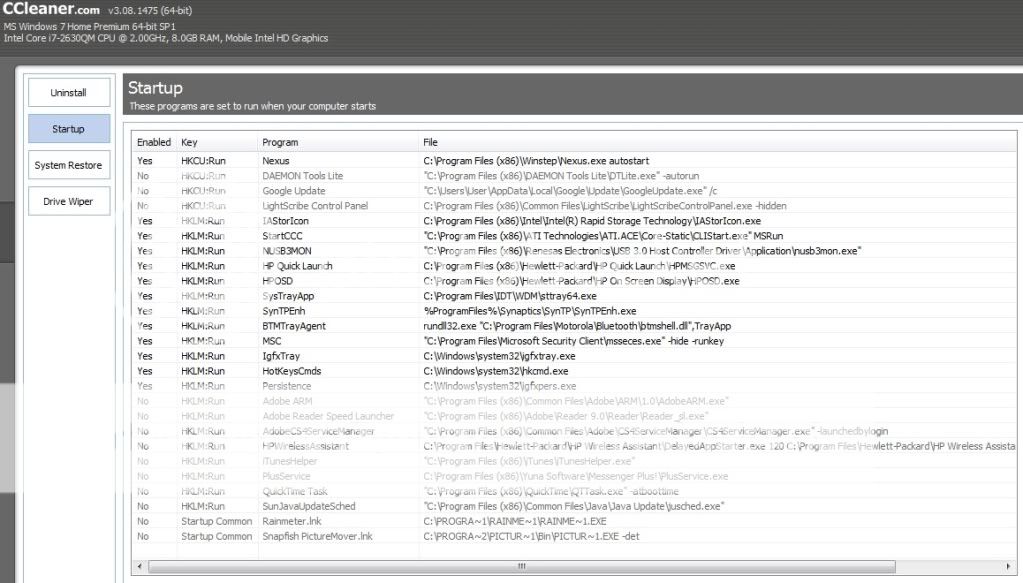 anything i can stop ar??? This post has been edited by louisfjh: Jul 22 2011, 09:37 PM |
|
|
Jul 22 2011, 09:50 PM
|
|
Senior Member
2,021 posts Joined: Jun 2011 From: Shah Alam
|
QUOTE(lee_what2004 @ Jul 22 2011, 04:21 PM) Its better to leave the temp apps running during the games, then check the max temp it got. If you start it after done gaming, it won't be accurate.. oo.... okok, thanks for the advice and guidance, sifu lee! When you exit the game, the HD6770M is turned off, hence the 0 temp.. Best if can below 80C, 90C still acceptable..  QUOTE(avengers88 @ Jul 22 2011, 04:36 PM) rurushu, try download openhardwaremonitor from lee's signature and try. I got it working to check my temp. Got it on wit maplestory and the temp around 51.5 . Not bad cause im putting the lappy on a wooden table, i think that would increase the temp abit. Wait till i get the U3 then should get very nice temperature for gaming Ok avengers88, i will try get the monitor from sifu lee's signature. Will post my temp when done testing.  |
|
|
Jul 23 2011, 04:28 AM
|

Junior Member
9 posts Joined: Sep 2006
|
QUOTE(aeroxd @ Jul 22 2011, 12:21 AM) k, i'm in now, got my 6108tx today, bought the rm4721 pikom pc fair promo bundle. how much is the laptop alone? where is the fair?came with the beats headphones, a printer, a laptop bag, a mouse, windows microsoft office 2010 and 3 years onsite warranty |
|
|
Jul 23 2011, 05:01 AM
|

Senior Member
6,612 posts Joined: Jan 2003 From: Tomorrow
|
QUOTE(amos_ong37 @ Jul 23 2011, 04:28 AM) how much is the laptop alone? where is the fair? Actually that is an online promotion. You can check it here.Link: Online Exclusive PC Fair Packages Added on July 23, 2011, 5:05 am QUOTE(louisfjh @ Jul 22 2011, 08:43 PM) » Click to show Spoiler - click again to hide... « anything i can stop ar??? Like me i don't use HP Quick Launch, HP OSD, BeatsAudio Control Panel, Igfxtray, HotkeysCmds, Persistence, Bluetooth and USB 3.0 Host Controller. I disabled them all. This post has been edited by Acid_RuleZz: Jul 23 2011, 05:05 AM |
|
Topic ClosedOptions
|
| Change to: |  0.0282sec 0.0282sec
 0.87 0.87
 6 queries 6 queries
 GZIP Disabled GZIP Disabled
Time is now: 16th December 2025 - 10:36 AM |
 Quote
Quote