Welcome Guest ( Log In | Register )

Bump Topic Topic Closed RSS Feed
117 Pages « < 103 104 105 106 107 > » Bottom

Outline · [ Standard ] · Linear+

 SAMSUNG GALAXY S II Official thread V5, It is coming to Malaysia 22 June !!

views
     
monza84
post Jun 24 2011, 07:38 AM

......
*******
Senior Member
2,059 posts

Joined: Jan 2010
QUOTE(CELCOM.AXIATA @ Jun 24 2011, 07:36 AM)
don't think so. it happened just on galaxy s2 launching day and the problem is still persisting.
i think either one of the mods or lyn owner received a small amt of money from either samsung/maxis for this.
hmm.gif
*
+1, i think the same way also, it was pinned on the day of lauching..i think must be some back-activity going brows.gif
TSbenny888
post Jun 24 2011, 07:39 AM

Gadget Freak
Group Icon
Elite
27,801 posts

Joined: Jun 2007
From: Johor


QUOTE(Lineage @ Jun 24 2011, 07:33 AM)
Uncle Benny, I remember before this that you saying you will  clear your dalvik cache, cache partition once a week right? what is the benefit of doing that?  laugh.gif
*
Just like cleaning your room . Over time the cache build up with lots of redundant files and is useless taking up memory. Doing it from recovery is a sure guarantee cleanup unlike using 3rd party apps which efficiency is doubtful.
Fallenangelz
post Jun 24 2011, 07:41 AM

24 Hours a day just isn't enough.
*******
Senior Member
3,221 posts

Joined: Sep 2008
From: KL


i tested lite'ning rom 1.5, but seems more power consuming than 1.4 version. charged full before sleep, today am went up and the battery is at 88% while using 1.4 ver is at 93%...
TSbenny888
post Jun 24 2011, 07:43 AM

Gadget Freak
Group Icon
Elite
27,801 posts

Joined: Jun 2007
From: Johor


QUOTE(destEX @ Jun 24 2011, 02:05 AM)
dont think so, might have a way using wifi router softwares, but i do know that you can transfer files/songs to another galaxy s2(or any wifi direct devices) at blazing fast wifi lan speed 64mbps!  brows.gif
*
Use free app WiFi file explorer
Lineage
post Jun 24 2011, 07:50 AM

the Chaotic Throne
*******
Senior Member
4,524 posts

Joined: Oct 2007
From: ~Still finding the place~


QUOTE(benny888 @ Jun 24 2011, 07:39 AM)
Just like cleaning your room . Over time the cache build up with lots of redundant files and is useless taking up memory. Doing it from recovery is a sure guarantee cleanup unlike using 3rd party apps which efficiency is doubtful.
*
Understand laugh.gif
Will do once I get my SGS II next week nod.gif
ventrilocks
post Jun 24 2011, 07:52 AM

So Nyuh Shi Dae
*******
Senior Member
3,030 posts

Joined: Sep 2006
From: GGWP
whats so special about villain rom that many people use it? lol..
vs angelom vs litening?
genus
post Jun 24 2011, 08:15 AM

Getting Started
**
Junior Member
164 posts

Joined: Dec 2010
QUOTE(Lineage @ Jun 24 2011, 07:50 AM)
Understand  laugh.gif
Will do once I get my SGS II next week  nod.gif
*
are you getting second batch of SGS2? Me too waiting for second bacth..donno when I can get it for next week? hopefully Monday...
TSbenny888
post Jun 24 2011, 08:26 AM

Gadget Freak
Group Icon
Elite
27,801 posts

Joined: Jun 2007
From: Johor


QUOTE(ohmlawx @ Jun 24 2011, 12:46 AM)
i m quite confuse here.

last time when i flash SGS,

1. 1 file no need to use pit
2. 3 file use pit with tick re-partition

is it no need to do so for SGS 2?
*
The pit file basically tells Odin how to divide the partitions (for formating) and also where certain components go when flashing them individually.
For example .pit file tells Odin to program modem.bin file to MODEM "partition", zImage to KERNEL "partition", etc.

One very important piece of advise. If you guys wish to flash any rom from www.samfirmware.com ALWAYS remeber to download and tick the PIT file in Odin. Many users has gone straight to flash ignoring it and end up bricking their phone. Roms at samfirmware are basically copies of the official rom - and when we flash such roms from there, your phone will be wipe clean. When you select pit, automatically repartition is selected. I always advise new users, flash rom from samfirmware.com only if you know what you are doing

Rom cooks when they develop their roms, how the internal memory is to be partition is already build in , so normally you need not select PIT or repartition

Most rom cooks when they need you to flash through odin , will package it as a tar file. So you just select this tar file as PDA file in Odin. Once a while you will come across some rom cooks who will package their rom as a zip file ( extracted it shows 3 files - PDA, Phone, CSC) which need to flash through odin. Normally for such files - you need to select at least the PDA file to flash; the phone and CSC file is optional. But no harm selecting it too if you want to try his proposed combination. I have also said before you can flash a rom as a rojak combo - use PDA from one cook, use the phone and csc from another . Again, if you are a newbie - be safe, stay away from trying your combo unless you really understand the features behind each of them


Added on June 24, 2011, 8:30 am
QUOTE(Boomeraangkid @ Jun 24 2011, 01:44 AM)
the boot animation takes so long dude! i had to remove just now im trying again now. see how its goes.
*
That is simply because you failed to follow the first golden rule of flashing : ALWAYS always clear your cache partition, dalvik cache before flashing any new rom, even just a simple update zip. Many rom cooks assume you know this basic rule, just like you put on your clothes when you wish to go out and not go out naked

This post has been edited by benny888: Jun 24 2011, 08:30 AM

toiletant
post Jun 24 2011, 08:33 AM

New Member
*
Junior Member
28 posts

Joined: Jun 2009
i need help guys... why my phone always stuck at boot screen after flashing new rom... i have tried litening and villian but all stuck at boot screen... i have to reset it in recovery mode baru back to normal.. what the problem? how to solve it?
TSbenny888
post Jun 24 2011, 08:33 AM

Gadget Freak
Group Icon
Elite
27,801 posts

Joined: Jun 2007
From: Johor


QUOTE(Boomeraangkid @ Jun 24 2011, 12:43 AM)
how come the page noobi3 gave the XXKF2 so small size while the one from samfirmware is so big?
*
Remind me , why yours so big, mine so small ??

Anyway, samfirmware.com is a copy of the whole official rom ( PDA,PHONE, CSC erc ) . Most rom cooks just give you a repackage of the rom - the PDA file. They normally leave the phone/CSC and others intact. As pointed above post, stay aware from samfirmware.com unless you understand what you are doing


Added on June 24, 2011, 8:34 am
QUOTE(toiletant @ Jun 24 2011, 08:33 AM)
i need help guys... why my phone always stuck at boot screen after flashing new rom... i have tried litening and villian but all stuck at boot screen... i have to reset it in recovery mode baru back to normal.. what the problem? how to solve it?
*
Read post 2090 just above yours

This post has been edited by benny888: Jun 24 2011, 08:34 AM
mydragoon
post Jun 24 2011, 08:36 AM

Look at all my stars!!
*******
Senior Member
7,044 posts

Joined: Nov 2007


wow... just like 1-2 days and its time for v6?!?

but i noticed most of the posts are the same thing -- asking questions already asked or even pinned on Pg1. else, its android vs apple. or some stupid comment about how many posts there are in this thread... lol...

This post has been edited by mydragoon: Jun 24 2011, 08:37 AM
Boomeraangkid
post Jun 24 2011, 08:43 AM

Behind You
*******
Senior Member
2,696 posts

Joined: Nov 2007
From: forum.lowyat.net


thanks for replies benny, learnt my lesson. using villainrom 1.4, this thing saves my batt life so much its still at full charge lol
MercurialA
post Jun 24 2011, 08:44 AM

New Member
*
Junior Member
45 posts

Joined: Dec 2010
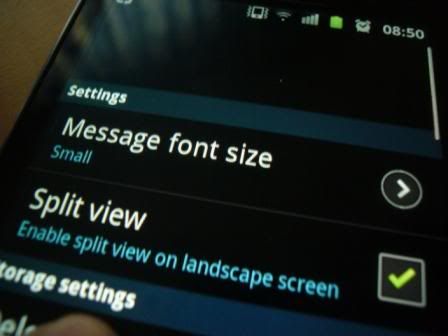
uncle benny... how to hard reset my phone...well it seems that i cant solve my message skin problem... it is not in the mesaging>settings

user posted image


Added on June 24, 2011, 8:45 ami press the volume down + power button but cant

This post has been edited by MercurialA: Jun 24 2011, 08:45 AM
ventrilocks
post Jun 24 2011, 08:48 AM

So Nyuh Shi Dae
*******
Senior Member
3,030 posts

Joined: Sep 2006
From: GGWP
QUOTE(benny888 @ Jun 24 2011, 08:26 AM)
The pit file basically tells Odin how to divide the partitions (for formating) and also where certain components go when flashing them individually.
For example .pit file tells Odin to program modem.bin file to MODEM "partition", zImage to KERNEL "partition", etc.

One very important piece of advise. If you guys wish to flash any rom from www.samfirmware.com ALWAYS remeber to download and tick the PIT file in Odin. Many users has gone straight to flash ignoring it and end up bricking their phone. Roms at samfirmware are basically copies of the official rom - and when we flash such roms from there, your phone will be wipe clean. When you select pit, automatically repartition is selected. I always advise new users, flash rom from samfirmware.com only if you know what you are doing

Rom cooks when they develop their roms, how the internal memory is to be partition is already build in , so normally you need not select PIT or repartition

Most rom cooks when they need you to flash through odin , will package it as a tar file. So you just select this tar file as PDA file in Odin. Once a while you will come across some rom cooks who will package their rom as a zip file ( extracted it shows 3 files - PDA, Phone, CSC) which need to flash through odin. Normally for such files - you need to select at least the PDA file to flash; the phone and CSC  file is optional. But no harm selecting it too if you want to try his proposed combination. I have also said before you can flash a rom as a rojak combo - use PDA from one cook, use the phone and csc from another . Again, if you are a newbie - be safe, stay away from trying your combo unless you really understand the features behind each of them
great explanation..i understand a little bit of ODIN right now..thanks benny.. thumbup.gif
gingerman2408
post Jun 24 2011, 08:48 AM

Getting Started
**
Junior Member
102 posts

Joined: Apr 2011
New case from Zenus looks awesome. Anyone wanna do bulk order? =p

http://www.zenuscase.net/product-29897.html
ventrilocks
post Jun 24 2011, 08:49 AM

So Nyuh Shi Dae
*******
Senior Member
3,030 posts

Joined: Sep 2006
From: GGWP
QUOTE(MercurialA @ Jun 24 2011, 08:44 AM)
uncle benny... how to hard reset my phone...well it seems that i cant solve my message skin problem... it is not in the mesaging>settings

user posted image


Added on June 24, 2011, 8:45 ami press the volume down + power button but cant
*
u mean factory reset?
go to setting>privacy
MercurialA
post Jun 24 2011, 08:51 AM

New Member
*
Junior Member
45 posts

Joined: Dec 2010
QUOTE(ventrilocks @ Jun 24 2011, 08:49 AM)
u mean factory reset?
go to setting>privacy
*
will it help in fixing that "bug/crash" problem?
ventrilocks
post Jun 24 2011, 08:52 AM

So Nyuh Shi Dae
*******
Senior Member
3,030 posts

Joined: Sep 2006
From: GGWP
QUOTE(MercurialA @ Jun 24 2011, 08:51 AM)
will it help in fixing that "bug/crash" problem?
*
give it a try..if not try flash stock rom back..
TSbenny888
post Jun 24 2011, 08:53 AM

Gadget Freak
Group Icon
Elite
27,801 posts

Joined: Jun 2007
From: Johor


QUOTE(MercurialA @ Jun 24 2011, 08:51 AM)
will it help in fixing that "bug/crash" problem?
*
What crash/bug is this ?? I have been using my phone for more than 1.5 months and has never faced any crash in all my apps I use
MercurialA
post Jun 24 2011, 08:53 AM

New Member
*
Junior Member
45 posts

Joined: Dec 2010
ok =) thank you


Added on June 24, 2011, 8:54 amnono uncle benny... it is the skin message... check the previous post for the photo... duno why it does not appear on my phone

This post has been edited by MercurialA: Jun 24 2011, 08:55 AM

117 Pages « < 103 104 105 106 107 > » Top
Topic ClosedOptions
 

Change to:
| Lo-Fi Version
0.0306sec    0.42    6 queries    GZIP Disabled
Time is now: 5th December 2025 - 02:30 AM