Welcome Guest ( Log In | Register )

Bump Topic Topic Closed RSS Feed
176 Pages « < 32 33 34 35 36 > » Bottom

Outline · [ Standard ] · Linear+

 HiMedia Media Player, All about HiMedia

views
     
kuntilanak
post Mar 4 2013, 12:21 PM

Enthusiast
*****
Senior Member
976 posts

Joined: Jun 2009
QUOTE(navilink @ Mar 3 2013, 11:12 AM)
Anyone using Himedia HD600F? seems not much comment on this model..
» Click to show Spoiler - click again to hide... «

*
Hi. I just bought one HD600F 2 days ago at LY. So far so good. It does all the things I asked it to do. I mainly use it to hook up my external DVD-RW to read those data disks I backed up. Also to stream media from my main PC through Wifi, but if the router SSID is hidden, it will not connect. It also comes with SD slot. Handy but not that useful for me. Haven't tried the eSATA since I don't have any devices of that nature. Wifi streaming is rather smooth. Tested all sorts of formats, all the way up to 1080p and so far, no hiccups... rclxms.gif
detroit1
post Mar 7 2013, 02:14 AM

New Member
*
Junior Member
18 posts

Joined: Dec 2010
I wanted to ask again about people's experiences with sound between Realtek and Sigma Chip

I just got the iconBit player with Realtek 1186 chip and it plays everything and it is quick and can read and play files from 3TB and 4TB drive so I give it strong grades for that

BUT the sound quality is not as good as my Sigma 8642 chip in my HDX; there is a clear difference; the sound on Realtek is thinner; Bass not as strong
I noticed on 5.1 playback as well as 96/24 audio files

this is the exact same thing I noticed on Egreat R300 with Realtek 1186 chip when I compared that to my HDX

so the realtek chip is great when it comes to features and playing all files but there is no way it sounds as good. I am sure of what I heard; I compared a few times
Skylinestar
post Mar 7 2013, 08:50 AM

Mega Duck
********
All Stars
10,473 posts

Joined: Jan 2003
From: Sarawak
QUOTE(detroit1 @ Mar 7 2013, 02:14 AM)
I wanted to ask again about people's experiences with sound between Realtek and Sigma Chip

I just got the iconBit player with Realtek 1186 chip and it plays everything and it is quick and can read and play files from 3TB and 4TB drive so I give it strong grades for that

BUT the sound quality is not as good as my Sigma 8642 chip in my HDX; there is a clear difference; the sound on Realtek is thinner; Bass not as strong
I noticed on 5.1 playback as well as 96/24 audio files

this is the exact same thing I noticed on Egreat R300 with Realtek 1186 chip when I compared that to my HDX

so the realtek chip is great when it comes to features and playing all files but there is no way it sounds as good. I am sure of what I heard; I compared a few times
*
Did you test it with passthrough bitstream too? Does the Sigma sound better in passthrough too? If yes, I think I wanna jump from Realtek to Sigma too.
willkso
post Mar 7 2013, 02:35 PM

Enthusiast
*****
Senior Member
993 posts

Joined: Apr 2007
From: Gas Town, Sarawak


I wonder if it's bitstream, the player supposedly to pass the unmolested signal from movie and let the AVR process it. If it's unmolested signal, how can the sigma chipset give a better sound since some sifus here do argue it's either 1 or 0 signal received and processed by the AVR..
Mov_freak
post Mar 7 2013, 02:38 PM

aka. Nickelodein Weirdo
Group Icon
Moderator
1,723 posts

Joined: Feb 2009


QUOTE(Skylinestar @ Mar 7 2013, 08:50 AM)
Did you test it with passthrough bitstream too? Does the Sigma sound better in passthrough too? If yes, I think I wanna jump from Realtek to Sigma too.
*
Yup

Unfortunately, Sigma is in real "Kaka" at this point in time.

They have always market their chipset as "high-end" (to some extend they are right) but their latest chipset is a big failure (didn't deliver what is promised) cause alot of media player manufacturer to abandon them (Dune, eGreat etc)

Dune latest flagship, which was shown in the E3 was powered by..... (drum roll) Intel!!?!

So my suggestion to you is before you jump ship, adopt a wait and see attitude.

Who knows, maybe Sigma will redeem themselves by actually delivering a new chipset that fulfill all they had promised, or Dune's latest experiment actually works!!

You know about Cinevia wight, that is also complicating things....

This post has been edited by Mov_freak: Mar 7 2013, 02:40 PM
Skylinestar
post Mar 7 2013, 07:03 PM

Mega Duck
********
All Stars
10,473 posts

Joined: Jan 2003
From: Sarawak
QUOTE(Mov_freak @ Mar 7 2013, 02:38 PM)
Yup
*
Wow...another member concurred that Sigma sounds better than Realtek when passthrough bitstream.
Any more Sigma users willing to comment more on this?
detroit1
post Mar 7 2013, 07:54 PM

New Member
*
Junior Member
18 posts

Joined: Dec 2010
There is Positively a Sound Difference between the Sigma 8642 and Realtek 1186. Remember the 8642 is a blu-ray chip; it is a top of the line chip
It is now discontinued.

It could also be the quality of the DAC or the output stage in the player

The HDX BD1 is premium in that regard; all Audio Files and Video with HD sound and DVD sound are excellent on that player and seemed to sound similar with the Popcorn Hour A400, which has Sigma 8910 chip but too many other playback problems with the A400 at this point
BOTBOTCHAI.
post Mar 8 2013, 09:03 AM

Casual
***
Senior Member
499 posts

Joined: Oct 2011
From: Black hole
QUOTE(willkso @ Mar 7 2013, 02:35 PM)
I wonder if it's bitstream, the player supposedly to pass the unmolested signal from movie and let the AVR process it. If it's unmolested signal, how can the sigma chipset give a better sound since some sifus here do argue it's either 1 or 0 signal received and processed by the AVR..
*
+1 . I have try in my friend place . Bitstream sound same in Dune and Himedia . LPCM Dune sound louder.
willkso
post Mar 8 2013, 09:59 AM

Enthusiast
*****
Senior Member
993 posts

Joined: Apr 2007
From: Gas Town, Sarawak


QUOTE(BOTBOTCHAI. @ Mar 8 2013, 10:03 AM)
+1 . I have try in my friend place . Bitstream sound same in Dune and Himedia . LPCM Dune sound louder.
*
I do agree the LPCM will sound different as it involve the internal DAC to convert the sound track format but bitstream processing should be done by the AVR.
detroit1
post Mar 10 2013, 07:49 AM

New Member
*
Junior Member
18 posts

Joined: Dec 2010
FYI, another person from the forums who owns a Realtek chip player and a Sigma player did a Bass test using a sound level meter and he wrote:


I just did my test using a radioshack digital sound meter set to 70 with response time set to fast. And the pink noise 7.1 dts-hd test disc. number for number they were the exact same across the board, with the exception of LFE channel while it peaked at the same sound level it was sporadic and jumpy. with the 8911 sigma player bass sat at a flat 85 (yes i know its to high.. for this test I turned the sub amp all the way up) But the 1186 player would make the spl meter jump between 80-86 during LFE.


This is a big difference and would explain what I am hearing when I complain about hearing less bass on 2 different realtek players

jinxiang
post Mar 13 2013, 02:15 PM

Getting Started
**
Junior Member
69 posts

Joined: Aug 2009
QUOTE(ccs221 @ Jan 10 2013, 02:01 AM)
play a real 3D movie, must have below device: a 3D TV (with 1.4v hdmi port), a 3d blu-ray player or 3d media player (with 1.4v hdmi port), a amplifier which support 3d n a ori 3d disk or ori 3d iso (bdmv) file...less one is not possible to play real 3d movie de...

those left-right, up-down or red n blue file just is simulation of 3D, not real 3d file, output quality is different de..(currently media player only got realtek 1186 chipset can play real 3d file de, sigma chipset still can not de)

the latest himedia hd900 firmware (2013.01.06) can download here: http://v.himedia-tech.cn/himedia/hd900/201..._1.0.5.7.tar.gz
hd600 lastest firmware: http://v.himedia-tech.cn/himedia/hd600/201...1.0.8.14.tar.gz
hd900 in market more than 18 month ady (hd600 more than 2 years), u cant expect a player over a year still every month can get new firmware de (most brand after half year ady stop provide the firmware support), pls do sum research before do complain lack of support from Himedia..

about the audio drop out so far i test my 6tb 3d database is ok de (3d Titanic i also have iso, mkv version, 3diso with DTS HDMA audio output dnt have any problem), but cant guarantee maybe got few source will happen de..(cant just say coz u have 1 or 2 source audio drop out then hd900 play movie will audio drop out de, better test another 1186 chipset player try the same movie file then see wut happen 1st)
*
Hi,

I downloaded the firmware for HD900 but when try to unzip, error msg says invalid folder.....please advise?
ck23
post Mar 13 2013, 04:26 PM

Enthusiast
*****
Senior Member
717 posts

Joined: Sep 2008


http://forum.lowyat.net/index.php?showtopic=2721023&hl=

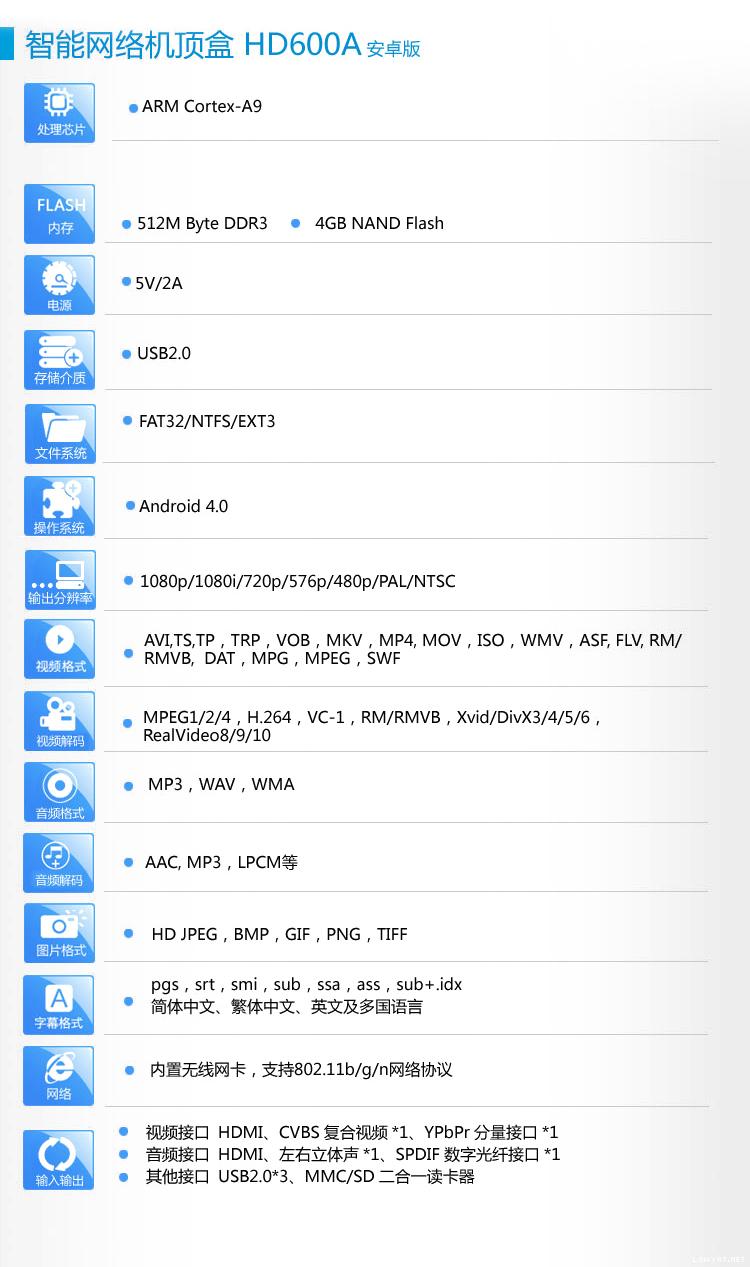
Im selling HD600A at RM388.00

Grab yours fast.

user posted image

This post has been edited by ck23: Mar 13 2013, 04:27 PM
nitromx
post Mar 15 2013, 04:36 PM

On my way
****
Senior Member
532 posts

Joined: Nov 2004


how to connect Q5 to network storage?
rx330
post Apr 2 2013, 01:04 PM

10k Club
********
All Stars
11,808 posts

Joined: Jun 2006
what are the channels we are available to watch on this himedia player? is there still a need for PPS?
and is 4mb internet line, good enough?
negayem
post Apr 2 2013, 10:20 PM

Getting Started
**
Junior Member
225 posts

Joined: Jul 2005


QUOTE(nitromx @ Mar 15 2013, 04:36 PM)
how to connect Q5 to network storage?
*
I'm also having problem connecting my Q5 to my Synology NAS.
Can anyone help, please?
numbertwo
post Apr 2 2013, 11:50 PM

Regular
******
Senior Member
1,787 posts

Joined: Mar 2009
From: PJ lamansara... :D


QUOTE(negayem @ Apr 2 2013, 10:20 PM)
I'm also having problem connecting my Q5 to my Synology NAS.
Can anyone help, please?
*
Although I'm still using 600A, it should be quite straighforward if both Q5 and Synology is under the same network workgroup... Is your laptop/desktop at home able to find the NAS? If yes, then try to find out what differences are between your laptop/desktop and Q5.
negayem
post Apr 3 2013, 10:11 AM

Getting Started
**
Junior Member
225 posts

Joined: Jul 2005


QUOTE(numbertwo @ Apr 2 2013, 11:50 PM)
Although I'm still using 600A, it should be quite straighforward if both Q5 and Synology is under the same network workgroup... Is your laptop/desktop at home able to find the NAS?  If yes, then try to find out what differences are between your laptop/desktop and Q5.
*
Basically can find the NAS but cannot mount.

Both my Q5 and Synology are under the same network. I went to the File Manager --> NFS, then input my IP address and server folder, and click mount but failed. Perhaps I incorrectly input the server folder. Any suggestions?
numbertwo
post Apr 3 2013, 10:32 AM

Regular
******
Senior Member
1,787 posts

Joined: Mar 2009
From: PJ lamansara... :D


QUOTE(negayem @ Apr 3 2013, 10:11 AM)
Basically can find the NAS but cannot mount.

Both my Q5 and Synology are under the same network. I went to the File Manager --> NFS, then input my IP address and server folder, and click mount but failed. Perhaps I incorrectly input the server folder. Any suggestions?
*
Try this site : http://www.acryan.com/forums/viewtopic.php?f=172&t=12321

they suggest to put the ip access for nfs within synology console...


QUOTE
1.
Go to control panel->shared folder->nfs in syno web interface,set up ip access for nfs (ip of mini2)
Do this for all folders you need to access . (ex. video, music, etc)

joechong>> This is done within the Synology Diskstation web console. The attached image is where you should be setting up all the steps above on enabling NFS. Take note of the mount path of each of the folder that you enabled NDS on. The image shows for /volume1/video

negayem
post Apr 3 2013, 02:54 PM

Getting Started
**
Junior Member
225 posts

Joined: Jul 2005


QUOTE(numbertwo @ Apr 3 2013, 10:32 AM)
Try this site : http://www.acryan.com/forums/viewtopic.php?f=172&t=12321

they suggest to put the ip access for nfs within synology console...
*
Thank you very much, number two! rclxms.gif rclxms.gif
I will try this at home tonight, should work (keeping my fingers crossed)!
negayem
post Apr 3 2013, 11:09 PM

Getting Started
**
Junior Member
225 posts

Joined: Jul 2005


QUOTE(negayem @ Apr 3 2013, 02:54 PM)
Thank you very much, number two! rclxms.gif  rclxms.gif
I will try this at home tonight, should work (keeping my fingers crossed)!
*
Unfortunately still cannot work on the Q5. I tried enabling NFS but still got the 'cannot mount' message. I also went to the LAN directory to setup password and username but was rewarded with 'username and password incorrect'. Sigh ... back to square one.

176 Pages « < 32 33 34 35 36 > » Top
Topic ClosedOptions
 

Change to:
| Lo-Fi Version
0.0345sec    0.53    6 queries    GZIP Disabled
Time is now: 4th December 2025 - 09:50 AM