Welcome Guest ( Log In | Register )

Bump Topic Topic Closed RSS Feed
6 Pages « < 2 3 4 5 6 >Bottom

Outline · [ Standard ] · Linear+

 HiMedia Media Player, All about HiMedia

views
     
dwRK
post Feb 11 2017, 11:55 AM

the consummate chartist
*******
Senior Member
6,229 posts

Joined: Jun 2006


QUOTE(AVFAN @ Feb 11 2017, 10:38 AM)
i just tested this, file of 2.5 hrs long, can work out the bit rate.

71.1GB,  2160p 4K UltraHD BluRay x265 (HEVC 10bit BT709) Dolby Atmos 7.1 mkv

*
In the good old days...just use gspot program to inspect biggrin.gif but I don't supposed it will work for 4k files anymore...

ffmpeg or ffprobe will be able to show all the codec info.

This post has been edited by dwRK: Feb 11 2017, 11:56 AM
dwRK
post Feb 11 2017, 12:02 PM

the consummate chartist
*******
Senior Member
6,229 posts

Joined: Jun 2006


QUOTE(plumberly @ Feb 11 2017, 11:47 AM)
I see. My apology for my wrong intuition/gut feel/jumping to conclusion.

One more guess, PhD in Mech Eng? Ha.

OT, better stop here.
*
No again...no worries mate. biggrin.gif
dwRK
post Feb 11 2017, 05:48 PM

the consummate chartist
*******
Senior Member
6,229 posts

Joined: Jun 2006


QUOTE(Maxram @ Feb 11 2017, 04:01 PM)
Cleaned up by removing unwanted apps, install kodi 16. Surprise, surprise, this old box works. Manage to watch 1 movie and 1 TV drama smoothly in kodi. I'm amazed, learning more about what Android box can do. So far, no issue on movies in HDDs but not 4k or those extreme stuffs. Wonder what more apps to add.

Unfortunately, no Bluetooth, can't use wireless hp. Might add Bluetooth transmitter. Or any suggestion? Is welcome

Himedia box age well
*
Not sure if it works with HiControl app...

Install the app to your phone...the box can "reverse cast" video and audio to your phone...but android phone only...then you can try hp & bt...just temp suggestions...

This post has been edited by dwRK: Feb 11 2017, 07:07 PM
dwRK
post Feb 15 2017, 11:06 PM

the consummate chartist
*******
Senior Member
6,229 posts

Joined: Jun 2006


I think he meant the q16 launcher perhaps...

This post has been edited by dwRK: Feb 15 2017, 11:06 PM
dwRK
post Feb 16 2017, 09:51 AM

the consummate chartist
*******
Senior Member
6,229 posts

Joined: Jun 2006


QUOTE(GuyM @ Feb 16 2017, 08:00 AM)
I don't think it's called the launcher...

In Q16 home screen, you'd usually have those flash of various latest programs sliding right to left on top screen while the bottom you'd have the shortcuts or favorite... That makes it look premium 😁😁😁

Doubt there's any device out there that does this...😝😝😝

That's the one I wanted to install into Q5 cos the current Q5 home screen is like dull....😴😴😴

Hope you get my drift
*
That IS the launcher, at least the landing page...we're on the same page here... biggrin.gif Nicest launcher by far...
Attached Image

I suspect it's this guy here but I'm not sure if it's hard coded into the firmware...
Attached Image

It can be downloaded/copied...but could be a real challenge if not impossible to get it working...its integrated with many other apks and you will need all of them too...

This post has been edited by dwRK: Feb 16 2017, 10:04 AM
dwRK
post Feb 16 2017, 11:37 AM

the consummate chartist
*******
Senior Member
6,229 posts

Joined: Jun 2006


QUOTE(GuyM @ Feb 16 2017, 11:11 AM)
Yup dwRK not sure if just install the apk will do the trick and worry abt other dependency
*
It won't install on my phone laugh.gif I tried...
dwRK
post Feb 16 2017, 02:57 PM

the consummate chartist
*******
Senior Member
6,229 posts

Joined: Jun 2006


QUOTE(GuyM @ Feb 16 2017, 02:22 PM)
Abng AVfan, give la link....😋😋😋
*
Search include "2.9"...so easy laugh.gif

Endorsed by the original developers...

All hints given

Research could also throw up a xxx fork laugh.gif

dwRK
post Feb 22 2017, 09:08 PM

the consummate chartist
*******
Senior Member
6,229 posts

Joined: Jun 2006


QUOTE(AVFAN @ Feb 22 2017, 05:52 PM)
Maybe i got the above wrong...

Spent a little time trying to understand this.... 2160p, 60hz, 24hz, 23.976hz, 10 bit, ycbcr 444, 420, hdmi 2.0, hdcp2.2... biggrin.gif

After playing around with my q10pro, 4k avr, 4k tv... am i right to say below... true or false?

.. if a video is 1920x1080, setting the player at 2160p does nothing; only that the tv may upscale it.
.. if a video is 23.976fps, the correct one to set on player is 24hz; 25, 30, 50, 60hz can work but does not improve video.
.. rgb is meant for older, lower grade videos like dvi, avi; ycbcr is better for newer videos.
.. ycbcr 420 8bit 60hz is a better setting than ycbcr444 10bit 24hz unless the video is 10bit.

Maybe some of u can help me out, thanks!
*
Set player to auto...player will output FHD...TV will upscale. If set player to 4k, TV does nothing.

23.976 if available...24 closest if not.

Not really.

Not really.

Movies are typically encoded to 420. (not sure about 4k) For you to see, it's converted back like this....

420 to 422 to 444 to rgb to ycbcr. ycbcr to rgb.

Your settings decide who gets to convert what. Your picture quality depends on who does a better job...player or TV.

This post has been edited by dwRK: Feb 23 2017, 06:39 AM
dwRK
post Feb 22 2017, 09:44 PM

the consummate chartist
*******
Senior Member
6,229 posts

Joined: Jun 2006


QUOTE(AVFAN @ Feb 22 2017, 09:13 PM)
thanks for all comments.

i will read up and do a bit more trial n error.

possible there are some other settings i need to play with.

as of now, i find 2160p 24hz, ycbcr 444 10 bit gives best overall performance for my collection, which i find is excellent, so far. biggrin.gif
*
...sorry made mistakes in the conversion description...busy with something else...brain freeze a bit... sad.gif
I'll type correction later...

This post has been edited by dwRK: Feb 22 2017, 09:45 PM
dwRK
post Feb 22 2017, 10:03 PM

the consummate chartist
*******
Senior Member
6,229 posts

Joined: Jun 2006


Does the Q10 upscale FHD to 4k in the truest sense? I.e, interpolation, or just stuff 1 pixel into 4?
dwRK
post Feb 23 2017, 01:05 AM

the consummate chartist
*******
Senior Member
6,229 posts

Joined: Jun 2006


H.264 & older, all encoded to 420.
H.265 aka hevc, depends. Mostly 420, but can be higher.

Let say your file is FHD 420 8bits; your TV 4K 444 10bits.

File is always ycbcr. TV panel is always rgb (well mostly).

Your settings decide who gets to convert what. Your picture quality depends on who does a better job...player or TV. So what is required is...

420 to 422 to 444. Ycbcr to rgb. FHD to 4k.

For chroma sampling conversion, the data rate increase exponentially, 8bit to 10bit is used here. This can be a problem for some system/hdmi cable. For color space conversation, depends what rgb profile is used...can affect dynamic range.

Your setting "2160p 24hz, ycbcr 444 10 bit" means Q10 converts everything except color space.

I can't find any upscaling info for Q10, as far as I can see, no upscaling is taking place. Your watching FHD only. Hmmmm...need to check the SoC chart again...

This post has been edited by dwRK: Feb 23 2017, 01:16 AM
dwRK
post Feb 23 2017, 09:27 AM

the consummate chartist
*******
Senior Member
6,229 posts

Joined: Jun 2006


SoC/Imprex - Multi-tap vertical and horizontal scaling of video; free scaling

Whatever that means...
dwRK
post Feb 23 2017, 10:05 AM

the consummate chartist
*******
Senior Member
6,229 posts

Joined: Jun 2006


QUOTE(AVFAN @ Feb 23 2017, 09:34 AM)
yep, starting to understand all that.

if the box does not upscale, the tv should... so ok! biggrin.gif

what is impt is, for each setting, how it comes out for the eyes.

esp the older videos... of course, garbage in, garbage out.

so far, quite happy with all the outcomes for that chosen set of settings.

for sure, q10pro does a better job than q16 with same file, same AVR and same TV.
*
I gave my calibrated TV to my dad...first thing he said...why so dark color so dull... 😂

...trial and error see what you like lor...i think box does some scaling too...


dwRK
post Feb 23 2017, 11:29 AM

the consummate chartist
*******
Senior Member
6,229 posts

Joined: Jun 2006


QUOTE(AVFAN @ Feb 23 2017, 10:22 AM)
old eyes vs young eyes syndrome? biggrin.gif

but true, this "dark should be dark-dark, bright should be bright bright" takes a while to get used to.

i actually find some of the scenes in some videos (e.g. terminator genysis) too dark, had to manually adjust.
one thing out of all that i've been through in the last few years... my 1000 dvd's will have to be given away or junked - becos i will not watch SD anymore. just like i junked a couple of hundred VHS some years ago. that's where my money goes... laugh.gif
*
...wrong rgb, gamma, contrast settings, etc...

For info if people don't know... Brightness sets the dark point... Contrast sets the brightness, Gamma sets the contrast/grey point, etc... laugh.gif

There's some free calibration videos around if you're interested...after that you can fine tune...

Found this for bedtime reading...
http://www.acousticfrontiers.com/uhd-101-v2/
dwRK
post Feb 27 2017, 12:12 PM

the consummate chartist
*******
Senior Member
6,229 posts

Joined: Jun 2006


QUOTE(beplouis76 @ Feb 27 2017, 09:51 AM)
Guys, I have Himedia Q10pro. Any suggestion for awesome launcher for TV? hardly find a good launcher online.

And which file protocol is recommend for me to use with my NAS? NFS or SMB?

And do I need a special 10bit HDMI cable?
*
IMHO... NFS > SMB...but SMB easier with Windows...

HDMI 2.0 for 4k
dwRK
post Feb 27 2017, 12:44 PM

the consummate chartist
*******
Senior Member
6,229 posts

Joined: Jun 2006


QUOTE(beplouis76 @ Feb 27 2017, 12:29 PM)
IMOH is a launcher?
*
I don't understand your question...

I'd just set it up for SMB no need to worry.

This post has been edited by dwRK: Feb 27 2017, 12:45 PM
dwRK
post Mar 4 2017, 09:57 AM

the consummate chartist
*******
Senior Member
6,229 posts

Joined: Jun 2006


QUOTE(GuyM @ Mar 4 2017, 09:09 AM)
I've always had iflix on Q16, today I tried the HD, it works but is there any indication it is HD?

Btw at the start of the stream, it does stutter a bit then as it progress it gets smooth
*
I tried iflix long time ago on Q16...it works, played 10 minutes to test... out of curiosity I tried again last month and it launched but could not get it to play...don't know why and I didn't troubleshoot further...

This post has been edited by dwRK: Mar 4 2017, 09:58 AM
dwRK
post Mar 6 2017, 05:50 PM

the consummate chartist
*******
Senior Member
6,229 posts

Joined: Jun 2006


QUOTE(GuyM @ Mar 6 2017, 04:31 PM)
Wow another Q10 Pro user.... Congrats! How much did u get it?
Long press the Menu button to clean the cache and ram.... It's a good shortcut
*
The poison is strong laugh.gif

AVFAN doing a fantastic job spreading it biggrin.gif

thumbup.gif
dwRK
post Mar 11 2017, 03:55 PM

the consummate chartist
*******
Senior Member
6,229 posts

Joined: Jun 2006


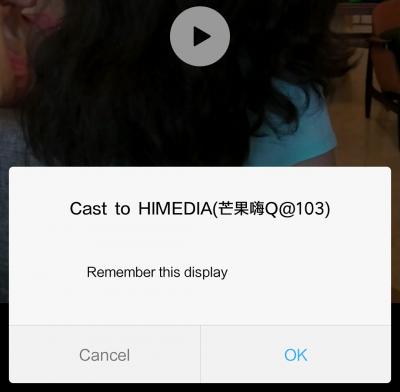
Anyone using Mi phones, any problems casting to any Himedia boxes?

I just got Redmi Note 4X... unable to get cast working to Q16... this is as far as it goes... after selecting nothing happens...

Attached Image
dwRK
post Mar 11 2017, 03:58 PM

the consummate chartist
*******
Senior Member
6,229 posts

Joined: Jun 2006


QUOTE(wcshin @ Mar 11 2017, 08:00 AM)
hi, noob here
i have a 2-3years old q5, lately has been buggy
think of resetting the device but how do i install google play after that?
any app to recommend for china/hk/taiwan drama & international movies?
*
If your's is the international version, I think Google play is part of the firmware...will still be available after resetting...

6 Pages « < 2 3 4 5 6 >Top
Topic ClosedOptions
 

Change to:
| Lo-Fi Version
0.0756sec    0.41    7 queries    GZIP Disabled
Time is now: 1st December 2025 - 10:31 PM