Outline ·
[ Standard ] ·
Linear+
HiMedia Media Player, All about HiMedia
|
dwRK
|
 Jan 5 2017, 11:18 AM Jan 5 2017, 11:18 AM
|

|
QUOTE(AVFAN @ Jan 5 2017, 10:41 AM) probably q16 was subsequently sold in china but only with china firmwares, w/o google as by china rule. our int'l models need to work with int'l firmware. maybe required for other brands. 1.0.9 came with Google Play... Not sure about others... A few Q16 firmwares list... Not sure if they combined nand/emmc... The first 1.0.9... I think this I downloaded n use... 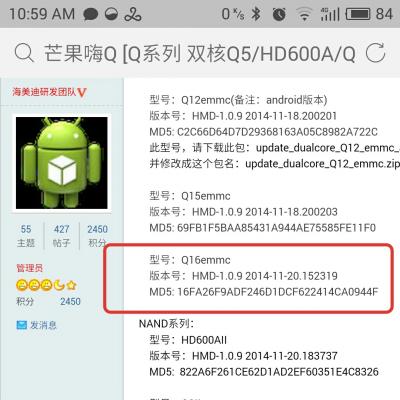
Latest 1.0.9... 
Latest 3.0.4...is this the latest n correct version? 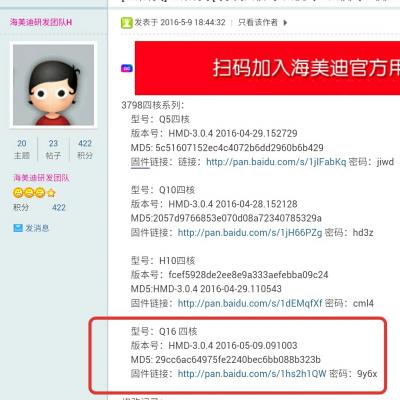
Latest based on Nougat...Q16 4th generation... Not for us I guess... 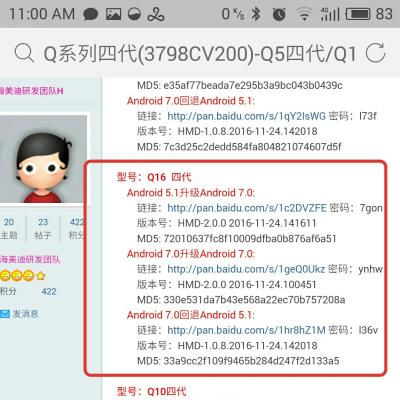 This post has been edited by dwRK: Jan 5 2017, 11:23 AM
 |
|
|
|
|
|
dwRK
|
Jan 5 2017, 11:34 AM
|
|
|
You can side load google stuff if required right?
With Aptoide you don't even need google account...
|
|
|
|
|
|
dwRK
|
Jan 5 2017, 02:09 PM
|
|
|
QUOTE(nicety @ Jan 5 2017, 01:07 PM) Q16 quad core CV100 already in the market 2 years +, latest firmware is 304. Every OS upgrade require thousands of test cycles not including coding modification. I do not think Himedia will invest the effort for the device released two years ago. Q16 CV100 originally designed for Hong Kong market, therefore the firmware come with Google Play Store. In 2016, Q16 CV200 released for China market as Q16 4th generation, the firmware do not have google play because Google is not allow in China. Please don't confused between Q16 CV100 and Q16CV200, both are different chipset. I'm not sure what is the impact if you apply CV200 firmware to CV100 chipset as CV200 is 64 bits and CV100 is 32bit chipset. Yup... Thanks for the clarification... I never bothered to update since 1.0.9 as what I use still OK. Dun mess unnecessary n create problems  Like I have said earlier...pick wisely for your box. I dunno what versions you guys have... I just show a sample what's there... This post has been edited by dwRK: Jan 5 2017, 02:16 PM |
|
|
|
|
|
dwRK
|
Jan 5 2017, 03:26 PM
|
|
|
QUOTE(cchean @ Jan 5 2017, 11:03 AM) Well, no choice then, i just keep using my Himedia until the software give way and then I will buy a Minix  I dug a bit further...since "invested" so much time on this ...went through the China threads, cross check with Nicety's announcements, prior firmware updates, etc... I'm 100% sure that for my q16 4-core final firmware is this...I'll download to keep for now... 
My Q16 is a gift not sourced from Nicety...so I'm on my own... I've updated twice long ago, now currently on this... 
|
|
|
|
|
|
dwRK
|
Jan 5 2017, 07:36 PM
|
|
|
QUOTE(cchean @ Jan 5 2017, 06:41 PM) Thanks for informing bro. I am not sure if i should upgrade to 1.0.9 first then only upgrade to 3.04. since my version is way behind 1.0.7 ...special instructions for 1.0.0 only need 2 steps... |
|
|
|
|
|
dwRK
|
Jan 6 2017, 01:31 PM
|
|
|
Yay...  
Will wipe & start a new later... |
|
|
|
|
|
dwRK
|
Jan 6 2017, 04:30 PM
|
|
|
QUOTE(dwRK @ Jan 6 2017, 01:31 PM) Yay...
Will wipe & start a new later... Link to download above firmware from my gdrive.... HERE... The usual formalities... 1. If you brick or blow up your box...let me be first to congratulate you on your next new box!!! That is ALL you gonna get from me. I can pretend to cry with you a bit...if that is your thing... 2. If you didn't brick it, well you'll have to live with the old horse for a bit longer...but congrats anyway 3. Make sure you check MD5...one bit out during transfer and its bye bye boxy... 4. This if for Q16 4-core eMMC 2/16gb, old HK model as I understands it. Not the NAND model, not the 2-core model and not the 4th gen China model. 5. Good luck and have fun... This post has been edited by dwRK: Jan 6 2017, 04:48 PM |
|
|
|
|
|
dwRK
|
Jan 6 2017, 11:04 PM
|
|
|
QUOTE(AVFAN @ Jan 6 2017, 01:53 PM) Thanks boss...  |
|
|
|
|
|
dwRK
|
Jan 10 2017, 03:47 PM
|
|
|
QUOTE(Bliz @ Jan 10 2017, 08:45 AM) Anyone noticed microstutters on q10pro when playing video files? Sometimes is really annoying and how do i play full screen without the black bars at the top and bottom using the media player ( without adjusting the aspect ratio ) Perhaps is the 24p pull down during encoding... Or miss match in settings. Every movie or just a few? The bars... I don't recall it having native zoom... Perhaps you can find a player app that has this feature, I or change TV setting...you will lose a lot of visuals you know... This post has been edited by dwRK: Jan 10 2017, 03:49 PM |
|
|
|
|
|
dwRK
|
Jan 11 2017, 09:40 AM
|
|
|
QUOTE(Bliz @ Jan 11 2017, 08:36 AM) So u suggest watching it at the current aspect ratio ( 16:9 ) with black bars at top & bottom? The stutters happened to most of the movies, not every movies  its your choice. Some movies are OK. Some look strange...eg you see only 2/3 of a person's face you use "stutter" which implies it's quite serious...anyway, read this article, check & play with your settings make sure they are all consistent and see if it improves...can't eliminate if it's source problem http://www.projectorcentral.com/judder_24p.htmThis post has been edited by dwRK: Jan 11 2017, 09:43 AM |
|
|
|
|
|
dwRK
|
Jan 11 2017, 07:21 PM
|
|
|
QUOTE(voncrane @ Jan 11 2017, 01:37 PM) So its the box... different res.. fps..bars..aspect ratios..zoom.. etc... Has anyone stopped to wonder if it's just the TV that's incompatible? #spannerintheworks...  He said some OK some not OK. |
|
|
|
|
|
dwRK
|
Jan 11 2017, 08:01 PM
|
|
|
QUOTE(AVFAN @ Jan 11 2017, 07:52 PM) The answer lies in the type of files. Describe yr "MKV" files, the answer is there. Mkv is only a container, whats in there? Same movie can be mkv 2gb or 30gb. Some 23.99 fps, some true 24fps, some others dunno what.... That's what I said... if source file problem nothing much we can do... If he has the source, he can try rewrap it back properly...assuming the ori encoding was done properly This post has been edited by dwRK: Jan 11 2017, 08:03 PM |
|
|
|
|
|
dwRK
|
Jan 11 2017, 08:31 PM
|
|
|
QUOTE(Bliz @ Jan 11 2017, 02:19 PM) My TV is sharp UE630x, the next upgrade is OLED haha Have you tried different apps to play? The stutters whole movie or some moving/panning scenes? Play on PC OK? This post has been edited by dwRK: Jan 11 2017, 08:32 PM |
|
|
|
|
|
dwRK
|
Jan 12 2017, 11:17 AM
|
|
|
QUOTE(AVFAN @ Jan 12 2017, 10:35 AM) no need to speculate if it's the box or the tv or file. just take the file and play it on another player, a pc, yr fren's. can also get a different file of same title, try it. from yr description, i will say it is the file. i have seen this a dozen times. Just to add... If stutter at the same scene - file. If no problem from PC, only from box - could still be file. If stutter from box, but random scene - transfer bandwidth or something messing up CPU or buffer. Try different apk also, last time some apk don't play nice with some mkv... |
|
|
|
|
|
dwRK
|
Jan 12 2017, 11:47 AM
|
|
|
QUOTE(AVFAN @ Jan 12 2017, 11:36 AM) that's my assumption. i have seen this many times. files incl big ones are can miss a bit or corrupted during ripping. no fret, just go get another one.  Yup... Not just ripping, suboptimal encoding, "wrong" A+V combo, wrong wrappers... Hahaha... Himedia's player has been most tolerant so far... This post has been edited by dwRK: Jan 12 2017, 11:48 AM |
|
|
|
|
|
dwRK
|
Jan 17 2017, 04:13 PM
|
|
|
QUOTE(blstz @ Jan 16 2017, 04:15 PM) i recently updated my himedia h8 octa firmware from 1.0.8 to 1.1.2 (china firmware with mangotv). I tried updating it with global firmware but i cant seem to get the "flash" going. keeps saying that signature verification failed. anyway, i've successfully update to v1.1.2 but now i cant seem to get google play back on my set. i've tried installing a few different google play version via apk file (v5, v6 & v7) but google play just jumps out to home screen a few seconds after i click on it. may i know where or which version would be able to work with my unit? Don't think you can run play store without the framework... |
|
|
|
|
|
dwRK
|
Jan 19 2017, 04:55 PM
|
|
|
QUOTE(blstz @ Jan 19 2017, 03:38 PM) will try again... any idea where to get working google framework? i tried installing with google installer apk v2.0. Seems like popular installer for Xiaomi phones to get google play store. after install and tried to load google play store, stuck at a blank white screen. Need to find the right one bro... Lol... I think must match SoC, etc... Or just sideload the apps lor. Things to read...open gapps, freaktab.... If you read Chinese... Go see their Chinese forums This post has been edited by dwRK: Jan 19 2017, 07:04 PM |
|
|
|
|
|
dwRK
|
Jan 21 2017, 09:24 AM
|
|
|
QUOTE(CTU @ Jan 21 2017, 02:32 AM) That app didnt help but tried another one and it led me to my security option where i could turn off d device admin thing and uninstall the app that was causing the popup ads. Thanks. Post the one you tried that did lah... Not that I needed it...but good for info to all... |
|
|
|
|
|
dwRK
|
Jan 21 2017, 09:13 PM
|
|
|
QUOTE(CTU @ Jan 21 2017, 03:55 PM) The one that was suggested did a scan on my box but didn't find any issues. The one that helped lead me to the problem is called Malwarebytes Anti-Malware. |
|
|
|
|
|
dwRK
|
Jan 23 2017, 11:16 AM
|
|
|
QUOTE(blstz @ Jan 23 2017, 09:39 AM) thx bro. finally contacted the seller and he told me to get this. after updating then now google play is ok. http://bbs.himedia.cn/thread-186361-1-1.html |
|
|
|
|



 Quote
Quote
 0.0833sec
 0.46
0.46
 7 queries
 GZIP Disabled