QUOTE(ThisIsBoletaria @ May 3 2011, 10:02 PM)
Um... I'm in a dv6-6001tx thread...

swt.. hmm, y dont u try running black ops on max.. and post temps after playing for 1 hourHP Pavillion DV6-6XXX series Owners Lounge, ~thou shall read 1st post or get troll.
|
|
 May 3 2011, 10:05 PM May 3 2011, 10:05 PM
|
 
Senior Member
3,098 posts Joined: Aug 2010 From: my house   
|
QUOTE(ThisIsBoletaria @ May 3 2011, 10:02 PM) Um... I'm in a dv6-6001tx thread... swt.. hmm, y dont u try running black ops on max.. and post temps after playing for 1 hour |
|
|
|
|
|
May 3 2011, 10:06 PM
|

Junior Member
85 posts Joined: May 2007
|
Hi All,
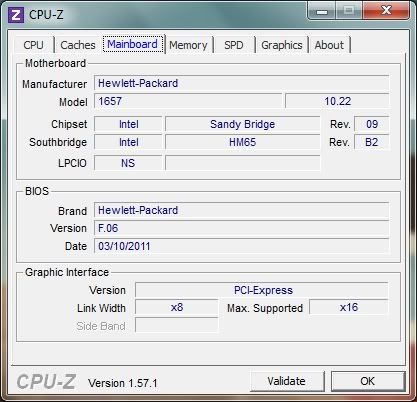
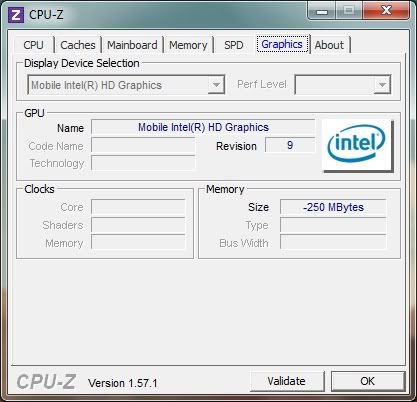
Need some help.. While i doing the temperature checking, found something very weird. 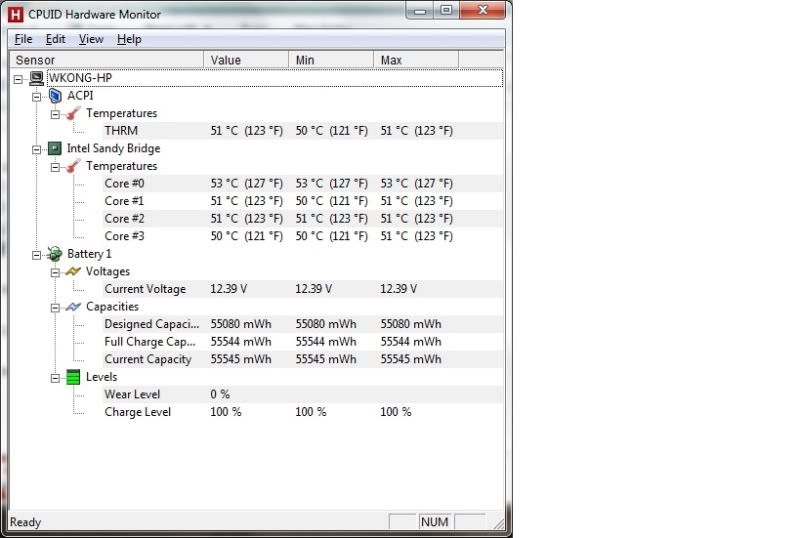 I can see my HD 6770 Graphic Card Temperature. Btw, i notice that mine is ACPI interface control while all of you is hewlett packard 1657. I had updated to latest BIOS. Does this the reason caused this ?? 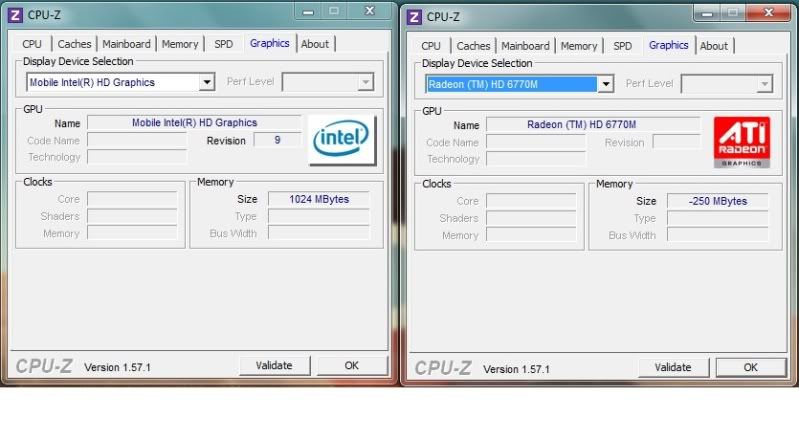 And my Graphic Memory figure so weird also ?? Memory for HD 6770 is -250M ?? |
|
|
May 3 2011, 10:08 PM
|
|
Senior Member
3,098 posts Joined: Aug 2010 From: my house
|
QUOTE(kenhirai83 @ May 3 2011, 10:06 PM) Hi All, restart ur com and try again? maybe it's a glitch in the software.. sometime my hwmonitor read my temps as fahrenheit.. lolNeed some help.. While i doing the temperature checking, found something very weird. I can see my HD 6770 Graphic Card Temperature. Btw, i notice that mine is ACPI interface control while all of you is hewlett packard 1657. I had updated to latest BIOS. Does this the reason caused this ?? And my Graphic Memory figure so weird also ?? Memory for HD 6770 is -250M ?? |
|
|
May 3 2011, 10:12 PM
|

Junior Member
108 posts Joined: Jan 2010 From: Jemapoh To Manchestee
|
@kenhirai83: You're running HWMonitor 1.16. If you download 1.17, the GPU heat data should appear, and the battery data should disappear.
@thieflord: Don't have that game. Not sure if want. This post has been edited by ThisIsBoletaria: May 3 2011, 10:13 PM |
|
|
May 3 2011, 10:27 PM
|
|
Junior Member
85 posts Joined: May 2007
|
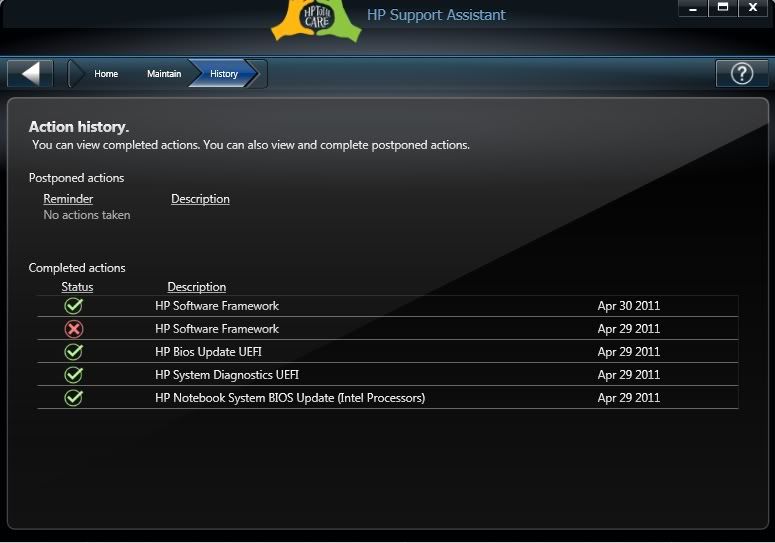
QUOTE(thieflord @ May 3 2011, 10:08 PM) restart ur com and try again? maybe it's a glitch in the software.. sometime my hwmonitor read my temps as fahrenheit.. lol Had tried to restart and test again.Same result. Here is the current BIOS i having. » Click to show Spoiler - click again to hide... « HP Update History. » Click to show Spoiler - click again to hide... « CPUID reading after switch back to Intel Integrated graphic card. » Click to show Spoiler - click again to hide... « |
|
|
May 3 2011, 10:31 PM
|

Senior Member
1,019 posts Joined: Sep 2009
|
QUOTE(kenhirai83 @ May 3 2011, 10:27 PM) Had tried to restart and test again. well i'm currently using adapter without the battery.Same result. Here is the current BIOS i having. » Click to show Spoiler - click again to hide... « HP Update History. » Click to show Spoiler - click again to hide... « CPUID reading after switch back to Intel Integrated graphic card. » Click to show Spoiler - click again to hide... « cpuid is showing -250mb for my integrated gpu too. weird eh, but my 6770 is fine though  |
|
|
|
|
|
May 3 2011, 10:32 PM
|
|
Junior Member
85 posts Joined: May 2007
|
QUOTE(ThisIsBoletaria @ May 3 2011, 10:12 PM) @kenhirai83: You're running HWMonitor 1.16. If you download 1.17, the GPU heat data should appear, and the battery data should disappear. Phew ... Yes, downloaded 1.17 version. @thieflord: Don't have that game. Not sure if want. Manage to see it. Now only remain the CPUID memory mysteries. How many of you all are updated the latest BIOS ?? QUOTE(joonwei23 @ May 3 2011, 10:31 PM) well i'm currently using adapter without the battery. -250mb for integrated when i switch to Intel Graphic Card.cpuid is showing -250mb for my integrated gpu too. weird eh, but my 6770 is fine though While switch to HD 6770. 1024mb for Intel. -250mb for HD6770. I also feel very weird. Or just miss reading of CPUID. This post has been edited by kenhirai83: May 3 2011, 10:36 PM |
|
|
May 3 2011, 10:40 PM
|

Senior Member
1,719 posts Joined: Feb 2006 From: Kuala Lumpur 
|
I also same BIOS, and same -250mb for the Intel GPU while 1024MB for the AMD GPU.
|
|
|
May 3 2011, 10:42 PM
|
|
Senior Member
3,098 posts Joined: Aug 2010 From: my house
|
so it's normal lol
|
|
|
May 3 2011, 10:43 PM
|
|
Senior Member
1,019 posts Joined: Sep 2009
|
updated my bios yesterday.
 didn't really check the updates though. All i know my caps lock was on when starting up. a few flashes then windows started |
|
|
May 3 2011, 10:47 PM
|
|
Junior Member
85 posts Joined: May 2007
|
QUOTE(reevephon @ May 3 2011, 10:40 PM) I also same BIOS, and same -250mb for the Intel GPU while 1024MB for the AMD GPU. reevephon, your bios version F.06 or F.05 ??I had update to F.06. before that the reading is normal. QUOTE(joonwei23 @ May 3 2011, 10:43 PM) updated my bios yesterday. joonwei23, how is your CPUID reading for graphic memory ??didn't really check the updates though. All i know my caps lock was on when starting up. a few flashes then windows started |
|
|
May 3 2011, 11:03 PM
|
|
Senior Member
1,719 posts Joined: Feb 2006 From: Kuala Lumpur
|
QUOTE(kenhirai83 @ May 3 2011, 10:47 PM) reevephon, your bios version F.06 or F.05 ?? F.06 newest, not really care about the reading, as long as can play game without lag, that's all.I had update to F.06. before that the reading is normal. joonwei23, how is your CPUID reading for graphic memory ?? |
|
|
May 3 2011, 11:05 PM
|
|
Senior Member
1,019 posts Joined: Sep 2009
|
QUOTE(kenhirai83 @ May 3 2011, 10:47 PM) reevephon, your bios version F.06 or F.05 ?? mine's at 1024mb's now since i'm using the 6770 atm. I had update to F.06. before that the reading is normal. joonwei23, how is your CPUID reading for graphic memory ?? |
|
|
|
|
|
May 3 2011, 11:13 PM
|
|
Junior Member
85 posts Joined: May 2007
|
Look like only mine got some reading problem.
Just curios does it will produce trouble or not. If got error, might try to send back to repair asap. |
|
|
May 3 2011, 11:38 PM
|

Junior Member
158 posts Joined: Jul 2008
|
Guys really a bit fed up on this laptop de. my street fighter still have the same problem. my friend now is using his 5750g acer to install this game
if his computer doesnt have any problem then i really can suicide de. |
|
|
May 3 2011, 11:49 PM
|

Senior Member
2,152 posts Joined: Nov 2008
|
QUOTE(Vox @ May 3 2011, 11:38 PM) Guys really a bit fed up on this laptop de. my street fighter still have the same problem. my friend now is using his 5750g acer to install this game What is the problem with your Street Fighter 4? I'm using my acer aspire 5750g to play it. I max all the settings. Its extremely smooth cause the game's requirement is super low! if his computer doesnt have any problem then i really can suicide de. but kinda boring though...so, whats wrong? |
|
|
May 3 2011, 11:53 PM
|
|
Junior Member
158 posts Joined: Jul 2008
|
QUOTE(wilsonphua @ May 3 2011, 11:49 PM) What is the problem with your Street Fighter 4? I'm using my acer aspire 5750g to play it. I max all the settings. Its extremely smooth cause the game's requirement is super low! I know is super low. thats why i m super worry with my laptop u know. but kinda boring though...so, whats wrong? its this case actually. When i log in, i play, its smooth and fps is around 60. just in a sudden, the fps will drop to 29-30 and it was like slow motion. after that it change back to smooth normal, then suddenly lag again. it was like repeating. thats why i'm finding someone to help me please.  1) izit possible the problem of driver? cos mine haven update to latest driver. 2) izit possible the CD game itself problem? |
|
|
May 3 2011, 11:59 PM
|
|
Senior Member
2,152 posts Joined: Nov 2008
|
QUOTE(Vox @ May 3 2011, 11:53 PM) I know is super low. thats why i m super worry with my laptop u know. have you tried any other games on your laptop? do they experience the same problems?its this case actually. When i log in, i play, its smooth and fps is around 60. just in a sudden, the fps will drop to 29-30 and it was like slow motion. after that it change back to smooth normal, then suddenly lag again. it was like repeating. thats why i'm finding someone to help me please. 1) izit possible the problem of driver? cos mine haven update to latest driver. 2) izit possible the CD game itself problem? urs is a DV6 with an ATi card right? shouldnt have problems cause there's no Optimus |
|
|
May 4 2011, 12:02 AM
|
|
Junior Member
158 posts Joined: Jul 2008
|
QUOTE(wilsonphua @ May 3 2011, 11:59 PM) have you tried any other games on your laptop? do they experience the same problems? DV6 with Ati Radeon HD 6770M. which i think should be better urs is a DV6 with an ATi card right? shouldnt have problems cause there's no Optimus  now i m installing COD Black Ops to test. if really have the same problem then i duno what to do already. already set all to performance instead of quality in the graphic properties. and also, in street fighter, i set it to lowest graphic for all option. still the same problem. so i don think its the graphic card? also 1 more thing i notice about this DV6. Whenever i close any windows it really like a bit of sluggish compare to the Acer 5750g. This post has been edited by Vox: May 4 2011, 12:07 AM |
|
|
May 4 2011, 12:16 AM
|

Senior Member
6,612 posts Joined: Jan 2003 From: Tomorrow
|
^ Did u turn Vsync off in SF IV? Take a screenshot from the options. I want to see your settings.
|
|
Topic ClosedOptions
|
| Change to: |  0.0305sec 0.0305sec
 0.36 0.36
 6 queries 6 queries
 GZIP Disabled GZIP Disabled
Time is now: 4th December 2025 - 08:53 AM |
 Quote
Quote