Welcome Guest ( Log In | Register )

Bump Topic Topic Closed RSS Feed
126 Pages « < 36 37 38 39 40 > » Bottom

Outline · [ Standard ] · Linear+

 HP Pavillion DV6-6XXX series Owners Lounge, ~thou shall read 1st post or get troll.

views
     
Vox
post May 4 2011, 12:22 AM

Getting Started
**
Junior Member
158 posts

Joined: Jul 2008
this is the one. rclxub.gif


Added on May 4, 2011, 12:33 amseriously, did you guys close windows got a bit of delay or lag?

mine is lag compare to my friend's acer 5750g. seriously. omg he is using 4gb somore.

This post has been edited by Vox: May 4 2011, 12:33 AM


Attached thumbnail(s)
Attached Image
TSAcid_RuleZz
post May 4 2011, 12:38 AM

ミウ ❤
*******
Senior Member
6,612 posts

Joined: Jan 2003
From: Tomorrow


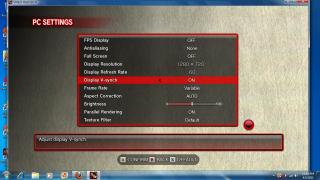
Off Vsync and dun set Frame Rate as Variable. That is ur "culprit".
Vox
post May 4 2011, 12:41 AM

Getting Started
**
Junior Member
158 posts

Joined: Jul 2008
QUOTE(Acid_RuleZz @ May 4 2011, 12:38 AM)
Off Vsync and dun set Frame Rate as Variable. That is ur "culprit".
*
but how come my friend set totally same like me but not lag bro.

btw, did you experience a bit of lag/delay when u close every window? it would like kik sia kik sia.
TSAcid_RuleZz
post May 4 2011, 12:42 AM

ミウ ❤
*******
Senior Member
6,612 posts

Joined: Jan 2003
From: Tomorrow


Also... download

3DMark11: http://www.3dmark.com/3dmark11/download/
Final Fantasy XIV: http://www.finalfantasyxiv.com/media/benchmark/na/

Run benchmark few times and if the scores is consistent mean your graphic card is ok.
Bayang Putih
post May 4 2011, 12:44 AM

New Member
*
Newbie
1 posts

Joined: Apr 2011


hello! maybe Vox probs are related with his laptop cooling system. just a piece of my mind.
TSAcid_RuleZz
post May 4 2011, 12:44 AM

ミウ ❤
*******
Senior Member
6,612 posts

Joined: Jan 2003
From: Tomorrow


QUOTE(Vox @ May 4 2011, 12:41 AM)
but how come my friend set totally same like me but not lag bro.

btw, did you experience a bit of lag/delay when u close every window? it would like kik sia kik sia.
*
No delay or lag when i close window. All smooth even when using Intel HD.
Vox
post May 4 2011, 12:45 AM

Getting Started
**
Junior Member
158 posts

Joined: Jul 2008
QUOTE(Bayang Putih @ May 4 2011, 12:44 AM)
hello! maybe Vox probs are related with his laptop cooling system. just a piece of my mind.
*
huh mine is using U3 cooling wo.


Added on May 4, 2011, 12:46 am
QUOTE(Acid_RuleZz @ May 4 2011, 12:44 AM)
No delay or lag when i close window. All smooth even when using Intel HD.
*
mine wil delay or lag a bit whenever i close a window. rclxub.gif

This post has been edited by Vox: May 4 2011, 12:46 AM
TSAcid_RuleZz
post May 4 2011, 12:46 AM

ミウ ❤
*******
Senior Member
6,612 posts

Joined: Jan 2003
From: Tomorrow


QUOTE(Bayang Putih @ May 4 2011, 12:44 AM)
hello! maybe Vox probs are related with his laptop cooling system. just a piece of my mind.
*
Make sense too.. hmm.gif
Temp too high and everything start throttle down.

@Vox
Download latest HWMonitor and check the temp while u playing SF.


Added on May 4, 2011, 12:49 amOr.. download and reinstall the graphic drivers. doh.gif
Software & Driver Downloads - HP Pavilion dv6-6001tx Entertainment Notebook PC

This post has been edited by Acid_RuleZz: May 4 2011, 12:49 AM
Vox
post May 4 2011, 12:50 AM

Getting Started
**
Junior Member
158 posts

Joined: Jul 2008
QUOTE(Acid_RuleZz @ May 4 2011, 12:46 AM)
Make sense too..  hmm.gif
Temp too high and everything start throttle down.

@Vox
Download latest HWMonitor and check the temp while u playing SF.
*
seriously im quite noob in computer. sad.gif if u call me to download something please show me some guide.

even til now i haven download the CPU and CGU
lee_what2004
post May 4 2011, 12:52 AM

*stare* ji--------
Group Icon
Elite
14,813 posts

Joined: Nov 2006


Its on my sig sweat.gif
TSAcid_RuleZz
post May 4 2011, 12:53 AM

ミウ ❤
*******
Senior Member
6,612 posts

Joined: Jan 2003
From: Tomorrow


QUOTE(Vox @ May 4 2011, 12:50 AM)
seriously im quite noob in computer.  sad.gif  if u call me to download something please show me some guide.

even til now i haven download the CPU and CGU
*
doh.gif doh.gif doh.gif

Download 3DMark11
http://www.4gamer.net/games/110/G011050/20...7055/link.html?

Run the benchmark few times.
Vox
post May 4 2011, 12:54 AM

Getting Started
**
Junior Member
158 posts

Joined: Jul 2008
this is the one u call me to download the latest graphic driver. but until now i duno how to extract it becos i right click it don have the word extract.


Added on May 4, 2011, 12:56 am
QUOTE(Acid_RuleZz @ May 4 2011, 12:53 AM)
doh.gif  doh.gif  doh.gif

Download 3DMark11
http://www.4gamer.net/games/110/G011050/20...7055/link.html?

Run the benchmark few times.
*
i'm downloading the final fantasty benchmark.

This post has been edited by Vox: May 4 2011, 12:56 AM


Attached thumbnail(s)
Attached Image
TSAcid_RuleZz
post May 4 2011, 12:56 AM

ミウ ❤
*******
Senior Member
6,612 posts

Joined: Jan 2003
From: Tomorrow


sweat.gif sweat.gif

Download and install 7-Zip. Kinda essential for any system.
http://downloads.sourceforge.net/sevenzip/7z920-x64.msi
Vox
post May 4 2011, 12:58 AM

Getting Started
**
Junior Member
158 posts

Joined: Jul 2008
QUOTE(Acid_RuleZz @ May 4 2011, 12:56 AM)
sweat.gif  sweat.gif

Download and install 7-Zip. Kinda essential for any system.
http://downloads.sourceforge.net/sevenzip/7z920-x64.msi
*
the file i show you is already extract or not? need to download the 7-zip to extract?
TSAcid_RuleZz
post May 4 2011, 12:58 AM

ミウ ❤
*******
Senior Member
6,612 posts

Joined: Jan 2003
From: Tomorrow


nvm.. FF benchmark oso can cool2.gif


Added on May 4, 2011, 12:59 am
QUOTE(Vox @ May 4 2011, 12:58 AM)
the file i show you is already extract or not? need to download the 7-zip to extract?
*
No. The file u shown is still compressed.

This post has been edited by Acid_RuleZz: May 4 2011, 12:59 AM
Vox
post May 4 2011, 01:23 AM

Getting Started
**
Junior Member
158 posts

Joined: Jul 2008
Bro i follow the way u teach me to update the driver but too bad it fails already. can i choose the 1 saerch update automatically with suitable driver instead of search for folders inside computer.


Added on May 4, 2011, 1:30 am
QUOTE(Acid_RuleZz @ May 4 2011, 12:38 AM)
Off Vsync and dun set Frame Rate as Variable. That is ur "culprit".
*
bro, i just tested this. I off the Vsync and set as Fixed Frame Rate.

ya the fps maintain at 60 and no more lagness.

but one thing is how come the Acer 5750g didnt off the Vsync and set Variable Frame Rate but still " no lag " and fps still maintain at 59-60?

meaning that the acer is more stable?

This post has been edited by Vox: May 4 2011, 01:30 AM
TSAcid_RuleZz
post May 4 2011, 01:32 AM

ミウ ❤
*******
Senior Member
6,612 posts

Joined: Jan 2003
From: Tomorrow


QUOTE(Vox @ May 4 2011, 01:23 AM)
Bro i follow the way u teach me to update the driver but too bad it fails already. can i choose the 1 saerch update automatically with suitable driver instead of search for folders inside computer.
*
No.. u can't. U better wait for Window Update to update the graphic driver. I'm scared something will went wrong when u do it manually.
Vox
post May 4 2011, 01:37 AM

Getting Started
**
Junior Member
158 posts

Joined: Jul 2008
bro, i just tested this. I off the Vsync and set as Fixed Frame Rate.

ya the fps maintain at 60 and no more lagness.

but one thing is how come the Acer 5750g didnt off the Vsync and set Variable Frame Rate but still " no lag " and fps still maintain at 59-60?

meaning that the acer is more stable?


bro can you know whats the problem?


Added on May 4, 2011, 1:38 am
QUOTE(Acid_RuleZz @ May 4 2011, 01:32 AM)
No.. u can't. U better wait for Window Update to update the graphic driver. I'm scared something will went wrong when u do it manually.
*
when i know when is the window update? if he dont come then i might be stuck with this old version forever unsure.gif

This post has been edited by Vox: May 4 2011, 01:38 AM
kenhirai83
post May 4 2011, 01:59 AM

Getting Started
**
Junior Member
85 posts

Joined: May 2007
When you all running the window update.
You all update those important status item only ??

Does you all installed one optional window update for
ATI HD 6770M ?
TSAcid_RuleZz
post May 4 2011, 02:05 AM

ミウ ❤
*******
Senior Member
6,612 posts

Joined: Jan 2003
From: Tomorrow


QUOTE(Vox @ May 4 2011, 01:37 AM)
bro, i just tested this. I off the Vsync and set as Fixed Frame Rate.

ya the fps maintain at 60 and no more lagness.

but one thing is how come the Acer 5750g didnt off the Vsync and set Variable Frame Rate but still " no lag " and fps still maintain at 59-60?

meaning that the acer is more stable?
bro can you know whats the problem?


Added on May 4, 2011, 1:38 am
when i know when is the window update? if he dont come then i might be stuck with this old version forever  unsure.gif
*
1) When u use Variable Frame rate in SF IV, the game will reduce the fps according to the scenes i think. Its a feature of the game. hmm.gif

2) That mean your fren's 5750g got problem. Don't want to follow the user setting. Lol.. jk. sweat.gif

3) No idea.. me and joonwei32 already got ours. Not sure about others. Just keep checking your window update. ph34r.gif


Added on May 4, 2011, 2:16 am
QUOTE(kenhirai83 @ May 4 2011, 01:59 AM)
When you all running the window update.
You all update those important status item only ??

Does you all installed one optional window update for
ATI HD 6770M ?
*
Yea, i've installed that optional update for graphic driver.

This post has been edited by Acid_RuleZz: May 4 2011, 02:16 AM

126 Pages « < 36 37 38 39 40 > » Top
Topic ClosedOptions
 

Change to:
| Lo-Fi Version
0.0316sec    0.96    6 queries    GZIP Disabled
Time is now: 1st December 2025 - 05:34 PM