Outline ·
[ Standard ] ·
Linear+
- Alienware Mothership V8 -, Waiting for M18x...
|
Lil Kiasu
|
 Jul 25 2011, 11:29 AM Jul 25 2011, 11:29 AM
|

|
QUOTE(thxxht @ Jul 25 2011, 10:28 AM) 6970m can OC gao gao too  imagine playin crysis 2 at 1080p with all settings on extreme and at 40fps @_@ also, the temp barely goes over 75C, such a beast. Tak nak Crysis 2... Nak tengok result @ Crysis 1~  |
|
|
|
|
|
thxxht
|
Jul 25 2011, 12:21 PM
|
|
|
QUOTE(Lil Kiasu @ Jul 25 2011, 11:29 AM) Tak nak Crysis 2... Nak tengok result @ Crysis 1~ for crysis 1 i play at 1080p with all settings at ultra (enthusiast) except shadows and blur at medium. hover at 30-40 fps. for witcher 2 i set all to very high, 1080p, hover at 30-40fps. my OC is 790 core 1000 memory. can probably go higher but it gets unstable at 800 core. or you can just refer to notebookcheck's benchmarks. http://www.notebookcheck.net/AMD-Radeon-HD...0M.43077.0.html |
|
|
|
|
|
duabijitelur
|
Jul 25 2011, 12:32 PM
|
|
|
QUOTE(thxxht @ Jul 25 2011, 11:20 AM) yep, using Artic MX-4 from one of the lowyat sellers. first time doing it too, was easier than i thought. I would never try repasting the G73, too much hassle to get to the GPU. love alienwares easy access and upgradability. so after u apply the thermal paste .... the max temp reduced?
Added on July 25, 2011, 12:32 pmcos now my max temp is like 106+ lol i check after gaming.. idle is like 50+ This post has been edited by duabijitelur: Jul 25 2011, 12:32 PM |
|
|
|
|
|
thxxht
|
Jul 25 2011, 01:43 PM
|
|
|
QUOTE(duabijitelur @ Jul 25 2011, 12:32 PM) so after u apply the thermal paste .... the max temp reduced?
Added on July 25, 2011, 12:32 pmcos now my max temp is like 106+ lol i check after gaming.. idle is like 50+ wow.. how can you game at 106C? your GPU doesn't throttle itself? that's waaay to high. my GPU starts throttling down to 400 Core 900 mem when it stays at 90C for more than 10seconds and I found out that the Thermal Pad (not paste) is not applied correctly, i corrected the error and reapplied new Paste, you have to reapply because you have to take apart the GPU and the heatsink. I will upload my GPUz log for after and before i applied the paste when i get back. edit: I idle at 58 - 60C, which is normal for 6970m. This post has been edited by thxxht: Jul 25 2011, 01:44 PM |
|
|
|
|
|
duabijitelur
|
Jul 25 2011, 02:52 PM
|
|
|
maybe i nid to reapply paste d... since i havent done it before
|
|
|
|
|
|
[PF] T.J.
|
Jul 25 2011, 02:58 PM
|
20k VIP Club

|
QUOTE(duabijitelur @ Jul 25 2011, 02:52 PM) maybe i nid to reapply paste d... since i havent done it before Can teach me? I is afraid T________T  |
|
|
|
|
|
duabijitelur
|
Jul 25 2011, 03:26 PM
|
|
|
QUOTE(PF T.J. @ Jul 25 2011, 02:58 PM) Can teach me? I is afraid T________T lol i plan to do it XD? nid to do some research ahead |
|
|
|
|
|
thxxht
|
Jul 25 2011, 03:36 PM
|
|
|
QUOTE(duabijitelur @ Jul 25 2011, 03:26 PM) lol i plan to do it XD? nid to do some research ahead use these guides http://forum.notebookreview.com/alienware-...ideo-guide.htmlhttp://forum.techinferno.com/alienware-m17...ide-w-pics.htmlthe 2nd link is for gtx460 but they are very similar, you can reuse the thermal pads, i've been unable to find any pad sellers around KL. it is not hard but you must be very diligent, make sure you prepare all the items listed, add in a air-can just in case you need to blow off dusks. I had a problem when i connected my GPU, i had blue lines on my display, so i blow the GPU connectors and re-seated the GPU again and it was fixed. |
|
|
|
|
|
duabijitelur
|
Jul 25 2011, 03:49 PM
|
|
|
QUOTE(thxxht @ Jul 25 2011, 03:36 PM) use these guides http://forum.notebookreview.com/alienware-...ideo-guide.htmlhttp://forum.techinferno.com/alienware-m17...ide-w-pics.htmlthe 2nd link is for gtx460 but they are very similar, you can reuse the thermal pads, i've been unable to find any pad sellers around KL. it is not hard but you must be very diligent, make sure you prepare all the items listed, add in a air-can just in case you need to blow off dusks. I had a problem when i connected my GPU, i had blue lines on my display, so i blow the GPU connectors and re-seated the GPU again and it was fixed. sure thks dude... if anything i will ask u bro
Added on July 25, 2011, 3:56 pmnid to take our gpu+ heat sink & cpu+ cpu heatsink and apply right? This post has been edited by duabijitelur: Jul 25 2011, 03:56 PM |
|
|
|
|
|
thxxht
|
Jul 25 2011, 04:15 PM
|
|
|
QUOTE(duabijitelur @ Jul 25 2011, 03:49 PM) sure thks dude... if anything i will ask u bro
Added on July 25, 2011, 3:56 pmnid to take our gpu+ heat sink & cpu+ cpu heatsink and apply right? na you dont need to apply the paste on the heatsink's side, if anything you DO NOT WANT to put too much paste or TOO FEW paste. too much paste, and you end up not transferring heat effectively between the GPU die and the heatsink. too little paste, and you don't have enough surface area covered on the GPU die. the point of pasting is to fill in any micro cracks on the die's surface. |
|
|
|
|
|
kelvin_hata
|
Jul 25 2011, 07:39 PM
|
|
|
QUOTE(thxxht @ Jul 25 2011, 08:27 AM) heh that 6870m is the reason why your lappy is cheap, it's on par with a GTX460, but i wanted the 6970m and if you go to dell's us site you'll find it's a 250USD upgrade, the 6990m is a 300USD upgrade, maybe i should have waited a bit. I bought for about 1900 USD including shipping with 8GB ram and 6970m, the rest is stock spec. but of course i had to deal with alot of issues with the seller and this piece of shit of a machine before i can fully enjoy it. vy cheap  |
|
|
|
|
|
thxxht
|
Jul 25 2011, 08:22 PM
|
|
|
heres my gpuz log before and after repaste ;p
both logs from playin crysis, you can see the temps on c2 log is much lower
|
|
|
|
|
|
duabijitelur
|
Jul 25 2011, 08:41 PM
|
|
|
hmm indeed
log 1 max temp is 90
the c2 is about 79
|
|
|
|
|
|
solbadguy610
|
Jul 26 2011, 08:14 AM
|
New Member

|
hi guys , had anyone tried SSD SATA 3 on m14x?
|
|
|
|
|
|
putochip123
|
Jul 26 2011, 01:11 PM
|
|
|
QUOTE(solbadguy610 @ Jul 26 2011, 08:14 AM) hi guys , had anyone tried SSD SATA 3 on m14x? all sandy bridge bridge are satat III, so just go ahead and get a sata III SSD, other than that dont waste money on those sata III HDD |
|
|
|
|
|
kelvin_hata
|
Jul 26 2011, 01:22 PM
|
|
|
QUOTE(putochip123 @ Jul 26 2011, 01:11 PM) all sandy bridge bridge are satat III, so just go ahead and get a sata III SSD, other than that dont waste money on those sata III HDD u wan sata III ssd mah??  2gb 6970 gc good ar?? |
|
|
|
|
|
thxxht
|
Jul 26 2011, 02:08 PM
|
|
|
QUOTE(kelvin_hata @ Jul 26 2011, 01:22 PM) u wan sata III ssd mah?? 2gb 6970 gc good ar?? i can say with confidence it's the best price for performance card in the market at the moment, 6990m is slightly premium but at least it's not as huge of a premium when compare to the overpriced 580m. and the 580m is just a slightly overclocked 485m (no extra hardware), whereas the 6990 has more cores than 6970m. look at the spread sheet below and you'll be able to see a clear difference between the 2. 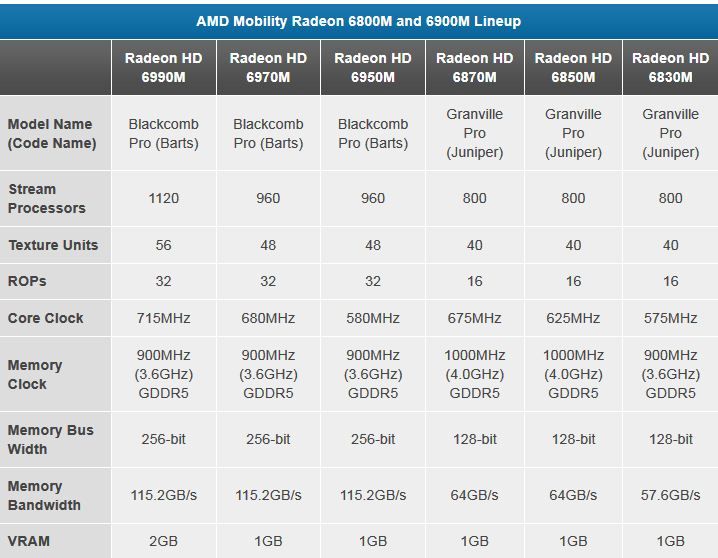 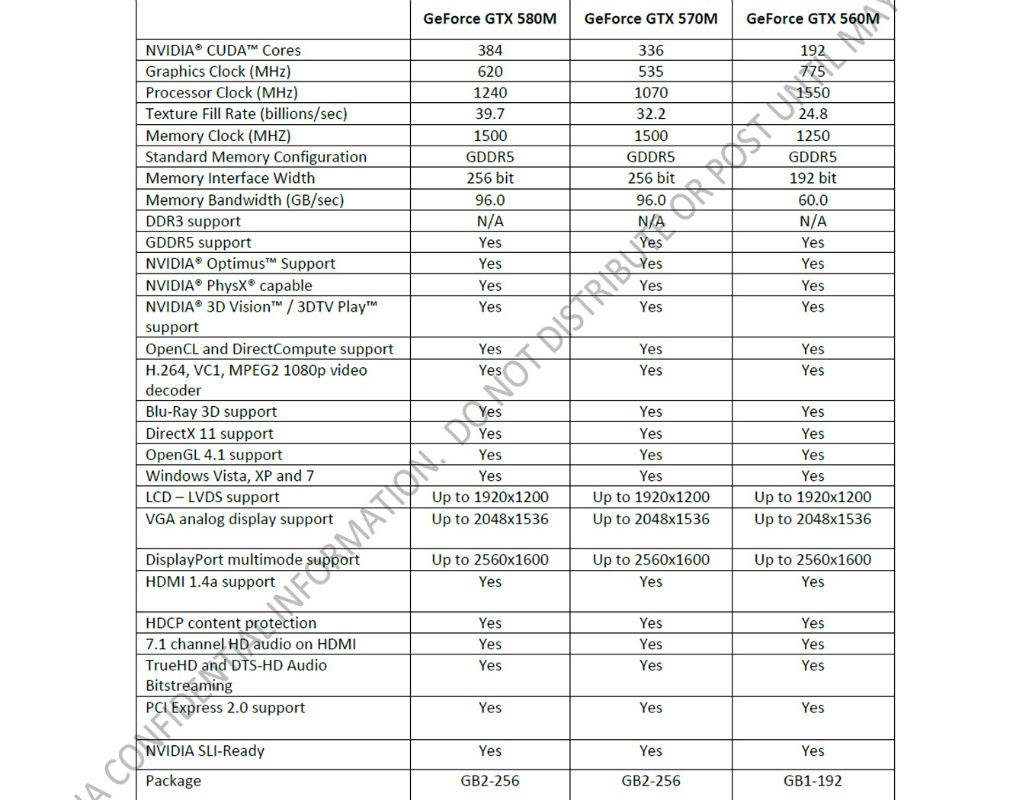 http://www.notebookcheck.net/NVIDIA-GeForc...5M.42883.0.html http://www.notebookcheck.net/NVIDIA-GeForc...5M.42883.0.html <-485m specs This post has been edited by thxxht: Jul 26 2011, 02:10 PM |
|
|
|
|
|
solbadguy610
|
Jul 26 2011, 05:58 PM
|
New Member
|
QUOTE(putochip123 @ Jul 26 2011, 01:11 PM) all sandy bridge bridge are satat III, so just go ahead and get a sata III SSD, other than that dont waste money on those sata III HDD Thanks . Finally there's something for me to upgrade my m14x |
|
|
|
|
|
putochip123
|
Jul 27 2011, 12:42 AM
|
|
|
QUOTE(thxxht @ Jul 26 2011, 02:08 PM) i can say with confidence it's the best price for performance card in the market at the moment, 6990m is slightly premium but at least it's not as huge of a premium when compare to the overpriced 580m. and the 580m is just a slightly overclocked 485m (no extra hardware), whereas the 6990 has more cores than 6970m. look at the spread sheet below and you'll be able to see a clear difference between the 2. http://www.notebookcheck.net/NVIDIA-GeForc...5M.42883.0.html <-485m specs bro, u cant compare on paper work...... |
|
|
|
|
|
thxxht
|
Jul 27 2011, 01:40 AM
|
|
|
QUOTE(putochip123 @ Jul 27 2011, 12:42 AM) bro, u cant compare on paper work...... I'm not sure what you are trying to say here, are you saying we should ignore official spec sheets, benchmarks, reviews..etc and just buy with preference? without doing some homework? howabout you make a better argument other than saying "don't compare to paperwork"? you want benchmarks? the 6990m and 580m are neck in neck in benchmarks. real world Game performances? same thing. 3D? the 580m 3D does not work in m17x r3 at the moment. Driver support? AMD/ATI's support has been uptodate so far, even enabled MLAA, that's something nvidia has yet to release themselves. price point? the 6990m is a 300USD upgrade, the 580m is a 600USD upgrade. Phyx and CUDA support? cool i guess, but with a 300USD premium on top? not my cup of tea. I know some people will still choose the 580m due to nvidia preference but hell any person that has done their homework would know which one's is the better deal. |
|
|
|
|





 Quote
Quote





 0.0204sec
 0.98
0.98
 6 queries
 GZIP Disabled