Welcome Guest ( Log In | Register )

Bump Topic Topic Closed RSS Feed
5 Pages < 1 2 3 4 5 >Bottom

Outline · [ Standard ] · Linear+

Streamyx The Official Streamyx 4Mbps Users Club V4, Streamyx 4 Mbps Discussion Thread Q&A

views
     
AjkR06
post Sep 15 2011, 02:29 PM

that's me
******
Senior Member
1,548 posts

Joined: Oct 2006
From: ugly kingdom


QUOTE(availyboy @ Sep 15 2011, 02:47 AM)
AjkR06 : Thanks bro for your suggestion,i am still wondering if i change the copper cable will it be better or something? I guess i'll ask 100 see if they use their own copper cable the SNR will raise or not

pigduck : hi there biggrin.gif tmnet gave me 5120,but i don't want it to drop,so i requested them to have a new copper line layout because the current SNR margin for me is arnd 8.0 or so,it's pretty weak.
*
I think it's better if you call 100 first, and asked them to send the technician to your home.
Sometimes, if the problem is lies within the distribution point box at your phone pole (the black box at the phone pole), then changing the cable will not improve the problem actually... usually they will check the DP as well as your cable...

AjkR06
post Sep 22 2011, 01:59 PM

that's me
******
Senior Member
1,548 posts

Joined: Oct 2006
From: ugly kingdom


QUOTE(mysql2779 @ Sep 22 2011, 12:02 PM)
Hey guys , anyone of here who using 4mbps is under Student Unipack ?
*
It's me biggrin.gif
AjkR06
post Oct 1 2011, 06:32 AM

that's me
******
Senior Member
1,548 posts

Joined: Oct 2006
From: ugly kingdom


QUOTE(kernel123 @ Oct 1 2011, 02:45 AM)
guys,may i ask a question.if i want to move my streamyx to another house,do i need to re-apply new phone line? and do i need to apply at TM point?
*
You can still use the existing phone line and streamyx service...
If you're moving within the same exchange, it's likely you still have a chance to use the old number...
But if you're moving to another place which use different exchange, you'll totally need to have a new phone number but with the old account. Another things, TM will charge RM50 (if i'm not mistaken) as a relocation charge plus RM30-RM50 line installation charge at your new home...

Just go to TMPOINT and fill the relocation of services form....
AjkR06
post Oct 4 2011, 07:15 PM

that's me
******
Senior Member
1,548 posts

Joined: Oct 2006
From: ugly kingdom


QUOTE(Berserker @ Oct 4 2011, 05:10 PM)
I recently upgraded from 2MB normal package to 4MB Blockbuster package.
Previous 2MB, I was given the TPLINK modem(single port) and aztech cordless phone.
For 4MB BlockBuster, I'm only given the D-Link wireless modem by the installer. The installer said the cordless phone is not applicable for upgrade package.

Can someone confirm this matter? whether the free cordless is suppose to come free for new installation or applies to upgrade as well?
*
Cordless phone only applies for the new application as well FIRST TIME upgrade...
AjkR06
post Oct 15 2011, 01:12 PM

that's me
******
Senior Member
1,548 posts

Joined: Oct 2006
From: ugly kingdom


QUOTE(maplesea889 @ Oct 15 2011, 09:34 AM)
upgraded from 1mbps to 4mbps yesterday at 6pm, now 9.30am still don't have anything yet. the modem says i got 5116kbps downstream and 511 upstream. but speedtest says i got only 1mbps..
*
Please check your application status here ;

http://sams.tm.net.my/marketingcenter/search.asp

by entering either your streamyx username or phone number.

I think your port already set to 4Mbps but you need to wait until the technician come to your house to do some testing as well as activate your new speed after they confirm and make sure that your line are really capable for 4Mbps... smile.gif

Since today is Saturday, then most of the technician will not work today... You need to wait until Monday...
AjkR06
post Oct 16 2011, 02:57 PM

that's me
******
Senior Member
1,548 posts

Joined: Oct 2006
From: ugly kingdom


QUOTE(karmizi @ Oct 16 2011, 01:45 PM)
hi all

need some clarification on the 2mbps package...hope there is help...thanks in advance.

i just upgrade my 512package to 2mbps last thursday when the technician came to my house in the evening...that nite straight away can see 1.7mbps on speedtest...but my problem till today the download speed is the same as 512package which is less than 30kb/sec.

is this normal? the technician said wait till 3 working days but same day also can use...exactly that nite can use already.

or do i need to wait tomorrow or the next day to complaint?

tried to find some infomation in this thread but too many info....apologizes if this is a repeating question and thanks for helping.
*
you're downloading from which sources? FS site?
AjkR06
post Oct 29 2011, 02:20 PM

that's me
******
Senior Member
1,548 posts

Joined: Oct 2006
From: ugly kingdom


QUOTE(amirudin920927 @ Oct 29 2011, 01:17 PM)
If i want upgrade from 1Mbps package @RM110 to 4Mbps package @RM140,is there have any charged n contract seems i still got contract?
*
Your contract will be renew for another year from the date of 4Mbps activation...
Upgrade to higher package will not have any penalty charge....
AjkR06
post Oct 29 2011, 03:54 PM

that's me
******
Senior Member
1,548 posts

Joined: Oct 2006
From: ugly kingdom


QUOTE(amirudin920927 @ Oct 29 2011, 02:51 PM)
that means there is no any 'upgraded fees' ?  rclxms.gif
*
Yes... There's no such things like 'upgrade fees'... Haven't heard it before... tongue.gif
AjkR06
post Nov 5 2011, 12:26 PM

that's me
******
Senior Member
1,548 posts

Joined: Oct 2006
From: ugly kingdom


QUOTE(wesley8526 @ Nov 4 2011, 09:53 PM)


[attachmentid=2519357]
*
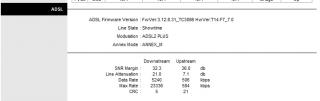
Nothing wrong at all with your line, and FYI, your line already capped to 5Mbps which is more than what you should get... I'm still not understand why the installer refuse to come to your house to do further inspection. BTW, just wait until this Wednesday and do update us what the installer will say when he test the line at your house... For me, your line are really capable and qualified for 4Mbps and even higher than that....

See my line statistics, it's kinda similar with your current stats...

Attached Image


AjkR06
post Nov 5 2011, 06:40 PM

that's me
******
Senior Member
1,548 posts

Joined: Oct 2006
From: ugly kingdom


QUOTE(wesley8526 @ Nov 5 2011, 02:54 PM)
Before I apply 4Mbps, the line is capped at 2Mbps.

Will update my status at Wednesday!  nod.gif

Btw is your 4M stable and how is the speedtest?
*
It's really stable... connection up-time already reached 2 weeks without any disconnection angat all... smile.gif
Unfortunately, as you can see from the speedtest results below, it's clearly shown that TM has a bad routing or maybe they encounter another AAG cable "problems" to the international server, I wonder why ping to Singapore spikes to more than 100ms! ohmy.gif Usually it's just about 40-50ms...

user posted image user posted image
user posted imageuser posted image


AjkR06
post Nov 21 2011, 01:27 PM

that's me
******
Senior Member
1,548 posts

Joined: Oct 2006
From: ugly kingdom


QUOTE(markypcs @ Nov 21 2011, 12:51 PM)
But from TMnet website, the price of 1mbps for standard package = RM99 and the price for BB 1mbps is RM110.
Why?
*
FYI, with standard package, you still need to pay the RM26 phone rentals every month and there's no free unlimited call to TM fixed line nationwide number....

So basically, you will pay = RM99 + RM26 + RMxx (call charges, if any)
= RM126

While for BBD 1Mbps, you will only need to pay RM110 per month including phone rental. Free call to TM Fixed line number and some 'discount' for calling the mobile number and fixed line other than TM provide (Time, Maxis etc)

This post has been edited by AjkR06: Nov 21 2011, 01:29 PM
AjkR06
post Nov 24 2011, 09:08 PM

that's me
******
Senior Member
1,548 posts

Joined: Oct 2006
From: ugly kingdom


QUOTE(zellleonhart @ Nov 24 2011, 06:25 PM)
Fed up with TM's free ZyXel P-600 wireless modem, it's so unreliable and keep restarting by itself out of no reason! Do you guys have this problem with zyxel too?

Should I buy myself a new modem?
*
Depends... In my opinion, TP Link TD-W8901G should be okay with the average usage.... biggrin.gif
It's cheap and reliable, less than RM100...

This post has been edited by AjkR06: Nov 24 2011, 09:09 PM
AjkR06
post Nov 28 2011, 02:22 PM

that's me
******
Senior Member
1,548 posts

Joined: Oct 2006
From: ugly kingdom


QUOTE(m.shah.f @ Nov 28 2011, 09:47 AM)
Hi can any one tell me. For those capped at more than 4M ( eg. 5M or some even 8M ), what is the downstream rate value in the router? Is it still shown as 4M or the value that u r capped at?
And may i know why is mine still downloading at a 1Mbps rate even though it shows 4096 downstream in the router config?
*
In my case, my router shows the 5280Kbps as the downstream value while 508Kbps for the upstream value.
What package that are you subscribe now? Is that 1Mbps? FYI, TM implement two types of account 'capping', first via the physical capping which is done at the port on your nearest DSLAM... The second capping is done remotely by using your username. Let's say, you're subscribing to 1Mbps package, but your port at the DSLAM are capped to 4096Kbps, but you still get the maximum speed of 1Mbps because your on the TM record, your username are based on the 1Mbps package...

This post has been edited by AjkR06: Nov 28 2011, 02:23 PM
AjkR06
post Nov 29 2011, 10:50 PM

that's me
******
Senior Member
1,548 posts

Joined: Oct 2006
From: ugly kingdom


QUOTE(m.shah.f @ Nov 29 2011, 07:07 PM)
Ooo. I just upgraded from 1Mbps to 4Mbps. So that means the download speed is based on which one is capped lowest. In order to get 4mbps, both need to be capped at least 4mbps or higher. Am i rite? I think the downstream rate shown by the router is the second capping u mentioned done remotely. So mayb the reason why i'm still getting 1mbps is because the dslam is still capped at 1mbps.
*
"I think the downstream rate shown by the router is the second capping u mentioned done remotely." - No. It's the first or physical capping done at your port on the nearest DSLAM (street cabinet or hosted in exchange)

"So mayb the reason why i'm still getting 1mbps is because the dslam is still capped at 1mbps." - It's not the DSLAM.. But it's the remote capping where TM still not raise your account speed from 1Mbps to 4Mbps...

Btw, have technician come to your house to do other inspection? Usually TM will only raise your account speed after the technician come to your house to do the further testing and he will make sure that your physical line are fully capable and qualified to support 4Mbps. After they confirm that everything is fine, they will call the technical department and ask them to raise your speed. TM will raise your speed between 48 hours from the date and time where the technician come. If you're fortunate, you will get the 4Mbps on-the-spot after the technician leave your house. Make sure you frequently restart your modem in order for the change to take effect... smile.gif


Added on November 29, 2011, 10:55 pm
QUOTE(wai2kit @ Nov 29 2011, 10:18 PM)
Hi can anyone help me?  icon_question.gif
*
They will give you another wireless modem router combo and it's all depending on you. You can still freely use back the existing equipment...

This post has been edited by AjkR06: Nov 29 2011, 10:55 PM
AjkR06
post Nov 30 2011, 06:27 PM

that's me
******
Senior Member
1,548 posts

Joined: Oct 2006
From: ugly kingdom


QUOTE(m.shah.f @ Nov 30 2011, 05:17 PM)

But sadly from the speed test he ran, it seems max i can get is around 3.5 M. He tried increasing the limit to 5 Mbps but still no difference. Told me the DSLAM which my line is connected to can't support more than 4Mbps coz it's still using copper, not optic. Well, is this true?

Also, i got a new modem. Surprised coz i only upgrade, not applying new. It's the Innacom W3400V. Anyone using this? Any prob? I plan on getting a new Wireless N modem for better wifi coverage coz my house is quite big. Or should i just stick with a wireless G? Will it make any difference from G to N coverage and speed wise?
*
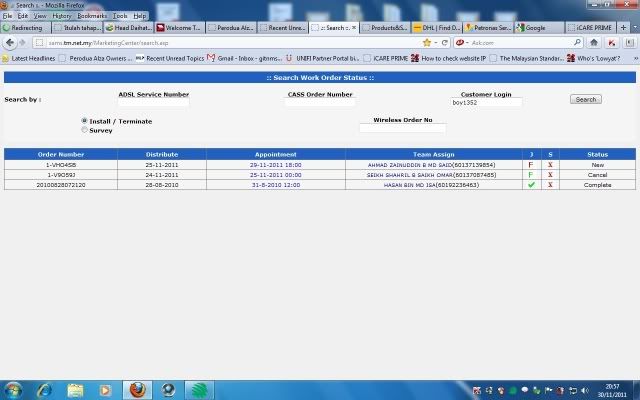
Probably it is due to the distance from your house to the exchange... You can check whether your line is 50% fiber optic (from the exchange to the remote cabinet DSLAM) or purely 100% copper by accessing TM SAMS WEBSITE. Just enter your streamyx username or phone number and you will know it. For partially fiber line, the green F symbol will appear at the J or Jumper area, meanwhile for the fully copper line, the green TICK symbol will appear instead of F symbol. You can see the attachment below for the example when your line is partially (or 50%) fiber.

It is recommended that you change the modem because you said that your house is big. You're using 4Mbps, and I heard that there are many problems involve around the TM Wifi modem (especially Riger and Innacom one). But you need to spend a bit... Maybe TP-Link TD-W8960N is suitable for you.... smile.gif Depending on the seller, and the most cheap one that I found is RM122 from one reputable seller at Lelong.my... Or perhaps, you can do the survey at the Lowyat itself... laugh.gif

Attached Image


AjkR06
post Nov 30 2011, 10:18 PM

that's me
******
Senior Member
1,548 posts

Joined: Oct 2006
From: ugly kingdom


QUOTE(kaolen @ Nov 30 2011, 10:08 PM)
may i know is the meaning of the "S" column there?
*
S - Speed...
Someone here has stated that if the technician did change your port speed, then the green tick will be appear...
But if the technician just leave the port as the default configuration, the red X mark will appear...

Example :
DSLAM original port speed = 2048Kbps

then you request to upgrade to 4Mbps, then the technician will cap it into 4096Kbps or if you're lucky, you will get 5240Kbps...
AjkR06
post Dec 1 2011, 09:31 AM

that's me
******
Senior Member
1,548 posts

Joined: Oct 2006
From: ugly kingdom


QUOTE(m.shah.f @ Dec 1 2011, 09:06 AM)
i entered my customer login on the TM SANS website. There are multiple results. does that mean some have the same login as me? how do i know which is mine then?
*
Multiple result? Can you post the screenshot here?

AjkR06
post Dec 1 2011, 04:30 PM

that's me
******
Senior Member
1,548 posts

Joined: Oct 2006
From: ugly kingdom


QUOTE(m.shah.f @ Dec 1 2011, 01:58 PM)
Looks something like this.

[attachmentid=2562331]
*
Basically what can I see is there are three "transaction" done on your account on the same day, which is 25 Nov 2011...

First, you terminate your line, and it seems your jumper is located on the street cabinet (by the green F sign there)..
Then the new installation process are made by TM, and your jumper suddenly change maybe from the fiber cabinet into the direct copper line to the exchange...

Lastly, it seems that there are some problems regarding your port, because the RED X mark available on your jumper status. You better call the mr Desmond and asked him what is the problem for your port... Or maybe they've done some 'mistakes' on the system... because you said that your 4Mbps application are succeed but why the SAMS status shows like that... hmm.gif
AjkR06
post Dec 1 2011, 07:28 PM

that's me
******
Senior Member
1,548 posts

Joined: Oct 2006
From: ugly kingdom


QUOTE(LcBoy135z @ Dec 1 2011, 06:48 PM)
» Click to show Spoiler - click again to hide... «


bro..help me too

hmmm..until now..installer man not come to my house...had contact him...just told me to come in this evening...but  blush.gif

i see there cancel status,who did that?that man??

before

user posted image

after
[attachmentid=2562911]

why he cancel without my knowledge??
*
Hmm.. I think on your case, you need to ask TM why the technician seems "refuse" to come to your house... And again, maybe your jumper is not done yet.. Worst case scenario, your port are not capable to 4Mbps... because the jumper status is red "X" mark which indicate there are something wrong with the port...
AjkR06
post Dec 1 2011, 07:54 PM

that's me
******
Senior Member
1,548 posts

Joined: Oct 2006
From: ugly kingdom


QUOTE(LcBoy135z @ Dec 1 2011, 07:33 PM)
so need i call 100 now?  icon_question.gif
*
Not yet... for the time being, it's the matter between you and the technician...
Everything will be based on his own pleasure (budi bicara)... whistling.gif As usual for TM...
Just wait until tomorrow

This post has been edited by AjkR06: Dec 1 2011, 07:55 PM

5 Pages < 1 2 3 4 5 >Top
Topic ClosedOptions
 

Change to:
| Lo-Fi Version
0.0249sec    0.82    7 queries    GZIP Disabled
Time is now: 5th December 2025 - 07:54 AM