QUOTE(NightFelix @ Oct 7 2015, 09:33 AM)
kan. these days all about storage. sigh. sometimes i wanna blame the cameraAndroid general questions thread, Ask anything here!
Android general questions thread, Ask anything here!
|
|
Oct 7 2015, 09:36 AM
|
![]() ![]() ![]()
Junior Member
404 posts Joined: Oct 2011 From: Yesterday, 10:21 PM |
|
|
|
|
|
|
Oct 7 2015, 12:04 PM
|
![]() ![]() ![]() ![]() ![]() ![]() ![]() ![]()
All Stars
17,467 posts Joined: May 2008 From: Lazada |
|
|
|
Oct 7 2015, 02:16 PM
|
![]() ![]() ![]()
Junior Member
404 posts Joined: Oct 2011 From: Yesterday, 10:21 PM |
|
|
|
Oct 12 2015, 12:16 AM
|
![]() ![]() ![]()
Junior Member
455 posts Joined: Oct 2006 |
Guys i couldnt find any HELP section regarding android, so i post here.
My note 2 stuck at GALAXY NOTE 2 when booting, try to do hard reset but unable to do so. When i press power+home+volumeup , it just wont show the hard reset option, only shows it is downloading. ( not odin mode) any one can help me ? |
|
|
Oct 12 2015, 01:01 PM
Show posts by this member only | IPv6 | Post
#3925
|
![]() ![]()
Junior Member
297 posts Joined: Jul 2010 |
QUOTE(cashboy @ Oct 12 2015, 12:16 AM) Guys i couldnt find any HELP section regarding android, so i post here. Prior to this, did you attempt to dirty flash (flashing w/o wiping data) any roms to your note 2?My note 2 stuck at GALAXY NOTE 2 when booting, try to do hard reset but unable to do so. When i press power+home+volumeup , it just wont show the hard reset option, only shows it is downloading. ( not odin mode) any one can help me ? If so, then you probably bricked your device. You can try: 1. Reflash the rom. *Fingers crossed* 2.ONLY IF YOU DON'T MIND WIPING YOUR APP DATA. This means you will lose your apps, and will be prompt to setup Google account again during first boot. Boot into recovery, wipe cache, dalvik, data. If no, you can try: 1. Boot into recovery, try wiping cache and dalvik. Reboot. 2. ONLY IF YOU DON'T MIND WIPING YOUR APP DATA. This means you will lose your apps, and will be prompt to setup Google account again during first boot. Boot into recovery, wipe cache, dalvik, data. BTW, what is hard reset option? Recovery mode? If you are in downloading mode instead of Recovery mode, you may have pressed the wrong button combinations. Try Power+Home+Volumedown instead? (not familiar with samsung devices, sorry) |
|
|
Oct 12 2015, 02:09 PM
|
![]() ![]() ![]()
Junior Member
455 posts Joined: Oct 2006 |
QUOTE(xchaosdragon @ Oct 12 2015, 01:01 PM) Prior to this, did you attempt to dirty flash (flashing w/o wiping data) any roms to your note 2? No.. i never do anything never flash before, what happen is my phone suddenly got freeze, and i cant force restart so i pull out battery and put it back, it freeze at the note II intro. I unable boot into the recovery. as i said i press the 3 combo button and do not have the recovery option,i do that recovery before long time ago but i dont know why the option is gone. only shows the phone in downloading mode.If so, then you probably bricked your device. You can try: 1. Reflash the rom. *Fingers crossed* 2.ONLY IF YOU DON'T MIND WIPING YOUR APP DATA. This means you will lose your apps, and will be prompt to setup Google account again during first boot. Boot into recovery, wipe cache, dalvik, data. If no, you can try: 1. Boot into recovery, try wiping cache and dalvik. Reboot. 2. ONLY IF YOU DON'T MIND WIPING YOUR APP DATA. This means you will lose your apps, and will be prompt to setup Google account again during first boot. Boot into recovery, wipe cache, dalvik, data. BTW, what is hard reset option? Recovery mode? If you are in downloading mode instead of Recovery mode, you may have pressed the wrong button combinations. Try Power+Home+Volumedown instead? (not familiar with samsung devices, sorry) How to reflash the rom? I try to connect phone to my pc. theres USB connected sound but my phone arent displayed on the PC., i cant backup anything. |
|
|
|
|
|
Oct 12 2015, 02:18 PM
|
![]() ![]() ![]() ![]() ![]() ![]() ![]() ![]()
All Stars
17,467 posts Joined: May 2008 From: Lazada |
QUOTE(cashboy @ Oct 12 2015, 02:09 PM) No.. i never do anything never flash before, what happen is my phone suddenly got freeze, and i cant force restart so i pull out battery and put it back, it freeze at the note II intro. I unable boot into the recovery. as i said i press the 3 combo button and do not have the recovery option,i do that recovery before long time ago but i dont know why the option is gone. only shows the phone in downloading mode. Well, I can't do anything help for you, but if you do need a new phone, SenHeng/SenQ offer to trade in your bricked/broken/used/new/whatever condition of your Note 2.How to reflash the rom? I try to connect phone to my pc. theres USB connected sound but my phone arent displayed on the PC., i cant backup anything. |
|
|
Oct 12 2015, 02:43 PM
|
![]() ![]() ![]()
Junior Member
455 posts Joined: Oct 2006 |
Does SenHeng smartphone price are cheaper ?
|
|
|
Oct 12 2015, 03:10 PM
Show posts by this member only | IPv6 | Post
#3929
|
![]() ![]()
Junior Member
297 posts Joined: Jul 2010 |
QUOTE(cashboy @ Oct 12 2015, 02:09 PM) No.. i never do anything never flash before, what happen is my phone suddenly got freeze, and i cant force restart so i pull out battery and put it back, it freeze at the note II intro. I unable boot into the recovery. as i said i press the 3 combo button and do not have the recovery option,i do that recovery before long time ago but i dont know why the option is gone. only shows the phone in downloading mode. Your driver won't show if the device is unable to fully boot How to reflash the rom? I try to connect phone to my pc. theres USB connected sound but my phone arent displayed on the PC., i cant backup anything. You can try manually flashing the recovery again through Odin. Check out this video maybe: Install TWRP recovery via Odin [WARNING] I'm not responsible if you bricked/hard-bricked your phone. |
|
|
Oct 12 2015, 03:56 PM
|
![]() ![]() ![]() ![]() ![]() ![]() ![]() ![]()
All Stars
17,467 posts Joined: May 2008 From: Lazada |
|
|
|
Oct 12 2015, 05:03 PM
|
![]() ![]() ![]()
Junior Member
455 posts Joined: Oct 2006 |
QUOTE(xchaosdragon @ Oct 12 2015, 03:10 PM) Your driver won't show if the device is unable to fully boot yesterday i did want to try but even my phone canot connect to pc. theres no partition or what shows up. nor phone storage. and now my phone unable to power on at all. guess its already spoilt..You can try manually flashing the recovery again through Odin. Check out this video maybe: Install TWRP recovery via Odin [WARNING] I'm not responsible if you bricked/hard-bricked your phone. |
|
|
Oct 12 2015, 07:27 PM
Show posts by this member only | IPv6 | Post
#3932
|
![]() ![]()
Junior Member
297 posts Joined: Jul 2010 |
QUOTE(cashboy @ Oct 12 2015, 05:03 PM) yesterday i did want to try but even my phone canot connect to pc. theres no partition or what shows up. nor phone storage. and now my phone unable to power on at all. guess its already spoilt.. Oh, I forgot you need to boot up in order to use Odin. Haha, my bad.Another method is via ADB fastboot. You'll need to: 1. Download and install ADB & fastboot drivers. [Google adb & fastboot tool] 2. Download a latest TWRP of your device. [Google note 2 TWRP] 3. Place your downloaded TWRP.img into the folder that contains the "fastboot" bat file. 4. Boot your device into Bootloader mode. (not sure if download mode and bootloader mode are the same. You need to check on this yourself) 5. Open up "fastboot". Type in the cmd: "fastboot flash xxxxx.img" //where xxxx is the file name of your downloaded TWRP. "adb reboot recovery" //this should bring you to the recovery mode More detailed, you can check HERE and scroll to "Procedure". My nexus 7 bricked the other day. Lost my recovery as well. This is how I resolved it. After doing all this, you may try those steps as said previously in my other post. If you are still unable to boot, you need to reflash your rom. Look under CynogenMod or XDA to see if there's any rom suitable for you. Use ADB to push the file into your device, and flash via recovery. Alternatively, i think you can "fastboot flash" the rom using fastboot as well. P/S: Be ready to lose some data. EG: Apps, text, photos, videos, etc. Also be aware that this is based on my experience as a Nexus 7 user. Not sure if there's any interfering samsung firmware/security. |

|
|
Oct 12 2015, 09:03 PM
|
![]() ![]() ![]()
Junior Member
455 posts Joined: Oct 2006 |
QUOTE(xchaosdragon @ Oct 12 2015, 07:27 PM) Oh, I forgot you need to boot up in order to use Odin. Haha, my bad. Thanks bro for the effort to help, still my phone canot even boot up. I already get a samsung a5. This model canot remove batt, hope it doesnt gives me big problem Another method is via ADB fastboot. You'll need to: 1. Download and install ADB & fastboot drivers. [Google adb & fastboot tool] 2. Download a latest TWRP of your device. [Google note 2 TWRP] 3. Place your downloaded TWRP.img into the folder that contains the "fastboot" bat file. 4. Boot your device into Bootloader mode. (not sure if download mode and bootloader mode are the same. You need to check on this yourself) 5. Open up "fastboot". Type in the cmd: "fastboot flash xxxxx.img" //where xxxx is the file name of your downloaded TWRP. "adb reboot recovery" //this should bring you to the recovery mode More detailed, you can check HERE and scroll to "Procedure". My nexus 7 bricked the other day. Lost my recovery as well. This is how I resolved it. After doing all this, you may try those steps as said previously in my other post. If you are still unable to boot, you need to reflash your rom. Look under CynogenMod or XDA to see if there's any rom suitable for you. Use ADB to push the file into your device, and flash via recovery. Alternatively, i think you can "fastboot flash" the rom using fastboot as well. P/S: Be ready to lose some data. EG: Apps, text, photos, videos, etc. Also be aware that this is based on my experience as a Nexus 7 user. Not sure if there's any interfering samsung firmware/security. |
|
|
|
|
|
Oct 13 2015, 08:47 AM
|
![]() ![]()
Junior Member
55 posts Joined: Jan 2010 |
|
|
|
Oct 14 2015, 12:01 AM
Show posts by this member only | IPv6 | Post
#3935
|
![]() ![]()
Junior Member
297 posts Joined: Jul 2010 |
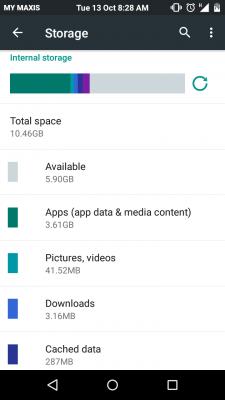
QUOTE(hbengz @ Oct 13 2015, 08:47 AM) I've just flash a custom rom into my note 2, but there is only 10.46GB, did i do something wrong? how can i get back the 6GB of space. I did a full cache,dalvik & factory wipe. You dont get 16 out of 16.For my 32GB Nexus 7, its 26.41/32gb. Some of the estate is reserved for the OS and firmware. |
|
|
Oct 14 2015, 04:17 PM
|
![]() ![]() ![]() ![]() ![]()
Senior Member
796 posts Joined: May 2005 |
hi Sifu,
On kitkat, tap the menu key (bottom left key on galaxy phone) bring up menu. This is needed on some apps to change the app setting. On lollipop, it is different.! Any one know the to bring up the menu on lollipop? tq |
|
|
Oct 27 2015, 10:42 PM
|
![]()
Junior Member
16 posts Joined: Oct 2015 |
Slow browsing speed on my phone
My WIFI internet speed test results: Laptop (i5 4GB ram running Win7, Chrome) - 1.08 mbps download Asus ZF2 (2.3GHz and 4GB ram, Chrome) - 1.3 mbps download Even though the ookla speedtest numbers are similar, my laptop is markedly faster in loading actual websites and streaming videos, especially when using multiple tabs. Actually i find streaming html5 videos relatively slow on my phone especially the initial buffer period. For example, my laptop will start playing a video as soon as I click on it, while a similar video will take at least 40 seconds to start playing on my phone. Worst still, if I seek a different time stamp, it will buffer again wasting my time and annoy the heck out of me. Is this normal for an android device or is there something wrong with my phone? This post has been edited by hassan1990: Oct 27 2015, 10:44 PM |
|
|
Oct 28 2015, 12:11 AM
|
![]() ![]() ![]() ![]() ![]() ![]() ![]() ![]()
All Stars
17,467 posts Joined: May 2008 From: Lazada |
QUOTE(hassan1990 @ Oct 27 2015, 10:42 PM) Slow browsing speed on my phone 3 problem.My WIFI internet speed test results: Laptop (i5 4GB ram running Win7, Chrome) - 1.08 mbps download Asus ZF2 (2.3GHz and 4GB ram, Chrome) - 1.3 mbps download Even though the ookla speedtest numbers are similar, my laptop is markedly faster in loading actual websites and streaming videos, especially when using multiple tabs. Actually i find streaming html5 videos relatively slow on my phone especially the initial buffer period. For example, my laptop will start playing a video as soon as I click on it, while a similar video will take at least 40 seconds to start playing on my phone. Worst still, if I seek a different time stamp, it will buffer again wasting my time and annoy the heck out of me. Is this normal for an android device or is there something wrong with my phone? 1. YouTube Apps sucks 2. Your Internet slow 3. Check your streaming resolution QUOTE(Lawrence Coleman @ Oct 28 2015, 12:06 AM) I am waiting for the launch of Galaxy S7, could anybody tell me probably when it is going to launch exactly. January 2015 or later. Rumor they postponed... |
|
|
Oct 28 2015, 12:18 AM
|
![]()
Junior Member
16 posts Joined: Oct 2015 |
QUOTE(NightFelix @ Oct 28 2015, 12:11 AM) 3 problem. Well i usually have no issues streaming 480p videos smoothly on my laptop even after considering my slow internet. The same cannot be said about my phone. 1. YouTube Apps sucks 2. Your Internet slow 3. Check your streaming resolution January 2015 or later. Rumor they postponed... This is why I'm wondering if there are hardware and software limitations inherent in the phone itself that leads to this scenario. |
|
|
Oct 28 2015, 12:25 AM
|
![]() ![]() ![]() ![]() ![]() ![]() ![]() ![]()
All Stars
17,467 posts Joined: May 2008 From: Lazada |
QUOTE(hassan1990 @ Oct 28 2015, 12:18 AM) Well i usually have no issues streaming 480p videos smoothly on my laptop even after considering my slow internet. The same cannot be said about my phone. Hardware on your Phone. No. your phone support WiFi AC, if your router does too?This is why I'm wondering if there are hardware and software limitations inherent in the phone itself that leads to this scenario. Software on your Phone? Yes. Could be Asus ZenUI ROM problem. bad handling cache... Another issues is the Apps itself. YouTube Apps bad handling backward or forward... |
| Change to: | 0.0308sec
0.47
6 queries
GZIP Disabled
Time is now: 5th December 2025 - 07:22 AM |