Welcome Guest ( Log In | Register )

Outline · [ Standard ] · Linear+

 Installing Gigabit Home Network

views
     
TSwz3k
post Feb 22 2011, 10:29 PM, updated 15y ago

Getting Started
**
Junior Member
109 posts

Joined: Apr 2008
From: Kuala Lumpur


Hi All,

I'm thinking of installing gigabit wired network in my home. This would consist of a switch and cat6 cables running into each room in a 2.5 storey house (5 rooms to be exact). Each room will have an ethernet wall plate each. I understand that this will involve hacking into the wall to lay and hide the cables. If anyone has previous experience either DIY or using contractor for this, hope you can share your experience and how much it cost. If you provide this service, please let know and we can discuss further.

Now I have considered other options like wireless N and homeplugs but I want reliability and speed (I mean some serious speed brows.gif ). If you know of another way to get reliable connection and speed, do let me know as well..

Thank you all.. thumbup.gif


This post has been edited by wz3k: Feb 23 2011, 05:04 PM
Kiding
post Feb 22 2011, 11:55 PM

Regular
******
Senior Member
1,135 posts

Joined: Jan 2003
From: Seri Kembangan


QUOTE(wz3k @ Feb 22 2011, 10:29 PM)
Hi All,

I'm thinking of installing gigabit wired network in my home. This would consist of a switch and cat6 cables running into each room in a 2.5 storey house (5 rooms to be exact). Each room will have an ethernet wall plate each. I understand that this will involve hacking into the wall to lay and hide the cables. If anyone has previous experience either DIY or using contractor for this, hope you can share your experience and how much it cost. If you provide this service, please let know and we can discuss further.

Now I have considered other options like wireless N and homeplugs but I want reliability and speed (I mean some serious speed  brows.gif ). If you know of another way to get reliable connection and speed, do let me know as well..

Thank you all.. thumbup.gif
*
I asked my lighting guys to do it when laid wires for lighting for total 8 points (5 cables from ground floor to first floor, and another 3 for ground floor), if my memory serve me well, total cost is around RM400.

If your house is still under renovation, better ask the lighting guys to do it when they hack the wall, otherwise, to re-conceal the cables is troublesome and may costly.
TSwz3k
post Feb 23 2011, 12:45 AM

Getting Started
**
Junior Member
109 posts

Joined: Apr 2008
From: Kuala Lumpur


wahh.. that's quite affordable.. my house will get CF soon.. so now surveying and calculating what I can afford to do.. thanks for the info.. will definitely check with electrician later to bundle with the other wiring job that is needed..

another question, when they install the network cable, did they put yours in PVC piping or something? thanks
Kiding
post Feb 23 2011, 09:00 AM

Regular
******
Senior Member
1,135 posts

Joined: Jan 2003
From: Seri Kembangan


QUOTE(wz3k @ Feb 23 2011, 12:45 AM)
wahh.. that's quite affordable.. my house will get CF soon.. so now surveying and calculating what I can afford to do.. thanks for the info.. will definitely check with electrician later to bundle with the other wiring job that is needed..

another question, when they install the network cable, did they put yours in PVC piping or something? thanks
*
You can ask them to put cable in the PVC pipe, just remember not to lay cable parallel with the electricity wires.

BTW, the RM 400 charge is only for laying cable and hacking, not including cable, wall plate, connector and cable termination.
SnoWFisH
post Feb 23 2011, 10:04 AM

Look at all my stars!!
*******
Senior Member
2,250 posts

Joined: Jan 2003
From: Penang / Bentong, Pahang / Genting


Usually you'll need to get your own cables (anyway recommended, cuz the contractor won't know what is your requirement). They can probably supply the wall plate.
LickGuy
post Feb 23 2011, 02:46 PM

Highly Flammable Material
******
Senior Member
1,520 posts

Joined: Jan 2003
From: Shuddup


I also got my contractor to lay CAT6 cables @ my new hse,
total 5 points (rj45 next to rj11, then go opposite wall (TV bench), then from TV bech got 3 rj45 go down all the way to basement... i use it to convert HDMI instead)...
total cost ... 1 lump sum they didn't gimme breakdown

If you want it cheap ... better get your own cable, faceplate, keystone... It's quite hard to get cat6 keystone but I manage to find 1 guy in garagesales sellin it ... the rest all selling faceplate + cat5e keystone. and 4 ports faceplate is VERY hard to get .. i scout whole klang valley kenot find, end up earlier this week I got one of my fren bought it from JB and now courier to me. sigh.

and I also bought cable stripper & punch down tool also... and pinjam network tester from my fren tongue.gif

btw, I've still got some 2 ports faceplate (brand dintek) and about 150-200m (dintek jugak) of cat6 cable ... leave me a pm if you're interested on these, thanks.
TSwz3k
post Feb 23 2011, 05:19 PM

Getting Started
**
Junior Member
109 posts

Joined: Apr 2008
From: Kuala Lumpur


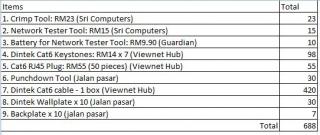
I'm working out the cost estimate in the attached below. What do you think guys? About there?
Attached Image

LickGuy, I'll PM you about your leftover cable.. if can sell for cheap maybe I'll get it.. smile.gif

jojozep
post Feb 23 2011, 06:09 PM

Getting Started
**
Junior Member
119 posts

Joined: Sep 2008
QUOTE(wz3k @ Feb 23 2011, 05:19 PM)
I'm working out the cost estimate in the attached below. What do you think guys? About there?
Attached Image

LickGuy, I'll PM you about your leftover cable.. if can sell for cheap maybe I'll get it.. smile.gif
*
Where is the best place to get these? Jalan Pasar? Where is the best place to put the modem...is it always next to TV?
TSwz3k
post Feb 23 2011, 06:43 PM

Getting Started
**
Junior Member
109 posts

Joined: Apr 2008
From: Kuala Lumpur


Jojozep, the price estimates above is based on my findings at lowyat and lowyat.net.. Sri Computers (Lowyat Store) has most of the items.. some items in there i estimate only..

I couldn't find Cat6 cable per box selling at lowyat though.. only lowyat.net. I'll be checking out jalan pasar later to see if it's available there.. I'm pretty sure they have it..

for me, i'm thinking the modem and switch I'll put on top of a rack somewhere... together with a media server or NAS..

do any of you guys have like a little server room at home? smile.gif


LickGuy
post Feb 23 2011, 10:06 PM

Highly Flammable Material
******
Senior Member
1,520 posts

Joined: Jan 2003
From: Shuddup


wz3k:
okie dokie, i'll need to go home and check how many feet cable i left,
then we'll try to achieve win-win situation
(u buy cheaper, i rugi not so teruk biggrin.gif )

i got cable stripper + punch down tools around rm25-30 @ pasar road,
but I didn't get the crimper tho .. currently I still got few pcs pre-crimped cat6
and you can get AMP RJ11 + RJ45 combo faceplate @ rm15 from pasar road too,
but the rj45 come w/ cat5e keystone not cat6 ...
for cat6 keystone i got it around 20/pcs ... later i pm u the forumer name here ...
dun wan other ppl said i selling ad
Kiding
post Feb 24 2011, 01:39 AM

Regular
******
Senior Member
1,135 posts

Joined: Jan 2003
From: Seri Kembangan


Remember, CAT6 system required end to end compliant, which means not only your cable, but also RJ45 plug, keystone must also complaint with CAT6 standard.

I still have >60 cat6 RJ45 plug bought from monoprice last time. if you want, I can sell it to you. BTW, you can try to order keystone from www.monoprice.com, they do ship to Malaysia.
simplicio
post Feb 24 2011, 02:43 AM

Getting Started
**
Junior Member
277 posts

Joined: Oct 2009
hi guys...anyone can recommend a repair guy.
i have all wall plate working except in one room.

I need him to check and change it if rosak.
so far i ask around no one seems to undertsand!!

thanks
ADJ
post Feb 24 2011, 09:46 AM

..::fairlight::..
*******
Senior Member
2,921 posts

Joined: Jan 2003
From: Ipoh/PJ/KL


QUOTE(wz3k @ Feb 23 2011, 06:43 PM)
Jojozep, the price estimates above is based on my findings at lowyat and lowyat.net.. Sri Computers (Lowyat Store) has most of the items.. some items in there i estimate only..

I couldn't find Cat6 cable per box selling at lowyat though.. only lowyat.net. I'll be checking out jalan pasar later to see if it's available there.. I'm pretty sure they have it..

for me, i'm thinking the modem and switch I'll put on top of a rack somewhere... together with a media server or NAS..

do any of you guys have like a little server room at home? smile.gif
*
there's a store in Lowyat level 3 that's selling networking cables and accessories, they sell premade cables and cables by the box
TSwz3k
post Feb 24 2011, 10:41 AM

Getting Started
**
Junior Member
109 posts

Joined: Apr 2008
From: Kuala Lumpur


ADJ, do you remember the store name in lowyat that sells cable per box?
jojozep
post Feb 25 2011, 11:20 AM

Getting Started
**
Junior Member
119 posts

Joined: Sep 2008
QUOTE(LickGuy @ Feb 23 2011, 02:46 PM)
I also got my contractor to lay CAT6 cables @ my new hse,
total 5 points (rj45 next to rj11, then go opposite wall (TV bench), then from TV bech got 3 rj45 go down all the way to basement... i use it to convert HDMI instead)...
total cost ... 1 lump sum they didn't gimme breakdown

If you want it cheap ... better get your own cable, faceplate, keystone... It's quite hard to get cat6 keystone but I manage to find 1 guy in garagesales sellin it ... the rest all selling faceplate + cat5e keystone. and 4 ports faceplate is VERY hard to get .. i scout whole klang valley kenot find, end up earlier this week I got one of my fren bought it from JB and now courier to me. sigh.

and I also bought cable stripper & punch down tool also... and pinjam network tester from my fren tongue.gif

btw, I've still got some 2 ports faceplate (brand dintek) and about 150-200m (dintek jugak) of cat6 cable ... leave me a pm if you're interested on these, thanks.
*
LIckguy,


I am renovating at the moment, whole house a mess..but good time to lay the cat6 cables?

can you tell me what are the steps to make it internet ready, I would like do have networked cable the major rooms.
also who is your contractor and approx what cost for the hacking?

my house now..


Attached thumbnail(s)
Attached Image
numbertwo
post Feb 25 2011, 11:36 AM

Regular
******
Senior Member
1,790 posts

Joined: Mar 2009
From: PJ lamansara... :D


To lay Cat5e or Cat6 cable, firstly you must decide where are you going to locate the incoming broadband line. From here, you will split all the individual access points to your living, your room, kitchen or even toilets per se.. Talk to the contractor see if he can lay it free for you since they are already hacking to conceal the electricity wires.. for my case it was a FOC case laying 2 cables to living and 2 to the masterbed room, all coming from the living hall upstairs where I will place my router etc. in.
ADJ
post Feb 25 2011, 02:06 PM

..::fairlight::..
*******
Senior Member
2,921 posts

Joined: Jan 2003
From: Ipoh/PJ/KL


QUOTE(wz3k @ Feb 24 2011, 10:41 AM)
ADJ, do you remember the store name in lowyat that sells cable per box?
*
cannot really remember, but its not too far from All IT. In fact, since you are buying per box, nearly all stores should sell it.
ryansia
post Feb 27 2011, 01:17 AM

Casual
***
Junior Member
316 posts

Joined: Apr 2005
for unifi user and user to be, tm normally belakang mali...

so if you are not running all cables to the room at the back, remember to run 2 cables from the back room to the location where all cables meet. the extra cable is for unifi modem to the router.

btw, mine was done by my wiring guy for free.
Rinyuu
post Feb 27 2011, 11:14 PM

Getting Started
**
Junior Member
90 posts

Joined: Jun 2007


KS NETWORK Lowyat 3rd Floor. Seller's name ADAM. If you have budget go for AMP CAT6, blue color cable. Dont buy AMP RM200++ in a box, its imitation.
DINTEK also good cable cheaper a bit than AMP.
ADJ
post Mar 5 2011, 12:55 PM

..::fairlight::..
*******
Senior Member
2,921 posts

Joined: Jan 2003
From: Ipoh/PJ/KL


anyone has any experience with schneider clipsal keystone jacks? the wiring diagram is very confusing!

the wiring diagram in the manual provided does not match the markings on the actual jack itself sad.gif
jojozep
post Mar 5 2011, 05:04 PM

Getting Started
**
Junior Member
119 posts

Joined: Sep 2008


CAT 6 point - rm180
Jo_da48
post Mar 18 2011, 12:01 AM

Regular
******
Senior Member
1,529 posts

Joined: Feb 2011
From: PJ


QUOTE(ryansia @ Feb 27 2011, 01:17 AM)
for unifi user and user to be, tm normally belakang mali...

so if you are not running all cables to the room at the back, remember to run 2 cables from the back room to the location where all cables meet. the extra cable is for unifi modem to the router.

btw, mine was done by my wiring guy for free.
*
No really clear what you meant. Please explain.

TM will lay the fiberOpt cable, so that cable should all the way to the place you expect to put...than what need?
* my contractor said the fiberopt cable can't be buy outside or better get it from UNIFI Contrator to prevent any issues raise by TM...not I not sure how should I do next...

Kiding
post Mar 18 2011, 10:46 AM

Regular
******
Senior Member
1,135 posts

Joined: Jan 2003
From: Seri Kembangan


QUOTE(Jo_da48 @ Mar 18 2011, 12:01 AM)
No really clear what you meant. Please explain.

TM will lay the fiberOpt cable, so that cable should all the way to the place you expect to put...than what need?
* my contractor said the fiberopt cable can't be buy outside or better get it from UNIFI Contrator to prevent any issues raise by TM...not I not sure how should I do next...
*
Some people have network servers and other network devices, so the UNIFI fiber cable should go to the network hub and then use UTP cables to distribute to each network points. UNIFI fiber cable is not designed to directly connect to all network points.

g-string
post Mar 18 2011, 12:20 PM

Getting Started
**
Junior Member
180 posts

Joined: Sep 2006
has anyone done a home entertainment system that can control the whole house entertainment from wall panels? i've seen some on exhibition during homedec, but cost like 50-100k!!!!

if we wire up the house, i wonder if there's any software we can DIY with?

usually how long can CAT cables run for before signal degradation?
Jo_da48
post Mar 18 2011, 07:27 PM

Regular
******
Senior Member
1,529 posts

Joined: Feb 2011
From: PJ


QUOTE(Kiding @ Mar 18 2011, 10:46 AM)
Some people have network servers and other network devices, so the UNIFI fiber cable should go to the network hub and then use UTP cables to distribute to each network points. UNIFI fiber cable is not designed to directly connect to all network points.
*
Thanks for the explaination. Now I clear.

jojozep
post Mar 31 2011, 05:03 PM

Getting Started
**
Junior Member
119 posts

Joined: Sep 2008
I have build a computer room at the back..now I think it is not the BEST location for the future.

The best location for the hub(modem,router,server,computer equipment) should be in the living room where the TV is.

In future, all Internet TV , the cables and modem are easy next to each other. Am I correct to assume this..your comments please..sifus..
Jo_da48
post Mar 31 2011, 06:06 PM

Regular
******
Senior Member
1,529 posts

Joined: Feb 2011
From: PJ


QUOTE(jojozep @ Mar 31 2011, 05:03 PM)
I have build a computer room at the back..now I think it is not the BEST location for the future.

The best location for the hub(modem,router,server,computer equipment) should be in the living room where the TV is.

In future, all Internet TV , the cables and modem are easy next to each other. Am I correct to assume this..your comments please..sifus..
*
Imaging your living room wiill be like Computer Room rclxub.gif

My initial plan is similar like you (everything in front), but now have change to only the internet TV equipment with be at living room (so that remote control could work).

numbertwo
post Mar 31 2011, 08:25 PM

Regular
******
Senior Member
1,790 posts

Joined: Mar 2009
From: PJ lamansara... :D


fiber to home or in fact any wired broadband in MY will comes in from the tel pole...and it usually routes thru your house ceiling and into the wall inside your house...

If you intend to install Unifi or something...best is to ensure a route(can use a pvc pipe open up in the ceiling) is ready(concealed) for the fiber to get into your house somewhere upstairs ... From there...prepare a few Lan cables coming all the way down to your TV cabinet...that would look better.
jojozep
post Mar 31 2011, 09:17 PM

Getting Started
**
Junior Member
119 posts

Joined: Sep 2008
QUOTE(numbertwo @ Mar 31 2011, 08:25 PM)
fiber to home or in fact any wired broadband in MY will comes in from the tel pole...and it usually routes thru your house ceiling and into the wall inside your house... 

If you intend to install Unifi or something...best is to ensure a route(can use a pvc pipe open up in the ceiling) is ready(concealed) for the fiber to get into your house somewhere upstairs ...  From there...prepare a few Lan cables coming all the way down to your TV cabinet...that would look better.
*
Yes!
fubu233
post Apr 2 2011, 11:43 AM

Im a star!
******
Senior Member
1,727 posts

Joined: Jan 2003
From: Malaysia

QUOTE(Kiding @ Feb 23 2011, 09:00 AM)
You can ask them to put cable in the PVC pipe, just remember not to lay cable parallel with the electricity wires.

BTW, the RM 400 charge is only for laying cable and hacking, not including cable, wall plate, connector and cable termination.
*
means if i lay the cat6 cable in the same pvc pipe as the electricity cable, its a big nono?
Jo_da48
post Apr 3 2011, 12:35 AM

Regular
******
Senior Member
1,529 posts

Joined: Feb 2011
From: PJ


QUOTE(fubu233 @ Apr 2 2011, 11:43 AM)
means if i lay the cat6 cable in the same pvc pipe as the electricity cable, its a big nono?
*
Data and electric cant on same pipe, it will disturb the data signal.

fubu233
post Apr 5 2011, 03:21 AM

Im a star!
******
Senior Member
1,727 posts

Joined: Jan 2003
From: Malaysia

how far apart should it be to avoid disturbance ?
Jo_da48
post Apr 5 2011, 03:35 AM

Regular
******
Senior Member
1,529 posts

Joined: Feb 2011
From: PJ


QUOTE(fubu233 @ Apr 5 2011, 03:21 AM)
how far apart should it be to avoid disturbance ?
*
On different PVC will do...

eclipse-space
post Jun 25 2011, 08:42 PM

Getting Started
**
Junior Member
174 posts

Joined: Feb 2010
I wonder if DIY is easy for installing network cable?? hmm

http://www.handymanhowto.com/2009/01/19/ho...a-home-network/
TSwz3k
post Jun 25 2011, 10:58 PM

Getting Started
**
Junior Member
109 posts

Joined: Apr 2008
From: Kuala Lumpur


it has been a while since i started this thread... just an update. i got the keys for my house and now starting renovation plans. I just purchased the following item from Lowyat earlier today:

1. Crimp Tool: RM23
2. Network Tester Tool: RM15
3. Battery for Network Tester Tool: RM9.90
4. Cat6 Keystones: RM14 x 7
5. Cat6 RJ45 Plug: RM55 (50 pieces)

Wanted to buy the box of Cat6 cable just now but too heavy and I parked at Berjaya Times Square.. saw the price was RM530 or RM420.. quite a big difference.. the guy said more expensive better quality.. wanted to get the wallplate as well but only got one design and doesnt look as nice..

I'll try to get it tomorrow or later because I want to see if Jalan Pasar has nicer wallplate or not.. after i get the cable then need to start practicing on wiring..

bro eclipse-space, I will share later if this is easy or hard.. smile.gif
eclipse-space
post Jun 25 2011, 11:15 PM

Getting Started
**
Junior Member
174 posts

Joined: Feb 2010
sure thanks! are you going to put it thru pvc pipes as well?

you should start a topic to "showcase" your renovation as well wink.gif
eteractive
post Jun 26 2011, 11:42 PM

Getting Started
**
Junior Member
126 posts

Joined: Jan 2003
QUOTE(wz3k @ Jun 25 2011, 10:58 PM)
it has been a while since i started this thread... just an update. i got the keys for my house and now starting renovation plans. I just purchased the following item from Lowyat earlier today:

1. Crimp Tool: RM23
2. Network Tester Tool: RM15
3. Battery for Network Tester Tool: RM9.90
4. Cat6 Keystones: RM14 x 7
5. Cat6 RJ45 Plug: RM55 (50 pieces)

Wanted to buy the box of Cat6 cable just now but too heavy and I parked at Berjaya Times Square.. saw the price was RM530 or RM420.. quite a big difference.. the guy said more expensive better quality.. wanted to get the wallplate as well but only got one design and doesnt look as nice..

I'll try to get it tomorrow or later because I want to see if Jalan Pasar has nicer wallplate or not.. after i get the cable then need to start practicing on wiring..

bro eclipse-space, I will share later if this is easy or hard.. smile.gif
*
Where did you get all these items from? Which shop in LowYat?

I'm planning to install Cat6 at my home too.

Thanks!
Hokomo
post Jun 27 2011, 12:48 AM

New Member
*
Newbie
2 posts

Joined: Oct 2006
QUOTE(g-string @ Mar 18 2011, 12:20 PM)
usually how long can CAT cables run for before signal degradation?
*
less than 100m
JinXXX
post Jun 27 2011, 09:34 AM

Look at all my stars!!
*******
Senior Member
2,516 posts

Joined: Feb 2007
From: Uarla Umpur


QUOTE(Hokomo @ Jun 27 2011, 12:48 AM)
less than 100m
*
according to specification ethernet cable signal will start degrade at abt 100m

best is to keep a single pull to less than 90 meters for best signal the shorter the better

but also depends on quality of the cable... but never go more than 100m

also rmbr cat6 cable is stiffer than cat5, so when the "contractors" pulling the cable through the conduit make sure it doesn't overly bend the cables like how the garden hose bent until the water flow kena block, cause u will "hurt/luka" the cable

since already pulling the lan cable.. always rmbr to pull extra for back up...


weikee
post Jun 27 2011, 10:48 AM

10k Club
********
All Stars
12,019 posts

Joined: Jan 2003
Cat 6 in the market i see need very big angle of bending. It can go with 90deg too but the installer need to be aware cause once over bend the cable are worse perform than a Cat5e. What i mean over bend is like when install try to push the cable into the conduit before they may bend few round here and there and that will damage the Cat 6.

I know few professional cabler who tell they don't recycle cat 6, but Cat 5e can be recycle. What it mean if it wrongly lay they pull out the Cat 6 cable and throw away, unlike Cat 5e, it can pull out and use in shorter route.

Use good terminator for all LAN cable, be it Cat 5e or Cat 6. If can, use AMP.

This post has been edited by weikee: Jun 27 2011, 10:56 AM
TSwz3k
post Jun 27 2011, 11:34 AM

Getting Started
**
Junior Member
109 posts

Joined: Apr 2008
From: Kuala Lumpur


QUOTE(eteractive @ Jun 26 2011, 11:42 PM)
Where did you get all these items from? Which shop in LowYat?

I'm planning to install Cat6 at my home too.

Thanks!
*
the following is where i got the items from:

1. Crimp Tool: RM23 (Sri Computers)
2. Network Tester Tool: RM15 (Sri Computers)
3. Battery for Network Tester Tool: RM9.90 (Guardian)
4. Cat6 Keystones: RM14 x 7 (Viewnet - next to All IT Hypermarket)
5. Cat6 RJ45 Plug: RM55 (50 pieces) (Viewnet - next to All IT Hypermarket)
eclipse-space
post Jun 27 2011, 11:46 PM

Getting Started
**
Junior Member
174 posts

Joined: Feb 2010
weikee - you seem to know a lot.

are these good? thinking of the FTP cat5e

http://forum.lowyat.net/index.php?showtopic=1386516&hl=
weikee
post Jun 28 2011, 12:08 AM

10k Club
********
All Stars
12,019 posts

Joined: Jan 2003
QUOTE(eclipse-space @ Jun 27 2011, 11:46 PM)
weikee - you seem to know a lot.

are these good? thinking of the FTP cat5e

http://forum.lowyat.net/index.php?showtopic=1386516&hl=
*
Network, Infrastructure are my forte.

I will be using this brand too "1101-03003" with conduit, because my good friend who use this for many installation sell it at cost price to me. Is good if you don't use > 100M, since he say got problem he will help me to do the cabling again FOC so I take his word biggrin.gif

I'll use this LAN cable for my CCTV, and also Network.

Why you need FTP cable? Your house got lot of EMI noise? if not, just get UTP + Conduit enough la.

This post has been edited by weikee: Jun 28 2011, 12:11 AM
eclipse-space
post Jun 28 2011, 03:15 AM

Getting Started
**
Junior Member
174 posts

Joined: Feb 2010
thanks for the advise smile.gif

What cctv system are you using? Self installation?
weikee
post Jun 28 2011, 10:22 AM

10k Club
********
All Stars
12,019 posts

Joined: Jan 2003
No specific system, is mix and match. Mostly for bank commercial use smile.gif

I put in both Coax RG-59, and LAN cable so i can switch to LAN camera or conventional camera depend what system i get.
TSwz3k
post Jun 29 2011, 08:42 AM

Getting Started
**
Junior Member
109 posts

Joined: Apr 2008
From: Kuala Lumpur


just got my box of Cat 6 cables yesterday. started my practice making cables.. failed first 2 attempts and had to recut and rewire. each strand of wire is much stronger than the cat 5 type so not as easy to manage.. however, after watching some youtube videos, found a lot of good tips..

DINTEK Cat 6 Cable - RM420 (Viewnet HUB - Lowyat)
Attached Image

Best Youtube instruction for Cat 6 cable i found
http://www.youtube.com/watch?v=ht8Di4HdyZM


weikee
post Jun 29 2011, 10:16 AM

10k Club
********
All Stars
12,019 posts

Joined: Jan 2003
QUOTE(wz3k @ Jun 29 2011, 08:42 AM)
just got my box of Cat 6 cables yesterday. started my practice making cables.. failed first 2 attempts and had to recut and rewire. each strand of wire is much stronger than the cat 5 type so not as easy to manage.. however, after watching some youtube videos, found a lot of good tips..

DINTEK Cat 6 Cable - RM420 (Viewnet HUB - Lowyat)
Attached Image

Best Youtube instruction for Cat 6 cable i found
http://www.youtube.com/watch?v=ht8Di4HdyZM
*
Happy Cabling.. Take lots of practice to clamp good termination. If you install on face plate you don't need to clamp, you need to push it in. Just like how telekom terminate in junction box.
TSwz3k
post Jun 29 2011, 04:07 PM

Getting Started
**
Junior Member
109 posts

Joined: Apr 2008
From: Kuala Lumpur


thanks weikee, I think i almost got it right for the clamp... the keystone have not yet tried..
raist86
post Jul 1 2011, 03:37 PM

Regular
******
Senior Member
1,577 posts

Joined: May 2005
From: USJ


Just got my keys to my apartment. Going to be doing electrical wiring and installing cat6.. any place to get cat6 at reasonable price? i think my electrical guy doesn't know how to install network cable.. just going to get him to pull the cable in the wall den do my own termination.

Any where to buy cat6 and termination tools at reasonable price?
TSwz3k
post Jul 1 2011, 03:44 PM

Getting Started
**
Junior Member
109 posts

Joined: Apr 2008
From: Kuala Lumpur


raist86, the prices that I got is the cheapest already I think..refer to the places where i bought the items.. the punch down tool you can get a good one at jalan pasar for RM30..
ozak
post Jul 2 2011, 10:13 AM

10k Club
********
All Stars
17,021 posts

Joined: Jan 2005


Is it possible to lay the cable along with the electrical wire? Or share the conduit together? If not, how far should the cable lay from the electrical wire? Incase the cable have to lay along with the eletrical wire route.
weikee
post Jul 2 2011, 11:40 AM

10k Club
********
All Stars
12,019 posts

Joined: Jan 2003
QUOTE(ozak @ Jul 2 2011, 10:13 AM)
Is it possible to lay the cable along with the electrical wire? Or share the conduit together? If not, how far should the cable lay from the electrical wire? Incase the cable have to lay along with the eletrical wire route.
*
Not advice for network and cctv. If you don't notice it now, later sure have problem. Most will separate by 1 feet. I separate by about 2 feet.


kingkong1
post Jul 3 2011, 12:55 AM

On my way
****
Senior Member
636 posts

Joined: Jun 2005
QUOTE(weikee @ Jul 2 2011, 11:40 AM)
Not advice for network and cctv. If you don't notice it now, later sure have problem. Most will separate by 1 feet.  I separate by about 2 feet.
*
Mine is side by side, but separate with PVC conduit, not sure OK or not.
ozak
post Jul 3 2011, 09:36 AM

10k Club
********
All Stars
17,021 posts

Joined: Jan 2005


After doing some research I found out that the technology of network now don't need anymore layout the LAN cable. Wireless or wired. It save some cost.

I think I exclude this network installation in my renovation list.
TSwz3k
post Jul 3 2011, 09:53 AM

Getting Started
**
Junior Member
109 posts

Joined: Apr 2008
From: Kuala Lumpur


ozak, not sure what u mean by "dont need anymore layout the lan cable". Can u share further? Thanks
weikee
post Jul 3 2011, 10:11 AM

10k Club
********
All Stars
12,019 posts

Joined: Jan 2003
QUOTE(kingkong1 @ Jul 3 2011, 12:55 AM)
Mine is side by side, but separate with PVC conduit, not sure OK or not.
*
Only time will tell. Use shield cable if possible.
ozak
post Jul 3 2011, 06:08 PM

10k Club
********
All Stars
17,021 posts

Joined: Jan 2005


QUOTE(wz3k @ Jul 3 2011, 09:53 AM)
ozak, not sure what u mean by "dont need anymore layout the lan cable". Can u share further? Thanks
*
Sorry, I mean don't need to instal the network cable. There is already gigabit router in the market that fast enough to transfer wired or wireless. Specially for media. For wireless speed can go 300Mbps using 5ghz. While wired, you can use homeplug to link. All this cost below rm1k.
TSwz3k
post Jul 3 2011, 06:25 PM

Getting Started
**
Junior Member
109 posts

Joined: Apr 2008
From: Kuala Lumpur


Ah, I see.. did you read about the reliability of Wireless N and Homeplugs and the actual speed they can deliver? but then again, everyone has different needs and preference.. I still prefer cabling it up.. biggrin.gif
eclipse-space
post Jul 3 2011, 07:05 PM

Getting Started
**
Junior Member
174 posts

Joined: Feb 2010
QUOTE(wz3k @ Jul 3 2011, 06:25 PM)
Ah, I see.. did you read about the reliability of Wireless N and Homeplugs and the actual speed they can deliver? but then again, everyone has different needs and preference.. I still prefer cabling it up.. biggrin.gif
*
I'm really confused whether to use cat5e or cat6!
weikee
post Jul 3 2011, 08:06 PM

10k Club
********
All Stars
12,019 posts

Joined: Jan 2003
QUOTE(ozak @ Jul 3 2011, 06:08 PM)
Sorry, I mean don't need to instal the network cable. There is already gigabit router in the market that fast enough to transfer wired or wireless. Specially for media. For wireless speed can go 300Mbps using 5ghz. While wired, you can use homeplug to link. All this cost below rm1k.
*
Yes, this is correct if you don't have many connection maybe good for 2 to 4 equipments if you want to achieve high speed. Wireless and Ethernet over Power/socket work in sharing a single band. The more equipments in wireless or Power plug the slower it will get.

It's not always guaranteed that you'll have the max wireless speed, and is all depend on the strength of signal.

The more equipments / computers using the network increases, the data transfer rate to each will be reduce.

If you plan to run cctv over IP, IPTV, Wireless, surfing and sharing to many device than you need to get more AP transmitter for better stability.

TSwz3k
post Jul 3 2011, 09:34 PM

Getting Started
**
Junior Member
109 posts

Joined: Apr 2008
From: Kuala Lumpur


I selected Cat6 to future proof the network... but looking at the prices of items I sometime wonder if it is worth it.. however, thinking that I'm doing this once off and don't want to rewire for future, I think Cat6 is safest.. only difference by a few hundreds right.. imagine if you find out in the future that you need rewiring because cat5e is no longer sufficient.. that's going to cost a whole lot more..

QUOTE(eclipse-space @ Jul 3 2011, 07:05 PM)
I'm really confused whether to use cat5e or cat6!
*
eclipse-space
post Jul 3 2011, 10:15 PM

Getting Started
**
Junior Member
174 posts

Joined: Feb 2010
QUOTE(wz3k @ Jul 3 2011, 09:34 PM)
I selected Cat6 to future proof the network... but looking at the prices of items I sometime wonder if it is worth it.. however, thinking that I'm doing this once off and don't want to rewire for future, I think Cat6 is safest.. only difference by a few hundreds right.. imagine if you find out in the future that you need rewiring because cat5e is no longer sufficient.. that's going to cost a whole lot more..
*
Very true. Is the crimping as easy? And also, how about the 90 degree thing?
TSwz3k
post Jul 3 2011, 11:03 PM

Getting Started
**
Junior Member
109 posts

Joined: Apr 2008
From: Kuala Lumpur


Crimping requires a few trials for me in the beginning. But now i get it right the first time and within cat 6 specs - under half inch of untwisted. The cable tester i got only test for continuity but does not test the RF. Then again, im not sure if RF tester is cheap.

Btw, what's the 90 degree?
weikee
post Jul 3 2011, 11:44 PM

10k Club
********
All Stars
12,019 posts

Joined: Jan 2003
QUOTE(wz3k @ Jul 3 2011, 11:03 PM)
Crimping requires a few trials for me in the beginning. But now i get it right the first time and within cat 6 specs - under half inch of untwisted. The cable tester i got only test for continuity but does not test the RF. Then again, im not sure if RF tester is cheap.

Btw, what's the 90 degree?
*
To really test Cat6 and LAN cable you need a sophisticate device to test Attenuation, noise level, and cross talk. For home use, if the interface did not show any crc lost or packet lost is already ok.

Think what he mean on the 90 deg things is bending problem for cat6, which is not going to show anything problem if is running on 100Mbps. Only using test equipment can show the problem.


ozak
post Jul 4 2011, 12:19 AM

10k Club
********
All Stars
17,021 posts

Joined: Jan 2005


QUOTE(weikee @ Jul 3 2011, 08:06 PM)
Yes, this is correct if you don't have many connection maybe good for 2 to 4 equipments if you want to achieve high speed. Wireless and Ethernet over Power/socket work in sharing a single band. The more equipments in wireless or Power plug the slower it will get.

It's not always guaranteed that you'll have the max wireless speed, and is all depend on the strength of signal.

The more equipments / computers using the network increases, the data transfer rate to each will be reduce.

If you plan to run cctv over IP, IPTV, Wireless, surfing and sharing to many device than you need to get more AP transmitter for better stability.
*
My requirement is very minimum. My home have 2 person only. I think sufficient kua. hmm.gif

At the moment I m using N basic router which network to nas, media player, laptop and wireless. I able to stream from nas to media while the nas is uploading/downloading. And wifi to laptop too at the sametime. So I judge from here, it more than enough to run if I upgrade to more advance router.

The latest dual band router like linksys e series, dlink or belkin is tacker for this high wifi traffic. And if wifi is consent, you can plug a homeplug to use your existing power cable as LAN. That can run at the speed of 200Mbps.

But my bottleneck is always the ISP 2Mbps not the home network. sad.gif
raist86
post Jul 4 2011, 10:21 AM

Regular
******
Senior Member
1,577 posts

Joined: May 2005
From: USJ


This is the my total price after adding up all the things i want to get from Monoprice.

user posted image

Uploaded with ImageShack.us

USD 289.44 include shipping and handling. if Worldwide express saver only USD 304.35. 3-5 days shipping. Is it cheaper than to buy from here?

Keystones i see here are very ex.. RM 15 for each... 8 pcs adi quite abit of money. Cat 6 also quite ex @ circa RM 500+ per box.


This post has been edited by raist86: Jul 4 2011, 10:37 AM
weikee
post Jul 4 2011, 10:49 AM

10k Club
********
All Stars
12,019 posts

Joined: Jan 2003
I suggest you buy here in Malaysia. You risk getting your equipments tax by custom, which can be anything from 10 to 30%.

I understand from the courier company, anything list as Network need AP.

My last try sending back a Router back from AU for my company, I need a bloody AP, or ask an agent / runner to do it. End up, i return the shipment to AU, send to HK. Is also MUCH Cheaper.
raist86
post Jul 4 2011, 11:04 AM

Regular
******
Senior Member
1,577 posts

Joined: May 2005
From: USJ


highly doubt i need ap for the said items above as they are considered cables and accessories only. not network equipment.
JinXXX
post Jul 4 2011, 11:17 AM

Look at all my stars!!
*******
Senior Member
2,516 posts

Joined: Feb 2007
From: Uarla Umpur


seems cheaper to get it in malaysia if you have the right contacts or

contractor doing structured cabling... for IT companies...
ozak
post Jul 4 2011, 11:28 AM

10k Club
********
All Stars
17,021 posts

Joined: Jan 2005


QUOTE(raist86 @ Jul 4 2011, 11:04 AM)
highly doubt i need ap for the said items above as they are considered cables and accessories only. not network equipment.
*
Custom tax cable for 40%. sweat.gif on top of that if your total value is over rm500, you will kena tax too.
raist86
post Jul 4 2011, 11:33 AM

Regular
******
Senior Member
1,577 posts

Joined: May 2005
From: USJ


hmm.. the tax is the only issue that i have.
other than that their keystones and wall plugs are cheap, plus they have the type that i want..

Jalan pasar can get all these things arr? at a good price?
weikee
post Jul 4 2011, 11:40 AM

10k Club
********
All Stars
12,019 posts

Joined: Jan 2003
QUOTE(raist86 @ Jul 4 2011, 11:04 AM)
highly doubt i need ap for the said items above as they are considered cables and accessories only. not network equipment.
*
Cable required AP or not, i am not sure. But cable i am very very sure need tax. Because my company practice central purchase of some IT equipments. Most of the IT equipments are tax free, but sometime when they put the Power cord cable in the AWB, i get tax 30%, which is not much about few ringgit only, but is the hassle.

For your case, I suggest you add in the 30% for your budget calculation.

Maybe try visit pasar road, you get many good vendor selling reasonable price cable. If you want convenient, try Malaysia RS website, which is not very cheap but get lots of selection. http://malaysia.rs-online.com
raist86
post Jul 4 2011, 11:48 AM

Regular
******
Senior Member
1,577 posts

Joined: May 2005
From: USJ


OMG.. RS-online pricing for cabling is crazy... RM1,350 for 305 meters of cat 6.. @.@
weikee
post Jul 4 2011, 11:59 AM

10k Club
********
All Stars
12,019 posts

Joined: Jan 2003
When you use important keystone jacket / faceplate not sure you have issue to mount into Malaysia wall (not sure what you call this, the black box mount in the wall)

Simtone, or clipsal sell faceplate with RJ45 socket, if you need only few better get local.


Added on July 4, 2011, 12:00 pm
QUOTE(raist86 @ Jul 4 2011, 11:48 AM)
OMG.. RS-online pricing for cabling is crazy... RM1,350 for 305 meters of cat 6.. @.@
*
Some are good brand.

Much better one are Tyco-AMP.

This post has been edited by weikee: Jul 4 2011, 12:00 PM
TSwz3k
post Jul 4 2011, 01:24 PM

Getting Started
**
Junior Member
109 posts

Joined: Apr 2008
From: Kuala Lumpur


so far my current totals are as follows.. i still need another 3 cat6 keystone which Viewnet is out of stock at the moment.. there is AMP version but that cost RM34 vs Dintek RM14..

Attached Image

This post has been edited by wz3k: Jul 4 2011, 01:28 PM
weikee
post Jul 4 2011, 02:21 PM

10k Club
********
All Stars
12,019 posts

Joined: Jan 2003
QUOTE(wz3k @ Jul 4 2011, 01:24 PM)
so far my current totals are as follows.. i still need another 3 cat6 keystone which Viewnet is out of stock at the moment.. there is AMP version but that cost RM34 vs Dintek RM14..

Attached Image
*
AMP is good, and if not mistaken Made in Malaysia. Dintek i think made in China / Taiwan.
TSwz3k
post Jul 4 2011, 03:19 PM

Getting Started
**
Junior Member
109 posts

Joined: Apr 2008
From: Kuala Lumpur


Actually the one I checked at the product label in Viewnet says AMP made in US.. I guess that's why expensive. Dintek is made in Taiwan..
eclipse-space
post Jul 4 2011, 09:11 PM

Getting Started
**
Junior Member
174 posts

Joined: Feb 2010
Where is Jalan pasar? Heard the name a few times here. Prices cheap vs lowyat?
weikee
post Jul 4 2011, 09:17 PM

10k Club
********
All Stars
12,019 posts

Joined: Jan 2003
Pasar Road, near Pudu market. Is where lots of electronic shop, similar to Sim Lim Plaza (not Sim Lim Square) in Singapore.
TSwz3k
post Jul 4 2011, 09:23 PM

Getting Started
**
Junior Member
109 posts

Joined: Apr 2008
From: Kuala Lumpur


thanks for the clarification.. looks like I need to get a Gigabit switch now to test the cable eh..

QUOTE(weikee @ Jul 3 2011, 11:44 PM)
To really test Cat6 and LAN cable you need a sophisticate device to test Attenuation, noise level, and cross talk. For home use, if the interface did not show any crc lost or packet lost is already ok.

Think what he mean on the 90 deg things is bending problem for cat6, which is not going to show anything problem if is running on 100Mbps. Only using test equipment can show the problem.
*
This post has been edited by wz3k: Jul 4 2011, 09:25 PM
raist86
post Jul 14 2011, 03:06 PM

Regular
******
Senior Member
1,577 posts

Joined: May 2005
From: USJ


Anyone heard of Siemon network products? got a quote from a known contact. Former company used to purchase alot of network cables from him.

Prices as follow (All Siemon Brand):
Cat6 Stranded (CM-Rated) 305m - RM 500
Cat6 punch down keystone - RM 19
Wall plate 1 port - RM 4
Wall plate 2 port - RM 4
Wall plate 4 port - RM 6

Electrical guy going to start hacking the wall of my apartment tomorrow to do the power points.. i still haven't buy the network stuff yet.. @.@

This post has been edited by raist86: Jul 19 2011, 09:47 PM
weikee
post Jul 14 2011, 07:55 PM

10k Club
********
All Stars
12,019 posts

Joined: Jan 2003
Original Siemon so cheap meh?
raist86
post Jul 15 2011, 01:21 AM

Regular
******
Senior Member
1,577 posts

Joined: May 2005
From: USJ


gave me dealer price as my old company used to buy alot cables from him.
If not wrong, Cat6 retail Siemon is around 900+
raist86
post Jul 16 2011, 12:53 AM

Regular
******
Senior Member
1,577 posts

Joined: May 2005
From: USJ


Anyone want to buy my left over cables once i'm done with laying? i think i'll be left with at least 200 meters of cable as i'm only using a small amount.. cut down my cat6 points to just 4 lines from initial 8.
weikee
post Jul 16 2011, 01:01 AM

10k Club
********
All Stars
12,019 posts

Joined: Jan 2003
Already have 12 points in my house smile.gif
gennn
post Jul 17 2011, 11:14 AM

New Member
*
Junior Member
16 posts

Joined: Mar 2011
QUOTE(raist86 @ Jul 16 2011, 12:53 AM)
Anyone want to buy my left over cables once i'm done with laying? i think i'll be left with at least 200 meters of cable as i'm only using a small amount.. cut down my cat6 points to just 4 lines from initial 8.
*
How much u plan to sell?
raist86
post Jul 17 2011, 02:30 PM

Regular
******
Senior Member
1,577 posts

Joined: May 2005
From: USJ


sell per meter lo if small qty.

how much u want?
toffeeman
post Jul 17 2011, 09:54 PM

Getting Started
**
Junior Member
230 posts

Joined: Jun 2009


GenerAlly what's the incremental price difference between cat 6 and 5e cables?
raist86
post Jul 17 2011, 11:16 PM

Regular
******
Senior Member
1,577 posts

Joined: May 2005
From: USJ


depending on brand. Siemon cat5e price is around 200+.. cat6 500.. this is the price i get from my supplier.

This post has been edited by raist86: Jul 19 2011, 09:47 PM
maxiscool
post Jul 18 2011, 11:39 AM

Casual
***
Junior Member
379 posts

Joined: Jan 2003
I'm in the middle of planning for hosue renovation in Selangor.
Any good contractor recommendation for:-
1. Gigabit Network Installation
2. Additinal electrical plug point installation
3. Streamyx / UniFi compatible readiness
4. Astro Cabling readiness
5. Alarm & CCTV readiness

I've seeing many house with patch work after hosue is renovate. I'm new in this area, would need some good recommendation in workmanship and knowledge wise.

Thankyou.
kh8668
post Aug 8 2011, 11:08 PM

Mamma Mia!
*******
Senior Member
5,488 posts

Joined: Jun 2008
anyone know where to buy fibre cable as per unifi contractor use?

weikee
post Aug 8 2011, 11:25 PM

10k Club
********
All Stars
12,019 posts

Joined: Jan 2003
QUOTE(kh8668 @ Aug 8 2011, 11:08 PM)
anyone know where to buy fibre cable as per unifi contractor use?
*
Think they are using single mode fiber, but type and brand i am not sure. I only lay a empty conduit straight from my rear laundry area to my server room smile.gif
kh8668
post Aug 9 2011, 12:19 AM

Mamma Mia!
*******
Senior Member
5,488 posts

Joined: Jun 2008
QUOTE(weikee @ Aug 8 2011, 11:25 PM)
Think they are using single mode fiber, but type and brand i am not sure. I only lay a empty conduit straight from my rear laundry area to my server room smile.gif
*
Does it far and straight line?
weikee
post Aug 9 2011, 12:30 AM

10k Club
********
All Stars
12,019 posts

Joined: Jan 2003
QUOTE(kh8668 @ Aug 9 2011, 12:19 AM)
Does it far and straight line?
*
Yes straight and 15' conceal.
raist86
post Aug 9 2011, 09:35 AM

Regular
******
Senior Member
1,577 posts

Joined: May 2005
From: USJ


it's not advisable to lay your own fibre as there'll be a chance that TM ppl will not accept it. It's free anyway from them so let them do it. Just lay the conduit so that they can thread it in den ok di.
eclipse-space
post Aug 23 2011, 10:41 PM

Getting Started
**
Junior Member
174 posts

Joined: Feb 2010
hello, got a question to ask! When I did my own patch panel, and run it thru the cable tester, the light flows from 1 to 8 but somehow miss the G. Does that mean the cable is not gigabit?

I'm using Cat6 cable.
weikee
post Aug 23 2011, 10:53 PM

10k Club
********
All Stars
12,019 posts

Joined: Jan 2003
You need to check your cable tester manual.
eclipse-space
post Aug 23 2011, 10:54 PM

Getting Started
**
Junior Member
174 posts

Joined: Feb 2010
Didn't come with it. sad.gif

Shouldn't have skimp on cheap cable tester!


BTW this is what I got -

user posted image


Edit:

Just read the website, what the heck does this mean:

1. It can test correspondingly double-twisted cables 1,2,3,4,5,6,7,8 and G,meanwile,can judge wrong   connection,short circuit and open circuit. ...

http://www.3nc.com/sbdzapeng.htm

This post has been edited by eclipse-space: Aug 23 2011, 10:57 PM
weikee
post Aug 23 2011, 11:20 PM

10k Club
********
All Stars
12,019 posts

Joined: Jan 2003
This one is good for testing connection only. Can't test lost signal and noise. If you have all the light run in sequence then is connect correctly. For full CAT6 compliance you need difference tester.
lazzy_dogg
post Aug 25 2011, 09:58 PM

Enthusiast
*****
Senior Member
943 posts

Joined: Oct 2004
From: K.Lumpur, Subang


anyone can recommend me where to get STP and UTP cables at good price from a reputable brand (i.e. AMP)...
can anyone tell me how much roughly?
looking at buying in reel/box


Added on August 25, 2011, 9:58 pmanyone can recommend me where to get STP and UTP cables at good price from a reputable brand (i.e. AMP)...
can anyone tell me how much roughly?
looking at buying in reel/box

This post has been edited by lazzy_dogg: Aug 25 2011, 09:58 PM
kamion
post Aug 25 2011, 10:39 PM

Casual
***
Junior Member
327 posts

Joined: Feb 2011
Where can I get a tester? I asked the electrician to lay the cables from my rooms upstairs to my living room. Would definitely like to test the installation before signing off.
weikee
post Aug 25 2011, 11:53 PM

10k Club
********
All Stars
12,019 posts

Joined: Jan 2003
QUOTE(lazzy_dogg @ Aug 25 2011, 09:58 PM)
anyone can recommend me where to get STP and UTP cables at good price from a reputable brand (i.e. AMP)...
can anyone tell me how much roughly?
looking at buying in reel/box
Why you want STP? your area got electrostatic problem?

Try Jalan Pasar, but not sure they carry AMP, cause is very expensive. Maybe need back to back order.


Added on August 25, 2011, 11:57 pm
QUOTE(kamion @ Aug 25 2011, 10:39 PM)
Where can I get a tester? I asked the electrician to lay the cables from my rooms upstairs to my living room. Would definitely like to test the installation before signing off.
*
The 8 lights tester most electronic shop sell, very cheap only. Try ask the two electronic shop @ ss2, one is same row as McD, and one is behind Guardian.

If you need db noise tester maybe need to go below places.
01) Pasar road,
02) mobicon "Remote" @ old klang road http://www.mobicon.com.my
03) http://malaysia.rs-online.com/web/


This post has been edited by weikee: Aug 25 2011, 11:57 PM
raist86
post Aug 26 2011, 02:49 PM

Regular
******
Senior Member
1,577 posts

Joined: May 2005
From: USJ


one thing i realised from doing my own network installation is never ever skimp on the quality of the cables and keystones you use. Once it's inside the wall, it's highly unlikely you'll want to tear it out and redo it. Get it right once and you'll be happy.

UTPs sold on the market have in-wall rated and for normal usage. It's ok to use solid cable for in wall while for patch cables, it's better to use stranded types as it's easier to bend. Stranded are expensive though here.


Added on August 26, 2011, 2:51 pmanyone wants to take over my SIEMON cat6 cable? It's their System6 cable that is in-wall rated. It is thicker than cat5 cables thus your wall conduit has to be bigger.

This post has been edited by raist86: Aug 26 2011, 02:51 PM
phoenix69
post Nov 11 2011, 08:09 PM

Regular
******
Senior Member
1,836 posts

Joined: Sep 2007


Hi Guys, In midst of renovating house now.
At the stage of house wiring and concealing cable now.
I had this idea and wonder if it works.

1. I plan to locate the BTU and the RG in the middle of my house on the ground floor so wireless signal can spread from the center of ground floor (through coverage).
- Plan to pull the FTB to BTU wire over the ceiling (plaster ceiling) so leave the plaster ceiling uncovered until the wire installed over above the plaster ceiling. After the ceiling leave a "longkang" to the BTU location area which I will conceal myself after instillation. Can ah? Kena charged ah?

2. My friend told me that RG wire to STB, DECT phone and wired PC are all the same CAT 5 type. My TV will be located at the corner edge of the ground floor.
- Plan to prepare 4 pcs CAT 6 concealed wire and plug from the middle of the ground floor where the BTU and RG is located to
1. corner edge of the ground floor where I plan to put the STB near the TV.
2. another corner of the ground floor where I plan to put a wired PC
3. up to 1st floor where I plan to put another wireless router.
4. up to my alarm system.
Can work ah?

All this is to take advantage of my renovation that is currently being done so as to avoid exposed wire lines.

All sifus pleaseeeeee help advice notworthy.gif notworthy.gif
kamion
post Nov 11 2011, 08:24 PM

Casual
***
Junior Member
327 posts

Joined: Feb 2011
I just pulled a CAT5 cable from each room upstairs (3) to my living room wall where I intend to put my TV.

Unifi come in to living room and there will be a router there. Connect the router to all 3 sockets and that's it. smile.gif Plus need to connect from router to the IP TV box anyway by the TV.

I can just add switches in any of the rooms when I need more ethernet connections.

Currently at my parents place, I have the WiFi router in the living room, and my PC is upstairs and at the diagonal end of the semi-D house to the WiFi router and it works fine, so no need to worry so much about putting the WiFi router right in the middle of your place.
zeese
post Jan 11 2012, 11:21 AM

Warning Level
******
Senior Member
1,818 posts

Joined: Jan 2005
From: Kuala Lumpur
how much does it cost to hack and reseal the wall only (we provide the cable, the contractor just hack & seal it back)? How much per feet run?
weikee
post Jan 11 2012, 11:51 AM

10k Club
********
All Stars
12,019 posts

Joined: Jan 2003
QUOTE(zeese @ Jan 11 2012, 11:21 AM)
how much does it cost to hack and reseal the wall only (we provide the cable, the contractor just hack & seal it back)?  How much per feet run?
*
Don't think they is standard pricing. You need to ask them before start. For my case, he supply conduit and installation. I supply cables for CCTV, Cat5e, and twin flat, face plates, and terminate myself.

Think I pay him good price, I paid 70 per point, it was not his request, but i just pay him this rate as he give me some discount and did not include many extra stuff I add on later stage.
phoenix69
post Jan 23 2012, 04:44 PM

Regular
******
Senior Member
1,836 posts

Joined: Sep 2007


Installed CAT 5e cables concealed in the wall. Anyone can tell me where to get someone to install the cover and connectors ah?
weikee
post Jan 23 2012, 05:48 PM

10k Club
********
All Stars
12,019 posts

Joined: Jan 2003
QUOTE(phoenix69 @ Jan 23 2012, 04:44 PM)
Installed CAT 5e cables concealed in the wall. Anyone can tell me where to get someone to install the cover and connectors ah?
*
DIY lo, is not that hard. And buy a patch panel for the central cable area.
phoenix69
post Jan 25 2012, 10:36 AM

Regular
******
Senior Member
1,836 posts

Joined: Sep 2007


QUOTE(weikee @ Jan 23 2012, 05:48 PM)
DIY lo, is not that hard. And buy a patch panel for the central cable area.
*
Patch panel, I googled and see so many connection lor.. sweat.gif
I only allocate 4 CAT5e concealed connections for my house, how to use all?!? blink.gif
weikee
post Jan 25 2012, 10:42 AM

10k Club
********
All Stars
12,019 posts

Joined: Jan 2003
QUOTE(phoenix69 @ Jan 25 2012, 10:36 AM)
Patch panel, I googled and see so many connection lor..  sweat.gif 
I only allocate 4 CAT5e concealed connections for my house, how to use all?!?  blink.gif
*
Your CCTV? you did not put LAN cable?

If only 4, just buy two face place with 2 Cat5e jacket per face plate ok already.
Neubie
post Jun 6 2012, 11:34 AM

New Member
*
Newbie
2 posts

Joined: Apr 2011
Hello

I came on this thread while looking to install wired Ethernet network. I am in Johor Baru. Can recommend a contractor to do this. I am not a technical person, not like you guys so really need someone to setup the whole process. I appreciate the help and advice that is given. Thanks.

This post has been edited by Neubie: Jun 6 2012, 11:35 AM
jerm
post Jun 29 2012, 03:35 PM

On my way
****
Senior Member
651 posts

Joined: Jan 2003


you just need to buy the cables and let your contractor run them for you

as for terminating them at the keystone, you can get diagrams from many sites, it's just pushing the cables into the pins, no crimping required. you can always pull a little extra in case you want to redo the keystones

as for patch cords, can buy off any computer shops, pre-crimped
xsi
post Jul 26 2012, 10:10 AM

Getting Started
**
Junior Member
186 posts

Joined: Jan 2005
questions...
1. is there any keystone that i can install without using the punch-down tool? It is available overseas but not sure locally
2. What is the normal transfer rate from PC to NAS for gigabit network? Using the el-cheapo WD NAS (2-slots) available widely at Lowyat. Transfer speed seem very slow. My network supposedly gigabit already but not sure how to check/verify.

Sorry...i'm a noob smile.gif
weikee
post Jul 26 2012, 10:27 AM

10k Club
********
All Stars
12,019 posts

Joined: Jan 2003
QUOTE(xsi @ Jul 26 2012, 10:10 AM)
questions...
1. is there any keystone that i can install without using the punch-down tool? It is available overseas but not sure locally
2. What is the normal transfer rate from PC to NAS for gigabit network? Using the el-cheapo WD NAS (2-slots) available widely at Lowyat. Transfer speed seem very slow. My network supposedly gigabit already but not sure how to check/verify.

Sorry...i'm a noob smile.gif
*
Use blade/ cutter can be punch down tool. Don't need special tools.

You need to understand bottleneck is not on the LAN, could be your devices and disk transfer rate. Even you get a 7200rpm drive, your average transfer maybe is around 50 to 80MB/sec, if you have more fragment files, difference files system, device design and other smaller files the transfer rate will be varied.


Added on July 26, 2012, 10:31 amA good throughput switch can sustain much higher transfer too. That is the difference between a cheap and high end switch.

This post has been edited by weikee: Jul 26 2012, 10:31 AM
xsi
post Jul 26 2012, 10:37 AM

Getting Started
**
Junior Member
186 posts

Joined: Jan 2005

thanks for the reply. For home use cat5e unshielded keystone shud be sufficient right?

my transfer rate is i thin 24mbps only, if i am not mistaken lah. Need to check. Not sure what's wrong. And yes my switch also cheapest gigabit ones..

weikee
post Jul 26 2012, 10:43 AM

10k Club
********
All Stars
12,019 posts

Joined: Jan 2003
QUOTE(xsi @ Jul 26 2012, 10:37 AM)
thanks for the reply. For home use cat5e unshielded keystone shud be sufficient right?

my transfer rate is i thin 24mbps only, if i am not mistaken lah. Need to check. Not sure what's wrong. And yes my switch also cheapest gigabit ones..
*
Check your HD spec, could be your HD transfer rate.

Yes, don't need Amp, but at least a good quality Taiwan cables or reliable brand. I am phobia with China cables after so many experience with it.


khieni
post Jul 26 2012, 09:06 PM

Getting Started
**
Junior Member
290 posts

Joined: Nov 2011
QUOTE(wz3k @ Feb 22 2011, 10:29 PM)
Hi All,

I'm thinking of installing gigabit wired network in my home. This would consist of a switch and cat6 cables running into each room in a 2.5 storey house (5 rooms to be exact). Each room will have an ethernet wall plate each. I understand that this will involve hacking into the wall to lay and hide the cables. If anyone has previous experience either DIY or using contractor for this, hope you can share your experience and how much it cost. If you provide this service, please let know and we can discuss further.

Now I have considered other options like wireless N and homeplugs but I want reliability and speed (I mean some serious speed  brows.gif ). If you know of another way to get reliable connection and speed, do let me know as well..

Thank you all.. thumbup.gif
*
Sorry, i dont have the answer for u,

but i would like to ask, what is Gigabit Home Network? rclxub.gif
jerm
post Aug 23 2012, 08:47 AM

On my way
****
Senior Member
651 posts

Joined: Jan 2003


Home networks is the term used for 'networking' your home. Think of a cybercafe, and imagine each PC is one room in your house, all connected together (whether wired or wireless)

This was at one time were a rarity, only for those who had the 'know-how'. It has evolved mainly from Cat5 (100Mbps) to Cat5e (around the same time), and now people are moving towards Cat6 (1 gbps) networks.

Advantages of Cat6? able to have higher (or simultaneously high) data transfer between devices, of course bottleneck is your disk, or whatever medium you write or read from. Also can be used with the new HDMI splitter devices to stream 1080p.
weikee
post Aug 23 2012, 12:33 PM

10k Club
********
All Stars
12,019 posts

Joined: Jan 2003
Cat 5e can go up to 1Gbps without problem. Cat6 can go up to 10Gbps that is if your cables are properly test.
Kain_Sicilian
post Sep 12 2012, 07:57 AM

Not So Friendly
*****
Senior Member
844 posts

Joined: Sep 2005
From: Mars, where else?


After reading the posts here, I gather that I have to lay the network cables in a separate PVC pipe to my electrical wiring.

However can I lay several network cables in the same PVC pipe?
mhhee
post Sep 12 2012, 08:06 AM

Regular
******
Senior Member
1,310 posts

Joined: Feb 2005


QUOTE(Kain_Sicilian @ Sep 12 2012, 07:57 AM)
After reading the posts here, I gather that I have to lay the network cables in a separate PVC pipe to my electrical wiring.

However can I lay several network cables in the same PVC pipe?
*
Shouldn't be a problem for multiple network cables in one PVC pipe. I guess maximum can put 4... If want to lay same piping as electrical wiring. You may consider shielded cat 5 cable.

weikee
post Sep 12 2012, 08:12 AM

10k Club
********
All Stars
12,019 posts

Joined: Jan 2003
QUOTE(Kain_Sicilian @ Sep 12 2012, 07:57 AM)
After reading the posts here, I gather that I have to lay the network cables in a separate PVC pipe to my electrical wiring.

However can I lay several network cables in the same PVC pipe?
*
Yes
Kain_Sicilian
post Sep 12 2012, 12:17 PM

Not So Friendly
*****
Senior Member
844 posts

Joined: Sep 2005
From: Mars, where else?


Thanks for the reply.. I am still deciding between ca5e and cat6. Cat5e for it's price and cat6 for future proofing. Difference about RM300-400 (cable + keystones, etc). Any suggestions which should I go for? My main purpose to is to deliver FTTH to all my computers/laptops, file sharing with NAS, and FullHD movie streaming from NAS to network media player.

I am thinking of maximum 6 in a pipe (hub side). They rest are either one or four in a pipe. Is that reasonable?

Edit:

And I forgot to add that I'll be using the network for cat5e/cat6 based HDMI extender and remote repeater.

This post has been edited by Kain_Sicilian: Sep 12 2012, 12:18 PM
mhhee
post Sep 12 2012, 01:34 PM

Regular
******
Senior Member
1,310 posts

Joined: Feb 2005


QUOTE(Kain_Sicilian @ Sep 12 2012, 12:17 PM)
Thanks for the reply.. I am still deciding between ca5e and cat6. Cat5e for it's price and cat6 for future proofing. Difference about RM300-400 (cable + keystones, etc).  Any suggestions which should I go for? My main purpose to is to deliver FTTH to all my computers/laptops, file sharing with NAS, and FullHD movie streaming from NAS to network media player.

I am thinking of maximum 6 in a pipe (hub side). They rest are either one or four in a pipe. Is that reasonable?

Edit:

And I forgot to add that I'll be using the network for cat5e/cat6 based HDMI extender and remote repeater.
*
Like this?

user posted image

1. Maxis FTTH 10Mbps
2. Qnap TS212 NAS Server
3. TP-Link Gigabit 16 Port Switch
Kain_Sicilian
post Sep 12 2012, 03:08 PM

Not So Friendly
*****
Senior Member
844 posts

Joined: Sep 2005
From: Mars, where else?


QUOTE(mhhee @ Sep 12 2012, 01:34 PM)
Like this?

user posted image

1. Maxis FTTH 10Mbps
2. Qnap TS212 NAS Server
3. TP-Link Gigabit 16 Port Switch
*
Yes, something very similar! Just that I probably will be using the maxis ori Thomson router instead of a switch. I might add a switch (Old TBase100 somewhere in my shed) to the router for non demanding gadgets e.g PS3 in future if I run out of ports on the router.
weikee
post Sep 12 2012, 03:31 PM

10k Club
********
All Stars
12,019 posts

Joined: Jan 2003
A real Cat 6 cabling standard need DB testing for optimum performence. If the test failed / have too much crc error running cat 6 at the highest rate, it will fall back to the lower rate and that is already similar to CAT5e.

Cat 5e is good up to 1Gbps, and Cat 6 can go up to 10Gbps if it pass all the testing.


Added on September 12, 2012, 3:31 pmHDMI extender need 2 LAN cable. Cat 5e or 6 does not matter.

This post has been edited by weikee: Sep 12 2012, 03:31 PM
Kain_Sicilian
post Sep 12 2012, 04:24 PM

Not So Friendly
*****
Senior Member
844 posts

Joined: Sep 2005
From: Mars, where else?


QUOTE(weikee @ Sep 12 2012, 03:31 PM)
A real Cat 6 cabling standard need DB testing for optimum performence.  If the test failed / have too much crc error running cat 6 at the highest rate, it will fall back to the lower rate and that is already similar to CAT5e.

Cat 5e is good up to 1Gbps, and Cat 6 can go up to 10Gbps if it pass all the testing.


Added on September 12, 2012, 3:31 pmHDMI extender need 2 LAN cable. Cat 5e or 6 does not matter.
*
I see, it seems like in that case cat5e should be sufficient for me isn't it?
weikee
post Sep 12 2012, 06:22 PM

10k Club
********
All Stars
12,019 posts

Joined: Jan 2003
1Gbps is good for sometime. If you want future proof, pull fiber entire house. Can go up to 100Gbps. biggrin.gif
Kain_Sicilian
post Sep 12 2012, 10:39 PM

Not So Friendly
*****
Senior Member
844 posts

Joined: Sep 2005
From: Mars, where else?


I think I will stick to cat5e smile.gif
nitromx
post Sep 13 2012, 08:53 AM

On my way
****
Senior Member
532 posts

Joined: Nov 2004


i just bought cat5e cable
will be laying it this weekend
tongue.gif
weikee
post Sep 13 2012, 10:09 AM

10k Club
********
All Stars
12,019 posts

Joined: Jan 2003
Everyone are talking about cat6, have anyone every try to boost the cable up to 10Gbps? and see if any CRC error?

Ususally is only 1Gbps, and that is still achiveable in cat5e.

For cat6, get the bendable without the center rubber, it cost almost double, but easy to lay and less problem. Lots of installer don't know how to handle Cat6 with the center rubber, is really a pain to deal with, especially after complete you run the test and fail.


Kain_Sicilian
post Sep 20 2012, 10:59 AM

Not So Friendly
*****
Senior Member
844 posts

Joined: Sep 2005
From: Mars, where else?


In the end, I chose to install cat5e partly because of the cost and I am not sure If i'll be able to make sure the cable that I install meet the conditions for cat6 to run optimally.

THanks for all the advice and help!
xerox1234
post Sep 20 2012, 11:54 AM

Casual
***
Junior Member
334 posts

Joined: Nov 2005
Cat5e is good enough lah, how many data you need to transfer just from your house? 1Gbps can last for 20-30 years good enough. When Cat6 is common perhaps the time u got new house and just install cat6 at new house smile.gif


Added on September 20, 2012, 11:56 am
QUOTE(mhhee @ Sep 12 2012, 01:34 PM)
Like this?

user posted image

1. Maxis FTTH 10Mbps
2. Qnap TS212 NAS Server
3. TP-Link Gigabit 16 Port Switch
*
UPS and Surge protector ?

This post has been edited by xerox1234: Sep 20 2012, 11:56 AM
weikee
post Sep 20 2012, 12:32 PM

10k Club
********
All Stars
12,019 posts

Joined: Jan 2003
Get fiber sure future proof. Current testing phase is fiber transmitting 1Tbps. Not even have any production servers can process such a huge data speed yet.
Gundam84
post Apr 7 2013, 04:17 PM

Getting Started
**
Junior Member
115 posts

Joined: Aug 2007


Hi,

My house is going through renovation now (with lotsa hacking) and i was planning to setup a small network system in my home.

Attached Image

Following is what i was planning to do (refer to diagram above)
1. Ask contractor to prepare an empty conduit so that TM contractor can lay the fiber to where I plan to put my Wireless Router.
2. Buy DINTEK Cat.5e 4 Pair UTP Cable 305m/Box (http://www.tom3c.com/networking-devices/network-cabling-accessories/dintek-1101-03003) and lay them around the house using wall plug so that all cabling will be concealed.
3. I would like to have two DECT phone, one at first floor and another ground floor. What type of cable are they using?
Do i just need to ensure the switch that i gonna buy has an VOIP port and it will works fine? Understood that the BTU from TM comes with a VOIP port. When the phone comes in, will both be ringing?

Last but not least, can someone let me know if my setup above is correct? Cause i was planning to lay them next week smile.gif
Many Thanks

This post has been edited by Gundam84: Apr 7 2013, 04:24 PM
weikee
post Apr 8 2013, 12:15 AM

10k Club
********
All Stars
12,019 posts

Joined: Jan 2003
You have 2 DECT Phone, is this the analog DECT supply by uniFi? Or VOIP Phone via internet? if is uniFi DECT Phone that is analog phone you can't plug into your ground floor switch.

Your layout are very confusing to me. How is Ground floor and 1st floor connect? Or you plan not to connect them?

For Analog phone cabling is using CAT 3 with RJ11 head/jack, but you can use CAT 5e and use Cat5e faceplate no issue, Cat 5e use RJ45 faceplate and are backwards compatible to RJ11 head.

This post has been edited by weikee: Apr 8 2013, 12:21 AM
Gundam84
post Apr 8 2013, 09:13 AM

Getting Started
**
Junior Member
115 posts

Joined: Aug 2007


QUOTE(weikee @ Apr 8 2013, 12:15 AM)
You have 2 DECT Phone, is this the analog DECT supply by uniFi? Or  VOIP Phone via internet? if is uniFi DECT Phone that is analog phone you can't plug into your ground floor switch.

Your layout are very confusing to me. How is Ground floor and 1st floor connect? Or you plan not to connect them?

For Analog phone cabling is using CAT 3 with RJ11 head/jack, but you can use CAT 5e and use Cat5e faceplate no issue, Cat 5e use RJ45 faceplate and  are backwards compatible to RJ11 head.
*
hi weikee,

Sorry for the confusion. Ground floor and 1st floor are connected via the concealed Dintex Cat 5e. UTP cable network cable.
If you refer to the numbering wall plug, it should be 1 to 1 mapping ( there is some mistake in the earlier diagram where i got no.2 plate mapped into two different location)
Following are the updated one

Attached Image

I had no prior knowledge for Unifi. I do mean the one that supplied by Unifi, thus from your post if i not mistaken, it can't connect it via my ground floor switch.
In this scenario, how could i have a two DECT setup (not VOIP Phone via internet).

Could i do it something as what shown in the updated diagram? using a splitter

This post has been edited by Gundam84: Apr 8 2013, 09:35 AM
Nitrous
post Apr 8 2013, 11:21 AM

Getting Started
**
Junior Member
212 posts

Joined: Jan 2003
QUOTE(Gundam84 @ Apr 8 2013, 09:13 AM)
hi weikee,

Sorry for the confusion. Ground floor and 1st floor are connected via the concealed Dintex Cat 5e. UTP cable network cable.
If you refer to the numbering wall plug, it should be 1 to 1 mapping ( there is some mistake in the earlier diagram where i got no.2 plate mapped into two different location)
Following are the updated one

Attached Image

I had no prior knowledge for Unifi. I do mean the one that supplied by Unifi, thus from your post if i not mistaken, it can't connect it via my ground floor switch.
In this scenario, how could i have a two DECT setup (not VOIP Phone via internet).

Could i do it something as what shown in the updated diagram? using a splitter
*
Some inputs based on my reno experience...
1) From BTU to wireless router - there's only one LAN cable connecting these 2 equipments, not 2 cables from your diagram (refer to point 2).
2) The wireless router have 5 ports, one WLAN port (to plug-in incoming LAN cable from the BTU), and 4 switch ports. Of these 4 switch ports, only 3 can be used for data, as port no 4 is dedicated to your IPTV.
3) Yes, you can have a simple splitter plugged into your BTU RJ-11 port to have 2 DECT phones connected. I have a 3 way splitter for my DECT phone. Just make sure your RJ-11 phone lines are long enough to reach your BTU unit.
4) Other setup seems to be ok, although I am not sure if your switch on the ground floor will be compatible with the wireless router or not (I am not sure abt this, u gotta ask some sifoo).
5) I used a separate switch to handle most of the traffic inside the house, leaving most of the ports in the TM's wireless router unused (only use port 1 for internet traffic, and port 4 for IPTV). I would suggest that you do the same if you stream lots of videos or audio around your house, as the router provided by TM isn't exactly enterprise quality level smile.gif

Hope this helps!
Gundam84
post Apr 8 2013, 12:06 PM

Getting Started
**
Junior Member
115 posts

Joined: Aug 2007


QUOTE(Nitrous @ Apr 8 2013, 11:21 AM)
Some inputs based on my reno experience...
1) From BTU to wireless router - there's only one LAN cable connecting these 2 equipments, not 2 cables from your diagram (refer to point 2).
2) The wireless router have 5 ports, one WLAN port (to plug-in incoming LAN cable from the BTU), and 4 switch ports. Of these 4 switch ports, only 3 can be used for data, as port no 4 is dedicated to your IPTV.
3) Yes, you can have a simple splitter plugged into your BTU RJ-11 port to have 2 DECT phones connected. I have a 3 way splitter for my DECT phone. Just make sure your RJ-11 phone lines are long enough to reach your BTU unit.
4) Other setup seems to be ok, although I am not sure if your switch on the ground floor will be compatible with the wireless router or not (I am not sure abt this, u gotta ask some sifoo).
5) I used a separate switch to handle most of the traffic inside the house, leaving most of the ports in the TM's wireless router unused (only use port 1 for internet traffic, and port 4 for IPTV). I would suggest that you do the same if you stream lots of videos or audio around your house, as the router provided by TM isn't exactly enterprise quality level smile.gif

Hope this helps!
*
Thanks, Nitrous. I had alwiz thought that the IPTV line from BTU. But it seems that it will be from the wireless router.
You mentioned that you used a separate switch to handle traffic. In that case, can I confirm if you connect the switch to the port 1 for the wireless router and port 4 for IPTV?
The rest of the LAN devices are connected to this separate switch (and with internet access)?

If yes, it is very similar to what I'm trying to achieve with the switch at ground floor. Just that besides, using the switch, I'm also utilizing port 2 & 3 of the wireless router smile.gif

Updated Diagram
(if this works, perhaps the IPTV can be using the port from the switch instead from the wireless router smile.gif then i can pull another cable for the other room which i removed earlier due to limited port at the wireless router)
Attached Image

This post has been edited by Gundam84: Apr 8 2013, 12:07 PM
Nitrous
post Apr 8 2013, 01:20 PM

Getting Started
**
Junior Member
212 posts

Joined: Jan 2003
QUOTE(Gundam84 @ Apr 8 2013, 12:06 PM)
Thanks, Nitrous. I had alwiz thought that the IPTV line from BTU. But it seems that it will be from the wireless router.
You mentioned that you used a separate switch to handle traffic. In that case, can I confirm if you connect the switch to the port 1 for the wireless router and port 4 for IPTV?
The rest of the LAN devices are connected to this separate switch (and with internet access)?
Just to be clear (since your diagram wasn't clear), Port 1 to 3 is on the unifi router are data ports, while port 4 is the IPTV dedicated VLAN port.
So Yes, Port 1 of my switch (Netgear) is connected to Port 1 of the Unifi router. The LAN ports from all around the house ends up connected to the netgear switch and does not connect directly to the unifi router.
Note : Port 4 of the unifi router does NOT connect to my netgear switch. It goes straight from the unifi router to the IPTV box, as it is a dedicated VLAN port. It will NOT work if it goes thru a switch.

QUOTE(Gundam84 @ Apr 8 2013, 12:06 PM)
If yes, it is very similar to what I'm trying to achieve with the switch at ground floor. Just that besides, using the switch, I'm also utilizing port 2 & 3 of the wireless router smile.gif
I didn't utilize port 2 and 3, thus I am not sure if it will work or not, if you have a separate switch. Can't remember if I did any settings to them too..

QUOTE(Gundam84 @ Apr 8 2013, 12:06 PM)
Updated Diagram
(if this works, perhaps the IPTV can be using the port from the switch instead from the wireless router  smile.gif then i can pull another cable for the other room which i removed earlier due to limited port at the wireless router)
Attached Image
No this will not work. Port 4 from your unifi router only works for IPTV and IPTV only. IPTV will not work if you route it thru a switch, unless you can set a VLAN port on your switch (there was a tutorial on this somewhere in LYN, do a search). This means that port will be dedicated solely for IPTV and will not share data between all other ports.
weikee
post Apr 8 2013, 01:50 PM

10k Club
********
All Stars
12,019 posts

Joined: Jan 2003
If you know how to use VLAN trunking <more advance networking>, you can utilized one network port for HypeTV, and network. But leave it with 2 network ports for your tv area. Anyway is sure not enough and you will eventually need to have small switch there.

For your DECT phone, why do hassle of cable, why not you buy the Twin, some even have Triple DECT set, you have one station, and one sub station. The sub station don't need phone line only power to charge the station.

In network, it must have a termination point, where is your termination points? From what I see, is at your first floor. Is it ready for it? Cosmetic point of view, that area will have many network points.
Gundam84
post Apr 8 2013, 03:07 PM

Getting Started
**
Junior Member
115 posts

Joined: Aug 2007


Nitrous, thanks for your detailed explanation. Understood what u mean.


QUOTE(weikee @ Apr 8 2013, 01:50 PM)
If you know how to use VLAN trunking <more advance networking>, you can utilized one network port for HypeTV, and network. But leave it with 2 network ports for your tv area. Anyway is sure not enough and you will eventually need to have small switch there.

For your DECT phone, why do hassle of cable, why not you buy the Twin, some even have Triple DECT set, you have one station, and one sub station. The sub station don't need phone line only power to charge the station.

In network, it must have a termination point, where is your termination points? From what I see, is at your first floor. Is it ready for it? Cosmetic point of view, that area will have many network points.
*
Didn't know there is such DECT phone. thanks for the enlightment. In that case, I will not need to pull the cable.
You are right, the the termination point is all at first floor near a corner of it. Will be trying to hide the cable etc which a big vase or cabinet.

Noted on this VLAN thingy for the IPTV, perhaps i will find out more from the computer shop when i buying the cable and the switch biggrin.gif
thanks everyone for the helps.

Gundam84
post Apr 8 2013, 03:36 PM

Getting Started
**
Junior Member
115 posts

Joined: Aug 2007


btw, anyone can recommend me where i can buy DINTEK Cat.5e 4 Pair UTP Cable 305m/Box? as in the price is reasonable smile.gif
Nitrous
post Apr 8 2013, 05:22 PM

Getting Started
**
Junior Member
212 posts

Joined: Jan 2003
QUOTE(Gundam84 @ Apr 8 2013, 03:07 PM)
Didn't know there is such DECT phone. thanks for the enlightment. In that case, I will not need to pull the cable.
*
Like what weikee mentioned, there are such DECT phones in the market which allows multiple handsets for one connected base station. But I needed to connect my home alarm to the phone-line, hence the splitter has been used to cater for that. You'd need to take note of this if you plan to use your home alarm call-out feature.
Cheers!
Gundam84
post Apr 15 2013, 09:28 AM

Getting Started
**
Junior Member
115 posts

Joined: Aug 2007


hi guyz,

I understood that the UTP cable should not be too near a electrical cable to avoid magnetic interference. But i have a few question regarding that.
Cause i don't think my electrical man will be knowing those as he will just be helping me to pull the cable smile.gif

1. Does it means that UTP cable should not run parallel with the electrical cable?
2. Is there a minimum recommended distance between UTP cable and electrical cable?
3. Is it really important for us to have a piping to contain the UTP cable? if yes, will a normal electric piping will do or a special piping is needed?

Thanks in advance.
weikee
post Apr 15 2013, 09:34 AM

10k Club
********
All Stars
12,019 posts

Joined: Jan 2003
QUOTE(Gundam84 @ Apr 15 2013, 09:28 AM)
hi guyz,

I understood that the UTP cable should not be too near a electrical cable to avoid magnetic interference. But i have a few question regarding that.
Cause i don't think my electrical man will be knowing those as he will just be helping me to pull the cable smile.gif

1. Does it means that UTP cable should not run parallel with the electrical cable?
2. Is there a minimum recommended distance between UTP cable and electrical cable?
3. Is it really important for us to have a piping to contain the UTP cable? if yes, will a normal electric piping will do or a special piping is needed?

Thanks in advance.
*
1 - Can run parallel, mush have some gab.

2 - House usually minimal 6", if you have high current equipments better to have 12" gap. Generally 6" is good enough.

3 - normal white conduit will do. Unless you run under the ground floor with earth/soil You need special cables and conduit.

Gundam84
post Apr 15 2013, 12:25 PM

Getting Started
**
Junior Member
115 posts

Joined: Aug 2007


QUOTE(weikee @ Apr 15 2013, 09:34 AM)
1 - Can run parallel, mush have some gab.

2 - House usually minimal 6", if you have high current equipments better to have 12" gap. Generally 6" is good enough.

3 - normal white conduit will do. Unless you run under the ground floor with earth/soil You need special cables and conduit.
*
Thanks WeiKee smile.gif
hayenadeblue
post Feb 7 2019, 04:38 PM

Getting Started
**
Junior Member
53 posts

Joined: Nov 2011


Hi guys,

I know this is an old thread. Just want to share that I managed to install gigabit (CAT6 only) in my house. Inside the wall (in conduit), above the ceiling (in conduit), network rack, patch panel etc. Total of 16 ports, 24 port unmanaged TP-LINK switch.

I bought the rack, patch panel, switch by myself. Everything else were supplied by my wireman. He charged me around RM 4500 (if I'm not mistaken), including spare piping for Unifi as well as rewiring my phone (initially from back of my house to the living room, but now from rear of my house to the network rack, if I have to use Streamyx in future).

Recently installed Unifi 100 Mbps and very happy with it. Some ports I used for telephones (simple reconfiguration at the patch panel), and some for access points (managed to cover the all the 2.4 GHz channels for my SSID).

My house is just a double storey terrace. Did conversion from single phase to three phase and thought of doing the gigabit wiring at the same time.

Performance, basic copy to/from my NAS (mechanical hard drive) and my PC (also mechanical drive) can be up to around 200 - 350 Mbps. I know it is slow but this is the normal achievable speed from reviews around the world. I haven't try with RAM Disk yet.

Maybe some of you might wonder why not CAT5e? - I'm preparing for 10Gbe in future. CAT6 can cover up to 10 Gbps with max length of 100 meters. The longest cable in my house does not reach 100 meters.

Maybe some of you might wonder why not CAT6a/CAT7? - These along with fibre are very expensive.

Maybe some of you might wonder why doing all these? - I hate to see network cables all around my previous house. And I hate to see the black fibre cable by TM for their Unifi.

I look forward to include PoE access points, ethernet-based CCTV in future.

I'm here to help if anyone wants to do the same.
yop da great
post Feb 7 2019, 08:50 PM

On my way
****
Senior Member
583 posts

Joined: Aug 2006
From: Subang


QUOTE(hayenadeblue @ Feb 7 2019, 04:38 PM)
Hi guys,

I know this is an old thread. Just want to share that I managed to install gigabit (CAT6 only) in my house. Inside the wall (in conduit), above the ceiling (in conduit), network rack, patch panel etc. Total of 16 ports, 24 port unmanaged TP-LINK switch.

I bought the rack, patch panel, switch by myself. Everything else were supplied by my wireman. He charged me around RM 4500 (if I'm not mistaken), including spare piping for Unifi as well as rewiring my phone (initially from back of my house to the living room, but now from rear of my house to the network rack, if I have to use Streamyx in future).

Recently installed Unifi 100 Mbps and very happy with it. Some ports I used for telephones (simple reconfiguration at the patch panel), and some for access points (managed to cover the all the 2.4 GHz channels for my SSID).

My house is just a double storey terrace. Did conversion from single phase to three phase and thought of doing the gigabit wiring at the same time.

Performance, basic copy to/from my NAS (mechanical hard drive) and my PC (also mechanical drive) can be up to around 200 - 350 Mbps. I know it is slow but this is the normal achievable speed from reviews around the world. I haven't try with RAM Disk yet.

Maybe some of you might wonder why not CAT5e? - I'm preparing for 10Gbe in future. CAT6 can cover up to 10 Gbps with max length of 100 meters. The longest cable in my house does not reach 100 meters.

Maybe some of you might wonder why not CAT6a/CAT7? - These along with fibre are very expensive.

Maybe some of you might wonder why doing all these? - I hate to see network cables all around my previous house. And I hate to see the black fibre cable by TM for their Unifi.

I look forward to include PoE access points, ethernet-based CCTV in future.

I'm here to help if anyone wants to do the same.
*
Can you share which rack, and patch panel that you bought?

Also, your phone is using rj45 connection?
heartache
post Feb 11 2019, 10:04 PM

New Member
*
Junior Member
48 posts

Joined: Nov 2006
QUOTE(hayenadeblue @ Feb 7 2019, 04:38 PM)
Hi guys,

I know this is an old thread. Just want to share that I managed to install gigabit (CAT6 only) in my house. Inside the wall (in conduit), above the ceiling (in conduit), network rack, patch panel etc. Total of 16 ports, 24 port unmanaged TP-LINK switch.

I bought the rack, patch panel, switch by myself. Everything else were supplied by my wireman. He charged me around RM 4500 (if I'm not mistaken), including spare piping for Unifi as well as rewiring my phone (initially from back of my house to the living room, but now from rear of my house to the network rack, if I have to use Streamyx in future).

Recently installed Unifi 100 Mbps and very happy with it. Some ports I used for telephones (simple reconfiguration at the patch panel), and some for access points (managed to cover the all the 2.4 GHz channels for my SSID).

My house is just a double storey terrace. Did conversion from single phase to three phase and thought of doing the gigabit wiring at the same time.

Performance, basic copy to/from my NAS (mechanical hard drive) and my PC (also mechanical drive) can be up to around 200 - 350 Mbps. I know it is slow but this is the normal achievable speed from reviews around the world. I haven't try with RAM Disk yet.

Maybe some of you might wonder why not CAT5e? - I'm preparing for 10Gbe in future. CAT6 can cover up to 10 Gbps with max length of 100 meters. The longest cable in my house does not reach 100 meters.

Maybe some of you might wonder why not CAT6a/CAT7? - These along with fibre are very expensive.

Maybe some of you might wonder why doing all these? - I hate to see network cables all around my previous house. And I hate to see the black fibre cable by TM for their Unifi.

I look forward to include PoE access points, ethernet-based CCTV in future.

I'm here to help if anyone wants to do the same.
*
can you share some infor on how you do it with the configuration or possible pics? i am doing my house reno and i want to do the same, problem it the wiring man is not a network guy. am thinking to buy materials and tell him where to lay the cables.
thanks!
hayenadeblue
post Feb 23 2019, 03:24 PM

Getting Started
**
Junior Member
53 posts

Joined: Nov 2011


Sorry guys for the late reply.

Below is my network rack from outside. Brand Grow, 9U, that costs me RM 535.30 (including a fan, a rack as you can see from inside).

Attached Image
Attached Image

Inside, I'm using:
Attached Image

1. Unmanaged Network Switch (TP-LINK 24P 1Gbps): RM 399.00
2. CAT6 Patch Panel, NuroMicron: RM 402.27
(the rest is not necessary as you can see I have Belkin extension and a simple NAS. You can also noticed the TM modem)

All over my house, I have 16 ports in total (6x2 ports and 4x1 port)

Attached Image

My wireman charge me RM 4680.00 for the CAT6 wiring, including the piping, hacking and the wall plate, including the wiring up to the patch panel, as well as telephone line (from outside of my house to the rack, I don't think you can see it from the image).

My wireman used to do the LAN wiring. If you are hiring electrical wireman, make sure find someone for the patch panel connection. Even my wireman, they thought that the cable should be plugged in at the front of the patch panel. I asked them to redo; the cable should be terminated at the back of the panel. We as user can reconfigure simply by connecting a patch cable (CAT5e/CAT6 etc. for ethernet networking or CAT3 for telephone) to our switch or other devices. As you can see, some of ports at the patch panel I connect with RJ11 cables. That cables are connected to RJ11 splitter that connected to the phone port at the modem (I placed my router on top of the rack). This way I can connect telephones at the pre-configured ports. FYI, I hire different wireman for my 3-phase electrical wiring (as mentioned in my previous post). My point is, I want wireman that has experience in LAN wiring.

Please note that during the planning stage, I have tested Dintek brand CAT6 cable but the performance is similar to any other CAT6 cable. You need to make sure all the portion of the cable that is twisted remain twisted, not overly bent and insist that the cable must be inside of conduit. Do not simply hack your wall, lay the cable and then cover by cement. This will shorten your cable's life. Dintek is expensive that is not necessary.

My budget is just for CAT6 and CAT6a during the time is very expensive, not to mention CAT7 and I don't mind the unpopular brand for cables, patch panel (NuroMicron), wall plate (AMPNetconnect). For switch, right now unmanaged is enough for me. Just make sure it is gigabit.

This post has been edited by hayenadeblue: Feb 23 2019, 03:49 PM
hayenadeblue
post Feb 23 2019, 03:27 PM

Getting Started
**
Junior Member
53 posts

Joined: Nov 2011


QUOTE(yop da great @ Feb 7 2019, 01:50 PM)
Can you share which rack, and patch panel that you bought?

Also, your phone is using rj45 connection?
*
Hi,
You should know that RJ11 connector can be plugged into RJ45 port (not the other way around since RJ45 is bigger)

This post has been edited by hayenadeblue: Feb 23 2019, 03:32 PM
ozak
post Feb 23 2019, 03:56 PM

10k Club
********
All Stars
17,021 posts

Joined: Jan 2005


QUOTE(hayenadeblue @ Feb 23 2019, 03:24 PM)
Sorry guys for the late reply.

Below is my network rack from outside. Brand Grow, 9U, that costs me RM 535.30 (including a fan, a rack as you can see from inside).

Attached Image
Attached Image

Inside, I'm using:
Attached Image

1. Unmanaged Network Switch (TP-LINK 24P 1Gbps): RM 399.00
2. CAT6 Patch Panel, NuroMicron: RM 402.27
(the rest is not necessary as you can see I have Belkin extension and a simple NAS. You can also noticed the TM modem)

All over my house, I have 16 ports in total (6x2 ports and 4x1 port)

Attached Image

My wireman charge me RM 4680.00 for the CAT6 wiring, including the piping, hacking and the wall plate, including the wiring up to the patch panel, as well as telephone line (from outside of my house to the rack, I don't think you can see it from the image).

My wireman used to do the LAN wiring. If you are hiring electrical wireman, make sure find someone for the patch panel connection. Even my wireman, they thought that the cable should be plugged in at the front of the patch panel. I asked them to redo; the cable should be terminated at the back of the panel. We as user can reconfigure simply by connecting a patch cable (CAT5e/CAT6 etc. for ethernet networking or CAT3 for telephone) to our switch or other devices. As you can see, some of ports at the patch panel I connect with RJ11 cables. That cables are connected to RJ11 splitter that connected to the phone port at the modem (I placed my router on top of the rack). This way I can connect telephones at the pre-configured ports. FYI, I hire different wireman for my 3-phase electrical wiring (as mentioned in my previous post). My point is, I want wireman that has experience in LAN wiring.

Please note that during the planning stage, I have tested Dintek brand CAT6 cable but the performance is similar to any other CAT6 cable. You need to make sure all the portion of the cable that is twisted remain twisted, not overly bent and insist that the cable must be inside of conduit. Do not simply hack your wall, lay the cable and then cover by cement. This will shorten your cable's life. Dintek is expensive that is not necessary.

My budget is just for CAT6 and CAT6a during the time is very expensive, not to mention CAT7 and I don't mind the unpopular brand for cables, patch panel (NuroMicron), wall plate (AMPNetconnect). For switch, right now unmanaged is enough for me. Just make sure it is gigabit.
*
For home ? Look some serious stuff in office. blink.gif

I setup my giga network DIY. biggrin.gif
hayenadeblue
post Feb 24 2019, 12:34 AM

Getting Started
**
Junior Member
53 posts

Joined: Nov 2011


QUOTE(ozak @ Feb 23 2019, 03:56 PM)
For home ? Look some serious stuff in office.  blink.gif

I setup my giga network DIY.   biggrin.gif
*
Yup, for home. I DIY'ed my gigabit home networking since last 3 houses that I rented.

It is serious stuff. I don't like having cables at the edge of my living room connecting router to my streaming boxes in my other room, or Unifi cable from ceiling down to side of TV to connect to the modem. If in Malaysia we have houses with soft boards that easily hacked like in US, I'd DIY myself like them. And I also don't like to depends on WiFi (even AC/5.0 GHz) for my devices that capable of ethernet connectivity.

This post has been edited by hayenadeblue: Feb 24 2019, 01:16 AM
hayenadeblue
post Feb 24 2019, 12:48 AM

Getting Started
**
Junior Member
53 posts

Joined: Nov 2011


QUOTE(heartache @ Feb 11 2019, 10:04 PM)
can you share some infor on how you do it with the configuration or possible pics? i am doing my house reno and i want to do the same, problem it the wiring man is not a network guy. am thinking to buy materials and tell him where to lay the cables.
thanks!
*
No problem with that. Just make sure there is a gap between power lines and the ethernet cables. According to the older post, it is 6". The rest is like what I posted before (in conduit, bending regulation etc.)

Hope my posts could help you.
ozak
post Feb 25 2019, 10:39 AM

10k Club
********
All Stars
17,021 posts

Joined: Jan 2005


QUOTE(hayenadeblue @ Feb 24 2019, 12:34 AM)
Yup, for home. I DIY'ed my gigabit home networking since last 3 houses that I rented.

It is serious stuff. I don't like having cables at the edge of my living room connecting router to my streaming boxes in my other room, or Unifi cable from ceiling down to side of TV to connect to the modem. If in Malaysia we have houses with soft boards that easily hacked like in US, I'd DIY myself like them. And I also don't like to depends on WiFi (even AC/5.0 GHz) for my devices that capable of ethernet connectivity.
*
My setup. Dump all into storeroom. Wired out to AV and pc. Phone and pad and others on wifi.

TP link 8port router, Maxis fiber, UPS and NAS.

user posted image
Nando's
post Feb 25 2019, 10:43 AM

Casual
***
Junior Member
431 posts

Joined: Dec 2012
From: Kitchen
QUOTE(ozak @ Feb 25 2019, 10:39 AM)
My setup. Dump all into storeroom. Wired out to AV and pc. Phone and pad and others on wifi.

TP link 8port router, Maxis fiber, UPS and NAS.

user posted image
*
How's the average temperature, planning to setup CCTV recorded in store room.
ozak
post Feb 25 2019, 11:02 AM

10k Club
********
All Stars
17,021 posts

Joined: Jan 2005


QUOTE(Nando's @ Feb 25 2019, 10:43 AM)
How's the average temperature, planning to setup CCTV recorded in store room.
*
Probably 30°c-32°c. Right side have window with open door for airflow infront.

Router and modem are behind the NAS. Which the NAS have 2 running fan behind. I make use the fan to cool down.

Been running for 2yrs+.

For CCTV, makesure the recorder is not easy to take away. No use to record once the theft cart away.
Hades76
post Feb 25 2019, 11:10 AM

On my way
****
Junior Member
680 posts

Joined: Jan 2012
So happy to see there are other people out there who decided to wire their houses. When I wired my house, my wife gave me an earful.

Now after 6 years, enjoying internet connectivity throughout the house with ease and no wifi instability even with only Cat5.

ozak
post Feb 25 2019, 11:25 AM

10k Club
********
All Stars
17,021 posts

Joined: Jan 2005


QUOTE(Hades76 @ Feb 25 2019, 11:10 AM)
So happy to see there are other people out there who decided to wire their houses. When I wired my house, my wife gave me an earful.

Now after 6 years, enjoying internet connectivity throughout the house with ease and no wifi instability even with only Cat5.
*
Been wired my home for 10yrs.

But wifi is increasingly necessary in home. Home automation, phnoe and pad is on wifi without any choice.

Those high speed data transfer like AV and PC is compulsory wired. Even have wifi option.
Nando's
post Feb 25 2019, 11:25 AM

Casual
***
Junior Member
431 posts

Joined: Dec 2012
From: Kitchen
QUOTE(ozak @ Feb 25 2019, 11:02 AM)
Probably 30°c-32°c. Right side have window with open door for airflow infront.

Router and modem are behind the NAS. Which the NAS have 2 running fan behind. I make use the fan to cool down.

Been running for 2yrs+.

For CCTV, makesure the recorder is not easy to take away. No use to record once the theft cart away.
*
Alright, thanks for sharing thumbup.gif


QUOTE(Hades76 @ Feb 25 2019, 11:10 AM)
So happy to see there are other people out there who decided to wire their houses. When I wired my house, my wife gave me an earful.

Now after 6 years, enjoying internet connectivity throughout the house with ease and no wifi instability even with only Cat5.
*
Maybe its time to upgrade to Cat 6? brows.gif
Mr.RW
post Feb 25 2019, 11:38 AM

Getting Started
**
Junior Member
65 posts

Joined: Feb 2019
QUOTE(hayenadeblue @ Feb 7 2019, 04:38 PM)

....... I bought the rack, patch panel, switch by myself. Everything else were supplied by my wireman. He charged me around RM 4500 (if I'm not mistaken .....
RM4500 is that too expensive?
Or just a starter pack?
hayenadeblue
post Feb 25 2019, 10:36 PM

Getting Started
**
Junior Member
53 posts

Joined: Nov 2011


QUOTE(ozak @ Feb 25 2019, 10:39 AM)
My setup. Dump all into storeroom. Wired out to AV and pc. Phone and pad and others on wifi.

TP link 8port router, Maxis fiber, UPS and NAS.

user posted image
*
Nice for DIY level. thumbup.gif Do you mind sharing how do you route the cables to your AV and PC? A picture maybe? Maybe someone browsing for "Home Renovations and Interior Design" can benefit?


QUOTE(Hades76 @ Feb 25 2019, 11:10 AM)
So happy to see there are other people out there who decided to wire their houses. When I wired my house, my wife gave me an earful.

Now after 6 years, enjoying internet connectivity throughout the house with ease and no wifi instability even with only Cat5.
*
CAT5 is okay bro! The important thing is stability. I'd rather connect my PC/media box using CAT5 than AC WiFi.


QUOTE(Mr.RW @ Feb 25 2019, 11:38 AM)
RM4500 is that too expensive?
Or just a starter pack?
*
What do you mean by starter pack? The cost is RM250 per port. That is the price around here in Penang. With 16 (sixteen) ports plus I asked them to do some additional works as mentioned in my previous posts, including finishing and painting.

Of course you can ask electrical wireman to do these (with cheaper price), but you have to be there to make sure the cable route is done properly. I've seen wireman that put CAT5e cable in the same conduit as the electrical wire. You don't want this. Unfortunately, I don't have time to be here at my house (during renovation). I just brief my wireman the requirement, the location of the ports, switch, and remind them the rules (bending, conduit etc.). I asked them to contact me before they cover the hacked wall because I want to make sure they properly follow the rules. I even warned them that if they do not comply with the rules, I would ask them to re-do. I'm very satisfy with the quality of the job including finishing (again, this is thread about "Home Renovations and Interior Design" and finishing is important, maybe at least for me).

My house is a normal 2 storey house. The Unifi incoming line is from the back, ground floor room. The room is a proper bedroom (with bed) and the farthest wall plate is not only at my ground floor living room, but the master bedroom at the second floor on the other end of my house. You can imagine how many walls they have to hack and plan properly the route especially at the stairs. I believe if you have single storey house, it would be cheaper.

I really hope all my posts here can be useful for Home Renovations and Interior Design.

Attached Image
Attached Image
Attached Image

Mr.RW
post Feb 26 2019, 09:20 AM

Getting Started
**
Junior Member
65 posts

Joined: Feb 2019
QUOTE(hayenadeblue @ Feb 25 2019, 10:36 PM)
Nice for DIY level.  thumbup.gif Do you mind sharing how do you route the cables to your AV and PC? A picture maybe? Maybe someone browsing for "Home Renovations and Interior Design" can benefit?
CAT5 is okay bro! The important thing is stability. I'd rather connect my PC/media box using CAT5 than AC WiFi.
What do you mean by starter pack? The cost is RM250 per port. That is the price around here in Penang. With 16 (sixteen) ports plus I asked them to do some additional works as mentioned in my previous posts, including finishing and painting.

Of course you can ask electrical wireman to do these (with cheaper price), but you have to be there to make sure the cable route is done properly. I've seen wireman that put CAT5e cable in the same conduit as the electrical wire. You don't want this. Unfortunately, I don't have time to be here at my house (during renovation). I just brief my wireman the requirement, the location of the ports, switch, and remind them the rules (bending, conduit etc.). I asked them to contact me before they cover the hacked wall because I want to make sure they properly follow the rules. I even warned them that if they do not comply with the rules, I would ask them to re-do. I'm very satisfy with the quality of the job including finishing (again, this is thread about "Home Renovations and Interior Design" and finishing is important, maybe at least for me).

My house is a normal 2 storey house. The Unifi incoming line is from the back, ground floor room. The room is a proper bedroom (with bed) and the farthest wall plate is not only at my ground floor living room, but the master bedroom at the second floor on the other end of my house. You can imagine how many walls they have to hack and plan properly the route especially at the stairs. I believe if you have single storey house, it would be cheaper.

I really hope all my posts here can be useful for Home Renovations and Interior Design.

Attached Image
Attached Image
Attached Image
*
@hayenadeblue

That was a great explain, thanks rclxm9.gif
My future home will have gaming room with semi office, cause I'm a designer.
yop da great
post Feb 26 2019, 09:26 AM

On my way
****
Senior Member
583 posts

Joined: Aug 2006
From: Subang


Are there official routing rules? I only know:
1. cannot run too close to power cables in parallel. How close I'm not sure.
2. Never bend smaller than the bend radius of the cable. This is especially critical for solid copper cables because it might break.
3. When terminating, don't untwist the pairs more than necessary.

Any other rules? We can compile them as a guide.
ozak
post Feb 26 2019, 09:37 AM

10k Club
********
All Stars
17,021 posts

Joined: Jan 2005


QUOTE(hayenadeblue @ Feb 25 2019, 10:36 PM)
Nice for DIY level.  thumbup.gif Do you mind sharing how do you route the cables to your AV and PC? A picture maybe? Maybe someone browsing for "Home Renovations and Interior Design" can benefit?
Cable run in the trunking along the bottom wall. Drill the hole from the store room out to the hall.

At the AV cabinet, all the cable is behind. There is no wall LAN socket termination. All direct cable connect to the player. Player is place inside the cabinet. No wall socket or any cable visible ontop.

My PC at upper floor. So drill a hole on the ceiling and pass the cable to top floor room. Direct connect to PC.

Cost me few hundred for the trunking, drill bit, foam, pipe and the LAN cable.

celciuz
post Apr 14 2019, 12:57 AM

10k Club
********
All Stars
14,037 posts

Joined: Nov 2004
I am planning to network my new home which is currently still under construction. I contacted the electrical sub contractor and they are quoting me RM200 per cable (doesn't matter long or short) for Cat6. Cable brand is Legrand (haven't heard of it). I'm thinking if I were to do it myself after the key submission would it be cheaper?

I'm expected to have 10 Cat6 points.
ozak
post Apr 14 2019, 02:16 AM

10k Club
********
All Stars
17,021 posts

Joined: Jan 2005


QUOTE(celciuz @ Apr 14 2019, 12:57 AM)
I am planning to network my new home which is currently still under construction. I contacted the electrical sub contractor and they are quoting me RM200 per cable (doesn't matter long or short) for Cat6. Cable brand is Legrand (haven't heard of it). I'm thinking if I were to do it myself after the key submission would it be cheaper?

I'm expected to have 10 Cat6 points.
*
Pay for it. You don't want the mess after finish the work.

And it is stupid to chisel the wall again to conceal the cable after construction.
nitehawk
post Apr 19 2019, 12:31 PM

On my way
****
Senior Member
699 posts

Joined: May 2006


QUOTE(yop da great @ Feb 26 2019, 09:26 AM)
Are there official routing rules? I only know:
1. cannot run too close to power cables  in parallel. How close I'm not sure.
2. Never bend smaller than the bend radius of the cable. This is especially critical for solid copper cables because it might break.
3. When terminating, don't untwist the pairs more than necessary.

Any other rules? We can compile them as a guide.
*
If you follow IEEE standard,
1) power run & network cable run in parallel should be 1 metre apart
2) bending radius at min 1 inch preferrably 2 inch
3) when terminating, untwisted should be limited within the plug


MX510
post Apr 19 2019, 12:32 PM

Love Me Sin Hate Me Sinner
*******
Senior Member
4,038 posts

Joined: Aug 2005
From: Earth


Anyone wanted to do cabling and wifi , cctv with ip camera can let me know

I do setup for high end state of the art setup

:-)


Nando's
post Apr 19 2019, 01:52 PM

Casual
***
Junior Member
431 posts

Joined: Dec 2012
From: Kitchen
QUOTE(hayenadeblue @ Feb 25 2019, 10:36 PM)
Nice for DIY level.  thumbup.gif Do you mind sharing how do you route the cables to your AV and PC? A picture maybe? Maybe someone browsing for "Home Renovations and Interior Design" can benefit?
CAT5 is okay bro! The important thing is stability. I'd rather connect my PC/media box using CAT5 than AC WiFi.
What do you mean by starter pack? The cost is RM250 per port. That is the price around here in Penang. With 16 (sixteen) ports plus I asked them to do some additional works as mentioned in my previous posts, including finishing and painting.

Of course you can ask electrical wireman to do these (with cheaper price), but you have to be there to make sure the cable route is done properly. I've seen wireman that put CAT5e cable in the same conduit as the electrical wire. You don't want this. Unfortunately, I don't have time to be here at my house (during renovation). I just brief my wireman the requirement, the location of the ports, switch, and remind them the rules (bending, conduit etc.). I asked them to contact me before they cover the hacked wall because I want to make sure they properly follow the rules. I even warned them that if they do not comply with the rules, I would ask them to re-do. I'm very satisfy with the quality of the job including finishing (again, this is thread about "Home Renovations and Interior Design" and finishing is important, maybe at least for me).

My house is a normal 2 storey house. The Unifi incoming line is from the back, ground floor room. The room is a proper bedroom (with bed) and the farthest wall plate is not only at my ground floor living room, but the master bedroom at the second floor on the other end of my house. You can imagine how many walls they have to hack and plan properly the route especially at the stairs. I believe if you have single storey house, it would be cheaper.

I really hope all my posts here can be useful for Home Renovations and Interior Design.

Attached Image
Attached Image
Attached Image
*
How much is the server rack?
sunami
post Apr 26 2019, 01:07 AM

A CAT that can Bark. LMAO
******
Senior Member
1,534 posts

Joined: Jul 2006
Hi All,

Anyone can share the colour layout for cat6 cable?
i have a network cable lay between my two living hall on second and ground
floor...tested ok with all the light correctly with tester...
my router at 2nd floor and a cable pull to living hall downstair for tvbox usage
but when i plug into laptop it shows unidentified network..cant even get an ip...
anyone know what's wrong?
sad.gif

current colour code is (both ends)
1white-orange
2orange
3white-blue
4blue
5white green
6green
7white brown
8brown

This post has been edited by sunami: Apr 26 2019, 01:10 AM
naqib0307
post Apr 26 2019, 06:30 AM

Enthusiast
*****
Junior Member
732 posts

Joined: Nov 2013
QUOTE(sunami @ Apr 26 2019, 01:07 AM)
Hi All,

Anyone can share the colour layout for cat6 cable?
i have a network cable lay between my two living hall on second and ground
floor...tested ok with all the light correctly with tester...
my router at 2nd floor and a cable pull to living hall downstair for tvbox usage
but when i plug into laptop it shows unidentified network..cant even get an ip...
anyone know what's wrong?
sad.gif

current colour code is (both ends)
1white-orange
2orange
3white-blue
4blue
5white green
6green
7white brown
8brown
*
White-orange
Orange
White-green
Blue
White-blue
Green
White-brown
Brown

weikee
post Apr 26 2019, 09:18 AM

10k Club
********
All Stars
12,019 posts

Joined: Jan 2003
QUOTE(sunami @ Apr 26 2019, 01:07 AM)
Hi All,

Anyone can share the colour layout for cat6 cable?
i have a network cable lay between my two living hall on second and ground
floor...tested ok with all the light correctly with tester...
my router at 2nd floor and a cable pull to living hall downstair for tvbox usage
but when i plug into laptop it shows unidentified network..cant even get an ip...
anyone know what's wrong?
sad.gif

current colour code is (both ends)
1white-orange
2orange
3white-blue
4blue
5white green
6green
7white brown
8brown
*
Malaysia usually use 568-B, make sure both end is 568-B

https://www.comms-express.com/infozone/article/cat5e-wiring/
ular_king
post Apr 26 2019, 01:19 PM

Getting Started
**
Junior Member
103 posts

Joined: Jun 2006
QUOTE(ozak @ Feb 25 2019, 10:39 AM)
My setup. Dump all into storeroom. Wired out to AV and pc. Phone and pad and others on wifi.

TP link 8port router, Maxis fiber, UPS and NAS.

user posted image
*
ozak, i thought Maxis broadband uses private IP. How do you do ddns? remote from outside?
idealhometech
post Apr 26 2019, 01:24 PM

NCS
*****
Senior Member
952 posts

Joined: Oct 2010
From: Yen Lee NCS Enterprise (Seri Kembangan)
QUOTE(ular_king @ Apr 26 2019, 01:19 PM)
ozak, i thought Maxis broadband uses private IP.  How do you do ddns? remote from outside?
*
Just call Maxis to request public IP, they will remote access to ur router to do it for u. Ur username will changed to xxx@public.maxis.com
sunami
post Apr 26 2019, 01:25 PM

A CAT that can Bark. LMAO
******
Senior Member
1,534 posts

Joined: Jul 2006
QUOTE(naqib0307 @ Apr 26 2019, 07:30 AM)
White-orange
Orange
White-green
Blue
White-blue
Green
White-brown
Brown
*
QUOTE(weikee @ Apr 26 2019, 10:18 AM)
Malaysia usually use 568-B, make sure both end is 568-B

https://www.comms-express.com/infozone/article/cat5e-wiring/
*
thanks alot..i try again to9 notworthy.gif notworthy.gif notworthy.gif
Dark8870
post Apr 26 2019, 01:41 PM

Casual
***
Junior Member
309 posts

Joined: Jan 2007


Just FYI:
Technically only need 2 pairs, pair 1 (1 &2) for transmitting and pair 2 (3 & 6) for receiving.
When u terminated ur cable ends, u did pair 2 wrongly, that's why no proper signal coming through.
ozak
post Apr 26 2019, 02:26 PM

10k Club
********
All Stars
17,021 posts

Joined: Jan 2005


QUOTE(ular_king @ Apr 26 2019, 01:19 PM)
ozak, i thought Maxis broadband uses private IP.  How do you do ddns? remote from outside?
*
Private IP?

Thought Dynamic or stastic IP ?

Anyway, I use synology provided ddns. Very easy setup and nothing change to Maxis bb.
ular_king
post Apr 26 2019, 02:35 PM

Getting Started
**
Junior Member
103 posts

Joined: Jun 2006
QUOTE(idealhometech @ Apr 26 2019, 01:24 PM)
Just call Maxis to request public IP,  they will remote access to ur router to do it for u. Ur username will changed to xxx@public.maxis.com
*
OK got it thanks!
ular_king
post Apr 26 2019, 02:37 PM

Getting Started
**
Junior Member
103 posts

Joined: Jun 2006
QUOTE(ozak @ Apr 26 2019, 02:26 PM)
Private IP?

Thought Dynamic or stastic IP ?

Anyway, I use synology provided ddns. Very easy setup and nothing change to Maxis bb.
*
What i read in the forum is MAXIS uses a private 10.x in their WAN IP. So ddns would not work if like this.

If your synology works in ddns it means your MAXIS uses a Public WAN IP? How long have you been using Maxis broadband?
ozak
post Apr 26 2019, 02:49 PM

10k Club
********
All Stars
17,021 posts

Joined: Jan 2005


QUOTE(ular_king @ Apr 26 2019, 02:37 PM)
What i read in the forum is MAXIS uses a private 10.x in their WAN IP.  So ddns would not work if like this.

If your synology works in ddns it means your MAXIS uses a Public WAN IP?  How long have you been using Maxis broadband?
*
Been using Maxis BB since day 1. My area only have maxis BB.

I don't no what maxis IP they use. After install, it work fine till now.

What I do is register with synology for quickconnect. Than setup the quickconnect in the server.

I think after register and setup the server, server will send infor to synology server and keep track the IP.

This post has been edited by ozak: Apr 26 2019, 02:50 PM
ular_king
post Apr 26 2019, 02:54 PM

Getting Started
**
Junior Member
103 posts

Joined: Jun 2006
QUOTE(ozak @ Apr 26 2019, 02:49 PM)
Been using Maxis BB since day 1. My area only have maxis BB.

I don't no what maxis IP they use. After install, it work find till now.

What I do is register with synology for quickconnect. Than setup the quickconnect in the server.

I think after register and setup the server, server will send infor to synology server and keep track the IP.
*
Easy to check, open command prompt and do a nslookup your ddns FQDN. If its able to resolve then it means you are on a public IP.
weikee
post Apr 26 2019, 05:00 PM

10k Club
********
All Stars
12,019 posts

Joined: Jan 2003
QUOTE(Dark8870 @ Apr 26 2019, 01:41 PM)
Just FYI:
Technically only need 2 pairs, pair 1 (1 &2) for transmitting and pair 2 (3 & 6) for receiving.
When u terminated ur cable ends, u did pair 2 wrongly, that's why no proper signal coming through.
*
2 pair if only 100mbps, at 1Gbps, all 4 pairs are used.
ozak
post Apr 27 2019, 12:33 PM

10k Club
********
All Stars
17,021 posts

Joined: Jan 2005


QUOTE(ular_king @ Apr 26 2019, 02:54 PM)
Easy to check, open command prompt and do a nslookup your ddns FQDN.  If its able to resolve then it means you are on a public IP.
*
It said,

Default Server: Unknown
Address: fe80::b2be: 65fe:fa35:76f4
SUSceo684
post Apr 27 2019, 12:46 PM

Component Burner
********
All Stars
11,667 posts

Joined: Jan 2003
From: Klang/Subang


Just visit your router web portal (typically 192.168.1.254) and see what is the IP listed for IPV4 IP.
If its 10.xxx its private IP >> Call maxis req for public IP
If its 58.xxx its all good

Generally if that IP matches with the google search for "what is my IP" then its likely to be public IP; also if you can browse Lazada smoothly its likely to be public IP
If you encounter high failure rate loading lazada pages then you'd probably be on private IP

This post has been edited by ceo684: Apr 27 2019, 12:50 PM


Attached thumbnail(s)
Attached Image

Attached image(s)
Attached Image
ozak
post Apr 27 2019, 01:05 PM

10k Club
********
All Stars
17,021 posts

Joined: Jan 2005


QUOTE(ceo684 @ Apr 27 2019, 12:46 PM)
Just visit your router web portal (typically 192.168.1.254) and see what is the IP listed for IPV4 IP.
If its 10.xxx its private IP >> Call maxis req for public IP
If its 58.xxx its all good

Generally if that IP matches with the google search for "what is my IP" then its likely to be public IP; also if you can browse Lazada smoothly its likely to be public IP
If you encounter high failure rate loading lazada pages then you'd probably be on private IP
*
In the router wan

Connection type : Dynamic IP
IP/mask: 10.182.x.x/x
gateway: 10.182.x.x
DNS: 58.71.x.x

Google search
our Public IPv6 is: 2001:d08:xx:xxxx:xxxx:xxxx:xxxx:xxxx
Your IPv4 is: Not Detected

Everything is running fine. Server can communicate outside world. Lazada runing fine.
ular_king
post Apr 29 2019, 11:34 AM

Getting Started
**
Junior Member
103 posts

Joined: Jun 2006
QUOTE(ozak @ Apr 27 2019, 01:05 PM)
In the router wan

Connection type : Dynamic IP
IP/mask: 10.182.x.x/x
gateway: 10.182.x.x
DNS: 58.71.x.x

Google search
our Public IPv6 is: 2001:d08:xx:xxxx:xxxx:xxxx:xxxx:xxxx
Your IPv4 is: Not Detected

Everything is running fine. Server can communicate outside world. Lazada runing fine.
*
Interesting it uses IPv6 to connect to public network.....
celciuz
post May 30 2019, 09:16 PM

10k Club
********
All Stars
14,037 posts

Joined: Nov 2004
QUOTE(hayenadeblue @ Feb 23 2019, 03:24 PM)
Sorry guys for the late reply.

Below is my network rack from outside. Brand Grow, 9U, that costs me RM 535.30 (including a fan, a rack as you can see from inside).

Attached Image
Attached Image

Inside, I'm using:
Attached Image

1. Unmanaged Network Switch (TP-LINK 24P 1Gbps): RM 399.00
2. CAT6 Patch Panel, NuroMicron: RM 402.27
(the rest is not necessary as you can see I have Belkin extension and a simple NAS. You can also noticed the TM modem)

All over my house, I have 16 ports in total (6x2 ports and 4x1 port)

Attached Image

My wireman charge me RM 4680.00 for the CAT6 wiring, including the piping, hacking and the wall plate, including the wiring up to the patch panel, as well as telephone line (from outside of my house to the rack, I don't think you can see it from the image).

My wireman used to do the LAN wiring. If you are hiring electrical wireman, make sure find someone for the patch panel connection. Even my wireman, they thought that the cable should be plugged in at the front of the patch panel. I asked them to redo; the cable should be terminated at the back of the panel. We as user can reconfigure simply by connecting a patch cable (CAT5e/CAT6 etc. for ethernet networking or CAT3 for telephone) to our switch or other devices. As you can see, some of ports at the patch panel I connect with RJ11 cables. That cables are connected to RJ11 splitter that connected to the phone port at the modem (I placed my router on top of the rack). This way I can connect telephones at the pre-configured ports. FYI, I hire different wireman for my 3-phase electrical wiring (as mentioned in my previous post). My point is, I want wireman that has experience in LAN wiring.

Please note that during the planning stage, I have tested Dintek brand CAT6 cable but the performance is similar to any other CAT6 cable. You need to make sure all the portion of the cable that is twisted remain twisted, not overly bent and insist that the cable must be inside of conduit. Do not simply hack your wall, lay the cable and then cover by cement. This will shorten your cable's life. Dintek is expensive that is not necessary.

My budget is just for CAT6 and CAT6a during the time is very expensive, not to mention CAT7 and I don't mind the unpopular brand for cables, patch panel (NuroMicron), wall plate (AMPNetconnect). For switch, right now unmanaged is enough for me. Just make sure it is gigabit.
*
So I got someone to do for my home, but seems this wireman is going to do all 8x Cat6a single wall plate dry.gif. Is it usually for these use patch panel?
naqib0307
post May 31 2019, 08:50 AM

Enthusiast
*****
Junior Member
732 posts

Joined: Nov 2013
QUOTE(hayenadeblue @ Feb 23 2019, 03:24 PM)
Sorry guys for the late reply.

Below is my network rack from outside. Brand Grow, 9U, that costs me RM 535.30 (including a fan, a rack as you can see from inside).

Attached Image
Attached Image

Inside, I'm using:
Attached Image

1. Unmanaged Network Switch (TP-LINK 24P 1Gbps): RM 399.00
2. CAT6 Patch Panel, NuroMicron: RM 402.27
(the rest is not necessary as you can see I have Belkin extension and a simple NAS. You can also noticed the TM modem)

All over my house, I have 16 ports in total (6x2 ports and 4x1 port)

Attached Image

My wireman charge me RM 4680.00 for the CAT6 wiring, including the piping, hacking and the wall plate, including the wiring up to the patch panel, as well as telephone line (from outside of my house to the rack, I don't think you can see it from the image).

My wireman used to do the LAN wiring. If you are hiring electrical wireman, make sure find someone for the patch panel connection. Even my wireman, they thought that the cable should be plugged in at the front of the patch panel. I asked them to redo; the cable should be terminated at the back of the panel. We as user can reconfigure simply by connecting a patch cable (CAT5e/CAT6 etc. for ethernet networking or CAT3 for telephone) to our switch or other devices. As you can see, some of ports at the patch panel I connect with RJ11 cables. That cables are connected to RJ11 splitter that connected to the phone port at the modem (I placed my router on top of the rack). This way I can connect telephones at the pre-configured ports. FYI, I hire different wireman for my 3-phase electrical wiring (as mentioned in my previous post). My point is, I want wireman that has experience in LAN wiring.

Please note that during the planning stage, I have tested Dintek brand CAT6 cable but the performance is similar to any other CAT6 cable. You need to make sure all the portion of the cable that is twisted remain twisted, not overly bent and insist that the cable must be inside of conduit. Do not simply hack your wall, lay the cable and then cover by cement. This will shorten your cable's life. Dintek is expensive that is not necessary.

My budget is just for CAT6 and CAT6a during the time is very expensive, not to mention CAT7 and I don't mind the unpopular brand for cables, patch panel (NuroMicron), wall plate (AMPNetconnect). For switch, right now unmanaged is enough for me. Just make sure it is gigabit.
*
is the price including CAT6 cable?

Nando's
post May 31 2019, 09:16 AM

Casual
***
Junior Member
431 posts

Joined: Dec 2012
From: Kitchen
QUOTE(hayenadeblue @ Feb 23 2019, 03:24 PM)
Sorry guys for the late reply.

Below is my network rack from outside. Brand Grow, 9U, that costs me RM 535.30 (including a fan, a rack as you can see from inside).

Attached Image
Attached Image

Inside, I'm using:
Attached Image

1. Unmanaged Network Switch (TP-LINK 24P 1Gbps): RM 399.00
2. CAT6 Patch Panel, NuroMicron: RM 402.27
(the rest is not necessary as you can see I have Belkin extension and a simple NAS. You can also noticed the TM modem)

All over my house, I have 16 ports in total (6x2 ports and 4x1 port)

Attached Image
Bro, you placed your router on top of the rack?
KuzumiTaiga
post Jun 3 2019, 02:57 AM

Spends too much time with mechanical keyboards
*******
Senior Member
3,317 posts

Joined: Jun 2008
From: Cheras ~ London WC1E 7HU~ Shenzhen


Hey guys, anyone knows if a Cat6 coupler or a punch-down keystone would be better for wall panel?
Moogle Stiltzkin
post Sep 7 2019, 02:22 PM

Look at all my stars!!
*******
Senior Member
4,474 posts

Joined: Jan 2003
QUOTE(KuzumiTaiga @ Jun 3 2019, 02:57 AM)
Hey guys, anyone knows if a Cat6 coupler or a punch-down keystone would be better for wall panel?
*
i would also like to know hmm.gif
naqib0307
post Sep 7 2019, 03:48 PM

Enthusiast
*****
Junior Member
732 posts

Joined: Nov 2013
QUOTE(KuzumiTaiga @ Jun 3 2019, 02:57 AM)
Hey guys, anyone knows if a Cat6 coupler or a punch-down keystone would be better for wall panel?
*
QUOTE(Moogle Stiltzkin @ Sep 7 2019, 02:22 PM)
i would also like to know  hmm.gif
*
Punch-down. Then use the wall plate.
Moogle Stiltzkin
post Sep 7 2019, 04:51 PM

Look at all my stars!!
*******
Senior Member
4,474 posts

Joined: Jan 2003
QUOTE(naqib0307 @ Sep 7 2019, 03:48 PM)
Punch-down. Then use the wall plate.
*
oic thx, like this?


is 1 x cat6 cable, wire to living room then wall plate (1rj45 ethernet port) then link it to a switch to have more ports. is that a reasonable setup? hmm.gif

also for cabling, i was wondering whether doing it like this guy is the best approach (cost effectiveness)


Like to get the cabling under doors, and also along the walls (not really within, but along the wall but neatly)


is there any services that provide this type of wiring for the home? hmm.gif

This post has been edited by Moogle Stiltzkin: Sep 7 2019, 05:02 PM
naqib0307
post Sep 7 2019, 05:10 PM

Enthusiast
*****
Junior Member
732 posts

Joined: Nov 2013
QUOTE(Moogle Stiltzkin @ Sep 7 2019, 04:51 PM)
oic thx, like this?

is 1 x cat6 cable, wire to living room then wall plate (1rj45 ethernet port) then link it to a switch to have more ports. is that a reasonable setup?  hmm.gif

also for cabling, i was wondering whether doing it like this guy is the best approach (cost effectiveness)

Like to get the cabling under doors, and also along the walls (not really within, but along the wall but neatly)
is there any services that provide this type of wiring for the home?  hmm.gif
*
Yup.. How many ports do you plan do to?

My home.. Wall -> patch panel -> switch.

I used patch panel to make it easier to troubleshoot later on and looks neater

for under doors.. depends on ur house.. If you're using drywall then ok la.. or you got wainscoting .. before doing it just do the wiring first. Since the rooms at my house got the antenna port, I replaced it with cat6 cable since we're not using it anymore. I always use the same wiring guy cause he knows where all the wires goes..
Moogle Stiltzkin
post Sep 7 2019, 05:27 PM

Look at all my stars!!
*******
Senior Member
4,474 posts

Joined: Jan 2003
QUOTE(naqib0307 @ Sep 7 2019, 05:10 PM)
Yup.. How many ports do you plan do to?

My home.. Wall -> patch panel -> switch.

I used patch panel to make it easier to troubleshoot later on and looks neater

for under doors.. depends on ur house.. If you're using drywall then ok la.. or you got wainscoting .. before doing it just do the wiring first. Since the rooms at my house got the antenna port, I replaced it with cat6 cable since we're not using it anymore. I always use the same wiring guy cause he knows where all the wires goes..
well i was thinking of connecting the switch in my work space (router + switch), to the other room with a single cat 6 ethernet cable. that other end point which a ethernet faceplate, would then be connected to another switch, so then i have more ethernet ports for other devices located elsewhere to be wired.
naqib0307
post Sep 7 2019, 05:39 PM

Enthusiast
*****
Junior Member
732 posts

Joined: Nov 2013
QUOTE(Moogle Stiltzkin @ Sep 7 2019, 05:27 PM)
well i was thinking of connecting the switch in my work space (router + switch), to the other room with a single cat 6 ethernet cable. that other end point which a ethernet faceplate, would then be connected to another switch, so then i have more ethernet ports for other devices located elsewhere to be wired.
*
Just my suggestion. Centralise it. Put all your network stuffs in one room/place. Just mess one place. Not everywhere in the house hahaha.

Find a place where you can pull the cable to every parts of the house. Just in case in the future you'd like to add on cctv or any other network related stuffs. It will be easier.

I started just with 16 ports gigabit switch w/o patch panel. Its a bit pain in the ass to troubleshoot and tidy it up. I put it below my db which is enclosed in a wall with a door. That was years ago.

This year i decided to install cctv around the house in n out. Luckily my initial gigabit network was centralised. The whole existing wiring i moved them together to a new place. Used patch panel (lesson learnt) and put it all together in a case and hook it up on the wall.

If you dont want to do it this way. The one you planned will work too.
Ckmwpy0370
post Sep 7 2019, 08:40 PM

Look at all my stars!!
*******
Senior Member
3,821 posts

Joined: May 2016
QUOTE(hayenadeblue @ Feb 23 2019, 03:24 PM)
Sorry guys for the late reply.

Below is my network rack from outside. Brand Grow, 9U, that costs me RM 535.30 (including a fan, a rack as you can see from inside).

Attached Image
Attached Image

Inside, I'm using:
Attached Image

1. Unmanaged Network Switch (TP-LINK 24P 1Gbps): RM 399.00
2. CAT6 Patch Panel, NuroMicron: RM 402.27
(the rest is not necessary as you can see I have Belkin extension and a simple NAS. You can also noticed the TM modem)

All over my house, I have 16 ports in total (6x2 ports and 4x1 port)

Attached Image

My wireman charge me RM 4680.00 for the CAT6 wiring, including the piping, hacking and the wall plate, including the wiring up to the patch panel, as well as telephone line (from outside of my house to the rack, I don't think you can see it from the image).

My wireman used to do the LAN wiring. If you are hiring electrical wireman, make sure find someone for the patch panel connection. Even my wireman, they thought that the cable should be plugged in at the front of the patch panel. I asked them to redo; the cable should be terminated at the back of the panel. We as user can reconfigure simply by connecting a patch cable (CAT5e/CAT6 etc. for ethernet networking or CAT3 for telephone) to our switch or other devices. As you can see, some of ports at the patch panel I connect with RJ11 cables. That cables are connected to RJ11 splitter that connected to the phone port at the modem (I placed my router on top of the rack). This way I can connect telephones at the pre-configured ports. FYI, I hire different wireman for my 3-phase electrical wiring (as mentioned in my previous post). My point is, I want wireman that has experience in LAN wiring.

Please note that during the planning stage, I have tested Dintek brand CAT6 cable but the performance is similar to any other CAT6 cable. You need to make sure all the portion of the cable that is twisted remain twisted, not overly bent and insist that the cable must be inside of conduit. Do not simply hack your wall, lay the cable and then cover by cement. This will shorten your cable's life. Dintek is expensive that is not necessary.

My budget is just for CAT6 and CAT6a during the time is very expensive, not to mention CAT7 and I don't mind the unpopular brand for cables, patch panel (NuroMicron), wall plate (AMPNetconnect). For switch, right now unmanaged is enough for me. Just make sure it is gigabit.
*
this is really an investment into it. like Small Office network except dun have firewall, load balancer biggrin.gif
Moogle Stiltzkin
post Sep 8 2019, 02:41 PM

Look at all my stars!!
*******
Senior Member
4,474 posts

Joined: Jan 2003
@naqib0307

ty

i'm going ahead with this flex.gif

since i am doing renovation, i also got the people to do the cat 6 wiring (i bought the 305meters cat6 cabling). they can do it through the walls (so i don't need the ugly cabling outside walls).

Then there will the the endpoint rj45 wall plate on both ends.

The one on the other side will be connected to a TP-Link TL-SG1008D 8-Port. I hope that is good enough?
https://goughlui.com/2018/08/12/teardown-d-...thernet-switch/


I was considering whether to go instead for a TP-Link TL-SG1008PE (A 8 port gigabite switch, 4 of which are POE ports), but i opted to go with the cheaper NON POE switch. Cause i'm not sure that i will be using any POE devices anytime soon.

So i have a very long cat6 cable .... then for connecting devices from the wall plate to the switch, and from the switch to the devices i will use short cat6 cables. Is short cat6 cables overkil? hmm.gif


There is one thing that i am unsure of. If they put the cat6 cable inside the wall, i thought that the cable shouldn't be too close to any power cables. What is the advise i should remind them for "NOT TO DO" ? ohmy.gif I'm not an expert on this, so i would appreciate some advise. Cause i'm not really sure how capable these guys are for doing the cabling, or will they just simply put it in there just like that.

I did forum search and found this
QUOTE(nitehawk @ Apr 19 2019, 12:31 PM)
If you follow IEEE standard,
1) power run & network cable run in parallel should be 1 metre apart
2) bending radius at min 1 inch preferrably 2 inch
3) when terminating, untwisted should be limited within the plug
*
https://forum.lowyat.net/index.php?act=ST&f...post&p=92435365


is there anything else i should know? hmm.gif

This post has been edited by Moogle Stiltzkin: Sep 16 2019, 09:26 PM
Moogle Stiltzkin
post Sep 17 2019, 03:01 PM

Look at all my stars!!
*******
Senior Member
4,474 posts

Joined: Jan 2003
also what keystone to get? confused.gif is any fine as long as it says cat6?

https://shopee.com.my/search?keyword=keystone


QUOTE
Use blade/ cutter can be punch down tool. Don't need special tools.


QUOTE
QUOTE
Hey guys, anyone knows if a Cat6 coupler or a punch-down keystone would be better for wall panel?


Punch-down. Then use the wall plate.


QUOTE
Cat6 punch down keystone - RM 19


QUOTE
you just need to buy the cables and let your contractor run them for you

as for terminating them at the keystone, you can get diagrams from many sites, it's just pushing the cables into the pins, no crimping required. you can always pull a little extra in case you want to redo the keystones

as for patch cords, can buy off any computer shops, pre-crimped


QUOTE
Remember, CAT6 system required end to end compliant, which means not only your cable, but also RJ45 plug, keystone must also complaint with CAT6 standard.

I still have >60 cat6 RJ45 plug bought from monoprice last time. if you want, I can sell it to you. BTW, you can try to order keystone from www.monoprice.com, they do ship to Malaysia.


This post has been edited by Moogle Stiltzkin: Sep 17 2019, 03:03 PM
naqib0307
post Sep 17 2019, 03:55 PM

Enthusiast
*****
Junior Member
732 posts

Joined: Nov 2013
» Click to show Spoiler - click again to hide... «


if got extra budget. get the poe and buy POE AP and mount it on the ceiling

This is the one i bought.

https://www.dlink.com.my/product/dap-2610-a...e-access-point/

Cleaner setup.. no more cable dangling

[attachmentid=10315603]

[attachmentid=10315604]

You run the cable inside a conduit.. just dont place it too close with electrical wirings..

How many port? depends on how many devices you want to connect to the gigabit network.. IF you ever think of future upgrade.. just get the one with more ports.. the price not much difference.. Bought 16 ports years ago.. now need to buy new switch cause it is not enough.. get more not less.. in the end you still need to add if you buy cukup cukup for now..

Get the keystone jack with cat6.. You DIY or the wiring guy do it for you.. get a cable tester as well.. you dont want to be dissapointed when you thought everything is done then cannot use...

My gigabit switch
https://www.dlink.com.my/product/24-port-gi...asing-thailand/

POE gigabit switch
https://www.dlink.com.my/product/dgs-1008mp...bit-poe-switch/

The poe gigabit switch can be used for cctv as wel.. I used this switch for my cctv and POE AP.
Moogle Stiltzkin
post Sep 17 2019, 05:54 PM

Look at all my stars!!
*******
Senior Member
4,474 posts

Joined: Jan 2003
QUOTE(naqib0307 @ Sep 17 2019, 03:55 PM)
» Click to show Spoiler - click again to hide... «


if got extra budget. get the poe and buy POE AP and mount it on the ceiling

This is the one i bought.

https://www.dlink.com.my/product/dap-2610-a...e-access-point/

Cleaner setup.. no more cable dangling

[attachmentid=10315603]

[attachmentid=10315604]

You run the cable inside a conduit.. just dont place it too close with electrical wirings..

How many port? depends on how many devices you want to connect to the gigabit network.. IF you ever think of future upgrade.. just get the one with more ports.. the price not much difference.. Bought 16 ports years ago.. now need to buy new switch cause it is not enough.. get more not less.. in the end you still need to add if you buy cukup cukup for now..

Get the keystone jack with cat6.. You DIY or the wiring guy do it for you.. get a cable tester as well.. you dont want to be dissappointed when you thought everything is done then cannot use...

My gigabit switch
https://www.dlink.com.my/product/24-port-gi...asing-thailand/

POE gigabit switch
https://www.dlink.com.my/product/dgs-1008mp...bit-poe-switch/

The poe gigabit switch can be used for cctv as well.. I used this switch for my cctv and POE AP.
*
ty bru notworthy.gif

yes i was almost gonna get a poe switch with AP. but i was thinking at the time a ubiquiti AP but then i see the price. so i opted not to.

Right now i'm using home router which already has wifi ac so i just left that alone.

how does the dlink ap compare to ubiquiti? hmm.gif

By the way, i haven't owned a dlink product in ages. Recently they even got slapped with a 10 year security audit due to their very lax security updates. they don't give a cr-ap about their customers, so why should we buy their products? i am VERY wary about dlink products puke.gif
https://www.bleepingcomputer.com/news/secur...evice-security/


actually buying parts then getting wiring guy to do it.

where to get cable tester? how much is that?

you have a cool setup by the way thumbup.gif


by chance are you using a patch panel as well? hmm.gif


This post has been edited by Moogle Stiltzkin: Sep 17 2019, 06:07 PM
naqib0307
post Sep 18 2019, 02:55 PM

Enthusiast
*****
Junior Member
732 posts

Joined: Nov 2013
QUOTE(Moogle Stiltzkin @ Sep 17 2019, 05:54 PM)
ty bru  notworthy.gif

yes i was almost gonna get a poe switch with AP. but i was thinking at the time a ubiquiti AP but then i see the price. so i opted not to.

Right now i'm using home router which already has wifi ac so i just left that alone.

how does the dlink ap compare to ubiquiti?  hmm.gif

By the way, i haven't owned a dlink product in ages. Recently they even got slapped with a 10 year security audit due to their very lax security updates. they don't give a cr-ap about their customers, so why should we buy their products? i am VERY wary about dlink products  puke.gif
https://www.bleepingcomputer.com/news/secur...evice-security/
actually buying parts then getting wiring guy to do it.

where to get cable tester? how much is that?

you have a cool setup by the way  thumbup.gif
by chance are you using a patch panel as well?  hmm.gif
*
Yes. Im using patch panel.

I dont know the differences between the 2 in term of performance.. Chose dlink cause of the looks. Ubiquity looks too fancy and abit more expensive than this dlink.. Meanwhile dlink, simpler and square i like it ahaha

Bought it at lowyat.. either viewnet/all-it

It took me some time do it by myself. tiring but it was fun and satisfying + can save some $$$ tongue.gif
IceBikers
post Sep 18 2019, 05:07 PM

Enthusiast
*****
Senior Member
960 posts

Joined: Jan 2003


QUOTE(Moogle Stiltzkin @ Sep 17 2019, 05:54 PM)
ty bru  notworthy.gif

yes i was almost gonna get a poe switch with AP. but i was thinking at the time a ubiquiti AP but then i see the price. so i opted not to.

Right now i'm using home router which already has wifi ac so i just left that alone.

how does the dlink ap compare to ubiquiti?  hmm.gif

By the way, i haven't owned a dlink product in ages. Recently they even got slapped with a 10 year security audit due to their very lax security updates. they don't give a cr-ap about their customers, so why should we buy their products? i am VERY wary about dlink products  puke.gif
https://www.bleepingcomputer.com/news/secur...evice-security/
actually buying parts then getting wiring guy to do it.

where to get cable tester? how much is that?

you have a cool setup by the way  thumbup.gif
by chance are you using a patch panel as well?  hmm.gif
*
i would recommend ready the POE cable at the ceiiling for future expansion, in case when u moved in realised the wifi coverage isnt sufficient then u can opt to switch to a few poe AP.
cdspins
post Sep 19 2019, 09:49 AM

Look at all my stars!!
*******
Senior Member
2,714 posts

Joined: May 2008


Just sharing my experience, if you are laying gigabit network cable, might as well ask the contractor to prepare accessible trunking from ground floor to 1st floor. 1 of my network cable faces issue after installation and nothing can be done unless I hack the wall and redo... Luckily I lay a total of 4, so, have to use wifi mode
naqib0307
post Sep 19 2019, 10:47 AM

Enthusiast
*****
Junior Member
732 posts

Joined: Nov 2013
QUOTE(cdspins @ Sep 19 2019, 09:49 AM)
Just sharing my experience, if you are laying gigabit network cable, might as well ask the contractor to prepare accessible trunking from ground floor to 1st floor. 1 of my network cable faces issue after installation and nothing can be done unless I hack the wall and redo... Luckily I lay a total of 4, so, have to use wifi mode
*


Agreed.. my dumb contractor did trunking.. All the cables go to the store room under the stairs... but.. he plaster the cables after entering the store room without the trunk .. I asked him to redo it cause, anything happen, i need to hack the wall again..

Find a good contractor.. dont be like me.. lol
Moogle Stiltzkin
post Sep 21 2019, 06:36 PM

Look at all my stars!!
*******
Senior Member
4,474 posts

Joined: Jan 2003
ty for advise :}

by the way seems i'll be doing the ethernet thing myself.

the cable is already laid, and the wall already cemented and painted back up already.

So all i need to do right now is... do the punch down for the keystone (after first cutting open the ethernet wire cover), and then... (yes lots of steps....) push in the ethernet wire excess into the wall hole where it comes from, then to finally fit in the wall faceplate.


i got the tools already, but i got questions :/ (i'm not an electrician or networking specialist, but i'm going to have to DIY macgyver this one bruce.gif )


I just want to go over what i researched myself, in case i missed something that the senseis over here may spot.


This video shows me the
- explanation about color codes.... do the "b" not the "a".....
- punchdown
- he also explains about the wire to leave it as twisted as possible, so you only undo the twist just enough to get it into the keystone (i got this part)
- add the plastic cable tighterner
- push the wire into the hole
- then connect the wall fate plate
- then do the ethernet testing with the cable tester device

https://www.youtube.com/watch?v=TWxKfHhqN2Y


then i compare with another video

in this one he explains a extra step when opening the ethernet wire. he first removes the jacket normally, but then he makes a line opening using the ripcord, then he cuts the jacket around the new opening but from the inside. Is this required? the other videos i saw didn't bother with that. They simply just remove the jacket the first time, and that 1 rip cord that was intermingled with the others, and that seemed sufficient.

https://www.youtube.com/watch?v=Ug5MS0gpfMw

he explains the reason for it, is sometimes when uncovering it, you cut too deep and it cut the wire. but as long as careful, don't need this step right? i can do the uncovering slowly without cutting too deep hmm.gif


another thing. one of the termination points, on one end, the cable is nice and straight when exiting out the hole.

but the other termination point, the cable was tied up into a rope. are those cables going to be fine like that? is straightening them out sufficient, or is that considered spoiled already?

Also is pushing back the excess wire into the hole the proper method, or should i cut the ethernet wire shorter to be much closer to the wall mount? whats the best method for this sweat.gif

This post has been edited by Moogle Stiltzkin: Sep 21 2019, 06:56 PM

naqib0307
post Sep 23 2019, 03:26 PM

Enthusiast
*****
Junior Member
732 posts

Joined: Nov 2013
QUOTE(Moogle Stiltzkin @ Sep 21 2019, 06:36 PM)
ty for advise :}

by the way seems i'll be doing the ethernet thing myself.

the cable is already laid, and the wall already cemented and painted back up already.

So all i need to do right now is... do the punch down for the keystone (after first cutting open the ethernet wire cover), and then... (yes lots of steps....) push in the ethernet wire excess into the wall hole where it comes from, then to finally fit in the wall faceplate.
i got the tools already, but i got questions :/ (i'm not an electrician or networking specialist, but i'm going to have to DIY macgyver this one  bruce.gif  )
I just want to go over what i researched myself, in case i missed something that the senseis over here may spot.
This video shows me the
- explanation about color codes.... do the "b" not the "a".....
- punchdown
- he also explains about the wire to leave it as twisted as possible, so you only undo the twist just enough to get it into the keystone (i got this part)
- add the plastic cable tighterner
- push the wire into the hole
- then connect the wall fate plate
- then do the ethernet testing with the cable tester device

https://www.youtube.com/watch?v=TWxKfHhqN2Y
then i compare with another video

in this one he explains a extra step when opening the ethernet wire. he first removes the jacket normally, but then he makes a line opening using the ripcord, then he cuts the jacket around the new opening but from the inside. Is this required? the other videos i saw didn't bother with that. They simply just remove the jacket the first time, and that 1 rip cord that was intermingled with the others, and that seemed sufficient.

https://www.youtube.com/watch?v=Ug5MS0gpfMw

he explains the reason for it, is sometimes when uncovering it, you cut too deep and it cut the wire. but as long as careful, don't need this step right? i can do the uncovering slowly without cutting too deep  hmm.gif
another thing. one of the termination points, on one end, the cable is nice and straight when exiting out the hole.

but the other termination point, the cable was tied up into a rope. are those cables going to be fine like that? is straightening them out sufficient, or is that considered spoiled already?

Also is pushing back the excess wire into the hole the proper method, or should i cut the ethernet wire shorter to be much closer to the wall mount? whats the best method for this  sweat.gif
*
just do it as long as it works.... dont cut too deep.. happened to me before.. altho it is just a small cut on one of the wire, it may not work/putus easily.. if u accidentally did a small cut on one of the wire.. just re do it..

If you are not sure if it will work.. dont cut the excess wire first.. test it out.. make sure everything is ok then only cut..

if the cat6 cable is too long, cut it to make sure it fits in the hole.... dont make it cukup makan.. if anything goes wrong, need to pull a new cable. if your conduit is not too tight, you can just push it back up to the ceiling or anywhere u can push it.. Extra cable is good in case u screw up icon_idea.gif rclxms.gif

Moogle Stiltzkin
post Sep 24 2019, 07:26 AM

Look at all my stars!!
*******
Senior Member
4,474 posts

Joined: Jan 2003
QUOTE(naqib0307 @ Sep 23 2019, 03:26 PM)
just do it as long as it works.... dont cut too deep.. happened to me before.. altho it is just a small cut on one of the wire, it may not work/putus easily.. if u accidentally did a small cut on one of the wire.. just re do it..

If you are not sure if it will work.. dont cut the excess wire first.. test it out.. make sure everything is ok then only cut..

if the cat6 cable is too long, cut it to make sure it fits in the hole.... dont make it cukup makan.. if anything goes wrong, need to pull a new cable. if your conduit is not too tight, you can just push it back up to the ceiling or anywhere u can push it.. Extra cable is good in case u screw up  icon_idea.gif  rclxms.gif
*
well the cable out of the wall is like an arms length. i hope that is acceptable?

i was considering cutting it to be a bit closer to the socket, but then i thought better not, because i may make a mistake and have to redo, but then the cable too short now.

i saw the video the guy just shoved the excess back into the hole laugh.gif xd

anyway i think i know wut to do now. i'm waiting for the parts to arrive


- keystone
- cable tighterner (not sure why need this, but the video uses them so i got it)
- cable tester
hayenadeblue
post Sep 29 2019, 04:42 PM

Getting Started
**
Junior Member
53 posts

Joined: Nov 2011


QUOTE(Nando's @ Apr 19 2019, 01:52 PM)
How much is the server rack?
*
RM5XX.XX

This post has been edited by hayenadeblue: Sep 29 2019, 05:05 PM
hayenadeblue
post Sep 29 2019, 04:49 PM

Getting Started
**
Junior Member
53 posts

Joined: Nov 2011


QUOTE(celciuz @ May 30 2019, 09:16 PM)
So I got someone to do for my home, but seems this wireman is going to do all 8x Cat6a single wall plate dry.gif. Is it usually for these use patch panel?

*
Use patch panel if you plan to change your network. For example, maybe at one time later, you want to make certain ethernet port as telephone port (or the other way around). We can simply change the network by configuring the patch cables that connect the patch panel and the switch/phone port at our modem. It doesn't matter if u r only use single port wall plate.
hayenadeblue
post Sep 29 2019, 04:50 PM

Getting Started
**
Junior Member
53 posts

Joined: Nov 2011


QUOTE(naqib0307 @ May 31 2019, 08:50 AM)
is the price including CAT6 cable?
*
Correct. The wireman supplied it.
hayenadeblue
post Sep 29 2019, 04:53 PM

Getting Started
**
Junior Member
53 posts

Joined: Nov 2011


QUOTE(Nando's @ May 31 2019, 09:16 AM)
Bro, you placed your router on top of the rack?
*
Yeah, temporarily because of the WiFi. I've found routers without WiFi but currently put it on hold. They are quite expensive compared to the one with WiFi.
hayenadeblue
post Sep 29 2019, 05:01 PM

Getting Started
**
Junior Member
53 posts

Joined: Nov 2011


QUOTE(Ckmwpy0370 @ Sep 7 2019, 08:40 PM)
this is really an investment into it. like Small Office network except dun have firewall, load balancer biggrin.gif
*
It is really an investment for "Home Renovations and Interior Design". I hate to see the cables dangling around. I hope this thread is purposely for "Home Renovations and Interior Design". I believe in other threads of Lowyat.Net have covered the ethernet wiring diagram, how to clamp etc. or even for DIYer with handmade rack etc. Nothing wrong with these, just lets don't loose focus on the purpose of this thread.

About the firewall and load balancer, dude, I have a lot of idea but networking is an expensive area. Will try to slowly make my network bigger.

Kudos to the rest, you have beautiful home with ethernet/WiFi/IP Camera/PoE. These are what we needed in this thread. I will turn to this thread again for my future projects.

Cheers.

This post has been edited by hayenadeblue: Sep 29 2019, 05:09 PM
buyoq
post Dec 18 2019, 04:39 PM

hat ni sebulan...........
******
Senior Member
1,305 posts

Joined: Jan 2010
From: Jitra >> Putrajaya


hi guys. sorry to revive an old thread.
my family moving to a new house soon and a bit curious about wiring the house.
both of the wall & ceiling are concrete though. how do we lay the wire actually, punch a hole in the wall then what ? inside the wall got hole/routing ? i dont want to to lay conduit and expose it around the house,wife will bising for sure

This post has been edited by buyoq: Dec 18 2019, 04:40 PM
ukiya21
post Dec 18 2019, 04:46 PM

Enthusiast
*****
Senior Member
755 posts

Joined: Oct 2008
From: Taiping, Perak


QUOTE(buyoq @ Dec 18 2019, 04:39 PM)
hi guys. sorry to revive an old thread.
my family moving to a new house soon and a bit curious about wiring the house.
both of the wall & ceiling are concrete though. how do we lay the wire actually,  punch a hole in the wall then what ? inside the wall got hole/routing ? i dont want to to lay conduit and expose it around the house,wife will bising for sure
*
Got money no need hack.. just buy a pair of Asus GT-AX11000. use the AiMesh... 2.2k 1 biji.. 2 biji become 4.4k....
buyoq
post Dec 18 2019, 09:23 PM

hat ni sebulan...........
******
Senior Member
1,305 posts

Joined: Jan 2010
From: Jitra >> Putrajaya


QUOTE(ukiya21 @ Dec 18 2019, 04:46 PM)
Got money no need hack.. just buy a pair of Asus GT-AX11000. use the AiMesh... 2.2k 1 biji.. 2 biji become 4.4k....
*
I wont be asking that type of question if im considering wifi. I hate wifi. Simple. LAN is my choice

This post has been edited by buyoq: Dec 18 2019, 09:25 PM
naqib0307
post Dec 18 2019, 09:26 PM

Enthusiast
*****
Junior Member
732 posts

Joined: Nov 2013
QUOTE(buyoq @ Dec 18 2019, 04:39 PM)
hi guys. sorry to revive an old thread.
my family moving to a new house soon and a bit curious about wiring the house.
both of the wall & ceiling are concrete though. how do we lay the wire actually,  punch a hole in the wall then what ? inside the wall got hole/routing ? i dont want to to lay conduit and expose it around the house,wife will bising for sure
*
really wall n ceiling concrete? apartment?
if old house, got the antenna/copper telecom cable hole can use that 1, but need to know where it goes.
buyoq
post Dec 18 2019, 09:28 PM

hat ni sebulan...........
******
Senior Member
1,305 posts

Joined: Jan 2010
From: Jitra >> Putrajaya


QUOTE(naqib0307 @ Dec 18 2019, 09:26 PM)
really wall n ceiling concrete? apartment?
if old house, got the antenna/copper telecom cable hole can use that 1, but need to know where it goes.
*
Townhouse. Not sure if modern house still got those hole or not haha

This post has been edited by buyoq: Dec 18 2019, 09:30 PM
Ckmwpy0370
post Dec 20 2019, 10:44 AM

Look at all my stars!!
*******
Senior Member
3,821 posts

Joined: May 2016
QUOTE(buyoq @ Dec 18 2019, 09:28 PM)
Townhouse. Not sure if modern house still got those hole or not haha
*
basically, if new townhouse, developer usually corporate with TM to laid the fiber cable concealed inside ur internal new house
when unifi activate, TM only install the router in your premise
If no, then is unlucky

buyoq
post Dec 20 2019, 01:08 PM

hat ni sebulan...........
******
Senior Member
1,305 posts

Joined: Jan 2010
From: Jitra >> Putrajaya


QUOTE(Ckmwpy0370 @ Dec 20 2019, 10:44 AM)
basically, if new townhouse, developer usually corporate with TM  to laid the fiber cable concealed inside ur internal new house
when unifi activate, TM only install the router in your premise
If no, then is unlucky
*
i dont mind about Unifi, what matter now is i'm concern about setting up my own private LAN in all of the room in the house
Ckmwpy0370
post Dec 21 2019, 10:52 AM

Look at all my stars!!
*******
Senior Member
3,821 posts

Joined: May 2016
QUOTE(buyoq @ Dec 20 2019, 01:08 PM)
i dont mind about Unifi, what matter now is i'm concern about setting up my own private LAN in all of the room in the house
*
since it is a new house, just do some minor hacking conceal the Cat6 cables inside, only at one time effort


corad
post Jun 26 2020, 01:34 PM

Hard to see, the dark side is.
*******
Senior Member
2,403 posts

Joined: Jan 2003
From: Sarawak / United Kingdom

if installing network cable in new build (estimate year end) , is Cat-6 still the way to go ? Worth to go for Cat-6A / Cat 7 ?

mainly to connect NAS to Home Office and room media player.

also for IP CCTV (Hikvision or Ubiquiti ?)
yop da great
post Jun 26 2020, 08:41 PM

On my way
****
Senior Member
583 posts

Joined: Aug 2006
From: Subang


QUOTE(corad @ Jun 26 2020, 01:34 PM)
if installing network cable in new build (estimate year end) , is Cat-6 still the way to go ? Worth to go for Cat-6A / Cat 7 ?

mainly to connect NAS to Home Office and room media player.

also for IP CCTV (Hikvision or Ubiquiti ?)
*
It is always worth to go for the latest standard if you have the budget because it is not easy to change in the future.. requires hacking and it's super messy with all the dust..
adamw
post Jun 26 2020, 11:07 PM

Back to serve justice to those PKHKC corrupted Ex-ministers!
*******
Senior Member
3,353 posts

Joined: Dec 2006


QUOTE(corad @ Jun 26 2020, 01:34 PM)
if installing network cable in new build (estimate year end) , is Cat-6 still the way to go ? Worth to go for Cat-6A / Cat 7 ?

mainly to connect NAS to Home Office and room media player.

also for IP CCTV (Hikvision or Ubiquiti ?)
*
Ip camera can consider Dahua or HIK. Even mat salleh don't really go for UBNT which is over price.
corad
post Jun 28 2020, 11:47 AM

Hard to see, the dark side is.
*******
Senior Member
2,403 posts

Joined: Jan 2003
From: Sarawak / United Kingdom

QUOTE(yop da great @ Jun 26 2020, 08:41 PM)
It is always worth to go for the latest standard if you have the budget because it is not easy to change in the future.. requires hacking and it's super messy with all the dust..
*
thanks, I've been reading up these few days. Still seem Cat6 (not even Cat6a) is OK ?

1gbps should be good enough for NAS to "Home Theater" (cheapo projector) ?

QUOTE(adamw @ Jun 26 2020, 11:07 PM)
Ip camera can consider Dahua or HIK. Even mat salleh don't really go for UBNT which is over price.
*
I have 1 existing installation of UBNT and 1 with HIK (separate location, each about 20 cams). Both 5 years old, UBNT didn't need to replace anything yet although 1 cam IR dosen't work.

HIK had to change 2 cameras. Yea cost wise I can buy a whole new set of HIK comparing with UBNT ... but just wondering if there are more "premium" model for HIK that lasts longer ? since this is for my own house, prefer something with least hassle / highest reliability.
adamw
post Jun 28 2020, 01:15 PM

Back to serve justice to those PKHKC corrupted Ex-ministers!
*******
Senior Member
3,353 posts

Joined: Dec 2006


QUOTE(corad @ Jun 28 2020, 11:47 AM)
thanks, I've been reading up these few days. Still seem Cat6 (not even Cat6a) is OK ?

1gbps should be good enough for NAS to "Home Theater" (cheapo projector) ?
I have 1 existing installation of UBNT and 1 with HIK (separate location, each about 20 cams). Both 5 years old, UBNT didn't need to replace anything yet although 1 cam IR dosen't work.

HIK had to change 2 cameras. Yea cost wise I can buy a whole new set of HIK comparing with UBNT ... but just wondering if there are more "premium" model for HIK that lasts longer ? since this is for my own house, prefer something with least hassle / highest reliability.
*
Yes, entry level Dahua/HIK reliability is a big question mark but if you can afford UBNT then search for the project models of dahua & HIK. Yours is dome or bullet?
corad
post Jun 29 2020, 03:56 PM

Hard to see, the dark side is.
*******
Senior Member
2,403 posts

Joined: Jan 2003
From: Sarawak / United Kingdom

QUOTE(adamw @ Jun 28 2020, 01:15 PM)
Yes, entry level Dahua/HIK reliability is a big question mark but if you can afford UBNT then search for the project models of dahua & HIK. Yours is dome or bullet?
*
you mean for UBNT ? I use both, dome for indoor and G3 for outdoor.

Problem with HIK is tough to know if it's a more premium/highend model or seller just marking up the price rclxub.gif
adamw
post Jun 29 2020, 04:20 PM

Back to serve justice to those PKHKC corrupted Ex-ministers!
*******
Senior Member
3,353 posts

Joined: Dec 2006


QUOTE(corad @ Jun 29 2020, 03:56 PM)
you mean for UBNT ? I use both, dome for indoor and G3 for outdoor.

Problem with HIK is tough to know if it's a more premium/highend model or seller just marking up the price  rclxub.gif
*
Project models normally not listed in Shopee/Lazada. Aliexpress have. How many dome & bullets, I try to recommend the models for you.

corad
post Jun 30 2020, 02:38 PM

Hard to see, the dark side is.
*******
Senior Member
2,403 posts

Joined: Jan 2003
From: Sarawak / United Kingdom

QUOTE(adamw @ Jun 29 2020, 04:20 PM)
Project models normally not listed in Shopee/Lazada. Aliexpress have. How many dome & bullets, I try to recommend the models for you.
*
13 dome, 9 bullet. IR is a must, and having a mic is a plus.


Change to:
| Lo-Fi Version
0.1162sec    0.78    6 queries    GZIP Disabled
Time is now: 14th December 2025 - 12:13 PM