Welcome Guest ( Log In | Register )

Bump Topic Topic Closed RSS Feed
104 Pages < 1 2 3 4 > » Bottom

Outline · [ Standard ] · Linear+

 SAMSUNG GALAXY TAB Official Thread V1, ..best and most portable Android tablet

views
     
TSbenny888
post Jan 26 2011, 02:18 AM

Gadget Freak
Group Icon
Elite
27,801 posts

Joined: Jun 2007
From: Johor


QUOTE(klwong99 @ Jan 26 2011, 02:09 AM)
OK. Then the problem is how could i copy from external SD card to internal SD if i can't access from phone? What's i mean here, if new ROM erased all my internal SD data and at the same time i fail to boot-up to the new ROM. But my data (backup) still store in my external SD?
*
If your TAB is hung, cannot use - just do a flash back to your stock rom or any rom example Roto JME. After that, flash back the clockwork recovery. These 2 processes will take you about less than 10 minutes. Then just copy back the folders to the internal SD card. TRY it, nothing to lose but only gain knowledge
klwong99
post Jan 26 2011, 02:26 AM

Getting Started
**
Junior Member
224 posts

Joined: Sep 2010
From: Shah Alam


OK. hope this thread will build the confidence to my flash my Tab. smile.gif
Indeed, well explanation and really appreciate your effort on this thread. rclxms.gif
TSbenny888
post Jan 26 2011, 02:32 AM

Gadget Freak
Group Icon
Elite
27,801 posts

Joined: Jun 2007
From: Johor


I am creating a userlist in post #4 : Check your version at Settings/About

Please provide me by posting here or PM me your : Username/Country/Baseband/Build Number and any rom upgrades you have done

Example : benny888/Europe/XXJK5/XWJJ7 upgraded to XXJMA/XAJME

This post has been edited by benny888: Jan 26 2011, 02:32 AM
naTTan
post Jan 26 2011, 05:25 AM

Regular
******
Senior Member
1,138 posts

Joined: Sep 2005


I haven't fully read your first few post, but maybe you should post the different type of tab there are out there?

When i go XDA i am unsure at first which tab i have is it the same as euro tab or what.
waeguk
post Jan 26 2011, 07:25 AM

On my way
****
Senior Member
633 posts

Joined: Apr 2006
Well done, benny888


My details :-
waeguk/Maxis/DXJJ1/LBJJ1 upgraded to JM4/JM1


Some questions of my own :-
1) When surfing with default browser, if I have scrolled down many pages, is there a shortcut to go back to top taskbar, instead of having to scroll up many pages again?
2) is there a way to calibrate the finger pointing touch-screen accuracy? I find the alignment is off. I keep clicking on wrong links
klwong99
post Jan 26 2011, 08:07 AM

Getting Started
**
Junior Member
224 posts

Joined: Sep 2010
From: Shah Alam


My detail as following:

klwong99/Maxis/DXJK2/DXJJ2 upgraded to DXJM2/DXJM4

upgraded though KIES
Hico
post Jan 26 2011, 08:19 AM

Look at all my stars!!
*******
Senior Member
4,709 posts

Joined: Jan 2003
Hico/Malaysia/DXJM2/DXJM4

tis is after upgrade thru Kies..forgot abt the initial detail when i bought it..
TSbenny888
post Jan 26 2011, 08:21 AM

Gadget Freak
Group Icon
Elite
27,801 posts

Joined: Jun 2007
From: Johor


QUOTE(waeguk @ Jan 26 2011, 07:25 AM)
Well done, benny888
My details :-
waeguk/Maxis/DXJJ1/LBJJ1 upgraded to JM4/JM1
Some questions of my own :-
1) When surfing with default browser, if I have scrolled down many pages, is there a shortcut to go back to top taskbar, instead of having to scroll up many pages again?
2) is there a way to calibrate the finger pointing touch-screen accuracy? I find the alignment is off. I keep clicking on wrong links
*
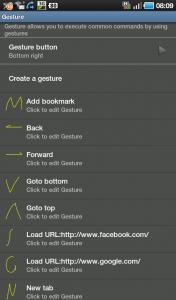
1) I would highly recommend Dolphin Browser HD as an alternative browser. Try it and 9.9/10 you will not want to use the default browser anymore. It is not only faster and have great Tab and bookmark features. As for your question, I don't think there is a solution for the default browser and quite few other browsers too. However Dolphin with its GESTURE features will help you greatly

QUOTE : Gesture commander feature is one of the most useful functions of the browser, as it shortens the time to access a website or do another actions such as, go back, forward, go to the top or end of a webpage. Basically, you can draw a special sign on the screen and the application will recognize it and act accordingly by automatically sending you to the webpage you previously specified. To make a gesture command you will need to click on the small hand on the left bottom corner of you browser and then draw the sign on the screen.

The small hand icon can be moved on the right bottom side or you can hide it. There's a number of predefined gesture controls that you can check by going to going to Settings / Gesture settings. You can also create you own gestures by clicking on the Create a gesture option. From what I noticed, the sign are immediately recognized and greatly improves the functionality of the application. There's no need to scroll through your bookmarks or scroll from the top to the bottom of a webpage, as you can do it with only two clicks.
Attached Image

2) No idea - perhaps a factory reset will help . Backup your data first using Titanium Backup or MyBackupPro

This post has been edited by benny888: Jan 26 2011, 08:25 AM

sphiroth
post Jan 26 2011, 08:30 AM

Look at all my stars!!
*******
Senior Member
2,804 posts

Joined: Jan 2003
Finally, a well deserved official thread for Tab. Thanks to TS. notworthy.gif

sphiroth/Digi-Malaysia/P1000DXJM2/FROYO.DXJM4

This post has been edited by sphiroth: Jan 26 2011, 08:36 AM
Hico
post Jan 26 2011, 08:34 AM

Look at all my stars!!
*******
Senior Member
4,709 posts

Joined: Jan 2003
for the maxis and digi apn setting, issit same for the wireless broadband and mobile internet? as i know got bbnet, unet for maxis and digi i think also got 2 type of apn...are those same? i remembered i tried b4, both can access to internet by using broadband sim card..
TSbenny888
post Jan 26 2011, 08:40 AM

Gadget Freak
Group Icon
Elite
27,801 posts

Joined: Jun 2007
From: Johor


QUOTE(Hico @ Jan 26 2011, 08:34 AM)
for the maxis and digi apn setting, issit same for the wireless broadband and mobile internet? as i know got bbnet, unet for maxis and digi i think also got 2 type of apn...are those same? i remembered i tried b4, both can access to internet by using broadband sim card..
*
DIGI refer to my post #5 : - I mentioned it
Maxis - unet is for 3G ; there is one other I think is "net" , cannot recall for plain GPRS - anyone knows , please update
Hico
post Jan 26 2011, 08:55 AM

Look at all my stars!!
*******
Senior Member
4,709 posts

Joined: Jan 2003
APN: 3gdgnet
Access number:*99#
User name: <none>
Password: <none

tis is wat i get from digi prepaid internet setting frm digi website, .. just wondering are the 2 apn give any different or not? i chat with digi representative b4, they told me tis is for broadband and internet prepaid.. i tried on digi smart plan b4, its working too hmm.gif

Operator: – Maxis
GPRS APN: – internet.gprs.maxis
Username: – {blank}
Password: – {blank}
DNS: – 202.75.129.101, 10.216.4.21

tis is wat i get from google.. rclxub.gif
subrok007
post Jan 26 2011, 08:57 AM

Squirtle
******
Senior Member
1,632 posts

Joined: Oct 2007
From: Sea


TS, update with "how to root your tab by using like z4root" and "unroot your tab"

this much help for newbie like me..

since rooting is legal in android world.. nod.gif
TSbenny888
post Jan 26 2011, 09:21 AM

Gadget Freak
Group Icon
Elite
27,801 posts

Joined: Jun 2007
From: Johor


QUOTE(subrok007 @ Jan 26 2011, 08:57 AM)
TS, update with "how to root your tab by using like z4root" and "unroot your tab"

this much help for newbie like me..

since rooting is legal in android world.. nod.gif
*
It is already being updated in the post#3 , question 2 or you can refer it at my blog post :
http://leemn.wordpress.com/2011/01/23/root...the-galaxy-tab/
arbelnox
post Jan 26 2011, 09:22 AM

Casual
***
Junior Member
446 posts

Joined: Mar 2009
From: MIRI


Thank you so much for your work, Benny!!

btw,

arbelnox/Maxis - Malaysia/DXJJ1/FROYO.DXJJ1

This post has been edited by arbelnox: Jan 26 2011, 09:56 AM
Hico
post Jan 26 2011, 09:26 AM

Look at all my stars!!
*******
Senior Member
4,709 posts

Joined: Jan 2003
for the spareparts, before uninstall the app, do we need to change back to the old setting?
laowai
post Jan 26 2011, 09:29 AM

Casual
***
Junior Member
490 posts

Joined: Apr 2006


Please add me :

Laowai/Malaysia/DXJM2/DXJM4
klwong99
post Jan 26 2011, 10:42 AM

Getting Started
**
Junior Member
224 posts

Joined: Sep 2010
From: Shah Alam


QUOTE(benny888 @ Jan 26 2011, 08:21 AM)
1) I would highly recommend Dolphin Browser HD as an alternative browser. Try it and 9.9/10 you will not want to use the default browser anymore. It is not only faster and have great Tab and bookmark features. As for your question, I don't think there is a solution for the default browser and quite few other browsers too. However Dolphin with its GESTURE features will help you greatly

QUOTE : Gesture commander feature is one of the most useful functions of the browser, as it shortens the time to access a website or do another actions such as, go back, forward, go to the top or end of a webpage. Basically, you can draw a special sign on the screen and the application will recognize it and act accordingly by automatically sending you to the webpage you previously specified. To make a gesture command you will need to click on the small hand on the left bottom corner of you browser and then draw the sign on the screen.

The small hand icon can be moved on the right bottom side or you can hide it. There's a number of predefined gesture controls that you can check by going to going to Settings / Gesture settings. You can also create you own gestures by clicking on the Create a gesture option. From what I noticed, the sign are immediately recognized and greatly improves the functionality of the application. There's no need to scroll through your bookmarks or scroll from the top to the bottom of a webpage, as you can do it with only two clicks.

Attached Image

2) No idea - perhaps a factory reset will help . Backup your data first using Titanium Backup or MyBackupPro
*
They have another browser call "Dolphin Browser for Pad". Is this compatible with our SGT?
mlthum
post Jan 26 2011, 10:49 AM

Getting Started
**
Junior Member
73 posts

Joined: Apr 2007


Hi Benny
Thanks for the efford!!!

mlthum/Malaysia/P1000DXJM2/FROYO.DXJM4

Question:
1. how to disable / enable 3g


Hico
post Jan 26 2011, 10:51 AM

Look at all my stars!!
*******
Senior Member
4,709 posts

Joined: Jan 2003
QUOTE(mlthum @ Jan 26 2011, 10:49 AM)
Hi Benny
Thanks for the efford!!!

mlthum/Malaysia/P1000DXJM2/FROYO.DXJM4

Question:
1. how to disable / enable 3g
*
do u mean 3g to 2g or totally off the mobile data? is under setting > wireless > mobile network> Use packet data or i install quick setting, then put in the home screen.. just click on button to on and off.. convenient.. smile.gif

This post has been edited by Hico: Jan 26 2011, 11:42 AM

104 Pages < 1 2 3 4 > » Top
Topic ClosedOptions
 

Change to:
| Lo-Fi Version
0.0260sec    0.38    6 queries    GZIP Disabled
Time is now: 3rd December 2025 - 05:10 AM