Outline ·
[ Standard ] ·
Linear+
SAMSUNG GALAXY TAB Official Thread V1, ..best and most portable Android tablet
|
TSbenny888
|
 Feb 20 2011, 07:52 PM Feb 20 2011, 07:52 PM
|
Gadget Freak


|
QUOTE(myzer0 @ Feb 20 2011, 07:46 PM) wow.. active community here  im a tab user since january! Thanks. Updated you as user. Please help to spread word about this thread. We need more active participants to share their experience using this marvelous tablet |
|
|
|
|
|
TSbenny888
|
Feb 20 2011, 09:49 PM
|
Gadget Freak
|
QUOTE(kelvin_tan @ Feb 20 2011, 08:20 PM) @benny888 help me put my name in the list as well been using it since November last year. Anyway, for your point 1 where I need to use S1C, what do you mean my computer can detect my tab? I just plug the USB connector to my PC and see whether it can be detected issit? Or do I need Samsung KIES?
Added on February 20, 2011, 8:31 pmBTW Benny888, I just went through your blog link you posted and noticed that you changed your file system from RFS to EXT4 before flashing the modaco ROM. This part is new to me. What happens if you flash a ROM that is based on EXT4 but your current file system is using RFS? Luckily I went through it before I started doing anything. Yes just connect with PC. If PC not able to detect you will see error message. In this case please refer my posts # 3 for possible solutions KIES actaully when you install will install the samsung usb drivers but KIES is buggy. Dunno why many PC Windows system fail to install drivers. KIES is necessary if you need it to sync with your PC your data. Other than this is not necessary. Infact most users dump KIES as it is miserably slow synching Modaco rom is ext4 based - you need change fs to ext4 first. If you flash it on a rfs fs it cannot be done as it is installed through recovery not thro odin. If you have a recovery program installed ( example chainfire or kousch) even using thee recovery to install will fail This post has been edited by benny888: Feb 20 2011, 09:51 PM |
|
|
|
|
|
TSbenny888
|
Feb 20 2011, 10:02 PM
|
Gadget Freak
|
QUOTE(kelvin_tan @ Feb 20 2011, 09:52 PM) @benny888 I'm set to go then. Final question which was not answered. Modaco vs Overcome. Which one? I wont be sticking to roms that still use the samsung's default properties. Lets just say when I decide to do something, I push it. Otherwise why do it at all?  I'll learn along the way haha.. thanks a lot ASs stated before, both are equally good. Up to you. Overcome has better features and well recommended by many. I choose Modaco because I want to use his online kitchen, Checkup the rom details and see which you prefer |
|
|
|
|
|
TSbenny888
|
Feb 20 2011, 11:02 PM
|
Gadget Freak
|
QUOTE(kelvin_tan @ Feb 20 2011, 10:44 PM) Just watched a video of a person using Overcome Rom with Modaco Kernel. Somehow the person pointed out that everything is very very smooth EXCEPT games. The person noticed that the games performance actually dropped compared to using the stock rom and kernel. There is laggyness now compared to before. Any experience on this benny ? Sorry never really tested this rom ; only a brief less than half day/ Perhaps other forumers can feedback - quite few using this rom. And I don't play games on the TAB so cannot comment on gaming issues. Flashing is darn easy using recovery. Just try out - one man's meat is another man's poison |
|
|
|
|
|
TSbenny888
|
Feb 20 2011, 11:52 PM
|
Gadget Freak
|
QUOTE(Lennox @ Feb 20 2011, 11:41 PM) You can try  I do remember i read a post before, cant remember is from LowYat.net or XDA. A guy who drop his tab while he trying to on/off some switch, and his tab goes DEAD  I will give him moral support to test and try ; than report back to us BTW I just realized I have my TAB on the 33rd day already and yet still so much stuffs I have yet to learn about it
Added on February 20, 2011, 11:53 pmQUOTE(kelvin_tan @ Feb 20 2011, 11:47 PM) @lennox That fragile huh? time for me to consider getting a casing for it. But most casings are SO FAT at the side. My current pockets can fit the tab but with the additional sides i find it difficult (and yes it makes that much of a difference when u add both sides) Carry sling bag loh !! Nowadays very common This post has been edited by benny888: Feb 20 2011, 11:53 PM |
|
|
|
|
|
TSbenny888
|
Feb 21 2011, 01:00 AM
|
Gadget Freak
|
QUOTE(dave18 @ Feb 21 2011, 12:48 AM) @kelvin-tan : Well I was on overcome rom with modaco kernel, played glow hockey (stupid game from market) and it lagged.Have gone on to richardtrip's oc kernel and playrd thegame without lag.Don't have need for speed now so don't know if there's an issue with overcome rom/modaco kernel. Maybe shinzan can try. Rgds,dave Are you still on Richardtrip 1.4 Ghz OC kernel ? I have taken it down and reflash back the Modaco R3 kernel. I just wanted to test out how much improvement it will gave me. The improvement was there but I was uncomfortable with the higher battery temperature ( on average 5 to sometimes 10 degree Centigrade ) higher. So I reset it back to max 1 Ghz using setcpu but than I noted following: - battery temperature was still higher though reduced by average 5 degree centigrade - I could accept - live ac direct charging was very slow - I noted about 15 % in an hour ; before I upgraded the kernel it took only about max 4 hours to fully charge from near empty |
|
|
|
|
|
TSbenny888
|
Feb 21 2011, 08:17 AM
|
Gadget Freak
|
QUOTE(myzer0 @ Feb 21 2011, 01:42 AM) i believe im prolly the first in malaysia to crack his LCD after 3 days they charged me rm800 but i complained about the expensive repairs and bla bla bla, finally reduced to rm650 for the repairs... BASICALLY THE GORRILLA GLASS IS UNSCRATCHABLE, not UNCRACKABLE... so do get a screen protector or a case...
Added on February 21, 2011, 1:45 amwow did ur camera or temperature sensor work? i can only get either one working  seriously the OC kernel needs undervolt-ing, or u will start feeling the heat.. Ouch the pain of cracking glass and rm650 to replace. How long you have to wait to get it back. If it is of any consolation the replacement cost is reasonable as htc 4.3 inch eg hd2 it cost rm800 to replace what app do you use to monitor voltage and chsnge it ? |
|
|
|
|
|
TSbenny888
|
Feb 21 2011, 11:48 PM
|
Gadget Freak
|
This was posted in comments on my blog about using ext4 kernel:
This will share his info about gaming performance which some of you guys were asking, which I know nuts.
Hi Benny,
I’m back to share what I found out about Paul O’Brien’s MCK-r3-ext4.tar and the absolute need of an external microSD card…
Perhaps it wasn’t made very clear at here / Paul’s Modaco page / Paul’s XDA post,
THAT,
an external microSD card with empty space that can support your existing ROM, Apps + Data
IS NEEDED
for Paul’s great EXT4 kernel and the included clockworkmod recovery in his .tar file to work flawlessly.
So, for those of you who are still on fence deciding whether to change to EXT4, go download and play the game “GUN BROS” from the market and you’ll definitely understand what lag due to RFS is all about! [ My TAB doesn't lag anymore playing this now that it runs Paul's EXT4 kernel ]
For those who’s taking the plunge same as Benny & I, follow my pre-requisite steps below closely if u like:
1. Make a backup of all your Apps & its Data using Titanium Backup.
2. Copy/Zip-over the TitaniumBackup folder to your home computer or anywhere safe [TAB's internal & external microSD NOT recommended!] and check the data integrity [Zip: Test Archive].
3. Now you have 2 options:
A. Get a new microSD card with enough free space that can support your “existing ROM + Apps + Data” to use as TAB’s external memory and proceed to Step 4 below.
B. Wipe / factory-reset your TAB to return to stock ROM that is with minimum space requirement and check if your existing inserted microSD card has enough free space to support. [fresh ROM usually needs ~600MB]
If formatting the external microSD will make enough room, go ahead.
4. Proceed with Benny’s guide from
“Download the EXT4 TAR file from HERE”
to
“The whole process took about 21 minutes.”
Good luck !
and enjoy the much superior EXT4 partition. I know I definitely am!
p/s: Great Thx to Benny for quick replying on my S.O.S.![I]
This post has been edited by benny888: Feb 21 2011, 11:50 PM
|
|
|
|
|
|
TSbenny888
|
Feb 22 2011, 01:08 AM
|
Gadget Freak
|
QUOTE(vicng @ Feb 22 2011, 01:01 AM) I done it but still cannot retrieve MMS on my Tab.  
Added on February 22, 2011, 7:49 amQUOTE(benny888 @ Feb 22 2011, 01:08 AM) Who is your telco ? You can also check this , scroll right down to : APN type - normally is default - select internet+mms If yours is Celcom - I have added in additional MMS settings in post #4 : Celcom 3g internet setting :
Name : Celcom 3G Internet
APN : celcom3g
MCC : 502
MNC : 19
APN type : default
Celcom 3g MMS setting :
Name : Celcom 3G MMS
APN : celcom3g
MMSC : http://mms.celcom.net.my
MMS proxy : 10.128.1.242
MMS port : 8080
MCC : 502
MNC : 19
APN type : mms
Celcom 2g internet setting :
Name : Celcom 2G Internet
APN : celcom.net.my
MCC : 502
MNC : 19
APN type : default
Celcom 2g MMS setting :
Name : Celcom 2G MMS
APN : mms.celcom.net.my
MMSC : http://mms.celcom.net.my
MMS proxy : 10.128.1.242
MMS port : 8080
MCC : 502
MNC : 19
APN type : mmsRefer here this case , same problem but solution was so simple : http://forum.lowyat.net/topic/1741916 |
|
|
|
|
|
TSbenny888
|
Feb 22 2011, 11:17 AM
|
Gadget Freak
|
Wish to change the look/themes on your Tab. You can try this Blue theme from Galaxayer http://forum.xda-developers.com/showthread.php?t=948942Install the zip file thro recovery mode; takes about half a minute. Read other user comments before you try. Do a NandroidBackup first incase anything go wrong or you wish to restore back original BEFORE 
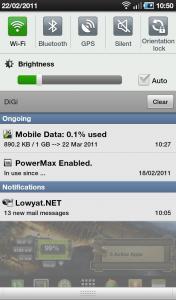
AFTER 
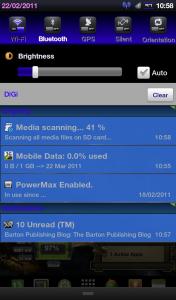
Gingerbread-like menu selection and Mounting Android change 

|
|
|
|
|
|
TSbenny888
|
Feb 22 2011, 04:39 PM
|
Gadget Freak
|
QUOTE(myzer0 @ Feb 22 2011, 02:04 PM) My Homescreen, without the OC kernel its kinda lagging [attachmentid=2055875] No need to change to O/C kernel to improve performance . Just change to a EXT4 file system will improve it a lot : http://android.modaco.com/content/samsung-...ung-galaxy-tab/You can refer to my blog HERE where I explained briefly why the need to change and steps to do it |
|
|
|
|
|
TSbenny888
|
 Feb 22 2011, 11:14 PM Feb 22 2011, 11:14 PM
|
Gadget Freak
|
QUOTE(mw5026 @ Feb 22 2011, 11:06 PM) hi guys..new owner gt here.. mw5026/Europe/XXJK5/XWJJ7  a,way thanks to benny888 for advise and helping to solve my problem.. Welcome. WOW ----- You are now the 100th user I have recorded |
|
|
|
|
|
TSbenny888
|
Feb 22 2011, 11:21 PM
|
Gadget Freak
|
QUOTE(Lennox @ Feb 22 2011, 11:18 PM) 100th USER  Guys, after i bought my Galaxy Tab, i join a contest call Samsung Reward Mania. And i WON another Galaxy TAB  WOW ! Congrats. |
|
|
|
|
|
TSbenny888
|
Feb 23 2011, 09:10 AM
|
Gadget Freak
|
QUOTE(dvng @ Feb 23 2011, 09:03 AM) I am still having errors trying to upgrade to EXT4 after many attempts. I can't seems to figure it whats is wrong. 1.Did you unsigned the botloader which could be locked 2. The external micro sd i suggest at least 2 gb free space prefarably 4gb what is your firmware? |
|
|
|
|
|
TSbenny888
|
Feb 23 2011, 09:31 AM
|
Gadget Freak
|
QUOTE(dvng @ Feb 23 2011, 09:23 AM) Bootloader already patched, micro sd has sufficient space and firmware is DXJM4. I suggest you flash rom to roto jmi with repartition, pit and then try the kernel change. You will lose all your data n internal sd card wipe. JMI is still a RFS rom. Anyway if you plan change to ext4 fs might as well upgrade rom later to ext4 based eg overcome or modaco |
|
|
|
|
|
TSbenny888
|
Feb 23 2011, 09:52 AM
|
Gadget Freak
|
QUOTE(dvng @ Feb 23 2011, 09:23 AM) Bootloader already patched, micro sd has sufficient space and firmware is DXJM4. the message i am getting goes like this: <ID:0/009> Added!! <ID:0/009> Odin v.3 engine (ID:9).. <ID:0/009> File analysis.. <ID:0/009> SetupConnection.. <ID:0/009> Initialzation.. <ID:0/009> Get PIT for mapping.. <ID:0/009> Firmware update start.. <ID:0/009> zImage <ID:0/009> <ID:0/009> Complete(Write) operation failed. <OSM> All threads completed. (succeed 0 / failed 1) flash just select pda no need for pit |
|
|
|
|
|
TSbenny888
|
Feb 23 2011, 11:45 AM
|
Gadget Freak
|
QUOTE(myzer0 @ Feb 23 2011, 11:38 AM) OMG richardtrip fixed the temperature problem! Thank for the headsup. Downloading now as I am writing this |
|
|
|
|
|
TSbenny888
|
Feb 23 2011, 04:54 PM
|
Gadget Freak
|
QUOTE(mingyan @ Feb 23 2011, 04:19 PM) im trying to get my tab with the digi plans but seems like everywhere no stock. i've been calling up all the digi stores to no avail In mid January, rumors is that Digi is not promoting the Galaxy Tab anymore. Infact I have signed up for notification since mid Dec until now - never receive any call until today. |
|
|
|
|
|
TSbenny888
|
Feb 23 2011, 05:01 PM
|
Gadget Freak
|
Guys - if you wish can try to change your bootup image. I have tested and works on my Tab. refer to this link - just follow the instructions - straightforward and simple. There are 3 ways. Easiest use root explorer http://forum.xda-developers.com/showthread.php?t=905538Example 2 of them : click on image to see animation 
 This post has been edited by benny888: Feb 23 2011, 05:01 PM
 |
|
|
|
|
|
TSbenny888
|
Feb 23 2011, 05:21 PM
|
Gadget Freak
|
QUOTE(alfredtwl @ Feb 23 2011, 05:09 PM) btw, samsung announce 8.9 inch new tablet next month .... actually consider buy galaxy tab before, but the screen size too small for me. now ipad 2 announce 2th March, + samsung galaxy tab 10.1 or lg optimus pad ..... which one which one ??? You want apps, lots of apps , games , smooth UI - iPad is the king Other than these two excellent features - I'd consider tab 10.1 over the LG purely cos I believe will have more support in tweaks/roms etc. Look at the official thread of TAB 10.1 at http://forum.lowyat.net/topic/1761603 . In post # 2 I have summarized several links comparing the Tab 10.1 with other tablets |
|
|
|
|



 Quote
Quote
 0.0476sec
 0.81
0.81
 7 queries
 GZIP Disabled