QUOTE(twokick @ Feb 27 2011, 12:03 PM)
Hi
I just got my TAB few days ago. Bought it from Digital Mall, the sales guy told me the device came in from Saudi Arabia.
Anyway, my TAB does not come with the market app. Would like to ask if there are any of you with the same situation?
How do i install the market app?
Grateful for any assistance. Thanks!
try this and report back :
1. Open the Phone App
2. Enter the following info *#272*your device IMEI#
(your IMEI number is on the back of the galaxy tab)
3. Then choose XSG as the Sales Code option and
tap ok/install.
4. The tab will reboot and reset, this should take around
1-2 min. Then setup your tab again and you can see the Market app on the main screen and the menu.
Added on February 27, 2011, 12:23 pmQUOTE(rahuldave @ Feb 27 2011, 10:24 AM)
Hi
Out of curiousity, I have flashed Overcome v1.2.0. After successfully flashing it, i went into recovery and it format the internal SD to EXT4 but IT says that MicroSD is not detected and its not formatted nor backup. My question is do I have to format my 16gb MicroSD to EXT4 after flashing to OC 1.2?
I have not unclocked it to 1.2ghz
My Quadrant test is getting 1660 and I saw that some of the user is achieving 18++. Any tweak to get this figure achieved.?
My understanding the EXT4 conversion is only on the 2GB portion of the internal SD card. Anyone - Correct me if I am wrong
Your external microSD not detected, not formatted etc is due to the card issue ; nothing related to the TAB. Before that , was it detected by the TAB ?
It is infact good practice to format the external card first using a PC . In my experience using various Windows and Android smartphones, the best method is to use SD tool not the usual windows format. This tool can even save supposedly spoilt/undetectable cards. I have use this tool to save several sd cards
http://www.sdcard.org/consumers/formatter/sdfv2000.zipYou need to run then Quadrant test 3 to 5 x to get the best reading
Added on February 27, 2011, 12:27 pmQUOTE(dave18 @ Feb 27 2011, 12:08 PM)
Some encountered your prblem so it was advised to format the microsd first using the tab b4 flashing the kernel- so i did.Actually they say you are suppose to run guadrant test three times to get the high scores. I dont bother. Maybe you can go into cwm recovrry to wipe cache partition then advance to wipe dalvik cache,then reboot. It will take a while to reboot since it's rebuilding cache. Maybe faster after that??.
dave : you are right. This is always my SOP in flashing any new roms too on all my Android devices:
clear cache partition, clear cache , clear battery
These steps will not remove any data
If I want to flash any new rom knowing it will overwrite my data , I take it another step further : clear data/factory reset. I believe this step is important as by so doing you will eliminate any force closure of apps ( especially those restore from Titanium or myBackupPro)
This post has been edited by benny888: Feb 27 2011, 12:27 PM 

 Feb 26 2011, 10:47 AM


 Quote
Quote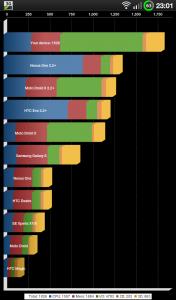


 0.0470sec
 0.42
0.42
 7 queries
 GZIP Disabled