

 Jan 14 2011, 03:29 PM


QUOTE(razor75 @ Jan 12 2011, 11:41 AM)
Hi,
I finally bought my first LCD
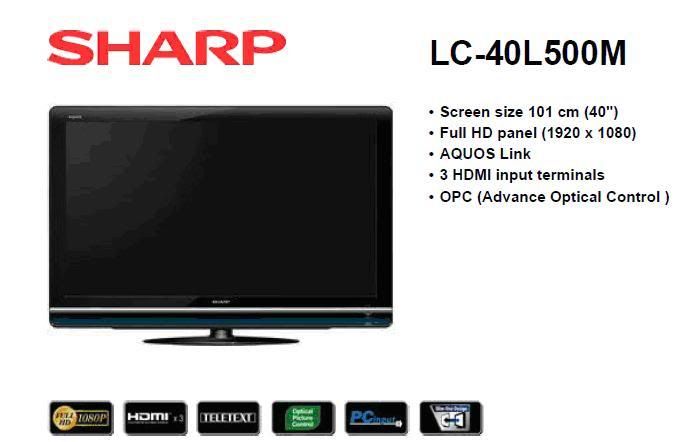
TV model: sharp LC-40L500M
Price: RM 1900
Specifications: manual
I bought the TV due to the following reasons:
1. Full Hd & 40 inch
2. Pc input & price was reasonable
3. Reputable manufacture
Questions
1. There is a service USB port on the TV. Does anyone have any software that can access the TV USB port? I am just curious what tweaking or extra things that can be done with the USB? A picture of it can be seen in the datasheet.
2. What does it mean when it states the following for this TV?
a. HD-ready / HD-ready 1080p: yes/yes
b. HDTV / HDTV 1080p: no/no
The above info taken from this tv specs.
3. I have a asus o’play r3 media player. When playing via hdmi cable through my external USB hard drive a 800*1080 movie (6.3 GB file), I notice some lag and greenish pixilation. My question is this due to the media player, data transfer from external USB hard drive, movie file or TV? I tried a short HD movie (1920 X 1080) and it worked smoothly.
4. Under the TV specifications, it says HDMI input at 1080I/60Hz. What does this means? I was told if the frequency is less than 100 Hz, high action scene such as sports show up as blurry. Will this affect movie performance also?
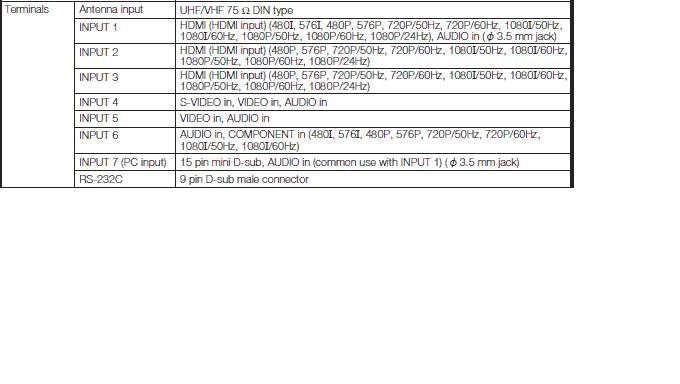
5.
For the pc compatibility chart, it says it can show at 1400*1050(see below). Can it go higher if the pc has a video card which supports higher resolution?
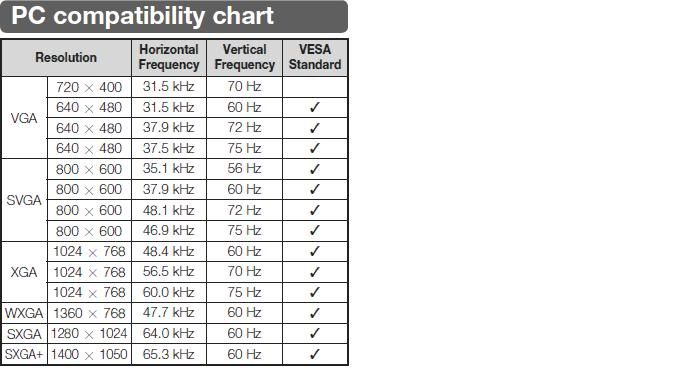
I hope I can get some answer from the experience people on these questions. Since this is my first LCD TV, I may not have gotten value for my money. I hope the members here can give some tips on things to look out in the future when buying an LCD TV.
Raz

same as mine..but i'm rm100 cheaper! I finally bought my first LCD
TV model: sharp LC-40L500M
Price: RM 1900
Specifications: manual
I bought the TV due to the following reasons:
1. Full Hd & 40 inch
2. Pc input & price was reasonable
3. Reputable manufacture
Questions
1. There is a service USB port on the TV. Does anyone have any software that can access the TV USB port? I am just curious what tweaking or extra things that can be done with the USB? A picture of it can be seen in the datasheet.
2. What does it mean when it states the following for this TV?
a. HD-ready / HD-ready 1080p: yes/yes
b. HDTV / HDTV 1080p: no/no
The above info taken from this tv specs.
3. I have a asus o’play r3 media player. When playing via hdmi cable through my external USB hard drive a 800*1080 movie (6.3 GB file), I notice some lag and greenish pixilation. My question is this due to the media player, data transfer from external USB hard drive, movie file or TV? I tried a short HD movie (1920 X 1080) and it worked smoothly.
4. Under the TV specifications, it says HDMI input at 1080I/60Hz. What does this means? I was told if the frequency is less than 100 Hz, high action scene such as sports show up as blurry. Will this affect movie performance also?
5.
For the pc compatibility chart, it says it can show at 1400*1050(see below). Can it go higher if the pc has a video card which supports higher resolution?
I hope I can get some answer from the experience people on these questions. Since this is my first LCD TV, I may not have gotten value for my money. I hope the members here can give some tips on things to look out in the future when buying an LCD TV.
Raz

enjoy the tv..its a good t.v for HD movie...not so good when watching asstro SD channel

This post has been edited by leftist: Jan 14 2011, 03:30 PM
 Quote
Quote



 0.0143sec
 0.99
0.99
 5 queries
 GZIP Disabled