This is one of my target LCD also during check-up, due to no stock, only left display set, finally I choose Samsung LA40C530 as I find it more nice color for me and support variety media format include .MKV (I don't own any standalone Media Player at the moment) ... I get quota both at RM 1800, hehe...
Hi,
I finally bought my first LCD
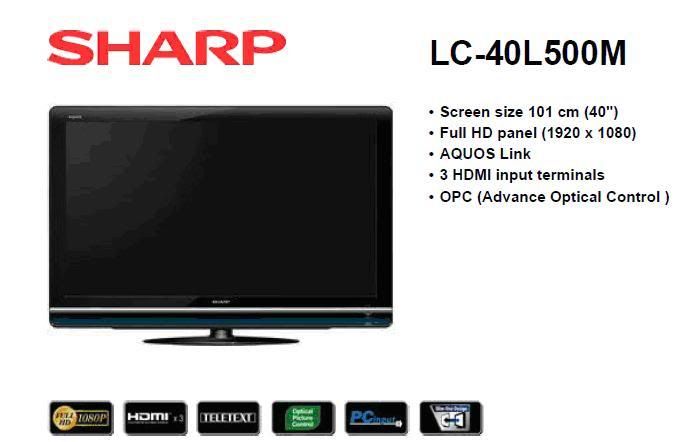
TV model: sharp LC-40L500M
Price: RM 1900
Specifications:
manualI bought the TV due to the following reasons:
1. Full Hd & 40 inch
2. Pc input & price was reasonable
3. Reputable manufacture
Questions
1. There is a service USB port on the TV. Does anyone have any software that can access the TV USB port? I am just curious what tweaking or extra things that can be done with the USB? A picture of it can be seen in the
datasheet.
It mention for services personnel only, "* Usually do not connect anything to this terminal as it is reserved only for service personnel." I doubt it did nothing, it is mainly for services only.2. What does it mean when it states the following for this TV?
a. HD-ready / HD-ready 1080p: yes/yes
b. HDTV / HDTV 1080p: no/no
The above info taken from this
tv specs.
Ignore the TV specs you get from that link, it is list for "MIDDLE EAST & AFRICA" and it is kinda confusing. Your TV is True HD and support up to resolution of 1080P (P= Progressive). This model is True HD, I had no idea why the sheet said it is not a HDTV3. I have a asus o’play r3 media player. When playing via hdmi cable through my external USB hard drive a 800*1080 movie (6.3 GB file), I notice some lag and greenish pixilation. My question is this due to the media player, data transfer from external USB hard drive, movie file or TV? I tried a short HD movie (1920 X 1080) and it worked smoothly.
Probably the source movie issue, try others 1080P / 720P format video which support by your Asus o’play r3 media player4. Under the TV specifications, it says HDMI input at 1080I/60Hz. What does this means? I was told if the frequency is less than 100 Hz, high action scene such as sports show up as blurry. Will this affect movie performance also?
This TV is not a 100hz / 200 hz set, it is up to 60hz only. Higher hz may given better motion flow but some find it look fake. You won't get any 100hz / 200hz TV set at price less than RM2k. I notice your TV is display as 1080i which means it is running at interlace mode, P (Progressive) mode is always the best (but i not means it is bad as human eye not means can differentiate it a lot). But do remember, it might run as interlace if your plugin device (example your Asus media player) support up to 1080i only, 2nd the BD / download movie is not formatted in Progressive mode, and also all broadcast now only up to 720P or 1080i (this include Astro). For the 1080P/24hz wise is the correct format which movie maker record and want us to see in this way. (Basically all new BD player support on it) You need a compatible TV and BD player to run movie in 1080P/24hz. Currently this model is support 1080/24P (1080P in 24hz). 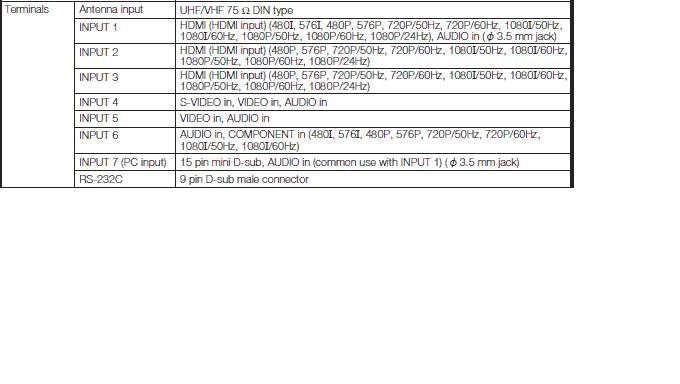
5.
For the pc compatibility chart, it says it can show at 1400*1050(see below). Can it go higher if the pc has a video card which supports higher resolution?
No idea, maybe not, even yes, it also blur as it native resolution is 1920x1080 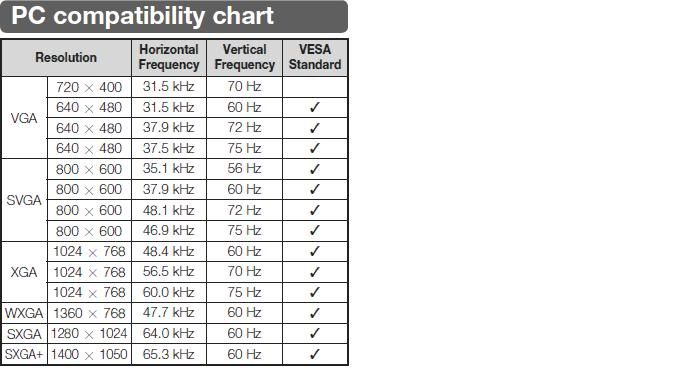
I hope I can get some answer from the experience people on these questions. Since this is my first LCD TV, I may not have gotten value for my money. I hope the members here can give some tips on things to look out in the future when buying an LCD TV.
Raz


 Jan 2 2011, 12:39 PM, updated 15y ago


 Quote
Quote












 0.0226sec
 0.29
0.29
 5 queries
 GZIP Disabled