Welcome Guest ( Log In | Register )

Bump Topic Topic Closed RSS Feed

Outline · [ Standard ] · Linear+

Unifi Official TM UniFi High Speed Broadbrand Thread V8, save RM200 from 15 January-15 February !

views
     
klseet
post Feb 10 2011, 09:16 PM

Getting Started
**
Junior Member
130 posts

Joined: Mar 2008
@Rangerkarl
Any device, as long as it can handle vlan 500 tagging

I believe these replacement options:
http://klseet.com/index.php?option=com_con...id=42&Itemid=39
are more cost effective than those higher end Cisco, HP, etc.

If you are not happy with DIR-615 for office, you may consider MikroTik RB750/750G.

klseet
post Feb 10 2011, 10:21 PM

Getting Started
**
Junior Member
130 posts

Joined: Mar 2008
QUOTE(billytong @ Feb 10 2011, 09:47 PM)
... those RouterOS may sounds and look scary from setting up for average user, but with dummy guides from klseet, it shouldnt be hard. Right the only missing part is a dummy guide for port forward, QoS, filtering,firewall etc. It might get tricky for average user to try understand from Mikrotik wiki site.
*
hahaha, it's indeed still dummy ! biggrin.gif
looking at those MikroTik wiki even make me more dummyx2 ! sweat.gif

I've been playing with couple of things, still not sure how it work, currently I'm using the following basic firewall & port-forward setup:
http://wiki.mikrotik.com/wiki/Manual:IP/Firewall/Filter
http://wiki.mikrotik.com/wiki/Forwarding_a..._an_internal_IP
will post some setup images soon.

As for QoS, i tested setup using Layer7 (apps level header marking) but i'm not sure whether it would over-kill or not for a home user ....
http://wiki.mikrotik.com/wiki/Basic_traffi...yer-7_protocols
http://l7-filter.sourceforge.net/protocols
this setting seem to improve on QoS according to my priority, but at the expense of CPU load between 20~40%, especially when i start torrenting .... unsure.gif
also i'm concern continuous needs to update L7 filter protocol ....

QUOTE(KuzumiTaiga @ Feb 10 2011, 09:49 PM)
am I supposed to be modifying the firmware after this? Without their help?
*
how do you intend to do so? shakehead.gif
no la bro, you cannot modify the router firmware .....
klseet
post Feb 11 2011, 12:52 AM

Getting Started
**
Junior Member
130 posts

Joined: Mar 2008
QUOTE(cherroy @ Feb 11 2011, 12:45 AM)
Thanks, it means basic requirement is to have a router that can vlan500
Biz 5 doesn't have IPTV, only concern about the internet.

I see in the BTU got VLan1, VLan2, VLan3, what is that for?
*
UniFi uses the following vlans:
vlan.400 = VOIP (handle directly by the BTU)
vlan.500 = Internet PPPoE (handle by DIR-615)
vlan.600 = IPTV (also by DIR-615)

Since you don't use IPTV, beside the 4 options, you may also consider flashing DD-WRT router, prefer Atheros, but definitely not Broadcom chip!
klseet
post Feb 11 2011, 09:15 AM

Getting Started
**
Junior Member
130 posts

Joined: Mar 2008
QUOTE(djhenry91 @ Feb 11 2011, 01:23 AM)
wat if i put VDSL and router under TV and astro?
*
For VDSL should be ok, but I really don't think it's good idea for wifi router.....

Long ago I tried to place Buffalo WHR-G300N wifi router in between Beyond & TV, the signal somehow is really bad.
At first I though it was the router issue, then tested Buffalo WCR-GN, Buffalo WHR-HP-G300N, ASUS RT-N12, all having similar issue.
Then I tried to place it few feets away from Beyond & TV area on a cabinet next to it, then the signal become better!

Of these routers:
WHR-G300N (Ralink - same with TM's DIR-615)
WCR-GN (Ralink)
WHR-HP-G300N (Atheros)
ASUS RT-N12 (Broadcom)

I noticed that 2 Ralink is the worst, Atheros better, Broadcom seem less affected.
Could it be the chip, brand, design, radiation, etc ? I really have no idea ..... rclxub.gif

In addition, I also encountered few cases when I put my mobile phone next to Beyond box, the TV image disrupted intermittently when my phone ring.

As all these things somehow connect wirelessly, not to implicate the issue further, that's why I always put wireless away from other electronic items for better reception. smile.gif

Anywhere, you may want to try both underneath or away, then let us know the result !


klseet
post Feb 12 2011, 12:49 AM

Getting Started
**
Junior Member
130 posts

Joined: Mar 2008
QUOTE(FauxHawk @ Feb 11 2011, 10:03 PM)
...
TP-LINK TL-WR841 WIFI N 300 ROUTER RM89
TP-LINK POWER LINE LAN TL-PA201 ( 200MBPS ) RM85
It's this 2 that recommended for simplicity rite?
*
For TL-WR841ND V7.x, please take note it is NOT working properly on Huawei HG655a VDSL.

If you really want to get TP-Link homeplug, you may want to consider the 3rd generation TL-PA211:
http://klseet.com/index.php?option=com_con...id=39&Itemid=37
it should be in the market very soon.
klseet
post Feb 12 2011, 02:28 PM

Getting Started
**
Junior Member
130 posts

Joined: Mar 2008
A UniFi user already managed to connect both RB750 & RB250GS per requirement like this:
http://forum.mikrotik.com/viewtopic.php?f=2&t=48634

This is interesting, now there is another option to combine both vlans traffic on a single cable through 2 MT products!! rclxms.gif

QUOTE(FauxHawk @ Feb 12 2011, 01:47 PM)
wah, new things expensive...alot better than the current one?
*
The price might be a little expensive, the last time i ask it's targeting around RM190 per pair.
To me, i would rather go with latest, this one even has a software for you to configure QoS if you have multiple type of connection through one homeplug end.

This post has been edited by klseet: Feb 12 2011, 02:29 PM
klseet
post Feb 13 2011, 10:09 AM

Getting Started
**
Junior Member
130 posts

Joined: Mar 2008
QUOTE(JinXXX @ Feb 12 2011, 04:00 PM)
or you can check out this thread

http://forum.lowyat.net/topic/1733801
*
Thanks for the guidance bro, may want to test it later on! biggrin.gif

QUOTE(ben3003 @ Feb 13 2011, 02:19 AM)
anyone wanted to buy the tp-link router? Cant use it at condo... might as well just sell it off..
*
I think for your case, since you already bought the unit, you may consider:

1. to flash the 841 with dd-wrt, create a vlan.500, create PPPoE and connect to BTU Port1 for internet
2. configure the DIR-615 as bridge mode and connect it to BTU Port2 for IPTV

Once TP-Link resolve the issue on HG855a, then you may flash it back. smile.gif
klseet
post Feb 13 2011, 04:05 PM

Getting Started
**
Junior Member
130 posts

Joined: Mar 2008
RB750/750G users & sifu out there!

Currently I setup these firewall rules & port forward:
http://klseet.com/index.php?option=com_con...id=43&Itemid=40
http://klseet.com/index.php?option=com_con...id=44&Itemid=41

I'm still not familiar with MikroTik and Linux command, I can't tell whether it's really working fine or sufficient enough for general usage purposes ..... sweat.gif

Appreciate anyone can advise/comment to further improve it, kindly PM or email me : klseet@gmail.com
I'll update the article accordingly to help others, credit will definitely go to whoever contribute to improve this article, many thanks in advance! notworthy.gif

klseet
post Feb 14 2011, 01:05 AM

Getting Started
**
Junior Member
130 posts

Joined: Mar 2008
QUOTE(boxsystem @ Feb 13 2011, 05:04 PM)
seet,

on portforwarding, i think it is fine. i can vouch that it is working. using the same steps as well. but on firewall, you might need to wait for other mikrotik sifus to give their feedback.
*
Thx bro, yes the PortForward seem to be ok, just want to re-confirm!

QUOTE(charymsylyn @ Feb 13 2011, 09:39 PM)
This is not really a good idea, DD-WRT support on TL-WR841ND is currently not really stable and wireless N is limited to 65Mbps only.
...
May I know which version are you using now & what's your wireless setting?
And what do you mean by "N limit to 65Mbps" only?

Anywhere, I tested on the latest r15962 from BrainSlayer:
Attached Image
Attached Image
Attached Image

It show 260Mb/s rate, may be you are referring to the RX Rate which seem to stick at 65M.
However, I can still get actual transfer rate between 5~8MB/s on my laptop connected within same floor at living area:
Attached Image

with this N-only setting:
Attached Image
Attached Image

To me, it's consider not bad for a Atheros7241 below RM90! smile.gif

This post has been edited by klseet: Feb 14 2011, 01:23 AM
klseet
post Feb 14 2011, 09:38 AM

Getting Started
**
Junior Member
130 posts

Joined: Mar 2008
@Have_nice_day_guy
try to unbridged both vlan2 & vlan2.500

@charymsylyn
May I know what rate are you getting on your v7.2?

Since it's published officially at dd-wrt and I have no problem getting clean 5~8MB/s rate, I presume it's a good build, at least better than stock with more features to play with!

QUOTE(BlackDoMiNiC @ Feb 14 2011, 09:36 AM)
hi guys, would like to ask whether the tplink wr841nd works with zte: ZXDSL 931DII vdsl modem
having wireless issues with the dir 615=(
thanks in advance =)
*
Few users complained on Huawei HG655a VDSL on frequent disconnect/connect issue, so far seem no complaint on ZTE yet.
You may refer there: http://klseet.com/index.php?option=com_con...e&id=7&Itemid=6

This post has been edited by klseet: Feb 14 2011, 09:45 AM
klseet
post Feb 14 2011, 04:42 PM

Getting Started
**
Junior Member
130 posts

Joined: Mar 2008
QUOTE(charymsylyn @ Feb 14 2011, 10:35 AM)
I get 65Mbps link speed up and down on all my devices when my iPhone is connected and same as yours on my computer if it isn't. I'm sure you are aware your file transfer tests corresponds to a 60~Mbps link speed, right? tongue.gif You will get higher speeds on stock firmware under the same conditions.
Somehow I hardly get more than 8MB/s on stock N-only WPA2+AES, tested few rounds on same location:

Attached Image
Attached Image
Attached Image
Attached Image

Did you manage get better transfer rate on stock?
I might not setup properly, please share on how to get faster on stock, thx! nod.gif
klseet
post Feb 14 2011, 06:02 PM

Getting Started
**
Junior Member
130 posts

Joined: Mar 2008
QUOTE(BlackDoMiNiC @ Feb 14 2011, 10:00 AM)
...btw, any suggestions on what wireless adapter that will work nicely with the wr841N ?
is the wn821n recommended? looking for strong and stable signal. often stream movies in the network..
*
I hardly use USB wifi dongle, I have a Edimax EW-7717Un bought 2 years ago, really strong with good speed!

The WN821N runs on Atheros AR91xx chip, should be able to work well with the 841! nod.gif
klseet
post Feb 15 2011, 01:15 AM

Getting Started
**
Junior Member
130 posts

Joined: Mar 2008
QUOTE(Have_nice_day_guy @ Feb 14 2011, 07:18 PM)
...Can anyone post working settings, sorry, I'm really new to this and hope everyone can help me, I just need this WR1043ND to connect to Unifi...
*
Have you tried to unbridged both vlan2 & vlan2.500 as per your previous photos?

As I don't have a 1043ND with me now and I have no idea what you have done, please do a hard-reset first, then go straight to:
Setup --> Networking
under Port Setup section, check what's on the WAN Port Assignment

and follow this guide to setup vlan.500 for internet:
http://klseet.com/index.php?option=com_con...id=15&Itemid=14

QUOTE(charymsylyn @ Feb 14 2011, 10:06 PM)
... large file transfer speed of about 20-22Mbps. This is an Aztech N150 USB adapter located ~10m away from the router with a concrete wall in-between ...
20~22Mbps = 2.5~2.8MB/s
either you've set it as NG-mixed or wall too thick or time to consider another USB dongle .... tongue.gif

QUOTE(AMDAthlon @ Feb 14 2011, 10:18 PM)
Ok..talking about transfering files between Network,while i always get speed less than 3MB/s?
Sometimes can even slower which is around 1MB/s?
Is it related with network or what?If yes how to improve the speed?
*
Wifi thing very complicated & complex ... sweat.gif

My personal experience & testing findings:
- Atheros or Broadcom seem to have better signal & stable than Ralink; I personally prefer Atheros at the moment
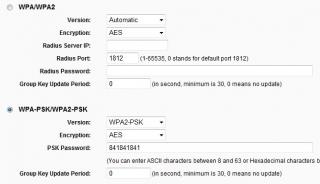
- if confirm no other B or G devices to connect, then may consider to setup N-only mode, prefer to use channel 6 with max 40mhz width upper channel 11, security use WPA2+AES
- try to place the wifi away from electronic items, not too near TV/Astro area, place on higher level without any heavy metal or concrete wall blocking
- try to use same chip maker whenever possible, especially bridging 2 wifi

Again, physical situation varies, really need to test to find the best location & signal smile.gif

QUOTE(BlackDoMiNiC @ Feb 15 2011, 01:09 AM)
already done with the setting up of 841 !! so far has been up for 5 hrs 25 min = ).. no problems with zte yet, hopefully never..
thanks for ur help and guide... rclxms.gif
*
Good to hear that, enjoy your UniFi gao-gao !! cool.gif

This post has been edited by klseet: Feb 15 2011, 01:21 AM

klseet
post Feb 15 2011, 10:26 AM

Getting Started
**
Junior Member
130 posts

Joined: Mar 2008
This morning on IPTV .....
Attached Image
Post valentine or Chap Goh Meh update?! flex.gif

Anywhere, seem like nothing changes on channels, may be firmware upgrade?! hmm.gif

QUOTE(Have_nice_day_guy @ Feb 15 2011, 01:26 AM)
Hard-reset as in 30-30-30? I did unbridged both vlan2 & vlan2.500...but it did not help, I noticed my DIR-615 has a vlan priority of 1, do I need to follow suit?
*
PMed you already, hope it work! smile.gif
klseet
post Feb 15 2011, 11:29 AM

Getting Started
**
Junior Member
130 posts

Joined: Mar 2008
QUOTE(JinXXX @ Feb 15 2011, 10:46 AM)
maybe update to prevent the channel hacking smile.gif
*
May be this hack cost them $$, so need to resolve quickly, another amazing work from Rizvanrp !! rclxms.gif
klseet
post Feb 15 2011, 01:39 PM

Getting Started
**
Junior Member
130 posts

Joined: Mar 2008
QUOTE(ruffstuff @ Feb 15 2011, 12:02 PM)
lol org TM pantau thread ni.
*
I'm sure they did, everywhere as long as people are not happy with that dirt lemon "special" DIR-615, their Marcom is ever ready to reply instantly:
http://weechookeong.wordpress.com/2010/08/...ises-suspicion/
(Thanks YB Wee for taking up my complaint to TM directly! notworthy.gif )

Of course, they'll bring you around the garden explaining everything BUT will never explain why the need for an external separate router, and why all vlans are not handled on the BTU itself where it's already handling vlan.400 VOIP well & it's still seriously underutilise.

Anywhere, I don't really bother what TM is going to explain again, as long as TM still stick to that "special" Ralink RT3052F ~384Mhz chip with a rather weak 1.8dBi with "special" relationship with D-Link ONLY, whatever their explanation is going to add more suspicious and will continue to make more unhappy customer, both home & business --> a really unwanted yet silly monopoly tactic which will definitely slow down subscriber growth. doh.gif

This post has been edited by klseet: Feb 15 2011, 01:49 PM

3 Pages < 1 2 3Top
Topic ClosedOptions
 

Change to:
| Lo-Fi Version
0.0430sec    0.77    7 queries    GZIP Disabled
Time is now: 1st December 2025 - 03:50 PM