

wont be any problem 1
how to boost up My Acer timeline startup time?
how to boost up My Acer timeline startup time?
|
|
 Nov 10 2010, 02:28 PM Nov 10 2010, 02:28 PM
|
 
Senior Member
1,496 posts Joined: Jul 2008 
|
wont be any problem 1
|
|
|
|
|
|
Nov 10 2010, 02:31 PM
|
 
Elite
24,193 posts Joined: Feb 2010 From: Perak
|
QUOTE(putochip123 @ Nov 10 2010, 02:28 PM) wont be any problem 1 Haha, that's nice to hear~ But for a noob like me I think sure will have problems 1  |
|
|
Nov 10 2010, 03:06 PM
|

Senior Member
2,248 posts Joined: Sep 2010
|
QUOTE(eugenechiuu @ Nov 10 2010, 10:00 AM) The boot timer is a bit inconsistent I think... u must have set the "Run this program as an administrator" in the Compatibility tab. make sure it is "uncheck".Do you guys have to click YES to run the boot timer after startup? Well mine does and depending how fast u click the YES, it affects ur boot time apparently lol... to run it as admin, just right click in boottimer.exe and select "Run as administrator". Added on November 10, 2010, 3:16 pm QUOTE(PF T.J. @ Nov 10 2010, 02:27 PM) Yeah, I've heard quite a lot about this HDD~ i heard 7.200RPM HDD is noisy and Seagate Momentus XT draw a little more power from battery, but should not be a bad choice.But how to change the HDD in the laptop? Is it easy? Will there be any incompatibility issues?  if i m upgrading, it should be a SSD, but current SSD is just too small and expensive. ALTHOUGH it's fast, lighter and use less power!!! This post has been edited by cowithgun: Nov 10 2010, 03:16 PM |
|
|
Nov 10 2010, 09:27 PM
|
|
Senior Member
2,909 posts Joined: Jul 2009 From: London, United Kingdom or Kota Kinabalu, Sabah 
|
i still don't know what is wrong with my laptop...
A minute it could improve the boot time to around 35 seconds.. then the next day it becomes 60+ seconds... |
|
|
Nov 16 2010, 03:42 PM
|
|
Senior Member
6,109 posts Joined: Dec 2008 From: Mike India Romeo India
|
Look at what Windows Vista Home Premium 32Bit can do
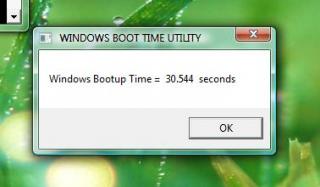
It's faster than my Windows 7  |
|
|
Nov 16 2010, 08:43 PM
|

Senior Member
1,379 posts Joined: Aug 2009
|
lol.. host might wan to uninstall de AV..beside i use K.I.S with 2 min boot time...haha
more faster then host de. |
|
|
|
|
|
Nov 16 2010, 09:21 PM
|
|
Senior Member
2,909 posts Joined: Jul 2009 From: London, United Kingdom or Kota Kinabalu, Sabah
|
QUOTE(verdangilte @ Nov 16 2010, 08:43 PM) lol.. host might wan to uninstall de AV..beside i use K.I.S with 2 min boot time...haha 2 minutes is quite slow for A42Jv lol, u should follow the method provided by Eugene91...more faster then host de. |
|
|
Nov 16 2010, 09:34 PM
|
|
Senior Member
1,379 posts Joined: Aug 2009
|
which method ??
Added on November 16, 2010, 9:55 pmlol .. my one is 99.669 sec  Uploaded with ImageShack.us This post has been edited by verdangilte: Nov 16 2010, 09:55 PM |
|
|
Nov 16 2010, 10:16 PM
|
|
Senior Member
6,109 posts Joined: Dec 2008 From: Mike India Romeo India
|
@verdangilte
So many apps running at startup? hmm |
|
|
Nov 16 2010, 10:37 PM
|
|
Senior Member
1,379 posts Joined: Aug 2009
|
i think so .. duno which should disable///
|
|
|
Nov 16 2010, 11:53 PM
|
|
Senior Member
2,909 posts Joined: Jul 2009 From: London, United Kingdom or Kota Kinabalu, Sabah
|
QUOTE(verdangilte @ Nov 16 2010, 10:37 PM) i think so .. duno which should disable/// have you done the optimisation yet?I manage to cramp it to less than 40 seconds.... Hmm, Startup I basically disabled most of the things except Avast and the ATK graphics... But in return I have to uninstall my tuneup utilities because the 3rd party tune up programs would fxxk up the windows optimisation |
|
|
Nov 17 2010, 10:58 AM
|
|
Senior Member
1,379 posts Joined: Aug 2009
|
lol...i duno how to make it.. but never mind la.. since my one already full of games.. may be it make my pc slow down gua..
|
|
|
Nov 17 2010, 11:10 AM
|
|
Senior Member
2,909 posts Joined: Jul 2009 From: London, United Kingdom or Kota Kinabalu, Sabah
|
QUOTE(verdangilte @ Nov 17 2010, 10:58 AM) lol...i duno how to make it.. but never mind la.. since my one already full of games.. may be it make my pc slow down gua.. Get CC Cleaner to disable ur startup programs, and do some cleaning with it... after that run the optimisation test again.. I can guarantee at least 20 seconds improvement lol.. |
|
|
|
|
|
Nov 17 2010, 11:22 AM
|

Elite
14,813 posts Joined: Nov 2006
|
QUOTE(verdangilte @ Nov 17 2010, 10:58 AM) lol...i duno how to make it.. but never mind la.. since my one already full of games.. may be it make my pc slow down gua.. Games shouldn't affect anything unless you set it to startup after you login....This post has been edited by lee_what2004: Nov 17 2010, 11:30 AM |
|
|
Nov 17 2010, 11:28 AM
|
|
Senior Member
1,496 posts Joined: Jul 2008
|
QUOTE(verdangilte @ Nov 17 2010, 10:58 AM) lol...i duno how to make it.. but never mind la.. since my one already full of games.. may be it make my pc slow down gua.. well, ur game wont launch in ur system start up, unless u made it as  try to disable some uneccessary start up program, and clean ur system might improve urs. if u lazy, get a SSD like me ^^ |
|
|
Nov 17 2010, 01:53 PM
|
|
Senior Member
1,379 posts Joined: Aug 2009
|
ssd too expensive for me la..
haha... hw to do the optimus check ?? |
|
|
Nov 17 2010, 01:57 PM
|
|
Senior Member
1,496 posts Joined: Jul 2008
|
optimus check? what u mean?
|
|
|
Nov 17 2010, 01:58 PM
|
|
Elite
14,813 posts Joined: Nov 2006
|
QUOTE(verdangilte @ Nov 17 2010, 01:53 PM) ssd too expensive for me la.. Do thishaha... hw to do the optimus check ?? http://www.msfn.org/board/topic/140262-how...a-or-windows-7/ and its not optimus check |
|
|
Nov 17 2010, 02:09 PM
|
|
Senior Member
1,379 posts Joined: Aug 2009
|
paiseh,,taip wrong ma..
|
|
|
Nov 17 2010, 02:10 PM
|
|
Senior Member
6,109 posts Joined: Dec 2008 From: Mike India Romeo India
|
Relax, you know he's not serious
|
| Change to: |  0.0208sec 0.0208sec
 0.52 0.52
 6 queries 6 queries
 GZIP Disabled GZIP Disabled
Time is now: 5th December 2025 - 05:50 AM |
 Quote
Quote