


Then run CCleaner and run a disk defrag using Auslogics DiskDefrag see if that helps

how to boost up My Acer timeline startup time?
|
|
 Nov 8 2010, 09:48 AM Nov 8 2010, 09:48 AM
Return to original view | Post
#1
|
 
Senior Member
6,109 posts Joined: Dec 2008 From: Mike India Romeo India  
|
Change ur Antivirus to Avast! Free Antivirus 5.. very light
Then run CCleaner and run a disk defrag using Auslogics DiskDefrag see if that helps |
|
|
|
|
|
Nov 8 2010, 06:22 PM
Return to original view | Post
#2
|
|
Senior Member
6,109 posts Joined: Dec 2008 From: Mike India Romeo India
|
Anyone wants to try this? http://www.msfn.org/board/topic/140262-how...a-or-windows-7/
But it did put a note there "Note! DON'T USE OTHER DEFRAGMENTATION PROGRAMS AFTER THE OPTIMIZATION, USE ONLY THE INCLUDED MS TOOL, BECAUSE EVERY TOOL PLACES THE FILES AT A DIFFERENT OFFSET ON YOUR HDD, BECAUSE ALL TOOL THINK THEY KNOW IT BETTER!" - Direct Quote. meaning only use Windows Disk Defragmenter only.. |
|
|
Nov 8 2010, 08:32 PM
Return to original view | Post
#3
|
|
Senior Member
6,109 posts Joined: Dec 2008 From: Mike India Romeo India
|
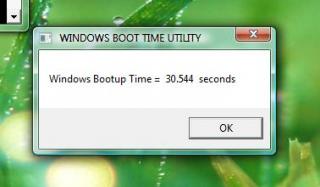
Use this to measure.. I get 41 sec..5400rpm hdd.. better to remove password from logon as a constant variable..
 Attached File(s)  BootTimer.7z ( 52.02k )
Number of downloads: 47
BootTimer.7z ( 52.02k )
Number of downloads: 47 |
|
|
Nov 9 2010, 09:04 AM
Return to original view | Post
#4
|
|
Senior Member
6,109 posts Joined: Dec 2008 From: Mike India Romeo India
|
I disable UAC and only having admin account
 I only got 40.310 seconds.. huhuhu This post has been edited by Eugene91: Nov 9 2010, 09:19 AM Attached thumbnail(s) 
|
|
|
Nov 9 2010, 09:48 AM
Return to original view | Post
#5
|
|
Senior Member
6,109 posts Joined: Dec 2008 From: Mike India Romeo India
|
haha fast feels nice bah
|
|
|
Nov 9 2010, 04:18 PM
Return to original view | Post
#6
|
|
Senior Member
6,109 posts Joined: Dec 2008 From: Mike India Romeo India
|
QUOTE(alvinkhorfire @ Nov 9 2010, 12:57 PM) Sorry to say that you are slightly incorrect about using Windows Disk Defragmenter. To apply this method, you do not have to use Windows Disk Defragmenter, instead you should use Windows Performance Tools Kit. Just download the Visual Studio 2010 Diagnostic Tool from Install the Windows Performance Tools Kit Thread. It really works, but you have to let it restart your computer 6 times for optimal reduction in boot-up time. Erm where exactly did you see that? Im quite blurred as well..  |
|
|
|
|
|
Nov 9 2010, 05:26 PM
Return to original view | Post
#7
|
|
Senior Member
6,109 posts Joined: Dec 2008 From: Mike India Romeo India
|
yeah.. that's what we (those who tested it here) did.. or else it wouldn't work without WPTK..
I think the author meant: "If the Installation of the Web- Installer fails or you have a limited Internet Connection, download the Visual Studio 2010 Diagnostic Tool. Extract the file PerformanceDiagnosticsSetup.exe " So the sentence " USE ONLY THE INCLUDED MS TOOL" must be referring to Windows own Disk Defragmenter.. |
|
|
Nov 10 2010, 08:39 AM
Return to original view | Post
#8
|
|
Senior Member
6,109 posts Joined: Dec 2008 From: Mike India Romeo India
|
QUOTE(cowithgun @ Nov 9 2010, 11:59 PM) 3820TG is 5400rpm HDD OMG.. so fast..  but according to review, it's quite fast. but according to review, it's quite fast.i detected a problem with previous setting; if i set "Dritek WMI Service" as "Delayed start", the Launch Manager will still work, but no more pop up graphics (which is cool and i like). so, i set it back to "Automatic", but i change the following to "Delayed start" - Acer ePower service - Diagnostic Policy service - Program compatibility assistant service - Raw socket service (Acer VCM) (if u dont use webcam chat, can remove this) - Threatfire i suspect the tool introduced by Eugine91 is really helpful, i run it again, my new score:   |
|
|
Nov 10 2010, 10:35 AM
Return to original view | Post
#9
|
|
Senior Member
6,109 posts Joined: Dec 2008 From: Mike India Romeo India
|
Im always getting a constant time.. +/- 2-3 seconds
|
|
|
Nov 10 2010, 12:51 PM
Return to original view | Post
#10
|
|
Senior Member
6,109 posts Joined: Dec 2008 From: Mike India Romeo India
|
QUOTE(PF T.J. @ Nov 10 2010, 11:31 AM)  OMG how you'all make it so fast 1? I'm still stuck at 45 secs  Not sure what to disable |
|
|
Nov 10 2010, 01:56 PM
Return to original view | Post
#11
|
|
Senior Member
6,109 posts Joined: Dec 2008 From: Mike India Romeo India
|
QUOTE(PF T.J. @ Nov 10 2010, 01:23 PM) Hmm... the start up time is reliant largely on HDD speed alone? Yes it does |
|
|
Nov 10 2010, 02:09 PM
Return to original view | Post
#12
|
|
Senior Member
6,109 posts Joined: Dec 2008 From: Mike India Romeo India
|
Import Seagate Momentus XT
|
|
|
Nov 16 2010, 03:42 PM
Return to original view | Post
#13
|
|
Senior Member
6,109 posts Joined: Dec 2008 From: Mike India Romeo India
|
Look at what Windows Vista Home Premium 32Bit can do
It's faster than my Windows 7  |
|
|
|
|
|
Nov 16 2010, 10:16 PM
Return to original view | Post
#14
|
|
Senior Member
6,109 posts Joined: Dec 2008 From: Mike India Romeo India
|
@verdangilte
So many apps running at startup? hmm |
|
|
Nov 17 2010, 02:10 PM
Return to original view | Post
#15
|
|
Senior Member
6,109 posts Joined: Dec 2008 From: Mike India Romeo India
|
Relax, you know he's not serious
|
|
|
Nov 17 2010, 02:41 PM
Return to original view | Post
#16
|
|
Senior Member
6,109 posts Joined: Dec 2008 From: Mike India Romeo India
|
up to 10 sec faster or even better for what im seeing ur currently getting..
|
|
|
Nov 17 2010, 03:25 PM
Return to original view | Post
#17
|
|
Senior Member
6,109 posts Joined: Dec 2008 From: Mike India Romeo India
|
Well..depends.. MSE is quite good as well.. free somemore from Microsoft
Shud be lighter than KIS.. Avast! 5 Antivirus Free is the lightest i've tested IMO.. |
|
|
Nov 22 2010, 02:32 PM
Return to original view | Post
#18
|
|
Senior Member
6,109 posts Joined: Dec 2008 From: Mike India Romeo India
|
eii.. better get a light effective av like Avast!5 Free or Panda Cloud Antivirus Free
|
|
|
Nov 22 2010, 02:42 PM
Return to original view | Post
#19
|
|
Senior Member
6,109 posts Joined: Dec 2008 From: Mike India Romeo India
|
Nah.. I feel MSE is heavy compared to the 2 I mentioned..
Avast! 5 Free you just install File, Network and Behaviour Shield good enuf.. super light |
|
|
Nov 22 2010, 05:23 PM
Return to original view | Post
#20
|
|
Senior Member
6,109 posts Joined: Dec 2008 From: Mike India Romeo India
|
QUOTE(istillmyself @ Nov 22 2010, 02:52 PM) walala i'l try it I won the Avast IS from a mini contest erm avast internet security ?My desktop is using the Free.. |
| Change to: |  0.0262sec 0.0262sec
 0.27 0.27
 7 queries 7 queries
 GZIP Disabled GZIP Disabled
Time is now: 3rd December 2025 - 11:47 AM |
 Quote
Quote