

QUOTE(crazyconsumer @ Mar 6 2011, 06:44 PM)
Got link to matrix? Thanks

See post #410 of this thread and PM him.Western Digital TV™ HD Media Player, Full HD 1080p Player
|
|
 Mar 7 2011, 10:28 AM Mar 7 2011, 10:28 AM
|
 
All Stars
11,058 posts Joined: Jun 2008 
|
QUOTE(crazyconsumer @ Mar 6 2011, 06:44 PM) Got link to matrix? Thanks See post #410 of this thread and PM him. |
|
|
|
|
|
Mar 7 2011, 12:45 PM
|

Senior Member
1,161 posts Joined: Jan 2003
|
hi guys. need some help. ripped some original dvds into iso and the iso file (including menu support) plays back fine on the wdtv live thru USB drive.
however, the same iso file doesn't play over my home network (I have a QNAP NAS hooked up to the home network). the wdtv live doesn't even see the iso file on the NAS when I try to view them thru wdtv -> media server. btw, all other files work fine (flac, mkv, etc.) thru wdtv -> media server. have not tried wdtv -> network folder. not sure what's the difference, actually. still new to this. any ideas or advice would be appreciated. thanks. This post has been edited by terranova: Mar 7 2011, 12:50 PM |
|
|
Mar 7 2011, 01:12 PM
|

Senior Member
4,454 posts Joined: Apr 2006
|
QUOTE(terranova @ Mar 7 2011, 12:45 PM) hi guys. need some help. ripped some original dvds into iso and the iso file (including menu support) plays back fine on the wdtv live thru USB drive. Probably media server can't detect iso file, like tversityhowever, the same iso file doesn't play over my home network (I have a QNAP NAS hooked up to the home network). the wdtv live doesn't even see the iso file on the NAS when I try to view them thru wdtv -> media server. btw, all other files work fine (flac, mkv, etc.) thru wdtv -> media server. have not tried wdtv -> network folder. not sure what's the difference, actually. still new to this. any ideas or advice would be appreciated. thanks. Try accessing your media file with network folder |
|
|
Mar 7 2011, 01:31 PM
|

Junior Member
490 posts Joined: Apr 2006
|
Aztech is not listed on wdtv list. Maybe have to take wdtv to shop to test. Where to get rm55? QUOTE(zeese @ Mar 7 2011, 09:22 AM) Anyone tried with aztech WL558USBN. Does it works with WDTV? currently I'm 150N version (WL552USB) and I want to upgrade it to 300N version. Aztech WL558USBN is the cheapest for 300N speed, around rm55 or so, but I don't know will it works with wdtv or not. Here's the pic.  I know some of you may suggest me to go with other brand like Asus N-13, etc, but my priority is being the cheapest first over quality/performance/warranty/etc. |
|
|
Mar 7 2011, 03:40 PM
|
|
Senior Member
1,161 posts Joined: Jan 2003
|
QUOTE(alucard89 @ Mar 7 2011, 01:12 PM) Probably media server can't detect iso file, like tversity thanks alucard89. will try that tonite and update here.Try accessing your media file with network folder |
|
|
Mar 7 2011, 04:18 PM
|

Senior Member
1,818 posts Joined: Jan 2005 From: Kuala Lumpur
|
QUOTE(laowai @ Mar 7 2011, 01:31 PM) Aztech is not listed on wdtv list. Yes.. it's not listed.. similar like the one I'm using, aztech usb150N. It's not listedMaybe have to take wdtv to shop to test. Where to get rm55? but it still working. To me, the reason it is not listed is because it's not sold in US. wdtv only list wifi usb that US users buy & use.. Where to get the rm55.. it's in lowyat.. everywhere in lowyat, it's around that price.. you can the price list on the lyn front page. QUOTE Maybe have to take wdtv to shop to test. Where to get rm55? Thanks for the idea. Good idea.. This post has been edited by zeese: Mar 7 2011, 04:25 PM |
|
|
|
|
|
Mar 7 2011, 05:48 PM
|

Senior Member
959 posts Joined: Apr 2007
|
Tp link usb dogle also around 50-60rm..
|
|
|
Mar 8 2011, 11:40 PM
|
|
Junior Member
490 posts Joined: Apr 2006
|
I bought the asus usb-n13 and tried it on wdtv live (latest 1.04.22 firmware).
Doesn't work. I followed the steps in http://wdc.custhelp.com/app/answers/detail/a_id/3806 After plug in, i see the the options for wired and wireless :- 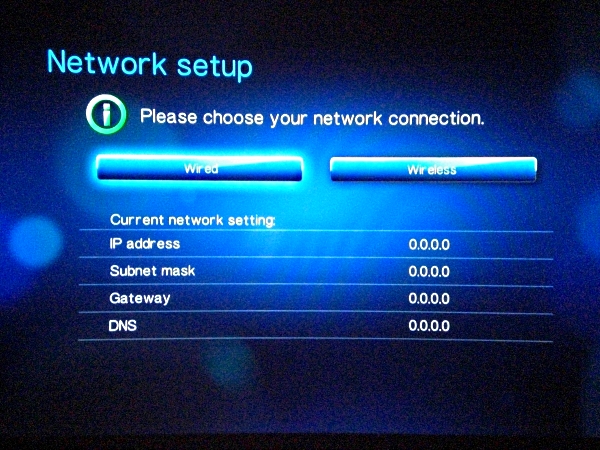 I chose wireless, detected my SSID, tried automatic settings but got error "Unable to obtain ip address. The media player has limited or no network connectivity". So I manually configured the ip / subnet / gateway / dns (sample screen below) :- 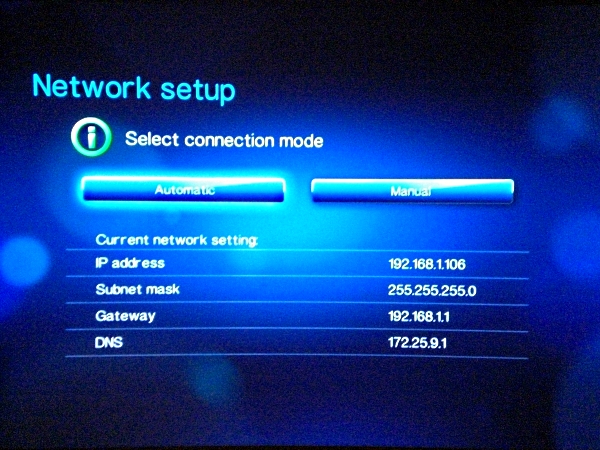 My SSID name somehow keeps disappearing and appearing (blinking) and signal strength goes up/down ..... does anyone have this issue? Or is the SSID always showing on screen (fixed)? 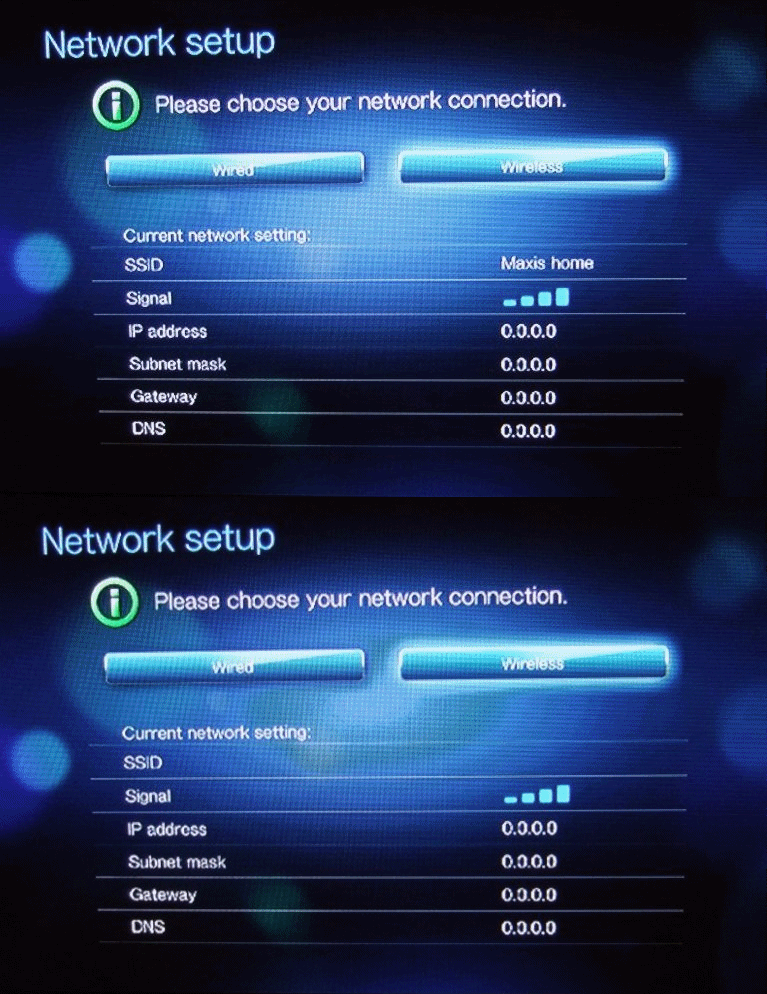 I tried CHECK CONNECTION ..... always fail the DNS step.  Not sure which problem ... wdtv or my usb wifi or my pc router (this needs to be compatible as well?) . On WDTV list, it's mentioned version is 1.10 but when I plug the N13 to my notebook, it's mentioned driver version was 1.4.6.0 I checked drivers on ASUS site but only have v1.4.6.0 and v.3.1.0.0. Can anyone that has a working N13 check their driver version from a notebook / pc? Is it same as mine 1.4.6.0 ? Or is version 1.10 not related to firmware, where can I check version? This post has been edited by laowai: Mar 10 2011, 03:21 PM |
|
|
Mar 10 2011, 04:31 PM
|
|
Junior Member
490 posts Joined: Apr 2006
|
Anyone claimed warranty on WDTV before? I called the service tel. no., they say there's no service center in malaysia. Only in singapore. Have to go thru distributor or send back using their pickup service (US$7.50), it seems |
|
|
Mar 10 2011, 04:59 PM
|

Junior Member
264 posts Joined: Jan 2003 From: Putrajaya  
|
use the pickup service fast n easy.. never sent wdtv before but i already sent my ext hdd thrice with them using this service.. really hassle free..
|
|
|
Mar 10 2011, 05:42 PM
|
|
Senior Member
4,454 posts Joined: Apr 2006
|
QUOTE(laowai @ Mar 8 2011, 11:40 PM) I tried CHECK CONNECTION ..... always fail the DNS step. Not sure which problem ... wdtv or my usb wifi or my pc router (this needs to be compatible as well?) . On WDTV list, it's mentioned version is 1.10 but when I plug the N13 to my notebook, it's mentioned driver version was 1.4.6.0 I checked drivers on ASUS site but only have v1.4.6.0 and v.3.1.0.0. Can anyone that has a working N13 check their driver version from a notebook / pc? Is it same as mine 1.4.6.0 ? Or is version 1.10 not related to firmware, where can I check version? In my case, I had to reset the player just to finally get wireless streaming working. Only difference is that I can still get the ip address,subnet mask etc automatically back when I'm still getting dns server error |
|
|
Mar 10 2011, 05:54 PM
|
|
Senior Member
1,818 posts Joined: Jan 2005 From: Kuala Lumpur
|
QUOTE(laowai @ Mar 8 2011, 11:40 PM) I bought the asus usb-n13 and tried it on wdtv live (latest 1.04.22 firmware). It shows you usb wifi is compatible with the wdtv. If it's not working, the wdtv won't detect any ssid at all..Doesn't work. I followed the steps in http://wdc.custhelp.com/app/answers/detail/a_id/3806 » Click to show Spoiler - click again to hide... « Can anyone that has a working N13 check their driver version from a notebook / pc? Is it same as mine 1.4.6.0 ? Or is version 1.10 not related to firmware, where can I check version? In your case, it must be the routers setting.. is you router using a default setting, or did you set the ip assignment manually? This post has been edited by zeese: Mar 10 2011, 05:56 PM |
|
|
Mar 10 2011, 07:31 PM
|
|
Junior Member
490 posts Joined: Apr 2006
|
Not really understand how you mean. Your dns problem went away after reset? Or still have ?
QUOTE(alucard89 @ Mar 10 2011, 05:42 PM) DNS server problem? My wifi router at pc is set to enable dhcp server with a starting address and pool size. Previously i left dns server as blank but after this error, i set one dns address ... Still not work. No static dhcp setting for mac address. In my case, I had to reset the player just to finally get wireless streaming working. Only difference is that I can still get the ip address,subnet mask etc automatically back when I'm still getting dns server error  QUOTE(zeese @ Mar 10 2011, 05:54 PM) It shows you usb wifi is compatible with the wdtv. If it's not working, the wdtv won't detect any ssid at all.. In your case, it must be the routers setting.. is you router using a default setting, or did you set the ip assignment manually? |
|
|
|
|
|
Mar 10 2011, 07:36 PM
|
|
Senior Member
1,161 posts Joined: Jan 2003
|
QUOTE(terranova @ Mar 7 2011, 12:45 PM) hi guys. need some help. ripped some original dvds into iso and the iso file (including menu support) plays back fine on the wdtv live thru USB drive. however, the same iso file doesn't play over my home network (I have a QNAP NAS hooked up to the home network). the wdtv live doesn't even see the iso file on the NAS when I try to view them thru wdtv -> media server. btw, all other files work fine (flac, mkv, etc.) thru wdtv -> media server. have not tried wdtv -> network folder. not sure what's the difference, actually. still new to this. any ideas or advice would be appreciated. thanks. QUOTE(alucard89 @ Mar 7 2011, 01:12 PM) Probably media server can't detect iso file, like tversity just to update here on my earlier issue. Try accessing your media file with network folder @ alucard89 - you were correct. the iso file works perfectly with menu support when accessed thru the "network shares", but not when it is accessed thru "media server". somehow, the DLNA upnp media server on the NAS doesn't display the iso. QNAP uses Twonky Media Server btw. anyway, i'm just glad to be able to play the iso file with menu. thanks bro. |
|
|
Mar 10 2011, 07:46 PM
|
|
Senior Member
1,161 posts Joined: Jan 2003
|
Just got prompted for a firmware update.
Current version : 1.04.17_V New version : 1.04.22_V Fix List: • Supports Tune-In radio application. • Supports 7.1 channel audio passthrough. • Supports Auto-framerate (Audio Video settings/video output/HDMI/auto/auto/Match video framerate) • Corrected various general menu and options wording issues. • Corrected various Netflix user interface functionality problems. • Corrected various Facebook user interface wording and functionality problems. • Corrected various Live365 user interface wording and functionality problems. • Corrected various Pandora user interface wording and functionality problems. • Corrected various Mediafly user interface wording and functionality problems. • Resolved problem with some HD files from Mediafly becoming out of sync. • Corrected various Blockbuster user interface wording and functionality problems. • Resolved various Blockbuster download issues • Resolved digital audio passthrough problem playing on both HDMI and optical at the same time. • Resolved problem with Auto-play feature not automatically playing content. • Resolved problem with Belkin F7D2101 v1WiFi adapter not connecting to network. • Resolved “Clear login info” from Network Share not clearing the login info. • Resolved problem where filenames that begin with the same name as a folder will not show up. • Resolved problem where HDMI resolution could not be forced if not supported by the EDID. • Resolved meta-data problem where “/” character in the title makes the system reboot. • Resolved problem of no video playback after using Netflix. • Resolved problem with ISO playback not working – except through preview mode. • Resolved video playback problem where the info bar does not hide on pause/resume or chapter skip. • Resolved problem where empty folder are hidden when copying or moving. • Resolved USB keyboard problem where the arrow keys don’t work in wireless network settings page. • Resolved problem where a folder icon was displayed over the top of the thumbnail. • Resolved problem where DVI output was not working for a particular DVI monitor. • Resolved problem of DTS and AC-3 not working with passthrough. • Resolved problem where videos can not start until after 10-90 seconds after start-up. • Resolved problem where user could not copy a file/folder to the root directory of the drive. • Resolved problem where an incorrect error message was displayed if invalid username/password entered. • Resolved problem where system reset fails to erase user info. • Resolved video playback where audio takes 5 seconds to catch up after fast-forward or re-wind • Resolved problem where the system would reboot when special characters are entered into device name. • Resolved a file management problem where deleting a file on a network share caused the device to reboot. • Resolved problem where high sample rate audio was being downsampled to 48KHz. • Removed Blu-ray DVD message “Unable to play this video menu. |
|
|
Mar 10 2011, 10:26 PM
|
|
Senior Member
4,454 posts Joined: Apr 2006
|
QUOTE(laowai @ Mar 10 2011, 07:31 PM) Not really understand how you mean. Your dns problem went away after reset? Or still have ? I actually reflash the firmware several times with official and custom one but none seems to work.My wifi router at pc is set to enable dhcp server with a starting address and pool size. Previously i left dns server as blank but after this error, i set one dns address ... Still not work. No static dhcp setting for mac address. After reset I can finally use wireless and youtube is working too. Added on March 10, 2011, 10:28 pm QUOTE(terranova @ Mar 10 2011, 07:36 PM) just to update here on my earlier issue. Good to hear that, hopefully it won't stutter much streaming those files thru network share@ alucard89 - you were correct. the iso file works perfectly with menu support when accessed thru the "network shares", but not when it is accessed thru "media server". somehow, the DLNA upnp media server on the NAS doesn't display the iso. QNAP uses Twonky Media Server btw. anyway, i'm just glad to be able to play the iso file with menu. thanks bro. This post has been edited by alucard89: Mar 10 2011, 10:29 PM |
|
|
Mar 11 2011, 08:53 AM
|
|
Senior Member
1,818 posts Joined: Jan 2005 From: Kuala Lumpur
|
last time, I'm having the same network problem with wdtv. When diagnose, it failed at "DNS Server" stage. After I reset my router to default, the wdtv networks immediately works fine.
|
|
|
Mar 11 2011, 10:23 AM
|

Senior Member
647 posts Joined: Jan 2010 From: Klang
|
QUOTE(terranova @ Mar 10 2011, 07:46 PM) Just got prompted for a firmware update. Current version : 1.04.17_V New version : 1.04.22_V Fix List: • Supports Auto-framerate (Audio Video settings/video output/HDMI/auto/auto/Match video framerate) Great, will test it. Miss this feature quite some time. |
|
|
Mar 11 2011, 05:58 PM
|
|
Senior Member
1,161 posts Joined: Jan 2003
|
QUOTE(alucard89 @ Mar 10 2011, 10:26 PM) Good to hear that, hopefully it won't stutter much streaming those files thru network share No stuttering at all. Wired gigabit network. |
|
|
Mar 14 2011, 10:03 AM
|
|
All Stars
11,058 posts Joined: Jun 2008
|
Anyone knows where got sell WDTV Live at a lower price?
|
| Change to: |  0.0282sec 0.0282sec
 0.89 0.89
 6 queries 6 queries
 GZIP Disabled GZIP Disabled
Time is now: 21st December 2025 - 12:18 PM |
 Quote
Quote