Welcome Guest ( Log In | Register )

Bump Topic Topic Closed RSS Feed
6 Pages < 1 2 3 4 > » Bottom

Outline · [ Standard ] · Linear+

 MSI Gaming Notebook, Check out Post #3! Gathering time!

views
     
Eiraku
post Jul 23 2013, 08:12 AM

Geeking since 1985!
*******
Senior Member
7,037 posts

Joined: Apr 2006


QUOTE(Areas Elysian @ Jul 23 2013, 07:37 AM)

What was your room temperature like? When I game, I game at home without any coolers. Just in an air conditioned room.
*
Normal room temperature sans air conditioning. Say 20-26c?

QUOTE(Areas Elysian @ Jul 23 2013, 07:37 AM)

Hmm.. depends on what Haswell you're looking at. Their low voltage mobile CPUs are doing extremely well on the battery life front with the 15W dual core i7s and what not.. it just looks like, a) their quads are hotter, b) due to their better efficiency and less heat output, OEMs are cutting down on the cooling performance resulting in warmer temperatures.

As for screen, it would be nice to have touch screen and an IPS panel on this.. lol.. while on the go/traveling, touch seems nice.. and for aesthetic reasons, back-lit keyboard.. lol..
*
I think it's actually a bad mix of both (a) and (b). OEMs cutting down cooling ability due to optimistic expectations regarding Haswell efficiency + Haswell actually running quite hot on boost.

It's a shame there's only two versions of the low TDW Haswells: the 4702 twins in HQ and MQ guise. Oh and the ultrabook dual cores (which is much less interesting for us lol).

As for things I would have wanted on the GE40, I'd say a metal body to lessen the "cheapo factor", a better built keyboard area with less flex and a better screen (doesn't even have to be IPS). Hopefully they read online reviews when coming up with the next gen GE40.

BTW, another review from Eurogame, covering both the GE40 and the GE60: http://bit.ly/18w8EtH

TLDR; They like the 40 a tad more, and the 60 has shitty battery life. But with Turbo Boost the 40 hits 93c quite easily.
Eiraku
post Jul 23 2013, 11:09 AM

Geeking since 1985!
*******
Senior Member
7,037 posts

Joined: Apr 2006


QUOTE(Areas Elysian @ Jul 23 2013, 10:10 AM)
For me I would prefer to not have an ODD bay.. who uses them in this time and age anymore? You can even boot to install Windows from a USB key now.

For me, I don't mind the plastic. What I don't like is the glossy plastic. That puts me off. And at least some decent speakers on this thing man.. It sounds really bad.. can't be wearing headphones all the time. I find the build okay right now. I rather they just change the materials a bit and stick with the same build, and put efforts elsewhere like screen/cooling/steelseries keyboard.. than to up their build and raise their pricing.. i don't want another Razer.. bloody expensive nonsense.. LOL

Oh, I find the...

|
\

Key that is next to the SpaceBar annoying.. a lot of time trying to hit ALT and I would hit that. Would be nice if they had a SteelSeries keyboard for the GE40 as well with the keys position etc.
*
IINM we already have a Steel Series keyboard. As for the ODD bay, well, you technically don't have an ODD in it, right? Personally I like being able to shove a BD burner in there if need arises - lessens the need for more external USB stuff.

But while it's good to have options, I'm prolly gonna dump in a caddy in there myself and get the mSATA adapter. Will be asking MSI support about the mSATA upgrade when I go for my adapter replacement - supposedly they can do it for you for a bit of cash.

Oh, and anybody know where I can wrap the glossy bits in carbon fiber or something? Or just buy my own CF vinyl?
Eiraku
post Jul 23 2013, 10:13 PM

Geeking since 1985!
*******
Senior Member
7,037 posts

Joined: Apr 2006


user posted image

Got itchy so finally "operated" my baby: Thermal repaste with Xigmatek Freezing Point. Interesting POIs during the procedure:

- If you plan to open up your GE40 often (and you're clumsy like me), consider ordering a spare back cover from MSI. It's plastic and I can see the tabs breaking at some point or another.

- It's quite easy to open the back cover, especially coming from the horror that was the M1210. This is very good for future self maintenance for sure.

- The original paste job is messy. REALLY REALLY messy. Not sure what goop they were using for paste either, but it actually didn't look half bad (except for the messiness).

With the "operation" all done, I ran Crysis 3 again (same area as before: The 1st level before the Jungle) and got:

AVG CPU TEMP: 78c (-6c)
PEAK CPU TEMP: 80c (-2c)
AVG GPU TEMP: 71c (-5c)
PEAK GPU TEMP: 74 (-4c)

Not bad. It also felt smoother than before, somehow.

But CPU temps quickly got back to the 80s range with a peak of 86c as soon as I hit the "New York Jungle" area. GPU stayed around 72-73c with a peak of 76c though.

Which leads me to wonder: might I have easily hit 90c with the stock paste when hitting the Jungle? Lol. Mind you this is all with TURBO BOOST DISABLED.

With it on + the factory paste job we might even touch 100c... maybe lol.

Any hows, next on the list of operations: Installing an Intel Advanced-N 6235 WIFI + BT4.0 card. Also, maybe undervolting a bit, anybody know if we can safely undervolt Haswell chips already?

QUOTE(Areas Elysian @ Jul 23 2013, 02:02 PM)
You know.. once this GE40 of mine hits to 2 years mark, I am going to dismantle it up and replace/stick on all the glossy part some sort of matte carbon vinyl or something.. LOL

Also, any GE40 owners out there interested in a 2nd 8GB A-DATA DDR3 SODIMM for some Dual Channel goodness?
*
You bought spare RAM or you installed gaming grade stuff? You could've warned me in advance - I already got some Kingmax RAM when I bought the thing, thankfully it's running dual channel no problem.

Unless someone wants my Kingmax ler lol. But I'd rather save up for something better later - BTW anybody know what's the fastest RAM the lappy supports?

I'm also planning to cover the lappy with some brushed metal vinyl myself, or some CF vinyl. The glossy plastic really screams "I'm cheap!".

In retrospect though, it looks nothing like the 4k lappy that it really is, so in a way that's good as it doesn't really attract "unwanted" attention.

This post has been edited by Eiraku: Jul 23 2013, 10:28 PM
Eiraku
post Jul 23 2013, 11:00 PM

Geeking since 1985!
*******
Senior Member
7,037 posts

Joined: Apr 2006


QUOTE(AiSheep @ Jul 23 2013, 10:51 PM)
If i not mistaken, they using MX-2 for thermal paste.
As for RAM, it's better find 1.35v ones. Haswell hates 1.5v RAM if not mistaken...  hmm.gif
*
MX2, not bad at all. Unfortunately it was spread liberally all over the place. Someone gotta go down to the MSI factory and tell them workers that "too much ain't good".

Care to elaborate why Haswell hates 1.5v RAM? What would happen if we use 1.5v RAM?

Both the stock ADATA and my additional Kingmax are 1600, 1.35v it seems though. Which is all good.

Also, Torture testing with Prime95 for 20mins: 78c CPU average. Okkkkkkk lah.

This post has been edited by Eiraku: Jul 23 2013, 11:07 PM
Eiraku
post Jul 24 2013, 12:10 AM

Geeking since 1985!
*******
Senior Member
7,037 posts

Joined: Apr 2006


QUOTE(lee_what2004 @ Jul 23 2013, 11:15 PM)
The notebook just won't boot.
*
Hahahaha. Okay dokey.

New update guys. ANOTHER ONE OF MY AC ADAPTERS JUST GOT FRIED. The score is now 2 adapters vs the GE40.

It was the CoolerMaster NA90 I bought after I got scared when the HuntKey Mini 90w got stuck under some pillows and threatened to burn itself down (it heated up like nobody's business). Now using the Huntkey again, hopefully it doesn't heat up too much - giving it a lotta room to breathe this time.

BUT SERIOUSLY, DOES MY GE40 EAT ADAPTERS OR WHAT? I was using the laptop happily, playing some Japanese "light entertainment" 3D games (with the battery disconnected, cause heat kills batteries rite). All of a sudden, Bzzzz POP! And everything just dies. Now the NA90 is COMPLETELY DEAD.

I'm thinking it actually DOES suck more than the rated 90w under extreme loads (although I really wouldn't call what I was doing "extreme"). Now plugging in the battery again, just so that it'll suck the extra juice it needs from the battery rather than from the adapter.

SO, am I just EXTREMELY UNLUCKY when it comes to adapters, or is something EXTREMELY WRONG with my GE40?

This post has been edited by Eiraku: Jul 24 2013, 12:12 AM
Eiraku
post Jul 24 2013, 12:27 AM

Geeking since 1985!
*******
Senior Member
7,037 posts

Joined: Apr 2006


QUOTE(Zakov @ Jul 24 2013, 12:13 AM)
I haven't been following your posts previously, so forgive me if I'm wrong. But the 1st adapter that failed was the stock GE40 adapter is it? Or is it just the third party adapters that you bought?
*
Yep. First adapter that died was the stock one. Due to the fact that I work outstation during the normal working week, I couldn't go for warranty replacement for it (it died on a Saturday night), so I had to go buy a replacement. The "replacement" (the HuntKey universal 90w Mini adapter) got kinda hot in use so I freaked out and got another "replacement" (the Coolermaster NA90).

The Coolermaster was working fine and dandy until just now. When it POPPED dead.

Now I'm back to using the HuntKey (a bit thankful I was stupid enough to buy multiple universal AC adapters). But the problem is the HuntKey isn't really charging the battery now (it's "plugged in, not charging").

Sigh. Funny that the laptop isn't giving me ANY PROBLEMS except this maddening issue. I'm gonna go all out later and get myself a Coolermaster USNA 120w adapter - if THAT dies than it's just weird.

This post has been edited by Eiraku: Jul 24 2013, 12:29 AM
Eiraku
post Jul 24 2013, 01:18 AM

Geeking since 1985!
*******
Senior Member
7,037 posts

Joined: Apr 2006


QUOTE(AiSheep @ Jul 24 2013, 01:08 AM)
Sad to hear that, hope that this new PSU will work.
1.5v RAM SODIMM's will not post and will *beep* for like 4 times.
Is the orignal PSU from Delta?
*
Yes the original PSU is from Delta. Are they any good?

I wonder if the MSI service center will help if I ask them for a 120w power brick to replace the dead 90w brick. I'm beginning to think that the GE40 needs the extra legroom.

UPDATE: The HuntKey adapter is charging the battery again, albeit verrrrry slowly. Weird sheet this is for sure.

Ran MSI battery calibration and.. it didn't really calibrate very well to be honest. Seems the HuntKey is simply not charging fast enough for it to work, it just stops charging while "calibrating".

I stop MSI battery calibration and the battery starts charging again. Ehhh?

Really peculiar weird sheet. Can't wait to get my replacement AC adapter from MSI. Not sure if MSI Service is open this Friday though.

This post has been edited by Eiraku: Jul 24 2013, 12:36 PM
Eiraku
post Jul 24 2013, 04:39 PM

Geeking since 1985!
*******
Senior Member
7,037 posts

Joined: Apr 2006


QUOTE(Zakov @ Jul 24 2013, 12:43 PM)
Was thinking of buying the USNA 120w adapter as well. Never hurts to have some sort of contingency given that the stock bricks do get alarmingly hot.

Maybe we should wrap the power bricks with bga heatsinks. XD
*
Well, problem is all local sellers seem to be outta stock for the USNA. I'll prolly ask the MSI SC about the possibility of getting a 120w AC adapter from them (considering the GE60/GT60 uses a 120w brick IINM). Though I can already see their staff telling me "a 120w AC unit will DAMAGE YOUR LAPTOP" (sic). Maybe I should just tell them it's for my kid brother's GE60.

If you plan to get the USNA from overseas, buzz me?

But the HuntKey really is a weird wonder. It gets really hot, and it sometimes doesn't even charge the battery to 100% - but it's still kicking when the Coolermaster NA90 (or even the stock adapter) have died already.

QUOTE(AiSheep @ Jul 24 2013, 01:27 PM)
Delta is one of quality branded laptop PSU's.
Try consult them, since PSU should be under warranty as well.
I found out most of the laptop battery calibration software is buggy, i don't dare to use it.
*
I gave up on the app on the second try. I'm thinking it only "simplifies" the calibration process, and it's something we can do without the app right?

With that said, can I uninstall the app? It'a just taking up space lol.

Oh and can we uninstall SCM? The FN button combos already takes care of the switching stuff on and off right?

This post has been edited by Eiraku: Jul 24 2013, 04:39 PM
Eiraku
post Jul 24 2013, 06:27 PM

Geeking since 1985!
*******
Senior Member
7,037 posts

Joined: Apr 2006


QUOTE(BAlm @ July 20:51 PM)
Bro, the possibility of your GE40 sucking the life out of your adapters, could it be your wall socket is the real culprit. Or anything the other side of the adapter
*
Can't be the wall socket. Two adapters died in TWO DIFFERENT PLACES, roughly 300km apart (KL and Work). Simply put, the 130-ish full load consumption figure somebody posted a few page back might just be correct - and considering the SECOND AC adapter died while I was doing stuff WITHOUT a battery (no secondary source of extra Ws), it probably tried to constantly suck something like 100w from the 90w adapter - which eventually killed it.

I can't find any other explaination for it, considering:
1) My GE40 is otherwise fine.
2) ALL my adapters ran hot/warm.
3) The HuntKey is doing FINE (albeit running a tad hot) with a battery installed (which supposedly buffers the adapter from any "extra" power consumption).

This doesn't fully explain the FIRST AC adapter death though - the battery was plugged in when THAT happened. But I did drain the battery before it happened, so I might have just been the GE40 sucking too much juice again.

Check out MSI documentation on other laptops (I think it was the GT60), this "sucking extra power from your battery" thing is actually touted as A FEATURE IINM.

WHY IS THIS NOT HAPPENING EVERYWHERE? Well, I think most people leave their batteries in while they use their "portable gaming unit", right? No sense unplugging it when you carry it around and use it in a mobile setting. That probably means not Many GE40s are being used at full load with the batteries out.

That's what I think, anyway.

So, is the decision made by MSI to use a 90w AC adapter for the GE40 the optimal choice? Or is it just an economical one OR for other reasons like portability? After all, the GE40 WAS positioned to be a "portable gaming" unit.

Or just maybe, they might have UNDERESTIMATED the consumption needs of a Haswell chip + 760 combo at FULL load. Sure the thing sips battery at lower loads, but 130w full consumption is not really "sipping" power now, right?

This post has been edited by Eiraku: Jul 24 2013, 09:32 PM
Eiraku
post Jul 24 2013, 10:17 PM

Geeking since 1985!
*******
Senior Member
7,037 posts

Joined: Apr 2006


QUOTE(Zakov @ Jul 24 2013, 10:02 PM)
Maybe you were just unlucky with the stock adapter? Could've been faulty and whatnot.. I've just left the adapter on for a whole day and I did several loops of 3DMark11 along with a short BF3 session. Although it did get hot but I it's the same as my old Dell Inspiron(in that case the battery died first but the charger kept going for 6 years).

Found a link to the Coolermaster USNA 120w.

http://www.lelong.com.my/cooler-master-usn...4-02-Sale-P.htm
*
Maybe, I won't discount that possibility. But for lightning to strike twice I must be REALLY unlucky.

As for today, the HuntKey is showing it's mettle: it's lasting the whole day as I spent hours playing Stalker Call of Pripyat. Not the most demanding game, for sure, but CPU averaged 75 and GPU around 74 so it's not a walk in the park either. The HuntKey got hot but it otherwise soldiered on with no issues.

Will be sourcing a 120w alternative nonetheless, at least to keep at home for heavy use. The mini HuntKey should suffice for mobile use. As for the replacement Coolermaster NA90 that I'll claim later, anybody interested in a spare universal 90w AC adapter?

As for that USNA link, I asked Feiton already (he's selling here on LYN as well) - he's out of stock. Hikari85 doesn't have any too.

Online's prolly our only choice.

This post has been edited by Eiraku: Jul 24 2013, 10:22 PM
Eiraku
post Jul 24 2013, 10:35 PM

Geeking since 1985!
*******
Senior Member
7,037 posts

Joined: Apr 2006


Headroom. That's it.

I guess it's no use supplying a 120w brick and increasing cost price when a 90w brick would suffice for 90% of the target market right? Serious "gamers" would have gone the GE60/GT60/GT70 route anyway. Plus, like I said earlier, most people will keep the battery in always, and will never even approach the headroom limit to begin with.

Oh well. Hopefully the MSI guys will entertain my request for a 120w power brick replacement. I'm even willing to pony up a bit extra.

As for the USNA, I'm under the impression they aren't taking in any more stocks. It's a very niche item after all.

Original stock LiteOn/Delta 120w adapters as being supplied for the GE60/GT60 are available online for like RM60-ish. They're huge though, and the shops I found them in were kinda... shady.

This post has been edited by Eiraku: Jul 24 2013, 11:01 PM
Eiraku
post Jul 25 2013, 10:27 AM

Geeking since 1985!
*******
Senior Member
7,037 posts

Joined: Apr 2006


QUOTE(Areas Elysian @ Jul 25 2013, 08:07 AM)
Most likely it's just the occasional peak draws? I've always had my batteries plugged in. I never believed in taking out batteries etc, too troublesome. I'll just pick up a new replacement battery 1-2 years down the road.
Or maybe it was just never intended to run without the battery? LOL..

I bought a replacement 90W ultra slim adapter.. the size different is amazing.. will upload a pic comparing it soon... will give it a go today to see how hot it gets and what not..

Edit:
Here is the comparison photo of the two adapters.

» Click to show Spoiler - click again to hide... «

*
That looks like either a Coolermaster SNA90 or a Huntkey Slim USB. Or is it something else?

As for batteries plugged in thing, you just added some anecdotal evidence to my theory: Battery plugged in - Peak draw protection for an under-rated PSU.

Not sure if it wasn't intended to run without the battery, because there isn't any documentation that suggest so. If it's built that way MSI should have made us know, but the "drawing extra power from the battery" thing WAS touted as a feature on one of the other MSI gaming laptops, like I said before.

Maybe they should have just pasted a warning sticker on the battery saying "Running this laptop without a battery might fry your PUNY 90w AC adapter - so don't even". biggrin.gif

This post has been edited by Eiraku: Jul 25 2013, 10:32 AM
Eiraku
post Jul 25 2013, 10:52 AM

Geeking since 1985!
*******
Senior Member
7,037 posts

Joined: Apr 2006


QUOTE(Areas Elysian @ Jul 25 2013, 10:38 AM)
It's something else totally. I haven't heard of the brand before, but apparently they are the OEM providers for Cooler Master and what not, making the insides for them. It's absolutely tiny. For comparison:

Cooler Master SNA 90
120 x 60 x 16.5 mm

Huntkey Slim USB
145 x 71.5 x 16mm

AcBel AD9009
88 x 63 x 16.5mm

Only down is it doesn't come with a built in USB charging port. That would have been handy.
*
AcBel? From Hikari85 izzit? How much? From the pics on the net it looks absolutely tiny, which doesn't bode well for heat performance IMO, unless they've found a new way to conduct heat out.

Please check out how the heat is under:

1) Normal use charging
2) Heavy load charging
3) While charging battery, normal load
4) While charging battery, heavy load

If it's normal hot, than it's a good compromise for such a small thing. If it's scorching... ummmmmmm... hmm.gif

Also check out how fast it's charging the battery. The Huntkey Mini, for instance, charges the battery VERY slowly.

EDIT: I found some specs for the thing: Ultra thin 1.65cm / Ultra light 160g / Efficiency 94% / Peak power 120W

If the Peak Power figures are right, that's not bad at all. Plenty of headroom, but not sure it's enough for the 130w max the GE40 would need under full load sans battery.

But with a battery installed, it should be fine.

This post has been edited by Eiraku: Jul 25 2013, 10:59 AM
Eiraku
post Jul 26 2013, 05:31 PM

Geeking since 1985!
*******
Senior Member
7,037 posts

Joined: Apr 2006


QUOTE(arcaloveher @ Jul 26 2013, 05:11 PM)
Why so cheap?  hmm.gif  hmm.gif  Used unit? Old processor?
*
That's the pre-Haswell GT60. Processor is last gen, GC not nVidia GF 7xx series. Of courselah cheap.

Not to say it's not powerful though: The GF 675 can whoop my 760's ass easy I think.
Eiraku
post Jul 27 2013, 03:09 AM

Geeking since 1985!
*******
Senior Member
7,037 posts

Joined: Apr 2006


QUOTE(Areas Elysian @ Jul 27 2013, 01:20 AM)
I just finished Heavy Load while charging. It is taking forever to charge (obviously, lol), but the adapter is REALLY hot. I can still hold on to it, but it gets uncomfortable. But so far I'm quite happy with it, for the size, compactness, I am all in for it.
*
Woah, not bad. All IT only has the AcBel in 65w variants unfortunately, and I'm tempted to try the HuntKey X-Man (which is ultra slim and has a USB slot like the USNA 120). If only I don't already have 3 adapters - 2 of which is awaiting warranty claims however (the original Delta and the CoolerMaster). God, I'm turning into an AC Adapter collector lol.

That said, my Huntkey Mini is working fabulously so far. It seems that it simply needs adequate clearance for cooling - and the battery to be constantly in to buffer for power consumption spikes. It DOES get uncomfortably hot during full loads and heavy charging, but so does my Sony 16.5w netbook adapter.

As for my first encounter with MSI warranty services, it's about normal I guess. Not much hassle, but it sure takes some time. Seems that you have to inform the MSI Service Careline FIRST before going in to the Service Centre (in my case, the service center in Kelana Square, PJ) - supposedly this speeds up the process (by how much, I'm not sure). Any other requests like the purchase of an extra battery pack etc. etc. will ALSO have to go through the Care Line first as it seems that the Service Center itself doesn't really keep stocks of ANYTHING. It's more of a dropoff/pickup centre.

Anyhow, it's gonna take me a week to get a replacement AC Adapter, and at least the people at the SC was willing to listen to my request about looking into a 120w replacement (though I'm not sure how much they can actually do).

I'm the patient sort, and I already have my backup(s), so a week is ooooook lah. But coming from a world where "warranty claims" meant someone coming over to where ever you are to send you even the smallest replacement parts (Dell on-site services), it feels... slow. I wonder what happens if your MSI laptop is CRUCIAL to your work and it's AC adapter dies - are these people expecting their customers to go get themselves backup adapters?

Oh well, maybe that's why the corporate types get corporate laptops with corporate on-site support. Or why people just buy Dells, Illegears and Alienwares lol.
Eiraku
post Jul 27 2013, 10:57 AM

Geeking since 1985!
*******
Senior Member
7,037 posts

Joined: Apr 2006


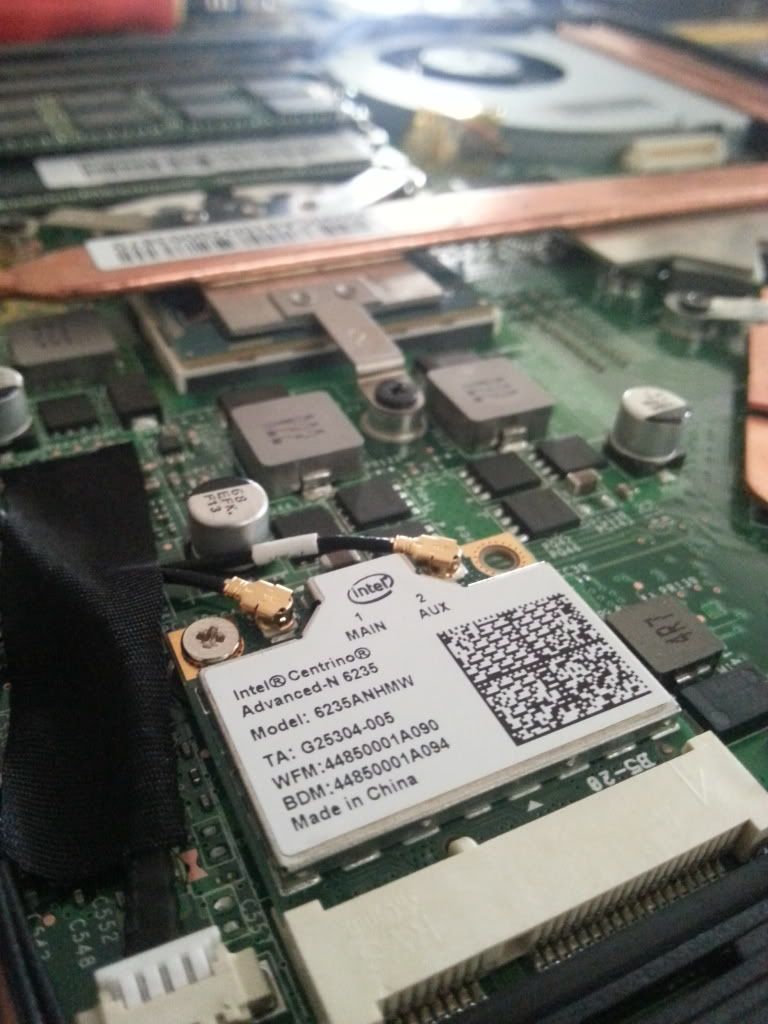
New parts get!

user posted image

Let's see if this works better than the cheapo stock Azurewave.

Initial results: EFFING FAST and STABLE - the Azurewave used to get stuck, slow down and throw me the "no connection" screen every 20 minutes. No such thing now.

BTW guys, you DON'T want to uninstall SCM. It disables the nifty pop-ups AND seems to disable the:

1) webcam switch button
2) eco switch button

This post has been edited by Eiraku: Jul 27 2013, 11:07 AM
Eiraku
post Jul 27 2013, 03:25 PM

Geeking since 1985!
*******
Senior Member
7,037 posts

Joined: Apr 2006


QUOTE(Areas Elysian @ Jul 27 2013, 11:18 AM)
What nifty pop-ups?
*
Just some translucent, aero style OSX pop-up knockoffs when you turn stuff on and off with SCM or the FN button combos. Which reminds me, WTF is "Eco mode" for anyway when we already have Windows managing our power profiles?

Oh and kudos to All IT Hypermart:

user posted image

Turns out I was still under the 7 day exchange period, so I could exchange the broken Coolermaster NA90 for the HuntKey Xman by just paying up the difference. Very classy, All IT.

Initial impressions, this thing is THIN!

This post has been edited by Eiraku: Jul 27 2013, 04:34 PM
Eiraku
post Jul 28 2013, 12:39 AM

Geeking since 1985!
*******
Senior Member
7,037 posts

Joined: Apr 2006


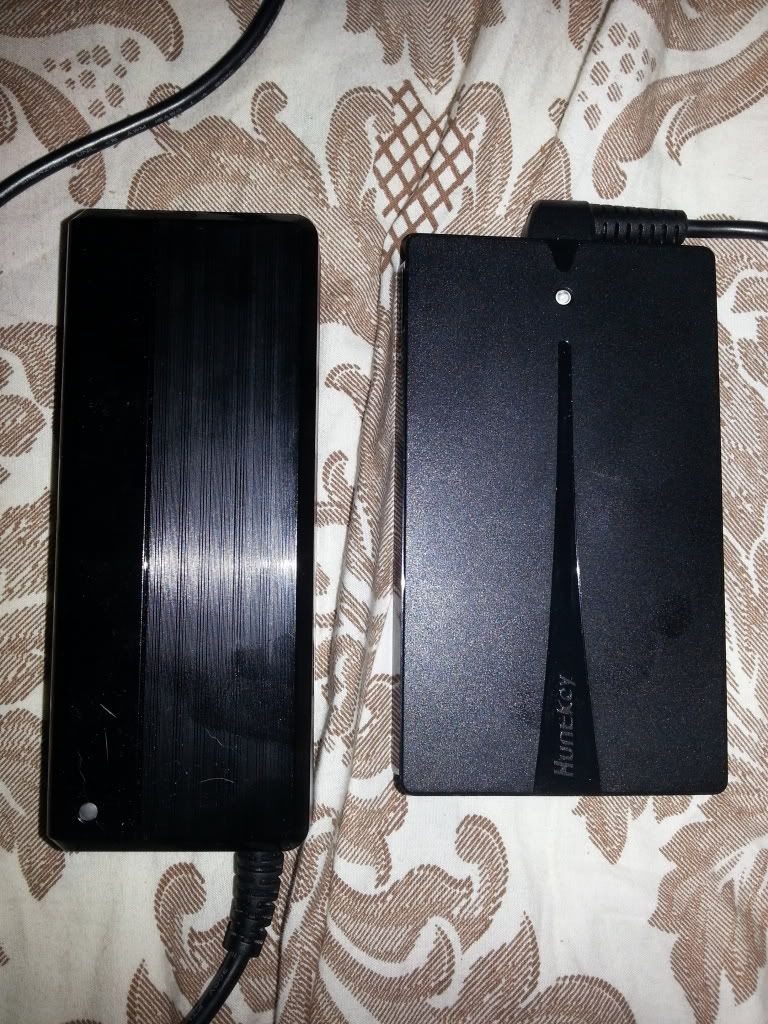
user posted image

Here's a photo comparison of the size difference between the Mini and the Xman, with the Xman being only half as thick. The finishing is different too: the Mini is glossy with a faux "brushed" effect while Xman is matte.

Funny thing is, while they both get really warm under heavy load, it seems that the supposed newer tech (and higher efficency) on the Xman is keeping it slightly cooler than the Mini, which - considering the thin-ness of the Xman - is surprising. The USB port works fine, and it supplies enough power for proper phone charging too (1A).

Issues? The Xman uses the same adapter plug as the Coolermaster (a dual prong connector to L-adapter plugs) vs the simple MSI-spec connector to other adapters configuration that the Mini uses (which means I can use the Mini adapter-less with the GE40). Thus, if you lose ANY of the Xman adapter heads, you're pretty much toast.

Long story short, HuntKey makes surprisingly good universal PSUs, and the Xman is a great choice for portable use.

Have I tested both W/O the battery inserted? After the horror that happened with the Coolermaster, I don't think so.

This post has been edited by Eiraku: Jul 28 2013, 12:53 AM
Eiraku
post Jul 28 2013, 12:55 AM

Geeking since 1985!
*******
Senior Member
7,037 posts

Joined: Apr 2006


Next, the Intel Advanced-N 6235 WIFI + BT card.

Initially I had issues keeping a solid WIFI connection from my room (which is at another end of the house from the router). But some tests revealed that it was channel interference causing a problem, so I switched the router to another channel and it's been performing admirably ever since.

Speeds were good (much less dropped pages while surfing), and pings were considerably better when I was playing Hawken, as compared as when I was using the Azurewave stock card (considerable lag and a boatload of dropped pages).

The BT4.0 part of the card also works fine, no issues. Pairing with the Orochi went on without a hitch - though I had to disable "allow BT sleep" in advanced driver settings to keep Windows 8 from BSODing on me (as it did with the Azurewave).
Eiraku
post Jul 28 2013, 01:51 AM

Geeking since 1985!
*******
Senior Member
7,037 posts

Joined: Apr 2006


QUOTE(Zakov @ Jul 28 2013, 01:11 AM)
Nice impressions there. Although I just read a review about the XMan on Techpowerup here: http://www.techpowerup.com/reviews/Huntkey/X-MAN_90W/

Decent score but there are issues with ripple suppression, which in real world usage we might not notice.

Looking forward to hear more about the Intel 6235 WIFI card, I'm also planning to go for the Intel 7260AC card as I've just upgraded my home router to an ASUS RT-AC66U. Won't hurt to adopt new standards early(apart from the costs that is).

Btw, anybody want to sell their stock 8GB DDR3L RAM that came with the MSI GE40? biggrin.gif
*
I don't think our GE40s came with DDR3L. Only normal DDR3 IINM. I think only the new M14x comes with 3Ls as standard.

6 Pages < 1 2 3 4 > » Top
Topic ClosedOptions
 

Change to:
| Lo-Fi Version
0.0693sec    0.66    7 queries    GZIP Disabled
Time is now: 11th December 2025 - 12:16 PM