

QUOTE(mrzee @ Dec 17 2012, 12:47 PM)
i have fx6100.what mobo is good for gaming.tyty 

ASUS SABERTOOTH 990FX RM6xx should be good. *Sarcasms mode*AMD Bulldozer & Bobcat
|
|
 Dec 17 2012, 01:03 PM Dec 17 2012, 01:03 PM
|
 
Senior Member
4,042 posts Joined: Jan 2011 From: Alor Gajah, Melaka  
|
QUOTE(mrzee @ Dec 17 2012, 12:47 PM) i have fx6100.what mobo is good for gaming.tyty ASUS SABERTOOTH 990FX RM6xx should be good. *Sarcasms mode* |
|
|
|
|
|
Dec 17 2012, 01:29 PM
|

Junior Member
133 posts Joined: May 2011 From: Malaysia 
|
QUOTE(Hilmax @ Dec 17 2012, 01:03 PM) ASUS SABERTOOTH 990FX RM6xx should be good. *Sarcasms mode* why the sacrasm?i don understand haha  |
|
|
Dec 17 2012, 01:38 PM
|

Senior Member
1,613 posts Joined: Feb 2008 From: Sg Long/Serdang
|
QUOTE(mrzee @ Dec 17 2012, 01:29 PM) why the sacrasm?i don understand haha haha he is trying poison u with premium stuff  |
|
|
Dec 17 2012, 01:44 PM
|
|
Senior Member
4,042 posts Joined: Jan 2011 From: Alor Gajah, Melaka
|
QUOTE(mrzee @ Dec 17 2012, 01:29 PM) why the sacrasm?i don understand haha Why no budget stated?  This post has been edited by Hilmax: Dec 17 2012, 01:49 PM |
|
|
Dec 17 2012, 01:44 PM
|
|
Junior Member
133 posts Joined: May 2011 From: Malaysia
|
QUOTE(bai1101 @ Dec 17 2012, 01:38 PM) haha he is trying poison u with premium stuff is it hahaha.but the mobo sound very good slurppppAdded on December 17, 2012, 4:37 pm QUOTE(Hilmax @ Dec 17 2012, 01:44 PM) Why no budget stated? Budget around 6 something.that value my moneyThis post has been edited by mrzee: Dec 17 2012, 04:37 PM |
|
|
Dec 17 2012, 05:56 PM
|
|
Senior Member
4,042 posts Joined: Jan 2011 From: Alor Gajah, Melaka
|
QUOTE(mrzee @ Dec 17 2012, 01:44 PM) is it hahaha.but the mobo sound very good slurpppp I try to reduce the mobo price featuring both X16 slot dual run at 8x and the selection are Asus M5A99X EVO R2.0, ASrock 990FX Extreme3 and MSI 990FXA-GD80 where the ASrock and MSI i cannot confirm if they can run at 8x in CF-X/SLI mode.Added on December 17, 2012, 4:37 pm Budget around 6 something.that value my money |
|
|
|
|
|
Dec 18 2012, 12:54 PM
|

Senior Member
2,004 posts Joined: Mar 2009
|
How to know that heatsink actually make proper contact with the cpu?
I tried touching the base plate after shutting down the computer but I didn't feel any heat. Does the heat lost very quickly?  |
|
|
Dec 18 2012, 01:31 PM
|

Senior Member
1,183 posts Joined: Jun 2009
|
Try change fan on the Heatsink like Scythe Gentle Typhoon 120mm - 1850 RPM
|
|
|
Dec 18 2012, 01:44 PM
|
|
Senior Member
2,004 posts Joined: Mar 2009
|
What does the fan has anything to do with the heatsink contact to the cpu?
Also my heatsink use 92mm fan  |
|
|
Dec 18 2012, 02:01 PM
|
|
Senior Member
1,183 posts Joined: Jun 2009
|
General Rule
More surface on the Heat-sink, the more the heat can be disperse quickly The larger the diameter of the fan, the more surface area it can cover The higher the static pressure fan rating, the more air can be pushed within the heat-sink fin. For heat-sink fan always go with the higher static pressure |
|
|
Dec 18 2012, 08:19 PM
|

Senior Member
5,211 posts Joined: Feb 2005 From: Konohana
|
QUOTE(Patent @ Dec 18 2012, 12:54 PM) How to know that heatsink actually make proper contact with the cpu? To check for proper heatsink contact, check how thermal paste coverage when you pressed the heatsink against the CPU. I tried touching the base plate after shutting down the computer but I didn't feel any heat. Does the heat lost very quickly? Your heatsink is using HDT (heatpipe direct touch), use this to properly apply thermal paste on it. QUOTE(sulfuriq @ Dec 18 2012, 02:01 PM) General Rule Don't be ridiculous. CM Hyper TX3 Evo could only fit 92mm fan. When fitted with 120mm fan it will be bigger than the heatsink itself, thus less airflow going though heatsink itself and the motor of the fan is larger than the 92mm fan means more dead spot (no airflow) on the fins. I have 92mm heatsink before (Arctic Freezer 64 Pro), fitting 120mm fan isn't the solution to get better performance out of it. Only way is to get higher CFM 92mm fan.More surface on the Heat-sink, the more the heat can be disperse quickly The larger the diameter of the fan, the more surface area it can cover The higher the static pressure fan rating, the more air can be pushed within the heat-sink fin. For heat-sink fan always go with the higher static pressure |
|
|
Dec 18 2012, 09:02 PM
|
|
Senior Member
1,183 posts Joined: Jun 2009
|
My bad I didn't realize that EVO can't fit the 120mm fan. Noctua DH-14 using 2 size of fans, 140mm and 120mm while the heatsink on the 2 towers are the same size including Thermalright Silver Arrow. The advantages of using large diameter fan is that you can cool down the heat pipe underneath the Heatsink fins. I managed to squeeze down 5 degrees C more on full load when I'm using GentleTyphoon which I have directed the fan to the heatpipe below. Another solution is if you can use a fan underneath the cpu socket (behind the motherboard).
|
|
|
Dec 18 2012, 09:29 PM
|
|
Senior Member
2,004 posts Joined: Mar 2009
|
So not feeling any heat from the heatsink base plate or the copper pipes is normal?
Feel kinda weird since the temperature is showing 50 °C but I barely feel any heat on them. |
|
|
|
|
|
Dec 18 2012, 09:45 PM
|
|
Senior Member
1,183 posts Joined: Jun 2009
|
It's normal. If you want to feel the actual heat using your finger, remove the hea tsink then start your pc. Your rig will automatically shutdown then put your finger on the proc. My A8-3870K running for 70C all the time as my sons playing LEGO games on it for several hours doing just fine without a glitch.
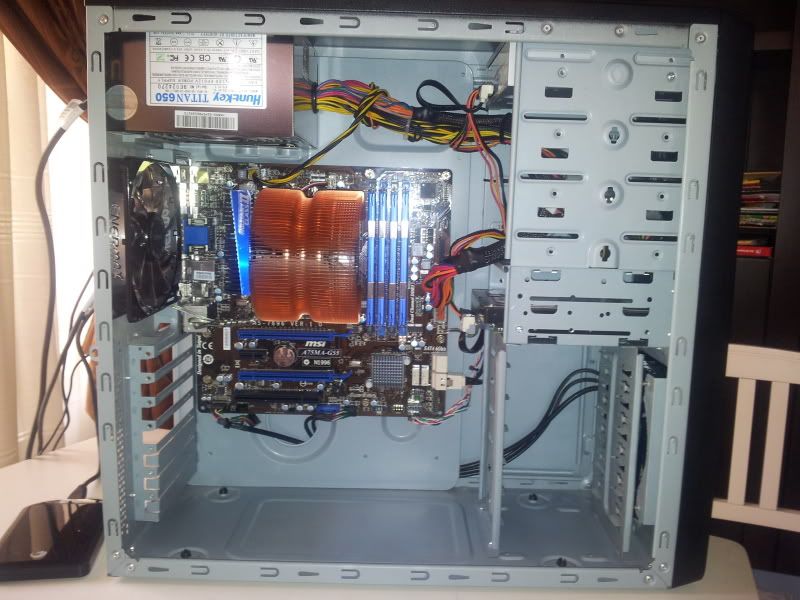 This post has been edited by sulfuriq: Dec 18 2012, 09:46 PM |
|
|
Dec 20 2012, 12:04 PM
|

Junior Member
92 posts Joined: Aug 2007 
|
good posts guys, learnt a lot from the posts.
 My FX8320 is running at approximately 47c idle and at 62c max. Am using the Passmark Burn-in Tests to gauge the maximum temperature. When playing CPU intensive games like Far Cry 3, it usually hovers around 58 - 60c. I am using stock AMD/Coolermaster HSF. The fan is noisy at higher temperature though  Just out of curiousity, are the temperatures higher/lower than yours? I am using Asus' PC Probe to gauge temperature by the way. If I am using CPUTemp, the readings are usually lower at max. thx This post has been edited by Alphawolf: Dec 20 2012, 12:05 PM |
|
|
Dec 20 2012, 05:26 PM
|
|
Senior Member
2,004 posts Joined: Mar 2009
|
QUOTE(Patent @ Dec 16 2012, 02:49 PM) My cpu temperature when playing borderlands 2. Another question, why is the temperature for the CPU and HD 7660D different?» Click to show Spoiler - click again to hide... « Maybe I need to use a better fan for my casing. Shouldn't the temperature be same since they are on the same die? |
|
|
Dec 20 2012, 05:47 PM
|
|
Senior Member
5,211 posts Joined: Feb 2005 From: Konohana
|
QUOTE(Patent @ Dec 20 2012, 05:26 PM) Another question, why is the temperature for the CPU and HD 7660D different? Physically yes they on the same die but they load differently thus different temperature and incorporate power gating which reduces voltage and clockspeed of certain light loaded units of the APU (like when using CPU intensive program, the CPU will get all the power while the GPU being clocked down and reduced voltage).Shouldn't the temperature be same since they are on the same die? |
|
|
Dec 20 2012, 05:56 PM
|

Senior Member
3,761 posts Joined: Oct 2005
|
Does the FX chip needs to add in ~10C to gauge it's true running temperature like the Phenom II?
|
|
|
Dec 27 2012, 08:50 AM
|
|
Junior Member
92 posts Joined: Aug 2007
|
QUOTE(Thrust @ Dec 20 2012, 05:56 PM) Does the FX chip needs to add in ~10C to gauge it's true running temperature like the Phenom II? could just use AMD's own Overdrive or cputemp to get the readings on the core temps. from my googling into core temps vs CPU temp, it seems like we should read from core temps. the core temps readings are apparently some sort of calculations to gauge heat inside the cores...so when idling, it will show ridiculously low temperatures.. http://www.overclock.net/t/1128821/amd-tem...ation-and-guide what worries me is that AMD set the maximum operating temperature of FX chips to 62c core temp. at maximum load, my core temps are hovering around 50c to 58c, ...uncomfortably close to 62c.  hope the sifus can shed some light on whether I should be worried.. This post has been edited by Alphawolf: Dec 27 2012, 09:26 AM |
|
|
Dec 27 2012, 04:40 PM
|
|
Senior Member
1,183 posts Joined: Jun 2009
|
Last time my full load was around 57c, now after using GentleTyphoon is around 52c. My rig is not in a condition room, so need a proper air flow to get those hot air out from the case.
|
| Change to: |  0.0287sec 0.0287sec
 0.28 0.28
 6 queries 6 queries
 GZIP Disabled GZIP Disabled
Time is now: 24th December 2025 - 01:21 AM |
 Quote
Quote
