Outline ·
[ Standard ] ·
Linear+
Asus A | U | N series combined thread V2, New model coming in.....
|
melvintcs
|
 Nov 14 2010, 10:47 PM Nov 14 2010, 10:47 PM
|

|
QUOTE(eugenechiuu @ Nov 14 2010, 10:42 PM) This GPU only can play SC II low-medium.. wat? so suxx? then how about i choose other model with i3 processor.. is tat i3 and i5 really have a big different?
Added on November 14, 2010, 10:50 pmhow about HD5470 1GB? This post has been edited by melvintcs: Nov 14 2010, 10:50 PM |
|
|
|
|
|
lee_what2004
|
Nov 14 2010, 11:41 PM
|
*stare* ji--------

|
Pretty much the same level with 310M....
You need at least GT420M/GT330M/GT335M/HD5650
|
|
|
|
|
|
sopi_neon
|
Nov 15 2010, 12:20 AM
|
Getting Started

|
can u join here???im using x42jr...lappy with i7..
|
|
|
|
|
|
ScivanShimitar
|
Nov 15 2010, 01:42 AM
|
Getting Started
|
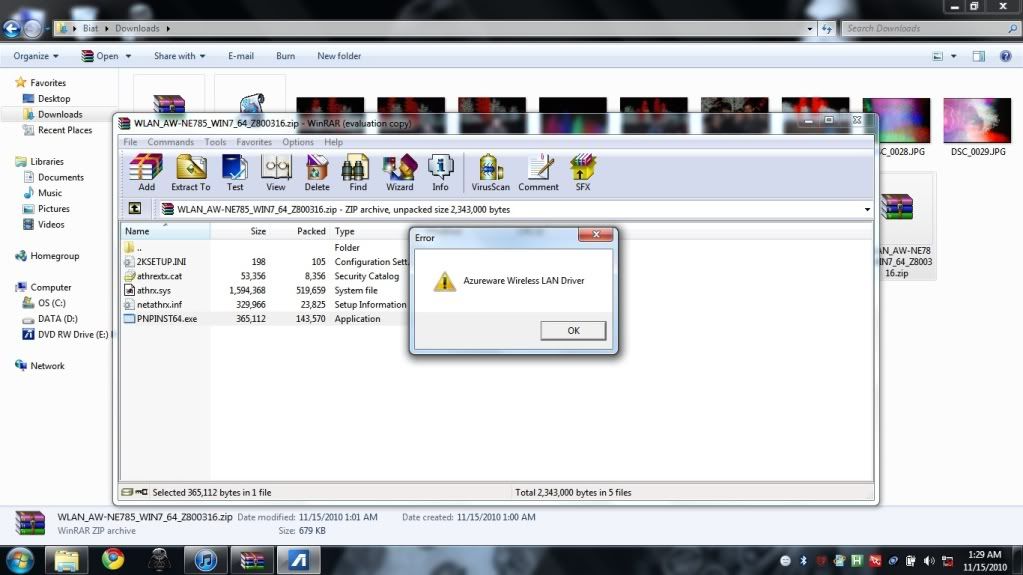
Im having prob with my wireless, it is not working right. it does not show the driver on the device manager, but when i try to install it this error popped out » Click to show Spoiler - click again to hide... « |
|
|
|
|
|
lee_what2004
|
Nov 15 2010, 01:44 AM
|
*stare* ji--------
|
Is that your wireless card ?
Since Asus website listed quite a lot different wireless card driver...
Pressed Fn + F2, right ?
|
|
|
|
|
|
ScivanShimitar
|
Nov 15 2010, 01:50 AM
|
Getting Started
|
i think its the right card,
im using a42jv, even it is not right i already downloaded from asus and tried all the available driver for wireless
|
|
|
|
|
|
lee_what2004
|
Nov 15 2010, 01:52 AM
|
*stare* ji--------
|
For A42Jv, its atheros driver (last time I check), which isn't in Asus driver website...
|
|
|
|
|
|
ScivanShimitar
|
Nov 15 2010, 01:57 AM
|
Getting Started
|
really?
searching right now
|
|
|
|
|
|
lee_what2004
|
Nov 15 2010, 01:58 AM
|
*stare* ji--------
|
Atheros AR5005G if not mistaken, didn't have A42Jv on hand now....
|
|
|
|
|
|
kizwan
|
Nov 15 2010, 02:03 AM
|
|
|
Mine AR9285.
|
|
|
|
|
|
ScivanShimitar
|
Nov 15 2010, 02:05 AM
|
Getting Started
|
Well in this site it says that it is using AR9285 http://forum.notebookreview.com/asus/51784...ers-lounge.htmldoes this laptop have different region hardware? |
|
|
|
|
|
lee_what2004
|
Nov 15 2010, 02:06 AM
|
*stare* ji--------
|
Or maybe it is AR9285... Can't remember the exact model number  and that's kizwan's thread  This post has been edited by lee_what2004: Nov 15 2010, 02:07 AM This post has been edited by lee_what2004: Nov 15 2010, 02:07 AM |
|
|
|
|
|
eanson
|
Nov 15 2010, 02:16 AM
|
|
|
hi guys, im using A52JC,just bought it 3 weeks ago, the cd-rom seems to stop halfway when im installing game..i tried different game cds oso the same n i tried to install it on other PC seems to have no problem...is there any solutions without sending it to service center? thx
|
|
|
|
|
|
ScivanShimitar
|
Nov 15 2010, 02:17 AM
|
Getting Started
|
well for now theres no .exe file on the folder that i downloaded.
how do I install the driver because when i scan for hardware changes on device manager it didnt detect my wireless hardware
|
|
|
|
|
|
lee_what2004
|
Nov 15 2010, 02:19 AM
|
*stare* ji--------
|
QUOTE(eanson @ Nov 15 2010, 02:16 AM) hi guys, im using A52JC,just bought it 3 weeks ago, the cd-rom seems to stop halfway when im installing game..i tried different game cds oso the same n i tried to install it on other PC seems to have no problem...is there any solutions without sending it to service center? thx Seems like need to send it to the service center... QUOTE(ScivanShimitar @ Nov 15 2010, 02:17 AM) well for now theres no .exe file on the folder that i downloaded. how do I install the driver because when i scan for hardware changes on device manager it didnt detect my wireless hardware Need to install the driver via device manager and browse the inf... This post has been edited by lee_what2004: Nov 15 2010, 02:20 AM |
|
|
|
|
|
eanson
|
Nov 15 2010, 02:21 AM
|
|
|
QUOTE(lee_what2004 @ Nov 15 2010, 02:19 AM) Seems like need to go service center.. sigh...thx anyway..dunno will take how long for the service centers to fix it...  |
|
|
|
|
|
ScivanShimitar
|
Nov 15 2010, 02:22 AM
|
Getting Started
|
QUOTE(lee_what2004 @ Nov 15 2010, 02:19 AM) Seems like need to send it to the service center... Need to install the driver via device manager and browse the inf... what do you mean by inf? |
|
|
|
|
|
lee_what2004
|
Nov 15 2010, 02:23 AM
|
*stare* ji--------
|
Need to right click the question mark (the wireless device) on device manager, then choose update driver, then keep choose the option to browse then browse to the folder you extract, then just choose either netathr.inf or netathrx.inf then install....
|
|
|
|
|
|
ScivanShimitar
|
Nov 15 2010, 02:30 AM
|
Getting Started
|
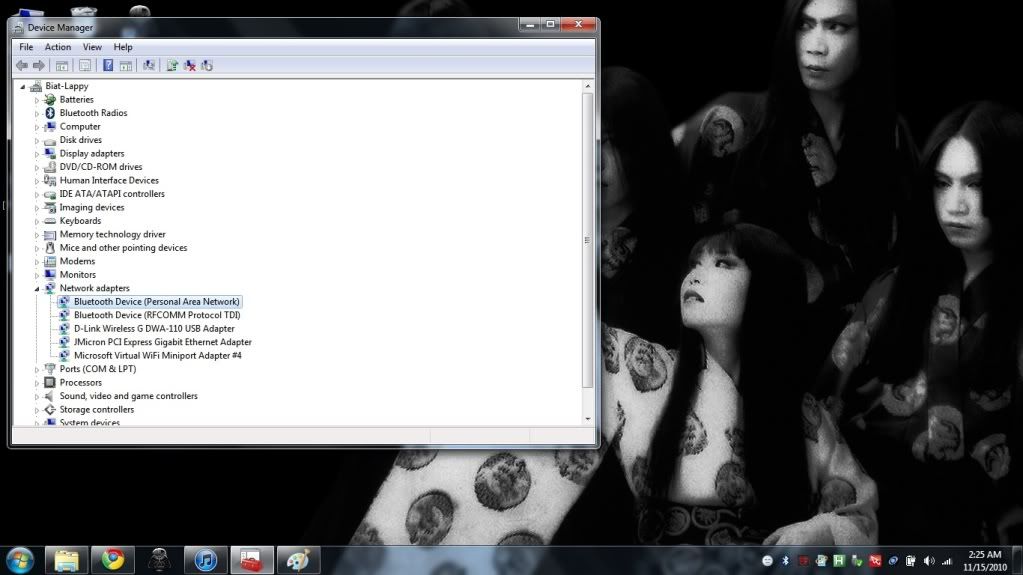
Ermm the thing is I cant find the wireless device on the device manager » Click to show Spoiler - click again to hide... « |
|
|
|
|
|
lee_what2004
|
Nov 15 2010, 02:31 AM
|
*stare* ji--------
|
If like that, no idea Tried restarting ? |
|
|
|
|



 Quote
Quote







 0.0286sec
 0.75
0.75
 6 queries
 GZIP Disabled