Welcome Guest ( Log In | Register )

Bump Topic Topic Closed RSS Feed

Outline · [ Standard ] · Linear+

 Asus A | U | N series combined thread V2, New model coming in.....

views
     
ScivanShimitar
post Sep 22 2010, 05:37 AM

Getting Started
**
Junior Member
186 posts

Joined: Mar 2010
QUOTE(afify88 @ Sep 22 2010, 02:56 AM)
hehe juz playing assasin creed 2.........my a42jv temp goes until 79 C even i'm using zalman nc1000.........hak3 biggrin.gif  biggrin.gif
still got probs with my internet lor... sad.gif  sad.gif  sad.gif

anyway can this game play with a42jv?? hmm.gif  hmm.gif
a)dragon age
b)transformers
c)all prince of persia series
d)bioshock
e)half life orange box
f)all battlefield and medal of honour series
*
i dont know about dragon age but I can play all of those game with highest setting
ScivanShimitar
post Nov 11 2010, 12:13 AM

Getting Started
**
Junior Member
186 posts

Joined: Mar 2010
Having prob with my a42JV,
my window is unable to boot,
just stuck at the asus loadscreen,
warghhhhhhhhhhhhhhhhhhh im sitting for final exam this week how to study?
ScivanShimitar
post Nov 11 2010, 12:15 AM

Getting Started
**
Junior Member
186 posts

Joined: Mar 2010
QUOTE(astria @ Nov 11 2010, 12:13 AM)
did u remove all USB stuff???
*
yeah even the cooler
ScivanShimitar
post Nov 11 2010, 07:22 AM

Getting Started
**
Junior Member
186 posts

Joined: Mar 2010
QUOTE(kizwan @ Nov 11 2010, 12:29 AM)

Added on November 11, 2010, 12:30 am
Your hard disk is kaput I think. Try remove the hard disk.
*
Well i dunno,
the hard disk does make alot of twitching sound on the bootscreen when I was booting


QUOTE(astria @ Nov 11 2010, 06:56 AM)
BIOS?
*
I doubt its a BIOS prob,
cause i managed to made it to desktop just now.

At first before the problem occur the wireless driver is missing from the device manager,
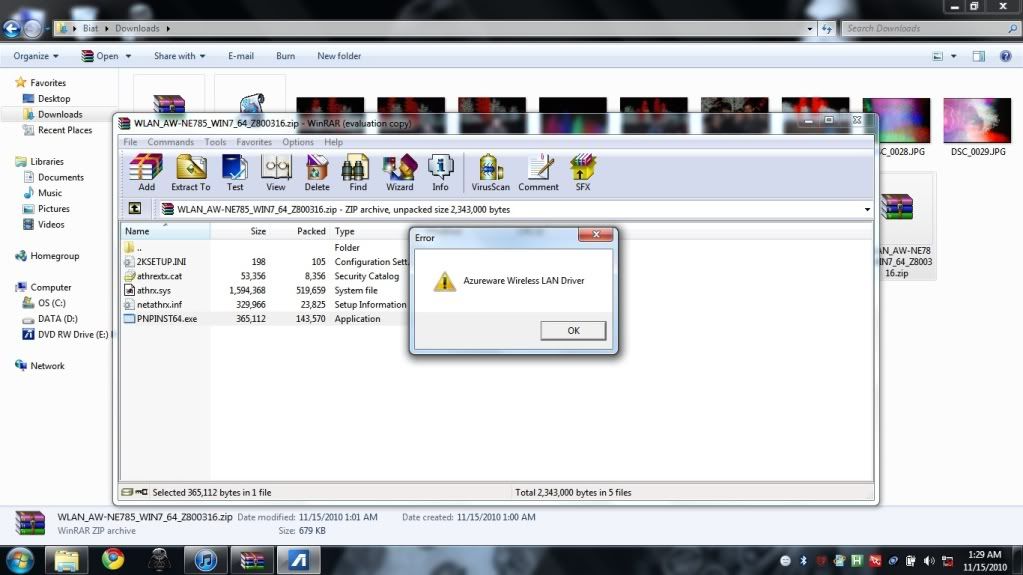
I tried to install it but theres an error keep blocking me, but it didn't specify the type of error.
After I turned off the power then wanted to on back the problem still persist at asus loadscreen.
Its kind of random chances that i make it to desktop

ScivanShimitar
post Nov 15 2010, 01:42 AM

Getting Started
**
Junior Member
186 posts

Joined: Mar 2010
Im having prob with my wireless, it is not working right.
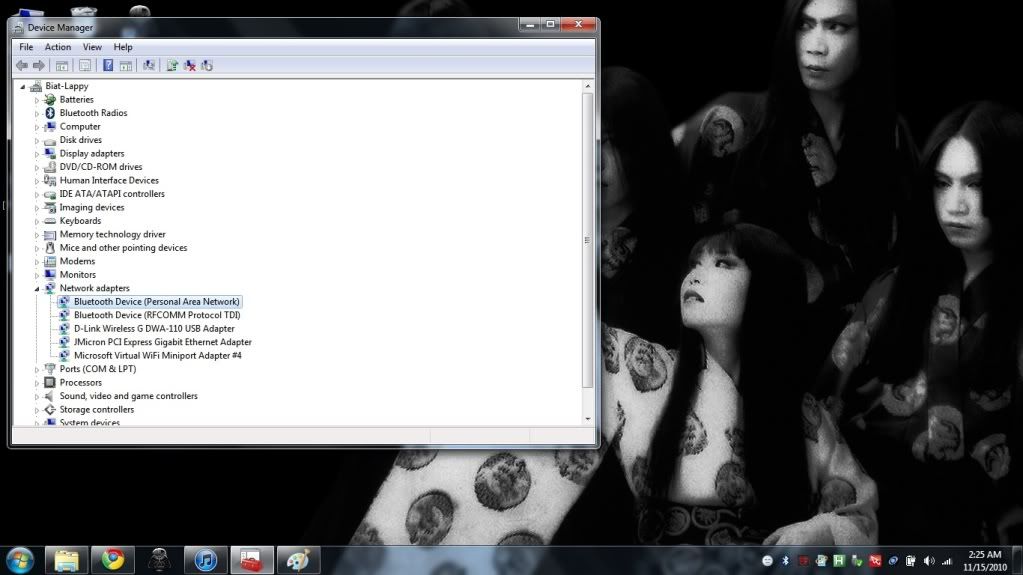
it does not show the driver on the device manager,
but when i try to install it this error popped out
» Click to show Spoiler - click again to hide... «


ScivanShimitar
post Nov 15 2010, 01:50 AM

Getting Started
**
Junior Member
186 posts

Joined: Mar 2010
i think its the right card,
im using a42jv, even it is not right i already downloaded from asus and tried all the available driver for wireless
ScivanShimitar
post Nov 15 2010, 01:57 AM

Getting Started
**
Junior Member
186 posts

Joined: Mar 2010
really?
searching right now
ScivanShimitar
post Nov 15 2010, 02:05 AM

Getting Started
**
Junior Member
186 posts

Joined: Mar 2010
Well in this site it says that it is using AR9285
http://forum.notebookreview.com/asus/51784...ers-lounge.html
does this laptop have different region hardware?
ScivanShimitar
post Nov 15 2010, 02:17 AM

Getting Started
**
Junior Member
186 posts

Joined: Mar 2010
well for now theres no .exe file on the folder that i downloaded.
how do I install the driver because when i scan for hardware changes on device manager it didnt detect my wireless hardware
ScivanShimitar
post Nov 15 2010, 02:22 AM

Getting Started
**
Junior Member
186 posts

Joined: Mar 2010
QUOTE(lee_what2004 @ Nov 15 2010, 02:19 AM)
Seems like need to send it to the service center...
Need to install the driver via device manager and browse the inf...
*
what do you mean by inf?
ScivanShimitar
post Nov 15 2010, 02:30 AM

Getting Started
**
Junior Member
186 posts

Joined: Mar 2010
Ermm the thing is I cant find the wireless device on the device manager
» Click to show Spoiler - click again to hide... «

ScivanShimitar
post Nov 15 2010, 02:33 AM

Getting Started
**
Junior Member
186 posts

Joined: Mar 2010
Yeah, no change whatsoever
ScivanShimitar
post Nov 15 2010, 09:42 PM

Getting Started
**
Junior Member
186 posts

Joined: Mar 2010
QUOTE(kizwan @ Nov 15 2010, 02:41 AM)
What happen if you disconnect the D-Link Wireless USB & restart?
*
erm nothing happened,
there will be no connection ler

QUOTE(astria @ Nov 15 2010, 07:55 AM)
try grab ur driver from lwww.laptopvideo2go.com

that's y i get the Atheros driver for my N81Vp's AR928X...
*
I already found the .exe for the driver
but as I tried to install it it will says cant found the hardware,
I think theres something wrong with my wireless device,
planning to send it to service centre after I finished my exam.

QUOTE(budingyun @ Nov 15 2010, 03:22 PM)
[attachmentid=1886254]
click that thing in the red square..scan hardware smile.gif
*
Nah..... cant cant anything

Topic ClosedOptions
 

Change to:
| Lo-Fi Version
0.0182sec    0.96    7 queries    GZIP Disabled
Time is now: 9th December 2025 - 04:59 PM