Welcome Guest ( Log In | Register )

Outline · [ Standard ] · Linear+

 Disk Partition Recovery, When BASIC becomes DYNAMIC suddenly

views
     
TScozack
post Apr 21 2005, 07:11 PM, updated 21y ago

New Member
*
Junior Member
30 posts

Joined: Jan 2003
From: Merlimau, malacca


anyone.. ?

it was like this, my friends got Seagate HD (80G) and have two partition on it.he used it as extrenal storage (USB). suddenly, one of the partition can't be read/access at all, the other one can. so he send it to one of the IT shop (at Lowyat - Hypermarket something) to recover it since he need his project data on it.

To make it worst, after he send it to that shop... both of the partition can't be read anymore and the disk now mark as DYNAMIC Disc (Unreadble) when used Disk management.

so, question is, is there any way to recover that partition? if does.. how to do it?

thanks in advance.
ulet
post Apr 22 2005, 01:39 AM

Regular
******
Senior Member
1,700 posts

Joined: Jan 2003
From: Kuala Lumpur


i aedi ask almost same situation like u but until now no reply that i can retrieve that data except using data recovery software.
u can visit the link here.
http://forum.lowyat.net/index.php?showtopi...6526&hl=dynamic
lex
post Apr 22 2005, 01:52 AM

Old Am I?
Group Icon
VIP
18,182 posts

Joined: Jan 2005
From: Dagobah
I'm kinda caught by this weird problems of drives reverting to Dynamic disks. blink.gif

I suspect it could be the use of SATA hard drive. Possibly the SATA RAID driver bugs or operating system bugs which a "new drive" (if not recognized) will be converted to dynamic disk setup (this is similar to NRAID configuration). sweat.gif

For those who did not encounter this problem yet, I suggest not to install any SATA RAID drivers but just the normal SATA drivers instead (most manufacturers have 2 driver versions - one for RAID and the other for non-RAID setup). unsure.gif

Another thing to watch out for is disk spanning (used for dynamic disk setups) also... If you are not using it, then disable this. blush.gif

So far I had 6 external USB HDDs (and all Seagates inside) and none of them had exhibit these kind of problems. smile.gif

Anyway.. WHAT brand and model is that external HDD case? rolleyes.gif

There is a data recovery service in Low Yat though, on the 3rd floor. Its called SCS-Myung. I suggest you ask for pricing first before trying it.. it may be quite expensive. sweat.gif

Reference: http://www.scs-myung.com/

Anyway would like to ask a few questions here:

Which WinXP operating system are you using?
1. Home Edition
2. Pro Edition
3. Corporate Edition

What Serive Pack are you using?
1. No Service Pack installed
2. Pre-Installed SP1 (comes with the WinXP)
3. Updated to SP1
4. Updated to SP2

Did you intsall any drive utilities such as Norton Utilities?

Did you install any drive auto-defragment utilities like "Disk Keeper"?

Can you list down your detailed full PC hardware specifications?

For research.. need to know if there are similarities in these cases. rolleyes.gif

This post has been edited by lex: Feb 12 2006, 06:31 PM
TScozack
post Apr 23 2005, 08:19 PM

New Member
*
Junior Member
30 posts

Joined: Jan 2003
From: Merlimau, malacca


Lex:

- Using WinXP Pro
- Service Pack 2
- no Norton Utilites (only norton antivirus)
- No disk keeper also
- Forgot the spec since it not in my pc.. it was my friends.. ask me to help him.. got so many project data in it.. pitty him.

Yup.. my friends already went to Data recovery shop at low yat, but its closed .. maybe next week.

now, he was very angry with the tech guy at that Hypermarket shop that make the disk morst.. (both of it can't be read at all)

thanks for the reply.. need to send it to data recovery.. ..

thanks again
lex
post Apr 25 2005, 02:35 AM

Old Am I?
Group Icon
VIP
18,182 posts

Joined: Jan 2005
From: Dagobah
From what I gather from other forum.. This issue of drives being assigned by Windows XP as dynamic disks arise when the drive letter assigned is used by another drive (usually a fixed drive) already installed. Since the drive already exists, then Windows XP doesn't know what do with it and re-assigns it as dynamic disk (because having the same drive letter). wacko.gif

What was the drive letter assigned to your drive before it suddenly became dynamic disk? unsure.gif
mietechie
post Apr 25 2005, 12:34 PM

Getting Started
**
Junior Member
209 posts

Joined: Dec 2004
From: KL


Try use R-Studio for NTFS for data recovery (Support Dynamic DIsk)..
TScozack
post Apr 27 2005, 11:28 PM

New Member
*
Junior Member
30 posts

Joined: Jan 2003
From: Merlimau, malacca


problem.... solved!!! using Active@Recovery Software (for ntfs)

both partition and all data are savely recovered!! no need to send it to data recovery center at lo yat... may be i will visit that hypermarket and told them how i did it..

thanks for your support


jeremy05
post May 3 2005, 02:25 PM

software engineer
******
Senior Member
1,851 posts

Joined: Apr 2005
From: kuala lumpur


Active@Recovery , whr r u download ? Is it free ?
outdoorxplorer
post May 6 2005, 09:31 PM

~Money Only Bring Pleasures When You Spent It WISELY!~
*******
Senior Member
2,028 posts

Joined: Jan 2003
From: Kuala Lumpur, MYS


notworthy.gif notworthy.gif i want to know where is that being downloaded too.. notworthy.gif notworthy.gif

This post has been edited by lex: Feb 12 2006, 06:31 PM
super macgyver
post May 11 2005, 07:45 PM

★~13k Spam Club~★
********
All Stars
19,322 posts

Joined: Jan 2003


QUOTE(cozack @ Apr 27 2005, 11:28 PM)
problem.... solved!!! using Active@Recovery Software (for ntfs)

both partition and all data are savely recovered!! no need to send it to data recovery center at lo yat... may be i will visit that hypermarket and told them how i did it..

thanks for your support
where to download it?

This post has been edited by lex: Feb 12 2006, 06:31 PM
SUSceo684
post May 11 2005, 10:08 PM

Component Burner
********
All Stars
11,667 posts

Joined: Jan 2003
From: Klang/Subang


off BT kua.. i used ontrack datarecovery

This post has been edited by lex: Feb 12 2006, 06:32 PM
VandreadX
post May 12 2005, 09:43 AM

New Member
*
Junior Member
29 posts

Joined: May 2005


For Ontrack...

http://www.ontrack.com/easyrecoverydatarecovery/
super macgyver
post May 12 2005, 02:20 PM

★~13k Spam Club~★
********
All Stars
19,322 posts

Joined: Jan 2003


nampak cozack punya special weapon lagi chun wor, atau mana yg bagus sekali?

This post has been edited by lex: Feb 12 2006, 06:31 PM
Drascox
post May 17 2005, 02:50 PM

Casual
***
Junior Member
328 posts

Joined: Jan 2003
Get It here Active@ product....

http://www.active-undelete.com/products.htm

This post has been edited by lex: Feb 12 2006, 06:32 PM
jinXxxx
post May 17 2005, 06:10 PM

Getting Started
**
Junior Member
57 posts

Joined: Feb 2005


my friend had the same prob.

i took his hard disk, put it in my pc, and suprisingly, i could read it....

i backed all the data into my ext hd and passed it back to him.

back home, my friend plugged his hd back into his drive and yet...he couldnt do anything....so he reformatted it...and retrieved his data from my hd.

but i'm curious....why can i read it when he cant?

This post has been edited by lex: Feb 12 2006, 06:32 PM
thor_gentt
post Jun 6 2005, 10:43 AM

Getting Started
**
Junior Member
155 posts

Joined: Jan 2003
From: Cyber Jaya


Is there any freeware data recovery for FAT and FAT32, Active@Data recovery is only support reading from ntfs and ntfs5, and Ontrack Data Recovery is not freeware..
shreaker
post Jun 6 2005, 02:49 PM

5-star hotel
*****
Senior Member
798 posts

Joined: Jan 2003
From: KL, KL
QUOTE(jinXxxx @ May 17 2005, 06:10 PM)
my friend had the same prob.

i took his hard disk, put it in my pc, and suprisingly, i could read it....

i backed all the data into my ext hd and passed it back to him.

back home, my friend plugged his hd back into his drive and yet...he couldnt do anything....so he reformatted it...and retrieved his data from my hd.

but i'm curious....why can i read it when he cant?
Dynamic disks can only be used in WinXP Pro and Windows 2000. Windows XP Home, Windows 95, 98 etc cannot use dynamic disks. Search for "dynamic disk" in Google, there're alot of articles about it.

If u need to downgrade from Pro to Home (like me), you need to convert the disk's data back to basic disk.

What I did was I copied out my files from HDD 1 to HDD 2 in WinXP Pro, then used the Disk Management tool to convert HDD 1 to basic disk... then copy everything back. Very mafan. I haven't tested the programs listed earlier, but if they work, use them. It'll make life alot easier.

This post has been edited by lex: Feb 12 2006, 06:33 PM
vandetta
post Jun 26 2005, 11:21 AM

On my way
****
Senior Member
658 posts

Joined: Jan 2003


i use stellar pheonix recovery. it can support FAT, NTFS and Linux format also, works great, can recover file in bad sector hdd too..

This post has been edited by vandetta: Jun 26 2005, 11:33 AM
Acquiesce
post Jul 4 2005, 01:36 PM

Casual
***
Junior Member
355 posts

Joined: Sep 2004
Guys i think i'm having the same problem here...not too sure about it tho...

i've a 40Gb and 80GB hdd. The 40gb are my OS and prog files and the other hdd (80gb) are my datafiles,video and mp3s.

in my 80GB there are 3 partitions. strangely one of the partitions when i double click on it, a dialog box pops out saying this drive is not formatted, do you wnat to format it?

I went to the computer management and check the partition is with a FATor NTSF and its just empty there.

Any idea how can i recover the data in that partition. Before this happenned the partition's space is fully maxed out (could this be the reason?). Now i cant even browse the partition.

Cheers.
cry.gif
zabidi57
post Jul 19 2005, 05:54 PM

Getting Started
**
Junior Member
95 posts

Joined: Jan 2005
From: Somewhere around Subang Jaya


QUOTE(Acquiesce @ Jul 4 2005, 01:36 PM)
Guys i think i'm having the same problem here...not too sure about it tho...

i've a 40Gb and 80GB hdd. The 40gb are my OS and prog files and the other hdd (80gb) are my datafiles,video and mp3s.

in my 80GB there are 3 partitions. strangely one of the partitions when i double click on it, a dialog box pops out saying this drive is not formatted, do you wnat to format it?

I went to the computer management and check the partition is with a FATor NTSF and its just empty there.

Any idea how can i recover the data in that partition. Before this happenned the partition's space is fully maxed out (could this be the reason?). Now i cant even browse the partition.

Cheers.
cry.gif
I suggest that you check the harddisk vendor. Goto their websites, normally they have tools to check for problem in your hardisk.

To recover data, try using easy recovery by Ontrack. This data recovery program is quite good. I am not sure whether you can download it from their websites. If not try to get it in LYP. I did a data recovery on my 80GB hardisk which is complaining of errors.

Happy recovery.

This post has been edited by lex: Feb 12 2006, 06:24 PM
soccergod
post Aug 6 2005, 10:58 AM

b t b u n i t e d
****
Senior Member
662 posts

Joined: Oct 2004

I just recovered my Maxtor 40GB using Stellar Phoenix NTFS, just that you have 2 recover all the files to another drive, or you can choose to recover folder by folder.
Danny
post Aug 9 2005, 11:04 PM

New Member
*
Junior Member
38 posts

Joined: Jan 2003


QUOTE(soccergod @ Aug 6 2005, 10:58 AM)
I just recovered my Maxtor 40GB using Stellar Phoenix NTFS, just that you have 2 recover all the files to another drive, or you can choose to recover folder by folder.
soccergod pls help me..
do u dl the original version of stellar phoenix ntfs
coz i found the software,and successfully found all deleted files..
but it cant recover back to my pc..
do i need to pay for it? or is there any other way??

This post has been edited by lex: Feb 12 2006, 06:24 PM
myth817
post Aug 28 2005, 07:37 PM

New Member
*
Junior Member
5 posts

Joined: Aug 2005


How to recover the data i'm not so sure but this thing do happen to me during my final year. my hardisk crash and all the project gone. I sent to to someone else to recover the data coz i've try many ways to recover it but can't.
tzyzhing
post Sep 13 2005, 04:44 PM

On my way
****
Senior Member
557 posts

Joined: Jul 2005
same problem here. I'm trying out Active@Recovery but it is a demo version. where to get full?

This post has been edited by lex: Feb 12 2006, 06:25 PM
dokidoki
post Oct 6 2005, 10:30 AM

I am not War machine~
*******
Senior Member
4,630 posts

Joined: Jul 2005
From: PJ somewhere~


QUOTE(tzyzhing @ Sep 13 2005, 04:44 PM)
same problem here. I'm trying out Active@Recovery but it is a demo version. where to get full?
bt will do~~ flex.gif

This post has been edited by lex: Feb 12 2006, 06:25 PM
sani_2020
post Oct 7 2005, 11:01 PM

On my way
****
Senior Member
582 posts

Joined: Sep 2004
From: K.L & Sg Petani


seems like all is shareware
have to pay lor...
how......
super macgyver
post Oct 13 2005, 09:41 AM

★~13k Spam Club~★
********
All Stars
19,322 posts

Joined: Jan 2003


if u sent to the data restore center, they require a very clean place to do their duty.
user posted image

This post has been edited by lex: Feb 12 2006, 06:25 PM
cheenjeat008
post Oct 18 2005, 05:15 AM

On my way
****
Senior Member
543 posts

Joined: Dec 2004
From: Kuala Lumpur


Good day, i have the same problem...I accidentally touch the molex connector on my Maxtor harddisk, damn, my pc hang. After re-boot, Oh my god, i keep on saying to myself, wtf and wts, all my data in my Maxtor harddisk gone..i can't even know what is the file format because the windows XP need me to initialize my harddisk and then need to format in order to use back the maxtor harddisk..I say to God, i dont care on my HK drama, i just want back my photo ( around 3.5GB ). I have become a mad man searching the internet looking for the solution and at last.....
Thank for this PINNED topic, i quickly get the ontrack EasyRecovery Pro v6.03 from internet (if you want to know how, please PM me, it is not good to publish the way to get the software). After download the USER GUIDE from Ontrack ( this is VERY IMPORTANT ), and read through, then i know what should i do.
I select RAW recovery. After letting the ontrack software scan on the maxtor harddisk, almost all the files recover (especially my photo). You just need to prepare an extra harddisk which is big enough for your data and files recovery in your old harddisk.
I would like to say thank you to Ontrack and Lowyat.net.

Now i am waiting for my files to be recover....Wish that all the lyn member discover the way to recover harddisk important files when WinXP can't recognize the File Format..

It take around 1hour and 20minutes to recover around 8.5GB of files..for the ontrack software..

Just a little bit sad because all my photo which over 2mb per photo can't recover perfectly, all my 8MP picture had been resize to 160 x 120. OMG, that is just i can say. Anyway the other type of file can be recover.
I am trying and searchin for the software which can recover photo in jpeg format ( the photo itself is over 2mb ).
Or does anyone know which software can do this perfectly??
Thank you and have a nice day.

Good day,
Finally i found the software that can meet my requirement and this software is really powerful.

Compare to the OnTrack EasyRecovery, the Stellar Phoenix FAT & NTFS is far more powerful than the OnTrack, but the User Interface is not attractive as the OnTrack.

After the comparison between the OnTrack and Stellar Phoenix, i will recommend the Stellar for more advance recover (like my photo-2mb case). As conclusion, both software perform well in normal recover task.
Thank you and have a nice day.

This post has been edited by cheenjeat008: Oct 18 2005, 05:17 AM
blind&deaf
post Oct 22 2005, 11:58 PM

Getting Started
**
Junior Member
84 posts

Joined: Jan 2003
From: Ipoh
i dont know whether it is appropriate to put this here ....

a friend of mine help me to assemble pc, i gratefully thank him for setting up my pc , however , there is one thing i dont understand, why he divided my harddisk into 3 partitions , and the C drive with total size just 4 GB , izzit suitable?

i am a stranger to this stuff, hope someone can help me
ahkeong82
post Oct 25 2005, 12:06 PM

Getting Started
**
Junior Member
72 posts

Joined: Oct 2005
From: Alor Setar


when u dun trust his profesional knowledge in pc, why u let him to do the assembly for u?
smile.gif

divide to few partition is normal, especially when u have a big capacity of hard disc
but 4gb for c a little too little, unless u dun install alot game and application need a large hard disc space

and for the recovery of my hard disc has fail, it show that my hard disc are unable to access and retrieve the data
sob sob cry.gif cry.gif cry.gif cry.gif cry.gif cry.gif cry.gif
QUOTE(blind&deaf @ Oct 22 2005, 11:58 PM)
i dont know whether it is appropriate to put this here ....

a friend of mine help me to assemble pc, i gratefully thank him for setting up my pc , however , there is one thing i dont understand, why he divided my harddisk into 3 partitions , and the C drive with total size just 4 GB , izzit suitable?

i am a stranger to this stuff, hope someone can help me


This post has been edited by lex: Feb 12 2006, 06:28 PM
super macgyver
post Oct 25 2005, 03:34 PM

★~13k Spam Club~★
********
All Stars
19,322 posts

Joined: Jan 2003


QUOTE(cheenjeat008 @ Oct 18 2005, 10:39 PM)
Good day,
Finally i found the software that can meet my requirement and this software is really powerful.
QUOTE(cheenjeat008 @ Oct 18 2005, 11:10 PM)
Compare to the OnTrack EasyRecovery, the Stellar Phoenix FAT & NTFS is far more powerful than the OnTrack, but the User Interface is not attractive as the OnTrack.

After the comparison between the OnTrack and Stellar Phoenix, i will recommend the Stellar for more advance recover (like my photo-2mb case). As conclusion, both software perform well in normal recover task.
Thank you and have a nice day.
ontrack EasyRecovery Pro v6.03 lose to Stellar Phonenix Fat & NTFS?
any reffer url for stellar?

This post has been edited by lex: Feb 12 2006, 06:28 PM
Silfrijin
post Oct 25 2005, 07:15 PM

Super Seven Stars
*******
Senior Member
2,186 posts

Joined: Aug 2005


QUOTE(cheenjeat008 @ Oct 18 2005, 11:10 PM)
Compare to the OnTrack EasyRecovery, the Stellar Phoenix FAT & NTFS is far more powerful than the OnTrack, but the User Interface is not attractive as the OnTrack.

After the comparison between the OnTrack and Stellar Phoenix, i will recommend the Stellar for more advance recover (like my photo-2mb case). As conclusion, both software perform well in normal recover task.
Thank you and have a nice day.
How about the latest version of Ontrack EasyRecovery Pro 6.10.07 as compared to Stellar Phoenix ? unsure.gif

This post has been edited by lex: Feb 12 2006, 06:29 PM
blind&deaf
post Nov 4 2005, 07:24 PM

Getting Started
**
Junior Member
84 posts

Joined: Jan 2003
From: Ipoh
QUOTE(ahkeong82 @ Oct 25 2005, 12:06 PM)
when u dun trust his profesional knowledge in pc, why u let him to do the assembly for u?
smile.gif

divide to few partition is normal, especially when u have a big capacity of hard disc
but 4gb for c a little too little, unless u dun install alot game and application need a large hard disc space

and for the recovery of my hard disc has fail, it show that my hard disc are unable to access and retrieve the data
sob sob cry.gif cry.gif cry.gif cry.gif cry.gif cry.gif cry.gif
i didnt say i dont trust his knowledges blink.gif

i just wonder if 4 GB C drive is too little for me

anyway thanks , i've formatted my pc

This post has been edited by lex: Feb 12 2006, 06:29 PM
Zeroize
post Nov 8 2005, 11:02 AM

Hardcock Gamer
*****
Senior Member
895 posts

Joined: Jan 2003
From: -- Alor Star, Kedah -- -- Gelang Patah, Johor --


I should have checked this thread earlier, my maxtor hdd facing this problem too, too bad i formated it already sad.gif

This post has been edited by lex: Feb 12 2006, 06:18 PM
cheenjeat008
post Nov 8 2005, 06:01 PM

On my way
****
Senior Member
543 posts

Joined: Dec 2004
From: Kuala Lumpur


QUOTE(Zeroize @ Nov 8 2005, 11:02 AM)
I should have checked this thread earlier, my maxtor hdd facing this problem too, too bad i formated it already sad.gif
Good day,
with the stellar software, you can recover the formatted harddisk data.....

QUOTE(super macgyver @ Oct 25 2005, 03:34 PM)
ontrack EasyRecovery Pro v6.03 lose to Stellar Phonenix Fat & NTFS?
any reffer url for stellar?
QUOTE(Silfrijin @ Oct 25 2005, 07:15 PM)
How about the latest version of Ontrack EasyRecovery Pro 6.10.07 as compared to Stellar Phoenix ? unsure.gif
Good day,
In the case for the recover folder and file name, the ontrack will set their own file and folder name, while the Stellar software let you to have a glance view on the recover data with the previous folder and files name.....
eBola
post Nov 13 2005, 07:56 PM

blah
Group Icon
Elite
1,928 posts

Joined: Jan 2003
From: i miss goatse :(


QUOTE(cheenjeat008 @ Oct 18 2005, 05:15 AM)
I would like to say thank you to Ontrack and Lowyat.net.
oh the irony of it all.

first you steal ontrack software by using a cracked copy. next you thank them pula.

lol!

why not thank them buy actually paying for a copy of their software?
tongue.gif

This post has been edited by lex: Feb 12 2006, 06:19 PM
bansai
post Nov 13 2005, 10:09 PM

Enthusiast
*****
Senior Member
781 posts

Joined: Jan 2003


Ontrack actually has a distributor in Malaysia? Wanna thank them personally?

Ontrack's software is actually not that powerful, but it puts everything in an easy to understand package.. it doesnt work at the lower levels of the drive operation...

This post has been edited by lex: Feb 12 2006, 06:19 PM
Acquiesce
post Nov 14 2005, 01:52 PM

Casual
***
Junior Member
355 posts

Joined: Sep 2004
guys what about this RecoverMyFile software?
bansai
post Nov 15 2005, 12:25 AM

Enthusiast
*****
Senior Member
781 posts

Joined: Jan 2003


if you're talking bout just recovering from deleted files/folders then give it a try.... dont recommend RecoverMyFile though.. there are lots more established names around..
Acquiesce
post Nov 15 2005, 12:17 PM

Casual
***
Junior Member
355 posts

Joined: Sep 2004
QUOTE(bansai @ Nov 15 2005, 12:25 AM)
if you're talking bout just recovering from deleted files/folders then give it a try.... dont recommend RecoverMyFile though.. there are lots more established names around..
ooooh ok ok..thanks for thepointer. thumbup.gif

btw my problem is that windows recognizes my drive as 'unformatted'

sure i guess that the above mention 2 software are the best around? blush.gif

This post has been edited by lex: Feb 12 2006, 06:20 PM
bansai
post Nov 15 2005, 04:06 PM

Enthusiast
*****
Senior Member
781 posts

Joined: Jan 2003


just run the software and select the drive you want to recover.. any software will do cause your problem is actually quite simple to solve..
tckowen
post Nov 21 2005, 12:58 AM

Getting Started
**
Junior Member
144 posts

Joined: Jun 2005
From: Tampin/Ipoh


I'm using a WD 80GB hd. I used PartitionMagic to create a new partition but instead created 2 accidentally. So I tried to merge both the 2 new partitons into a single partition but it fails.

Now, my old partiton becomes inactive and hidden. After toying around with a couple of times of merging and creating new partitions, even PartitionMagic could not load now. It states that the partition table could not be loaded. Any idea on what actually went wrong or how to solve this problem ? notworthy.gif

Snapshot of my storage management console

user posted image

This post has been edited by lex: Feb 12 2006, 06:20 PM
bansai
post Nov 21 2005, 03:48 PM

Enthusiast
*****
Senior Member
781 posts

Joined: Jan 2003


like above... try running the data recovery software... the whole table is lost, file locations are lost, got a chance that maybe some percentage of your files will be lost unless you do a raw recovery..
project-o
post Nov 21 2005, 08:18 PM

PROJECT-O
******
Senior Member
1,182 posts

Joined: Nov 2005
Is this R-studio DOS or Windows based ? Am trying to look for a DOS based one that can access and remove dynamic disks
QUOTE(mietechie @ Apr 25 2005, 12:34 PM)
Try use R-Studio for NTFS for data recovery (Support Dynamic DIsk)..


This post has been edited by lex: Feb 12 2006, 06:21 PM
Acquiesce
post Nov 23 2005, 03:15 PM

Casual
***
Junior Member
355 posts

Joined: Sep 2004
running recovery...in progress now...shall update youguys on the outcome!

finger crossed! thumbup.gif
tylux
post Nov 23 2005, 09:51 PM

Getting Started
**
Junior Member
103 posts

Joined: Nov 2005


QUOTE(tckowen @ Nov 21 2005, 03:58 AM)
Any idea on what actually went wrong or how to solve this problem ? notworthy.gif
Use Knoppix LiveCD and run QtParted to fix the partition table. RTFM on howtos and good luck!
Acquiesce
post Nov 24 2005, 11:44 AM

Casual
***
Junior Member
355 posts

Joined: Sep 2004
QUOTE(Acquiesce @ Nov 23 2005, 03:15 PM)
running recovery...in progress now...shall update youguys on the outcome!

finger crossed! thumbup.gif
good.managed to reclaim back all the photos in my drive..somephotos i think its being resized...not sure..have to ask the owner. I'll try on some audio and video files and see if there are any issues.

Restoring 1800++ files took only 1-2 hours. Vid and audio i believe will take ages. The restoring rate is somewhere between 300-400KB per second. Well depends on your pc spec i believe.

Cheers.
thumbup.gif

This post has been edited by lex: Feb 12 2006, 06:21 PM
project-o
post Nov 26 2005, 01:24 PM

PROJECT-O
******
Senior Member
1,182 posts

Joined: Nov 2005
Works on Dynamic disk ? without booting into Windows 2000/XP ?
QUOTE(vandetta @ Jun 26 2005, 11:21 AM)
i use stellar pheonix recovery. it can support FAT, NTFS and Linux format also, works great, can recover file in bad sector hdd too..


This post has been edited by lex: Feb 12 2006, 06:22 PM
Acquiesce
post Nov 28 2005, 02:26 PM

Casual
***
Junior Member
355 posts

Joined: Sep 2004
i've recovered somefiles...but right after i restart my pc...i got some DNS problem..my network completion out and i couldnt connect to the net! cry.gif
xypanz
post Dec 6 2005, 11:43 AM

New Member
*
Newbie
2 posts

Joined: Dec 2005
hi all,

can any body help me. i think i have a weird problem. i'm trying to install P2P software call DC++. then after install that software required to do "hashing" in my hard disk in order to share my file. the problem is when hashing process still running ( about 60 % ), i had restart my pc. this is because it take to long to do that job and i could not wait. after restart PC my hard disk cannot be read. i had try to use maxtor tools download from internet to recover even use minimal format also my hard disk failed. so anybody sifoo that can help me on this matter. my hard disk is maxtor diamond 40 Gb ATA/133 HDD. thanks any way.
super macgyver
post Dec 16 2005, 03:45 PM

★~13k Spam Club~★
********
All Stars
19,322 posts

Joined: Jan 2003


QUOTE(cheenjeat008 @ Nov 8 2005, 06:04 PM)
Good day,
In the case for the recover folder and file name, the ontrack will set their own file and folder name, while the Stellar software let you to have a glance view on the recover data with the previous folder and files name.....
can give us again the full name of the software kah? thumbup.gif

This post has been edited by lex: Feb 12 2006, 06:23 PM
cheenjeat008
post Dec 17 2005, 07:00 PM

On my way
****
Senior Member
543 posts

Joined: Dec 2004
From: Kuala Lumpur


QUOTE(project-o @ Nov 26 2005, 01:24 PM)
Works on Dynamic disk ? without booting into Windows 2000/XP ?
I use the stellar software in the window base

QUOTE(super macgyver @ Dec 16 2005, 03:45 PM)
can give us again the full name of the software kah? thumbup.gif
On????k....

Good day,
Anyone know the way to recover the inside the SATA RAID??
Thank you and good day..
super macgyver
post Dec 24 2005, 12:02 PM

★~13k Spam Club~★
********
All Stars
19,322 posts

Joined: Jan 2003


QUOTE(cheenjeat008 @ Dec 17 2005, 07:02 PM)
On????k....
i mean the sw u use to recover from ur hdd disaster previously lah. doh.gif

This post has been edited by lex: Feb 12 2006, 06:10 PM
lucifah
post Dec 25 2005, 12:42 PM

St. Fu
Group Icon
Staff
7,948 posts

Joined: Jan 2005
From: Soviet Sarawak


cheenjeat: thanx

anyway, here's my share of stoopid maxtor drive

yes, i have a maxtor drive. it's an 80gb HDD that is used as a tertiary drive, seldom accessed, keeps all my manga (about 80% full) and suddenly, one fine farking day, the hdd master file table just got corrupted

that was 2 months ago. lucky that i was soooo lazy to re-format everything. i got the chance to recover 100.00% of my files, INTACT, and with ease in less than 2 hours (that's about 250,000+ individual files, mind you)

what software u say? it's none other than the full version STELLAR PHOENIX FAT & NTFS recovery software. works like a charm i tell you. however, ur gonna need another different hdd to store all recovered files (in my case, i have 3 different hdds)

This post has been edited by lex: Feb 12 2006, 06:10 PM
cheenjeat008
post Dec 26 2005, 10:58 PM

On my way
****
Senior Member
543 posts

Joined: Dec 2004
From: Kuala Lumpur


Good day to Lucifah...
Is good to hear that you have recover all your file with the powerful software..
super macgyver
post Dec 28 2005, 09:44 AM

★~13k Spam Club~★
********
All Stars
19,322 posts

Joined: Jan 2003


QUOTE(lucifah @ Dec 25 2005, 12:42 PM)
cheenjeat: thanx

anyway, here's my share of stoopid maxtor drive

yes, i have a maxtor drive. it's an 80gb HDD that is used as a tertiary drive, seldom accessed, keeps all my manga (about 80% full) and suddenly, one fine farking day, the hdd master file table just got corrupted

that was 2 months ago. lucky that i was soooo lazy to re-format everything. i got the chance to recover 100.00% of my files, INTACT, and with ease in less than 2 hours (that's about 250,000+ individual files, mind you)

what software u say? it's none other than the full version STELLAR PHOENIX FAT & NTFS recovery software. works like a charm i tell you. however, ur gonna need another different hdd to store all recovered files (in my case, i have 3 different hdds)
u both using the same version?

This post has been edited by lex: Feb 12 2006, 06:11 PM
dinodog_Jr
post Dec 28 2005, 10:33 AM

I am not a dog
*******
Senior Member
3,813 posts

Joined: Jan 2003
hi guys..this is the worst situtation thread we dun want to join in the whole LYN area.

btw, i had become one of the victim now. So BLoodyful lucky.

I got a 2.5HDD cannot access anymore. It is not the Enclosure problem. CUz i did tried wif another good condition 2.5 HDD.

then, i followed u guys getting the Stellar. I still cannot accesed the SPoilt 2.5HDD.

So, how am i supposed to "detect" my Spoilt 2.5HDD wif Stellar?
Connect into CPU? But the Pin socket is not match btwn 3.5 wif 2.5.

thx for advicing approachment~
lex
post Dec 29 2005, 01:01 PM

Old Am I?
Group Icon
VIP
18,182 posts

Joined: Jan 2005
From: Dagobah
QUOTE(dinodog_Jr @ Dec 28 2005, 10:33 AM)
then, i followed u guys getting the Stellar. I still cannot accesed the SPoilt 2.5HDD.
Most data recovery software works properly with internal IDE interface, and do not usually work with external USB and/or Firewire drives. wink.gif

QUOTE(dinodog_Jr @ Dec 28 2005, 10:33 AM)
So, how am i supposed to "detect" my Spoilt 2.5HDD wif Stellar?
Connect into CPU? But the Pin socket is not match btwn 3.5 wif 2.5.
Refer to your thread here: Seagate EXT 2.5 HDD no Respond anymore~, Due to UN-Safety remove too many times. You can buy a 2.5 to 3.5 IDE adaptor to use it as an internal IDE drive on your desktop PC. cool.gif
speedrider
post Dec 31 2005, 06:44 PM

Casual
***
Junior Member
403 posts

Joined: Jul 2005
From: in front of your house.... peeping


QUOTE
dinodog_Jr Posted Dec 28 2005, 10:33 AM
hi guys..this is the worst situtation thread we dun want to join in the whole LYN area.
Yeah dude.. Its my turn to be the victim today!

I dunno why, after doing some maintenance inside my casing, the ckhdsk blue screen is taking place everytime I boot up my pc at my E: drive

[ I have 2 160GB WD SATAII drives. 1 (2 partition, around 79GB each drive C and E) and the other 1 is 4 partition (39GB each) drive D,F,G,H ] - My WINDOWS file is in D drive..

However, Drive C is UNREADABLE and after being fully formatted in Windows, this error message appear.

user posted image

I lost ALL my videoclips in that drive, and I tried to recover it using File Scavenger.

user posted image

Question:
1. Is my drive corrupt?
2. How about warranty, is this problem covered?

Thanks for any help!

This post has been edited by lex: Feb 12 2006, 06:12 PM
lucifah
post Dec 31 2005, 06:52 PM

St. Fu
Group Icon
Staff
7,948 posts

Joined: Jan 2005
From: Soviet Sarawak


wow.. lots of HIM video clips... i like HIM

p/s i'm not gay, HIM is a rock group
speedrider
post Jan 1 2006, 11:58 AM

Casual
***
Junior Member
403 posts

Joined: Jul 2005
From: in front of your house.... peeping


QUOTE(batousai @ Dec 31 2005, 06:44 PM)
Yeah dude.. Its my turn to be the victim today!

I dunno why, after doing some maintenance inside my casing, the ckhdsk blue screen is taking place everytime I boot up my pc at my E: drive

[ I have 2 160GB WD SATAII drives. 1 (2 partition, around 79GB each drive C and E) and the other 1 is 4 partition (39GB each) drive D,F,G,H ] - My WINDOWS file is in D drive..

However, Drive C is UNREADABLE and after being fully formatted in Windows, this error message appear.

user posted image

I lost ALL my videoclips in that drive, and I tried to recover it using File Scavenger.

user posted image

Question:
1. Is my drive corrupt?
2. How about warranty, is this problem covered?

Thanks for any help!
Hi again...

After trying by myself, I've got my solution.


STEP 1 - Is the drive ok?

1. Shut down Windows
2. UNPLUGGED the OK drive, leave the problem drive stick at MOBO
3. Insert WinXP bootable CD.
4. DELETE the unaccessible partition.
5. Create partition in unpatition space
6. FULL FORMAT the newly created partition.
7. Install WinXP as usual.

*If you noticed, If the drive really corrupted with bad sector etc, it cannot be formatted or even being installed.

Step 2 - Recovering Files

1. I'm using File Scavenger 2.1
2. Read manual first, usually File Recovery program like mine, we will use EXHAUSTIVE SEARCH in the drive related. In my case, we will recover file in DRIVE C:.

user posted image

3. Find the file, example... I need my NFS most wanted PROFILE data, so I will search [remember_your_file_dude!], if a documents file, just type in *.doc. In my case, I'll find speedo because I remember my profile in NFS Most Wanted smile.gif

4. Recover it anywhere in other partition.

user posted image

5. File Scavenger recover the main folder also dude.... That's an option. Copy your recovered file, and paste it at Most Wanted folder in My Documents. Walla! Your career mode now is safe without you have to play it again!

user posted image user posted image

This post has been edited by lex: Feb 12 2006, 06:13 PM
super macgyver
post Jan 1 2006, 09:00 PM

★~13k Spam Club~★
********
All Stars
19,322 posts

Joined: Jan 2003


but u need to full format is too serious i guess just bcoz disk scan every boot. ~~"~~

This post has been edited by lex: Feb 12 2006, 06:13 PM
speedrider
post Jan 2 2006, 04:12 AM

Casual
***
Junior Member
403 posts

Joined: Jul 2005
From: in front of your house.... peeping


if the disk STILL being 'chkdsk' (blue screen check disk) every time you boot, that's mean the drive is either have other problem or DISMOUNTED.

1. START>RUN>CMD (bring up the command promt)

2. chkdsk [drive]:\f

settle.
super macgyver
post Jan 3 2006, 12:13 PM

★~13k Spam Club~★
********
All Stars
19,322 posts

Joined: Jan 2003


QUOTE(batousai @ Jan 2 2006, 04:12 AM)
if the disk STILL being 'chkdsk' (blue screen check disk) every time you boot, that's mean the drive is either have other problem or DISMOUNTED.

1. START>RUN>CMD (bring up the command promt)

2. chkdsk [drive]:\f

settle.
wat diffrrent with boot windows scandisk? not same? blink.gif

This post has been edited by lex: Feb 12 2006, 06:14 PM
speedrider
post Jan 4 2006, 03:11 AM

Casual
***
Junior Member
403 posts

Joined: Jul 2005
From: in front of your house.... peeping


I dont know... Its probably because.. When u try defrag the problem partition, Windows will give notes that the partition have been scheduled to be chkdsk when boot up.

After I chkdsk'ed it with cmd prompt in windows, then I can defrag it and no more boot chkdsk for that partition.

I've send the error simptom to ABIT tech staff and waiting for their answer.. The problem just strike again for me just now.. I dont know why...
shahrilridzwan
post Jan 4 2006, 11:55 AM

Getting Started
**
Junior Member
109 posts

Joined: Dec 2005


My WD 80GB HDD also crashed last week. My windows XP didn't detect the hdd & turned it into RAW File System. The bad thing is, I've ran chkdisk and it has created some new folders in the hdd which contains .chk or .001 files.

I've tried to recover the hdd by using Stellar Phoenix FAT & NTFS & Active @ Undelete but failed.

The software that can recover my hdd are Stellar Phoenix RAW File Recovery & Ontrack RAW Recovery. But Ontrack RAW Recovery has resized my >5MB recovered pictures to 160 x 120. Stellar Phoenix needs an activation code in order for it to start recovering my hdd. (I have the demo version, which only allows me to search the hdd but not recover).

So anyone out there know any good RAW File Recovery softwares that I could use? Which of course, have available cracks. I know there's EASEUS DataRecovery, but there's no available cracks for in online.

Cheenjeat008, do you have the crack for Stellar Phoenix RAW File Recovery. I need it desperately.

super macgyver
post Jan 4 2006, 05:12 PM

★~13k Spam Club~★
********
All Stars
19,322 posts

Joined: Jan 2003


QUOTE(shahrilridzwan @ Jan 4 2006, 11:55 AM)
My WD 80GB HDD also crashed last week. My windows XP didn't detect the hdd & turned it into RAW File System. The bad thing is, I've ran chkdisk and it has created some new folders in the hdd which contains .chk or .001 files.

I've tried to recover the hdd by using Stellar Phoenix FAT & NTFS & Active @ Undelete but failed.

The software that can recover my hdd are Stellar Phoenix RAW File Recovery & Ontrack RAW Recovery. But Ontrack RAW Recovery has resized my >5MB recovered pictures to 160 x 120. Stellar Phoenix needs an activation code in order for it to start recovering my hdd. (I have the demo version, which only allows me to search the hdd but not recover).

So anyone out there know any good RAW File Recovery softwares that I could use? Which of course, have available cracks. I know there's EASEUS DataRecovery, but there's no available cracks for in online.

Cheenjeat008, do you have the crack for Stellar Phoenix RAW File Recovery. I need it desperately.
Stellar Phoenix FAT & NTFS & Active DIFERRENT with Stellar Phoenix RAW File Recovery? huh.gif

This post has been edited by lex: Feb 12 2006, 06:15 PM
shahrilridzwan
post Jan 4 2006, 05:47 PM

Getting Started
**
Junior Member
109 posts

Joined: Dec 2005


yup... i've tried to recover my files using Stellar Phoenix FAT & NTFS but the files aren't there.. but when i use Stellar Phoenix RAW File Recovery.. i've found all my lost files.

I think its b'coz Stellar Phoenix FAT & NTFS & Actine doesn't support RAW file system.
speedrider
post Jan 5 2006, 08:51 AM

Casual
***
Junior Member
403 posts

Joined: Jul 2005
From: in front of your house.... peeping


I've submit the error log from Microsoft
Online Crash Analysis

QUOTE(batousai @ Jan 4 2006, 03:11 AM)
I dont know... Its probably because.. When u try defrag the problem partition, Windows will give notes that the partition have been scheduled to be chkdsk when boot up.

After I chkdsk'ed it with cmd prompt in windows, then I can defrag it and no more boot chkdsk for that partition.

I've send the error simptom to ABIT tech staff and waiting for their answer.. The problem just strike again for me just now.. I dont know why...
ABIT's answer
» Click to show Spoiler - click again to hide... «
Huhuhuhuhuhu.... Newest BIOS datafile although it's only BETA. Look at the date dudes~ ABIT rawks!!! cool.gif

This post has been edited by lex: Feb 12 2006, 06:16 PM


Attached thumbnail(s)
Attached Image
Motorbaby
post Jan 5 2006, 05:24 PM

Look at all my stars!!
*******
Senior Member
2,126 posts

Joined: Jan 2003


wow, they provide u beta bios for u only?
speedrider
post Jan 6 2006, 03:52 AM

Casual
***
Junior Member
403 posts

Joined: Jul 2005
From: in front of your house.... peeping


maybe to other users too.. Many users complaining about the system will crash when connecting to network (especially when using P2P proggies)...


Still testing...
super macgyver
post Jan 26 2006, 01:10 PM

★~13k Spam Club~★
********
All Stars
19,322 posts

Joined: Jan 2003


my system only crash if under win98.

QUOTE(shahrilridzwan @ Jan 4 2006, 11:55 AM)
My WD 80GB HDD also crashed last week. My windows XP didn't detect the hdd & turned it into RAW File System. The bad thing is, I've ran chkdisk and it has created some new folders in the hdd which contains .chk or .001 files.

I've tried to recover the hdd by using Stellar Phoenix FAT & NTFS & Active @ Undelete but failed.

The software that can recover my hdd are Stellar Phoenix RAW File Recovery & Ontrack RAW Recovery. But Ontrack RAW Recovery has resized my >5MB recovered pictures to 160 x 120. Stellar Phoenix needs an activation code in order for it to start recovering my hdd. (I have the demo version, which only allows me to search the hdd but not recover).

So anyone out there know any good RAW File Recovery softwares that I could use? Which of course, have available cracks. I know there's EASEUS DataRecovery, but there's no available cracks for in online.

Cheenjeat008, do you have the crack for Stellar Phoenix RAW File Recovery. I need it desperately.
u mean only full version can use it?

This post has been edited by lex: Feb 12 2006, 06:08 PM
aranur
post Feb 8 2006, 05:07 PM

Regular
******
Senior Member
1,545 posts

Joined: Dec 2004
From: Gombak


just recovered my bust up thumbdrive (EMTEC) using a very cool software called DFSee. DOS program running in a shell inside windows xp. R-Studio and a couple of other software was tried and all failed.

what led to the problem was my attempt at making my thumbdrive bootable for Damn Small Linux. it made two partitions and one was a swap, thus hidden. after a successful run, i tried changing it back to fat32 for the usual data commuting role. then the disaster striked. primary partition gone, secondary hidden. even QParted on Knoppix couldn't do a thing.

This post has been edited by lex: Feb 12 2006, 06:17 PM
super macgyver
post Feb 9 2006, 04:59 PM

★~13k Spam Club~★
********
All Stars
19,322 posts

Joined: Jan 2003


QUOTE(aranur @ Feb 8 2006, 05:07 PM)
just recovered my bust up thumbdrive (EMTEC) using a very cool software called DFSee. DOS program running in a shell inside windows xp. R-Studio and a couple of other software was tried and all failed.

what led to the problem was my attempt at making my thumbdrive bootable for Damn Small Linux. it made two partitions and one was a swap, thus hidden. after a successful run, i tried changing it back to fat32 for the usual data commuting role. then the disaster striked. primary partition gone, secondary hidden. even QParted on Knoppix couldn't do a thing.
is tat freeware too?

This post has been edited by lex: Feb 12 2006, 06:08 PM
bansai
post Feb 9 2006, 06:49 PM

Enthusiast
*****
Senior Member
781 posts

Joined: Jan 2003


DFsee is a compilation of tools that are used when doing data recovery or just diagnostics.. quite a useful set of tools if used properly..
AnimeAsia
post Feb 12 2006, 05:17 PM

Casual
***
Junior Member
358 posts

Joined: Jun 2005
From: Selangor


I've tried to use Stellar but the files which I've deleted a few weeks ago doesn't seem to show up.
cheenjeat008
post Feb 13 2006, 12:26 PM

On my way
****
Senior Member
543 posts

Joined: Dec 2004
From: Kuala Lumpur


Good day,
After you face the lost file problem, don't add any file to your hdd, because the new file might be stack on your old file, then you can't find your old file.
At the same time, dont defragment your hdd before you recover your file with any recovery software...
By the way, sorry for the late reply AnimeAsia, do you get a full version of S & P recovery software??
Thank you and all the best...
AnimeAsia
post Feb 13 2006, 05:41 PM

Casual
***
Junior Member
358 posts

Joined: Jun 2005
From: Selangor


Yup, I got the full version. Thanks man. If can't add files to the hdd, what's the point of this software then? So means I can't retrieve the old files I've deleted since I added files to the hdd already?
super macgyver
post Feb 21 2006, 12:35 PM

★~13k Spam Club~★
********
All Stars
19,322 posts

Joined: Jan 2003


QUOTE(cheenjeat008 @ Feb 13 2006, 12:26 PM)
Good day,
After you face the lost file problem, don't add any file to your hdd, because the new file might be stack on your old file, then you can't find your old file.
At the same time, dont defragment your hdd before you recover your file with any recovery software...
By the way, sorry for the late reply AnimeAsia, do you get a full version of S & P recovery software??
Thank you and all the best...
r u refer to the stellar raw receover?

This post has been edited by lex: Feb 23 2006, 10:16 AM
cheenjeat008
post Feb 22 2006, 08:49 AM

On my way
****
Senior Member
543 posts

Joined: Dec 2004
From: Kuala Lumpur


QUOTE(super macgyver @ Feb 21 2006, 12:35 PM)
r u refer to the stellar raw receover?
*
good day,
is the stellar and phoenix recovery software only...
super macgyver
post Feb 24 2006, 04:02 PM

★~13k Spam Club~★
********
All Stars
19,322 posts

Joined: Jan 2003


QUOTE(cheenjeat008 @ Feb 22 2006, 08:49 AM)
good day,
is the stellar and phoenix recovery software only...
other forumer said stellar raw recover is more powerful than the basic recovery in ti thread.

This post has been edited by lex: Feb 24 2006, 05:31 PM
ElderG
post Feb 27 2006, 01:01 AM

New Member
*
Junior Member
8 posts

Joined: May 2005
hi everyone

my 200 gb just did a crash on me and after reading through all the posts, i should gat a data recovery program.

problem is, i can only find the demos.

any way to get the full?
camaE
post Apr 7 2006, 09:45 PM

New Member
*
Junior Member
15 posts

Joined: Nov 2005
hi everyone..
now its my turn tongue.gif..200GB Seagate with 3 partition. 2 partition suddently converted to "raw"..i tried Easyus Datarecovery 2.0..data seems ok but i still need an additional hdd to transfer them. hrmm..wonder how to recover the "raw" into its original condition along with the contents.

neway, thanks all for the big info
lex
post Apr 10 2006, 01:06 PM

Old Am I?
Group Icon
VIP
18,182 posts

Joined: Jan 2005
From: Dagobah
Referring to my recent 160GB HDD "crash" (see pinned thread Eight Ways To Kill Your HDD, About what NOT to do to prolong HDD life, Post #139) no thanks to my old ASUS CDRW, I've used Ontrack Easy Recovery and managed to recover almost all of my files out of that drive. sweat.gif

Actually, I had another copy of most of the files in that drive already (redundancy, using another HDD) but I needed to recover files that were added recently. thumbup.gif

Recovery success very much depends very much on the type of drive failure. In my case, it was some bad sectors (ie. probably head touching the media induced by vibrations from my old CDRW) while the SMART status shows OK. wink.gif

This post has been edited by lex: May 11 2006, 04:47 PM
IanLim
post Apr 26 2006, 12:52 PM

Getting Started
**
Junior Member
57 posts

Joined: Jan 2005
From: Seri Kembangan.


I pressume that the data recovery software works only windows is accessible, what could if my windows is no longer accessible? I really don't how to install the program via dos or recovery console mode.

I have a 200GB SATA with 3 partitions, the computer detect my drive if i type MAP from the recovery console. But, i really needs the programs or data in the c drive, the data recovery center at LY will cost a BOMB for me, any other suggetions?

Thanks..

This post has been edited by IanLim: Apr 26 2006, 12:53 PM
super macgyver
post Apr 26 2006, 07:57 PM

★~13k Spam Club~★
********
All Stars
19,322 posts

Joined: Jan 2003


QUOTE(IanLim @ Apr 26 2006, 12:52 PM)
I pressume that the data recovery software works only windows is accessible, what could if my windows is no longer accessible? I really don't how to install the program via dos or recovery console mode.

I have a 200GB SATA with 3 partitions, the computer detect my drive if i type MAP from the recovery console.  But, i really needs the programs or data in the c drive, the data recovery center at LY will cost a BOMB for me, any other suggetions?

Thanks..
if plug into other hdd with os?

This post has been edited by lex: May 11 2006, 04:44 PM
IanLim
post Apr 26 2006, 08:48 PM

Getting Started
**
Junior Member
57 posts

Joined: Jan 2005
From: Seri Kembangan.


QUOTE(super macgyver @ Apr 26 2006, 07:57 PM)
if plug into other hdd with os?
Thanks for the reply, i do have another computer wif OS, but, it doesn't support SATA drive...

I had found one program name R-Studio Emergency thats allows me to move files in DOS mode, but, it's only support 64kb of size limit, it requires computer's activation code which only could be obtain from RTT site after input the purchase details, there are not keygens or crack or full version of this one.

So far, only this programs does what i really want... Or maybe some of you knows the alternates which does the same functions?

The programs that i mention can be found here:

http://www.data-recovery-software.net/Data..._Download.shtml

This post has been edited by lex: May 11 2006, 04:45 PM
super macgyver
post Apr 30 2006, 05:14 PM

★~13k Spam Club~★
********
All Stars
19,322 posts

Joined: Jan 2003


QUOTE(IanLim @ Apr 26 2006, 08:48 PM)
Thanks for the reply, i do have another computer wif OS, but, it doesn't support SATA drive...

I had found one program name R-Studio Emergency thats allows me to move files in DOS mode, but, it's only support 64kb of size limit, it requires computer's activation code which only could be obtain from RTT site after input the purchase details, there are not keygens or crack or full version of this one.

So far, only this programs does what i really want... Or maybe some of you knows the alternates which does the same functions?

The programs that i mention can be found here:

http://www.data-recovery-software.net/Data..._Download.shtml
why u dun just use other pc with os & sata onboard? sweat.gif

This post has been edited by lex: May 3 2006, 10:18 AM
IanLim
post May 1 2006, 01:18 AM

Getting Started
**
Junior Member
57 posts

Joined: Jan 2005
From: Seri Kembangan.


I failed to get the program, i bought a new SATA drive and sent to ALL IT to fix it for me as i failed to install the drivers, and i bought the system form there anyway, i just called them, they already installed the drivers and windows for me..

This time, i want to install program in another partition.., hope it will be a good backup if i really need to refomat it..

Thanks for the reply though..


super macgyver
post May 2 2006, 03:35 PM

★~13k Spam Club~★
********
All Stars
19,322 posts

Joined: Jan 2003


QUOTE(IanLim @ May 1 2006, 01:18 AM)
I failed to get the program, i bought a new SATA drive and sent to ALL IT to fix it for me as i failed to install the drivers, and i bought the system form there anyway, i just called them, they already installed the drivers and windows for me..

This time, i want to install program in another partition.., hope it will be a good backup if i really need to refomat it..

Thanks for the reply though..
so the hdd u rma aldy?

This post has been edited by lex: May 11 2006, 04:46 PM
IanLim
post May 2 2006, 09:33 PM

Getting Started
**
Junior Member
57 posts

Joined: Jan 2005
From: Seri Kembangan.


Yup. I actually bought an external enclosure seems the technician installed my Windows without plug in my old harddrive.

Windows detects my "External" harddrive then i just copied files from there to another drive..

I reformated the old harddrive without any worries though...
lex
post May 5 2006, 02:29 PM

Old Am I?
Group Icon
VIP
18,182 posts

Joined: Jan 2005
From: Dagobah
BEWARE!

I have noticed quite a number of people bought "Maxtor QuickView" drives for use with their desktop PCs (and/or for external data storage). Please beware that these drives are NOT meant for proper data storage purposes! Please check the following statement in BOLD RED (source: Maxtor QuickView Hard Drives - Built for your DVR, PVR and Consumer Electronics Devices):
QUOTE
QuickView drives have a few key differences from normal desktop drives that make them far superior to desktop drives for PVR usage:

    * Thermal Control: On board sensors monitor temperature and adjust characteristics as necessary to keep the temperature optimal.
    * Durability: These drives run at 7200 RPM - more than fast enough for every PVR (providing about three times the necessary peak throughput) but not fast enough to wear out sooner.
    * Acoustic Management: Maxtor QuickView drives are specially tuned to run as quietly as possible.
    * A/V Streaming: QuickView drives have been optimized and tuned to provide consistent data to the PVR processor. Standard desktop drives can hang while retrying drive reads - QuickView drives know to move ahead and provide more data to keep video smooth.
    * Error Recovery: Desktop drives retry on errors to make sure that your Excel spreadsheet is exactly right - it's imperative. But when watching video, if one block of data is bad, you may not even notice a dark spot on one frame for 1/30th of a second. So these drives are tuned to move past errors faster, putting the stream of data as top priority. Where desktop drives often cause stutters, these drives run smooth.
Regards. wink.gif

This post has been edited by lex: May 5 2006, 02:31 PM
adrian_lmk
post May 9 2006, 10:28 PM

Getting Started
**
Junior Member
52 posts

Joined: Jan 2006
anyone can tell me where to get the full version of STELLAR PHOENIX FAT & NTFS recovery software ??
Thanks ya
hunterseek
post May 11 2006, 02:24 PM

New Member
*
Junior Member
46 posts

Joined: Jan 2003
From: Butterworth, Penang


actually, linux OS already provide several partition tools to configure/data recovery on hard disk partition. You can try it if you know linux
super macgyver
post May 12 2006, 12:28 AM

★~13k Spam Club~★
********
All Stars
19,322 posts

Joined: Jan 2003


QUOTE(hunterseek @ May 11 2006, 02:24 PM)
actually, linux OS already provide several partition tools to configure/data recovery on hard disk partition. You can try it if you know linux
*
most of us is using windows ler. sweat.gif
Aoshi_88
post May 21 2006, 08:35 PM

Talking isn't difficult. Speaking is.
*******
Senior Member
4,670 posts

Joined: Dec 2004


Crap...should have seen this earlier.
highman
post May 23 2006, 01:37 PM

Getting Started
**
Junior Member
101 posts

Joined: Apr 2006
QUOTE(cozack @ Apr 21 2005, 07:11 PM)
anyone.. ?

it was like this, my friends got Seagate HD (80G) and have two partition on it.he used it as extrenal storage (USB). suddenly, one of the partition can't be read/access at all, the other one can. so he send it to one of the IT shop (at Lowyat - Hypermarket something) to recover it since he need his project data on it.

To make it worst, after he send it to that shop... both of the partition can't be read anymore and the disk now mark as DYNAMIC Disc (Unreadble) when used Disk management.

so, question is, is there any way to recover that partition? if does.. how to do it?

thanks in advance.
*
disk management cant read the dynamic disk status, because ur disk format is upgrade to dynamic mode. even if u format the disk, it cant resinstall back the windows. because there still in dynamic status. it will prompt u an error while installing progress.

u try to delete all the partitions, recreate a new partitions. then format. the data, i believe it hard to recover back.
super macgyver
post May 24 2006, 01:51 AM

★~13k Spam Club~★
********
All Stars
19,322 posts

Joined: Jan 2003


QUOTE(highman @ May 23 2006, 01:37 PM)
disk management cant read the dynamic disk status, because ur disk format is upgrade to dynamic mode. even if u format the disk, it cant resinstall back the windows. because there still in dynamic status. it will prompt u an error while installing progress.

u try to delete all the partitions, recreate a new partitions. then format. the data, i believe it hard to recover back.
*
try use the ontrack easy recovery sw dulu.
Skylinestar
post Jun 2 2006, 10:25 AM

Mega Duck
********
All Stars
10,475 posts

Joined: Jan 2003
From: Sarawak
i have a small problem with my WD 40GB PATA HDD (actual: 37GB).

long time ago, i created 3 partitions. C: 12GB, D: 12GB and E: 13GB.

now, i format my pc. i plan to delete D partition and C partition. so that i have an unpartitioned space of 24GB. i wanna make it into C: for games and windows.

here comes the problem. after i delete both partitions, i still get unpartitioned space of 12GB and another unpartitioned space of 12GB. they don't combined into 24GB like i expect them to be.

why??
is there a way to fix it?
Chee
post Jun 2 2006, 12:31 PM

Regular
******
Senior Member
1,998 posts

Joined: Jan 2003
From: kl
QUOTE(Skylinestar @ Jun 2 2006, 10:25 AM)
i have a small problem with my WD 40GB PATA HDD (actual: 37GB).

long time ago, i created 3 partitions. C: 12GB, D: 12GB and E: 13GB.

now, i format my pc. i plan to delete D partition and C partition. so that i have an unpartitioned space of 24GB. i wanna make it into C: for games and windows.

here comes the problem. after i delete both partitions, i still get unpartitioned space of 12GB and another unpartitioned space of 12GB. they don't combined into 24GB like i expect them to be.

why??
is there a way to fix it?
*
Try use partition magic to merge it.
jiant
post Jun 22 2006, 08:33 PM

Regular
******
Senior Member
1,785 posts

Joined: Jan 2003
how about can't boot for c drive (Windows XP pro )wif ntfs system? i got important file inside
Brotherjoe
post Jun 25 2006, 01:05 AM

Look at all my stars!!
*******
Senior Member
2,215 posts

Joined: Jan 2003
From: Ipoh/Penang/PJ/Melaka
QUOTE(jiant @ Jun 22 2006, 08:33 PM)
how about can't boot for c drive (Windows XP pro )wif ntfs system? i got important file inside
*
Maybe you can try ithis..
Insert and bootup using the windows installation cd, choose repair option during the setup and run recovery console. When you are logged on, run the FIXBOOT command to try to fix the boot sector..
After that run the scandisk on the drive..
Hope this help..

To play safe.. disconnect your hdd from your rig and connect the hdd to another computer copy all your important datas first before you do any attempt on recovering the boot record. make sure the other system is running on windows 2000 or XP
jiant
post Jun 25 2006, 01:15 PM

Regular
******
Senior Member
1,785 posts

Joined: Jan 2003
where got the scandisk?
Brotherjoe
post Jun 25 2006, 01:44 PM

Look at all my stars!!
*******
Senior Member
2,215 posts

Joined: Jan 2003
From: Ipoh/Penang/PJ/Melaka
QUOTE(jiant @ Jun 25 2006, 01:15 PM)
where got the scandisk?
*
sorry sorry you should run chkdsk /f

super macgyver
post Jun 25 2006, 03:29 PM

★~13k Spam Club~★
********
All Stars
19,322 posts

Joined: Jan 2003


QUOTE(Brotherjoe @ Jun 25 2006, 01:44 PM)
sorry sorry you should run chkdsk /f
*
the f stand for fix or full?
Brotherjoe
post Jun 25 2006, 04:04 PM

Look at all my stars!!
*******
Senior Member
2,215 posts

Joined: Jan 2003
From: Ipoh/Penang/PJ/Melaka
F switch is to fix the errors
keane04
post Jul 5 2006, 04:45 PM

Regular
******
Senior Member
1,057 posts

Joined: Nov 2004


deleted.

solution found in other post

This post has been edited by keane04: Jul 6 2006, 04:26 PM
sniper69
post Jul 17 2006, 07:59 AM

.: One Shot One Kill :. .+|Level 9 Type Shit|+.
*******
Senior Member
7,173 posts

Joined: Jan 2003
From: PCH


good morning today...had to wake up early to post this technical prob...really important, my 80GB worth data in risk as it's unreadable due to Dynamic Mode after formated my 1st (40GB Seagate 2MB) 2nd is 80GB Maxtor DiamondMax10 8MB - both of them are PATA.yes, 1st HDD is no prob, but all my projects, important file are inside this 80GB, in disk management, showed unreadable n right click, no action can do except to convert to basic mode, but this will deleted all data!!! wtf...i cant do nothing...
read previous post n saw most of u guys recommend stellar, d/loaded already, beside i dun have home internet connection...so i need to find this solution A.S.A.P thanks...
sniper69
post Jul 20 2006, 07:01 PM

.: One Shot One Kill :. .+|Level 9 Type Shit|+.
*******
Senior Member
7,173 posts

Joined: Jan 2003
From: PCH


As my problem settled n i decided to let you guys know how to recover back all...err not 100% guarantee, but almost 99% you can get back all of your files using this R-Studio (Latest is 3.0) downloadable at R-Studio Data Recovery --- remember it's demo n it only allowed u to recover maximum 64KB in size no matter how big ur file is...
i'm not going to tell you how to pay/crack or watsoever...

from my experience using this, this R-Studio can be use a recovery or undelete files solution as it can almost recover from anything, either from formatted partition, accidentally deleted the file, emptied recycle bin...

in my case...i use my Maxtor 80GB which is was in Dynamic Mode, unreadable after format C:\ and clean install WinXP SP2. so i use R-Studio Data Recovery...
what i'm trying to say is...before all this happen, (i don't know why it happen in first place), all my partition in 80GB is in dynamic mode, yes, it's stated NTFS but it still dynamic mode, if i force them to convert to basic, i might be in risk to lost some data, so here's R-Studio will help...

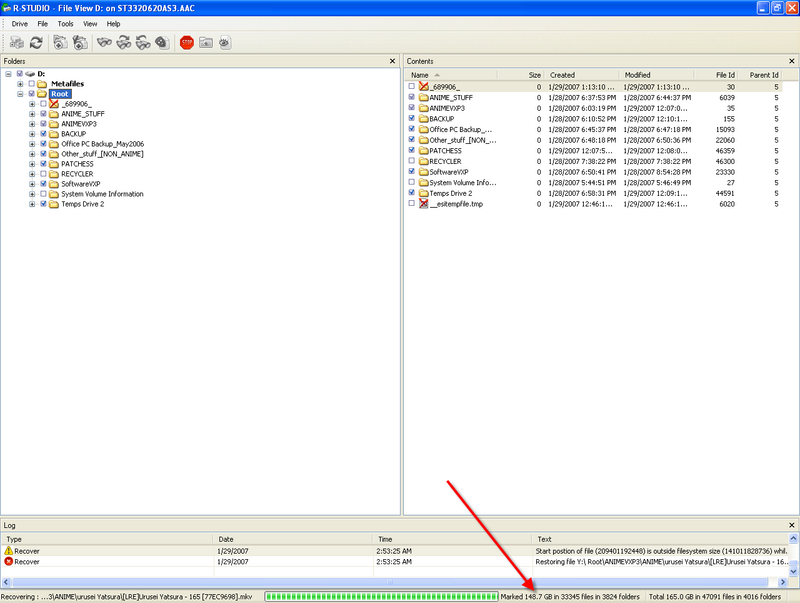
[attachmentid=122015]
note that in Maxtor drive, there's available partition which is G:\, H:\ n I:\ n this is current working partition after converted to Basic from Dynamic.

[attachmentid=122016]
right click on one of those partition - those with unrecognized partition (no drive letter one) - select open

[attachmentid=122017]
u clicked n this dialog appears...

[attachmentid=122018]
click which folder/apps you want to recover -- keep in mind, not 100% things can full recover ok...
those in X mark is those long deleted file, while un-X mark is the one last folder before i format it...

[attachmentid=122021]
say... i mark on NFS Most Wanted folder which i remember, i was moved this folder to another partition 6 months ago...

[attachmentid=122026]
nothing much to say...in recovering process
before i forgot, you'll need xtra space HDD to put ur recovered file, my suggestion, get another HDD as mr. lucifah told me earlier.

[attachmentid=122027]
yeah...succesfully recovered...my guesstimation...it takes about 10 minutes to recover almost 20GB of file.

the result...
i could play the NFS Most Wanted - theoritically... laugh.gif until i found something interesting...
well...i recovered all of my MTV Collection, n some of the file seems like exchange with another file...say...i launch Cradle Of Filth - Nymphentamine.mpg, n Media Player plays Siti Nurhaliza - Bukan Rahsia.mpg doh.gif , true...n i dunno why/ n how's that happen...
thanks guys...
i hope this can help you...

This post has been edited by sniper69: Jan 12 2007, 05:21 PM
godreysyy
post Aug 1 2006, 01:00 PM

New Member
*
Junior Member
8 posts

Joined: Aug 2006


QUOTE(cozack @ Apr 21 2005, 07:11 PM)
anyone.. ?

it was like this, my friends got Seagate HD (80G) and have two partition on it.he used it as extrenal storage (USB). suddenly, one of the partition can't be read/access at all, the other one can. so he send it to one of the IT shop (at Lowyat - Hypermarket something) to recover it since he need his project data on it.

To make it worst, after he send it to that shop... both of the partition can't be read anymore and the disk now mark as DYNAMIC Disc (Unreadble) when used Disk management.

so, question is, is there any way to recover that partition? if does.. how to do it?

thanks in advance.
*
i got a side way...
packing the hardisk with newspaper, then put it in the refrigerator around 6-10 hour, u maybe can read the data inside for a moment, but after this ur hardisk wil totally damage.........

i been try 3 hardisk, only 1 successful.... rclxms.gif

so if u r oledi plan 2 buy a new hardisk, u can try it. thumbup.gif
justin_83
post Aug 5 2006, 02:45 AM

Ctrl+W to see word below ████████████
******
Senior Member
1,713 posts

Joined: May 2006
From: Kuala Lumpur & Labis Level: Beginner


i totally agree v sniper69, i also using r-studio but is v2.0 version, it recover all my data, 100%...
even Ontrack Easy Recovery Professional v.6.0 also cant match it.

i recover back data from sata hdd...so dun worry if u r using sata hdd.

This post has been edited by justin_83: Aug 5 2006, 02:48 AM
super macgyver
post Aug 5 2006, 12:47 PM

★~13k Spam Club~★
********
All Stars
19,322 posts

Joined: Jan 2003


QUOTE(sniper69 @ Jul 20 2006, 07:01 PM)
as my problem settled n i decided to let u guys know how to recover back all...err not 100% gerenti, but almost 99% u can get back all ur files using this R-Studio (Latest is 3.0) downloadable at R-Studio Data Recovery --- remember it's demo n it only allowed u to recover maximum 64KB in size no matter how big ur file is...
i'm not going to tell u how to pay/crack or watsoever...

in my case...i use my Maxtor 80GB which is was in Dynamic Mode, unreadable after format n install WinXP SP2. so i use R-Studio Data Recovery...

[attachmentid=122015]
note that in Maxtor drive, there's available partition which is G:\, H:\ n I:\ n this is current working partition after converted to Basic from Dynamic.

[attachmentid=122016]
right click on one of those partition - those with unrecognized partition (no drive letter one) - select open

[attachmentid=122017]
u clicked n this dialog appears...

[attachmentid=122018]
click which folder/apps u want to recover -- keep in mind, not 100% things can full recover ok...
those in X mark is those long deleted file, while un-X mark is the one last folder before i format it...

[attachmentid=122021]
say... i mark on NFS Most Wanted folder which i remember, i was moving this folder to another partition 6 months ago...

[attachmentid=122026]
nothing much to say...in recovering process
before i forgot, u'll need xtra space HDD to put ur recovered file, my suggestion, get another HDD as mr.lucifah told me earlier.

[attachmentid=122027]
yeah...succesfully recovered...my guesstimation...it takes about 10 minutes to recover almost 20GB of file.

the result...
i could play the NFS Most Wanted - theoritically...  laugh.gif  until i found something interesting...
well...i recovered all of my MTV Collection, n some of the file seems like exchange with another file...say...i launch Cradle Of Filth - Nymphentamine.mpg, n Media Player plays Siti Nurhaliza - Bukan Rahsia.mpg  doh.gif , true...n i dunno why/ n how's that happen...
thanks guys...
i hope this can help u...
*
u mean u need to take all partition after converted to Basic from Dynamic b4 u can use r-studio?

Cradle Of Filth - Nymphentamine.mpg, n Media Player plays Siti Nurhaliza - Bukan Rahsia.mpg
u mean just name is different or two files exist?
sniper69
post Aug 7 2006, 09:36 PM

.: One Shot One Kill :. .+|Level 9 Type Shit|+.
*******
Senior Member
7,173 posts

Joined: Jan 2003
From: PCH


QUOTE(super macgyver @ Aug 5 2006, 12:47 PM)
u mean u need to take all partition after converted to Basic from Dynamic b4 u can use r-studio?

Cradle Of Filth - Nymphentamine.mpg, n Media Player plays Siti Nurhaliza - Bukan Rahsia.mpg
u mean just name is different or two files exist?
*
yes...u need to convert the disk to Basic which is going to data lost after converting, but dun worry, R-Studio is here to help...

2nd Q, yeap, some file (1%) only, appeared to be wrong 'recovered' rclxub.gif dunno why...recovered Cradle Of Filth - Nymphentamine.mpg (filename) but when played, no video (*.mpg) but only audio (*.mp3/*.wav- not sure), with different song...in this case, Siti Nurhaliza - Bukan Rahsia wtf... doh.gif
huichai
post Aug 10 2006, 05:16 PM

New Member
*
Junior Member
32 posts

Joined: Jan 2006


I used dskprobe.exe to change dynamic to basic disk.. It worked just change a value and the hd (IDE) became a basic disk...

cannavaro
post Aug 12 2006, 06:53 AM

CATTENACIO
*******
Senior Member
3,008 posts

Joined: Sep 2005
From: T.T.D.I, Bukit Damansara


Anyone has any idea on roughly how much it will cost me if I send a 20GB hdd for data recovery?

It's in a severe state (bloody tick tick tick sound), a data recovery program won't work because the disk won't properly start. I've tried.
allenultra
post Aug 12 2006, 11:16 PM

Look at all my stars!!
*******
Senior Member
9,027 posts

Joined: Jan 2003
From: Ipoh


Windows OS installed in my 40gb corrupted.

Then, I'm not able to format the hdd in NTFS but weirdly, I can format it to FAT32.

I wonder why.....Anyone?

Sorry if out of topic.
super macgyver
post Aug 16 2006, 11:00 PM

★~13k Spam Club~★
********
All Stars
19,322 posts

Joined: Jan 2003


QUOTE(huichai @ Aug 10 2006, 05:16 PM)
I used dskprobe.exe to change dynamic to basic disk.. It worked just change a value and the hd (IDE) became a basic disk...
*
u mean no data lost after convert?

QUOTE(cannavaro @ Aug 12 2006, 06:53 AM)
Anyone has any idea on roughly how much it will cost me if I send a 20GB hdd for data recovery?

It's in a severe state (bloody tick tick tick sound), a data recovery program won't work because the disk won't properly start. I've tried.
*
lowyat level 4 beside cycom.

QUOTE(allenultra @ Aug 12 2006, 11:16 PM)
Windows OS installed in my 40gb corrupted.

Then, I'm not able to format the hdd in NTFS but weirdly, I can format it to FAT32.

I wonder why.....Anyone?

Sorry if out of topic.
*
try convert from fat32 to ntfs then.
allenultra
post Aug 17 2006, 08:37 PM

Look at all my stars!!
*******
Senior Member
9,027 posts

Joined: Jan 2003
From: Ipoh


No need convert already. Its dead now
kanethesun
post Aug 18 2006, 09:14 AM

Regular
******
Senior Member
1,426 posts

Joined: Jan 2005
From: Jln Sg Besi, Taiping


hello there, my HDD dead month ago, because I dont have internet that time, so I cant really found out any useful solution, I've try to post the topic before here, but I cant find it back now.
I'll make it simple.
I got a 80gb and 120gb HDD.
and now my problem is my 120gb HDD, which can detect at BIOS, but it cant show up any drive, folders, files when I logon to windows. And it do take quite a long time to loading for login to windows.
I doubt its corrupted? any software can save back all my data?
and I plan to get a new HDD later and try to backup all my files.
Any comments is appreciate alots wink.gif laugh.gif
allengorden
post Sep 17 2006, 05:29 PM

New Member
*
Junior Member
6 posts

Joined: Sep 2006


To my experience several things might have happened to your external hdd.
1. Bad sectors
2. Bad SMART (IC spoilt)
3. Using the front chassis usb ports(for pc)- this is a big no no. Pls use the back ones as the front usb ports have not enough power to fuel the external hdd. data will corrupt.
4. Initial formatting of hdd should be formatted by a pc using a hdd convertor. Means the notebook hdd should be attached to a pc using a ide adaptor. The data will be more stable and correct hdd size will be reported accurately.
bata
post Sep 25 2006, 10:38 PM

Look at all my stars!!
*******
Senior Member
3,726 posts

Joined: Sep 2005
my fren hav a prob here.....
his hdd suddenly bcome type44 format instead of NTFS....
is there any other way to repair the partition??

its not about how to recover back the data......
i know how to.....but its a bit time consuming coz his hdd quite large

Chow.
super macgyver
post Sep 26 2006, 12:18 AM

★~13k Spam Club~★
********
All Stars
19,322 posts

Joined: Jan 2003


QUOTE(allengorden @ Sep 17 2006, 05:29 PM)
To my experience several things might have happened to your external hdd.
1. Bad sectors
2. Bad SMART (IC spoilt)
3. Using the front chassis usb ports(for pc)- this is a big no no. Pls use the back    ones as the front usb ports have not enough power to fuel the external hdd. data will corrupt.
4. Initial formatting of hdd should be formatted by a pc using a hdd convertor. Means the notebook hdd should be attached to a pc using a ide adaptor. The data will be more stable and correct hdd size will be reported accurately.
*
u sure? the 4 th statement? coz i alwiz use usb to format it but no issue ler. sweat.gif
hellfire8888
post Oct 4 2006, 07:07 PM

Look at all my stars!!
*******
Senior Member
3,196 posts

Joined: Feb 2006
QUOTE(super macgyver @ Sep 26 2006, 01:18 AM)
u sure? the 4 th statement? coz i alwiz use usb to format it but no issue ler.  sweat.gif
*
of course not true la..lol

it is funny to see all sort of crap advise here.. sigh...
superlfc
post Oct 5 2006, 08:44 AM

Getting Started
**
Junior Member
100 posts

Joined: Oct 2005


previously i cant access to my 2.5 hdd using external usb 2.0... after going thru this post... i got myself a 2.5 to 3.5 ide adapter at low yat place.... connect to my pc and i got all my file back!!!

much much more smoother and faster
hellfire8888
post Oct 9 2006, 01:44 PM

Look at all my stars!!
*******
Senior Member
3,196 posts

Joined: Feb 2006
QUOTE(superlfc @ Oct 5 2006, 09:44 AM)
previously i cant access to  my 2.5 hdd using external usb 2.0... after going thru this post... i got myself a 2.5 to 3.5 ide adapter at low yat place.... connect to my pc and i got all my file back!!!

much much more smoother and faster
*
good for u
super macgyver
post Oct 10 2006, 03:35 PM

★~13k Spam Club~★
********
All Stars
19,322 posts

Joined: Jan 2003


QUOTE(superlfc @ Oct 5 2006, 08:44 AM)
previously i cant access to  my 2.5 hdd using external usb 2.0... after going thru this post... i got myself a 2.5 to 3.5 ide adapter at low yat place.... connect to my pc and i got all my file back!!!

much much more smoother and faster
*
the xternal enclosure is faulty?
jimlim007
post Oct 16 2006, 04:50 AM

Enoch
*******
Senior Member
4,073 posts

Joined: Aug 2006


Help Help Help !!! icon_question.gif icon_question.gif icon_question.gif

I lose my 127 GB data after using Partition Magic v8.5 performed the Resizing Partition & Creating Partition. Data gone because in the middle of process Partition Magic doing Resizing have "error", and turn my harddisk partition into very weird partition name #D~*) instead of D and it show my drive partition have 127GB free space. Holy shit... cry.gif cry.gif cry.gif cry.gif

Problem: 127Gb data gone
Root Cause: Middle of process of partition magic doing partition resizing (i do this bcos plan to created another partition)
Drive Info: Seagate 200GB PATA detected as 127GB; created under 1 NTFS partition (127GB)
OS: Winxp Pro (no service pack)

Currently, i already recreated this drive (200GB) into 2 partitions under NTFS and running system now. However, i still want to recover back my previous data if there is a chance even need to erase my current system files. this is ok as long as able to get back data

So, with using Active Recovery or Ontrack Easy Recovery pro, is it will successfully cover back my previous single NTFS partition with 127GB fully data? drool.gif drool.gif drool.gif drool.gif drool.gif

This post has been edited by jimlim007: Oct 16 2006, 04:53 AM
syyang85
post Oct 17 2006, 04:59 PM

Enthusiast
*****
Senior Member
982 posts

Joined: May 2005
I had the same problem too. My NTFS somehow changed to RAW due to i suspect faulty cables + Nvidia stupid IDE drivers which caused my lots of troubles with cd-roms + hard disk.

I used Getdataback for NTFS. I got back some of my files. It can scan for previous data even u've formated the drive. As long as u didn't fully erased the disk( writing all ZEROS into the drives).

super macgyver
post Oct 17 2006, 05:27 PM

★~13k Spam Club~★
********
All Stars
19,322 posts

Joined: Jan 2003


QUOTE(jimlim007 @ Oct 16 2006, 04:50 AM)
Help Help Help !!! icon_question.gif  icon_question.gif  icon_question.gif 

I lose my 127 GB data after using Partition Magic v8.5 performed the Resizing Partition & Creating Partition. Data gone because in the middle of process Partition Magic doing Resizing have "error", and turn my harddisk partition into very weird partition name #D~*) instead of D and it show my drive partition have 127GB free space. Holy shit... cry.gif  cry.gif  cry.gif  cry.gif

Problem: 127Gb data gone
Root Cause: Middle of process of partition magic doing partition resizing (i do this bcos plan to created another partition)
Drive Info: Seagate 200GB PATA detected as 127GB; created under 1 NTFS partition (127GB)
OS: Winxp Pro (no service pack)

Currently, i already recreated this drive (200GB) into 2 partitions under NTFS and running system now. However, i still want to recover back my previous data if there is a chance even need to erase my current system files. this is ok as long as able to get back data

So, with using Active Recovery or Ontrack Easy Recovery pro, is it will successfully cover back my previous single NTFS partition with 127GB fully data? drool.gif  drool.gif  drool.gif  drool.gif  drool.gif
*
if u want recover it back, u should do further operation on ur hdd in the first place after happened tis tragedy. sweat.gif good luck, but still can recover sum as long u dun put any more data on it for now.
jimlim007
post Oct 18 2006, 03:18 AM

Enoch
*******
Senior Member
4,073 posts

Joined: Aug 2006


QUOTE(syyang85 @ Oct 17 2006, 04:59 PM)
It can scan for previous data even u've formated the drive. As long as u didn't fully erased the disk( writing all ZEROS into the drives).
*
what is that mean dind't fully erased the disk (writing all zeros into the drive)???

perhaps, as i mentioned my data gone bcos Partition damage. So i recreated partition lo....into 2 NTFS and now running at system.

I want to ask, is it now i do recovery data in window or i need to erased my window and do recovery in DOS....??
jimlim007
post Oct 18 2006, 03:19 AM

Enoch
*******
Senior Member
4,073 posts

Joined: Aug 2006


QUOTE(super macgyver @ Oct 17 2006, 05:27 PM)
if u want recover it back, u should do further operation on ur hdd in the first place after happened tis tragedysweat.gif  good luck, but still can recover sum as long u dun put any more data on it for now.
*
what is that mean in red text??? currently i redownload all the file that i m missing. few GB already save wor......then how???
super macgyver
post Oct 22 2006, 12:02 AM

★~13k Spam Club~★
********
All Stars
19,322 posts

Joined: Jan 2003


QUOTE(jimlim007 @ Oct 18 2006, 03:19 AM)
what is that mean in red text??? currently i redownload all the file that i m missing. few GB already save wor......then how???
*
nvm, u already damage the allocation in the hdd sector which can recover. sweat.gif
Neil_ppc
post Nov 20 2006, 02:31 PM

New Member
*
Newbie
1 posts

Joined: Nov 2006
try "diskgen" is very good!
It's chinese ver
winlose2582
post Nov 25 2006, 10:59 PM

On my way
****
Senior Member
516 posts

Joined: Jan 2003
From: Bandar Kinrara


QUOTE(superlfc @ Oct 5 2006, 08:44 AM)
previously i cant access to  my 2.5 hdd using external usb 2.0... after going thru this post... i got myself a 2.5 to 3.5 ide adapter at low yat place.... connect to my pc and i got all my file back!!!

much much more smoother and faster
*
Im now also facing the same problem. Everytime i plug in my ext 2.5 hdd, the pc goes hang....after i unplug the notebook hdd, the pc is working fine...
some file is corrupted in 2.5 hdd...so now very upset...
I think i need to buy the 2.5 to 3.5 ide adapter to retrieve back my files...

Ash
post Nov 26 2006, 07:20 PM

Legend
******
Senior Member
1,697 posts

Joined: Jan 2003
From: KL


QUOTE(huichai @ Aug 10 2006, 05:16 PM)
I used dskprobe.exe to change dynamic to basic disk.. It worked just change a value and the hd (IDE) became a basic disk...
*
where can i get dskprobe.exe?

Netto Hikari
post Dec 9 2006, 12:33 AM

Solution Architect?
*******
Senior Member
2,410 posts

Joined: Jan 2003
From: Selangor


guys, u all noe how to recover data from a spoil hdd? the hdd when i use it as external.....it has no file system(not ntfs or fat32 or basic or dynamic....just plain) but previously it IS install with winxp home.
super macgyver
post Dec 11 2006, 12:33 PM

★~13k Spam Club~★
********
All Stars
19,322 posts

Joined: Jan 2003


QUOTE(winlose2582 @ Nov 25 2006, 10:59 PM)
Im now also facing the same problem. Everytime i plug in my ext 2.5 hdd, the pc goes hang....after i unplug the notebook hdd, the pc is working fine...
some file is corrupted in 2.5 hdd...so now very upset...
I think i need to buy the 2.5 to 3.5 ide adapter to retrieve back my files...
*
it just around RM25 under garage sales section.

QUOTE(Netto Hikari @ Dec 9 2006, 12:33 AM)
guys, u all noe how to recover data from a spoil hdd? the hdd when i use it as external.....it has no file system(not ntfs or fat32 or basic or dynamic....just plain) but previously it IS install with winxp home.
*
how come? if u got install winxp into it, sure it is got fat system like ntfs, fat32.
Netto Hikari
post Dec 11 2006, 12:38 PM

Solution Architect?
*******
Senior Member
2,410 posts

Joined: Jan 2003
From: Selangor


QUOTE(super macgyver @ Dec 11 2006, 12:33 PM)
how come? if u got install winxp into it, sure it is got fat system like ntfs, fat32.
*
i really got no idea. the wierd part is that it report the hdd space as empty which is impossible as it contains all my dad data's inside.

edit: some how i manage to screencap it. it takes like 5-20 minutes for the windows to regconise it as a normal HDD.
user posted image

its the drive e:.


This post has been edited by Netto Hikari: Dec 11 2006, 12:47 PM
lOvEbItE
post Dec 13 2006, 04:24 PM

On my way
****
Senior Member
563 posts

Joined: Apr 2005


I've used partition magic to merge to drives
Drive D and Drive E. All the files in Drive E will be put into 1 folder in Drive D, assume the folder name is "myfiles".

After partition merged, I try to open "myfiles" folder but it mentioned that I got no access rights! What happened? Any idea?
wongzai
post Dec 19 2006, 03:20 PM

Enthusiast
*****
Senior Member
780 posts

Joined: Aug 2006


personal recommend Easy Recovery Data Recovery....very helpful and ec to use to recover data..
zwiezack
post Dec 19 2006, 11:09 PM

New Member
*
Junior Member
7 posts

Joined: Oct 2004
Need help here. My hardisk (slave hardisk) just crash. it seem not found in windows (my computer) but it can seen in bios and hardware profiles. Need to copy very important data on it. Anyone can help?

This post has been edited by zwiezack: Dec 19 2006, 11:09 PM
riskbreaker
post Dec 22 2006, 04:10 PM

Getting Started
**
Junior Member
241 posts

Joined: Aug 2006
From: Dragon In Dream
Can detect in BIOS is OK, any sound from HDD when u booting?

May be u can try on other PC or make it as Secondary Master (U need to set the jumper).
zwiezack
post Dec 22 2006, 06:44 PM

New Member
*
Junior Member
7 posts

Joined: Oct 2004
Got noisy sound, maybe bios try to detect it. On bios screen, it state there hardisk name. Maxtor 40... something la. But any information on cylinder, sector, size, just state 0 (zero). Try at many pc, make it slave, make it master, change cable, still same result. Dont know what to do now. sad.gif
LYR
post Dec 25 2006, 11:24 AM

No one is indispensable
******
Senior Member
1,866 posts

Joined: Apr 2006
QUOTE(zwiezack @ Dec 22 2006, 06:44 PM)
Got noisy sound, maybe bios try to detect it. On bios screen, it state there hardisk name. Maxtor 40... something la. But any information on cylinder, sector, size, just state 0 (zero). Try at many pc, make it slave, make it master, change cable, still same result. Dont know what to do now.  sad.gif
*
maybe you should find a certified Pro to fix it. there may be something loosened or damaged.
amazinggrace
post Dec 25 2006, 01:52 PM

Ei8ht Plus Plus
*****
Senior Member
840 posts

Joined: Apr 2006
From: CBJ


Is it possible to recover a crashed harddisk?
super macgyver
post Dec 25 2006, 05:29 PM

★~13k Spam Club~★
********
All Stars
19,322 posts

Joined: Jan 2003


QUOTE(zwiezack @ Dec 22 2006, 06:44 PM)
Got noisy sound, maybe bios try to detect it. On bios screen, it state there hardisk name. Maxtor 40... something la. But any information on cylinder, sector, size, just state 0 (zero). Try at many pc, make it slave, make it master, change cable, still same result. Dont know what to do now.  sad.gif
*
u try to make it external yet to check if work?
zwiezack
post Dec 26 2006, 08:46 PM

New Member
*
Junior Member
7 posts

Joined: Oct 2004
QUOTE(super macgyver @ Dec 25 2006, 05:29 PM)
u try to make it external yet to check if work?
*
not yet bro! But i will try it.
mruzian
post Dec 27 2006, 10:06 PM

Androidify
*****
Senior Member
744 posts

Joined: Oct 2005
From: Android World


can sumone help me
i got this 80gb samsung ide hd
remove it from my old pc to new one
but after remove to new one
hd cannot be read...got to be formatted

is that any other way to use the hd w/o formatting?
coz there is lotsa important stuff inside there
help me please icon_question.gif icon_question.gif icon_question.gif icon_question.gif icon_question.gif
malayneum
post Dec 29 2006, 01:55 PM

penjaga kontrak sosial
*******
Senior Member
2,041 posts

Joined: Jan 2003
ive tried R-Studio and Active@Partition but problem is the scan cannot finish cause my pc will hanged!! ive tried scan for bad sectors but it will hanged too!! any solution?? ive got many important files inside for my project.
shahrilridzwan
post Dec 30 2006, 01:23 AM

Getting Started
**
Junior Member
109 posts

Joined: Dec 2005


QUOTE(malayneum @ Dec 29 2006, 01:55 PM)
ive tried R-Studio and Active@Partition but problem is the scan cannot finish cause my pc will hanged!! ive tried scan for bad sectors but it will hanged too!! any solution?? ive got many important files inside for my project.
*
try OnTrack Easy Recovery
malayneum
post Dec 30 2006, 04:35 PM

penjaga kontrak sosial
*******
Senior Member
2,041 posts

Joined: Jan 2003
QUOTE(shahrilridzwan @ Dec 30 2006, 01:23 AM)
try OnTrack Easy Recovery
*
ok ive already tried at other pc. now it can finish scan but sadly there is nothing to be found. 0 partition and 0 files found. does this means my files are totally lost and unrecoverable??

sexy188
post Dec 30 2006, 10:49 PM

Getting Started
**
Junior Member
66 posts

Joined: Dec 2006
thanks for sharing....keep it up........cheeeeeeeer !!

super macgyver
post Jan 10 2007, 06:49 PM

★~13k Spam Club~★
********
All Stars
19,322 posts

Joined: Jan 2003


QUOTE(mruzian @ Dec 27 2006, 10:06 PM)
can sumone help me
i got this 80gb samsung ide hd
remove it from my old pc to new one
but after remove to new one
hd cannot be read...got to be formatted

is that any other way to use the hd w/o formatting?
coz there is lotsa important stuff inside there
help me please  icon_question.gif  icon_question.gif  icon_question.gif  icon_question.gif  icon_question.gif
*
try r-studio yet?
slacx
post Jan 11 2007, 02:02 AM

Casual
***
Junior Member
398 posts

Joined: Dec 2004
From: Am Neckar


Hi,

I have 200gb hdd use as external harddisk and I think my hdd has bad sector since my com always can't detect it and I have reformat about 6-7 times already. I used Easyrecovery Profesional but it can't recover all of my files. cry.gif

Is there any programs that can eliminate the bad sector in my hdd?
super macgyver
post Jan 11 2007, 02:06 PM

★~13k Spam Club~★
********
All Stars
19,322 posts

Joined: Jan 2003


QUOTE(slacx @ Jan 11 2007, 02:02 AM)
Hi,

I have 200gb hdd use as external harddisk and I think my hdd has bad sector since my com always can't detect it and I have reformat about 6-7 times already. I used Easyrecovery Profesional but it can't recover all of my files.  cry.gif

Is there any programs that can eliminate the bad sector in my hdd?
*
or u can try do a low level format then.
edan1979
post Jan 11 2007, 10:56 PM

*GruMpy_MoDe*
*******
Senior Member
5,511 posts

Joined: Jun 2006
From: On Earth.


hmm my problem.. actually its my friend problem... he got hit by act by bro virus and reformating his hd over and over... baka... now his 40gb hd can only read as 3gb... the rest donno what happen to it...

any idea to recover it back... he gave the disk to me to look for after he unpatiently screw it up... flex.gif

This post has been edited by edan1979: Jan 11 2007, 10:57 PM
bbtat
post Jan 12 2007, 04:31 AM

Getting Started
**
Junior Member
293 posts

Joined: Sep 2005


R-Studio ... I love you !! THe World is so Amazing ! The best Recovery Software among all !!! I recovered 99% of my files.. !!! Cool !!!
sniper69
post Jan 12 2007, 05:22 PM

.: One Shot One Kill :. .+|Level 9 Type Shit|+.
*******
Senior Member
7,173 posts

Joined: Jan 2003
From: PCH


hmm...for those came up problem with recovery tools, i highly recommend to use R-Studio with my guidance at

http://forum.lowyat.net/index.php?showtopi...dpost&p=7854899 thumbup.gif
ryanso85
post Jan 13 2007, 12:12 AM

VVIP
****
Senior Member
562 posts

Joined: Sep 2004


QUOTE(zwiezack @ Dec 22 2006, 06:44 PM)
Got noisy sound, maybe bios try to detect it. On bios screen, it state there hardisk name. Maxtor 40... something la. But any information on cylinder, sector, size, just state 0 (zero). Try at many pc, make it slave, make it master, change cable, still same result. Dont know what to do now.  sad.gif
*
i facing exactly the same prob like u
i using maxtor 60G
same cannot b seen in windows..bios can b detected but same as urs info is all 0
got noisy sound like this "ti ti ti ti ti..."
when "ti" is sounded mean the hdd is been read or write...i think so

same change all the ide port,cable,master,slave
it is just the same
but lucky i back up some important files but still some important files inside

so any1 have any idea how to solve it??
can b repair??

need help from all of u
ryanso85
post Jan 13 2007, 01:50 PM

VVIP
****
Senior Member
562 posts

Joined: Sep 2004


just now i went to ask a computer shop to help me to recover the data
but the pro the told me the hdd is dead
cannot use software to recover the data
even change of the board does not help

i hv been told tat that is only way to recover the data
is to take out the disk but this nid those very pro only can do
n sound very expensive
coz this is hardware faulty...

i need some help...
any1 knw wer got provide those hardware repair?

help!!!!
cheenjeat008
post Jan 14 2007, 10:46 AM

On my way
****
Senior Member
543 posts

Joined: Dec 2004
From: Kuala Lumpur


QUOTE(jimlim007 @ Oct 16 2006, 04:50 AM)
Help Help Help !!! icon_question.gif  icon_question.gif  icon_question.gif 

I lose my 127 GB data after using Partition Magic v8.5 performed the Resizing Partition & Creating Partition. Data gone because in the middle of process Partition Magic doing Resizing have "error", and turn my harddisk partition into very weird partition name #D~*) instead of D and it show my drive partition have 127GB free space. Holy shit... cry.gif  cry.gif  cry.gif  cry.gif

Problem: 127Gb data gone
Root Cause: Middle of process of partition magic doing partition resizing (i do this bcos plan to created another partition)
Drive Info: Seagate 200GB PATA detected as 127GB; created under 1 NTFS partition (127GB)
OS: Winxp Pro (no service pack)

Currently, i already recreated this drive (200GB) into 2 partitions under NTFS and running system now. However, i still want to recover back my previous data if there is a chance even need to erase my current system files. this is ok as long as able to get back data

So, with using Active Recovery or Ontrack Easy Recovery pro, is it will successfully cover back my previous single NTFS partition with 127GB fully data? drool.gif  drool.gif  drool.gif  drool.gif  drool.gif
*
First of all, when your hdd is in problem, Never repartition it into another format.
When you have install the windows XP or any other software back into old drive, it will overlap the old data and you will have lower change to recover your data.

Must find a spare hdd, install a fresh winXP, then install any recovery program.
You will have higher chances to recover your data.


abnerx
post Jan 16 2007, 09:32 PM

Getting Started
**
Junior Member
61 posts

Joined: Feb 2005
Hey ppl..sadly I find myself posting here nw cry.gif My hardisk have landed with sum problems. I have 2 hardisk fixed on my system. One with the OS in it and another with all my personal and important documents/files. Sadly yesterday, I found my Maxtor 40Gb hardisk containning all my important files having a set of funny or rather weird characters as its name shakehead.gif

The hardisk was named with all these weird charachters;

user posted image

Once I double click on the drive, I get a list of files and folders than cant be opened. Below are the error messages that pops up;

user posted image

user posted image


Im new to all this stuff, I look forward for help from all the gurus here to help me solve my problem. I really need all those data on my hardisk. What should I do now? Use one of those data recovery tools? ..im lost icon_question.gif

Thanx for all your time!
kelvinkaw84
post Jan 17 2007, 10:46 AM

Getting Started
**
Junior Member
101 posts

Joined: Jan 2007


QUOTE(cozack @ Apr 21 2005, 07:11 PM)
anyone.. ?

it was like this, my friends got Seagate HD (80G) and have two partition on it.he used it as extrenal storage (USB). suddenly, one of the partition can't be read/access at all, the other one can. so he send it to one of the IT shop (at Lowyat - Hypermarket something) to recover it since he need his project data on it.

To make it worst, after he send it to that shop... both of the partition can't be read anymore and the disk now mark as DYNAMIC Disc (Unreadble) when used Disk management.

so, question is, is there any way to recover that partition? if does.. how to do it?

thanks in advance.
*
I think only one way u can do it. take your hard disk and plug into another PC, then do backup(copy all your data and save into that PC). After that,try to format your hard disk. If the same problem still happen, then i think is your hard disk got bad sector.
kelvinkaw84
post Jan 17 2007, 10:52 AM

Getting Started
**
Junior Member
101 posts

Joined: Jan 2007


QUOTE(abnerx @ Jan 16 2007, 09:32 PM)
Hey ppl..sadly I find myself posting here nw cry.gif  My hardisk have landed with sum problems. I have 2 hardisk fixed on my system. One with the OS in it and another with all my personal and important documents/files. Sadly yesterday, I found my Maxtor 40Gb hardisk containning all my important files having a set of funny or rather weird characters as its name  shakehead.gif

The hardisk was named with all these weird charachters;

user posted image

Once I double click on the drive, I get a list of files and folders than cant be opened. Below are the error messages that pops up;

user posted image

user posted image
Im new to all this stuff, I look forward for help from all the gurus here to help me solve my problem. I really need all those data on my hardisk. What should I do now? Use one of those data recovery tools? ..im lost icon_question.gif

Thanx for all your time!
*
Is it when u open the external drive, the error is prompt out on screen? ok....you can try to change the drive name and path..after that,try to open it.

abnerx
post Jan 17 2007, 12:52 PM

Getting Started
**
Junior Member
61 posts

Joined: Feb 2005
QUOTE(kelvinkaw84 @ Jan 17 2007, 10:52 AM)
Is it when u open the external drive, the error is prompt out on screen? ok....you can try to change the drive name and path..after that,try to open it.
*
its an internal drive and I have tried fixin it on another pc but same thing hapens sad.gif
auyongck
post Jan 20 2007, 09:38 PM

Getting Started
**
Junior Member
70 posts

Joined: Sep 2005


I have a 80Gb SATA seagate hard disk, but it cant detect in my BIOS , meaning cant find any driver. sad.gif

But my hard disk is spining/runing, Is there a possible to repair? my 6 year data is inside, i am sure that all the wayar that i plug is correct. cry.gif

Anyone can help?
super macgyver
post Jan 24 2007, 07:18 PM

★~13k Spam Club~★
********
All Stars
19,322 posts

Joined: Jan 2003


QUOTE(auyongck @ Jan 20 2007, 09:38 PM)
I have a 80Gb SATA seagate hard disk, but it cant detect in my BIOS , meaning cant find any driver. sad.gif

But my hard disk is spining/runing, Is there a possible to repair? my 6 year data is inside, i am sure that all the wayar that i plug is correct.  cry.gif

Anyone can help?
*
try sum rescue tool in seagate website.
auyongck
post Jan 25 2007, 02:45 PM

Getting Started
**
Junior Member
70 posts

Joined: Sep 2005


QUOTE(super macgyver @ Jan 24 2007, 07:18 PM)
try sum rescue tool in seagate website.
*
cant detect..how to rescue cry.gif
unknowndevices
post Jan 25 2007, 04:49 PM

***StaRs oF NakamA uP***
*******
Senior Member
2,915 posts

Joined: Jan 2005


got notebook of 120GB...and wanted to do partition for my hardisk... nod.gif
is it advisable to use Magic Partition...will it caused data error/lost/hanged in future... sweat.gif
of is it advisable to use normal partition...mean have to reformat and install everything back... unsure.gif
need advice here...thank you... thumbup.gif
SUSMatrix
post Jan 25 2007, 04:56 PM

King of Char Siew!
********
Senior Member
15,022 posts

Joined: Jan 2003
From: Damansara Jaya/Bandar Utama


QUOTE(unknowndevices @ Jan 25 2007, 04:49 PM)
got notebook of 120GB...and wanted to do partition for my hardisk... nod.gif
is it advisable to use Magic Partition...will it caused data error/lost/hanged in future... sweat.gif
of is it advisable to use normal partition...mean have to reformat and install everything back... unsure.gif
need advice here...thank you... thumbup.gif
*
The rule of the game is always do a FREAKIN BACKUP of ur important data whenever you wanna try something dangerous. Heck, even when you're not, you're suppose to make a backup anyway.

If you're too lazy to do backup, no one can help ya.

unknowndevices
post Jan 25 2007, 05:52 PM

***StaRs oF NakamA uP***
*******
Senior Member
2,915 posts

Joined: Jan 2005


QUOTE(Matrix @ Jan 25 2007, 04:56 PM)
The rule of the game is always do a FREAKIN BACKUP of ur important data whenever you wanna try something dangerous. Heck, even when you're not, you're suppose to make a backup anyway.

If you're too lazy to do backup, no one can help ya.
*
actually...by doing DOS based partition...need to install everything back right... unsure.gif
but i'm might lost some software that provided by the manufacturers...no software cds given... blush.gif
so...from what i seen...magic partition you can avoid the perform of from installing all the software back... smile.gif
that's why...is it advisable to use perform with magic or DOS? unsure.gif
miloy2k
post Jan 29 2007, 02:01 AM

[[[[[IMPERIAL ARMY]]]]]
********
All Stars
15,773 posts

Joined: Jan 2003
From: Capital Wasteland


Using R-Studio 3.6 to recover my 165gb of my data ... so far still running sweat.gif rolleyes.gif

user posted image

for some unknown reason my 320gb hd become 3 partition where by it should only have 2 rclxub.gif It happen after I plug in other hd in the system (another sata hd)

user posted image

anyone know what causing it happen? unsure.gif

This post has been edited by miloy2k: Jan 29 2007, 02:21 AM
wak
post Jan 31 2007, 04:57 PM

New Member
*
Junior Member
37 posts

Joined: Dec 2006
QUOTE(abnerx @ Jan 16 2007, 03:32 AM)
Hey ppl..sadly I find myself posting here nw cry.gif  My hardisk have landed with sum problems. I have 2 hardisk fixed on my system. One with the OS in it and another with all my personal and important documents/files. Sadly yesterday, I found my Maxtor 40Gb hardisk containning all my important files having a set of funny or rather weird characters as its name  shakehead.gif

The hardisk was named with all these weird charachters;

user posted image

Once I double click on the drive, I get a list of files and folders than cant be opened. Below are the error messages that pops up;

user posted image

user posted image
Im new to all this stuff, I look forward for help from all the gurus here to help me solve my problem. I really need all those data on my hardisk. What should I do now? Use one of those data recovery tools? ..im lost icon_question.gif

Thanx for all your time!
*
Have you tried with other file manager? Windows Commander?
Google telling me that your WindowsExplorer having some problem.
NOX
post Feb 1 2007, 11:57 AM

Getting Started
**
Junior Member
278 posts

Joined: Jan 2003
From: SEREMBAN < > PETALING JAYA

Need Help here.. my fren HDD which is MAXTOR 200gb ide die on him.. there is no disk activity a.k.a not spinning.. can he repair it or anyway to copy data inside? he now very angry with MAXTOR.. just 8 month aleady dead.. this drive is use for his Hello Project Collection.. so very desperate to recover.. Onegai..

p/s: that's why i use Western Digital.. my last maxtor 80gb also die on me(but after use for bout 3 year la).. maxtor quality is not good..
miloy2k
post Feb 7 2007, 07:09 AM

[[[[[IMPERIAL ARMY]]]]]
********
All Stars
15,773 posts

Joined: Jan 2003
From: Capital Wasteland


QUOTE(NOX @ Feb 1 2007, 11:57 AM)
Need Help here.. my fren HDD which is MAXTOR 200gb ide die on him.. there is no disk activity a.k.a not spinning.. can he repair it or anyway to copy data inside? he now very angry with MAXTOR.. just 8 month aleady dead.. this drive is use for his Hello Project Collection.. so very desperate to recover.. Onegai..

p/s: that's why i use Western Digital.. my last maxtor 80gb also die on me(but after use for bout 3 year la).. maxtor quality is not good..
*
nothing else is new sleep.gif

Maxtor/Seagate/W. D has fail me b4 sad.gif

the best thing to do is backup ur data often nod.gif
NOX
post Feb 8 2007, 11:36 AM

Getting Started
**
Junior Member
278 posts

Joined: Jan 2003
From: SEREMBAN < > PETALING JAYA

any way for him to recover back data? just the spiinning thing@motor problem right? can he transfer the disk into another let say spoilt 200gb with good motor? do u get the idea?
luvjim
post Feb 8 2007, 03:04 PM

to the moon and back
******
Senior Member
1,036 posts

Joined: Mar 2006
here's my prob...hope the pro's can help me...

actually i just want to format the C drive, as usual boot with XP CD and select the drive to delete and format it.
as listed there is another D drive...but when i select C and delete the C partition, it also delete my D drive!! (im not sure where my E and F drive go also). It's only show C and D drive....

my HDD is 80gb and i only use 20000mb for my new XP. i formatted the 20000mb and left the rest i din format.

issit possible for me to do recovery for the unformatted space??
i lost all my photos and my bro's backup.. cry.gif
gochev.george
post Feb 8 2007, 03:43 PM

New Member
*
Junior Member
6 posts

Joined: Feb 2007


QUOTE(cozack @ Apr 21 2005, 02:11 PM)
anyone.. ?

it was like this, my friends got Seagate HD (80G) and have two partition on it.he used it as extrenal storage (USB). suddenly, one of the partition can't be read/access at all, the other one can. so he send it to one of the IT shop (at Lowyat - Hypermarket something) to recover it since he need his project data on it.

To make it worst, after he send it to that shop... both of the partition can't be read anymore and the disk now mark as DYNAMIC Disc (Unreadble) when used Disk management.

so, question is, is there any way to recover that partition? if does.. how to do it?

thanks in advance.
*
Hi
Ok if plug in the hard disk in ATA slot,take bootable CD with win98,go Bios firmware set to boot device like first : CD-ROM or CD/DVD
then save settings,restart when you se the Boot Menu click on : run windows without CDROM support, wait to see A:/
type fdisk
Create the partitions(Primary logic,Extended ...)
when you create ,restart the PC (CTRL+DEL+DEL) so the system update the data recovery.
Then click again on the field bellow "run windows without CDROM support"
It will show "A:\
type "format C:" then Enter
after operation complete type format "D"
If are create 2 partitions
It have another way,but it's not guarantied.
Standard way - Plug in the hard in ATA or SATA slot and then boot it from WINDOWS XP CD, if system detect HARD DRIVE - Good
If not - Use the upper case. But I think you have on drive BAD SECTORS.It is a very very bad.That case smelling like NEW HDD,cou'se in the future you'll meet other problems,like WINDOWS not Respond,many restart or system faulire.
Good Luck thumbup.gif

This post has been edited by gochev.george: Feb 8 2007, 03:50 PM
cheenjeat008
post Feb 9 2007, 02:15 AM

On my way
****
Senior Member
543 posts

Joined: Dec 2004
From: Kuala Lumpur


QUOTE(wak @ Jan 31 2007, 04:57 PM)
Have you tried with other file manager? Windows Commander?
Google telling me that your WindowsExplorer having some problem.
*
It might cause by sudden electrical shock or unstable power supply....
Mcrae
post Mar 30 2007, 02:17 AM

fu la weh...
*****
Senior Member
955 posts

Joined: Jan 2003
From: Ipoh/MMU Melaka/MMU Cyber<->Puchong


Guys i wanna ask something bout my hard disk, weird problem happens.

My problem was my hdd had remaining of 2GB left space, but after i played a round game of Serius Sam then i quit, i saw my hdd space remained 22MB left sad.gif what has happened ? Even i restarted my pc, my hdd still detects my hdd remaining space was still 22MB... where has the rest suddenly gone ?
super macgyver
post Apr 5 2007, 04:28 PM

★~13k Spam Club~★
********
All Stars
19,322 posts

Joined: Jan 2003


QUOTE(Mcrae @ Mar 30 2007, 02:17 AM)
Guys i wanna ask something bout my hard disk, weird problem happens.

My problem was my hdd had remaining of 2GB left space, but after i played a round game of Serius Sam then i quit, i saw my hdd space remained 22MB left sad.gif what has happened ?  Even i restarted my pc, my hdd still detects my hdd remaining space was still 22MB... where has the rest suddenly gone ?
*
u try & c ur tmp folder got a lot of trASH OR NOT.
mjnshaq
post Apr 6 2007, 10:17 AM

New Member
*
Junior Member
17 posts

Joined: Nov 2006
hi all,
i hving a prob here, need some help from u all...
i wan to change my HD from 40GB to 160GB.
but then my 40GB is a dynamic HD so i cant use those software i used b4 like norton ghost and acronis since they not recognise dynamic disk.
i read few pages n i knew there got few software available but some need to pay to get a full version and which 1 suit to my situation???
is tat anyone can recommand me to use any software to solve my prob???
thanks....

super macgyver
post Apr 11 2007, 04:35 PM

★~13k Spam Club~★
********
All Stars
19,322 posts

Joined: Jan 2003


u mean ur 40gb hdd is corrupted?
Polaris
post Apr 12 2007, 06:56 PM

Trust Fund Baby
*******
Senior Member
2,850 posts

Joined: Aug 2006
From: Stellar Nursery
What's the best partition software?

I used to use Partition Magic, but the old version can't seem to recognize SATA drives at all.
mjnshaq
post Apr 13 2007, 01:35 PM

New Member
*
Junior Member
17 posts

Joined: Nov 2006
QUOTE(super macgyver @ Apr 11 2007, 04:35 PM)
u mean ur 40gb hdd is corrupted?
*
nope....
my current hd is only 40GB so i wan to upgrade it to 160GB.
my existing hd is dynamic hd and i tried to use norton ghost and acronis also doesnt support dynamic hd.
i js wan to fully copy all my data including the sharing n security of every folders n files from my existing dynamic hd to my new hd.
hope some1 can help me on this
thanks...

This post has been edited by mjnshaq: Apr 13 2007, 01:35 PM
etingkieng
post Apr 18 2007, 10:42 AM

New Member
*
Junior Member
39 posts

Joined: Nov 2004


QUOTE(Polaris @ Apr 12 2007, 06:56 PM)
What's the best partition software?

*
I use partition software also before, but not feel nice... new partition named after your dvd-rom drive.... biggrin.gif
cheenjeat008
post May 2 2007, 11:14 AM

On my way
****
Senior Member
543 posts

Joined: Dec 2004
From: Kuala Lumpur


QUOTE(etingkieng @ Apr 18 2007, 10:42 AM)
I use partition software also before, but not feel nice... new partition named after your dvd-rom drive.... biggrin.gif
*
Good day,
You can change the drive letter in WinXp wo....
tinbaktu
post May 3 2007, 06:22 PM

Getting Started
**
Junior Member
65 posts

Joined: Feb 2006


QUOTE(cozack @ Apr 21 2005, 07:11 PM)
anyone.. ?

it was like this, my friends got Seagate HD (80G) and have two partition on it.he used it as extrenal storage (USB). suddenly, one of the partition can't be read/access at all, the other one can. so he send it to one of the IT shop (at Lowyat - Hypermarket something) to recover it since he need his project data on it.

To make it worst, after he send it to that shop... both of the partition can't be read anymore and the disk now mark as DYNAMIC Disc (Unreadble) when used Disk management.

so, question is, is there any way to recover that partition? if does.. how to do it?

thanks in advance.
*
Use Spinrite to recover your hdd & data. It's a small application(less than 200kb), you can run in dos or window. Same thing happen to my boot drive, window detect as raw drive.
melz84
post May 3 2007, 06:28 PM

Regular
******
Senior Member
1,603 posts

Joined: Jun 2005
From: Seremban-Wangsa Maju


Spinrite need to pay LOL
tinbaktu
post May 4 2007, 04:04 AM

Getting Started
**
Junior Member
65 posts

Joined: Feb 2006


QUOTE(melz84 @ May 3 2007, 06:28 PM)
Spinrite need to pay LOL
*
get the free version from bt....
little one
post May 19 2007, 12:30 PM

Getting Started
**
Junior Member
58 posts

Joined: May 2007


anybody, plz help me solve this problem!!!!

one day, when i turned on my computer, i cant get in 2 window.

my windows is win xp sp2 media center edition.

it said this file----> \WINDOWS\SYSTEM32\CONFIG\SYSTEM is missing

it said need 2 insert setup disk 2 repair. i dont have. so, i use system

recovery.everything looks fine,the desktop still there, but all cant open.

the saddest thing is all my personal files gone.

Anyone else plz help me?How do i restore my files? mellow.gif mellow.gif
hafiez
post May 25 2007, 11:19 PM

Look at all my stars!!
*******
Senior Member
2,980 posts

Joined: Jan 2007
From: Mount Chiliad


when u change all the windows settings, the new windows will not recognize the old windows already... if im not mistaken, during the recovery, it says 'All data in My Document will be lost' isnt it?

so, there they goes...
karom
post Jun 1 2007, 11:28 AM

Hello everybody
******
Senior Member
1,262 posts

Joined: Aug 2006
From: Butterworth, Penang


For seagate HDD, it has its own software to cater partition and formatting task. You clear all data from the software or transferring existent System into new HDD with less problem.

So all programs in your previous system will be able to run without having to reinstall them all again.
super macgyver
post Jun 10 2007, 04:52 PM

★~13k Spam Club~★
********
All Stars
19,322 posts

Joined: Jan 2003


QUOTE(little one @ May 19 2007, 12:30 PM)
anybody, plz help me solve this problem!!!!

one day, when i turned on my computer, i cant get in 2 window.

my windows is win xp sp2 media center edition.

it said this file----> \WINDOWS\SYSTEM32\CONFIG\SYSTEM is missing

it said need 2 insert setup disk 2 repair. i dont have. so, i use system

recovery.everything looks fine,the desktop still there, but all cant open.

the saddest thing is all my personal files gone.

Anyone else plz help me?How do i restore my files?  mellow.gif  mellow.gif
*
Did u make 2 partition for ur dual boot os?
bryanyeo87
post Jun 15 2007, 08:07 PM

Below the Belt
*******
Senior Member
3,175 posts

Joined: May 2006
actually there is program from WD digital to recover lost data either u formatted it, virus, or u deleted a particular file...but its blardy expensive x_x
t3chn0m4nc3r
post Jun 18 2007, 07:44 PM

Teh Necron Lord
*******
Senior Member
4,139 posts

Joined: Sep 2006
From: Internet


QUOTE(little one @ May 19 2007, 01:30 PM)
anybody, plz help me solve this problem!!!!

one day, when i turned on my computer, i cant get in 2 window.

my windows is win xp sp2 media center edition.

it said this file----> \WINDOWS\SYSTEM32\CONFIG\SYSTEM is missing

it said need 2 insert setup disk 2 repair. i dont have. so, i use system

recovery.everything looks fine,the desktop still there, but all cant open.

the saddest thing is all my personal files gone.

Anyone else plz help me?How do i restore my files?  mellow.gif  mellow.gif
*
"files" can't be restored by mere system restore... u can try a software called restoration... try googling it...
peng01
post Jun 21 2007, 12:11 AM

Getting Started
**
Junior Member
53 posts

Joined: Jul 2005
From: JB Town


Is there anyway to retrieve back the data on a harddisk that cannot be detect by bios (got click click sound)
super macgyver
post Jun 21 2007, 01:54 PM

★~13k Spam Club~★
********
All Stars
19,322 posts

Joined: Jan 2003


QUOTE(peng01 @ Jun 21 2007, 12:11 AM)
Is there anyway to retrieve back the data on a harddisk that cannot be detect by bios (got click click sound)
*
no , if bios cant detect, u cant use sw then.
any1else87
post Jul 2 2007, 01:55 AM

Casual
***
Junior Member
310 posts

Joined: Jun 2006


i used active file recovery. It is working great for me. It cant recover fat file ? I tot can ?
super macgyver
post Jul 3 2007, 05:14 PM

★~13k Spam Club~★
********
All Stars
19,322 posts

Joined: Jan 2003


QUOTE(any1else87 @ Jul 2 2007, 01:55 AM)
i used active file recovery. It is working great for me. It cant recover fat file ? I tot can ?
*
u mean it only support ntfs? blink.gif
ukiya
post Jul 11 2007, 08:22 AM

* Hardcore Adventurer *
******
Senior Member
1,079 posts

Joined: Sep 2005
From: Planet Earth

i wonder how much its cost to recover data from the hardisk ? counted by MB per price? or wat ?
super macgyver
post Jul 12 2007, 01:46 AM

★~13k Spam Club~★
********
All Stars
19,322 posts

Joined: Jan 2003


counted by the GB size.
boyz
post Jul 24 2007, 05:36 PM

Your Humble Vaudevillian
******
Senior Member
1,523 posts

Joined: Oct 2004
From: Penrissen Camp


Hi all,

Need some info and help here.
I've just reformatted my machine. Everything is fine except that i could not see my E drive.
Under Disk mgmt: i see my Drive as Disk 1,Dynamic and Foreign.
Well E: Drive serve as my backup data. If i were to convert this disk back to basic it will lose all the data inside which i dont want that to happen. cry.gif
How in the world did it ever became like that. Fine.
Anyway any idea to save this data of mine in drive E:?

Attached is a screen shots.. hopefully some gurus can guide me. thanks.

[attachmentid=266312]

This post has been edited by boyz: Jul 24 2007, 06:08 PM
bryanyeo87
post Aug 1 2007, 08:12 PM

Below the Belt
*******
Senior Member
3,175 posts

Joined: May 2006
QUOTE(ukiya @ Jul 11 2007, 08:22 AM)
i wonder how much its cost to recover data from the hardisk ? counted by MB per price? or wat ?
*
i count by package, whether ur a student like me or working but sure cheap cheap la brows.gif


QUOTE(boyz @ Jul 24 2007, 05:36 PM)
Hi all,

Need some info and help here.
I've just reformatted my machine. Everything is fine except that i could not see my E drive.
Under Disk mgmt: i see my Drive as Disk 1,Dynamic and Foreign.
Well E: Drive serve as my backup data. If i were to convert this disk back to basic it will lose all the data inside which i dont want that to happen. cry.gif
How in the world did it ever became like that. Fine.
Anyway any idea to save this data of mine in drive E:?

Attached is a screen shots.. hopefully some gurus can guide me. thanks.

[attachmentid=266312]
*
ok, is it a ntfs or fat32 partition before it became like that?
richie86
post Aug 25 2007, 05:16 AM

Getting Started
**
Junior Member
212 posts

Joined: Aug 2007


For those have MBR corrupted and cause the partition messed up, end up need file recovery. In fact you dont need to do so, you can recover 100% of your file by using Partition Table Doctor, it will search all sector for possible MBR, then you choose which one correct and restore it.

On how to choose correct MBR, check the size of each partition, as well as file system. This method work very good. I had recover my harddisk from corrupted partiton.
ali_setanx
post Aug 27 2007, 01:00 PM

New Member
*
Junior Member
29 posts

Joined: Apr 2005
From: Kuala Lumpur


help everybody,

i bought a hitachi notebook HDD ( 40G ) about 8 months ago and suddenly today the HDD can't run/function ( the HDD didnt vibrate like usual ). inside got data of my projects n my works. please anybody help me how to fix the HDD or where to repair it. i dun want to lose all the data.
richie86
post Aug 27 2007, 06:37 PM

Getting Started
**
Junior Member
212 posts

Joined: Aug 2007


notebook... able to boot into window?
ali_setanx
post Aug 27 2007, 09:13 PM

New Member
*
Junior Member
29 posts

Joined: Apr 2005
From: Kuala Lumpur


QUOTE(richie86 @ Aug 27 2007, 06:37 PM)
notebook... able to boot into window?
*
nope...it totaly didint make vibiration or totaly dead. y arr?
newbie2
post Aug 28 2007, 12:33 PM

Regular
******
Senior Member
1,322 posts

Joined: Jan 2003
From: Dunno


i've used easy recovery to recover my lost file from my memory stick which become corrupted. however all the files dat are recover are unreadable. althought their extensions are correct but they fail to open. what to do? i really want my pictures back. T^T
cheenjeat008
post Aug 30 2007, 01:49 AM

On my way
****
Senior Member
543 posts

Joined: Dec 2004
From: Kuala Lumpur


QUOTE(newbie2 @ Aug 28 2007, 12:33 PM)
i've used easy recovery to recover my lost file from my memory stick which become corrupted. however all the files dat are recover are unreadable. althought their extensions are correct but they fail to open. what to do? i really want my pictures back. T^T
*
Good day,
Just found the another well-comment software - Using R-Studio 3.6 to recover my 165gb of my data ... so far still running from few forumer...
You can try your luck....
all the best.
AhRon
post Sep 4 2007, 08:15 PM

Getting Started
**
Junior Member
84 posts

Joined: Feb 2005


I suffered failure in my harddisk with bluescreen showing "UNMOUNTABLE BOOT DEVICE".

Searching through the web and tried the few programs commonly mentioned here (ontrack recovery etc) are not working well.

The fault is in recognising the harddisk through an external casing. Windows can't even mount the harddisk.

I don't have PCs at home so plugging the harddisk via the IDE connector is not an option.


Microsoft website suggested to:

1. CHKDSK /F
2. FIXBOOT
3. FIXMBR

All of the above failed.

I have 60GB of solid data which I haven't backup for 6 months. This is no fun.

When all hopes are gone, I stumbled upon a simple posting in a forum mentioning "Knoppix able to see the harddisk as and all files are recovered"

This is when I started out investigating Knoppix.

It turns out to be a Linux system, ready to run from CD.

I downloaded the 700MB ISO, burn it to a CD, and boot up my dead machine.

To my surprise, I am reading my harddisk (after plugging it back into the laptop) like there is nothing wrong with it!! This is done without any alien command line, all through the windows like GUI.


I quickly plug in an external disk to back up all my data. Managed to recover every single file I have.


Now I am keeping the crashed 60GB harddisk in an external case (unwilling to reformat it knowing formating will solve the problem). When plug in to a Windows machine, you can't mount the disk at all and will get an $MFT error. Of course, with suggestion for you to run CHKDSK (that doesn't work).

This harddisk is the evident I am keeping to show how Microsoft can f**k us up while Linux can rescue the day.


Lastly, I am not an IT expert but just an average user. The scary story of unfriendly Linux is no longer in me after I try it out myself. Knoppix Version 5.1.1. IT'S LEGALLY FREE!


Here you go:
http://www.knoppix.com/


karom
post Sep 7 2007, 09:55 AM

Hello everybody
******
Senior Member
1,262 posts

Joined: Aug 2006
From: Butterworth, Penang


QUOTE(ali_setanx @ Aug 27 2007, 01:00 PM)
help everybody,

i bought a hitachi notebook HDD ( 40G ) about 8 months ago and suddenly today the HDD can't run/function ( the HDD didnt vibrate like usual ). inside got data of my projects n my works. please anybody help me how to fix the HDD or where to repair it. i dun want to lose all the data.
*
One way is to hire a company to retireve the data in the HDD. But it will dfnitely cost a more money than the HDD itself.
alrasla
post Sep 13 2007, 08:48 PM

Casual
***
Junior Member
363 posts

Joined: Jul 2006
hello,
how to do partition on window vista basic? inside my pc got hp recover.
is very hard to go partition on window vista?
just new to vista

thank
bulibulizaimon
post Sep 13 2007, 09:44 PM

PSN : bulibulizaimon
*******
Senior Member
4,667 posts

Joined: Jan 2005
From: UniVeRSiTy Of MaLaYa


I got 1 HDD which got 2 partition before this.. suddently.. it not appear in 'my computer'

Disk management shows that this hard drive was unlocated.. could those partition recoverable..? coz i got my stuff in them sad.gif

And 1 more.. what is that UDF..?

Attached Image


JasLyn
post Sep 26 2007, 02:48 PM

Kernel Panic
*****
Senior Member
724 posts

Joined: Jul 2007
From: Land Below The Wind...
QUOTE(karom @ Sep 7 2007, 09:55 AM)
One way is to hire a company to retireve the data in the HDD. But it will dfnitely cost a more money than the HDD itself.
*
Yup! yup! agree.... i experienced it already.... mind to back up always dude....

yawhong
post Oct 7 2007, 05:57 PM

ordentlichen Kerl
*****
Senior Member
976 posts

Joined: Jan 2007
From: Newcastle Upon Tyne


need help, i format my external harddisk with ntfs in window vista. everything work fine for me. however, after i format my comp and install window xp, i cant see my external harddisk. i can still detect the harddisk but i just cant see my files. any idea how to take out my file? i really lz to install window vista again, pls help


Added on October 7, 2007, 9:51 pmok successful take out my item, the problem now is i cant format the harddisk. It say it is healty (GPT Protective Partition). Any way to solve this? Previously, i do partition this harddisk into 2.

This post has been edited by yawhong: Oct 7 2007, 09:51 PM
shanelai
post Oct 22 2007, 12:31 AM

MAyd@y M@ydAy!
******
Senior Member
1,820 posts

Joined: Jan 2003
From: KL/Singapore


HELPPPPPPPPPPPPPPPPPPPPP!!!!!

My hard disk got no power although i plug in the power... The IC was burned.... The harddisk cannot spin now but i got somethigng very important inside... Anyone know where or which company can help me to restore my hard disk?? Roughly how much does it cost..??
senbonzakura
post Oct 22 2007, 08:18 PM

Getting Started
**
Junior Member
244 posts

Joined: Jul 2006


HELPP...!!!
Here it goes..i was having BSOD probs and my comp keep crashing to the point where i can't enter windows when i turn on my comp..
so i decided to reformat my comp but the prob is i can oni format 127 out of the 300gb..
so i formated it anyway and not i can oni see the 127 gb drive i formated on my computer but the remaining 170gb is nt shown
but i can see both partitions in computer management..
is there anyway to save my data which are mostly pics and songs..??they are very important to me..
please help...
thanks..

lelong2007
post Oct 26 2007, 05:28 AM

arissto premium coffee looking for experience salesman / salesg
*****
Senior Member
704 posts

Joined: Apr 2007


QUOTE(shanelai @ Oct 22 2007, 12:31 AM)
HELPPPPPPPPPPPPPPPPPPPPP!!!!!

My hard disk got no power although i plug in the power... The IC was burned.... The harddisk cannot spin now but i got somethigng very important inside... Anyone know where or which company can help me to restore my hard disk?? Roughly how much does it cost..??
*
the price is depend on your harddisk capasity
soulmate
post Oct 26 2007, 02:54 PM

..your girlfriend said im a good kisser
******
Senior Member
1,276 posts

Joined: Jan 2003
From: ..in your heart 中心 Status: Blessed

» Click to show Spoiler - click again to hide... «

UDF is Universal Disk Format (UDF), used for Optical Media format (e.g CDs)
no need to worry about it, nothing u can do to change its format to FAT32 or NTFS crap
read more about UDF here: http://en.wikipedia.org/wiki/Universal_Disk_Format

about the unallocated disk, how many physical HDD did u have?
the screen shows as 2 physical HDD attached to the PC, and just C & D slice is active
you may need to check the other HDD perhaps it's not formatted yet

correct me if im wrong smile.gif
sang_karim
post Oct 26 2007, 04:19 PM

:: sάής ЌάЯΐм ::
******
Senior Member
1,557 posts

Joined: Dec 2005
From: Batu Pahat, Johor Status: ..: Y N W A ::.


guy .. wanna ask .. dunno wether this is related here or not ... sweat.gif ... i have install new window to my hard disk .... so now the current windows folder is window.03 coz last time i've install several times .. then i've oredi delete the files ... can i delete the old windows folder that still in the hard disk?? is it safe? unsure.gif
keigo911
post Oct 29 2007, 02:34 PM

New Member
*
Junior Member
5 posts

Joined: Jan 2006
QUOTE(vandetta @ Jun 26 2005, 11:21 AM)
i use stellar pheonix recovery. it can support FAT, NTFS and Linux format also, works great, can recover file in bad sector hdd too..
*
i've tried the software, but nid key to use the full version le.... swt

btw, u have the key?
tongue.gif
ppguy2006
post Nov 13 2007, 01:23 AM

Getting Started
**
Junior Member
244 posts

Joined: Oct 2006
I have EasyRecovery Profesional Version(can't remember),is a crack version already.Anyone need it? Please do PM me with the email address.I will sent it to your email or anywhere i can post it so that those who need the software can download from?

I just recover all my file which is unreadable from HDD
DeviousEgg
post Nov 26 2007, 08:05 PM

Getting Started
**
Junior Member
61 posts

Joined: Oct 2007
There's a very easy way to recover the data on your hard disk no matter what type of HD it is. All you need is a Linux live CD distro. I suggest Knoppix LiveDVD. Just download the DVD image and burn it to a DVD. Set your BIOS boot sequence to first boot the DVD drive. Then pop in the dvd to your computer. Reboot the computer and it will boot into the LiveDVD. Don't worry, it's not installing linux, the linuxOS is just running off the DVD. Knoppix will automatically detect and mount your partitions. Back up all the data to an external HD and you'll be fine. Then try a reformat of your original HD and reinstall the proper drivers.

Other linux distros may have LiveCD's instead. It's the same steps but I like knoppix's smooth auto detect/mount of the partition tables. PS: When installing windows, you can choose to install without AHCI (ie, IDE). Just change the SATA mode in the BIOS. This is also the fix when installing XP on newer computers with SATA when XP cannot detect the HD. Just change the SATA mode to IDE. XP will then detect the HD.

----------------------------------------------------------------
Catch Malaysia's Premier Tech Podcast on GeeksWeekly for more TECH!
ckho924
post Nov 29 2007, 07:46 PM

Getting Started
**
Junior Member
291 posts

Joined: Oct 2007
From: Pulau Piang


QUOTE(cozack @ Apr 21 2005, 07:11 PM)
anyone.. ?

it was like this, my friends got Seagate HD (80G) and have two partition on it.he used it as extrenal storage (USB). suddenly, one of the partition can't be read/access at all, the other one can. so he send it to one of the IT shop (at Lowyat - Hypermarket something) to recover it since he need his project data on it.

To make it worst, after he send it to that shop... both of the partition can't be read anymore and the disk now mark as DYNAMIC Disc (Unreadble) when used Disk management.

so, question is, is there any way to recover that partition? if does.. how to do it?

thanks in advance.
*
u try to find this software "recovery 4 all"
this software can recover the file which was deleted in your hdd
ninjamerah
post Dec 8 2007, 03:02 AM

Getting Started
**
Junior Member
261 posts

Joined: Dec 2005
From: kulim/seberang jaya/parit buntar/kuala kangsar


QUOTE(keigo911 @ Oct 29 2007, 02:34 PM)
i've tried the software, but nid key to use the full version le.... swt

btw, u have the key?
tongue.gif
*
my problem is almost the same to most of you.

I have a slave drive sizes 200GB, partitioned to 4 partitions. Suddenly, one of the partition was gone. Fortunately, I came across this topic, and came to know what softwares are available to cure my problem.

At the moment, I am recovering my other 14GB of files after I had successfully recovered my image files few minutes ago.

The software I am using is the well-known Stellar Phoenix FAT and NTFS v2.1.

PM me if you wanna the "full" version.

But now I am gonna sleep. Maybe tomorrow I will format the problematic partition after all the files recovered.
pengiranijam
post Dec 11 2007, 08:54 AM

Regular
******
Senior Member
1,568 posts

Joined: Dec 2004
From: Malaysia Truly Asia


Active@ Partition Recovery Professional also can restore unformatted hardisc that removed partitions successful, anyone screen shots...

I have this problem, sudden clicked the remove partitions, yet not rewrite anything into it...


Added on December 11, 2007, 5:37 pmProblem solved, hardisc back to normal, no files or data lost...

This post has been edited by pengiranijam: Dec 11 2007, 05:37 PM
David900924
post Dec 24 2007, 08:16 PM

Crypto Master
******
Senior Member
1,269 posts

Joined: Dec 2005
From: Sibu, KL


Any1 can recommend what software to recover the NTFS
I just wan recover the .txt files. I use Stellar Phoenix
NTFS Data Recovery but I cant find any .txt files. Pls help me, I just wan my .txt files.

This is because I just reformat my pc today.
iZuDeeN
post Dec 24 2007, 08:18 PM

Look at all my stars!!
*******
Senior Member
3,466 posts

Joined: Jan 2003
From: PJ, Malaysia
GetDataBack for NTFS
Lost Soul
post Jan 1 2008, 03:32 PM

Getting Started
**
Junior Member
116 posts

Joined: Mar 2005
Just formatted my HD and found out i accidentally formatted my backup HD where i used to stored my files. The new OS is in that particular HD and i said OMG! All my files are gone!! This the worst present that i ever received. New year new present. Fark!!

Do Stellar Phoenix FAT and NTFS will help to recover those files? Or any alternative or advise from you all?

Thanks,


Added on January 4, 2008, 12:04 pmProblem solved. At least 70% of the file can be retrieved back. Im using Stellar Phoenix. Intend to use ontrack and see what had left out by Stellar Phoenix.

Thanks to all of you!

This post has been edited by Lost Soul: Jan 4 2008, 12:04 PM
SUSfred_lee
post Jan 11 2008, 02:33 PM

New Member
*
Junior Member
6 posts

Joined: Jan 2008
From: KL


please introduce more freeware of data recovery or backup!!! it is very useful for me, thanks!!!
Createmous
post Jan 11 2008, 07:16 PM

On my way
****
Senior Member
638 posts

Joined: Nov 2007
QUOTE(fred_lee @ Jan 11 2008, 02:33 PM)
please introduce more freeware of data recovery or backup!!! it is very useful for me, thanks!!!
*
go find it urself use google.
gunblades_86
post Jan 12 2008, 06:06 PM

New Member
*
Junior Member
26 posts

Joined: Jul 2007


hi. got problem here. i was surfing the internet then i suddenly i heard clicking noise. then my pc hangs. i tried to restart it but failed. seems my WD 80 gb died, rite? the prob is, how to retrieve all the data inside? huhuhu... cry.gif is it possible using data recovery software?
sukun
post Jan 12 2008, 06:20 PM

Casual
***
Junior Member
471 posts

Joined: Mar 2005
From: London Calling
QUOTE(gunblades_86 @ Jan 12 2008, 06:06 PM)
hi. got problem here. i was surfing the internet then i suddenly i heard clicking noise. then my pc hangs. i tried to restart it but failed. seems my WD 80 gb died, rite? the prob is, how to retrieve all the data inside? huhuhu... cry.gif  is it possible using data recovery software?
*
shift the problemo hardisk to other pc if u got, or bring to friends house.. use recovery softwares thats been listed out in this thread. just read along all pages.
tifosi
post Jan 15 2008, 02:22 AM

Friend is someone to share last Cookie with!
*******
Senior Member
5,156 posts

Joined: Jan 2003


Dont know if this is the right place to post. My thumb drive suddenly goes corrupted and i suspect that the MBR is gone. Tried some freeware and they cannot read my drive cosue there is no root there for them to start from. Tried two better software and they could detect all my files inside and is still intact but to save them i need to buy their software :S

Any ways i could save my files?
gunblades_86
post Jan 15 2008, 06:26 AM

New Member
*
Junior Member
26 posts

Joined: Jul 2007


tifosi-san, wat software did u use to detect ur file? i've tried active n r-studio installed on my fren's pc but they can't detect my dead harddisk, plugged in on his pc. any ideas how to solve this? thanks.
tifosi
post Jan 15 2008, 09:19 AM

Friend is someone to share last Cookie with!
*******
Senior Member
5,156 posts

Joined: Jan 2003


QUOTE(gunblades_86 @ Jan 15 2008, 06:26 AM)
tifosi-san, wat software did u use to detect ur file? i've tried active n r-studio installed on my fren's pc but they can't detect my dead harddisk, plugged in on his pc. any ideas how to solve this? thanks.
*
Data Doctor Recovery and Virtual Lab but both needed to pay for the services. cry.gif
nostradamus
post Jan 24 2008, 10:38 AM

Casual
***
Junior Member
344 posts

Joined: Feb 2006
From: Klang, Kuala Lumpur


hi guys. i need help to get my HDD space back. any suggestion really appreciated.

i just install HDD which have 250Gb. it PATA HDD. but when i format it only show 150 which i devided to 2 partitions. 1partition 50 Gb and another 1 is 100Gb. any1 know how to get back another 100Gb or any suggestion which software to use? FYI, this HDD used at my CCTV system before for 2 months.


virginslayer
post Jan 26 2008, 12:17 AM

On my way
****
Senior Member
558 posts

Joined: Aug 2005


reformat again,maybe can gua.
amysiko
post Feb 15 2008, 05:57 PM

New Member
*
Junior Member
8 posts

Joined: Jul 2006
From: hidden directory,
faced the same problem past few years ago,...juz recover back the data with recovery freeware, don't remember the name but get it from russian web....
shiverXT
post Mar 3 2008, 11:30 AM

Getting Started
**
Junior Member
269 posts

Joined: Jan 2003
From: OHh S#%t , I'm LoSt!!!


i use GetDataBack for NTFS...... can recover 100% of my data

thats time my partition become RAW suddenly... blink.gif
super macgyver
post Mar 18 2008, 12:40 PM

★~13k Spam Club~★
********
All Stars
19,322 posts

Joined: Jan 2003


QUOTE(nostradamus @ Jan 24 2008, 10:38 AM)
hi guys. i need help to get my HDD space back. any suggestion really appreciated.

i just install HDD which have 250Gb. it PATA HDD. but when i format it only show 150 which i devided to 2 partitions. 1partition  50 Gb and another 1 is 100Gb. any1 know how to get back another 100Gb or any  suggestion which software to use? FYI, this HDD used at my CCTV system before for 2 months.
*
try use partition magi cto check ur lost space.
chikern
post Apr 3 2008, 03:32 AM

Casual
***
Junior Member
489 posts

Joined: Oct 2006


i have the same prob here .. i have 250GB HDD and have 3 partition C,D,E .. my C drive working but D & E no partition (RAW) and both in NTFS file type before .. any suggestion what freeware i need to use??
arkxkra
post Apr 19 2008, 11:19 PM

New Member
*
Junior Member
37 posts

Joined: Feb 2008
I have a problem, because my main board spoiled and change the board, so everything was move to the new board.

I have 2 hardisk, 1 for the window and another for the storage only(which already set to dynamic disk in the last window). When the current window setup, and i logon, another disk was not detect, so i go to the disk management and it show "Unreadable", so how to fix this? I found alot of tutorial online already but still can't do it. Or it no way to fix this?
nsw1216
post Apr 23 2008, 12:23 PM

New Member
*
Junior Member
18 posts

Joined: Apr 2008
My Frens facing the same prob on his Maxtor 80GB hdd . It is a storage hdd . He stored all his mp3 inside .
One day he cant even boot his windows . After he removed his 80 GB hdd out , he can boot up his windows normally . Then he asked me to test for him . After i plug in the hdd into my comp as slave hdd . I faced the same prob as his . Cant boot up at all .

Any idea about tis problem ?
longpants
post Apr 24 2008, 11:40 PM

Getting Started
**
Junior Member
260 posts

Joined: Nov 2005


Hey Guys,

I'm just got a new HDD to replace my old HDD. My new HDD is the Primary (WinXP) while the Old HDD is using as a spare - unformatted. The problem is, some of my files are not inside there(Old HDD). There is only the old program files that is listed inside the old HDD but not my pics or songs.

I was wondering whether it got to do with the previous windows which i used USERS with PASSWORDS to log in to My Documents?

GetBackData will work for me?
Hiwatari
post Apr 24 2008, 11:51 PM

Think u're good enuff 2 beat me?
******
Senior Member
1,214 posts

Joined: Oct 2005
From: tenet


u put songs n pics in my doc kah?(my music n my pix)
if yes, it's privacy sort of protection...restricted to the user of that my doc...u hv 2 move it

oso u can change ownership...but 4got liao
maybe other user can help w/ the ownership

This post has been edited by Hiwatari: Apr 24 2008, 11:52 PM
longpants
post Apr 25 2008, 12:00 AM

Getting Started
**
Junior Member
260 posts

Joined: Nov 2005


oh thanks, Your reply was much appreciated. well, my old files are in it. Need it kinda urgent. So, i guess the getbackdata thing will not work for me? sobs sobs!

and What's worse, I searched around -google , but everything leads me back to "formatting PC".
Hiwatari
post Apr 25 2008, 12:44 PM

Think u're good enuff 2 beat me?
******
Senior Member
1,214 posts

Joined: Oct 2005
From: tenet


well...u did mentioned that old hdd unformatted
so jz boot using the old hdd n move ur urgently needed files to some place where all users can access(partition w/o OS should b gud enuff)

edited: oh btw, getdata is a recovery s/w...say u accidently lost ur data due 2 4mat n so on. but in ur case, data is still there...jz not accessible due to user restriction...so no need s/w...n no need 2 worry of losing it wink.gif

This post has been edited by Hiwatari: Apr 25 2008, 12:50 PM
KooHei
post Apr 25 2008, 01:25 PM

Casual
***
Junior Member
431 posts

Joined: Apr 2008
what other free softwares that similar to GetbackData....
longpants
post Apr 25 2008, 04:52 PM

Getting Started
**
Junior Member
260 posts

Joined: Nov 2005


QUOTE(Hiwatari @ Apr 25 2008, 12:44 PM)
well...u did mentioned that old hdd unformatted
so jz boot using the old hdd n move ur urgently needed files to some place where all users can access(partition w/o OS should b gud enuff)

edited: oh btw, getdata is a recovery s/w...say u accidently lost ur data due 2 4mat n so on. but in ur case, data is still there...jz not accessible due to user restriction...so no need s/w...n no need 2 worry of losing it wink.gif
*
AND YA, I've one more thing - that is, I've also changed my MOBO, PROC and RAMS into new one. Kept the old HDD, CD ROM only. So, basically it's a new computer. So How am I going to boot the old HDD?

and I'm not sure how to boot to the old HDD. Is it: the F8 button before windows Logo or Do I switch the cables inside the PC?

your reply and help is much appreciated.
Hiwatari
post Apr 25 2008, 05:56 PM

Think u're good enuff 2 beat me?
******
Senior Member
1,214 posts

Joined: Oct 2005
From: tenet


emm...if ur current pc specs is far up to date compared to ur previous specs...chances r u won't b able to boot w/ ur old hdd

F8 is how u want ur windows to run(e.g. run in safe mode n so on)

it's :start pc, press DEL to enter to BIOS n change ur boot device priority

well, guess ur last option is to change the ownership
if xp can use command prompt...if vista i think vista can do it 4 ya much easier
for xp command, i need to search bout it 1st

found...this is a reply from TristanX in my topic not so long ago
QUOTE
takeown /f rundll32.exe
icacls rundll32.exe /grant "%username%":f

that time i'm having prob w/ rundll32.exe
so in ur case...err, wonder how
since my case it's 1 file only, but urs is folders rolleyes.gif

mayb TristanX or others can give some help here notworthy.gif

This post has been edited by Hiwatari: Apr 25 2008, 06:04 PM
longpants
post Apr 26 2008, 12:55 AM

Getting Started
**
Junior Member
260 posts

Joined: Nov 2005


alright, I will check it out ASAP. Because I'm currently busy with other work. But anyway, THANKS A LOT MAN!
Hiwatari
post Apr 26 2008, 01:06 AM

Think u're good enuff 2 beat me?
******
Senior Member
1,214 posts

Joined: Oct 2005
From: tenet


no prob man
anyway, try 2 boot via old hdd 1st
who knows ur luck...
tetsuhighrose
post Apr 29 2008, 02:08 AM

Casual
***
Junior Member
406 posts

Joined: Dec 2006
Hi guys need help here,i have this problem from my external harddisk mainly for storage:

user posted image

This is the first time i get this kind of error so i have no idea what should i do,i panicked,angry and sad.Lets just say i salah cabut the cable because my desktop didnt respond/freeze and thought everything will return normal.

I partition into 4 parts,one part i foolishly formatted it(because after that i realize those files can be recover/repair),one part magically auto repaired after i use Partition Table Doctor trial version and restart my pc but the software didnt recover/repair other 2 parts.

So now the 2 parts give me the error like the picture above.

I google 'how to fix this problem' and tried 4-5 free trial of recover file software like getbackdata,Easy Recovery,Paragon Hard disk manager,Partition table doctor...but still can't solve the problem,all of that work halfway thru and need registration.

Any help/advice/tips would be really appreciated because my family pictures,songs,english series worth 80Gb of patience,money,eletricity and effort in there being held hostage cry.gif
Motorbaby
post Apr 29 2008, 07:07 PM

Look at all my stars!!
*******
Senior Member
2,126 posts

Joined: Jan 2003


QUOTE(tetsuhighrose @ Apr 29 2008, 02:08 AM)
Hi guys need help here,i have this problem from my external harddisk mainly for storage:

user posted image

This is the first time i get this kind of error so i have no idea what should i do,i panicked,angry and sad.Lets just say i salah cabut the cable because my desktop didnt respond/freeze and thought everything will return normal.

I partition into 4 parts,one part i foolishly formatted it(because after that i realize those files can be recover/repair),one part magically auto repaired after i use Partition Table Doctor trial version and restart my pc but the software didnt recover/repair other 2 parts.

So now the 2 parts give me the error like the picture above.

I google 'how to fix this problem' and tried 4-5 free trial of recover file software like getbackdata,Easy Recovery,Paragon Hard disk manager,Partition table doctor...but still can't solve the problem,all of that work halfway thru and need registration.

Any help/advice/tips would be really appreciated because my family pictures,songs,english series worth 80Gb of patience,money,eletricity and effort in there being held hostage cry.gif
*
Did u try with rstudio yet?
tetsuhighrose
post Apr 30 2008, 05:19 AM

Casual
***
Junior Member
406 posts

Joined: Dec 2006
QUOTE(Motorbaby @ Apr 29 2008, 07:07 PM)
Did u try with rstudio yet?
*
Not yet...but i'll give it a try

I've use Stellar Phoenix(being mention in the 1st page of this thread so i give it a try) but it doesnt solve the problem sad.gif
Tanakwagu_noh
post May 20 2008, 08:22 AM

Photographer
*****
Senior Member
866 posts

Joined: Jan 2003
From: "Pak Pak Kangku Noh"


mine hitachi hdd...got any software or utilitue to repair..seem got problem in writting and reading data.. hmm.gif
super macgyver
post May 28 2008, 01:42 PM

★~13k Spam Club~★
********
All Stars
19,322 posts

Joined: Jan 2003


QUOTE(Tanakwagu_noh @ May 20 2008, 08:22 AM)
mine hitachi hdd...got any software or utilitue to repair..seem got problem in writting and reading data.. hmm.gif
*
if u dun need backup it, quickly send it for warranty. sweat.gif
blue16
post Jun 6 2008, 12:23 PM

Metal Box-Blue16
****
Senior Member
618 posts

Joined: Dec 2006
From: Metal Box Enterprise JB
QUOTE(Tanakwagu_noh @ May 20 2008, 08:22 AM)
mine hitachi hdd...got any software or utilitue to repair..seem got problem in writting and reading data.. hmm.gif
*
me 2~

my hdd also got some reading problem

i think is my pc autorestart problem cause it
trencher10
post Jun 7 2008, 07:35 PM

Long-term AFK ...
****
Senior Member
665 posts

Joined: Jan 2003


Well, I have a somewhat similar problem that I need help with:

I have a Barracuda ES 750GB drive I brought back home from the desktop I left overseas. It was, I believe, set as DYNAMIC, but after setting it with an external enclosure, the drive is not readable, as in, it has no drive letter assigned to it, so cannot be accessed.(there is USB mass storage driver icon, which shows the external device works) The drive is not corrupted (I hope so), but I have no idea how to enable it.

*** Problem Solved with Google & TestDisk 6.9. ***

This post has been edited by trencher10: Jun 12 2008, 02:22 PM
kosinus
post Jun 9 2008, 10:14 PM

Getting Started
**
Junior Member
151 posts

Joined: Apr 2008


i lost my 180G data in 200G hardisk. i tried R-Studio and managed to retrieve the data back. Unfortunately, not all recovered. some files corrupted. Especially my precious pictures cry.gif but better than nothing rclxms.gif

now, another prob get in. when i tried to copy files into the hardisk from other PC, it seem all success.
but when i pluged into my PC again, the data wasnt there. no space usage of hardisk. but it's actually there when i scanned with R-Studio.. y ma?? hmm.gif

d@ny
post Jun 11 2008, 07:24 PM

New Member
*
Junior Member
9 posts

Joined: May 2008
for me u can try this 1 of software
Easy Recovery Profesional
u just download form internet
after u download u need chose
-data recovery
-advanced recovery

normaly that can find ur data
but not accordingly
even or format ur harddisk also
can retrieve


good luck
maranello55
post Jun 13 2008, 03:10 PM

Accelera Ayrton!!
*******
Senior Member
3,385 posts

Joined: Aug 2006
From: Sao Paolo, Brazil


Hie all..i heard there are a place in berjaya times square that u can send ur HD for data recovery. Anyone knows the name of the place? I reckon it should be somehwhere near cycom?
adammale
post Jun 28 2008, 07:04 AM

Getting Started
**
Junior Member
151 posts

Joined: Jun 2008
From: Bandar Tasik Selatan, Kuala Lumpur


Yesterday I have done two mistakes, turn on and off my external hard drive in a short period of time and also remove it from the computer without safely remove hardware because it always hang. Now it is unreadable and corrupted. Can anyone suggest me any software to use? Or is there any shop in Klang Valley that can fix, repair and recover data from a broken external hard drive? Any information and help would very much appreciated. I have too much important data in the 500gb external hard drive! Thanks in advance!


Added on June 29, 2008, 8:42 amWhich one of these software is the bestest?

Stellar Phoenix
GetDataBack
Zero Assumption Recovery
R-Studio
Restorer2000 Pro
Activ@
Recuva
Nukleus Kernel
Virtual Lab

Or are there any other big names that I missed?


Added on July 2, 2008, 5:49 am
QUOTE(kosinus @ Jun 9 2008, 11:14 PM)
i lost my 180G data in 200G hardisk. i tried R-Studio and managed to retrieve the data back. Unfortunately, not all recovered. some files corrupted. Especially my precious pictures  cry.gif but better than nothing   rclxms.gif

now, another prob get in. when i tried to copy files into the hardisk from other PC, it seem all success.
but when i pluged into my PC again, the data wasnt there. no space usage of hardisk. but it's actually there when i scanned with R-Studio.. y ma?? hmm.gif
*
Have you format the corrupted hard disk after successfully restored all your data from it?

This post has been edited by adammale: Jul 2 2008, 05:53 AM
asusfreak
post Jul 2 2008, 08:22 AM

LiFeS a GaMbLe
*****
Senior Member
862 posts

Joined: Oct 2006
From: Terengganu


QUOTE(adammale @ Jun 28 2008, 07:04 AM)
Yesterday I have done two mistakes, turn on and off my external hard drive in a short period of time and also remove it from the computer without safely remove hardware because it always hang. Now it is unreadable and corrupted. Can anyone suggest me any software to use? Or is there any shop in Klang Valley that can fix, repair and recover data from a broken external hard drive? Any information and help would very much appreciated. I have too much important data in the 500gb external hard drive! Thanks in advance!


Added on June 29, 2008, 8:42 amWhich one of these software is the bestest?

Stellar Phoenix
GetDataBack
Zero Assumption Recovery
R-Studio
Restorer2000 Pro
Activ@
Recuva
Nukleus Kernel
Virtual Lab

Or are there any other big names that I missed?


Added on July 2, 2008, 5:49 am

Have you format the corrupted hard disk after successfully restored all your data from it?
*
go for r studio...theres a shop infront of mph...at bkt raja..they do data retrieval....but i dont know if the shop it still there cause it was a year ago
epo
post Jul 2 2008, 08:05 PM

Enthusiast
*****
Senior Member
892 posts

Joined: Jan 2003
From: Sg Buloh


i have 64mb pendrive just for document backup purpose only
after try this software (http://www.idsecuritysuite.com/products/id-usb-lock-key.htm)
my pendrive display error message when to access.
pls insert a disk into drive f:\ appear after i double click it...

already remove the software but still can't access it...
try it at another pc, the error message still appeared...

already used stellar software but still can't resolved...
anyone know how to resolve it? TQ in advance...
kosinus
post Jul 3 2008, 02:44 PM

Getting Started
**
Junior Member
151 posts

Joined: Apr 2008


QUOTE(adammale @ Jun 28 2008, 07:04 AM)
Have you format the corrupted hard disk after successfully restored all your data from it?
Yes. I've format the hardisk. there are 2 partitions. 1 i format with quick format and another with regular format. if the problem caused by that "quick format" partition, why is it affect the "regular format" partition 1? hmm.gif
metsatsu
post Jul 10 2008, 09:52 PM

Chocolate Starfish
Group Icon
VIP
2,510 posts

Joined: Dec 2004
From: Penang Island and Bidor


QUOTE(epo @ Jul 2 2008, 09:05 PM)
i have 64mb pendrive just for document backup purpose only
after try this software (http://www.idsecuritysuite.com/products/id-usb-lock-key.htm)
my pendrive display error message when to access.
pls insert a disk into drive f:\ appear after i double click it...

already remove the software but still can't access it...
try it at another pc, the error message still appeared...

already used stellar software but still can't resolved...
anyone know how to resolve it? TQ in advance...
*
try testdisk, see if it can detect your pen drive.
Cally
post Jul 13 2008, 01:29 PM

New Member
*
Junior Member
13 posts

Joined: Jan 2008
I got problem with my 80 GB SATA SEAGATE. I did two partition on it. One now can be read and the other one can't . Went to LYP, they say they have to charge me rm 500++ for data recovery!!.. That is like ripping me... in the end they just reformat it for me... Lost all my data.... is it possible for me to get back the data?..... Like what you can do to your data when you deleted them from recycle bin???
cry4freedom
post Jul 26 2008, 02:28 PM

The Only Exception
*****
Senior Member
938 posts

Joined: May 2005
From: Cyberjaya


Cally

I suggest you to use R-Studio recovery software. Worked like a charm for me as I just recovered my 90gb partition last night.
slacx
post Aug 16 2008, 05:23 AM

Casual
***
Junior Member
398 posts

Joined: Dec 2004
From: Am Neckar


Suddenly my bios cant detect the hdd anymore. Is my hdd dead already? Just after i restarted it. I can hear it spinning at the beginning but after that bios cant detect it. Help me.
Dickong
post Aug 17 2008, 06:38 AM

Regular
******
Senior Member
1,689 posts

Joined: Jan 2003
Hi, any sifu can recommend partition os for vista 32bit, thanks in advance.
Cex
post Sep 2 2008, 04:29 PM

New Member
*
Junior Member
7 posts

Joined: May 2008
QUOTE(Dickong @ Aug 17 2008, 06:38 AM)
Hi, any sifu can recommend partition os for vista 32bit, thanks in advance.
*
You can try to use acronis disk director.
Azzat.x
post Sep 23 2008, 06:05 PM

Getting Started
**
Junior Member
293 posts

Joined: Sep 2008
From: Klang , Selangor


i have one problem here. i just bought a 60gb hard disc and when i try to format it , i couldn't
find the partition in BIOS.
plus when i try to format in bios , the loading was so long and took like 5-10minutes.
any solution?
francischuahcw
post Sep 23 2008, 07:17 PM

Retired. Do Not Disturb
*******
Senior Member
2,152 posts

Joined: Feb 2006
If you could not find the partition,
how are you going to format it?
Does you means sometimes you find it sometimes not?

I suggest you to change your IDE/SATA cable and check whether the partition is detectable or not.
If still undetectable. That means your HDD is at the end of its life.

Thanks
Silverwolf
post Sep 25 2008, 01:43 PM

Getting Started
**
Junior Member
67 posts

Joined: Jun 2007
cry.gif cry.gif Didn't see this thread until i format my drive. Same problem, disk drive changed from basic to dynamic. Gonna get a recovery program, hopefully can recover some files.
francischuahcw
post Sep 25 2008, 01:59 PM

Retired. Do Not Disturb
*******
Senior Member
2,152 posts

Joined: Feb 2006
QUOTE(Silverwolf @ Sep 25 2008, 01:43 PM)
cry.gif  cry.gif  Didn't see this thread until i format my drive. Same problem, disk drive changed from basic to dynamic.  Gonna get a recovery program, hopefully can recover some files.
*
Hi there,
you should have refer here
some of the topic for dynamic and basic hdd is discuss and the thread above is one of those which are full of information with sufficient link provided for understanding.

Thanks
Silverwolf
post Sep 26 2008, 10:37 AM

Getting Started
**
Junior Member
67 posts

Joined: Jun 2007
Thx for the linky, am still recovering data, total estimated time shocking.gif ~ 12hrs. Guess it's about time to replace that P4.
francischuahcw
post Sep 26 2008, 11:08 AM

Retired. Do Not Disturb
*******
Senior Member
2,152 posts

Joined: Feb 2006
Hi there,
your post noted.
Hopefully you manage to get your stuff back ya.
Any issue please highlight.
Thanks
Jew
post Oct 8 2008, 03:41 PM

New Member
*
Junior Member
5 posts

Joined: Oct 2008


That is amazing. I can not imagine taht was been done by the IT Shop. you may have a try of this"http://www.majorgeeks.com/download4129.html
lepo
post Oct 8 2008, 04:48 PM

Casual
***
Junior Member
382 posts

Joined: Jul 2006


guys,how to repair my hd with these kind of prob

1)hd detected in Bios but from 80gb, ite become 7gb
2)hd got sound 'ketuk2'
3)in bios detect but windows,the hardisk gone
francischuahcw
post Oct 10 2008, 11:53 AM

Retired. Do Not Disturb
*******
Senior Member
2,152 posts

Joined: Feb 2006
QUOTE(lepo @ Oct 8 2008, 04:48 PM)
guys,how to repair my hd with these kind of prob

1)hd detected in Bios but from 80gb, ite become 7gb
2)hd got sound 'ketuk2'
3)in bios detect but windows,the hardisk gone
*
Use disk scan to check for your hdd error. Run CHKDSK to check and fix your HDD error.
But with the symptom of 2nd and 3rd information that you had provided, i can tell you that your HDD have a huge bad sector and its almost dying.
jiant
post Oct 18 2008, 08:45 PM

Regular
******
Senior Member
1,785 posts

Joined: Jan 2003
QUOTE(cozack @ Apr 27 2005, 11:28 PM)
problem.... solved!!! using Active@Recovery Software (for  ntfs)

both partition and all data are savely recovered!! no need to send it to data recovery center at lo yat... may be i will visit that hypermarket and told them how i did it..

thanks for your support
*
i m also using this but only can found the files...can't save it or run it...how??
alyaa
post Nov 1 2008, 08:32 AM

New Member
*
Newbie
1 posts

Joined: Nov 2008
HELP! how to make partition on my computer? When I search the net they say I have to click on 'Unlocated' at Disk Management but I cant find the word 'unlocated' HELP SOMEONE!
francischuahcw
post Nov 1 2008, 08:52 AM

Retired. Do Not Disturb
*******
Senior Member
2,152 posts

Joined: Feb 2006
Post a screenshot of your Disk Management here. I will guide you from there.
H3LLaVen
post Nov 2 2008, 05:37 PM

New Member
*
Junior Member
11 posts

Joined: Apr 2008
From: Kuala Lumpur


help...my ext HDD cant be detected and i heard some sounds tik tik tik like fan or something everytime i connect it...is there any software that can detect an undetected HDD?
francischuahcw
post Nov 3 2008, 01:29 PM

Retired. Do Not Disturb
*******
Senior Member
2,152 posts

Joined: Feb 2006
QUOTE(H3LLaVen @ Nov 2 2008, 05:37 PM)
help...my ext HDD cant be detected and i heard some sounds tik tik tik like fan or something everytime i connect it...is there any software that can detect an undetected HDD?
*
Your HDD is almost dead.
My idea would be:
Take your HDD out from the casing, use a Notebook HDD SATA converter to run it in a PC see if there is possibility the hdd still can be accessed.
Thanks
H3LLaVen
post Nov 3 2008, 02:59 PM

New Member
*
Junior Member
11 posts

Joined: Apr 2008
From: Kuala Lumpur


QUOTE(francischuahcw @ Nov 3 2008, 01:29 PM)
Your HDD is almost dead.
My idea would be:
Take your HDD out from the casing, use a Notebook HDD SATA converter to run it in a PC see if there is possibility the hdd still can be accessed.
Thanks
*
hmm....a little inquiry here...what is "Notebook HDD SATA converter"? sweat.gif a software? hmm.gif thanx for answering me biggrin.gif
francischuahcw
post Nov 3 2008, 05:43 PM

Retired. Do Not Disturb
*******
Senior Member
2,152 posts

Joined: Feb 2006
http://www.1topstore.com/images/products_i...verter-1730.jpg

http://www.sataadapter.com/SATA-IDE-ATA-66...-ide-drives.jpg
H3LLaVen
post Nov 4 2008, 12:27 AM

New Member
*
Junior Member
11 posts

Joined: Apr 2008
From: Kuala Lumpur


QUOTE(francischuahcw @ Nov 3 2008, 05:43 PM)
ahhh...it's a tools then...so it can smehow convert my Ext HDD into a Int HDD?something like that??thanx...will try to look for it and try it...thank you for helpinG! thumbup.gif
chickenducksoup
post Nov 8 2008, 01:20 PM

I'm so GAY
******
Senior Member
1,298 posts

Joined: Jan 2003
From: utopia
i have 2 hdd,1 for boot,1 for back up file
i using 3 boot (xp,vista and linux)
i got 1 problem is after i install everything,
my xp cant view the back up file hdd.
linux manage to mount the back up file hdd and vista manage to open the back up file hdd also
only xp cant,but at the disc management it say the back up file hdd is GPT protective partition)

how to make this back up file hdd to open in winxp without lose all the data?

Attached Image

This post has been edited by chickenducksoup: Nov 8 2008, 03:02 PM
Genova
post Nov 22 2008, 11:40 AM

Regular
******
Senior Member
1,664 posts

Joined: Jan 2003
From: Penang / KotaKinabalu


Hello,

I am having problem with my harddisk partition right now. The scenario goes like this. I have two harddisks (40GB and 250GB). I boot from the 40GB, while I store all my stuff in the 250GB. Both harddisk are using NTFS. Recently, I reformatted the 40GB for fresh clean install of Windows XP SP2. When I boot into windows, the 250GB was shown as unpartitioned. In a nutshell, my secondary harddisk suddenly became unpartitioned after a fresh format. Since it's a clean install, I am sure I didn't install any software to mess that up. My secondary harddisk is the WD2500SB.

Just an extra note:
Previously (few years ago), I've posted this in the forum before and someone (sorry I forgot his name) came up with a simple solution by asking me to post a HEX data of my unpartitioned harddisk. Then he asked me to change a value so that the partition becomes 'identifiable' by Windows. According to him, for some unknown reason, the 'identifier' of my harddisk was changed. So windows identified that partition as 'unpartitioned' instead of the actual 'NTFS'. This method managed to recover all my files. Unfortunately, I searched up and could not find the post anymore. Anyone can help me with the problem?
cscheat
post Nov 26 2008, 04:25 PM

V.V.I.P member
******
Senior Member
1,262 posts

Joined: Aug 2005
From: Mars


QUOTE(Genova @ Nov 22 2008, 12:40 PM)
Hello,

I am having problem with my harddisk partition right now. The scenario goes like this. I have two harddisks (40GB and 250GB). I boot from the 40GB, while I store all my stuff in the 250GB. Both harddisk are using NTFS. Recently, I reformatted the 40GB for fresh clean install of Windows XP SP2. When I boot into windows, the 250GB was shown as unpartitioned. In a nutshell, my secondary harddisk suddenly became unpartitioned after a fresh format. Since it's a clean install, I am sure I didn't install any software to mess that up. My secondary harddisk is the WD2500SB.

Just an extra note:
Previously (few years ago), I've posted this in the forum before and someone (sorry I forgot his name) came up with a simple solution by asking me to post a HEX data of my unpartitioned harddisk. Then he asked me to change a value so that the partition becomes 'identifiable' by Windows. According to him, for some unknown reason, the 'identifier' of my harddisk was changed. So windows identified that partition as 'unpartitioned' instead of the actual 'NTFS'. This method managed to recover all my files. Unfortunately, I searched up and could not find the post anymore. Anyone can help me with the problem?
*
any noise from the HDD ?
xenon
post Nov 26 2008, 10:20 PM

On my way
****
Senior Member
502 posts

Joined: Jan 2005
From: Selangor

QUOTE(Genova @ Nov 22 2008, 11:40 AM)
... came up with a simple solution by asking me to post a HEX data of my unpartitioned harddisk. Then he asked me to change a value so that the partition becomes 'identifiable' by Windows...
*
Was that me? I also can't remember you.
I can help with MBR-style partition table, FAT, NTFS troubleshooting and data recovery using hex/disk editor.
As for the tools to use, I haven't choose the best to introduce. Hex Workshop works great as a plain disk editor, but later I found WinHex which is more suitable for this purpose. Unfortunately, WinHex trial version is severely function limited.
Genova
post Nov 30 2008, 06:13 PM

Regular
******
Senior Member
1,664 posts

Joined: Jan 2003
From: Penang / KotaKinabalu


QUOTE(cscheat @ Nov 26 2008, 04:25 PM)
any noise from the HDD ?
*
No. smile.gif

QUOTE(xenon @ Nov 26 2008, 10:20 PM)
Was that me? I also can't remember you.
I can help with MBR-style partition table, FAT, NTFS troubleshooting and data recovery using hex/disk editor.
As for the tools to use, I haven't choose the best to introduce. Hex Workshop works great as a plain disk editor, but later I found WinHex which is more suitable for this purpose. Unfortunately, WinHex trial version is severely function limited.
*
Hello there. Your avatar seems very familiar. biggrin.gif. I think it was you!. Can you help me out again this time around?

xelnamikaze
post Dec 2 2008, 12:50 AM

i ♥ to workout
******
Senior Member
1,892 posts

Joined: Oct 2008


-deleted-

This post has been edited by xelnamikaze: Dec 11 2008, 11:12 AM
blue16
post Dec 18 2008, 02:33 PM

Metal Box-Blue16
****
Senior Member
618 posts

Joined: Dec 2006
From: Metal Box Enterprise JB
anyone have any paging error???

like tis

An error was detected on device \Device\Harddisk0\D during a paging operation.
voryuz
post Jan 9 2009, 05:14 PM

New Member
*
Junior Member
47 posts

Joined: Dec 2008
From: Sarawak & Penang


Anyone can teach me to make an extra partition on my computer? pls.. anyone...~

marcuscjw
post Jan 16 2009, 11:39 AM

New Member
*
Newbie
1 posts

Joined: Jan 2009
Hi can anyone help me or provide services for lost data in a pendrive. The data just got corrupted so im completely baffled. It ran through chkdsk and there is about 252 mb out of 2gb free in a Found.000 folder and everything else is blank. Thank you so much!
motherboard_barai
post Jan 16 2009, 04:02 PM

Getting Started
**
Junior Member
98 posts

Joined: Jan 2009
find in internet got software to recover HDD.. but i'm not too sure it's free or paid.. as i remember it's paid..
silverwave
post Feb 2 2009, 09:44 PM

Look at all my stars!!
*******
Senior Member
4,082 posts

Joined: Apr 2006


Hi, i currently have an 80GB used as external. I plan to put it in my desktop which currently has 40GB. I tried the other day but the 80GB shows as 30GB. If i'm not mistaken, we need to install smtg right? Btw, it's a Maxtor Diamond Max

Edit: Problem solved.

This post has been edited by silverwave: Feb 2 2009, 10:13 PM
enzim10
post Mar 20 2009, 06:13 PM

Getting Started
**
Junior Member
218 posts

Joined: Nov 2006
From: Passion and the Opera


i have Hdd raptor 74gb ( used as raid before )

Problem : detect 0gb at my computer..when open inside nothing , unable to format and when try to copy file into it ..error occur.

How to solve it and used normal again? i dont care about data inside as long hdd is ok icon_question.gif
lan85evo
post Mar 25 2009, 11:26 PM

New Member
*
Junior Member
19 posts

Joined: Mar 2009
From: Cyberjaya


my hd got some noise la.click sound.any one1 know how to recover since bios cannot detect the hd
sunmenghao
post Mar 29 2009, 08:11 AM

Casual
****
Senior Member
502 posts

Joined: Nov 2007
From: Kedah / Siam

Hi! wave.gif

My external HDD become corrupted and unreadable also turn into RAW files system.

Here the screenshot:

pic 1
pic 2
pic 3

Its NTFS before.


Which recovery software the best to revover about 400GB files cry.gif sweat.gif

icon_question.gif


Added on March 29, 2009, 5:11 pmProblemo solved!

Thanks to GetDataBack software, manage to recover all my 400GB files sweat.gif


Added on March 29, 2009, 5:17 pmQ:

1) What cause this problem?
2) The HDD will have this problem in future?
3) After this problem occured, need to change new HDD or can still be use?

This post has been edited by sunmenghao: Mar 29 2009, 05:17 PM
ckwei
post Apr 9 2009, 12:11 AM

Nacho Man(tm)
*****
Senior Member
969 posts

Joined: Jan 2003
From: nachoville

Hi guys, I have a tricky situation here.

I have a 36g raptor as the OS drive, and i have a few other drives of different sizes for storage purposes. What happened was out of a sudden this afternoon after i saved a 2.1mb sized photo from the net, my computer suddenly froze and unfroze continuously (for example if you're trying to move your mouse cursor from left side of the screen to the right, the cursor will stop after moving a few cm, move again, stop again, move again until it finally reaches the right side).

After that happened(and the computer was lagging/freezing quite badly) I rebooted to try to solve the problem. As the computer rebooted, it went to chkdsk and froze a few times there while trying to remove some corrupted files and indexes. So i hard rebooted a few times more. And it froze a few times more until I finally managed to get into windows. Once I try to access data from the same harddisk, the same freeze-unfreeze thing happened. I then tried to boot in safe mode.

What happened now is that after I managed to get into safe mode, things were accessible, under disk management the harddisk was shown as having full capacity, but at my computer it showed as having 120gb or so of free space(which means my data is still there i presume). As a last ditch attempt I tried salvaging and copying data, but I could only copy very little of it. Also, as I copied the files a dialogue box saying something like 'F:/$MFT cant be saved. Could be caused by network connection loss or hardware failure' appeared repeatedly just above the system tray.

Now my problem is that harddisk is the most important one in my computer, filled with bucketload of songs and craploads of photos from yesteryear. I'm not sure what the problem is but the most important data would be my photos, and I hope all of them can be recovered as none of my friends have the raw photo files.

What should I do guys? Is there a software I can try to use to recover the files, or do I have to pay through my nose for hardware recovery? Thanks in advance and sorry for the length

EDIT: Thanks to sunmenghao's suggestion I've managed to recover around 90% of the files using GetDataBack. Decided to chuck the problematic hdd away and replace it with a new one. And added a backup drive just for safety's sake smile.gif

This post has been edited by ckwei: Apr 20 2009, 06:18 PM
allankuah
post Apr 23 2009, 11:09 AM

Getting Started
**
Junior Member
76 posts

Joined: Nov 2007


I have a WD 80GB laptop harddisk, it cannot be read and even fail to boot. I have tried using external harddisk case, the outcome still the same. My harddisk was on, but my PC didn`t detect. Any idea how to fix it?
Thanks in Advance.
musicmonster2003
post Apr 29 2009, 01:41 AM

New Member
*
Newbie
3 posts

Joined: Oct 2007


hello guys, im facing a problem where my D drive is corrupted and unreadable, is there anything i can do to recover it? i have many important data inside~
sunmenghao
post May 7 2009, 05:02 PM

Casual
****
Senior Member
502 posts

Joined: Nov 2007
From: Kedah / Siam

QUOTE(musicmonster2003 @ Apr 29 2009, 01:41 AM)
hello guys, im facing a problem where my D drive is corrupted and unreadable, is there anything i can do to recover it? i have many important data inside~
*
Try GetBackData -> Download Here
Kroit
post May 28 2009, 05:05 AM

New Member
*
Junior Member
9 posts

Joined: May 2009
i have same prob to my External harddisk is MAXTOR 320BG 1 touch 4 mini

if i plug it the Computer have been detect and say uknown Drive

How to recover the file

Give me Some Tutorial

This post has been edited by Kroit: May 28 2009, 05:06 AM
narkon
post Jun 3 2009, 11:33 PM

On my way
****
Senior Member
647 posts

Joined: Nov 2006


hello there..i got a bigg problem here....my 500G 3.5 western digital hardisk suddenly cannot detect la....y ya??when i plug the power n cable, the i hear it runnig and the <ding> sound as something was connected..but my hard disk is not detect....anyone can help me?..please...there is alot of info that i need in there....omg omg ....


i just used it for 3 month...i can send it to warannty but i need to get bak the data... cry.gif cry.gif cry.gif

This post has been edited by narkon: Jun 3 2009, 11:35 PM
BaeM
post Jul 10 2009, 01:45 PM

New Member
*
Junior Member
42 posts

Joined: Aug 2008
From: Shah Alam


QUOTE(sunmenghao @ May 7 2009, 05:02 PM)
Try GetBackData -> Download Here
*
this GetBackData is just trial mah..

any idea how to get full version?

sad.gif

or any free recover software recommended here?


Franklin12
post Jul 13 2009, 09:40 PM

New Member
*
Newbie
3 posts

Joined: Jul 2009
Hello guys! Same problem too!
I took her hard disk, put it in my PC, and suprisingly, i could read it..
I backed all the data into my exit had and passed it back to her.
Back home my friend plugged her had back into her drive and yet she couldn't do anything. So she reformatted it...and retrieved her data from my had. But I'm totally curious, why can i read it when she can't?

Thanks!
crapp0
post Jul 20 2009, 10:51 PM

Look at all my stars!!
*******
Senior Member
4,414 posts

Joined: Feb 2005


QUOTE(sunmenghao @ Mar 29 2009, 08:11 AM)
Hi! wave.gif

My external HDD become corrupted and unreadable also turn into RAW files system.

Here the screenshot:

pic 1
pic 2
pic 3

Its NTFS before.
Which recovery software the best to revover about 400GB files  cry.gif  sweat.gif

icon_question.gif


Added on March 29, 2009, 5:11 pmProblemo solved!

Thanks to GetDataBack software, manage to recover all my 400GB files sweat.gif


Added on March 29, 2009, 5:17 pmQ:

1) What cause this problem?
2) The HDD will have this problem in future?
3) After this problem occured, need to change new HDD or can still be use?
*
I honestly hope you bought that software.
Vistaril
post Aug 4 2009, 11:08 AM

Getting Started
**
Junior Member
81 posts

Joined: Apr 2009


Hello to everyone,

I have a problem with my External Hard Drive. I've been using it for the pass 2 years but suddenly it failed to be recognized. Every time I click the hard disk via My Computer it says i/o device error. Is there a way to retrieve my files & important documents from the Hard Disk? Surprisingly I can connect the External Hard Drive to My PS3 to watch videos. Could someone please provide me a solution? It would be most appreciated.

midnest
post Aug 8 2009, 08:19 AM

Getting Started
**
Junior Member
62 posts

Joined: Jan 2003
From: Kedah or Butterworth, Malaysia


try to use a software call "GetData Back", it might be useful to recover your important data
Vistaril
post Aug 8 2009, 08:42 PM

Getting Started
**
Junior Member
81 posts

Joined: Apr 2009


I still can't retrieve it. Sigh I guess I lost all the files from the hardisk I guess.
ne3ro
post Aug 12 2009, 09:33 PM

On my way
****
Senior Member
623 posts

Joined: Apr 2006
From: Are Lock Stuck


I have 2 partition on my external harddisk. but only now i realize that one of the partition is not showing on 'My Computer'. when i check with disk management, the partition is still there. Here I attach the screenshot:


user posted image


When i use Active@ PArtition recovery, the lost partition is known as "new volume(1:)" and shows all the file in that partition.

Can someone please help me to retirieve back my partition and data. All of my portfolio is in there.. icon_question.gif icon_question.gif
leomike87
post Aug 19 2009, 11:14 AM

New Member
*
Junior Member
38 posts

Joined: Aug 2009


QUOTE(cozack @ Apr 21 2005, 07:11 PM)
anyone.. ?

it was like this, my friends got Seagate HD (80G) and have two partition on it.he used it as extrenal storage (USB). suddenly, one of the partition can't be read/access at all, the other one can. so he send it to one of the IT shop (at Lowyat - Hypermarket something) to recover it since he need his project data on it.

To make it worst, after he send it to that shop... both of the partition can't be read anymore and the disk now mark as DYNAMIC Disc (Unreadble) when used Disk management.

so, question is, is there any way to recover that partition? if does.. how to do it?

thanks in advance.
*
our company provide data recovery services, but it will cost u rm200 per time testing whether the HD still can recover or nt, do u hav interest on this?
sham83
post Aug 24 2009, 11:56 PM

New Member
*
Newbie
1 posts

Joined: Aug 2009


hi sham here.. i am using maxtor 500g SATA internal harddisc. its label "D"..
today i got this problem..an error message "D:\ is not accessible. The request could not be performed because of an I/O device error"

i cannot access D drive. Can someone help me? i have change the cable, the other slot of SATA, reset the motherboard, etc..

can i recover the data?? do anyone know where can i get the service to recover this 500gb data?? perhaps a phone number of good repair shop can help me.. please..
Attached Image
jdachum
post Sep 28 2009, 10:34 PM

Casual
***
Junior Member
311 posts

Joined: Feb 2007
QUOTE(ne3ro @ Aug 12 2009, 09:33 PM)
I have 2 partition on my external harddisk. but only now i realize that one of the partition is not showing on 'My Computer'. when i check with disk management, the partition is still there. Here I attach the screenshot:
user posted image
When i use Active@ PArtition recovery, the lost partition is known as "new volume(1:)" and shows all the file in that partition.

Can someone please help me to retirieve back my partition and data. All of my portfolio is in there..  icon_question.gif  icon_question.gif
*
mind telling me what u can see after u right click that partition? It's most probably that THAT partition is not assigned to any letter. Hope that's your prob.
SUSd3l4croix
post Oct 9 2009, 11:08 AM

Getting Started
**
Junior Member
74 posts

Joined: Jan 2009
maybe accidently delete(not format) the partition, try use test disk, easy to use disk recovery software, documentation on how to use in their site
ky_ler
post Oct 13 2009, 03:57 PM

Getting Started
**
Junior Member
74 posts

Joined: Dec 2006
From: Cat City, Borneo.
Hi guys. As I've mentioned in another thread, my PC has a tendency of crashing unexpectedly. Recently, my external HD became unaccessible after the crash. Strangely to me, few crashes before nothing similar occured.
Can anyone explain to me what is exactly going on? I am pretty much puzzled right now. rclxub.gif
skyxis
post Oct 21 2009, 04:17 PM

[QVICE]
****
Senior Member
626 posts

Joined: May 2005


QUOTE(ky_ler @ Oct 13 2009, 03:57 PM)
Hi guys. As I've mentioned in another thread, my PC has a tendency of crashing unexpectedly. Recently, my external HD became unaccessible after the crash. Strangely to me, few crashes before nothing similar occured.
Can anyone explain to me what is exactly going on? I am pretty much puzzled right now. rclxub.gif
*
HD normally unaccesible due to the disk problem or the motor problem. (maybe power can't be transmit, or the disk position already misplace.)
x-death-x
post Nov 25 2009, 03:29 AM

Getting Started
**
Junior Member
175 posts

Joined: Jun 2008
From: Kuala Lumpur


i have external hdd which i partition to 2 parts (A and B)...then my friends playing around and make a new partition from the B but the size only 4 gb..can i make this new 4 gb part back to old partition so tha t i only have 2 partition instead of 3?
carbocraze
post Dec 7 2009, 04:58 PM

New Member
*
Junior Member
4 posts

Joined: Jun 2008
Hi, my boss ask me to look for company (not data recovery software) who does data recovery in Malaysia. Who can take back our HD and recover the data. We don't have any terer-IT ppl in the company.

Do u guys have any good one to recommend? Thanks!
ozak
post Dec 18 2009, 08:46 AM

10k Club
********
All Stars
17,018 posts

Joined: Jan 2005


QUOTE(carbocraze @ Dec 7 2009, 04:58 PM)
Hi, my boss ask me to look for company (not data recovery software) who does data recovery in Malaysia. Who can take back our HD and recover the data. We don't have any terer-IT ppl in the company.

Do u guys have any good one to recommend? Thanks!
*
Just google for data recovery malaysia and you will find a lot of company doing this service. Prepare for high cost.
ky_ler
post Dec 24 2009, 12:27 AM

Getting Started
**
Junior Member
74 posts

Joined: Dec 2006
From: Cat City, Borneo.
I lost some unimportant files on my external HDD as the partition failed to appear after I forcibly terminated a software installation.

So I Quick Formatted the partition and tried recovering the files using Nucleus Kernel NTFS Data Recovery.
What happened was all I managed to do was recover the file names and folders, NONE of the files are as they were and was ALL damaged.

Is it because I tried recovering the files into the formatted partition? Should have I saved into other partitions instead? sweat.gif
ozak
post Dec 24 2009, 12:02 PM

10k Club
********
All Stars
17,018 posts

Joined: Jan 2005


It is better don't format or write anything to the fault HDD till you recover the file.
trisx
post Feb 2 2010, 05:29 PM

Life is Full of BS eyh !
******
Senior Member
1,198 posts

Joined: Nov 2008
From: ~~BacK FroM HelL~~ Status: R.I.P
go on with the formating as long all hdd set to raid-1 perhaps.
if raid-0 then u need to backup to other device then coz it will totally LOST
fatb0y
post Feb 3 2010, 02:49 PM

New Member
*
Junior Member
10 posts

Joined: Dec 2005
ive been to the company that does data recovery and they did a good job in recovering my data. better not do anything and send it to shop for them to repair. maybe i can suggest go to prizal dot com dot my. they have cheap promotion now. good luck.
ozak
post Feb 3 2010, 03:24 PM

10k Club
********
All Stars
17,018 posts

Joined: Jan 2005


QUOTE(fatb0y @ Feb 3 2010, 02:49 PM)
ive been to the company that does data recovery and they did a good job in recovering my data. better not do anything and send it to shop for them to repair. maybe i can suggest go to prizal dot com dot my. they have cheap promotion now. good luck.
*
May I know what is the price per GB? I have a raid disk spoil liau. I ask before. Cost RM1000+. sweat.gif
tri_angle
post Feb 5 2010, 11:42 AM

New Member
*
Junior Member
14 posts

Joined: Feb 2010
hmm....my hard disk spoiled too cry.gif ..n my final year project is inside it.. so i went to a data recovery lab n they help to recover bac my data biggrin.gif ..so mayb u can try their service, Dareco Origin..
daredare
post Mar 8 2010, 12:10 AM

New Member
*
Junior Member
24 posts

Joined: Jun 2009
Hello comp guruS..have u guys tried to recover lost data after u format and install a new OS? im kinda in the situation right now..any advice?
tri_angle
post Mar 8 2010, 03:37 PM

New Member
*
Junior Member
14 posts

Joined: Feb 2010
QUOTE(daredare @ Mar 8 2010, 12:10 AM)
Hello comp guruS..have u guys tried to recover lost data after u format and install a new OS?  im kinda in the situation right now..any advice?
*
IF U HAVEN OVERWRITE ANY NEW DATA IN UR HDD,THEN U HAV THE BIG CHANCE TO GET BAC UR DATA... smile.gif
fatb0y
post Mar 11 2010, 04:46 PM

New Member
*
Junior Member
10 posts

Joined: Dec 2005
ive been to prizal.com.my check it out. they might can help you
ck_boon
post Apr 2 2010, 11:27 AM

Regular
******
Senior Member
1,894 posts

Joined: Nov 2009


is there anyway to recover raid partition problem? my client pc which use to recording files for cctv suddently became raw files, it mention the drive is not formated do u wan to format now? all the software like ontrack is only for one phsyical hdd not on raid hdd, anyone pls help
data is very important


Added on April 2, 2010, 11:41 am
QUOTE(BaeM @ Jul 10 2009, 02:45 PM)
this GetBackData is just trial mah..

any idea how to get full version?

sad.gif

or any free recover software recommended here?
*
GetData Back cannot detect raid hdd, it just cant read the drive e which is raid hdd at all
but windows got show drive e but is unformated drive 0 bytes

This post has been edited by ck_boon: Apr 2 2010, 11:41 AM
ozak
post Apr 2 2010, 09:24 PM

10k Club
********
All Stars
17,018 posts

Joined: Jan 2005


QUOTE(ck_boon @ Apr 2 2010, 11:27 AM)
is there anyway to recover raid partition problem? my client pc which use to recording files for cctv suddently became raw files, it mention the drive is not formated do u wan to format now? all the software like ontrack is only for one phsyical hdd not on raid hdd, anyone pls help
data is very important


Added on April 2, 2010, 11:41 am
GetData Back cannot detect raid hdd, it just cant read the drive e which is raid hdd at all
but windows got show drive e but is unformated drive 0 bytes
*
No choice. You got to take it to data recovery to take out the data. They can do it for you.

I too have a raid spoil HDD. I try many method, but still can'r retrive the data.


adrianocy
post Apr 14 2010, 01:09 AM

Enthusiast
*****
Senior Member
907 posts

Joined: Jan 2003
From: Somewhere I Belong
Hi, my problems go this way:
I have a 250GB sole HDD which splitted into 3 partitions. eg: C:\ for OS, D:\ for Doc & E:\ for MP3.

Today when i switch on my pc it keep restart after the BIOS screen. i tried to use recovery console on chkdsk /p /r command. but it shows "The volume appears to contain one or more unrecoverable"

so i slaved it with another HDD....and now the problem HDD has become single partition with 30GB instead of 250GB and da rest partitions all gone!! When i clik on this drive..it ask me to format which i fear to do it.

Anybody pls help to advise wat to do to recover back all those data ??? Thanks !!
kokwei2004
post Apr 19 2010, 05:00 PM

Getting Started
**
Junior Member
122 posts

Joined: Mar 2007
From: Kota Kinabalu, Sabah


Try using HDD Generator to check for bad sector & recover back the data using RecoverMyFiles Software.
alex890628
post May 15 2010, 02:35 PM

Enthusiast
*****
Senior Member
739 posts

Joined: Mar 2010
I have 1 drive with unallocated, and i have maximum partition in my notebook already (4 partition), so i cannot format this unallocated drive. wat should i do with it?
user posted image
saigetsu
post Jun 27 2010, 09:46 PM

Enthusiast
*****
Senior Member
707 posts

Joined: Feb 2010


my new lappy pre installed with win 7 and only has one partition... is it possible to re create 2 partition without compromising my win 7...
CHR15
post Jun 28 2010, 08:55 PM

Getting Started
**
Junior Member
141 posts

Joined: Mar 2007
thanks guys lucky that i found this thred
my harddisk crash and thanks to u guys i manage to retrive all my data in it
leyley
post Jul 5 2010, 11:39 AM

Look at all my stars!!
*******
Senior Member
2,096 posts

Joined: May 2008
QUOTE(saigetsu @ Jun 27 2010, 09:46 PM)
my new lappy pre installed with win 7 and only has one partition... is it possible to re create 2 partition without compromising my win 7...
*
It is like that in Windows 7. I also tried to ask the technical person to create few parts but this can't be done tat tech says. doh.gif
phreakout
post Jul 6 2010, 11:07 PM

New Member
*
Junior Member
38 posts

Joined: Mar 2008
I would like to copy my C drive with OS and all licensed softwares to another HDD. The new HDD will need to function just like my C drive. Will Disk Image work?

Also my D drive is currently a recovery disk, if I Disk Image the whole drive to another HDD, will it still function as recovery disk?

This post has been edited by phreakout: Jul 6 2010, 11:36 PM
theONLYmayo
post Jul 7 2010, 09:59 AM

New Member
*
Junior Member
22 posts

Joined: Jun 2010
there is one tools i always like to use to recover my damage hard disk.. it almost help me recovered 100% files in my damage hard disk.. the software name is call file scavenger~ you need full version only can recover your files.. else you only could scan your damage hard disk but not recover..
sulaiman ruslan
post Jul 7 2010, 11:13 AM

Getting Started
**
Junior Member
88 posts

Joined: Jun 2010


QUOTE(super macgyver @ May 11 2005, 08:45 PM)
where to download it?
*
yea lah.. where to download that software??? i oso want to know..

Noning
post Jul 9 2010, 12:23 AM

Getting Started
**
Junior Member
112 posts

Joined: Jul 2009
From: Crawling Below The Wind


guys....i messed up with my HD, now 1 partition is missing. Can suggest me what current software recovery can help me recover it? ohmy.gif
adie82
post Jul 9 2010, 12:39 AM

please count my stars
*******
Senior Member
3,532 posts

Joined: May 2008


use getdataback portable!


Added on July 9, 2010, 12:39 amonly 8mb size...


Added on July 9, 2010, 12:42 amuser posted image

This post has been edited by adie82: Jul 9 2010, 12:42 AM
Noning
post Jul 9 2010, 02:17 AM

Getting Started
**
Junior Member
112 posts

Joined: Jul 2009
From: Crawling Below The Wind


Doest GetDataBack can recover partition for Hitachi ATA HD?? I could not understand the description given from the internet hmm.gif


Added on July 9, 2010, 3:57 amThanks for the tips Mr adie82 smile.gif

Ok. So this what i found using the software

My 1st Partition - Drive C:
user posted image

My 2nd Partition - Drive D (Previously b4 this thing happens)
user posted image

Another pic to consider
user posted image

Actually my HD was 320GB but somehow i was messed-up (i forgot what did i do doh.gif )
Both partition were evenly separated.
but 2nd partition was less from what it should be. Can someone give me a tip?? What did i miss? hmm.gif
How am i going to recover the other 140++GB??
The HD brand is Hitachi ohmy.gif

This post has been edited by Noning: Jul 9 2010, 04:57 AM
kit615
post Jul 16 2010, 12:20 AM

Getting Started
**
Junior Member
150 posts

Joined: Dec 2005
hi guys i encounter a really weird prob recently

i got a new pc around April and i took a 160gb hd from my previous pc and install win 7 ultimate on it and use it on my new pc. Until now, July, one day i feel like rebooting my pc (did not reboot for like 1 month), after that my windows cannot boot at all!

I try to do system repair/recovery, but no luck. And to my surprise, i used the command prompt provided in the windows 7 dvd and browse through my C drive, i found the drive now contains the exact data BEFORE i install windows 7! Those data were from my old pc and i recognize them due to there are collections of movies on it. Anyone else encounter this before?
leyley
post Jul 19 2010, 04:35 PM

Look at all my stars!!
*******
Senior Member
2,096 posts

Joined: May 2008
What do you mean cannot boot at all? Even cannot enter Windows 7 Splash Screen?

Starting your computer in Windows 7 Safe Mode can help you diagnose and solve many serious problems, especially when starting Windows normally is not possible.

To begin entering Windows 7 Safe Mode, turn on or restart your PC.

Just before the Windows 7 splash screen shown above appears, press the F8 key to enter Advanced Boot Options.
blue16
post Jul 30 2010, 12:37 AM

Metal Box-Blue16
****
Senior Member
618 posts

Joined: Dec 2006
From: Metal Box Enterprise JB
hi

my bro have a problem

when he's using the WINTOFLASH to 'burn' the window 7 into his external harddisk, something happen n he stopped it by using ctrl+alt+del

but after that, his external harddisk become undetectable by his lappy
the computer can actually "detecte" it , but it show nothing =[

is it possible to format the external harddisk w/o using window ( eg, in bios, etc) ?

thanks for helping
casey
post Jul 30 2010, 12:55 AM

Getting Started
**
Junior Member
224 posts

Joined: Jan 2006


QUOTE(blue16 @ Jul 30 2010, 12:37 AM)
hi

my bro have a problem

when he's using the WINTOFLASH to 'burn' the window 7 into his external harddisk, something happen n he stopped it by using ctrl+alt+del

but after that, his external harddisk become undetectable by his lappy
the computer can actually "detecte" it , but it show nothing =[

is it possible to format the external harddisk w/o using window ( eg, in bios, etc) ?

thanks for helping
*
Bro,

You may also consider download a linux liveCD such as ubuntu, and boot it up through the CDROM.

Then goto "system" and look for Gparted, a sort of partition manager in linux, but a lot more powerful, and I believe you would see your ex-HDD then.

Then from there, you could partition it again to whatever format you desire.

I hope this would help to solve your problems.

Best of luck
blue16
post Jul 30 2010, 01:25 AM

Metal Box-Blue16
****
Senior Member
618 posts

Joined: Dec 2006
From: Metal Box Enterprise JB
QUOTE(casey @ Jul 30 2010, 12:55 AM)
Bro,

You may also consider download a linux liveCD such as ubuntu, and boot it up through the CDROM.

Then goto "system" and look for Gparted, a sort of partition manager in linux, but a lot more powerful, and I believe you would see your ex-HDD then.

Then from there, you could partition it again to whatever format you desire.

I hope this would help to solve your problems. 

Best of luck
*
so i download the liveCD from somewhere and ned to install the ,eerr ubuntu for example?

then after installing the Ubuntu
i jst do al the Gparted stuff ,is it correct?

is that any alternative way to work around
becoz this one involve quite many thing rclxub.gif
azrys
post Nov 27 2010, 12:28 PM

Getting Started
**
Junior Member
126 posts

Joined: Jan 2010
From: Bandar Kinrara, Puchong


Hi, i'm also having problem with my HDD. Bought 2 secondhand HDD, 160GB each. My friend suggest to used low level format. When try, it cannot detect hdd. (previously i've format the hdd using in winxp and ok - 160GB still there). After that, when log in, only show 34GB only - unallocated. How to find the balance of HDD space? Already tried EASEUS Data Recovery Wizard Professional 4.3.6 (Retail), but can't recover the lost partition. Can someone help?
denon91
post Dec 5 2010, 11:09 PM

Casual
***
Junior Member
321 posts

Joined: Jun 2010


i had encountered a problem,half of my partition of hard disk had missing.Anyone can help me?
freddy manson
post Dec 5 2010, 11:13 PM

ðñê hêll ð£ å gµ¥
*******
Senior Member
4,858 posts

Joined: Jun 2006
From: Tawau, Sabah


i tried using software but my problem still persist..

user posted image
-----
user posted image

i tried checkdisk but also to no avail..
is this a bug with the system? doh.gif all my backup is in the partition..
azrys
post Dec 9 2010, 07:48 PM

Getting Started
**
Junior Member
126 posts

Joined: Jan 2010
From: Bandar Kinrara, Puchong


QUOTE(denon91 @ Dec 6 2010, 12:09 AM)
i had encountered a problem,half of my partition of hard disk had missing.Anyone can help me?
*
Have U try look in disk manager?
bad melatonin
post Dec 21 2010, 01:57 AM

Insomnia
******
Senior Member
1,677 posts

Joined: Sep 2007
From: Pills & Thrills


guys, can sm1 recommend place/shop doing data recovery. i dropped my ext hdd 2day. my hdd rosak already.... cry.gif

This post has been edited by bad melatonin: Dec 21 2010, 02:00 AM
asellerrs
post Dec 21 2010, 10:47 PM

Getting Started
**
Junior Member
235 posts

Joined: Apr 2009
From: Kuala Lumpur, MY

QUOTE(bad melatonin @ Dec 21 2010, 01:57 AM)
guys, can sm1 recommend place/shop doing data recovery. i dropped my ext hdd 2day. my hdd rosak already.... cry.gif
*
your external hardisk still running or not? If hardware failure, nothing much can do with software recovery.

This post has been edited by asellerrs: Dec 21 2010, 10:47 PM
leyley
post Dec 22 2010, 10:42 AM

Look at all my stars!!
*******
Senior Member
2,096 posts

Joined: May 2008
Adroit Data Recovery Centre
http://www.adrc.com.my/pricing.html
pakoff
post Dec 22 2010, 09:06 PM

New Member
*
Newbie
1 posts

Joined: Dec 2010


what is pro's and con's if i want to recover my laptop
i'm using HP pavillion dm4 1122tx
kesian
post Jan 11 2011, 06:08 PM

New Member
*
Junior Member
11 posts

Joined: Dec 2008
Can someone tell me how to solve this problem? I think the files are corrupted. but some other files in other folder still look fine.
URGENT!


Attached thumbnail(s)
Attached Image
Nathaniel666
post Jan 13 2011, 06:33 PM

Getting Started
**
Junior Member
59 posts

Joined: Jun 2009
accessed my external yesterday, copied files into it, ejected it
today, when i plugged in the external, "You need to reformat the hard drive"

WTF?
Frangipani
post Feb 2 2011, 07:10 PM

Getting Started
**
Junior Member
83 posts

Joined: Jun 2008


This morning I tried to backup my hdd but the pc hang coz got a lot of heavy programs running..few minutes later..the hdd corrupted!! vmad.gif

The first few pages say "Stellar Phoenix RAW File Recovery" software is the best to solve this kind of problem.

Any LYN seller here sells that software?

How much is it?

cyril85
post Mar 24 2011, 11:26 AM

Getting Started
**
Junior Member
136 posts

Joined: Nov 2009
Need help on my hard disk.
i think my hard disk already corrupt/dead, so now i need doing retrive data by put in another PC.

main point is, when i plug in other PC, when start windows, it prompt out window scandisk and it take few hour to complete due to many segment are unreadable.

after the scandisk done, in my computer, i click the drive it said "F:\ is not accessable".

any chance i can backup only one folder from my corrupt hard disk? as the file is important.
jmartins
post Apr 6 2011, 02:54 PM

New Member
*
Newbie
2 posts

Joined: Apr 2011
From: USA


Its informative one provides a lots of information on topic also provide more information on topic.
skylinestan
post May 11 2011, 11:07 PM

New Member
*
Junior Member
27 posts

Joined: Mar 2011


QUOTE(cyril85 @ Mar 24 2011, 11:26 AM)
Need help on my hard disk.
i think my hard disk already corrupt/dead, so now i need doing retrive data by put in another PC.

main point is, when i plug in other PC, when start windows, it prompt out window scandisk and it take few hour to complete due to many segment are unreadable.

after the scandisk done, in my computer, i click the drive it said "F:\ is not accessable".

any chance i can backup only one folder from my corrupt hard disk? as the file is important.
*
Dude i think u can get a recovery software from the web to get back ur information in the corrupted HDD..but if ur HDD completely DEAD then u cant retrive ur info in it..
christ99
post May 21 2011, 08:34 PM

New Member
*
Junior Member
31 posts

Joined: Sep 2005


Anyone has getdataback or recovermyfiles software?? need them to recover my hard disk... please let me know...will pay of course
Rei7
post May 24 2011, 01:52 PM

Game, anime and headphones ❤️
******
Senior Member
1,669 posts

Joined: Apr 2011


Can I get my data back if I reformat my external? Yes with software of course.
kakicam
post May 25 2011, 08:53 AM

Enthusiast
*****
Senior Member
992 posts

Joined: Sep 2010
there is so many good info here.. thanks guys
Kyl3
post May 29 2011, 07:55 PM

Newbie
******
Senior Member
1,221 posts

Joined: Mar 2006


Not sure this is the right place to ask or not.
My 8gb pendrive turned into 2 64mb partitions suddenly

Is there a way to recover it?
tried formatting
kakicam
post Jun 3 2011, 03:58 AM

Enthusiast
*****
Senior Member
992 posts

Joined: Sep 2010
QUOTE(Kyl3 @ May 29 2011, 07:55 PM)
Not sure this is the right place to ask or not.
My 8gb pendrive turned into 2 64mb partitions suddenly

Is there a way to recover it?
tried formatting
*
thats weird. if reformatting doesnt work i dunno what else
CalvinKS
post Jun 11 2011, 09:47 AM

Getting Started
**
Junior Member
175 posts

Joined: Jun 2011
Morning, Everybody!!! blush.gif
brian88
post Jul 1 2011, 12:52 AM

New Member
*
Junior Member
8 posts

Joined: May 2009
Hi,
My laptop hard disc was infected with a virus that caused most of the files to be hidden. I managed to unhidden all the files. Now my external hard disc had been infected also, but the problem now the partition cannot be detected and the hard disc tends to be heated quite fast. What steps should I do now to ensure that I can recover all the datas in it before formatting it. Thanks.
super macgyver
post Jul 1 2011, 05:59 PM

★~13k Spam Club~★
********
All Stars
19,322 posts

Joined: Jan 2003


QUOTE(brian88 @ Jul 1 2011, 12:52 AM)
Hi,
My laptop hard disc was infected with a virus that caused most of the files to be hidden. I managed to unhidden all the files. Now my external hard disc had been infected also, but the problem now the partition cannot be detected and the hard disc tends to be heated quite fast. What steps should I do now to ensure that I can recover all the datas in it before formatting it. Thanks.
*
u can try Active@ Partition Recovery Enterprise
pkh135
post Aug 25 2011, 02:37 PM

New Member
*
Newbie
3 posts

Joined: Jan 2011
QUOTE(lOvEbItE @ Dec 13 2006, 04:24 PM)
I've used partition magic to merge to drives
Drive D and Drive E. All the files in Drive E will be put into 1 folder in Drive D, assume the folder name is "myfiles".

After partition merged, I try to open "myfiles" folder but it mentioned that I got no access rights! What happened? Any idea?
*
Where can I get partition magic? Is it freeware?
super macgyver
post Sep 25 2011, 05:03 PM

★~13k Spam Club~★
********
All Stars
19,322 posts

Joined: Jan 2003


QUOTE(pkh135 @ Aug 25 2011, 02:37 PM)
Where can I get partition magic? Is it freeware?
*
it is shareware, freeware u can go for EASEUS Partition Master 9.0.0
emmahudson88
post Oct 11 2011, 05:17 PM

New Member
*
Newbie
1 posts

Joined: Oct 2011
QUOTE(ulet @ Apr 22 2005, 01:39 AM)
i aedi ask almost same situation like u but until now no reply that i can retrieve that data except using data recovery software.
u can visit the link here.
http://forum.lowyat.net/index.php?showtopi...6526&hl=dynamic
*
Such a very amazing link!
palokain
post Oct 15 2011, 09:57 PM

New Member
*
Newbie
2 posts

Joined: Oct 2011


hot deal in town smile.gif http://www.dealmates.com.my/deals/October-LittlePantry-RM34
Sshz110
post Oct 31 2011, 03:32 PM

New Member
*
Newbie
1 posts

Joined: Oct 2011
I think it is better way to get that out of rip cage and used as al memory sample...!!!!
tomnagel
post Dec 19 2011, 08:23 PM

New Member
*
Newbie
1 posts

Joined: Dec 2011
From: 17 Halpin Ln, Ridgefield, CT 06877


Please Tell me how to remove bad sectors from hard disk drive?
super macgyver
post Dec 20 2011, 03:52 PM

★~13k Spam Club~★
********
All Stars
19,322 posts

Joined: Jan 2003


QUOTE(tomnagel @ Dec 19 2011, 08:23 PM)
Please Tell me how to remove bad sectors from hard disk drive?
*
u can try to use low level format tool
ravi6662
post Dec 20 2011, 03:55 PM

Enthusiast
*****
Senior Member
927 posts

Joined: Nov 2007

low level format utilities will mark bad sectors so it cant be used.. it does not "remove" them...
once marked.. the high level OS format will ignore those sectors...

mohdazlan
post Dec 28 2011, 10:29 AM

New Member
*
Junior Member
13 posts

Joined: Dec 2011


recovered files form deleted partition volume are usually bad and unaccessable. did anyone know how to cure them?
nas06
post Feb 13 2012, 12:13 PM

♫..the sexy side of House..♪
****
Senior Member
549 posts

Joined: Sep 2008
Hi everyone.
I've got a problem with my HDD, one of the partition cannot be read.
This happened after my pc went into a system check before startup that goes by: "Replacing security ID with default ID".
It checks over all over the files but it took a lot of time to finish checking.
Now the partition cannot be accessed but the files and folders are there, I checked them using EaseUs software.
Can anyone clarify/help?
stevenlaw188
post Feb 22 2012, 12:20 AM

New Member
*
Junior Member
25 posts

Joined: Dec 2011
From: Penang Island


thanks for sharing, i should try those software later for myself.
un_id
post Apr 17 2012, 08:33 PM

music is soul's food
*******
Senior Member
7,106 posts

Joined: Sep 2010
my external HD having 3 partitions, 2 partitions corrupted. i suspect due to millions of malware/virus multiplied in it until it become unreadable. the HD still spinning and still can be detected on PC. can anyone suggest a free software to recover data? if only paid software available, i rather send to service shop than wasting my time. can anyone recommend a service shop/center? thanks in advance
GG4you
post Apr 18 2012, 03:37 PM

New Member
*
Junior Member
11 posts

Joined: Apr 2012
QUOTE(tomnagel @ Dec 19 2011, 08:23 PM)
Please Tell me how to remove bad sectors from hard disk drive?
*
try diagnose your drive, if nothing happens you should reformat it for sure.


QUOTE(un_id @ Apr 17 2012, 08:33 PM)
my external HD having 3 partitions, 2 partitions corrupted. i suspect due to millions of malware/virus multiplied in it until it become unreadable. the HD still spinning and still can be detected on PC. can anyone suggest a free software to recover data? if only paid software available, i rather send to service shop than wasting my time. can anyone recommend a service shop/center? thanks in advance
*
try scanning your partitions with your anti virus, I think some pc that you have use your hd have malwares. if nothing happens say goodbye from your precious backups files. Then reformat your drive.
Miakana
post Jul 5 2012, 08:28 PM

Getting Started
**
Junior Member
52 posts

Joined: Oct 2010
From: JB


QUOTE(un_id @ Apr 17 2012, 08:33 PM)
my external HD having 3 partitions, 2 partitions corrupted. i suspect due to millions of malware/virus multiplied in it until it become unreadable. the HD still spinning and still can be detected on PC. can anyone suggest a free software to recover data? if only paid software available, i rather send to service shop than wasting my time. can anyone recommend a service shop/center? thanks in advance
*
u can use this software. totally free. lots of function like convert dynamic to basic, recovery lost partiion and so on.EaseUS Partition Master
kristinchoy
post Dec 21 2012, 03:38 PM

New Member
*
Junior Member
12 posts

Joined: Apr 2009


Please excuse my blunder but if the hard drive is dead, can i still recover some files? cry.gif

-i did have back up before it died but my careless self just lost the pendrive carrying the important files that i bckup from the hard drive -
Super Administraitor
post Jan 3 2013, 05:02 PM

New Member
*
Junior Member
41 posts

Joined: Nov 2012
From: Heaven 7th Floor


just my advice, dont use 3rd party disk partition manager to do the job/task. it will made your PC sleep forever.
jin^manusia
post Feb 24 2013, 07:16 AM

Getting Started
**
Junior Member
210 posts

Joined: Sep 2011
langsung tak retiii tongue.gif
impreza_2007
post Mar 5 2013, 09:47 AM

Casual
***
Junior Member
315 posts

Joined: Dec 2007
From: Seksyen 18, Shah Alam, Selangor


http://www.easeus.com/datarecoverywizard/
stephen.alvin
post Mar 12 2013, 12:58 AM

Getting Started
**
Junior Member
176 posts

Joined: Sep 2011
Easeus is an easy solution and its free. Use it before quite good accept for the detail in serch is limited.
edr1c
post Mar 13 2013, 11:45 PM

Getting Started
**
Junior Member
228 posts

Joined: Sep 2011
My hard disk indicator keeps lighted up after start up. After restart still the same. Everything is not responding.
how doi backup my files before restoring to factory default through recovery manager?
Acer aspire 4745g.
scwong93
post May 19 2013, 06:04 PM

Doraemon
****
Senior Member
545 posts

Joined: May 2013


QUOTE(cozack @ Apr 21 2005, 07:11 PM)
anyone.. ?

it was like this, my friends got Seagate HD (80G) and have two partition on it.he used it as extrenal storage (USB). suddenly, one of the partition can't be read/access at all, the other one can. so he send it to one of the IT shop (at Lowyat - Hypermarket something) to recover it since he need his project data on it.

To make it worst, after he send it to that shop... both of the partition can't be read anymore and the disk now mark as DYNAMIC Disc (Unreadble) when used Disk management.

so, question is, is there any way to recover that partition? if does.. how to do it?

thanks in advance.
*
Download HxD freeware

install and run it

Go to extras> open disk... > select the disk which has turned into dynamic disk (UNTICK READ-ONLY before you press ok)

on the code 00000001C0 3rd value it should be 42 , change it to 07

Save it. Then check your disk again. It should changed from dynamic to basic disk.


Do let me know if this help. rclxms.gif thumbup.gif All the best!

asa1020
post May 20 2013, 12:21 PM

New Member
*
Junior Member
14 posts

Joined: Jan 2013
Active Datarecovery and Ontrack data recovery are reliable data recovery programs. But if that doesn't work, I would suggest you to take help of some professional.
bleedingangel25
post Jun 4 2013, 02:11 PM

New Member
*
Junior Member
17 posts

Joined: Jun 2013


QUOTE(asa1020 @ May 20 2013, 12:21 PM)
Active Datarecovery and Ontrack data recovery are reliable data recovery programs. But if that doesn't work, I would suggest you to take help of some professional.
*
+1 on this
jrshow
post Jun 18 2013, 05:11 PM

Look at all my stars!!
*******
Senior Member
2,186 posts

Joined: Nov 2011
From: Alpha IT Shop


QUOTE(cozack @ Apr 27 2005, 11:28 PM)
problem.... solved!!! using Active@Recovery Software (for  ntfs)

both partition and all data are savely recovered!! no need to send it to data recovery center at lo yat... may be i will visit that hypermarket and told them how i did it..

thanks for your support
*
wow...this is a good thread...save many life bro..thanks
alvinool
post Jun 19 2013, 01:12 AM

On my way
****
Senior Member
520 posts

Joined: Dec 2004
From: kelana jaya


mac os use what software?
jrshow
post Jun 21 2013, 10:54 AM

Look at all my stars!!
*******
Senior Member
2,186 posts

Joined: Nov 2011
From: Alpha IT Shop


QUOTE(lex @ Apr 22 2005, 01:52 AM)
I'm kinda caught by this weird problems of drives reverting to Dynamic disks. blink.gif

I suspect it could be the use of SATA hard drive. Possibly the SATA RAID driver bugs or operating system bugs which a "new drive" (if not recognized) will be converted to dynamic disk setup (this is similar to NRAID configuration).  sweat.gif

For those who did not encounter this problem yet, I suggest not to install any SATA RAID drivers but just the normal SATA drivers instead (most manufacturers have 2 driver versions - one for RAID and the other for non-RAID setup).  unsure.gif

Another thing to watch out for is disk spanning (used for dynamic disk setups) also... If you are not using it, then disable this. blush.gif

So far I had 6 external USB HDDs (and all Seagates inside) and none of them had exhibit these kind of problems. smile.gif

Anyway.. WHAT brand and model is that external HDD case? rolleyes.gif

There is a data recovery service in Low Yat though, on the 3rd floor. Its called SCS-Myung. I suggest you ask for pricing first before trying it.. it may be quite expensive.  sweat.gif

Reference: http://www.scs-myung.com/

Anyway would like to ask a few questions here:

Which WinXP operating system are you using? 
1. Home Edition
2. Pro Edition
3. Corporate Edition

What Serive Pack are you using?
1. No Service Pack installed
2. Pre-Installed SP1 (comes with the WinXP)
3. Updated to SP1
4. Updated to SP2

Did you intsall any drive utilities such as Norton Utilities?

Did you install any drive auto-defragment utilities like "Disk Keeper"?

Can you list down your detailed full PC hardware specifications?

For research.. need to know if there are similarities in these cases. rolleyes.gif
*
good addmin...u very pro in hdd field right bro?
ktfong
post Oct 20 2013, 04:33 PM

Getting Started
**
Junior Member
72 posts

Joined: Aug 2012
Serious help needed. I need help to recover recording files from a formatted memory card. Any pros here??
ajaxcbcb
post Nov 7 2013, 02:14 PM

Casual
***
Junior Member
421 posts

Joined: Apr 2011
From: Kuala Lumpur Malaysia


This issue can be resolved by using Aomei

http://www.disk-partition.com/AOMEI-ddc.html

the software is free, worked well for me to convert from dynamic drive to primary partition
XeMoAsLaM91
post Dec 8 2013, 10:56 PM

I ❤ BooBs
*******
Senior Member
2,155 posts

Joined: Jan 2013
From: The Land of Lost Socks


QUOTE(ktfong @ Oct 20 2013, 04:33 PM)
Serious help needed. I need help to recover recording files from a formatted memory card. Any pros here??
*
reformat card. hmmm i duno about that. u can try recuva. but that for deleted files. not sure about reformat. but goodluck
eddie2020
post Dec 23 2013, 02:39 PM

Trusted
*******
Senior Member
3,125 posts

Joined: Jun 2008
From: Mars


I purchased transcend external hard disk few month back and seldom use it. i backup alot of my file into the hard disk. Yesterday i move some drama from my laptop to the external. Later i plug it into my gf laptop, and watched 1 movie. .

After that we go out eat, when finish eat we back and want to watch another movie it pop out this `need to format disk in drive f: before you can use it`. After plug and unplug few time, i take it out and i put into my laptop also have this same error.
I use the safety remove feature each time i plugin or unplug.How to fix this? I dont want to lost my data.

Any pros can help me out?
i tried method like chkdsk /f and its same...
when i go tools > check now (error checking) it wont show up, it will pop out the "need format disk in drive f: before u can use it"

This post has been edited by eddie2020: Dec 23 2013, 02:44 PM
Barbara12Wood
post Jan 23 2015, 10:11 AM

New Member
*
Newbie
4 posts

Joined: Dec 2014


QUOTE(cozack @ Apr 21 2005, 07:11 PM)
anyone.. ?

it was like this, my friends got Seagate HD (80G) and have two partition on it.he used it as extrenal storage (USB). suddenly, one of the partition can't be read/access at all, the other one can. so he send it to one of the IT shop (at Lowyat - Hypermarket something) to recover it since he need his project data on it.

To make it worst, after he send it to that shop... both of the partition can't be read anymore and the disk now mark as DYNAMIC Disc (Unreadble) when used Disk management.

so, question is, is there any way to recover that partition? if does.. how to do it?

thanks in advance.
*
You can use a data recovery software to recover disk partition.

WiseRecovery helps you recover lost data from Hard Drives, PCs and Laptops, Memory Sticks, USB storage media, SD card, cameras, cell phones or other storage media. It performs read only operation and will never do any damage to your card or hard drive. WiseRecovery also can recover your deleted or lost files due to situations of corruption, formatting, virus attack, etc. With WiseRecovery you don't need to worry about your lost data any more. http://www.wiserecovery.com/

1. Download WiseRecovery Data Recovery Software, install it and launch it. Click the "Start Scan" button on the main window of Data WiseRecovery.
2. You can see the list of all volumes found on your computer, select the exact drive and click the "Next" button to start scanning. If you can't see the drive, please make sure your external drives are connected, and click 'Refresh' button.
3. It will take about 2-10 minutes to scan, it depends on your disk size and files amount on the disk. After scanning is finished, you can preview text document and picture files.
Note:If you are not able to get the desired results after Deleted File Recovery, go back to home window and select the option "RAW Recovery" or "Partition Recovery ". rclxms.gif rclxms.gif rclxms.gif rclxms.gif


Attached image(s)
Attached Image
PlasticNightingal
post Feb 24 2015, 08:43 AM

New Member
*
Newbie
1 posts

Joined: Feb 2015
QUOTE(cozack @ Apr 21 2005, 07:11 PM)
anyone.. ?

it was like this, my friends got Seagate HD (80G) and have two partition on it.he used it as extrenal storage (USB). suddenly, one of the partition can't be read/access at all, the other one can. so he send it to one of the IT shop (at Lowyat - Hypermarket something) to recover it since he need his project data on it.

To make it worst, after he send it to that shop... both of the partition can't be read anymore and the disk now mark as DYNAMIC Disc (Unreadble) when used Disk management.

so, question is, is there any way to recover that partition? if does.. how to do it?

thanks in advance.
*
Hey Hiee...
actually this is because of choosing file system while partition allocation.. I think you need real expert who have knowledge of bias formatting and re installation of file system to the hard drive..
There is another way why don't you try Segate Support ..?
bluetiang
post Jan 8 2016, 12:26 PM

New Member
*
Junior Member
14 posts

Joined: Jun 2012


Hi guys, need help here!

I was using my hard disk for few years now, one day I woke up and my WD hard disk went broken. It can be detected but instead of showing my hard disk's name, it shows as Local Disk F. Every time i try to open it, it won't open, it'll just keep reading and then hang. If i open my disk management with the hard disk plugged in, the disk management will show nothing except for 'connecting virtual disk' with no end.

I've tried uninstall and reinstall the driver, it won't work too.

I did a lot of research on net, but non of them work!


lene002
post Mar 3 2016, 04:05 PM

Getting Started
**
Junior Member
154 posts

Joined: Jun 2011


Hi
Anyone can help me. looking for someone can do the data recovery for me
my hdd drop, 2 or 3 small things dropped out. this is the diagnose result.
please pm me

Attached Image
adilz
post Mar 3 2016, 04:30 PM

Getting Started
**
Junior Member
267 posts

Joined: Oct 2007
From: Kuala Lumpur, Malaysia


QUOTE(lene002 @ Mar 3 2016, 04:05 PM)
Hi
Anyone can help me. looking for someone can do the data recovery for me
my hdd drop, 2 or 3 small things dropped out. this is the diagnose result.
please pm me

Attached Image
*
You can try this http://www.mydatarecovery.my/

I used their service to recovery data from my 1TB external drive (kong after dropped).
kwackers
post Mar 15 2016, 09:38 PM

Casual
***
Junior Member
350 posts

Joined: Jan 2003
From: Kuala Lumpur


Need help with a 1TB WD My Passport USB 3.0.

It shows up in Device Manager:

user posted image


...but not in Disk Management:

user posted image


I get the following error message:

user posted image


Running WD Lifeguard shows:

user posted image


I've tried several data recovery programs, but it looks like the partition's hosed. Can anyone suggest any programs or affordable data recovery service providers?
ElvisMoo
post May 26 2016, 07:38 PM

Getting Started
**
Junior Member
196 posts

Joined: Jul 2013


Anyone using SD Card recovery software?

Need someone help to recovery some photos in SD card.
I will pay for it.

Please whatsapp or call

+6017-6783376 Elvis


Thanks
ibnet
post May 31 2016, 04:20 PM

New Member
*
Junior Member
5 posts

Joined: May 2010
From: Ipoh


QUOTE(ElvisMoo @ May 26 2016, 07:38 PM)
Anyone using SD Card recovery software?

Need someone help to recovery some photos in SD card.
I will pay for it.

Please whatsapp or call

+6017-6783376 Elvis
Thanks
*
You can try some free recovery software like,

http://www.piriform.com/recuva

http://www.pandorarecovery.com/

http://www.pcinspector.de/Default.htm?language=1


CandyBang
post May 25 2017, 11:18 PM

New Member
*
Newbie
3 posts

Joined: May 2017


Usually, just to be safe I scan using command prompt every time I copy heavy file load.
matrix green tech
post Jan 22 2018, 10:54 PM

New Member
*
Newbie
4 posts

Joined: Jul 2017
From: plaza lowyaat 1st floor and plaza IMBI G floor


MATRIX DATA RECOVERY SERVICES.


WHATSAPP +60163333004
Email:matrixdatarecovery@gmail.com

Matrix Data Recovery Malaysia, KL
We Can Recover Data From Any Type Of Damage Data Storage, NAS, Server, San, Raid, HDD, Hard Disk, SSD, Sd Card, Flash Drive, External Hard Drive, Laptop, Desktop, Mac, Apple, Mobile phone, Android, Water Damage,

1 Repair firmware failures of all hard drive brands,
2 Remove password,
3 Edit ID, repair bad sectors,
4 Reset smart,
5 Image hard drives,
6 Extract lost files,
7 Repair common firmware failures by fast solutions,
8 Recover good heads first and then recover bad heads,
9 Repair undetected drives,
10 Repair busy drives,
11 Repair 0mb or wrong sized hard drives.


1, Data extraction : full disk image, multiple pass image, selective head image, selective file image, partition image, data-only image; File extraction, scan lost partitions, recover data by file types, MFT scan, skip bad sector manually and automatically, fast and accurate extraction, repair common firmware failures, etc;

2, Seagate HDD Firmware Repair : firmware module read/write, 0mb size repair, busy repair, wrong size repair, undetected hd repair, COM port repair, SIM1009 repair, MCMT repair, SIM1002 repair, Partial sector access repair, ready and then busy repair, remove password, reset smart, etc;

3, WD HDD Firmware Repair : omb size repair, wrong size repair, busy repair, firmware module read/write/edit/generation, ROM read/write/generation, head test, head map edit, extract modules from tracks, force loading tech, ARCO and selftest, common fw write and repair, remove password, reset smart, etc;

4, Hitachi/IBM HDD Firmware Repair Module: ROM/NVRAM read/write/edit; Password removal, firmware module read/write/edit/regeneration, partial sector access repair, reset smart, etc;

5, Toshiba/Fujitsu HDD Firmware Repair Module: Firmware module read/write/edit; Password removal, Clear Glist, virtual translator fix, full disk bad sector repair, reset smart, etc;

6, Samsung HDD Firmware Repair : Firmware read/write/edit, password removal, reset smart, LED error repair, etc

YES, your data can be recovered* and you may have only single chance of recovery, all you need to do now is to contact or send over your hard storage to us for a FREE Evaluation through a very simple procedure, and you will get the actual diagnosis report which will cover the list of recoverable data and the quote within 48 hours, or simply CONTACT US immediately.
naim schwarzweiss
post Jul 16 2018, 11:47 PM

New Member
*
Newbie
4 posts

Joined: Jul 2018


Need help with my HDD. It shows up in device manager & disk management but not on Devices & drives (PC > Devices & drives). This problem only happen on PCs with older OS (win7, winxp).

This problem happens after I connect my HDD to PS4. After that I can't connect to PCs with older OS (as said above) but no problem on PCs with newer OS (win8 win10).

Anyone know how to solve this? Always got notifications WD SES driver not installed.

Many thanks. smile.gif
Hinoni P
post May 10 2019, 10:46 PM

New Member
*
Probation
8 posts

Joined: Apr 2019
igot same problem too and tried the above solutions, ended up messed up my laptop and gave up console.gif
thefitnessdiets P
post May 15 2019, 03:45 PM

New Member
*
Probation
1 posts

Joined: May 2019


Excellent post, It’s such a pleasure learning from you. Your blog post is always catchy and easy to read.
Thanks for such a great post...

pinksapphire
post Jul 3 2019, 01:00 AM

Regular
******
Senior Member
1,264 posts

Joined: Aug 2009
Hi, guys...anyone here able to crack USB drive that is locked by BitLocker? I've forgotten the password and that's about the end of it. I don't have recovery key either.
Sigh, such senile mind.

If there's any place I can go to for such help, it's much appreciated too.
luke_lloyd13 P
post Aug 22 2019, 07:08 PM

New Member
*
Probation
1 posts

Joined: Jul 2019
I have found some disk data recovery software. They have worked pretty well for me. You should try them and I am sure it will help you too.
shahzadhaider797 P
post Aug 28 2019, 03:34 PM

New Member
*
Probation
8 posts

Joined: Jul 2019
From: Pakistan


use data recovery software to recover data from the disk

vincentkills
post Sep 11 2019, 08:39 PM

New Member
*
Junior Member
15 posts

Joined: Aug 2019


how about live cd like hiren boot cd? https://www.hirensbootcd.org/download/, check out the recovery software included
chocobo7779
post Sep 12 2019, 05:25 AM

Power is nothing without control
********
All Stars
14,674 posts

Joined: Sep 2010
QUOTE(pinksapphire @ Jul 3 2019, 01:00 AM)
Hi, guys...anyone here able to crack USB drive that is locked by BitLocker? I've forgotten the password and that's about the end of it. I don't have recovery key either.
Sigh, such senile mind.

If there's any place I can go to for such help, it's much appreciated too.
*
Unfortunately the only way is to find a data backup and restore it from there sweat.gif
martingail11 P
post Sep 18 2019, 09:05 PM

New Member
*
Probation
1 posts

Joined: Aug 2019
From: London


You should go at hardware center. They will give you technical assistance for finding mistake of your hard disk.
sybari
post Feb 11 2020, 11:01 PM

New Member
*
Newbie
38 posts

Joined: Jun 2008
From: Cyberjaya


Bitlocker only can crack using brute force. The encryption strength at least also is AES128 considered quite high.
George441
post Apr 2 2020, 10:17 AM

Getting Started
**
Junior Member
64 posts

Joined: Mar 2020
From: Wallstrasse 28, Hessen, 35321, Laubach


In Disk Management, just delete all volumes one by one and then the dynamic disk can be turned into the basic disk.
Please do the following steps,
Method 1: Use Windows Disk Management to Convert
Step 1. Run diskmgmt.msc to load Disk Management directly, or you can right-click "My Computer/This PC", select "Manage" - "Storage" - "Disk Management".
Step 2. Right-click on a dynamic volume and choose Delete Volume… Continue deleting volumes until the whole hard disk displays as Unallocated.
Step 3. Depending on the operating system you are using, after the deletions, the dynamic disk will become basic disk automatically; or you still need to right-click the dynamic disk and then choose
If still facing the problem then go to method 2.

Method 2: Use Command Prompt to Convert
Run Command Prompt as administrator. Then in the command prompt window, type these commands successively:

*diskpart
*list disk
*select disk n (n is the number of the dynamic disk you want to convert)
*detail disk
*select volume n (n is the number of the selected volume)
*delete volume (If there is more than 1 volume, just delete them one by one until all volumes on the disk are removed.)
*select disk n
*convert basic
I think it will solve your problem. dynamic disk to basic disk
minousoso P
post Apr 13 2020, 07:15 AM

New Member
*
Probation
5 posts

Joined: Apr 2020
Method 1: Use Windows Disk Management to Convert
Step 1. Run diskmgmt.msc to load Disk Management directly, or you can right-click "My Computer/This PC", select "Manage" - "Storage" - "Disk Management".
Step 2. Right-click on a dynamic volume and choose Delete Volume… Continue deleting volumes until the whole hard disk displays as Unallocated.
Step 3. Depending on the operating system you are using, after the deletions, the dynamic disk will become basic disk automatically; or you still need to right-click the dynamic disk and then choose
If still facing the problem then go to method 2. Tutuapp 9apps Showbox
viqq
post Jul 21 2020, 12:02 PM

From the Eastside
******
Senior Member
1,836 posts

Joined: Oct 2005
From: Mars

Guys my external hard disk suddenly becomes very sluggish hence I ran a chkdsk but then it got stuck and I pulled the hard disk out (unwise but was super frustrated) I know its dumb to pull the hard disk out during a chkdsk.

Now the external hard disk disappears during disk repair. Still can save the data?
RectangleX
post Jan 9 2021, 12:45 PM

On my way
****
Junior Member
642 posts

Joined: Mar 2017
QUOTE(George441 @ Apr 2 2020, 10:17 AM)
In Disk Management, just delete all volumes one by one and then the dynamic disk can be turned into the basic disk.
Please do the following steps,
Method 1: Use Windows Disk Management to Convert
Step 1. Run diskmgmt.msc to load Disk Management directly, or you can right-click "My Computer/This PC", select "Manage" - "Storage" - "Disk Management".
Step 2. Right-click on a dynamic volume and choose Delete Volume… Continue deleting volumes until the whole hard disk displays as Unallocated.
Step 3. Depending on the operating system you are using, after the deletions, the dynamic disk will become basic disk automatically; or you still need to right-click the dynamic disk and then choose
If still facing the problem then go to method 2.

Method 2: Use Command Prompt to Convert
Run Command Prompt as administrator. Then in the command prompt window, type these commands successively:

*diskpart
*list disk
*select disk n (n is the number of the dynamic disk you want to convert)
*detail disk
*select volume n (n is the number of the selected volume)
*delete volume (If there is more than 1 volume, just delete them one by one until all volumes on the disk are removed.)
*select disk n
*convert basic
I think it will solve your problem. dynamic disk to basic disk
*
What you mentioned above will erase all their data. If I'm not mistaken, I think people here is trying to reverse from "Dynamic Disk" back to "Basic" in the form of preserving their data.


Change to:
| Lo-Fi Version
0.2092sec    0.16    6 queries    GZIP Disabled
Time is now: 9th December 2025 - 05:35 AM