Outline ·
[ Standard ] ·
Linear+
Post your Homescreen, Pimp your Droid
|
LuffyPSP
|
 Jul 31 2010, 05:08 PM Jul 31 2010, 05:08 PM
|

|
i've rooted mine! got access to paid market and buying like mad...lolz...will post my screen later. btw how do i use Shootme?
and btw
i've created my keyboard, how do i apply it on phone?
and when froyo out do i need to change to v27 highres froyo?
|
|
|
|
|
|
TSSlekerz
|
Jul 31 2010, 05:30 PM
|
|
|
QUOTE btw how do i use Shootme? Open shootme, hide the apps, on your screen shack your phone it will save on your shootme folder QUOTE i've created my keyboard, how do i apply it on phone? Using file manager like astro open your keyboard mod apk and install. |
|
|
|
|
|
nIcV
|
Jul 31 2010, 06:22 PM
|
Getting Started

|
QUOTE(Slekerz @ Jul 31 2010, 05:30 PM) Open shootme, hide the apps, on your screen shack your phone it will save on your shootme folder Using file manager like astro open your keyboard mod apk and install. Ya..i've install,but still can use it..
Added on July 31, 2010, 6:40 pmQUOTE(LuffyPSP @ Jul 31 2010, 05:08 PM) i've rooted mine! got access to paid market and buying like mad...lolz...will post my screen later. btw how do i use Shootme? and btw i've created my keyboard, how do i apply it on phone? and when froyo out do i need to change to v27 highres froyo? So nice..how u root it?during ur rooting,if there is error,how u goin to make it default?im thinkin on rooting my fon too.but scare to do so. This post has been edited by nIcV: Jul 31 2010, 06:40 PM |
|
|
|
|
|
LuffyPSP
|
Jul 31 2010, 07:35 PM
|
|
|
QUOTE(nIcV @ Jul 31 2010, 06:22 PM) Ya..i've install,but still can use it..
Added on July 31, 2010, 6:40 pmSo nice..how u root it?during ur rooting,if there is error,how u goin to make it default?im thinkin on rooting my fon too.but scare to do so. Not much to be scared bro. I screwed many times by interupting the process...still manage to root it in the end. Just make sure u know wht r u doin. N dont do it if u hesitate...hehe gud luck bro, i,m sure u can do it..well if this is ur first time doin these kind of stuffs, maybe ok la to be scared...  |
|
|
|
|
|
llk
|
Jul 31 2010, 07:44 PM
|
|
|
QUOTE(LuffyPSP @ Jul 31 2010, 07:35 PM) Not much to be scared bro. I screwed many times by interupting the process...still manage to root it in the end. Just make sure u know wht r u doin. N dont do it if u hesitate...hehe gud luck bro, i,m sure u can do it..well if this is ur first time doin these kind of stuffs, maybe ok la to be scared... Agreed with you, i believe most of us including me sure screwed for the first attempt, never try never learn, we learn from the mistake, important is study first since there are so many info in the web now. |
|
|
|
|
|
nIcV
|
Jul 31 2010, 07:44 PM
|
Getting Started
|
QUOTE(LuffyPSP @ Jul 31 2010, 07:35 PM) Not much to be scared bro. I screwed many times by interupting the process...still manage to root it in the end. Just make sure u know wht r u doin. N dont do it if u hesitate...hehe gud luck bro, i,m sure u can do it..well if this is ur first time doin these kind of stuffs, maybe ok la to be scared... Haha..tis is my 1st time to do this..can u show me the step how to rooting? |
|
|
|
|
|
LuffyPSP
|
Jul 31 2010, 08:59 PM
|
|
|
QUOTE(Slekerz @ Jul 31 2010, 05:30 PM) Open shootme, hide the apps, on your screen shack your phone it will save on your shootme folder Using file manager like astro open your keyboard mod apk and install. I see i see. thanks for the info bro!  QUOTE(nIcV @ Jul 31 2010, 07:44 PM) Haha..tis is my 1st time to do this..can u show me the step how to rooting? i use this guide - http://myhtcdesire.com/modding/how-to-root...easily-method-2well i am used to modding stuffs so i kinda felt ok when i screwed the process this morning...hehe...i know how you feel bro, first time is the hardest but the best feeling ever! |
|
|
|
|
|
Andrewtst
|
Jul 31 2010, 10:10 PM
|
|
|
QUOTE(ntc3freak @ Jul 31 2010, 07:13 AM) Andrew,where did U get the transparent FB widget? That is smoked widget: http://forum.xda-developers.com/showthread.php?t=731625 |
|
|
|
|
|
LuffyPSP
|
Jul 31 2010, 10:13 PM
|
|
|
QUOTE(Andrewtst @ Jul 31 2010, 10:10 PM) thanks! i needed this too! EDIT : where do i type those adb thing actually? and i need to donwload the files provided right? another Q, i successfully installed the HTC IME mod keyboard but how do i use it? This post has been edited by LuffyPSP: Jul 31 2010, 11:50 PM |
|
|
|
|
|
Andrewtst
|
Aug 1 2010, 12:02 PM
|
|
|
QUOTE(LuffyPSP @ Jul 31 2010, 10:13 PM) thanks! i needed this too! EDIT : where do i type those adb thing actually? and i need to donwload the files provided right? another Q, i successfully installed the HTC IME mod keyboard but how do i use it? You can google on ADB instruction. For easy, just use root explorer to do it, make sure click the top right corner to enable write access on /system/app Enable the HTC keyboard at Settings --> Language & keyboard |
|
|
|
|
|
puteh
|
Aug 1 2010, 12:45 PM
|
Getting Started
|
QUOTE(cleave @ Jul 25 2010, 04:41 PM) For low-res devices, go here:- http://www.gimpsta.com/themerlo/We shouldnt forget those Hero and Magic users  Out of Topic Question......How Do I Get It To Work on Tattoo....?....Which Version...Ori Stock 1.6 ? |
|
|
|
|
|
pluginbaby
|
Aug 1 2010, 12:47 PM
|
|
|
QUOTE(puteh @ Aug 1 2010, 12:45 PM) Out of Topic Question......How Do I Get It To Work on Tattoo....?....Which Version...Ori Stock 1.6 ? HTC_IME Low Res Kitchen i guess.. have a shot |
|
|
|
|
|
LuffyPSP
|
Aug 1 2010, 12:51 PM
|
|
|
QUOTE(Andrewtst @ Aug 1 2010, 12:02 PM) You can google on ADB instruction. For easy, just use root explorer to do it, make sure click the top right corner to enable write access on /system/app Enable the HTC keyboard at Settings --> Language & keyboard yay got it working for the keyboard. btw i beleive i've put 2 IME keyboard in the root folder of mSD card, then i installed one and the other one already installed too? how do i change between them? |
|
|
|
|
|
LuffyPSP
|
Aug 1 2010, 02:59 PM
|
|
|
Need these widget names; mostly the ones by Andrewtst 1) the weather at the top; plus your music player http://farm5.static.flickr.com/4094/484806..._ecc6f61691.jpg2) Again, the weather at the top; http://farm5.static.flickr.com/4134/484806..._9a0860fed0.jpg3) music player and is that swicthpro at the bottom? how do i remove the background border? http://farm5.static.flickr.com/4122/484806..._bd01f2c862.jpg4) the top info widgets(battery, memory, etc); and i want the nexus one icon in the middle too! http://farm5.static.flickr.com/4079/483011..._4d5f800930.jpgthanks! |
|
|
|
|
|
Andrewtst
|
Aug 1 2010, 03:31 PM
|
|
|
QUOTE(LuffyPSP @ Aug 1 2010, 02:59 PM) Need these widget names; mostly the ones by Andrewtst 1) the weather at the top; plus your music player  2) Again, the weather at the top; 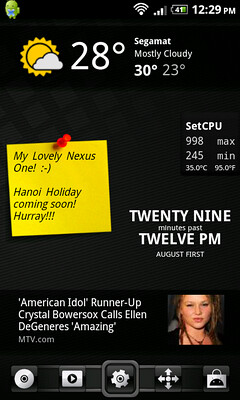
- This is a MOD edition of stock weather, include inside LeoFroYo v1.2.0 ROM
3) music player and is that swicthpro at the bottom? how do i remove the background border? 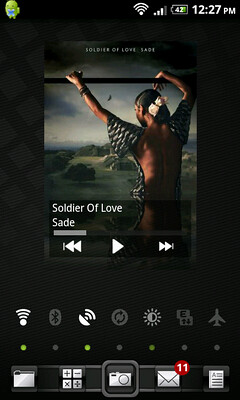
- This is a MOD stock Music Player by cacheinjection - http://forum.xda-developers.com/showthread.php?t=690180
- Ya, it is SwitchPro widget, during adding, they will ask you what kind of skin you preferrable.
- For others apps, you may press this
 button (at your phone bottom) for all apps to see more function. button (at your phone bottom) for all apps to see more function.
4) the top info widgets(battery, memory, etc); and i want the nexus one icon in the middle too! 
- System Info
- If you are using LauncherPro, press and hold the center app drawer button and select App Drawer, then choose custom image.
thanks! |
|
|
|
|
|
LuffyPSP
|
Aug 1 2010, 03:43 PM
|
|
|
thanks for the info bro, and yeah i used to use the IMG code but afraid will clutter the page, so yeah thats why i use http... but thanks again! heading to market now! |
|
|
|
|
|
hihihehe
|
Aug 1 2010, 05:27 PM
|
|
|
changed wallpaper 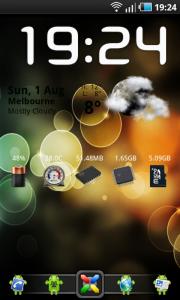
|
|
|
|
|
|
LEVIATHAN
|
Aug 1 2010, 07:18 PM
|
|
|
 QUOTE The love & star icons are from StatusNotes, $.
Battery icon with 92% is from Battery Indicator Pro, $.
Froyo-only search widget.
Tajm.
The toggles are from SwitchPro Widget, $.
And obviously, LauncherPro.  QUOTE The icons are from Suave set, changed with ShorterCut, $.   QUOTE The only widget here is from Music Mod.  QUOTE All installed apps are hidden by Preferences > General Settings > Hidden Apps in LauncherPro so I have a clean apps drawer. All the $ apps are purchased via Market obviously. Edit: I have 4 home screens, and I set the physical home button to the 1st home screen, so I have the iPhone-like search screen. This post has been edited by LEVIATHAN: Aug 1 2010, 07:25 PM |
|
|
|
|
|
DecaPix
|
Aug 2 2010, 01:13 AM
|
|
|
QUOTE(hihihehe @ Aug 1 2010, 05:27 PM) changed wallpaper
eh..is that the normal weather widget or from beautiful widgets? how to get it transparent background? |
|
|
|
|



 Quote
Quote







 0.0260sec
 0.65
0.65
 6 queries
 GZIP Disabled