Welcome Guest ( Log In | Register )

3 Pages  1 2 3 >Bottom

Outline · [ Standard ] · Linear+

 Post your Homescreen, Pimp your Droid

views
     
LuffyPSP
post Jul 29 2010, 11:12 PM

Droid, droid droid droid!
*******
Senior Member
3,771 posts

Joined: Apr 2010
From: Kota Bharu


guys i just got my Desire less than 24 hours and if possible dont want to root my phone since its still new. any chance i can have cool home screens like you guys without rooting?

and how do i go into paid market? i can only see free in the current market now....
LuffyPSP
post Jul 30 2010, 12:16 AM

Droid, droid droid droid!
*******
Senior Member
3,771 posts

Joined: Apr 2010
From: Kota Bharu


QUOTE(bryan_823 @ Jul 29 2010, 11:42 PM)
To access paid market u must root ur device.
Those cool home screens can be customize without root, just download some apps from Market like apps organizer, folder organizer, beautiful widgets etc. You need to try out each of these apps, you will have lovely homescreen by the combination of these of appsĀ  biggrin.gif
*
damn should i root or just use the 2.2 Froyo when its available? i know some stuffs on what rooted device can do but if possible i wanted to stay original as possible, though i love hacking stuffs~~

do i miss many stuffs on the paid market?

and yeah btw thanks for suggestions of the apps.

EDIT : after doing some reading, no harm if i root my phone right, cuz after that i can continue using the current ROM without installing custom ROM? i can still update normally am i? or no?

Sorry for the off topic a bit, but the above questions are somewhat related i think?

This post has been edited by LuffyPSP: Jul 30 2010, 12:27 AM

LuffyPSP
post Jul 30 2010, 02:27 PM

Droid, droid droid droid!
*******
Senior Member
3,771 posts

Joined: Apr 2010
From: Kota Bharu


QUOTE(bryan_823 @ Jul 30 2010, 11:40 AM)
Refer to the Desire official thread, you will get lots of info on rooting, flashing custom ROMs and there will be more ppl helping you there. This thread is more for sharing of homescreens.  rclxms.gif
*
yeah i did that after i posted this last night. sorry for the trouble. Will update with my screens after i done researching.
LuffyPSP
post Jul 31 2010, 12:25 AM

Droid, droid droid droid!
*******
Senior Member
3,771 posts

Joined: Apr 2010
From: Kota Bharu


I'm using Desire, 2.1 Eclair. my phone only 1 day and 12 hours old so you can expect me as a noob and everthing is still new. so i want to ask something.

I want this keyboard!! how?

user posted image

whats the name of the widget for toggling on/off on the right-most screen?

user posted image

same as above, whats the name? and whats the name of widget Battery Life/Left too? and how do you change the icons?

user posted image

name of the clock together with the place/weather?

user posted image


thanks!
LuffyPSP
post Jul 31 2010, 04:42 AM

Droid, droid droid droid!
*******
Senior Member
3,771 posts

Joined: Apr 2010
From: Kota Bharu


hihi sorry for that. and btw does all of that require paid market?
LuffyPSP
post Jul 31 2010, 05:13 AM

Droid, droid droid droid!
*******
Senior Member
3,771 posts

Joined: Apr 2010
From: Kota Bharu


i see...but i cant root!!!

dont these stuff have the methods to pay via paypal like launcher pro plus? i just bought it btw...

This post has been edited by LuffyPSP: Jul 31 2010, 05:15 AM
LuffyPSP
post Jul 31 2010, 12:30 PM

Droid, droid droid droid!
*******
Senior Member
3,771 posts

Joined: Apr 2010
From: Kota Bharu


QUOTE(cleave @ Jul 31 2010, 04:40 AM)
Wow! A quiz.  drool.gif

1) That keyboard is a modded HTC_IME. You can make your own here:-
http://www.gimpsta.com/themer/index.php
Just register, login and design your keyboard.

2) SwitchPro Widget

3) JuiceDefender & JuicePlotter Widget. In between them is a 2x2 MoreIcons Widget. (this is the 5th time I answered this question this week)  sweat.gif

4) That's a Beautiful Widget weather clock.
*
ok i've created my keyboard, how do i apply it on phone?

and when froyo out do i need to change to v27 highres froyo?
LuffyPSP
post Jul 31 2010, 05:08 PM

Droid, droid droid droid!
*******
Senior Member
3,771 posts

Joined: Apr 2010
From: Kota Bharu


i've rooted mine! got access to paid market and buying like mad...lolz...will post my screen later. btw how do i use Shootme?

and btw

i've created my keyboard, how do i apply it on phone?

and when froyo out do i need to change to v27 highres froyo?
LuffyPSP
post Jul 31 2010, 07:35 PM

Droid, droid droid droid!
*******
Senior Member
3,771 posts

Joined: Apr 2010
From: Kota Bharu


QUOTE(nIcV @ Jul 31 2010, 06:22 PM)
Ya..i've install,but still can use it..


Added on July 31, 2010, 6:40 pm

So nice..how u root it?during ur rooting,if there is error,how u goin to make it default?im thinkin on rooting my fon too.but scare to do so.
*
Not much to be scared bro. I screwed many times by interupting the process...still manage to root it in the end. Just make sure u know wht r u doin. N dont do it if u hesitate...hehe gud luck bro, i,m sure u can do it..well if this is ur first time doin these kind of stuffs, maybe ok la to be scared...smile.gif
LuffyPSP
post Jul 31 2010, 08:59 PM

Droid, droid droid droid!
*******
Senior Member
3,771 posts

Joined: Apr 2010
From: Kota Bharu


QUOTE(Slekerz @ Jul 31 2010, 05:30 PM)
Open shootme, hide the apps, on your screen shack your phone it will save on your shootme folder
Using file manager like astro open your keyboard mod apk and install.
*
I see i see. thanks for the info bro! biggrin.gif

QUOTE(nIcV @ Jul 31 2010, 07:44 PM)
Haha..tis is my 1st time to do this..can u show me the step how to rooting?
*
i use this guide - http://myhtcdesire.com/modding/how-to-root...easily-method-2

well i am used to modding stuffs so i kinda felt ok when i screwed the process this morning...hehe...i know how you feel bro, first time is the hardest but the best feeling ever! biggrin.gif
LuffyPSP
post Jul 31 2010, 10:13 PM

Droid, droid droid droid!
*******
Senior Member
3,771 posts

Joined: Apr 2010
From: Kota Bharu


QUOTE(Andrewtst @ Jul 31 2010, 10:10 PM)
thanks! i needed this too!

EDIT : where do i type those adb thing actually? and i need to donwload the files provided right?

another Q, i successfully installed the HTC IME mod keyboard but how do i use it?

This post has been edited by LuffyPSP: Jul 31 2010, 11:50 PM
LuffyPSP
post Aug 1 2010, 12:51 PM

Droid, droid droid droid!
*******
Senior Member
3,771 posts

Joined: Apr 2010
From: Kota Bharu


QUOTE(Andrewtst @ Aug 1 2010, 12:02 PM)
You can google on ADB instruction.

For easy, just use root explorer to do it, make sure click the top right corner to enable write access on /system/app

Enable the HTC keyboard at Settings --> Language & keyboard
*
yay got it working for the keyboard. btw i beleive i've put 2 IME keyboard in the root folder of mSD card, then i installed one and the other one already installed too? how do i change between them?
LuffyPSP
post Aug 1 2010, 02:59 PM

Droid, droid droid droid!
*******
Senior Member
3,771 posts

Joined: Apr 2010
From: Kota Bharu


Need these widget names; mostly the ones by Andrewtst

1) the weather at the top; plus your music player

http://farm5.static.flickr.com/4094/484806..._ecc6f61691.jpg

2) Again, the weather at the top;

http://farm5.static.flickr.com/4134/484806..._9a0860fed0.jpg

3) music player and is that swicthpro at the bottom? how do i remove the background border?

http://farm5.static.flickr.com/4122/484806..._bd01f2c862.jpg

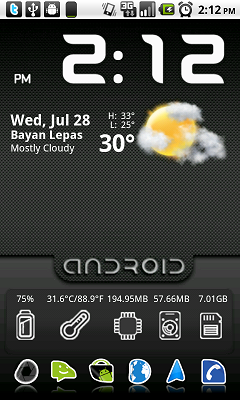
4) the top info widgets(battery, memory, etc); and i want the nexus one icon in the middle too!

http://farm5.static.flickr.com/4079/483011..._4d5f800930.jpg

thanks!


LuffyPSP
post Aug 1 2010, 03:43 PM

Droid, droid droid droid!
*******
Senior Member
3,771 posts

Joined: Apr 2010
From: Kota Bharu


thanks for the info bro, and yeah i used to use the IMG code but afraid will clutter the page, so yeah thats why i use http...biggrin.gif but thanks again! heading to market now!
LuffyPSP
post Aug 2 2010, 06:03 PM

Droid, droid droid droid!
*******
Senior Member
3,771 posts

Joined: Apr 2010
From: Kota Bharu


I cant get the smocked widget to work.... i'm using root xplorer btw.. hope someone can teach me the adb method...
LuffyPSP
post Aug 4 2010, 12:29 PM

Droid, droid droid droid!
*******
Senior Member
3,771 posts

Joined: Apr 2010
From: Kota Bharu


@bonanno - what's the name for these widgets;

user posted image
this picture frame

user posted image
the music player

and how do you make the notification bar into white? i want mine to be transparent/white too...biggrin.gif


Added on August 4, 2010, 12:37 pmwhats this music widget name?

user posted image

and how do i change the system info widget skin into like this;

user posted image

This post has been edited by LuffyPSP: Aug 4 2010, 12:37 PM
LuffyPSP
post Aug 4 2010, 02:05 PM

Droid, droid droid droid!
*******
Senior Member
3,771 posts

Joined: Apr 2010
From: Kota Bharu


haha lol no harm asking many question kan?

i am just a curious little newbie.
LuffyPSP
post Aug 4 2010, 05:47 PM

Droid, droid droid droid!
*******
Senior Member
3,771 posts

Joined: Apr 2010
From: Kota Bharu


QUOTE(Slekerz @ Aug 4 2010, 04:57 PM)
That is Music Mod V1.8, you can get on market now, here the link market://search?q=pname:com.piratemedia.musicmod
*
Got it!

now 2 more to go, the frame and system info skin~~
LuffyPSP
post Aug 4 2010, 06:28 PM

Droid, droid droid droid!
*******
Senior Member
3,771 posts

Joined: Apr 2010
From: Kota Bharu


thanks! now only the skin!

will post my screens later!
LuffyPSP
post Aug 4 2010, 06:31 PM

Droid, droid droid droid!
*******
Senior Member
3,771 posts

Joined: Apr 2010
From: Kota Bharu


so cannot be changed?

i mean the skin for the system info widget...hehe...biggrin.gif

3 Pages  1 2 3 >Top
 

Change to:
| Lo-Fi Version
0.0333sec    0.29    7 queries    GZIP Disabled
Time is now: 15th December 2025 - 06:01 PM