Welcome Guest ( Log In | Register )

84 Pages « < 78 79 80 81 82 > » Bottom

Outline · [ Standard ] · Linear+

 VAIO Club V2.5, make.believe

views
     
shien
post Jul 24 2013, 09:16 AM

Getting Started
**
Junior Member
146 posts

Joined: Sep 2004


please advise compare with the vaio pro 11 inch and vaio pro 13 inch which one is more favourable to buy. which one of the 2 more people will choose to buy? one is the lightest 11 inch notebook and another one is lightest 13 inch notebook
aobk84
post Jul 24 2013, 09:58 AM

Casual
***
Junior Member
406 posts

Joined: Feb 2006


QUOTE(shien @ Jul 24 2013, 09:16 AM)
please advise compare with the vaio pro 11 inch and vaio pro 13 inch which one is more favourable to buy. which one of the 2 more people will choose to buy? one is the lightest 11 inch notebook and another one is lightest 13 inch notebook
*
I'm also considering, maybe if you travel a lot then 11inch would be better. If not 13 inch screen with slightly heavier weight should be a better choice. Since the price difference is rm200
Sib
post Jul 24 2013, 05:40 PM

#PasukanPenyelamatMalaysia
******
Senior Member
1,945 posts

Joined: Mar 2008
From: Malaya


edit

This post has been edited by Sib: Jul 25 2013, 04:37 AM
Kaka23
post Jul 31 2013, 12:11 AM

Look at all my stars!!
*******
Senior Member
8,259 posts

Joined: Sep 2009


Guys.. Is Vaio Fit E a good buy? Using for Internet, songs, microsoft office...
mrashdi
post Aug 11 2013, 04:46 PM

Getting Started
**
Junior Member
51 posts

Joined: Jan 2009
my another vaio. 11 incher E series. SVE11125. add me on the list. thanks.

shien
post Aug 19 2013, 05:00 PM

Getting Started
**
Junior Member
146 posts

Joined: Sep 2004


is vaio pro launch already in malaysia? i see that their website stated new anyone have boiught it?
hapa
post Aug 21 2013, 03:13 PM

i kill u!!
*****
Senior Member
828 posts

Joined: Nov 2007
Anyone got the new VAIO pro? Had been calling a few stores but all said still don't have stock.
Wanyum
post Aug 21 2013, 09:58 PM

New Member
*
Junior Member
5 posts

Joined: Oct 2012
Is vaio fit 14E good for gaming,, someone help me,, and it is suitable for solid work and any programming software
speedfamgirl
post Sep 5 2013, 06:29 AM

Not afraid of #138
******
Senior Member
1,900 posts

Joined: Apr 2007
From: Mental Asylum
Vaio Tap 11, anyone?

user posted image
shien
post Sep 5 2013, 03:29 PM

Getting Started
**
Junior Member
146 posts

Joined: Sep 2004


vaio pro have been waiting for months to launch in malaysia until now still no news dont ever think about vaio tap dont know how many months more have to wait for it
speedfamgirl
post Sep 5 2013, 10:01 PM

Not afraid of #138
******
Senior Member
1,900 posts

Joined: Apr 2007
From: Mental Asylum
QUOTE(shien @ Sep 5 2013, 03:29 PM)
vaio pro have been waiting for months to launch in malaysia until now still no news dont ever think about vaio tap dont know how many months more  have to wait for it
*
ya lor...last time i went to sony center they have a sale on older vaio models....mcm stock clearance la. but still on display is for mid-end vaio. they're nice, but i'm looking for a light laptop. light = less than 1kg
sookk
post Sep 13 2013, 12:49 AM

Casual
***
Junior Member
325 posts

Joined: Mar 2005
From: PJ


Just bought the Vaio Pro 13 (i7 version) ... loving every bit of it ... the high res screen is to die for .... stock have arrived on Wednesday and you can walk into any Sony Center to purchase one (Curve/KLCC) ...

If you ask me ... get the 13 inch ... you get the same resolution for the 11/13 inch Pro .... you practically have to upscale the font to use the notebook properly .... imagine if you have the 11 inch version ... eyes will pop out trying to read the small text
Peter C
post Sep 13 2013, 08:42 PM

New Member
*
Newbie
3 posts

Joined: Sep 2013


QUOTE(sookk @ Sep 13 2013, 12:49 AM)
Just bought the Vaio Pro 13 (i7 version) ... loving every bit of it ... the high res screen is to die for .... stock have arrived on Wednesday and you can walk into any Sony Center to purchase one (Curve/KLCC) ...

If you ask me ... get the 13 inch ... you get the same resolution for the 11/13 inch Pro .... you practically have to upscale the font to use the notebook properly .... imagine if you have the 11 inch version ... eyes will pop out trying to read the small text
*
Hi Sookk,
Seems like you are a happy customer of vaio pro 13. How's its performance? I'm very interested to get 1, but now holding on because report in sony community site that some have wifi issue. Betul?
peter C

sookk
post Sep 13 2013, 11:04 PM

Casual
***
Junior Member
325 posts

Joined: Mar 2005
From: PJ


QUOTE(Peter C @ Sep 13 2013, 08:42 PM)
Hi Sookk,
Seems like you are a happy customer of vaio pro 13. How's its performance? I'm very interested to get 1, but now holding on because report in sony community site that some have wifi issue. Betul?
peter C
*
Let me tackle this question from all perspective:

1. Weight and size

My gawd is this thing thin and light. Even the 13 inch version is lighter than my previous MBA13. If you are looking for portability then this IS the Ultrabook that you want to get. There is no questions asked for sure ... btw, stay away from the 11 inch model. Full HD on an 11 inch will kill your eye sight. Even on the 13 inch you had to do font scaling to 125%/150% to use comfortably .... unless you intend to connect an external monitor ... but then you loose out on the fantastic screen on the Vaio Pro

2. Build quality

As you know it is made from carbon fibre and yes there is flex on the body. However, I won't say this thing would break easily... it's not exactly a tofu. The idea is to flex and prevent dents and cracks should you drop it (heaven forbids). Bump it on its side or carrying it around won't introduce dents like on an aluminium body. But this thing is a fingerprint magnet .... top, bottom, screen ... will soon see lots of fingerprints ...

3. Wifi problem

What WIFI problem? So far performance has been rock solid. I suggest you download the latest Intel drivers from Intel support website.

4. Fan issue

The fan does blow loud when performing windows update and graphic/disk intensive activities. However, it does not turn on as often as you think. In fact, there is a new BIOS patch that allow you to setup the fan to operate in silent mode ... so it won't blow so loud

5. Who is this for?

Road warriors who perform office processing (word, powerpoint, email), simple games, browsing the net, listening to songs or watching some HD movies ... this is for you ... I especially love the SSD via PCIe .... this damn thing loads up into Windows 8 desktop in 4 seconds flat from cold boot ....


However, I would suggest you go to the store and play around with it first before making a decision .. besides ... it's your money

yuekuan
post Sep 13 2013, 11:16 PM

Casual
***
Junior Member
495 posts

Joined: Oct 2005
From: Sj


I am currently using Vaio Duo 13. The WIFI seems to have weaker signal compare to other laptop which I am using currently. I already send my laptop to Sony centre the curve and they also admit weak signal issue. They have brought up the issue to the regional support (Singapore) but unfortunately no feedback until now which is already been more than a month. I have tried, and Sony also did format and update the latest driver for me but same issue occurs. Therefore it's VAIO's problem.
sookk
post Sep 13 2013, 11:20 PM

Casual
***
Junior Member
325 posts

Joined: Mar 2005
From: PJ


QUOTE(yuekuan @ Sep 13 2013, 11:16 PM)
I am currently using Vaio Duo 13. The WIFI seems to have weaker signal compare to other laptop which I am using currently. I already send my laptop to Sony centre the curve and they also admit weak signal issue. They have brought up the issue to the regional support (Singapore) but unfortunately no feedback until now which is already been more than a month. I have tried, and Sony also did format and update the latest driver for me but same issue occurs. Therefore it's VAIO's problem.
*
Have you tried installing the driver from Intel website instead of Sony? It makes a huge difference.

Try it here:

https://downloadcenter.intel.com/SearchResu...4&FamilyId=1783
yuekuan
post Sep 13 2013, 11:27 PM

Casual
***
Junior Member
495 posts

Joined: Oct 2005
From: Sj


QUOTE(sookk @ Sep 13 2013, 11:20 PM)
Have you tried installing the driver from Intel website instead of Sony? It makes a huge difference.

Try it here:

https://downloadcenter.intel.com/SearchResu...4&FamilyId=1783
*
Thanks for your suggestion. But VAIO duo is using Wi-Fi® Adapter : Broadcom® BCM43241 (802.11a/b/g/n) not intel. I don't think that driver page you give is supporting my hardware right?
notworthy.gif
sookk
post Sep 13 2013, 11:28 PM

Casual
***
Junior Member
325 posts

Joined: Mar 2005
From: PJ


QUOTE(yuekuan @ Sep 13 2013, 11:27 PM)
Thanks for your suggestion. But VAIO duo is using Wi-Fi® Adapter : Broadcom® BCM43241 (802.11a/b/g/n) not intel. I don't think that driver page you give is supporting my hardware right?
notworthy.gif
*
Whooppss ... won't work then .. sorry bro ... was trying to find out what Wifi adaptor does Duo 13 uses on Sony website but couldn't find the info .... won't work for you .... unless Broadcom has their own driver download site
Peter C
post Sep 14 2013, 12:37 AM

New Member
*
Newbie
3 posts

Joined: Sep 2013


QUOTE(sookk @ Sep 13 2013, 11:04 PM)
Let me tackle this question from all perspective:


3. Wifi problem

What WIFI problem? So far performance has been rock solid. I suggest you download the latest Intel drivers from Intel support website.


However, I would suggest you go to the store and play around with it first before making a decision .. besides ... it's your money
*
Hi Sookk,
On your point 3, how far away are you from your router and any walls in between?

Have you tried to bring your SVP to say 15m away from your router and see
1) any dropout/disconnection?
2) slower in internet speed?

I'm particularly eager to find out this item as this can be my only deal breaker.

Cheers
Peter C

sookk
post Sep 14 2013, 08:55 AM

Casual
***
Junior Member
325 posts

Joined: Mar 2005
From: PJ


QUOTE(Peter C @ Sep 14 2013, 12:37 AM)
Hi Sookk,
On your point 3, how far away are you from your router and any walls in between?

Have you tried to bring your SVP to say 15m away from your router and see
1) any dropout/disconnection?
2) slower in internet speed?

I'm particularly eager to find out this item as this can be my only deal breaker.

Cheers
Peter C
*
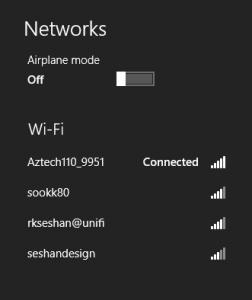
There was never any case of disconnection. I have tried using the device about 20 meters away with 2 brick wall in the way .... Still no problems with the wifi. Not sure why some people are having problems with the wifi .... However, I suspect perhaps they type of router might be a crucial point. I have used it with dlink, aztech, 3com and Cisco without problems.

At home I sit about 10 meters away .... Also on different floors .... No issues

Attached Image
As you can see ... both of the top 2 are my wireless AP ... both showing great signal strength

This post has been edited by sookk: Sep 14 2013, 09:12 AM

84 Pages « < 78 79 80 81 82 > » Top
 

Change to:
| Lo-Fi Version
0.0317sec    0.40    6 queries    GZIP Disabled
Time is now: 8th December 2025 - 04:18 PM