Welcome Guest ( Log In | Register )

Outline · [ Standard ] · Linear+

 VAIO Club V2.5, make.believe

views
     
sookk
post Sep 13 2013, 12:49 AM

Casual
***
Junior Member
325 posts

Joined: Mar 2005
From: PJ


Just bought the Vaio Pro 13 (i7 version) ... loving every bit of it ... the high res screen is to die for .... stock have arrived on Wednesday and you can walk into any Sony Center to purchase one (Curve/KLCC) ...

If you ask me ... get the 13 inch ... you get the same resolution for the 11/13 inch Pro .... you practically have to upscale the font to use the notebook properly .... imagine if you have the 11 inch version ... eyes will pop out trying to read the small text
sookk
post Sep 13 2013, 11:04 PM

Casual
***
Junior Member
325 posts

Joined: Mar 2005
From: PJ


QUOTE(Peter C @ Sep 13 2013, 08:42 PM)
Hi Sookk,
Seems like you are a happy customer of vaio pro 13. How's its performance? I'm very interested to get 1, but now holding on because report in sony community site that some have wifi issue. Betul?
peter C
*
Let me tackle this question from all perspective:

1. Weight and size

My gawd is this thing thin and light. Even the 13 inch version is lighter than my previous MBA13. If you are looking for portability then this IS the Ultrabook that you want to get. There is no questions asked for sure ... btw, stay away from the 11 inch model. Full HD on an 11 inch will kill your eye sight. Even on the 13 inch you had to do font scaling to 125%/150% to use comfortably .... unless you intend to connect an external monitor ... but then you loose out on the fantastic screen on the Vaio Pro

2. Build quality

As you know it is made from carbon fibre and yes there is flex on the body. However, I won't say this thing would break easily... it's not exactly a tofu. The idea is to flex and prevent dents and cracks should you drop it (heaven forbids). Bump it on its side or carrying it around won't introduce dents like on an aluminium body. But this thing is a fingerprint magnet .... top, bottom, screen ... will soon see lots of fingerprints ...

3. Wifi problem

What WIFI problem? So far performance has been rock solid. I suggest you download the latest Intel drivers from Intel support website.

4. Fan issue

The fan does blow loud when performing windows update and graphic/disk intensive activities. However, it does not turn on as often as you think. In fact, there is a new BIOS patch that allow you to setup the fan to operate in silent mode ... so it won't blow so loud

5. Who is this for?

Road warriors who perform office processing (word, powerpoint, email), simple games, browsing the net, listening to songs or watching some HD movies ... this is for you ... I especially love the SSD via PCIe .... this damn thing loads up into Windows 8 desktop in 4 seconds flat from cold boot ....


However, I would suggest you go to the store and play around with it first before making a decision .. besides ... it's your money
sookk
post Sep 13 2013, 11:20 PM

Casual
***
Junior Member
325 posts

Joined: Mar 2005
From: PJ


QUOTE(yuekuan @ Sep 13 2013, 11:16 PM)
I am currently using Vaio Duo 13. The WIFI seems to have weaker signal compare to other laptop which I am using currently. I already send my laptop to Sony centre the curve and they also admit weak signal issue. They have brought up the issue to the regional support (Singapore) but unfortunately no feedback until now which is already been more than a month. I have tried, and Sony also did format and update the latest driver for me but same issue occurs. Therefore it's VAIO's problem.
*
Have you tried installing the driver from Intel website instead of Sony? It makes a huge difference.

Try it here:

https://downloadcenter.intel.com/SearchResu...4&FamilyId=1783
sookk
post Sep 13 2013, 11:28 PM

Casual
***
Junior Member
325 posts

Joined: Mar 2005
From: PJ


QUOTE(yuekuan @ Sep 13 2013, 11:27 PM)
Thanks for your suggestion. But VAIO duo is using Wi-Fi® Adapter : Broadcom® BCM43241 (802.11a/b/g/n) not intel. I don't think that driver page you give is supporting my hardware right?
notworthy.gif
*
Whooppss ... won't work then .. sorry bro ... was trying to find out what Wifi adaptor does Duo 13 uses on Sony website but couldn't find the info .... won't work for you .... unless Broadcom has their own driver download site
sookk
post Sep 14 2013, 08:55 AM

Casual
***
Junior Member
325 posts

Joined: Mar 2005
From: PJ


QUOTE(Peter C @ Sep 14 2013, 12:37 AM)
Hi Sookk,
On your point 3, how far away are you from your router and any walls in between?

Have you tried to bring your SVP to say 15m away from your router and see
1) any dropout/disconnection?
2) slower in internet speed?

I'm particularly eager to find out this item as this can be my only deal breaker.

Cheers
Peter C
*
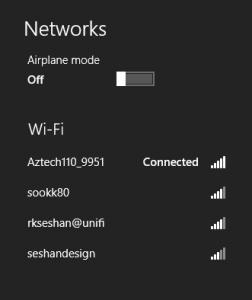
There was never any case of disconnection. I have tried using the device about 20 meters away with 2 brick wall in the way .... Still no problems with the wifi. Not sure why some people are having problems with the wifi .... However, I suspect perhaps they type of router might be a crucial point. I have used it with dlink, aztech, 3com and Cisco without problems.

At home I sit about 10 meters away .... Also on different floors .... No issues

Attached Image
As you can see ... both of the top 2 are my wireless AP ... both showing great signal strength

This post has been edited by sookk: Sep 14 2013, 09:12 AM
sookk
post Oct 7 2013, 04:42 PM

Casual
***
Junior Member
325 posts

Joined: Mar 2005
From: PJ


QUOTE(speedfamgirl @ Oct 3 2013, 02:26 AM)
nice, thanks for your review....been waiting for months & hopefully by the time i visit the Sony Centres this vaio pros will be available
*
I believe all the Sony Centers are already carrying the Vaio Pro 11/13 models ... alternatively you can order it online as well.
sookk
post Oct 18 2013, 04:48 PM

Casual
***
Junior Member
325 posts

Joined: Mar 2005
From: PJ


QUOTE(cheerz~ @ Oct 13 2013, 08:24 PM)
Hi, for current vaio pro owners, I like to ask whether black or silver is better?

The keyboard backlit is better for black n the overall contrast looks nice. But when I was at Sony center, I saw a lot of fingerprints n grease marks on the palm rest.

It's not so obvious on the silver version. But I read that silver can easily scratch and the underlying colour is gray so the black colour mask scratches better.
*
Sounds like a personal choice ... black is more classy and there isn't backlight leak from the keyboard if you use the keyboard in the dark. However, it does attract lots of fingerprint and oil on the keys, cover and touchpad. The silver model doesn't show those fingerprint as clearly (but it is still there). However, there is a huge backlight leak issue with the silver version where using the keyboard in the dark can blind you.

Also, since I got the i7 version ... I didn't even get a choice .. I could only get the black version. Sony Malaysia should have brought in the Black Carbon version ... at least that won't have the fingerprint issue (like the silver).
sookk
post Oct 18 2013, 04:49 PM

Casual
***
Junior Member
325 posts

Joined: Mar 2005
From: PJ


Any Vaio Pro 13 users upgraded to Windows 8.1? I seem to have a problem where the damn screen will go to sleep ... and then after that refuse to wake up again ... especially true when closing the lid ... walking to another location .. open the lid ... the green power light still on .. but no response from the screen ...

Had to turn off the notebook and turn it on again to solve ... irritating ... feel like going back to Windows 7 since Sony recently released the Windows 7 drivers
sookk
post Oct 21 2013, 01:20 PM

Casual
***
Junior Member
325 posts

Joined: Mar 2005
From: PJ


QUOTE(xda2 @ Oct 21 2013, 11:14 AM)
Yup. Same experience. Additionally, the brightness sensor on mine has gone bonkers. Am not able to set the brightness and have to turn off auto brightness in sony control center. Oh, and the fan seems to kick in more often now...
*
Anyhow .. I found the solution. Just uninstall the graphic driver and install the latest one from Sony Support website (for some strange reason, the Asia Pac one not updated with Windows 8.1 drivers) ... you need to get the drives from Sony USA.


sookk
post Oct 21 2013, 01:28 PM

Casual
***
Junior Member
325 posts

Joined: Mar 2005
From: PJ


QUOTE(uzary @ Oct 21 2013, 10:34 AM)
i believe somehow sony will bring back the Z series in the future. i hope so. btw altho im a sony fan, i never bought vaio before, the closest was vaio P that my brother in law gave me, but i hate it, it was a joke from sony for that product.

anyway i have  few questions to ask u guys, cause i aiming to get a vaio as my laptop replacement.

1) should i buy here with sony malaysia stores or should i buy online from overseas? i ask this because i think sony malaysia put a really expensive price tag for most vaio sold here, also i think there are models that not available here.

2) is it safe and easy to buy from overseas? what are the pros and cons? any recommendation website?

3) i heard from people that vaio hardware cant be replace simply like other laptop, is it true? i mean things like upgrading the hard disk or the ram...

4) since windows 8/8.1 really optimize for touchscreen, that is why im aiming for vaio flip or tap 11. but i think i go for the flip as it is more toward a laptop and i need a bigger storage. also, i can be flip into a tablet mode, which i think will come in handy. any other model suggestion recommended?

for reference, i used my laptop mostly to do some office work, lots of downloading  brows.gif  laugh.gif , watching movies, light gaming like DOTA  laugh.gif  laugh.gif  sweat.gif  cause that is the only game my laptop can handle, high end games i played on my pc and ps3. 

please advice. TQ.
*
(1) I don't think the Vaio notebooks in Malaysia have a higher price tag. In fact, most of the Vaio are cheaper in Malaysia compared to overseas (which have not included the sales tax). The only problem is you don't have freedom to customise the hardware if you buy locally.

(2) It's definitely safe to buy overseas ... as long as you get it from a reliable source (Amazon, Best Buy, etc.) ... but the shipment cost will kill you. Also, don't forget that Vaio only come with 1 year international warranty. If you buy it locally, you get 1 year international warranty and 2 years local warranty (with the option to extend the warranty up to 5 years). And trust me ... that warranty will be worth your while knowing how much Sony charges to repair your devices. If you really want to buy from overseas, try Sony itself (you can order it online and ship your devices to relevant forwards - like CGW, MyUS, etc.) ... those forwarders will arrange to ship the notebook to you ....

(3) Depends on the devices... The Vaio Pro for example has everything soldered on (like RAM). Will be tough to make upgrades/changes yourself ... however, there are other range like Vaio Fit which you can easily swap RAM and HDD/SSD ... but are you willing to loose the warranty ?

(4) That is up to you .... cannot comment since it's a personal choice

sookk
post Oct 21 2013, 05:51 PM

Casual
***
Junior Member
325 posts

Joined: Mar 2005
From: PJ


QUOTE(uzary @ Oct 21 2013, 03:09 PM)
thanks for the reply bro, regarding no 3, , swap ram and hdd will void warranty? same to add more ram? i can understand if hdd, but what about adding more ram? im talking bout any vaio that for e.g come with 2gb of ram, but got 1 more ram slot for adding up additional ram. by adding it will void warranty too?
*
I'm not sure .... best you check / google it first .... I think any attempt to open the notebook (unless it comes with some special slot which allow you to easily access the memory slot) would be considered a void of warranty .... but obviously you can remove the additional memory module before sending in for repairs smile.gif

Just got clarification that adding RAM does not void warranty ... but your additional RAM is not covered by the original warranty (even the extended warranty). So that's that ...

This post has been edited by sookk: Oct 21 2013, 05:54 PM
sookk
post Oct 27 2013, 03:35 PM

Casual
***
Junior Member
325 posts

Joined: Mar 2005
From: PJ


QUOTE(Rhoel @ Oct 26 2013, 10:17 AM)
updated my S to windows 8.1 ... all well except for the dreaded SecureBoot disease... LOL
*
What is the SecureBoot disease ?

sookk
post Oct 28 2013, 02:20 PM

Casual
***
Junior Member
325 posts

Joined: Mar 2005
From: PJ


Dang .. that sucks .... well ... it's irritating .. but it doesn't stop any functionality ...
sookk
post Nov 14 2013, 03:26 PM

Casual
***
Junior Member
325 posts

Joined: Mar 2005
From: PJ


QUOTE(kae7 @ Oct 30 2013, 08:26 AM)
My keyboard aren't working properly... some of the button not working

mine is VPCEA16FG .. how much to replace my keyboard?
*
Do you want to repair from official sources? If so, you can probably give Sony Service Center (http://www.sony.com.my/section/servicecentres) a call and get a quote first
sookk
post Nov 26 2013, 08:46 AM

Casual
***
Junior Member
325 posts

Joined: Mar 2005
From: PJ


QUOTE(speedfamgirl @ Nov 23 2013, 05:25 AM)
finally managed to have a good play with Vaio Pro 13...while it is thin & noticeably lighter than my old vaio Z, but too many sharp edges! still thinking of getting this or wait for the Vaio Tap 11 next year....good thing nowadays the vaios becoming affordable even though for their flagship laptop (if someone remember the Z series it comes with a hefty pricetag)
*
Vaio Tap 11 unfortunately is not a powerhouse ... Managed to play with it while in Bangkok ... I would say ... if you tried using a Microsoft Surface Pro (not the 2nd version) ... it's more or less like that .. a bit sluggish
sookk
post Nov 29 2013, 02:31 PM

Casual
***
Junior Member
325 posts

Joined: Mar 2005
From: PJ


QUOTE(ClessRV @ Nov 27 2013, 05:17 PM)
Hi guys, I am looking at the Sony Flip for my next laptop/tablet, does anyone know when will it release here? Read it before it will be end of Nov or early Dec, maybe anyone has insiders info?
*
You can try calling Sony Style and getting an estimated arrival date ... normally they are quite accurate ... it's already selling in Thailand if you cannot wait smile.gif

The 13 inch model is selling at RM 4400 (converted from THB with VAT included)

http://www.sony.co.th/product/svf13n12sh?site=hp_en_TH_i

Technically ... it should start selling here 2-3 months after it is released in Thailand

Vaio comes with 2 years warranty (local) with first year as international warranty ... in case you are getting it in Thailand ... so you can consider it

This post has been edited by sookk: Nov 29 2013, 02:32 PM
sookk
post Dec 1 2013, 08:05 AM

Casual
***
Junior Member
325 posts

Joined: Mar 2005
From: PJ


QUOTE(Al Puccino @ Nov 30 2013, 11:10 PM)
I have been thinking about getting pro 11. Now im not sure based from what you have reviewed.
Is the 11 inch one too small to read? Any recommendation? I currently torn between getting macbook air or vaio pro 11. with inclination more towards sony at the moment.

Strictly 11 inch because i want it to be as portable as possible. I move a lot from place to place.

_______________________________

If possible I want to know how the typing feels in vaio pro 2013. I mostly do writings and several light drafting software and photo editing software.
*
Personally I have used both the MBA11 and Vaio pro 11... Just like yourself I have constant travelling overseas and need something light and practical. My only concern about the Vaio pro 11 is the screen resolution is to high and the yourself on Windows 8 isn't as great as the Mac retina display scaling... In terms of portability.. They both win hands down...

But the thing is using mba11 has its own set of challenges as well. The reason why I moved to a 13 inch screen is because 11 is not practical to use for a long period of time. Pretty bad for the eyes.

Since you have already shortlisted both these notebooks, Why don't you check out the screen of the Vaio pro 11 at the stores and see if you like it. Make sure to test it in desktop mode with word processing... Windows 8 start screen mode is always up scaled. If you don't mind the screen resolution... By all means go grab it.. Silver one is less of a fingerprint magnet
sookk
post Jan 20 2014, 09:31 PM

Casual
***
Junior Member
325 posts

Joined: Mar 2005
From: PJ


I think most of the people jumped to Macs ..... ever since you can install bootcamp and run Windows on those machines .... everybody owns a mac now
sookk
post Apr 25 2014, 09:14 AM

Casual
***
Junior Member
325 posts

Joined: Mar 2005
From: PJ


QUOTE(thunderbird @ Mar 26 2014, 07:29 PM)
Hi Guys,

Where is the best store in Klang valley to buy Vaio laptop?
*
Why don't you head over to Sony Center (KLCC/The Curve) to check them out
sookk
post Jul 26 2014, 12:02 AM

Casual
***
Junior Member
325 posts

Joined: Mar 2005
From: PJ


Sony no longer part of development for new vaio notebooks ... but they still do sell them in the stores and online

2 Pages  1 2 >Top
 

Change to:
| Lo-Fi Version
0.0505sec    0.65    7 queries    GZIP Disabled
Time is now: 6th December 2025 - 01:13 PM