Outline ·
[ Standard ] ·
Linear+
Lenovo ideapad Y460/Y560 Thread, Gaming nerd in a business package
|
TSjotaro12
|
 May 2 2010, 08:40 AM May 2 2010, 08:40 AM
|

|
@samlee860407 I think this will solve your problem. QUOTE The updated audio driver fixes the following issue on Y460/560 systems: The unavailability of HD Audio when system is connected to HD Device via HDMI Cable. Realtek HD Audio
Added on May 2, 2010, 8:43 amQUOTE(gstoh @ May 2 2010, 01:08 AM) your temperature is cool even it is overclock ! did you use cooler that time ? Traditional cooler  ... Just a fan. But it does stays @60C after i finished the test. This post has been edited by jotaro12: May 2 2010, 08:43 AM |
|
|
|
|
|
TSjotaro12
|
May 2 2010, 01:38 PM
|
|
|
QUOTE(samlee860407 @ May 2 2010, 01:23 PM) hm...i cant install it. it give me some sort of error when install halfway, and it says cannot install the driver :S Try unistall your own driver and software then proceed the upgrade step. Download the driver again if possible to make sure the file size is same. QUOTE for Q1 i dont know, for Q2, yes you can request for extended warranty. 3 years warranty cost extra rm300++. and you need to buy from the seller itself. Just go LYP where shops selling the model and don't expect to get unbeatable price, if you think it's reasonable, just go for it. Extended warranty can go through shops/sales agent. You can call Lenovo CC to get info on shops around your area which they do sell the warranty pack too. |
|
|
|
|
|
TSjotaro12
|
May 3 2010, 09:35 PM
|
|
|
It's better to go there rather than asking us because we can't predict whether they have stock or not. They are all selling retail price for sure so do negotiate till you think it's reasonable. If not happy, turn to other shops, no hard feelings.
|
|
|
|
|
|
TSjotaro12
|
May 3 2010, 10:35 PM
|
|
|
QUOTE(synz @ May 3 2010, 10:05 PM) this laptop suppose to have 500GB hdd right how come when i sum up all include hidden partitions all that only 460GB? so much difference Yahoo does answer  |
|
|
|
|
|
TSjotaro12
|
May 4 2010, 02:50 PM
|
|
|
QUOTE(chiugy @ May 4 2010, 11:14 AM)
what games ati 5650 lag while played??
Played Assassin's Creed II last night using 1280x720 w/ all max settings. I'm using my 22 inch LCD as main screen though. (Can't use 1680x1050, too heavy lol or 1366x768 as no selection) Smooth as average more than 30FPS for sure.  Most recent games are definitely playable using HD5650. Lagging while gaming is letting you know you need to lower some settings like AA, resolution, graphic details etc. Just don't expect it to have all smooth gaming as it's a mid range GC only. |
|
|
|
|
|
TSjotaro12
|
May 4 2010, 06:26 PM
|
|
|
@leng2 It's my own laptop, of course it's meant for 'work', hehe . Hardly play games these days coz not many titles attract my taste except a few. Heard the new Splinter Cell came out so that will be on my list too. |
|
|
|
|
|
TSjotaro12
|
May 5 2010, 12:29 AM
|
|
|
@^bAbym310n^ Great to hear that. Btw, the new Lenovo SC at LYP is already open for "business". |
|
|
|
|
|
TSjotaro12
|
May 5 2010, 12:36 AM
|
|
|
QUOTE(-pWs- @ May 5 2010, 12:31 AM) What do you meant by that bro? -pWs-It's the new Lenovo service center at LYP, so its good for KL Lenovo owners since it's near. |
|
|
|
|
|
TSjotaro12
|
May 6 2010, 01:37 AM
|
|
|
Teach?? We can share our experience if you like to . Hmmm, if possible you can do your own observation of your laptop's temperature to see how efficient your temp would go. Mine at home, non air cond room, CPU min 39-41C, load 49-51C, max 66-68C(gaming). Monitor your temp does help you know that your laptop is working happily or sad/anger(heavy load lol...) I do found out an answer(I guess...) why some people complaint about heat especially during gaming if you're in for hours. I've played AC 2 just now for 2 hours+ with max temp I checked it's just 72C on GPU-Z(ave. 68C). The problem lies on the material of the glossy surface which do hold the heat w/o spreading fast enough thru the other parts like heatsink and causes you felt uncomfortable using the keyboard for longer period especially FPS gaming. I do amaze the max temperature it hit . Thanks to bro gstoh regarding tips on switching to super saver mode before you game and you'll see/feel the difference. |
|
|
|
|
|
TSjotaro12
|
May 6 2010, 09:22 AM
|
|
|
@rubrubrub
No doubt Y460 still reign the best bang for the buck in 3k-4k range for these 2 months. If you can wait for others, it's fine, but how long would it be? I've been waiting to replace my old laptop since late March and I still think Vostro 3700 is an unbeatable laptop in terms of price/performance, too bad my order got postponed and I had to cancel it. It's good to know some specs do excel against Y460, but NONE of them officially make/selling it in M'sia atm.
Technology will grow daily and you can't wait forever to get your decent laptop. Just pick what's available in the market, if no, go for desktop then lol.
|
|
|
|
|
|
TSjotaro12
|
May 6 2010, 11:35 AM
|
|
|
QUOTE(Mie131085 @ May 6 2010, 10:21 AM) Welcome to the club!  I think the recent Y460s are already w/ the latest BIOS, so no need to flash. Mine manufactured @16th March and it's already on the latest BIOS version so you guys can use it as a guide. @marky I think you still can get the i5 430M, but you might have to go to LYP/DM to check with them to see whether stocks available. |
|
|
|
|
|
TSjotaro12
|
May 6 2010, 08:47 PM
|
|
|
QUOTE(^bAbym310n^ @ May 6 2010, 06:10 PM) sorry bro may i kno how 2 check d temp? i tried 2 play wit it bt stil not familiar.... o ya...i din use tis laptop for heavy use... for tis moments js online & do paper works... so far tis Y460 is a good catch for my side as i ad surveyed for months for all models  You can use GPU-Z to monitor your graphic card's temp; HWMonitor and Everest for most of your hardware's temp. If possible, make it like a casual science project where temperature are recorded based on starting up, idle, load, long hours etc so you can know your lappy better . This post has been edited by jotaro12: May 6 2010, 08:48 PM |
|
|
|
|
|
TSjotaro12
|
May 6 2010, 11:19 PM
|
|
|
Just routine check would be fine, like specs, keyboard, buttons etc. The Y460 box only contained the laptop, battery, adapter+cord and setup guides manual. P/S: I've updated the OC score on the 1st page so feel free to comment. This post has been edited by jotaro12: May 7 2010, 01:20 AM |
|
|
|
|
|
TSjotaro12
|
May 7 2010, 11:39 AM
|
|
|
QUOTE(^bAbym310n^ @ May 7 2010, 09:30 AM)
Added on May 7, 2010, 9:34 amu mean d MV Lenovo shop? they r playing the price...last time i asked thy r selling RM3699 then wan charge me 5.5% for installment plan & if i use credit card 2 swipe 1shoot they wil charge me 4%   B4 i bought mine Y460 at lowyat...i asked PC3 & they are selling RM3699 also...but as i kno the market price is RM3599 disccused with the SA but also thy die die also say RM3699 even i dun1 d free gifts... Till the end asked my fren 2 grab for me bcs whole lowyat is out of stock.....  except PC3....which selling RM3699 This is a common scene in LYP whereby they'll know the stock availability of other shops and decide whether it's own price should remain/jack up/lower down. If you have an item which is hot selling and there's no stocks on other shops, I'm sure you'll jack it up too to make more profit  . The other way to avoid this would be order from shops and wait for the stock to arrive, as you let them know the SRP 1st and see how much discount they can give. If agree, pay the down payment and wait. |
|
|
|
|
|
TSjotaro12
|
May 7 2010, 02:40 PM
|
|
|
For me, it's still not the time to replace my HDD to SSD just a simple fact, capacity. You'll love the speedy boot up, transfer files and accessing HDD but in end, capacity will be your main concern which most games and programs take up many spaces within few months. You can store your programs on another external drive but it's not the best solution imo.
Btw, SSD doesn't make much of a difference in gaming.
|
|
|
|
|
|
TSjotaro12
|
May 7 2010, 10:34 PM
|
|
|
QUOTE(samlee860407 @ May 7 2010, 04:24 PM) good question. I try it with GTA4, seems laggy. But don't knw isit game requirement too high hence lag or what. Later try play with normal one see how GTA 4 does require bit more juice than usual games so it's better to do a benchmark test which comes with it and see which settings play nice with HD 5650. As for keyboard lag, that might related to graphics also, but you can try switch between laptop keyboard and wireless to see the difference. |
|
|
|
|
|
TSjotaro12
|
May 8 2010, 10:03 AM
|
|
|
@Mie131085 The temp on your laptop does look good but somehow I'm a bit curious why your GPU clock is lower than usual... it should be 450/800 idle and 550/800 load. If you have a screenshot on GPU-Z showing the HD 5650 info, that will let us know more . |
|
|
|
|
|
TSjotaro12
|
May 8 2010, 05:09 PM
|
|
|
QUOTE(bluesky413 @ May 8 2010, 03:48 PM) Statistics Average FPS: 23.26 Duration: 33.23 sec CPU Usage: 67% System memory usage: 68% Video memory usage: 57% Graphics Settings Video Mode: 1366 x 768 (60 Hz) Texture Quality: High Shadow Quality: High Reflection Resolution: High Water Quality: High Texture Filter Quality: Anisotropic x4Even though it's 20+ FPS but it also quite lag, the movement is like teleporting. Try change the AF setting to none and see how it performs. Try use High Performance mode and see how it goes too. As for GPU-Z, even the latest version isn't able to accurately detect most mobile graphic's spec. @synz What kinda sound you're mentioning? HDD? Fan? Btw, I've confirmed you can OC HD 5650 to 5730 w/ the same heat produce(idle/load) so it's safe  This post has been edited by jotaro12: May 8 2010, 05:11 PM This post has been edited by jotaro12: May 8 2010, 05:11 PM |
|
|
|
|
|
TSjotaro12
|
May 9 2010, 02:24 AM
|
|
|
Had another gaming session for >2 hours playing AC 2. Screenshot took while I'm just past 2 hours mark. » Click to show Spoiler - click again to hide... « Game @all high settings 1280X720. OCed to HD 5730 and lowered CPU speed. GPU ave. 68C so the heat is bearable . @rubrubrubthe answer is already on last few pages. @Izwan898No need voltage tweak. |
|
|
|
|
|
TSjotaro12
|
May 9 2010, 04:48 PM
|
|
|
@wztech
You're using the HD 5730 clock or others? Maybe let us know which game you're playing and did you use gstoh's method to lower CPU clock?
|
|
|
|
|



 Quote
Quote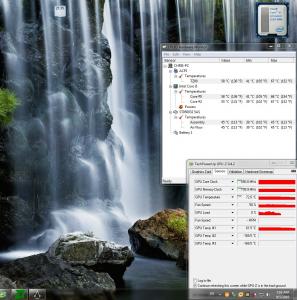

 0.3669sec
 0.46
0.46
 7 queries
 GZIP Disabled