QUOTE(wztech @ May 9 2010, 05:23 PM)
im using the hd5730 clock and was only playing codmw...i didnt tried lowering the cpu clock yet..

MW2 is not a graphic intensive game. Mind letting us know your idle/load temp for both GPU?Lenovo ideapad Y460/Y560 Thread, Gaming nerd in a business package
|
|
 May 9 2010, 11:14 PM May 9 2010, 11:14 PM
Return to original view | Post
#81
|
 
Senior Member
541 posts Joined: Apr 2008 
|
QUOTE(wztech @ May 9 2010, 05:23 PM) im using the hd5730 clock and was only playing codmw...i didnt tried lowering the cpu clock yet.. MW2 is not a graphic intensive game. Mind letting us know your idle/load temp for both GPU? |
|
|
|
|
|
May 10 2010, 08:29 PM
Return to original view | Post
#82
|
|
Senior Member
541 posts Joined: Apr 2008
|
QUOTE(synz @ May 10 2010, 07:56 PM) just play game for a while cpu temp went up to 70++ C Did you use gstoh's method? Do you use cooler pad? My method is use a block of polystyrene which is put underneath the back of my Y460 and create a space where I can get better air-flow on my vent below. This is what I did 
|
|
|
May 10 2010, 10:00 PM
Return to original view | Post
#83
|
|
Senior Member
541 posts Joined: Apr 2008
|
It's a good idea actually but there is no model that will clip on Y460's vent bcoz of it's design. The other option would be also from Evercool and where the cooler fan "park" next to your vent and suck the air out but I think it's not a good solution
 . . |
|
|
May 11 2010, 03:32 PM
Return to original view | Post
#84
|
|
Senior Member
541 posts Joined: Apr 2008
|
550Mhz only kick in when you're running 3D applications.
|
|
|
May 11 2010, 09:25 PM
Return to original view | Post
#85
|
|
Senior Member
541 posts Joined: Apr 2008
|
QUOTE(wztech @ May 11 2010, 06:29 PM) i noticed that after oced the ati hd5650 the clock will revert back to its stock clock whenever i switch the gc to intel?? Yep. Unless ATI does provide overclock tools embedded with CCC like overdrive that would be awesome  |
|
|
May 11 2010, 09:52 PM
Return to original view | Post
#86
|
|
Senior Member
541 posts Joined: Apr 2008
|
Because your HDD space is full?? I turned mine off as I choose to back up myself.
|
|
|
|
|
|
May 12 2010, 09:47 PM
Return to original view | Post
#87
|
|
Senior Member
541 posts Joined: Apr 2008
|
QUOTE(^bAbym310n^ @ May 11 2010, 11:25 PM) didnt full wor bro... Go to Start > All Programs > Maintenance > Backup and Restore to change you backup options.i stil got more thn 300gb of space i would like to kno how 2 shut it off? |
|
|
May 13 2010, 01:58 PM
Return to original view | Post
#88
|
|
Senior Member
541 posts Joined: Apr 2008
|
If you're really that eager to get one, call IT shops in LYP like sri com, jaya com etc which sells this product and ask about the stock availability. If got, paid an amount of fee as down payment just to secure your unit, then pay the rest when you get there.
|
|
|
May 13 2010, 06:22 PM
Return to original view | Post
#89
|
|
Senior Member
541 posts Joined: Apr 2008
|
I thought it should be on lower right unless you're looking from below... Btw, you do hear the noise from HDD and depends how good the case is made to cover it. Some owners did mention they can hear the HDD's head "parks" so consider the case is not well sound proof
 . . |
|
|
May 14 2010, 01:36 AM
Return to original view | Post
#90
|
|
Senior Member
541 posts Joined: Apr 2008
|
@-pWs-
There's no warranty sticker on HDD part so it's safe. Just to remind you that if there's human error happened during your swapping HDD process causing system faulty, Lenovo will/can void your warranty also. |
|
|
May 14 2010, 06:03 PM
Return to original view | Post
#91
|
|
Senior Member
541 posts Joined: Apr 2008
|
@^bAbym310n^
Your case really brings me a lot of thoughts why your unit got sounds while others don't seem to have much trouble with it. I wish this time they will fix your problem for sure. @fishysjj Do burn those recovery DVD if possible as you might need it one day. Backup the drivers on Drive D: then you should be good to go  . .Btw, I'm playing with my new keyboard, Logitech Illuminated... Nice |
|
|
May 14 2010, 08:38 PM
Return to original view | Post
#92
|
|
Senior Member
541 posts Joined: Apr 2008
|
Some of the owners here have Seagate HDD including me but I've read other forum owners are having Hitachi HDD so not sure if it's a bad HDD or really blame on the HDD compartment for not sound proof enough.
|
|
|
May 15 2010, 12:35 AM
Return to original view | Post
#93
|
|
Senior Member
541 posts Joined: Apr 2008
|
QUOTE(^bAbym310n^ @ May 14 2010, 09:59 PM) i also wan to kno y my HDD got sound...bt d sound is sometimes got sometimes nop... Your case does suit the usual HDD head 'parks" sound whereby it happens when you're accessing your HDD like looking for files/open a folder which normally you won't notice it unless you're sensitive and in an air cond room/office/quiet place. If you did hear the HDD is spinning rather noisy, that might be a different story. If it's the 1st one, then it's normal. You can try to replace with another HDD or SSD if you wanna avoid it   @samlee860407 It does sound normal to me unless you've had this a few times within a week. Btw, there's no on site services provided to IdeaPad users except ThinkPad series. |
|
|
|
|
|
May 15 2010, 08:00 AM
Return to original view | Post
#94
|
|
Senior Member
541 posts Joined: Apr 2008
|
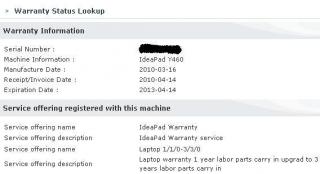
Sam, I can assured it's normal, it even happen on my old laptop once a while/more like once a year hehe. I've confirmed with a few sources before I get my extended warranty thru website and sales person. You said your warranty status have stated it's on site? On Lenovo's webstie?
|
|
|
May 15 2010, 10:32 AM
Return to original view | Post
#95
|
|
Senior Member
541 posts Joined: Apr 2008
|
That a bit worries me.
This is my status. . » Click to show Spoiler - click again to hide... « It might take 1-2 weeks for them to update your status. You can call them to acquire your warranty status |
|
|
May 15 2010, 11:48 AM
Return to original view | Post
#96
|
|
Senior Member
541 posts Joined: Apr 2008
|
270. The thing worries me on your case would be if you got the wrong care pack which is for ThinkPad. Does your carepack has a white yellowish pamplet alike which resemble the ideapad color? I've confirmed a few times and Lenovo SC did give me a few numbers on shops and sales person just I can confirm if it does carry on site.
|
|
|
May 15 2010, 12:44 PM
Return to original view | Post
#97
|
|
Senior Member
541 posts Joined: Apr 2008
|
@samlee860407
the extend 2 years + on site is indeed around 350, but the sales person told me it only applies to thinkpad, ideapad max out only 3 years parts and labor w/ carry in, no on site. I purchased a carepack from a shop so I did the extend warranty process myself. |
|
|
May 15 2010, 05:56 PM
Return to original view | Post
#98
|
|
Senior Member
541 posts Joined: Apr 2008
|
@D3viL-JiN
The difference is not huge. but still noticeable except you're comparing 520M & 540M then you won't feel much. |
|
|
May 17 2010, 10:54 AM
Return to original view | Post
#99
|
|
Senior Member
541 posts Joined: Apr 2008
|
@samlee860407
Did you buy yours @PC fair or shop? If PC fair, then you need to becareful as promoters there tend to mislead info while in shop unless you're talking to senior staff, same thing would happen if not careful. |
|
|
May 17 2010, 06:48 PM
Return to original view | Post
#100
|
|
Senior Member
541 posts Joined: Apr 2008
|
@samlee860407
It's better you edit the name out as we're not accusing anyone here. I was initially same on your side, wanna get max 3 years on site as 350 it's ok for me but most of the person I spoke with they'll ask me the magic question: "Which Lenovo model series you have?" Same goes to a few dealers which Lenovo informed them to call me for warranty info. The answer is the same. |
| Change to: |  0.0343sec 0.0343sec
 0.83 0.83
 7 queries 7 queries
 GZIP Disabled GZIP Disabled
Time is now: 4th December 2025 - 08:39 AM |
 Quote
Quote