QUOTE(samlee860407 @ Apr 28 2010, 09:12 PM)
i know if just buy win7 professional is rm500 like that, but if i aready got home premium, upgrade to professional also need rm500 aR?

Lenovo ideapad Y460/Y560 Thread, Gaming nerd in a business package
|
|
 Apr 28 2010, 09:23 PM Apr 28 2010, 09:23 PM
Return to original view | Post
#41
|
 
Senior Member
541 posts Joined: Apr 2008 
|
QUOTE(samlee860407 @ Apr 28 2010, 09:12 PM) i know if just buy win7 professional is rm500 like that, but if i aready got home premium, upgrade to professional also need rm500 aR? |
|
|
|
|
|
Apr 28 2010, 10:43 PM
Return to original view | Post
#42
|
|
Senior Member
541 posts Joined: Apr 2008
|
QUOTE(samlee860407 @ Apr 28 2010, 09:44 PM) oh i see....sigh, thats bad Most 32bit programs are able to install onto a 64bit system under the program files(x86) folder. Most of the recent 32bit programs do run fine under Win 7 64bit, i.e. Firefox, VLC player or recent games like SF4, BFBC2, Metro 2033, Assassin Creed 2 etc. Some programs might not work well with 64bit if they don't update/upgrade their versions to cope with. I would suggest you to install your software just to see if it does work like usual.  Added on April 28, 2010, 9:47 pmoh btw, since my windows7 shud be 64bit , and if i got a program that only supports windows 7 32bit, can i run it at 32bit mode? i was told by the program supplier that i cant do so ,and i can only wait them to release the 64bit driver :S  Added on April 28, 2010, 11:02 pm QUOTE(rashad @ Apr 28 2010, 09:02 PM) hi guys, i want to ask about the battery life?. so far after configuring the battery to energy saver it seems the battery cant last more than 3 hours The term browsing internet under the battery consumption theory is strictly browse web with no interactive add-ons i.e. youtube, webpage with flash ads etc which it'll draw the battery life too. I think to achieve browsing "normal" websites near 4 hours battery life would be turn on Super Energy Saver, close all interactive buttons and wifi/bluetooth on laptop, no other apps running besides folder browsing, dim the screen brightness, 60-70 processes running only, turn off mouse pad if possible lol... But that will suck up your fun on just normal surf w/o thinking about battery life (i am still testing it), and that's with normal use just using internet. at the beginning it will state that the battery will last more than 4 hours. any of you had it last longer that?  This post has been edited by jotaro12: Apr 28 2010, 11:02 PM |
|
|
Apr 28 2010, 11:23 PM
Return to original view | Post
#43
|
|
Senior Member
541 posts Joined: Apr 2008
|
QUOTE(Maverick_Neutron @ Apr 28 2010, 10:08 PM) Hey guys, I'm still on the fence between the Y460 and the N82, but i wanna clarify, are the Y460's ATI drivers dependable? Because I read somewhere that the NVidia manual switching graphics like on the M11x will be phased out because of Optimus, does the Y460 face the same problem with its ATI switchable graphics? Does the driver get good support? Thanks all! ATI didn't announce any automatic switching graphics between apps/games atm so far. They did mention they'll have monthly update for mobile graphics which is a good news(just not sure how true that is hehe, plus some OEMs don't allow ATI to interfere the OEMs' customized hardware driver bcoz of various concerns like battery life, interaction between other hardware, heating issues etc). Same goes to nVidia. I do think the M11x will go into that route eventually, just not sure when will that be...  Better get N61 rather than N82 unless you need a 14 inch or below lappy. Better get N61 rather than N82 unless you need a 14 inch or below lappy.Added on April 28, 2010, 11:27 pm QUOTE(rashad @ Apr 28 2010, 11:05 PM) ok i take back what i said after consuming my battery, it lasts exactly 2 hours and half just browsing the internet and that's in power saver mode, browsing the internet through out the whole period ( youtube, facebook ,....) ........is that normal or should i be worried? Sounds reasonable to me.This post has been edited by jotaro12: Apr 28 2010, 11:35 PM |
|
|
Apr 28 2010, 11:55 PM
Return to original view | Post
#44
|
|
Senior Member
541 posts Joined: Apr 2008
|
QUOTE(rashad @ Apr 28 2010, 11:40 PM) thx, i tried googling it, i mean battery life period, and i couldn't find anyone actually testing it. I think you still can adjust the screen brightness even you're in super energy saver mode... gosh.... just short it SES mode then lol. The battery life really differs as what I've mentioned b4, it hardly get the same result even the test is the same. Background apps + youtube + flash will surely suck battery life faster i agree but i guess 4 hours is too much to ask maybe without internet its possible, but the super energey saver mode really sucks, especially the screen brightness. cant work with that. . |
|
|
Apr 29 2010, 03:08 PM
Return to original view | Post
#45
|
|
Senior Member
541 posts Joined: Apr 2008
|
QUOTE(samlee860407 @ Apr 29 2010, 06:32 AM) yea, guess thats what i can do only Gratz on your purchase if really cant then just have to get prof version Added on April 29, 2010, 2:00 pmwoot my y460 is here!   . . |
|
|
Apr 29 2010, 03:19 PM
Return to original view | Post
#46
|
|
Senior Member
541 posts Joined: Apr 2008
|
QUOTE(Maverick_Neutron @ Apr 29 2010, 02:53 PM) The N61 is way over my budget la bro, the N82 is already peaking my budget limit, fortunately the Y460 fits perfectly. So, what you are trying to say is, the Y460's graphic drivers are relatively safe, and ATI claims they'll update the drivers regularly, but I should only get the drivers from Lenovo because of the customizations. So, is Lenovo's driver support reliable? I have no experience at all with Lenovo/IBM products, sorry for the trouble.. If you're referring the RM3999 N82 then I'm not sure since the stocks mostly available from LYN sellers rather than resellers. As some bro had posted a pic shown the SRP is RM4999 which is the same with N61. For the driver part, I can't give an exact answer because the latest 10.3/10.4 Catalyst does exclude Sony, Toshiba and Panasonic, together with switchable graphic lappys. Time only will tell that if ATI does update it's driver to support switchable GC, then we'll know the answer. Added on April 29, 2010, 3:26 pm QUOTE(leng2 @ Apr 29 2010, 03:15 PM) are you gonna mod your y460? Hardware??  Still not able to use those OC tool to recognize the GC... So no progress atm lol Still not able to use those OC tool to recognize the GC... So no progress atm lolBtw, do you guys experience audio skipping while watching movies or listening music? I think this happen mostly when I didn't turn off my laptop for more than a day...Already update my audio driver till the latest at Realtek but not a real fix This post has been edited by jotaro12: Apr 29 2010, 03:26 PM |
|
|
|
|
|
Apr 29 2010, 05:20 PM
Return to original view | Post
#47
|
|
Senior Member
541 posts Joined: Apr 2008
|
For touch sense buttons, it's better to install all of them. Even though you only need the OneKey Recovery, it'll take a while to figure out why the button won't function after you've installed it
 |
|
|
Apr 29 2010, 05:33 PM
Return to original view | Post
#48
|
|
Senior Member
541 posts Joined: Apr 2008
|
The upcoming Lenovo ideapad Z460
Lenovo Z460 in China » Click to show Spoiler - click again to hide... « I want it's keyboard!!!!!!!!!!!!!  |
|
|
Apr 29 2010, 06:28 PM
Return to original view | Post
#49
|
|
Senior Member
541 posts Joined: Apr 2008
|
QUOTE(samlee860407 @ Apr 29 2010, 06:24 PM) hm...which one are you sayinG? lol, since you've installed all drivers on D: then those touch sense buttons should work fine i install everything from D drive d la, all the driver ma. now left some extras nia, no time to fully test it yet @@ or do you mean i need to install everything under "software" from here: those are not in the D drive , have to download liao :S . The buttons are under OneKey Recovery, OneKey Theater and SlideNav iirc. |
|
|
Apr 30 2010, 01:38 PM
Return to original view | Post
#50
|
|
Senior Member
541 posts Joined: Apr 2008
|
@leng2
That will destroy the purpose of replacing a chiclet keyboard lol. I'm considering a wireless backlit keyboard now bcoz I wanna play games while on bed hehe but so far limited choices. |
|
|
Apr 30 2010, 05:32 PM
Return to original view | Post
#51
|
|
Senior Member
541 posts Joined: Apr 2008
|
QUOTE(leng2 @ Apr 30 2010, 05:12 PM) i didn't want the okr... so i didn't install the okr. i reinstalled the touch buttons and most of them worked except for the slidenav. still couldn't figure out what is missing. The SlideNav is the tricky one. I'll let you know after I got back from work(Don't really remember the steps atm)... Or you can try your luck on the SlideNav folder |
|
|
Apr 30 2010, 09:19 PM
Return to original view | Post
#52
|
|
Senior Member
541 posts Joined: Apr 2008
|
QUOTE(wztech @ Apr 30 2010, 07:23 PM) how to use the double-finger scrolling on the touch pad?? The vertical line on your touch pad is the scroll slider. About the SlideNav, if you've installed the software, try go to Loacl Disk C: > Drivers > Lenovo SlideNav > Installation > Installation.exe Run it and I think it should solve the problem. P/S: A nice gadget if you need one for us ATI fans. GPU Observer 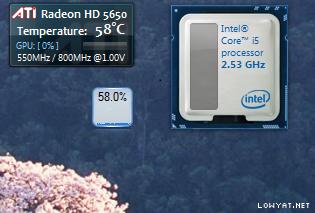 |
|
|
Apr 30 2010, 10:14 PM
Return to original view | Post
#53
|
|
Senior Member
541 posts Joined: Apr 2008
|
QUOTE(samlee860407 @ Apr 30 2010, 10:02 PM) thanks!!! slide nav can use liao This one should be btw, i still cant let my TV to have sound all sound come from my lappy speakers, although the speakers are not bad la Right click volume icon > Playback Devices > Right click Realtek HDMI output > Set as default device Make sure you've connect your HDMI cable to your TV before performed the above steps. |
|
|
|
|
|
Apr 30 2010, 10:36 PM
Return to original view | Post
#54
|
|
Senior Member
541 posts Joined: Apr 2008
|
You're using your TV's sound or output to speakers?
|
|
|
Apr 30 2010, 10:56 PM
Return to original view | Post
#55
|
|
Senior Member
541 posts Joined: Apr 2008
|
QUOTE(samlee860407 @ Apr 30 2010, 10:47 PM) i use HDMI cable to connect my laptop to TV ma, picture got, but sound tarak (if i select realtek digital output as my default sound) I meant did you hook up any speaker system/HiFi to your TV? If no, you need to check the settings on your TV too in order to receive audio signal thru HDMI.if i select speakers as my default sound, then the sound will come from my laptop speakers |
|
|
May 1 2010, 10:48 AM
Return to original view | Post
#56
|
|
Senior Member
541 posts Joined: Apr 2008
|
QUOTE(Eugene91 @ May 1 2010, 09:06 AM) HDMI output must be from the ATi drivers itself iinm.. Actually it's the ATI HDMI output also. Although Realtek HDMI output is shown on the playback devices list, but under it there's a grey wording saying ATI HDMI output.That's how it works on my system with Nvidia Graphics.. If not there will be no sound through HDMI output.. |
|
|
May 1 2010, 11:06 AM
Return to original view | Post
#57
|
|
Senior Member
541 posts Joined: Apr 2008
|
QUOTE(gstoh @ May 1 2010, 10:50 AM) haih .. now having a bit problem with the keyboard.. Might be a software/hardware problem rather than BIOS. If possible just call Lenovo and let them know the situation and see how would they suggest.sometimes i start my laptop , and the keyboad is not functioning at all in windows = = this error occured twice so far... i have to restart laptop for the keyboard to work is software error or hardware failure ? bios problem ? If it happens too often, I'll just call them but it's up to you. |
|
|
May 1 2010, 01:51 PM
Return to original view | Post
#58
|
|
Senior Member
541 posts Joined: Apr 2008
|
@gstoh
I see. So far mine works fine. @leng2 Actually Razer doesn't have wireless model of backlit keyboard. I haven't encounter any so far (thought the Logitech Illuminated keyboard was wireless, but it isn't, sigh...) |
|
|
May 1 2010, 09:45 PM
Return to original view | Post
#59
|
|
Senior Member
541 posts Joined: Apr 2008
|
Just a preview of my few mins ago "early project"
CAUTION: Below is the result of strictly trained professional and do not intend to use/implement to your lappy without having N thoughts about blew up. Cheers ! » Click to show Spoiler - click again to hide... « Will add it on 1st page later. |
|
|
May 2 2010, 12:39 AM
Return to original view | Post
#60
|
|
Senior Member
541 posts Joined: Apr 2008
|
The AMD GPU clock tool.
|
| Change to: |  0.0394sec 0.0394sec
 0.38 0.38
 7 queries 7 queries
 GZIP Disabled GZIP Disabled
Time is now: 1st December 2025 - 11:57 PM |
 Quote
Quote