Welcome Guest ( Log In | Register )

91 Pages « < 69 70 71 72 73 > » Bottom

Outline · [ Standard ] · Linear+

 The Idiot Proof Guide To -> Laptop Cooling, All you need to know!

views
     
Acid_RuleZz
post Apr 18 2012, 11:37 AM

ミウ ❤
*******
Senior Member
6,612 posts

Joined: Jan 2003
From: Tomorrow


QUOTE(Kenichi88 @ Apr 17 2012, 02:35 PM)
Hey I have Asus N55 and I found that the bottom side does not have any vents at all except the one on the side, which blows air OUT.
So does that means using a cooler won't give any effects at all? I am concern of overheat issues since I'm playing heavy games like Battlefield 3, Crysis 2, etc.
Last time I played the heat was over 80C.
*

For a laptop especially when u live in Msia, >80c is pretty normal when u play game like BF3. You can disable TurboBoost to get lower temperature.
Kenichi88
post Apr 18 2012, 04:20 PM

New Member
*
Junior Member
6 posts

Joined: Apr 2012


QUOTE
For a laptop especially when u live in Msia, >80c is pretty normal when u play game like BF3. You can disable TurboBoost to get lower temperature.


That is a downer. Any other ways to reduce temperature without having to resort to lower settings? I kinda like playing it on high/ultra hmm.gif
If there is none I guess I will have to settle with using air-cond.

In any case, I should skip getting a laptop cooler and get a stand instead?
Acid_RuleZz
post Apr 18 2012, 04:33 PM

ミウ ❤
*******
Senior Member
6,612 posts

Joined: Jan 2003
From: Tomorrow


^ Is disabling TurboBoost reduce the fps so much? Have u try it? because it can reduce your max temp from 4c-10c.

Also.. use vsync or limit the frame rate to 60fps when u play game because no point getting higher than that and it only increase your temperature.
Kenichi88
post Apr 18 2012, 04:37 PM

New Member
*
Junior Member
6 posts

Joined: Apr 2012


Yes I tried disabling it. Temperature does drop but so does the performance, by 10fps average.
I'm currently using GT555M driver though, if that have any effects at all.

Currently downloading driver for gt635M. I will try and see if that can help the performance without turbo boost.
Will update later. rclxms.gif
Acid_RuleZz
post Apr 18 2012, 04:39 PM

ミウ ❤
*******
Senior Member
6,612 posts

Joined: Jan 2003
From: Tomorrow


Dropped that much? Yours with i5 or i7?
Kenichi88
post Apr 18 2012, 04:41 PM

New Member
*
Junior Member
6 posts

Joined: Apr 2012


Yeah that much. My model is N55SL with i5 processer. Couldn't effort the i7 since it was outside my maximum budget
Acid_RuleZz
post Apr 18 2012, 04:47 PM

ミウ ❤
*******
Senior Member
6,612 posts

Joined: Jan 2003
From: Tomorrow


hmm.. for BF3 maybe u can try some console tweak that improve the performance but without noticeable reduce in IQ.
Kenichi88
post Apr 19 2012, 10:22 PM

New Member
*
Junior Member
6 posts

Joined: Apr 2012


Hey I've done the driver update for gt635m.
Reduced the processor to around 95% and the heat seemed to cap at 70C.
Performance-wise not much affected. The best driver update so far!! rclxms.gif
Sorry for the long update, I was kinda busy focusing on gaming tongue.gif

I guess I can scrap getting a laptop cooler now huh?
[PF] T.J.
post Apr 26 2012, 11:51 AM

20k VIP Club
Group Icon
Elite
24,193 posts

Joined: Feb 2010
From: Perak
hmm.gif
Looks like NZXT is releasing something like the Cooler Master U series cooler pad:

QUOTE
...designed to cool laptops up to 15" in size and comes with a pair of 2x80mm movable fans

Expected to launch sometime in May, the Cryo E40 will cost $27.99.


http://www.notebookcheck.net/NZXT-unveils-...er.74067.0.html
Akikawa
post Apr 29 2012, 05:23 PM

New Member
*
Junior Member
5 posts

Joined: Apr 2012
From: KL, Malaysia


Hi all. I need advice on laptop cooling.

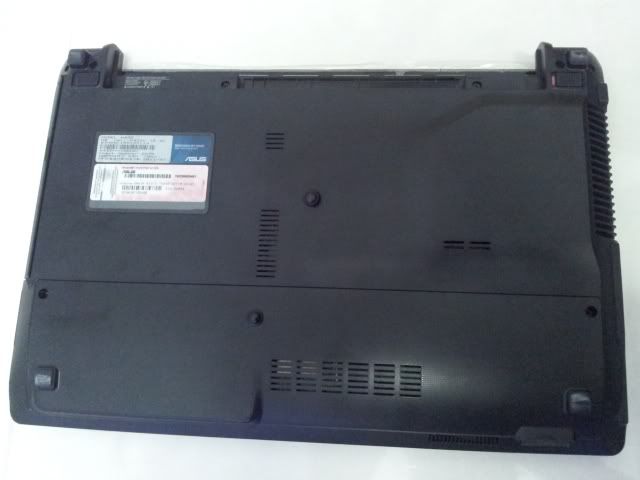
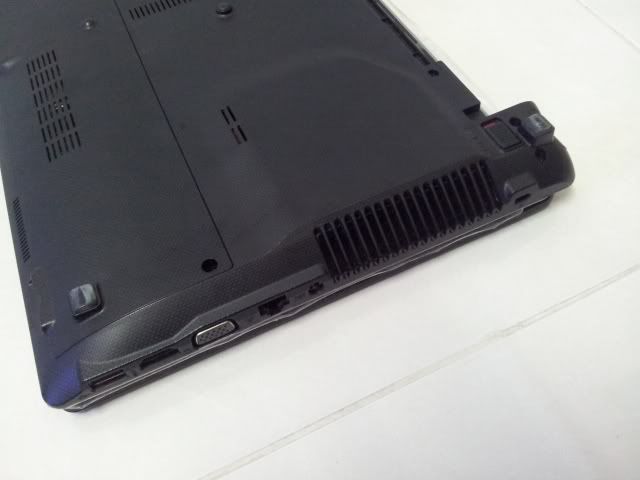
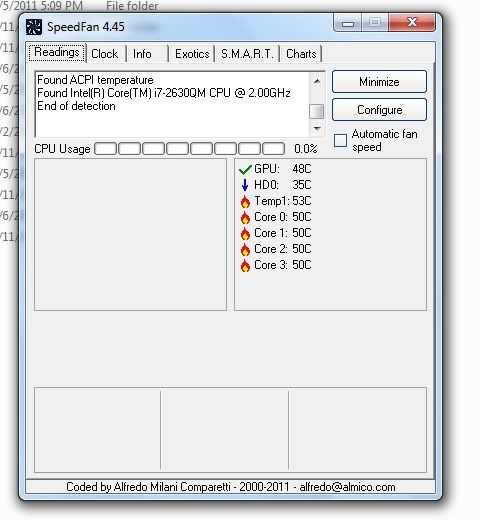
I am using an ASUS A43S running on Intel Core i7 -2630QM, 2.0GHz and nVidia GeForce GT540M 2GB. I use it for some mid-range gaming. Before this I did not use any laptop cooling pads or fans and it was all cool, but understandably after prolonged use it's beginning to show signs of heating up recently. I am guessing dust must have piled up on the internal cooling fans.

I do not know if there is such service but I have thought of taking it for cleaning. However people advised me to just get a cooling pad. But after reading through this thread I am having doubts. The A43S's ventilation is located at the side of the machine, not at the bottom. I'm not sure as to how effective a cooling pad would be. I have tried making the laptop stand like most people advised, but I don't seem to notice a drop in the temperature, or maybe I'm just too paranoid?

I need advice. I am worried that I would burn out my laptop. What should I do? My budget is around 300.

P/S: I am an online gamer, I usually leave my laptop on over the night, also for download purpose. My room is air-conditioned though.

Below I have attached snapshots of my laptop and a screenshot of my Speedfan readings while not running anything, in case you need to know if it is really overheating.

» Click to show Spoiler - click again to hide... «

AlexLai
post Apr 29 2012, 08:56 PM

Look at all my stars!!
*******
Senior Member
5,531 posts

Joined: Feb 2009
From: Kajang, Selangor


QUOTE(PF T.J. @ Apr 26 2012, 11:51 AM)
hmm.gif
Looks like NZXT is releasing something like the Cooler Master U series cooler pad:
http://www.notebookcheck.net/NZXT-unveils-...er.74067.0.html
*
Thanks but I'll stick with the CM U-series or the CM Storm SF-19. laugh.gif

QUOTE(Akikawa @ Apr 29 2012, 05:23 PM)
» Click to show Spoiler - click again to hide... «

*
Your best bet is to get it cleaned and also get a cooling pad.

For the cooling pad, suggest you get the Cooler Master U2 or even the U3 and add up to the maximum 3 fans and place them where the vents on the underside are.

So long as there is a temperature drop, i is considered effective. How effective on the other hand, is entirely subjective. laugh.gif
[PF] T.J.
post Apr 29 2012, 10:45 PM

20k VIP Club
Group Icon
Elite
24,193 posts

Joined: Feb 2010
From: Perak
Review on the NZXY Cryo E40 thumbup.gif
Seems pretty decent, especially the fact that its affordable

Pros:
Cooled notebook down by as much as 5 degrees F
Movable fans to pinpoint hotspots
Steel mesh design
Affordable

Cons:
Temperatures went up (slightly) in some areas
Only fits up to 15" notebooks

Source: http://www.notebookreview.com/default.asp?...notebook+cooler

This post has been edited by [PF] T.J.: Apr 29 2012, 10:49 PM
Akikawa
post Apr 29 2012, 11:37 PM

New Member
*
Junior Member
5 posts

Joined: Apr 2012
From: KL, Malaysia


QUOTE(AlexLai @ Apr 29 2012, 08:56 PM)
Thanks but I'll stick with the CM U-series or the CM Storm SF-19. laugh.gif
Your best bet is to get it cleaned and also get a cooling pad.

For the cooling pad, suggest you get the Cooler Master U2 or even the U3 and add up to the maximum 3 fans and place them where the vents on the underside are.

So long as there is a temperature drop, i is considered effective. How effective on the other hand, is entirely subjective. laugh.gif
*
Thank you. Thank you so much. smile.gif
[PF] T.J.
post May 1 2012, 11:22 PM

20k VIP Club
Group Icon
Elite
24,193 posts

Joined: Feb 2010
From: Perak
Another review on the NZXT Cryo E40~
http://www.notebookcheck.net/NZXT-Cryo-E40...ew.74294.0.html

Seems pretty popular this one haha laugh.gif

Again, the most important fact about this particular notebook cooler is the variable results. Cooling efficiency will vary depending on the laptop model...
Laptops with more/ larger vents at the bottom of the laptop will work better with this cooler nod.gif
sandisk
post May 13 2012, 03:12 AM

New Member
*
Junior Member
5 posts

Joined: May 2012
Does it means the cooler can increase the computer speed? I've never used cooling pad before.
Pain_X
post May 19 2012, 01:18 AM

Getting Started
**
Junior Member
244 posts

Joined: May 2007


Hey guys,my friends laptop fan stopped working and we're not sure what the problem is. Ive not seen her laptop so i dont know any of the specs but i was wondering how much will it cost to change her fan?

Is it a cheap thing or will it cost a couple of hundreds including workmanship?
AlexLai
post May 19 2012, 01:19 PM

Look at all my stars!!
*******
Senior Member
5,531 posts

Joined: Feb 2009
From: Kajang, Selangor


QUOTE(sandisk @ May 13 2012, 03:12 AM)
Does it means the cooler can increase the computer speed? I've never used cooling pad before.
*
Not really. All it does it helps keep the machine cool and increases stability if there is a heat problem.

QUOTE(Pain_X @ May 19 2012, 01:18 AM)
Hey guys,my friends laptop fan stopped working and we're not sure what the problem is. Ive not seen her laptop so i dont know any of the specs but i was wondering how much will it cost to change her fan?

Is it a cheap thing or will it cost a couple of hundreds including workmanship?
*
Pretty sure regardless of model, it'll not be a cheap fix.

skeleton202
post May 24 2012, 10:50 AM

Perdana Malaysia ke-9
******
Senior Member
1,132 posts

Joined: Jan 2010
From: shit island

i wanna connect cpu fan wire to 12v power supply but don't know how to identify which one is positive wire and which one is negative wire..

the cpu fan split into two which is red wire and black wire.. but the power supply both are black wire with one got stripe and the other are fully black with some writing on it...

thus how can i know the one is + and the other is - ?

[PF] T.J.
post May 24 2012, 11:19 AM

20k VIP Club
Group Icon
Elite
24,193 posts

Joined: Feb 2010
From: Perak
QUOTE(skeleton202 @ May 24 2012, 10:50 AM)
i wanna connect cpu fan wire to 12v power supply but don't know how to identify which one is positive wire and which one is negative wire..

the cpu fan split into two which is red wire and black wire.. but the power supply both are black wire with one got stripe and the other are fully black with some writing on it...

thus how can i know the one is + and the other is - ?
*
Trial and error?
Connecting wrongly will cause the fan to rotate in the opposite direction, so you'll know based on the direction of the air which is blown out hmm.gif

skeleton202
post May 24 2012, 12:10 PM

Perdana Malaysia ke-9
******
Senior Member
1,132 posts

Joined: Jan 2010
From: shit island

QUOTE(PF T.J. @ May 24 2012, 11:19 AM)
Trial and error?
Connecting wrongly will cause the fan to rotate in the opposite direction, so you'll know based on the direction of the air which is blown out hmm.gif
*
oh isit like tat ah?

tot the fan gonna shocked doh.gif

91 Pages « < 69 70 71 72 73 > » Top
 

Change to:
| Lo-Fi Version
0.0247sec    0.35    6 queries    GZIP Disabled
Time is now: 13th December 2025 - 12:12 AM