Welcome Guest ( Log In | Register )

Outline · [ Standard ] · Linear+

 The Idiot Proof Guide To -> Laptop Cooling, All you need to know!

views
     
Kudoshi
post Nov 6 2019, 02:20 PM

Getting Started
**
Junior Member
125 posts

Joined: Nov 2019


Mau ask jap. The yuesong air vacuum kind of cooler. Can pakai ke? There are reviews stating very good for its price. Worth it to get that kind of cooler if your budget around rm 30-50?
spbmedia P
post Nov 13 2019, 12:12 PM

New Member
*
Probation
3 posts

Joined: Nov 2019


Thank for share!
yeo1992cc
post Jan 8 2020, 06:24 PM

Casual
***
Junior Member
417 posts

Joined: Mar 2010
From: Chukai


Just sharing my opinion.

Nowadays laptop equipped with high clock-speed, but the cooling doesn't improve much.

1. Always lift your laptop if there is intake / exhaust airflow at bottom.

2. If you would like to get cooling pad, I myself doesn't see much effect unless you do MOD fans.

3. You can further undervolt to reduce temperature, but i suggest start with capping cpu clock speed as most temperature rise due to cpu boost.
mariuSSS P
post Jan 14 2020, 07:09 PM

New Member
*
Probation
6 posts

Joined: Jan 2020
Sorry my air con is located on top of my laptop table so can't get direct cool air here
dddougal P
post Oct 6 2020, 04:02 AM

New Member
*
Probation
1 posts

Joined: Oct 2020


No matter what i do my laptop burns my legs!
Dickong
post Jan 3 2021, 11:11 PM

Regular
******
Senior Member
1,689 posts

Joined: Jan 2003
Not sure its the right place to ask here, my problem is my laptop maximum lan speed is 100mbps so can i upgrade to 1000mbps or gigabit lan using usb 3.0 lan to usb3.0 gigabit lan adaptor. My unifi speed is 500mbps. My question is does the usb 3.0 lan adaptor really can improve my laptop speed.tq
Supreme1394
post Jan 24 2021, 05:17 PM

Achieving Supremacy
*****
Senior Member
864 posts

Joined: Oct 2011
From: planet earth


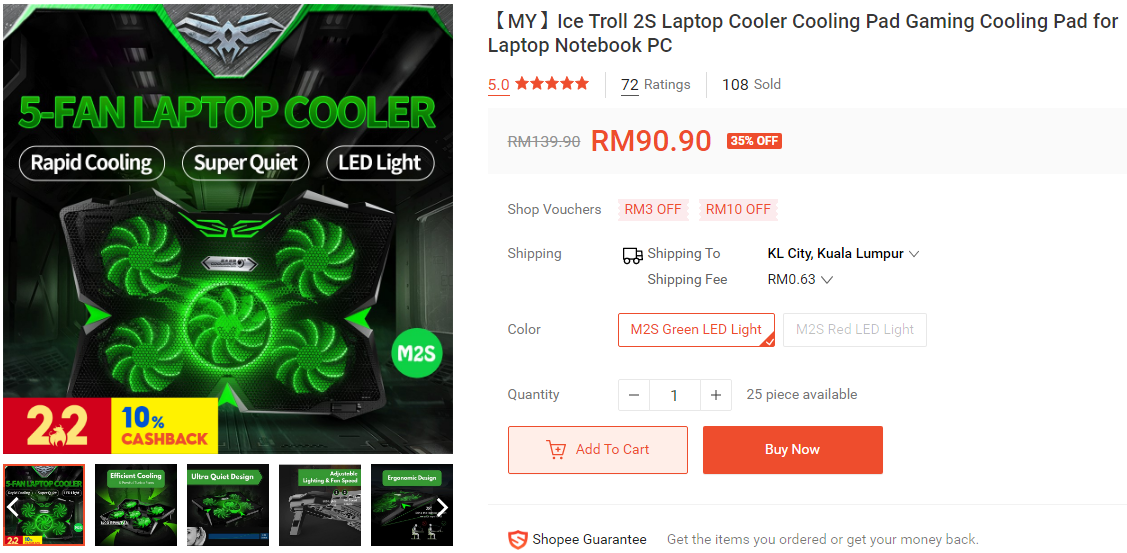
Anyone tried this? Feedback seems to be good on shoppee. Strong and silent it seems.

user posted image

https://shopee.com.my/%E3%80%90MY%E3%80%91I...8938.7152257319
HumbleBF
post May 31 2021, 09:38 PM

On my way
****
Junior Member
501 posts

Joined: Apr 2020
QUOTE(zoixc @ May 19 2019, 05:57 PM)
Did repaste already with thermal grizzly.

CPU temp still go ups to mid 90 but GPU stays at constant 76

So weird haha
*
May I know what you use to test temp?
TSericmaxman
post Jun 1 2021, 10:17 AM

-
*******
Senior Member
7,951 posts

Joined: Sep 2005
QUOTE(HumbleBF @ May 31 2021, 09:38 PM)
May I know what you use to test temp?
*
you can try hwinfo64
zoixc
post Jun 2 2021, 01:51 PM

haha
******
Senior Member
1,406 posts

Joined: Aug 2018
QUOTE(HumbleBF @ May 31 2021, 09:38 PM)
May I know what you use to test temp?
*
i use HWMonitor to monitor
HumbleBF
post Jun 2 2021, 08:33 PM

On my way
****
Junior Member
501 posts

Joined: Apr 2020
Hey guys, I think I might have a heating issue on my work laptop. Will purchasing an external cooler helps?

It's performance will drop everytime pass noon...and I feel it burning on the bottom..I am not allowed to do any modifications inside the laptop ,so was wondering if buying a external cooling fan will help or not..
SamReynolds
post Aug 29 2021, 01:58 AM

New Member
*
Junior Member
2 posts

Joined: May 2020
QUOTE(HumbleBF @ Jun 2 2021, 08:33 PM)
Hey guys, I think I might have a heating issue on my work laptop. Will purchasing an external cooler helps?

It's performance will drop everytime pass noon...and I feel it burning on the bottom..I am not allowed to do any modifications inside the laptop ,so was wondering if buying a external cooling fan will help or not..
*
It will definitely help you can use core temp app to monitor the temperatures. I have done some DIY and trail and error with and elevated laptop cooling stand or you may use items to elevate the laptop, You can start by identifying the exhaust and intake ports of your laptop by turning it 180 and using a piece of tissue to identify which vents are intake and exhaust. If its an intake the tissue will stick.
You may now proceed with customizing with fans that fit your vents. To simplify if there are two vents one for intake and exhaust you can experiment by getting a single fan that covers the exhaust and the areas that are affected by heat the most and turn the fan upsidedown to suckup the air from underneath it. You can elevate the fan by using long screws to elevate the fan. Now the experiments may begin. Once you have the ideal placement for the exhaust now you can move onto the intake.Gaming laptops elevate as much as possible with the biggest fans directed at the heat areas. Some work with fans blowing at the intake vents and some just dont. Depending on the inherent cooling design you're trying to address the inefficiencies in its design. YMMV.
overfloe
post Aug 31 2021, 07:09 PM

Ain't nothing but a thang..
*******
Senior Member
2,207 posts

Joined: Jan 2003
From: stankonia
QUOTE(HumbleBF @ Jun 2 2021, 09:33 PM)
Hey guys, I think I might have a heating issue on my work laptop. Will purchasing an external cooler helps?

It's performance will drop everytime pass noon...and I feel it burning on the bottom..I am not allowed to do any modifications inside the laptop ,so was wondering if buying a external cooling fan will help or not..
*
I have a work computer thats switches graphics card, depending on which app im running. WFH with minimal aircon usage, the laptop does runs hot during sunny days. I bought a simple cooler (cooler master notepal x-slim) and it helps to cool the laptop a bit.

If you dont have a cooler yet, try to elevate your laptop to give it some breathing space to allow more airflow.
yeo1992cc
post Jul 27 2022, 03:09 PM

Casual
***
Junior Member
417 posts

Joined: Mar 2010
From: Chukai


Latest update on notebook cooling tips:

## What you may do without purchase notebook cooling pad

1. Ensure sufficient airflow into air intake/exhaust vent
-- Bottom vent (intake): Use something to lift your laptop without blocking the air vent.
-- Side/Rear vent (exhaust if have bottom vent; intake & exhaust if no bottom vent): Keep at least 4'inch distance from wall, etc.
-- Top vent (exhaust): Always keep your laptop lid open.
-- Hinge display vent (intake & exhaust): Always keep your laptop lid open.

2. Disable processor boost mode processor boost mode
-- Open "cmd" as administrator and run enter "powercfg.exe -attributes sub_processor perfboostmode -attrib_hide".
-- Press the Windows key, type “Edit power plan”, and open the app with the same name. Click on Change advanced power settings.
-- Select Processor power management: Processor performance boost mode. Change the option to Disabled.

3. Undervolt your laptop CPU by reduce the CPU TDP value of your (Core Voltage Offset & Cache Voltage Offset, Long Power P1 & P2, Core Ratio & Cache Ratio)
- Check ThrottleStop

## Best Notebook Cooling Pad
i.) IETS GT500
ii.) Klim Mistral
iii.) Cooler Master Notepal U2/U3 with self-install 2x 12V 140mm/200mm FANS.


## Premium Looking Notebook Cooling Pad
i.) Targus Lap Chill Mat
ii.) Thermaltake Massive A21/A22
iii.) Cooler Master A200


## Travel Notebook Cooling Pad (without fan)
i.) For 17' inch or below - Lenovo Legion Z3
ii.) For 15' inch or below - MC LS501

This post has been edited by yeo1992cc: Jan 10 2024, 09:44 AM

hafizhans
post Sep 1 2022, 03:16 PM

haa..ahnn..ahnn..aduii
******
Senior Member
1,484 posts

Joined: Feb 2012


hi recently bought lenovo ideapad gaming 3.
I notice got exhaust fan at the bottom,
if like this can use cooling pad?

edit: it was inlet ventilation, so should be no problem lol

now looking for slim cooling for travel

This post has been edited by hafizhans: Sep 2 2022, 08:36 AM
yeo1992cc
post Oct 6 2022, 01:37 PM

Casual
***
Junior Member
417 posts

Joined: Mar 2010
From: Chukai


QUOTE(hafizhans @ Sep 1 2022, 03:16 PM)
hi recently bought lenovo ideapad gaming 3.
I notice got exhaust fan at the bottom,
if like this can use cooling pad?

edit: it was inlet ventilation, so should be no problem lol

now looking for slim cooling for travel
*
I updated my post including the travel notebook cooler
DSV4600
post Nov 3 2022, 03:53 PM

Casual
***
Junior Member
432 posts

Joined: Dec 2010


https://youtu.be/K2Bm1YzI-_E

Just buy Dell-Alienware. Comes with Quad Fan setup yo!
WaNaWe900
post May 8 2023, 06:11 PM

చąហ ąచҽ™
******
Senior Member
1,397 posts

Joined: Feb 2012
From: sOuL SoCiETY.. iSKaNDaRPuTeRi.. JB.. JDT


Is this cooling good?

IETS GT500

91 Pages « < 89 90 91Top
 

Change to:
| Lo-Fi Version
0.0274sec    0.59    6 queries    GZIP Disabled
Time is now: 2nd December 2025 - 04:10 PM