Outline ·
[ Standard ] ·
Linear+
The Idiot Proof Guide To -> Laptop Cooling, All you need to know!
|
IvanWong1989
|
 Aug 8 2011, 03:52 PM Aug 8 2011, 03:52 PM
|

|
haha... @ tj.... rili la.... i use li-po battery....  amp too big.... wayar melted... robot catch on fire.. whole room smoke... main board tripped.. whole engineering center boom.. no elec.... moral of the story... be careful haha.... @duckies erm... u can strt with looking for fans rili.. =P miahahahaa rmb 12v..... =P |
|
|
|
|
|
[PF] T.J.
|
Aug 8 2011, 04:01 PM
|
20k VIP Club

|
QUOTE(IvanWong1989 @ Aug 8 2011, 03:52 PM) haha... @ tj.... rili la.... i use li-po battery.... amp too big.... wayar melted... robot catch on fire.. whole room smoke... main board tripped.. whole engineering center boom.. no elec.... moral of the story... be careful haha.... @duckies erm... u can strt with looking for fans rili.. =P miahahahaa rmb 12v..... =P I is no understand lar  Nvm, I ask you when I'm buying  |
|
|
|
|
|
IvanWong1989
|
Aug 8 2011, 04:11 PM
|
|
|
lolx... dun go buy those without a sticker or wateva that says rated voltage and bla bla.... cz u wun knw.. buy those that hav rated numbers on them.. that u will knw..  |
|
|
|
|
|
TSericmaxman
|
Aug 10 2011, 09:00 PM
|
|
|
changed back to my older crappier fan..
new one not enough air
|
|
|
|
|
|
pandera999
|
Aug 12 2011, 07:19 PM
|
|
|
these few days i notice my tempt nw increase than normal.. highest is 80C T_T maybe due to dust?? that day gt see the screen really dusty...
|
|
|
|
|
|
[PF] T.J.
|
Aug 12 2011, 07:26 PM
|
20k VIP Club
|
Time to vacuum |
|
|
|
|
|
pandera999
|
Aug 12 2011, 07:56 PM
|
|
|
QUOTE(PF T.J. @ Aug 12 2011, 07:26 PM) Time to vacuum  wat vacuum?? feel like want to "surgery" clean inside... but will break the seal... so, jz use ultra vacuum  |
|
|
|
|
|
Najmods
|
Aug 12 2011, 08:58 PM
|
|
|
QUOTE(pandera999 @ Aug 12 2011, 07:56 PM) wat vacuum?? feel like want to "surgery" clean inside... but will break the seal... so, jz use ultra vacuum Yep ASUS annoys me because they put the warranty sticker right on the HSF screw that hold it down. Even worse in their netbooks like 1015 and 1215, the sticker is on the backplate behind the keyboard so even changing the harddisk is voiding the warranty Acer meanwhile have no such stickers anywhere |
|
|
|
|
|
pandera999
|
Aug 12 2011, 10:40 PM
|
|
|
QUOTE(Najmods @ Aug 12 2011, 08:58 PM) Yep ASUS annoys me because they put the warranty sticker right on the HSF screw that hold it down. Even worse in their netbooks like 1015 and 1215, the sticker is on the backplate behind the keyboard so even changing the harddisk is voiding the warranty Acer meanwhile have no such stickers anywhere yalo..., they really smart when do business.... put sticker every where at the screw. huh easier clean acer... well, how u clean yours? |
|
|
|
|
|
IvanWong1989
|
Aug 12 2011, 10:50 PM
|
|
|
har.. means cant open my asus??? @@
then i can oli vacuum lo until my warranty over.. @@
|
|
|
|
|
|
lee_what2004
|
Aug 12 2011, 11:08 PM
|
*stare* ji--------
|
My Dell also don't have any sticker...
|
|
|
|
|
|
Najmods
|
Aug 13 2011, 12:43 AM
|
|
|
QUOTE(pandera999 @ Aug 12 2011, 10:40 PM) yalo..., they really smart when do business.... put sticker every where at the screw. huh easier clean acer... well, how u clean yours? I did clean my ASUS but I don't open up the HSF, just merely blow the dust in opposite direction from the fan and clean the fan using old toothbrush. On Acer I have the chance to do repaste. Running sweet for few months now, even both CPU and GPU overclocked it runs pretty cool. Only thing I miss is ASUS palm proof which keeps palm rest area cool, unlike Acer which runs quite warm because the harddisk is right below the left palm rest area. Its a tradeoff I can take, Its better to have warm-ish palmrest rather than have poached harddrive up to 55C |
|
|
|
|
|
lee_what2004
|
Aug 13 2011, 12:45 AM
|
*stare* ji--------
|
Does the Acer fan ever shut off or it keep running at low speed ?
|
|
|
|
|
|
Najmods
|
Aug 13 2011, 12:57 AM
|
|
|
QUOTE(lee_what2004 @ Aug 13 2011, 12:45 AM) Does the Acer fan ever shut off or it keep running at low speed ? It constantly running at very low speed, so low it feels like it's not spinning at all and nearly no noise too. But now and then when the temperature increases to I think about 50C it will speed up slightly blowing heat off for half a minute or so and then slows down back. Its gets wooshy but not really noisy |
|
|
|
|
|
lee_what2004
|
Aug 13 2011, 01:07 AM
|
*stare* ji--------
|
I see. This Dell would turn off its fan under 50C I guess, couldn't get the exact measurement..
Last time did managed to installed 18kfangui (need to disable driver signing) to control the fan speed, but could only set either 0% or 100%, when try to put it between 1%-99%, the computer will start to lag until I put it either 0%, 100% or default..
|
|
|
|
|
|
Najmods
|
Aug 13 2011, 01:20 AM
|
|
|
QUOTE(lee_what2004 @ Aug 13 2011, 01:07 AM) I see. This Dell would turn off its fan under 50C I guess, couldn't get the exact measurement.. Last time did managed to installed 18kfangui (need to disable driver signing) to control the fan speed, but could only set either 0% or 100%, when try to put it between 1%-99%, the computer will start to lag until I put it either 0%, 100% or default.. Weird, I guess the fan controller either register it to be on or off and nothing in between |
|
|
|
|
|
lee_what2004
|
Aug 13 2011, 01:23 AM
|
*stare* ji--------
|
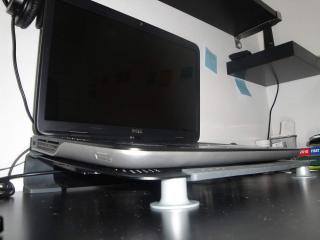
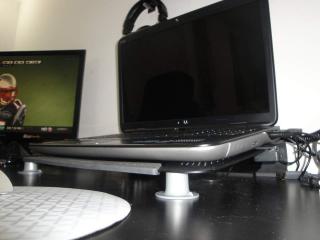
In default mode, the fan seems to have low noise and louder noise though... Nice feet for Notepal U3 credit anilpalepu@NBR This post has been edited by lee_what2004: Aug 13 2011, 03:18 AM Attached thumbnail(s)
|
|
|
|
|
|
SUSngkhanmein
|
Aug 13 2011, 10:36 AM
|
|
|
sifu lee can use speedfan 4.44 to control fan speed! 18kfangui can cause BSOD leh! dell will auto stop the fan if the temp is below 53!
|
|
|
|
|
|
lee_what2004
|
Aug 13 2011, 10:39 AM
|
*stare* ji--------
|
So now your fan is controllable ?
|
|
|
|
|
|
SUSngkhanmein
|
Aug 13 2011, 10:44 AM
|
|
|
can control but i left it to defaults.. my gpu no more 128 liau! dell fan works depend usage also.. if hiked above 15% the fan will start working 2k++ rpm to 3k++ rpm depend the usage %!
|
|
|
|
|





 Quote
Quote




 0.0299sec
 0.24
0.24
 6 queries
 GZIP Disabled