Welcome Guest ( Log In | Register )

Bump Topic Topic Closed RSS Feed
126 Pages « < 56 57 58 59 60 > » Bottom

Outline · [ Standard ] · Linear+

 NOKIA N97 V3!, Firmware v21 is available for updates!

views
     
BuFung
post Jan 17 2010, 10:27 AM

Newbie
*******
Senior Member
8,407 posts

Joined: Jun 2005


QUOTE(gsfeng @ Jan 17 2010, 01:07 AM)
Hi, Mind to post an image of it? However, it is a good news to hear, cant wait to head to the NCC.
*
Image will not tell the different... except using a high quality macro lens.. laugh.gif


QUOTE(jerm @ Jan 17 2010, 02:46 AM)
bufung, what bt problems were you having?

im actually thinking of getting the gps shielding fix, but the last time i asked them about it they didnt even know about it

glad to know about the silver paint problem being fixed, mine's damn ugly right now. even got a speck of dust under the screen arghh
*
My BT, both of my motorola headphone cannot receive the voice clearly.. it is like breaking in every 0.2 second.. but my headset sound clearly on my N95.. NCC said it is compatibility issue...

Any of u guys using Motorola Headset?? got problem.. if yes, I have to abondon my Moto headset n buy nokia BT heaadset.. doh.gif


QUOTE(Evrae90 @ Jan 17 2010, 07:05 AM)
hey if my warranty under avaxx can i send to zitron?
*
they are the same... . U can send to any NCC


QUOTE(sagaman @ Jan 17 2010, 09:39 AM)
Hi All,

Need some help :

1. How to remove /uninstall the Adobe PDF that is pre-install in N97 which has trial license ? Cannot find the program in the Application Manager.

2. How to install game program into N97 Game Folder? Normally it will install under Application Folder. The program didn't ask where is the target destination.

Thks
*
2. go to ur appl folder, press option, then move to folder.. move that particular software to wherever u want.. say under game folder...
sagaman
post Jan 17 2010, 11:06 AM

New Member
*
Junior Member
13 posts

Joined: Jan 2010
BuFung....
Thks for the info.

Hopefully others can assist me on the No 1 issue.
PyOsE
post Jan 17 2010, 01:18 PM

Regular
******
Senior Member
1,661 posts

Joined: Oct 2008


QUOTE(sagaman @ Jan 17 2010, 09:39 AM)
1. How to remove /uninstall the Adobe PDF that is pre-install in N97 which has trial license ? Cannot find the program in the Application Manager.
*
i dont think its possible at the moment coz the application is embedded in the phone itself..i've tried it before..
mannquin
post Jan 17 2010, 05:10 PM

Casual
***
Junior Member
351 posts

Joined: Jul 2008
From: Hamilton


Hey guys, I was browsing the internet and these are what I found. Try it out as many people had reported the methods work.

1) Flash-flooded problem
- Get a marker, then draw some lines around the camera flash. (I can't post a picture right now as it's already 4 a.m and im so sleepy)

2) GPS antenna issues
- Take off the back cover, and on the left side of around your lens (where the antennas(or maybe just 1 antenna) are located, gently apply some pressure,
then run the map program. Let me know if it works. It might be caused by the glue Nokia applied in between the sticker-like thing and the body, the antenna lies between them. The glue isn't strong
enough to get the antenna fixed in position and get in contact with the yellow metal thing as reported by some users.

-The other method is, call NCC and ask them whether or not the new back cover has arrived. From what I read, the the gps issues might be caused by some interference as well.
The new back cover has insulating foam fitted to inside of phone to stop solve this problem. Besides, the lens cover damages the lens itself is fixed with this new cover.
You should notice the difference between the old cover and the new back cover from the color of the so called a cleaner (underneath the lens cover). It should be in some other color
other than blue.

Can someone please inquire NCC about these issues as I'm currently not in Malaysia. I was about to switch to iPhone 3gs until I found these solutions.
This phone isn't the greatest, but still, i believe it isn't that useless.


Added on January 17, 2010, 5:13 pmAbout replacing the back cover with a new model, many people have done this and they reported it turns the frown upside down!


This post has been edited by mannquin: Jan 17 2010, 05:13 PM
BuFung
post Jan 17 2010, 07:35 PM

Newbie
*******
Senior Member
8,407 posts

Joined: Jun 2005


the lens cover(cleaner) inside are still blue.. in my new cover...

but.. the cleaner no longer do the cleaning job.. it lift higher and didnt contact with the lens surface like before anymore..

my GPS is bloody strong.. u guy encouter some problem?? I still receiving GPR signal while inside the house, top floor with roof tile/zink/plaster ceiling... not near to window at all.. still can detect gps signal...
stephen7177
post Jan 17 2010, 09:28 PM

Getting Started
**
Junior Member
208 posts

Joined: Feb 2009
From: M'sia


my N97 very often cant access the inbox and the inbox indicates that i dont have sms inside. after i turn off it for a while then it goes back to normal. Anyone experiencing this problem?
PyOsE
post Jan 17 2010, 10:12 PM

Regular
******
Senior Member
1,661 posts

Joined: Oct 2008


QUOTE(stephen7177 @ Jan 17 2010, 09:28 PM)
my N97 very often cant access the inbox and the inbox indicates that i dont have sms inside. after i turn off it for a while then it goes back to normal. Anyone experiencing this problem?
*
kinda same problem but different..everytime i disconnect my N97 from PC, a message will pop out "Unable to access selected memory, phone memory will be used". So when i go to inbox, the SMS will be gone. I have to go setting--->other---->memory in use--->mass memory. then i got my SMS back...lol


Added on January 17, 2010, 10:46 pm
QUOTE(mannquin @ Jan 17 2010, 05:10 PM)
1) Flash-flooded problem
- Get a marker, then draw some lines around the camera flash. (I can't post a picture right now as it's already 4 a.m and im so sleepy)
*
damn..marker doesn't work..still got flash flood picture shakehead.gif ..gonna try with permanent marker tomorrow..see how sweat.gif


This post has been edited by PyOsE: Jan 17 2010, 10:46 PM
jerm
post Jan 18 2010, 12:50 AM

On my way
****
Senior Member
651 posts

Joined: Jan 2003


QUOTE(mannquin @ Jan 17 2010, 05:10 PM)
Hey guys, I was browsing the internet and these are what I found. Try it out as many people had reported the methods work.

1) Flash-flooded problem
- Get a marker, then draw some lines around the camera flash. (I can't post a picture right now as it's already 4 a.m and im so sleepy)

2) GPS antenna issues
- Take off the back cover, and on the left side of around your lens (where the antennas(or maybe just 1 antenna) are located, gently apply some pressure,
  then run the map program. Let me know if it works. It might be caused by the glue Nokia applied in between the sticker-like thing and the body, the antenna lies between them. The glue isn't strong 
  enough to get the antenna fixed in position and get in contact with the yellow metal thing as reported by some users.
NCC is required to fix these problems, do not attempt to do anything by yourself thus voiding your warranty..
also, the gps antenna is located at the bottom part of the battery compartment, not near the lens area

QUOTE(PyOsE @ Jan 17 2010, 10:12 PM)
kinda same problem but different..everytime i disconnect my N97 from PC, a message will pop out "Unable to access selected memory, phone memory will be used". So when i go to inbox, the SMS will be gone. I have to go setting--->other---->memory in use--->mass memory. then i got my SMS back...lol
this will happen when you connect your phone in 'File Transfer Mode', best is to not use that mode. for now its sms for you, but if you have emails etc, it'll screw things up pretty quick wink.gif

sagaman, programs that come with the phone pre-installed (not to be confused with installed on first use) cannot be removed. task manager will not show it. e.g. pdf, quickoffice. to move a program from one folder to another is Options -> Edit, then click on the icon and move to folder <...>

mannquin
post Jan 18 2010, 01:13 AM

Casual
***
Junior Member
351 posts

Joined: Jul 2008
From: Hamilton


QUOTE(jerm @ Jan 18 2010, 12:50 AM)
NCC is required to fix these problems, do not attempt to do anything by yourself thus voiding your warranty..
also, the gps antenna is located at the bottom part of the battery compartment, not near the lens area
this will happen when you connect your phone in 'File Transfer Mode', best is to not use that mode. for now its sms for you, but if you have emails etc, it'll screw things up pretty quick wink.gif

sagaman, programs that come with the phone pre-installed (not to be confused with installed on first use) cannot be removed. task manager will not show it. e.g. pdf, quickoffice. to move a program from one folder to another is Options -> Edit, then click on the icon and move to folder <...>
*
Does scribbling your phone void the warranty? LOL, you're funny man

And don't simply make a statement without doing any research, the GPS antenna is indeed located right next to your lens.


Added on January 18, 2010, 1:15 am
QUOTE(BuFung @ Jan 17 2010, 07:35 PM)
the lens cover(cleaner) inside are still blue.. in my new cover...

but.. the cleaner no longer do the cleaning job..  it lift higher and didnt contact with the lens surface like before anymore..

my GPS is bloody strong.. u guy encouter some problem??  I still receiving GPR signal while inside the house, top floor with roof tile/zink/plaster ceiling... not near to window at all..  still can detect gps signal...
*
Damn, I never get my gps locked, especially while moving. Sounds like you've already using the upgraded version of the back cover. Many people mentioned it's a bit tilted you can even see a gap between the lens cover and the lens


Added on January 18, 2010, 1:28 am
QUOTE(PyOsE @ Jan 17 2010, 10:12 PM)
kinda same problem but different..everytime i disconnect my N97 from PC, a message will pop out "Unable to access selected memory, phone memory will be used". So when i go to inbox, the SMS will be gone. I have to go setting--->other---->memory in use--->mass memory. then i got my SMS back...lol


Added on January 17, 2010, 10:46 pm

damn..marker doesn't work..still got flash flood picture  shakehead.gif ..gonna try with permanent marker tomorrow..see how  sweat.gif
*
Yes it works , here`s the link to the video

By the way these are methods for those who are not able to claim their warranty for some issues, like too far away from NCC smile.gif
Flash Flooding Quick Fix

This post has been edited by mannquin: Jan 18 2010, 03:58 AM
BuFung
post Jan 18 2010, 08:53 AM

Newbie
*******
Senior Member
8,407 posts

Joined: Jun 2005


QUOTE(mannquin @ Jan 18 2010, 01:13 AM)
Does scribbling your phone void the warranty? LOL, you're funny man

And don't simply make a statement without doing any research, the GPS antenna is indeed located right next to your lens.


Added on January 18, 2010, 1:15 am

Damn, I never get my gps locked, especially while moving. Sounds like you've already using the upgraded version of the back cover. Many people mentioned it's a bit tilted you can even see a gap between the lens cover and the lens


Added on January 18, 2010, 1:28 am

Yes it works , here`s the link to the video

By the way these are methods for those who are not able to claim their warranty for some issues, like too far away from NCC  smile.gif
Flash Flooding Quick Fix
*
any sample picture showing the problem.. hmm.gif hmm.gif


Added on January 18, 2010, 10:52 amhmm.gif this is the problem.. hmm.gif

let me try out my have this problem or not.. hmm.gif

http://discussions.europe.nokia.com/discus...23062009146.jpg

This post has been edited by BuFung: Jan 18 2010, 10:52 AM
tplus1
post Jan 18 2010, 12:13 PM


******
Senior Member
1,148 posts

Joined: Jan 2009
WKAKKAKAAK.... got my N97 white today.... its arista set.. so its original right?

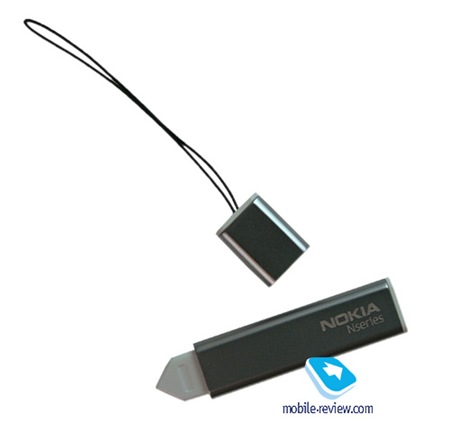
V1.2 version... but something that is weird is the stylus... my stylus is round... nt flat like seen in the picture wor... and it doesnt have a sharp point like the flat one.... New set means new thing?

and it comes with Guitar hero Game.... =.=

anything just seems nice.... installing some new apps to it! xD gonna update to V2.0.... or NOT? xD
PyOsE
post Jan 18 2010, 12:26 PM

Regular
******
Senior Member
1,661 posts

Joined: Oct 2008


welcome bro!! xplore the v12 1st before update to v20..so you can feel the change smile.gif
tplus1
post Jan 18 2010, 12:33 PM


******
Senior Member
1,148 posts

Joined: Jan 2009
ok... then whts up with that stylus?? i still wonder.... anyone get the same stylus like mine? round and long... lol... nt the flat stylus
PyOsE
post Jan 18 2010, 12:38 PM

Regular
******
Senior Member
1,661 posts

Joined: Oct 2008


your stylus not like this one?
user posted image
tplus1
post Jan 18 2010, 01:37 PM


******
Senior Member
1,148 posts

Joined: Jan 2009
NO..... i upload my stylus pic later....... duno why nt same..... but got Nokia Logo
BuFung
post Jan 18 2010, 02:08 PM

Newbie
*******
Senior Member
8,407 posts

Joined: Jun 2005


U guys didnt point out the camera problem I also didnt know...

my camera picture @ total black scene are so much different when there is some dush on the lens there and when after wipe/clean....

I think the dush still bounch some flash reflex to the lens.. although it is not like 1 side very white like the picture above..

luckily as long as it is clean.. there is no issue...
jcleoch
post Jan 18 2010, 02:59 PM

Getting Started
**
Junior Member
75 posts

Joined: May 2006
From: kepong


QUOTE(tplus1 @ Jan 18 2010, 12:13 PM)
WKAKKAKAAK.... got my N97 white today.... its arista set.. so its original right?

V1.2 version... but something that is weird is the stylus... my stylus is round... nt flat like seen in the picture wor... and it doesnt have a sharp point like the flat one.... New set means new thing?

and it comes with Guitar hero Game.... =.=

anything just seems nice.... installing some new apps to it! xD gonna update to V2.0.... or NOT? xD
*
Arista set also 1 of the authorized dealer for nokia malaysia.So u can go any nokia service center for warranty claim also.

Now d new batch for n97 stylus is round model.
bagata
post Jan 18 2010, 03:08 PM

Enthusiast
*****
Senior Member
804 posts

Joined: Sep 2006


urm, asking...

AP set can get the lens cover n chrome fixed?
BuFung
post Jan 18 2010, 03:26 PM

Newbie
*******
Senior Member
8,407 posts

Joined: Jun 2005


QUOTE(bagata @ Jan 18 2010, 03:08 PM)
urm, asking...

AP set can get the lens cover n chrome fixed?
*
of course you can...

» Click to show Spoiler - click again to hide... «

tplus1
post Jan 18 2010, 03:27 PM


******
Senior Member
1,148 posts

Joined: Jan 2009
Oo... thx jcleoch... mine is Round one.. xD

user posted image


Added on January 18, 2010, 3:37 pm=.= forgot to resize... took with My new N97... xD

btw... any nice apps to intro? and themes too.. thx..

This post has been edited by tplus1: Jan 18 2010, 03:37 PM

126 Pages « < 56 57 58 59 60 > » Top
Topic ClosedOptions
 

Change to:
| Lo-Fi Version
0.0291sec    0.72    6 queries    GZIP Disabled
Time is now: 1st December 2025 - 10:23 PM