

hi all, how do u clean your 7559 effectively? since the surface is like errrr..matte??
Dell Inspiron Users Thread, The ultra mobile from Dell
Dell Inspiron Users Thread, The ultra mobile from Dell
|
|
 Jun 11 2016, 09:44 PM Jun 11 2016, 09:44 PM
|
 
Junior Member
559 posts Joined: May 2006 From: 1,234  
|
hi all, how do u clean your 7559 effectively? since the surface is like errrr..matte??
|
|
|
|
|
|
Jun 11 2016, 09:54 PM
|

All Stars
12,089 posts Joined: Jun 2014 From: Kuchai Lama
|
QUOTE(47100 @ Jun 11 2016, 09:44 PM) hi all, how do u clean your 7559 effectively? since the surface is like errrr..matte?? use microfibre cloth can de |
|
|
Jun 13 2016, 09:30 AM
|
|
Junior Member
75 posts Joined: Jan 2010
|
My Dell 7559 has the latest Nvidia graphic driver installed for GTX960M. It is using the 'High Performance' power plan on Windows 10 64bit, also the power management mode is on 'Prefer maximum performance' for Nvidia settings. The problem is my laptop is not pumping out as much fps as those benchmarks posted on Youtube with the same laptop. My model is non 4k i5 regular hdd version. For example, with all low settings on CSGO, I'm getting <100 fps running around dust2 alone, while others say they are getting 100-200+. Another example, my Dota 2 is struggling to stay on constant 60fps with all high settings, especially in team fights. I have AC power plugged in when gaming.
Is this normal? Or am I expecting a lil bit too much from a laptop with only GTX960M? This post has been edited by Dakaa: Jun 13 2016, 09:46 AM |
|
|
Jun 13 2016, 01:31 PM
|
|
Senior Member
3,188 posts Joined: Nov 2007
|
QUOTE(Dakaa @ Jun 13 2016, 09:30 AM) My Dell 7559 has the latest Nvidia graphic driver installed for GTX960M. It is using the 'High Performance' power plan on Windows 10 64bit, also the power management mode is on 'Prefer maximum performance' for Nvidia settings. The problem is my laptop is not pumping out as much fps as those benchmarks posted on Youtube with the same laptop. My model is non 4k i5 regular hdd version. For example, with all low settings on CSGO, I'm getting <100 fps running around dust2 alone, while others say they are getting 100-200+. Another example, my Dota 2 is struggling to stay on constant 60fps with all high settings, especially in team fights. I have AC power plugged in when gaming. how to check the fps. let me try on mine.Is this normal? Or am I expecting a lil bit too much from a laptop with only GTX960M? |
|
|
Jun 13 2016, 03:30 PM
|

Senior Member
735 posts Joined: Sep 2013 From: IYD ~ In Your Dream  
|
QUOTE(NewbieBetta @ Jun 10 2016, 11:31 AM) Still having same problem, screen will just blackout without error from Dell support assist software. access it using safe mode. downgrade your nvidia graphic driver. |
|
|
Jun 13 2016, 03:49 PM
|
|
Senior Member
3,188 posts Joined: Nov 2007
|
QUOTE(DellMalaysia @ Jun 13 2016, 03:30 PM) access it using safe mode. downgrade your nvidia graphic driver. so good even dell got support in forum. |
|
|
|
|
|
Jun 13 2016, 10:23 PM
|
|
Junior Member
75 posts Joined: Jan 2010
|
QUOTE(Velocity @ Jun 13 2016, 05:31 PM) how to check the fps. let me try on mine. Add '-console' to your launch option (right click the game on Steam -> properties) for CSGO/Dota2, inside the game option you will see how to bind a keybind to console, pull down the console and type 'net_graph 3' on console then press enter.This post has been edited by Dakaa: Jun 13 2016, 10:24 PM |
|
|
Jun 13 2016, 10:51 PM
|
|
Senior Member
3,188 posts Joined: Nov 2007
|
QUOTE(Dakaa @ Jun 13 2016, 10:23 PM) Add '-console' to your launch option (right click the game on Steam -> properties) for CSGO/Dota2, inside the game option you will see how to bind a keybind to console, pull down the console and type 'net_graph 3' on console then press enter. on battery 25-30fpson ac 90 to 120fps seems same like yours most review on internet are i7 version This post has been edited by Velocity: Jun 13 2016, 10:54 PM |
|
|
Jun 16 2016, 09:04 PM
|

Senior Member
3,706 posts Joined: Aug 2005
|
hey guys, when you start up your 7559 laptop, your Dell white logo will appear first, will it goes very bright for 1 second and become deem then the screen become bright again when finish loading win10.
I remember it will light up like you set your screen brightness and maintain the brightness till finish loading win10 |
|
|
Jun 21 2016, 01:49 PM
|

Senior Member
1,245 posts Joined: Oct 2004 From: Selangor
|
is the inspiron 15 5000 i7 worth to buy?
Or are they gonna release new revision again soon? Dell nowadays macam less customizable liao... |
|
|
Jun 22 2016, 01:16 AM
|
|
Senior Member
3,188 posts Joined: Nov 2007
|
QUOTE(EpsilonStar @ Jun 21 2016, 01:49 PM) is the inspiron 15 5000 i7 worth to buy? what type of customization you looking for? From my experience 5000 is a low end series. I would go for 7000 series if i am youOr are they gonna release new revision again soon? Dell nowadays macam less customizable liao... if you wanna know any new upcoming model check dell usa http://www.dell.com/us/p/inspiron-15-5000-series/pd |
|
|
Jun 25 2016, 12:03 AM
Show posts by this member only | IPv6 | Post
#1032
|
|
Senior Member
3,706 posts Joined: Aug 2005
|
when you guys first start your system inspiron 7559, the Dell logo appear and is there a bottom loading bar appear and on lower right corner you have F2 & F12?
after changing a new motherboard, i got this btm bar loading and F2 & F12 appear. How can i hide this away? |
|
|
Jun 25 2016, 08:31 AM
|
|
Senior Member
3,188 posts Joined: Nov 2007
|
QUOTE(NewbieBetta @ Jun 25 2016, 12:03 AM) when you guys first start your system inspiron 7559, the Dell logo appear and is there a bottom loading bar appear and on lower right corner you have F2 & F12? no bar. just dell logoafter changing a new motherboard, i got this btm bar loading and F2 & F12 appear. How can i hide this away? |
|
|
|
|
|
Jun 25 2016, 11:20 AM
|

All Stars
31,607 posts Joined: Aug 2010
|
QUOTE(NewbieBetta @ Jun 25 2016, 12:03 AM) when you guys first start your system inspiron 7559, the Dell logo appear and is there a bottom loading bar appear and on lower right corner you have F2 & F12? Dell logo onlyafter changing a new motherboard, i got this btm bar loading and F2 & F12 appear. How can i hide this away? Try update your bios |
|
|
Jun 25 2016, 11:22 PM
Show posts by this member only | IPv6 | Post
#1035
|
|
Senior Member
3,706 posts Joined: Aug 2005
|
Im running 1.1.7 bios now. I know he latest now is 1.1.8
Dell help me solve my intermittent screen blackout problem by replacing a new motherboard. I have not call them and ask them why there is a bar like loading on my screen. But I still clock below 20s to enter into Windows. |
|
|
Jun 26 2016, 02:06 PM
|

Junior Member
327 posts Joined: Jul 2011 From: Ask Me
|
QUOTE(NewbieBetta @ Jun 25 2016, 12:03 AM) when you guys first start your system inspiron 7559, the Dell logo appear and is there a bottom loading bar appear and on lower right corner you have F2 & F12? Enable uefi boot, if legacy it will show the F2 and F12.after changing a new motherboard, i got this btm bar loading and F2 & F12 appear. How can i hide this away? |
|
|
Jun 27 2016, 12:05 AM
|
|
Senior Member
3,706 posts Joined: Aug 2005
|
QUOTE(Paisy @ Jun 26 2016, 02:06 PM) Enable uefi boot, if legacy it will show the F2 and F12. But when I enter Bios and check, it's already in EUFI boot. |
|
|
Jun 27 2016, 12:42 AM
|
|
Senior Member
677 posts Joined: Apr 2013
|
harluuuuu~~~
anyone has experience purchased from a retailer and upgrading the warranty to 4 years with accidental?? i am interested in purchasing the lowest specs of inspiron 7559, but sadly dell official sites doesn't sell the machine in DOS version  it seems very very sad for me  hopefully they will release a dos version of that model soon~ |
|
|
Jun 27 2016, 12:28 PM
|
|
Senior Member
3,188 posts Joined: Nov 2007
|
QUOTE(hihichew @ Jun 27 2016, 12:42 AM) harluuuuu~~~ alot forumer here offer what you request. post this at the recommendation thread on this request sure few seller will pm youanyone has experience purchased from a retailer and upgrading the warranty to 4 years with accidental?? i am interested in purchasing the lowest specs of inspiron 7559, but sadly dell official sites doesn't sell the machine in DOS version it seems very very sad for me hopefully they will release a dos version of that model soon~ |
|
|
Jun 27 2016, 11:11 PM
|
|
Junior Member
327 posts Joined: Jul 2011 From: Ask Me
|
QUOTE(NewbieBetta @ Jun 27 2016, 12:05 AM) But when I enter Bios and check, it's already in EUFI boot. Enable secure boot, maybe its windows problem, if you dont have EFI folder, maybe the bios is searching for i thats why F2 and F12 is appeared. Should check it.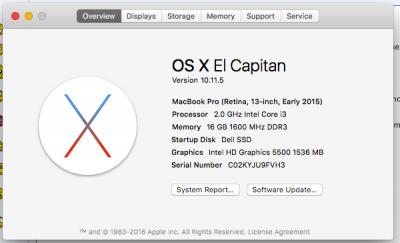
Hello people, im Dell 5448 user, upgraded RAM to 16GB and 512GB SSD(Samsung 850 PRO), since the processor is Core i3, i think i can beat macbook pro 2012 performance as im installing mac osx on it. For the wifi problem faced by 5447 and 5448 user, you can fix it by changing the WiFi card, like me, i changed to broadcom mac compitable card, and it fixed the issue.  I can say that this model is good. It has same keyboard as 7447 which has backlit keyboard, i changed it which price RM85 only, bought from Dell China. I also changed the screen to 1080p (which dell 7447 has the version too), i can conclude that i dont regret buying this laptop. recommended dell as its warranty can be extended. But the issue for now is, The battery life is not good since it has small battery, thats why. I'm planning to get a bigger battery but its not available for this model. This post has been edited by Paisy: Jun 28 2016, 12:10 PM |
| Change to: |  0.0322sec 0.0322sec
 0.37 0.37
 6 queries 6 queries
 GZIP Disabled GZIP Disabled
Time is now: 4th December 2025 - 07:02 PM |
 Quote
Quote