Outline ·
[ Standard ] ·
Linear+
Battery Drain/Usage on iPhone 2G/3G/3GS/4, What to do? How? Solution?
|
' or 1=1 --
|
 Sep 29 2010, 12:28 PM Sep 29 2010, 12:28 PM
|

|
my battery life just by turning off 3g and enabling it whenever i need to surf. :3 with normal use, calls, wifi, surfing, video recording, games, practically everything really. the 3g is the battery killer and ur running apps in the background. kill all ur running apps before u go to sleep at night (i also turn off cellular data when i sleep  ) if u dont wanna leave it plugged in or kill the unnecessary ones that u dont need to be running in the background. makes a world of difference This post has been edited by ' or 1=1 --: Sep 29 2010, 12:31 PM |
|
|
|
|
|
dannywonglh
|
Sep 29 2010, 01:44 PM
|
Getting Started

|
QUOTE(' or 1=1 -- @ Sep 29 2010, 12:28 PM) my battery life just by turning off 3g and enabling it whenever i need to surf. :3 with normal use, calls, wifi, surfing, video recording, games, practically everything really. the 3g is the battery killer and ur running apps in the background. kill all ur running apps before u go to sleep at night (i also turn off cellular data when i sleep ) if u dont wanna leave it plugged in or kill the unnecessary ones that u dont need to be running in the background. makes a world of difference Sorry I have one out-of-topic question, may I know how do you capture your iPhone screen? |
|
|
|
|
|
' or 1=1 --
|
Sep 29 2010, 01:47 PM
|
|
|
u press the top power buttun and the home button at the same time and it'll be saved in ur camera roll  |
|
|
|
|
|
nimrod323
|
Sep 29 2010, 02:28 PM
|
|
|
QUOTE(' or 1=1 -- @ Sep 29 2010, 12:28 PM) » Click to show Spoiler - click again to hide... « my battery life just by turning off 3g and enabling it whenever i need to surf. :3 with normal use, calls, wifi, surfing, video recording, games, practically everything really. the 3g is the battery killer and ur running apps in the background. kill all ur running apps before u go to sleep at night (i also turn off cellular data when i sleep ) if u dont wanna leave it plugged in or kill the unnecessary ones that u dont need to be running in the background. makes a world of difference Just to add, turning off wifi,location services,push notification adjusting the brightness and bluetooth prolong the battery, turn them on when you need it, otherwise dont bother, wifi and edge conserve battery. |
|
|
|
|
|
LeChuCk
|
Sep 29 2010, 03:07 PM
|
|
|
anyone knows whether the apps that are in the multitask bar drain your ip battery? apparently it does and it's a bother to manually close them after using the app..
|
|
|
|
|
|
rstusa
|
Sep 29 2010, 03:15 PM
|
|
|
QUOTE(LeChuCk @ Sep 29 2010, 04:07 PM) anyone knows whether the apps that are in the multitask bar drain your ip battery? apparently it does and it's a bother to manually close them after using the app.. How to close the running apps? This post has been edited by rstusa: Sep 29 2010, 03:16 PM |
|
|
|
|
|
LeChuCk
|
Sep 29 2010, 03:21 PM
|
|
|
QUOTE(rstusa @ Sep 29 2010, 03:15 PM) How to close the running apps? 1. go to the multitask bar by pressing your home button twice 2. touch any app for more than 3 secs and it should wiggle 3. remove them by touching the "-" icon at the top corner of the app |
|
|
|
|
|
limyusiong
|
Sep 29 2010, 05:17 PM
|
|
|
QUOTE(clayclws @ Sep 29 2010, 08:53 AM) How many apps are there in your multitasking bar? oppss.....problem solved d...rupa rupanya those open apps running on background n dint turn it off.....multitasking close apps....hehehe...thx for advice... by d way, i start using from 100% at around 8am, play until 3pm, battery left 22% and force me to charge again... |
|
|
|
|
|
Feliex
|
Sep 29 2010, 05:26 PM
|
|
|
First time use Apple Series Phone, so i dunno what the Standard of the battery compare with 3Gs Here is the Picture(Battery Usage): » Click to show Spoiler - click again to hide... « First Day:  Second Day:  Is that OK and normal ?  |
|
|
|
|
|
mybiebie
|
Sep 30 2010, 12:41 AM
|
|
|
QUOTE(nimrod323 @ Sep 29 2010, 02:28 PM) Just to add, turning off wifi,location services,push notification adjusting the brightness and bluetooth prolong the battery, turn them on when you need it, otherwise dont bother, wifi and edge conserve battery. thks for the info...deactivate some of the functions and hopefully will improve the batt life. |
|
|
|
|
|
objectifyme
|
Sep 30 2010, 04:00 AM
|
|
|
QUOTE(Feliex @ Sep 29 2010, 05:26 PM) First time use Apple Series Phone, so i dunno what the Standard of the battery compare with 3Gs Here is the Picture(Battery Usage): » Click to show Spoiler - click again to hide... « First Day: Second Day: Your usage? OK and normal would depend on what you were doing on your phone. |
|
|
|
|
|
giovanni
|
Sep 30 2010, 05:10 AM
|
|
|
I normally get to 100% and not just 99% for a full charge. With continuous mp3 playing, web browsing, games and email checking, I normally still have 20 to 30% left by 9pm every night. Is that good enough? Oh ya, I start my day at 8.30am everyday!
One thing I do realize is that if your workplace/house has bad signal strength, you battery drains so much faster! Once left my fully charged IP4 overnight at my friend's apartment (getting one or two bars at most), battery went down by 30% overnight!!!
|
|
|
|
|
|
deepan84
|
Sep 30 2010, 09:32 AM
|
|
|
dat day i did a test. morning 9am 100%. loads of websurfin and games. calls about 45mins. by d time i was home bout 10pm 10%. considered maximum usage lar. but screen brightness at 1/2 wit auto brightness on.
|
|
|
|
|
|
LeChuCk
|
Sep 30 2010, 10:16 AM
|
|
|
initial results show that turning off unwanted apps does prolong battery life..i will keep on monitoring for the next few days and will post results..
|
|
|
|
|
|
objectifyme
|
Sep 30 2010, 12:04 PM
|
|
|
QUOTE(Feliex @ Sep 29 2010, 11:26 AM) I got face this problem, after the charge already 100%(plug icon), than when i plug the 100% direct change to 99%. When restart the phone it become back to 100%. Is my iPhone normal ? ><|| I think I might have experienced this last night—but I'm not sure if I charged it to full (with the plug icon). I'll try again later and let you know the results. Are you still experiencing problems? |
|
|
|
|
|
rstusa
|
Sep 30 2010, 12:07 PM
|
|
|
I facing one problem, thought to switch off the power to save up the battery when sleeping time. But I set the alarm on, it won't work if i switch off the phone, not like nokia.
|
|
|
|
|
|
cschun86
|
Sep 30 2010, 12:49 PM
|
|
|
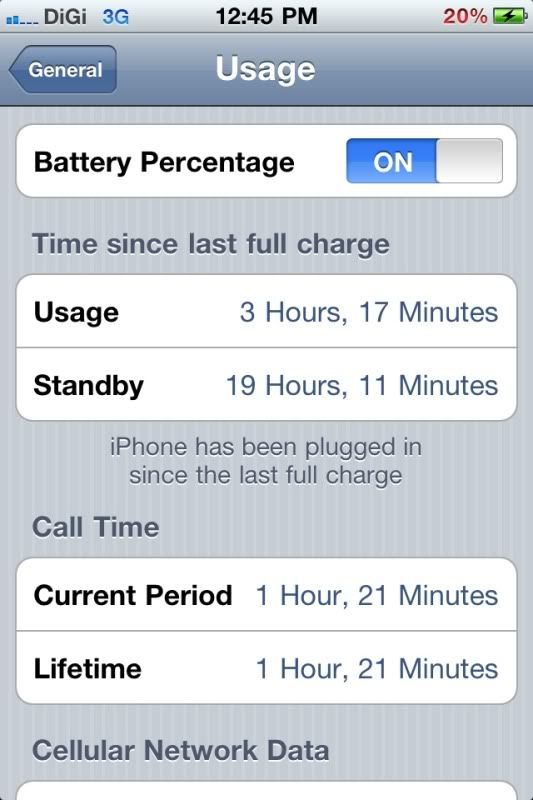 This is mine usage after full charge from 100% to 20%. Not too bad. Last around one day for my usage. |
|
|
|
|
|
rstusa
|
Sep 30 2010, 01:40 PM
|
|
|
Battery must maintain 20% above?
|
|
|
|
|
|
objectifyme
|
Sep 30 2010, 01:56 PM
|
|
|
QUOTE(cschun86 @ Sep 30 2010, 12:49 PM) This is mine usage after full charge from 100% to 20%. Not too bad. Last around one day for my usage. What do you do with your phone, dude? Mine lasts an average of 6 hours and above with internet usage, Google maps, 3G, music, games, etc.  |
|
|
|
|
|
davidmak
|
Sep 30 2010, 02:40 PM
|
|
|
QUOTE(hi54ever @ Sep 29 2010, 11:10 AM) To be honest IMO casing is not 100% solution to Deathgrip matters, it only ' reduce' the bad effect, thus we thought it is THE solution. my guess it will affect our data speed with casing. nonetheless, thats the only way for now I would like to add onto your comments. Wrapping a case on the iPhone 4 would only solve the 'antenna shorting/grounding' issue which ruins the antenna's effectiveness and efficiency in reception. It doesn't resolve the present issue of 'antenna attenuation' which is inherent in a lot of current mobile phones. Due to SAR regulations, the GSM antenna is typically located at the bottom of the phone and facing the back of the phone away from the user's head. When your hand is holding the phone, essentially the human flesh is absorbing some of the RF power and also blocking the line-of-sight of the antenna. It alters the impedance of the antenna and in return also reduces the effectiveness and efficiency in reception. Thats why you will observe similar characteristics (drop in signal bars) which is especially pronounced when you are in an area of weak signal coverage. All these changes in signal bars only shows the signal intensity (RSSI values) at the point of antenna. It doesn't indicate anything about signal quality in which the iPhone 4 was marketed to improve on. That is why they said the iPhone 4 was design to intelligently use any available bandwidth on AT&T's sucky network. So they say.... |
|
|
|
|



 Quote
Quote





 0.0198sec
 0.68
0.68
 6 queries
 GZIP Disabled