Let us unite together for those who have to/want to use wireless broadband for online gaming on 3rd gen console, share wit us all about what u have been through while using 3G or HSDPA network in online gaming. help others who have problem trying to get their 3rd gen console online wit wireless BB network.
this bellow is what i put together for those who need help in setting up their ps3 to play online with wireless BB network. i'm sorry i dont provide xbox setup cos i dont hv one to test it out hehe, maybe someone out there can contribute on the xbox set up? anyway here goes
------------------------------------------------------------------------------------------------------------------------------------------
method to do an internet connection sharing (ICS) on PlayStation3 for XP computersFirst off u will need a cross cable for the connection
1. Connect the cross cable from ur pc to your ps3
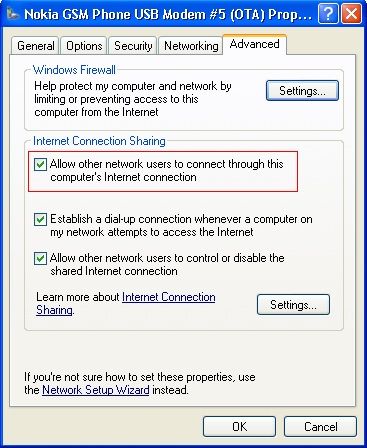
2. Go to control panel > network connection > right click property on ur modem (this could be ur phone modem or USB modem)
3. Advance > click ICS option then click “
allow other users to connect throught this computer”
» Click to show Spoiler - click again to hide... «
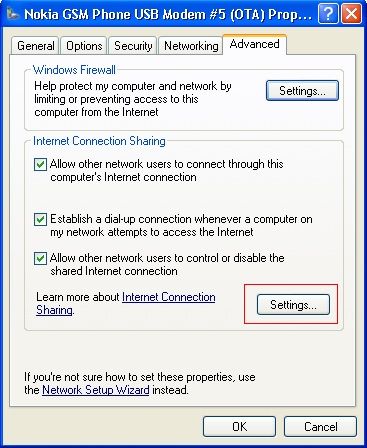
4. Then after this click the setting button on the ICS option.
» Click to show Spoiler - click again to hide... «
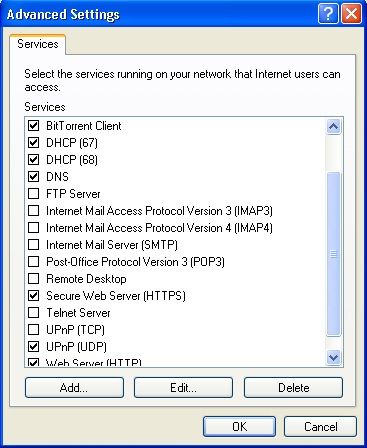
5. Click these item in the box in the options
UDP
DNS
HDCP
HTTP
HTTPS
» Click to show Spoiler - click again to hide... «
That’s it! ur done on the computer side.For Step 5 (computer), mine only have HTTP & HTTPS only, UDP, DNS, HDCP are not avail..do i need to add? if yes, how?
great job btw..
cheers!
now for the ps3 part1. Go to network setting
2. Then select internet connection setting
3. They will ask u to select a setting method, select custom
4. Next they will ask u to connect wired or wireless connection, select wired
5 from here, select these bellow:
Operation Mode: auto-detect
IP Adress: automatic
DHCP Host Name: Do not use
DNS: Automatic
MTU: Automatic
Proxy Server: Do not use
UPNP: enable
Once all this is done, there is nothing to do but to Sign IN and play online! hope it helps guys!

------------------------------------------------------------------------------------------------------------------------------------------
List of wireless broadband gamers» Click to show Spoiler - click again to hide... «
1. Borneo928
2. K-End
3. qudeenz360
4. uchiha_sauffie
5. chicano
6. cwl_ykh
7. akeef
8. aiyish
9. Kaiser Wave
10. enserv
11. oyama
12. watever77
13. pel
14.
For Step 5 (computer), mine only have HTTP & HTTPS only, UDP, DNS, HDCP are not avail..do i need to add? if yes, how?
great job btw..


 Dec 27 2009, 10:39 PM


 Quote
Quote




 . how to get nat2 . anyone




 0.0271sec
 0.72
0.72
 6 queries
 GZIP Disabled