

QUOTE(Kul | Mo0 @ Apr 8 2009, 12:25 AM)
cjlai : what lens you used ar?

moon from the 500mm reflex lens...this is my recent macro shot


Photography The Sony Alpha Thread V23!, The Orange Legion
|
|
 Apr 8 2009, 12:38 AM Apr 8 2009, 12:38 AM
|
 
Senior Member
1,631 posts Joined: Jan 2003 From: Puchong   
|
QUOTE(Kul | Mo0 @ Apr 8 2009, 12:25 AM) cjlai : what lens you used ar? moon from the 500mm reflex lens...this is my recent macro shot |
|
|
|
|
|
Apr 8 2009, 12:40 AM
|

Senior Member
3,807 posts Joined: Jan 2003 From: Masking
|
QUOTE(SHOfrE3zE @ Apr 8 2009, 12:21 AM) albnok: thx bro. yup i did some sharpening on it coz it's a bit soft. guess it's a big mistake then. using photoshop??btw, i'm using firmware 4 with NR off this is the original picture with no sharpening (just editted on the colour curve):  is this normal for ISO1600 with a700? how about mask off the wall part? |
|
|
Apr 8 2009, 12:41 AM
|

Senior Member
1,462 posts Joined: Jul 2005 From: Klang,Subang Jaya
|
QUOTE(AlphaBeta @ Apr 8 2009, 12:31 AM) yes...only 3 options on A100 to 350 - Off, DRO and DRO+. Ok get A700 to do +5! poison enough?? started laa... dei alphabeta, i just oni got my A200 laa... chill a while laa...   haha... was lookin forward to join ur "red and black" clan... ut then i had to go get a cobra... haha... was lookin forward to join ur "red and black" clan... ut then i had to go get a cobra... Added on April 8, 2009, 12:43 am QUOTE(cjlai @ Apr 8 2009, 12:38 AM) moon from the 500mm reflex lens... really like it cjlai... luv them colors... just an opinion ah, i think composition cud be better...either the insect a lil to the middle OR a lil to the left... dua sen aku...this is my recent macro shot » Click to show Spoiler - click again to hide... « This post has been edited by millenia3000: Apr 8 2009, 12:43 AM |
|
|
Apr 8 2009, 12:43 AM
|
Senior Member
544 posts Joined: Jan 2007 From: behind you
|
QUOTE(albnok @ Apr 8 2009, 12:10 AM) This is what the A700/A900 can do with DRO Level 5: Bro Albert go Kuching ? » Click to show Spoiler - click again to hide... « I think you know by now that if you usually shoot in such sunny conditions without DRO, the trees would be nearly black! You can do the same thing with RAW or a HDR program. Really this is what HDR is meant to do, not those cartoony-looking pictures! Added on April 8, 2009, 12:45 am QUOTE(cjlai @ Apr 8 2009, 12:20 AM) moon from yesterday mine .. yesterday also ..  » Click to show Spoiler - click again to hide... « 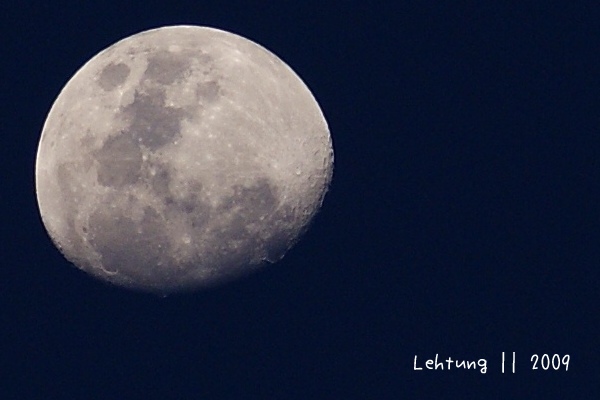 This post has been edited by lehtung: Apr 8 2009, 12:45 AM |
|
|
Apr 8 2009, 12:45 AM
|
 
Elite
4,956 posts Joined: Jan 2003 From: KL
|
SHOfrE3zE, shifting color is going to add noise.
In Photoshop, hit Ctrl-1, then Ctrl-2, then Ctrl-3; you'll see that the noise is different in every channel. If you stretch the wrong one you'll end up with a noisy picture. It looks like you pulled up the green and blue channels. Usually green is less noisy because our sensors have 1 red, 1 blue and 2 green elements. I would use the Magic Wand on the blue-green bit, then do a Smart Blur on it. lehtung, yes I was there for the Rainforest World Music Festival 2008! This post has been edited by albnok: Apr 8 2009, 12:46 AM |
|
|
Apr 8 2009, 12:50 AM
|

Senior Member
2,955 posts Joined: Dec 2007 From: Perth Oz
|
QUOTE(albnok @ Apr 8 2009, 12:37 AM) SHOfrE3zE, you could mask the sharpening off so it doesn't occur on the noise in the blues. That said it has a film-like texture which I don't mind. ooo i see.. not exactly got wht u mean..but i got the rough idea. Wish i could attend the TT...can learn more from you. haha..AlphaBeta: Yes, because DRO is basically an automatic Shadow Fill. Highlight Recovery is done by the camera, which chooses to underexpose to retain the tones in the white clouds. So even though I shot it at ISO200, the blues are a good 2 stops below (0 EV) while the buildings are possibly 3-4 stops below the sky (ISO1600-3200.) When you underexpose an ISO200 shot by -2 EV, and bring it back up to 0 EV brightness, the picture has basically become an ISO800 shot. Added on April 8, 2009, 12:52 am QUOTE(millenia3000 @ Apr 8 2009, 12:41 AM) started laa... dei alphabeta, i just oni got my A200 laa... chill a while laa... don get wht u mean.. haha... was lookin forward to join ur "red and black" clan... ut then i had to go get a cobra...  u mean the f42 flash? u mean the f42 flash?This post has been edited by AlphaBeta: Apr 8 2009, 12:52 AM |
|
|
|
|
|
Apr 8 2009, 01:04 AM
|

Senior Member
1,895 posts Joined: Jan 2003 From: Shah Alam
|
albnok: thx for the tips. actually, i just pull the red channel on the curves. smart blur eh? never thought of doing it coz i'm busy worrying about the sharpening
. need to familiarize more with the high ISO thing. |
|
|
Apr 8 2009, 01:04 AM
|

Senior Member
3,844 posts Joined: Nov 2008 From: Damansara Utama
|
Anybody uses iPhoto on a Mac to do photo editting?
|
|
|
Apr 8 2009, 01:10 AM
|
|
Senior Member
1,462 posts Joined: Jul 2005 From: Klang,Subang Jaya
|
QUOTE(AlphaBeta @ Apr 8 2009, 12:50 AM) don get wht u mean.. u mean the f42 flash? |
|
|
Apr 8 2009, 01:18 AM
|
|
Senior Member
3,807 posts Joined: Jan 2003 From: Masking
|
QUOTE(Kul | Mo0 @ Apr 8 2009, 01:04 AM) Anybody uses iPhoto on a Mac to do photo editting? i use iphoto to manage all my raws....and i link it to adobe cs4..when i press enter on any raw in iphoto..it'd open it with cs4 for edit... if u use mac..actually u can use lightroom if u don do photo manipulation... |
|
|
Apr 8 2009, 01:18 AM
|
|
Senior Member
2,955 posts Joined: Dec 2007 From: Perth Oz
|
QUOTE(Kul | Mo0 @ Apr 8 2009, 01:04 AM) Anybody uses iPhoto on a Mac to do photo editting? ask achew..he is using Mac..and he produces good photos..  oh...u call N 'black and red'? i call it darkside lol... Sony is good...i love the CZ lenses and button layout of it. EDIT: there achew replied you b4 me lol.. This post has been edited by AlphaBeta: Apr 8 2009, 01:20 AM |
|
|
Apr 8 2009, 01:19 AM
|
|
Senior Member
3,807 posts Joined: Jan 2003 From: Masking
|
QUOTE(SHOfrE3zE @ Apr 8 2009, 01:04 AM) albnok: thx for the tips. actually, i just pull the red channel on the curves. smart blur eh? never thought of doing it coz i'm busy worrying about the sharpening wad u use for sharpening??the default sharpen in photoshop is a lil bit hash imo..i prefer smart sharpen too.... need to familiarize more with the high ISO thing. |
|
|
Apr 8 2009, 01:21 AM
|
|
Elite
4,956 posts Joined: Jan 2003 From: KL
|
achew, I'm still using Photoshop 7, so it's Unsharp Mask for me. Smart Sharpen is much better though for handling highlights and shadows separately.
|
|
|
|
|
|
Apr 8 2009, 01:24 AM
|
|
Senior Member
1,462 posts Joined: Jul 2005 From: Klang,Subang Jaya
|
QUOTE(Kul | Mo0 @ Apr 8 2009, 01:04 AM) Anybody uses iPhoto on a Mac to do photo editting? guys, i haven't tried this myself yet... ut had a friend of mine telling me that GIMP can be a lil more easier than Ps.... and guess what, it's a multi-platform program.... oh yea and it's FREE!!  check this out --> http://inphotos.org/gimp-for-photographers-levels/ |
|
|
Apr 8 2009, 01:24 AM
|
|
Senior Member
1,895 posts Joined: Jan 2003 From: Shah Alam
|
QUOTE(achew @ Apr 8 2009, 01:19 AM) wad u use for sharpening??the default sharpen in photoshop is a lil bit hash imo..i prefer smart sharpen too... im using photoshop cs3 for all my photo editing. so the sharpening is done in photoshop. Smart sharpening of course.This post has been edited by SHOfrE3zE: Apr 8 2009, 01:25 AM |
|
|
Apr 8 2009, 01:25 AM
|
|
Senior Member
3,807 posts Joined: Jan 2003 From: Masking
|
QUOTE(albnok @ Apr 8 2009, 01:21 AM) achew, I'm still using Photoshop 7, so it's Unsharp Mask for me. Smart Sharpen is much better though for handling highlights and shadows separately. haha..actually i know nuts about photoshop...just explore myself blindly..and after so long..i think smartsharpen givs me better result..not that aggressive especially when i lower down the radius... |
|
|
Apr 8 2009, 01:25 AM
|
|
Senior Member
1,462 posts Joined: Jul 2005 From: Klang,Subang Jaya
|
QUOTE(AlphaBeta @ Apr 8 2009, 01:18 AM) ask achew..he is using Mac..and he produces good photos.. yea man... i love it... maybe cos its my first dslr... oh...u call N 'black and red'? i call it darkside lol... Sony is good...i love the CZ lenses and button layout of it. EDIT: there achew replied you b4 me lol.. |
|
|
Apr 8 2009, 01:27 AM
|
|
Senior Member
3,807 posts Joined: Jan 2003 From: Masking
|
QUOTE(millenia3000 @ Apr 8 2009, 01:24 AM) guys, i haven't tried this myself yet... ut had a friend of mine telling me that GIMP can be a lil more easier than Ps.... and guess what, it's a multi-platform program.... oh yea and it's FREE!! yup..its a multi-platform...i tried to use it few times b4 i could 'find' any cs4 for my mac....but after exposed to photoshop for so long..i just couldnt get myself fit into gimp..lol check this out --> http://inphotos.org/gimp-for-photographers-levels/ but i think if one havn get used to ps..and need a freeware..it could b a good choice.. |
|
|
Apr 8 2009, 01:30 AM
|
|
Senior Member
1,462 posts Joined: Jul 2005 From: Klang,Subang Jaya
|
QUOTE(achew @ Apr 8 2009, 01:27 AM) yup..its a multi-platform...i tried to use it few times b4 i could 'find' any cs4 for my mac....but after exposed to photoshop for so long..i just couldnt get myself fit into gimp..lol yea... really used to photoshop too... im gonna go download GIMP and go rest a while... champs league matches are gonna start soon edi... lol!but i think if one havn get used to ps..and need a freeware..it could b a good choice.. |
|
|
Apr 8 2009, 01:30 AM
|
|
Senior Member
2,955 posts Joined: Dec 2007 From: Perth Oz
|
QUOTE(millenia3000 @ Apr 8 2009, 01:24 AM) guys, i haven't tried this myself yet... ut had a friend of mine telling me that GIMP can be a lil more easier than Ps.... and guess what, it's a multi-platform program.... oh yea and it's FREE!! if u want software similar to PS but easier to use.. try ''Paint.NET'', it is free. I use Lightroom2 all the time...and if things really go nuts...then i use CS2 to PP it. check this out --> http://inphotos.org/gimp-for-photographers-levels/ others to try - Picasa and Photoscape. bye guys off to sleep..nite.. This post has been edited by AlphaBeta: Apr 8 2009, 01:32 AM |
|
Topic ClosedOptions
|
| Change to: |  0.0273sec 0.0273sec
 0.30 0.30
 6 queries 6 queries
 GZIP Disabled GZIP Disabled
Time is now: 16th December 2025 - 01:12 PM |
 Quote
Quote


