i like 1000H, but the price is really too high ...
Asus Eee PC Thread V3
|
|
 Dec 20 2008, 05:52 PM Dec 20 2008, 05:52 PM
|
 
Junior Member
245 posts Joined: Oct 2008 
|
Thanks for comparison...hope my luck can get me 6600mah 904hd at RM1199
i like 1000H, but the price is really too high ... |
|
|
|
|
|
Dec 20 2008, 06:31 PM
|

Senior Member
1,241 posts Joined: Nov 2004 From: Georgetown Penang 
|
QUOTE(havocx @ Dec 19 2008, 03:54 PM) [size=1] Tks once again for your reply. I have search the DVD, and only found U1 folder to be AiGuru U1 USB Phone For Skype, did u mean Super Hybrid Engine? Hope u can helpAsus U1 Tuner comes with the 1000 series, perhaps you can look for the download there ?  |
|
|
Dec 21 2008, 10:30 AM
|

Senior Member
2,549 posts Joined: Dec 2004 From: Sungai Petani, Kedah
|
QUOTE(havocx @ Dec 20 2008, 09:49 AM) The Tesco I went to had their EEEPC's at the same RM1199 but the receipt is handled by ThunderMatch. What the sales person said was that you can return it to ThunderMatch for Service or Asus Royal Club directly which I thought was a fair bargain. |
|
|
Dec 21 2008, 02:59 PM
|

Senior Member
2,403 posts Joined: Dec 2004  
|
@havocx ,
how's the celeron-900 compares with the atom? (aside of consumption on batt.) does the celeron-900 able to handles some surfing on firefox with few tabs & vga out to tv for watching movie, etc etc.? how bout the temp.? is it hotter than atom? Thanks. |
|
|
Dec 21 2008, 11:45 PM
|
|
Newbie
1 posts Joined: Oct 2005
|
guys i am gonna buy a netbook within next week. after reading ur all posts here, the leading contender would be Eee PC 1000H. I know all here are owners of Asus netbook, but need sincere and unbias
 (i know u guys sincere already and unbias) of other possible brand/model of netbook available out there which could rival 1000H in terms of technical capabilities/vulnerabilities, money (price and warranty wise), OS (i need xp at the very least), batt life, and connectivity. I am always on the go (got Celcom broadband), need to do lots of presentations (powerpoint), online vids viewing, googling, report writing, emailing (vital), and listen to music (i know u guys sincere already and unbias) of other possible brand/model of netbook available out there which could rival 1000H in terms of technical capabilities/vulnerabilities, money (price and warranty wise), OS (i need xp at the very least), batt life, and connectivity. I am always on the go (got Celcom broadband), need to do lots of presentations (powerpoint), online vids viewing, googling, report writing, emailing (vital), and listen to music  whenever is possible using my stereo bluetooth headset. thats all i need it for. Thanks in advance for your advice. whenever is possible using my stereo bluetooth headset. thats all i need it for. Thanks in advance for your advice. p/s: me going to lowyat, so who ever has/or know of any best deal i can find in lowyat, feel free to share with me too. thank you.  |
|
|
Dec 22 2008, 03:16 AM
|

Senior Member
1,078 posts Joined: Nov 2005
|
Derex ... based on what you said in your post that you have read all the post here ... 1000H is still the way to go ...
Actually all the netbooks are nearly the same coz all are running the atom chip... 2gb (if u upgrade)... 160gb and wifi of course ... but 1 thing good with the 1000H is their 6 cell batt... I myself own a 1000H loaded with Vista and Ubuntu ... Both OS works great on the 1000H ... =) |
|
|
|
|
|
Dec 22 2008, 06:30 AM
|

Senior Member
5,967 posts Joined: Oct 2004 From: Malaysia... Duh!
|
Guys, recently Asus releases some cool stuffs to help with eee PC 901 lack of space on C drive. Its on the asus site, under eee PC 901, under utility. I'm uploading it here since its so slow to download directly from their site. Please read the readme, especially on the AutoC2D since the installation is a bit unconventional.
QUOTE The AutoC2D automatically sets up partition D (D:) as the default path for Program Files folder, and thus leaves more space on partition C (C:) for Windows Update. After the AutoC2D activation finishes, the C:/Program Files becomes a soft link, which synchronizes with D:/Program Files. Softwares will be installed ONLY in D:/Program Files even if you select C:/Program Files as the installation path. A very nice thing indeed! If you do that manually by tweaking the registry, it causes problems with Microsoft Office since their common files is always on C: drive, but this software helps a lot! Attached File(s)  EeePC_Shrinker_new.zip ( 514.63k )
Number of downloads: 184
AutoC2D_3_1_.zip ( 1.13mb )
Number of downloads: 60
EeePC_Shrinker_new.zip ( 514.63k )
Number of downloads: 184
AutoC2D_3_1_.zip ( 1.13mb )
Number of downloads: 60 |
|
|
Dec 22 2008, 03:05 PM
|
|
Senior Member
1,241 posts Joined: Nov 2004 From: Georgetown Penang
|
|
|
|
Dec 22 2008, 09:47 PM
|

Junior Member
26 posts Joined: Jun 2006
|
twinhead e10 is selling for RM1299. the 10-incher uses an amd lx-800 ulv processor with 60GB HDD. must be using a Linux OS. If so, can one just install win xp sp3 and overwrite it? and speaking of XP is it the Pro or Home version? I suppose the Pro would be overkill. how does the AMD CPU rate in terms of power usage when compared with Intel Atom? twinhead claims 1.2kg weight and 0.9 watt of power consumption. The Asus 1002HA is already selling in other foreign markets. When is the 1000H successor coming to Malaysia? 100OH at RM1800 is pricy. so i'm considering a 9-inch asus. would the sacrifice in screen space be worth it or should I just bite the bullet and opt for the 1000H/1002HA. whether 9-inch or 10-inch, it must be Atom processor for longer battery life, and use SSD. so where can I find both models using SSD in PJ/KL? went to digital mall and evernew yesterday, practically all use 160GB HDD. |
|
|
Dec 22 2008, 09:51 PM
|
|
Senior Member
5,967 posts Joined: Oct 2004 From: Malaysia... Duh!
|
QUOTE(SapperJones @ Dec 22 2008, 09:47 PM) twinhead e10 is selling for RM1299. This is why I dont get why they stop bringing 901 into this country. Its a perfect choice for those who wants SSD.the 10-incher uses an amd lx-800 ulv processor with 60GB HDD. must be using a Linux OS. If so, can one just install win xp sp3 and overwrite it? and speaking of XP is it the Pro or Home version? I suppose the Pro would be overkill. how does the AMD CPU rate in terms of power usage when compared with Intel Atom? twinhead claims 1.2kg weight and 0.9 watt of power consumption. The Asus 1002HA is already selling in other foreign markets. When is the 1000H successor coming to Malaysia? 100OH at RM1800 is pricy. so i'm considering a 9-inch asus. would the sacrifice in screen space be worth it or should I just bite the bullet and opt for the 1000H/1002HA. whether 9-inch or 10-inch, it must be Atom processor for longer battery life, and use SSD. so where can I find both models using SSD in PJ/KL? went to digital mall and evernew yesterday, practically all use 160GB HDD. Now your hope is only wait for the S101 I guess. |
|
|
Dec 22 2008, 11:02 PM
|

Senior Member
1,913 posts Joined: Jan 2003 From: Quantum Leaping, Next Location Unknown.. 
|
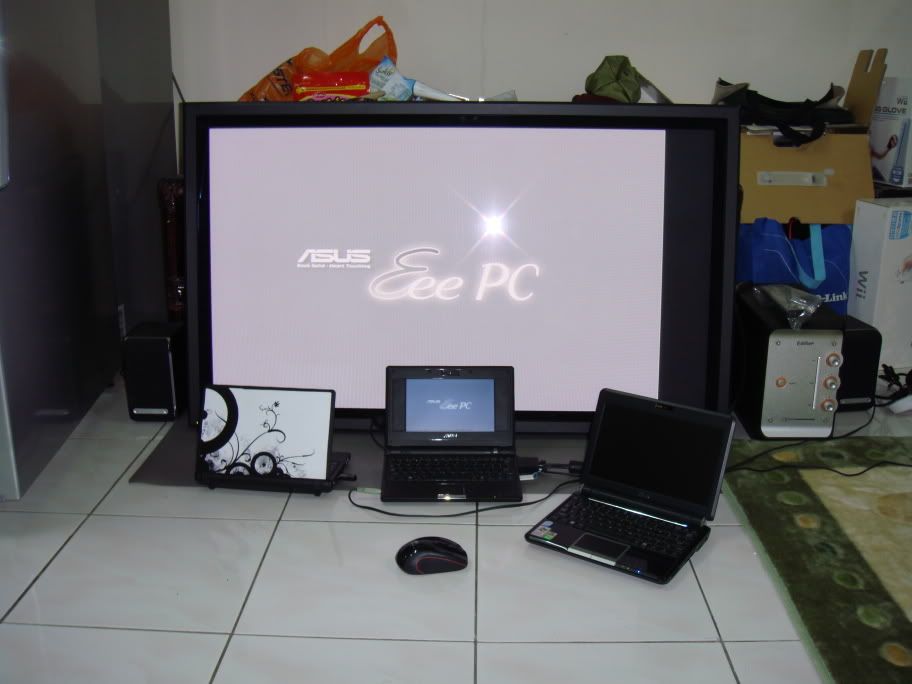
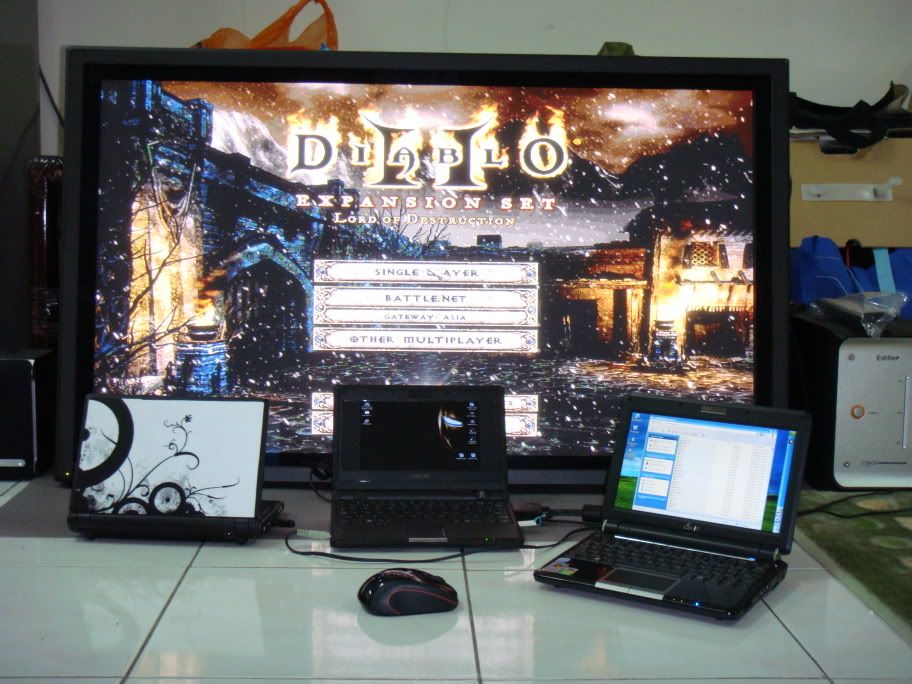
QUOTE(rahuldave @ Dec 20 2008, 06:31 PM) Tks once again for your reply. I have search the DVD, and only found U1 folder to be AiGuru U1 USB Phone For Skype, did u mean Super Hybrid Engine? Hope u can help Sorry mate thats what I originally meant, right yout are  QUOTE(mynewuser @ Dec 21 2008, 10:30 AM) Any idea where this Asus Royal Clud located in northern malaysia region? Im afraid the only official address I seem to find it is only in KL.ASUS Royal Club (Malaysia) Address: G-2IT@SPS, Ground Floor, Wisma SPS, Jalan Imbi, 55100 Kuala Lumpur Tel: 603- 2141 9379 Fax: 603- 2145 8379 QUOTE(phunkydude @ Dec 21 2008, 02:59 PM) @havocx , Aside from the Battery the Celeron 900 actually performs just as well and on par with the Atom, I dont see any speed boosts or slowness as compared to my Atom processors at home.how's the celeron-900 compares with the atom? (aside of consumption on batt.) does the celeron-900 able to handles some surfing on firefox with few tabs & vga out to tv for watching movie, etc etc.? how bout the temp.? is it hotter than atom? Thanks. But that can also perhaps be attributed to my 1000H having HDD, my 901 running twin SSD's though seems to move along the same speed as the Celeron 900. On the 701 running FF3 i can open 11 tabs without any lags whilst the 12 does show a little bit on the sluggish side, running games is not recommended while FF3 is running in background. That said, with Chrome running, i can run Diablo 2 and Word 2003 and having the Internet simultaneously running without any major issues. In fact Im happily doing that now on my machine while typing this. My review about the lowest end EEEPC and what it can do has been posted a few pages back if youd care to see. Now for watching movies and all that, well I have one running downstairs, I thought id just go and take a quick snapshot, since I took the display down to do some carpenting on the wall behind Behold the MIGHTY EEEPC The EEEPC downstairs is connected constantly to my Display, its used to run Diablo 2 ( you can see the wireless mouse there ), so its a 7" running on a 42" hehe, seems to be overkill, but I like it, I have a wireless keyboard connected to it as well, and we use the display as a Photo Wall, basically displaying pictures coming from my HDD connected to it via USB, a Digital Photo Frame if youd like. Though the EEEPC's loud, i connected it to an Edifier and we have a Movie Running on it sometimes, and as you can see, when im bored, I sometimes play Diablo on the 42" as well. Very nice. So yes, my EEEPC is my GPS, Gaming, Movie Watching Internet Surfing portable Photo Display to which I lurve to bits Pictured is my constantly connected EEEPC 701, next to it is my 701 which i carry in my pocket when I go out and next to it is my 901, the rest are upstairs. Dont mind the mess and Emino its in the spoiler now, was editing it earlier » Click to show Spoiler - click again to hide... « QUOTE(rahuldave @ Dec 22 2008, 03:05 PM) The netbook docking station is already available here, I actually bought one for my brother in law, its RM139 for the full fledged version. Didnt think to catch a picture of it though.Personally for me, I dont have the need for it though This post has been edited by havocx: Dec 22 2008, 11:09 PM |
|
|
Dec 22 2008, 11:05 PM
|
|
Senior Member
5,967 posts Joined: Oct 2004 From: Malaysia... Duh!
|
dude, can you put big pictures inside spoiler tag? its kind stretches my browser.
|
|
|
Dec 23 2008, 06:09 AM
|

Senior Member
4,709 posts Joined: Jan 2003
|
havocx,
what is the use of docking?? |
|
|
|
|
|
Dec 23 2008, 07:43 AM
|
|
Senior Member
1,913 posts Joined: Jan 2003 From: Quantum Leaping, Next Location Unknown..
|
QUOTE(Hico @ Dec 23 2008, 06:09 AM) havocx, If you dont already know, a dock in the normal sense of the word for a normal laptop would enable it to expand its ports and have much more connectivity than normal, itll come with, for instance extra VGA or DVI port, more USB ports, an extra LAN, an extra Pararel port in some cases. Usually the come in raised platforms to encourage better ergonomics for users. what is the use of docking?? In my office, we use our office given laptops together with our LCD's making us have extended twin monitors for our work, the ports are also much easier to use. The EEEPC dock however is a little different, well its not really an EEEPC dock, its a dock specifically designed for netbooks, the pros ( and cons ) of it, 1. Its light in design. Plus points there means itll be easier to carry around - Its bigger than the netbook makes it a little cumbersome at times. 2. Expansion ports, you use on USB port to power the dock, and from the dock you have 3 more. You now have a total of 5 USB (3 on dock and remaining 2 on your machine) - The same output is also going to be used by the HDD in the dock ( more on that later ) 3. Has fans running inside, keeps your machine cool. - Works only for certain models because like the 701 and 901, the vents are by the side. 4. Best feature, you can put any size SATA HDD into the slot below of the Dock thereby increasing your total Laptop capabity. - While cool, the HDD also shares the same USB connection that powers up the Dock as well as powering up the other ports, data transfer might not be as good, I can do the same already with an External HDD connected to my machine, plus its more friendly, ie I can use it together with my Desktop and other laptops, the currect dock setup is much more cumbersome. But hey thats just me, a whole lot of folks might actually find they like using the dock |
|
|
Dec 23 2008, 08:32 AM
|
|
Senior Member
4,709 posts Joined: Jan 2003
|
QUOTE(havocx @ Dec 23 2008, 07:43 AM) If you dont already know, a dock in the normal sense of the word for a normal laptop would enable it to expand its ports and have much more connectivity than normal, itll come with, for instance extra VGA or DVI port, more USB ports, an extra LAN, an extra Pararel port in some cases. Usually the come in raised platforms to encourage better ergonomics for users. In my office, we use our office given laptops together with our LCD's making us have extended twin monitors for our work, the ports are also much easier to use. The EEEPC dock however is a little different, well its not really an EEEPC dock, its a dock specifically designed for netbooks, the pros ( and cons ) of it, 1. Its light in design. Plus points there means itll be easier to carry around - Its bigger than the netbook makes it a little cumbersome at times. 2. Expansion ports, you use on USB port to power the dock, and from the dock you have 3 more. You now have a total of 5 USB (3 on dock and remaining 2 on your machine) - The same output is also going to be used by the HDD in the dock ( more on that later ) 3. Has fans running inside, keeps your machine cool. - Works only for certain models because like the 701 and 901, the vents are by the side. 4. Best feature, you can put any size SATA HDD into the slot below of the Dock thereby increasing your total Laptop capabity. - While cool, the HDD also shares the same USB connection that powers up the Dock as well as powering up the other ports, data transfer might not be as good, I can do the same already with an External HDD connected to my machine, plus its more friendly, ie I can use it together with my Desktop and other laptops, the currect dock setup is much more cumbersome. But hey thats just me, a whole lot of folks might actually find they like using the dock |
|
|
Dec 23 2008, 08:43 AM
|
|
Senior Member
1,913 posts Joined: Jan 2003 From: Quantum Leaping, Next Location Unknown..
|
QUOTE(Hico @ Dec 23 2008, 08:32 AM) icic..now i understand...it sound kinda useful...but need to carry another docking is a bit troublesome...3usb port should be enuff for my use now... HDD put below docking? got any protection or not or just explore like that? kinda dangerous issnt it? like u say..external HDD is even more useful.. Well its small, for me im okay already with my External HDD which I carry so I dont really find much use for the Docking station and since Im already using a hub with my EEEPC the only thing left is the function of the cooling fan, something I can do without for now. HDD below Docking, here's some pics courtesy of the earlier link. Second pictures show where the HDD will go under the docking station.   This post has been edited by havocx: Dec 23 2008, 08:44 AM |
|
|
Dec 23 2008, 08:45 AM
|
|
Senior Member
4,709 posts Joined: Jan 2003
|
QUOTE(havocx @ Dec 23 2008, 08:43 AM) Well its small, for me im okay already with my External HDD which I carry so I dont really find much use for the Docking station and since Im already using a hub with my EEEPC the only thing left is the function of the cooling fan, something I can do without for now. HDD below Docking, here's some pics courtesy of the earlier link. Second pictures show where the HDD will go under the docking station. |
|
|
Dec 23 2008, 08:52 AM
|
|
Senior Member
1,913 posts Joined: Jan 2003 From: Quantum Leaping, Next Location Unknown..
|
QUOTE(Hico @ Dec 23 2008, 08:45 AM) do u found sometime usb hub do not function when plug in pen drive or memory card reader? but if use with usb mouse or keyboard then it works well...i tried dekstop also the same... Hmm not that I can recall, I have a Logitech and Belkin hub. Perhaps your hub is not giving you enough power to work on it guess. Keyboard and mice usually needs only 3w to run, your basic computer usb 2.0 ports should give it 5w of juice, sometimes though, the needs for readers go up to 5w in which the hub cant power those items up, perhaps you should give powered hubs a try ? The give much more juice than normal hubs. |
|
|
Dec 23 2008, 11:01 AM
|
|
Senior Member
4,709 posts Joined: Jan 2003
|
QUOTE(havocx @ Dec 23 2008, 08:52 AM) Hmm not that I can recall, I have a Logitech and Belkin hub. Perhaps your hub is not giving you enough power to work on it guess. Keyboard and mice usually needs only 3w to run, your basic computer usb 2.0 ports should give it 5w of juice, sometimes though, the needs for readers go up to 5w in which the hub cant power those items up, perhaps you should give powered hubs a try ? The give much more juice than normal hubs. |
|
|
Dec 23 2008, 12:19 PM
|
|
Senior Member
1,241 posts Joined: Nov 2004 From: Georgetown Penang
|
QUOTE(havocx @ Dec 23 2008, 08:43 AM) Well its small, for me im okay already with my External HDD which I carry so I dont really find much use for the Docking station and since Im already using a hub with my EEEPC the only thing left is the function of the cooling fan, something I can do without for now. HDD below Docking, here's some pics courtesy of the earlier link. Second pictures show where the HDD will go under the docking station. Bro, the one which u say u bought for RM 139 that is the full fledged ones, pls advise where can i get it, if possible online? And does the docking comes with DVD Drive? Does the drive supports DVD +/- Dual Layer? If the drive is not included, how can I find it, is it hard to get in Malaysia? Hope u can advise some specs.  |
| Change to: |  0.0339sec 0.0339sec
 0.34 0.34
 6 queries 6 queries
 GZIP Disabled GZIP Disabled
Time is now: 11th December 2025 - 01:12 AM |
 Quote
Quote