Welcome Guest ( Log In | Register )

5 Pages  1 2 3 > » Bottom

Outline · [ Standard ] · Linear+

 [Review] Sunbeamtech Core-Contact Freezer, Tested on Intel and AMD Platform!!!

views
     
TSham_revilo
post Aug 25 2008, 11:32 PM, updated 17y ago

I
*******
Senior Member
6,583 posts

Joined: Feb 2008


==================================================================================================

Content

1. Introduction
2. Box and Bundle
3. Heatsink and Fan
4. Clearance
5. Installation and Guide
6. Xigmatek S1283 Vs Core-Contact Freezer
7. Test Bed
8. Fan Test Result
9. Fanless Test Result
10. Conclusion

1. Introduction

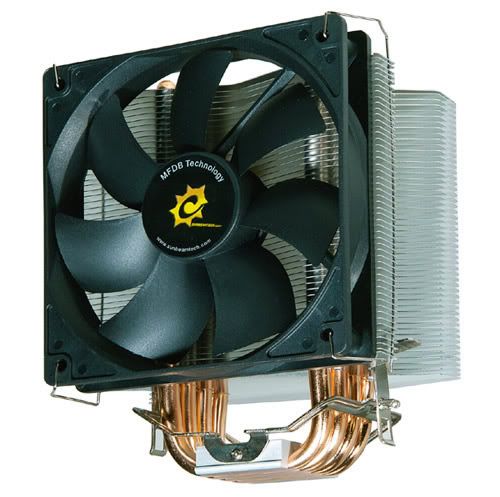
There are many kinds of CPU coolers out there ranging from fancy design, normal conventional, or gigantic cooler but what is most important aspect of a CPU cooler is the technology used by the cooler. The HDT is a recent new technology which can be seen from products like the Xigmatek 1283, Vendetta 2, etc. This technology has no doubt did a very good job on delivering greater and faster dissipation due to increased contact between the heat transport components.

From that, there is one product that uses this kind of technology which is the Sunbeamtech Core-Contact Freezer rclxms.gif . So lets go through this cooler and see how kick as* it can be laugh.gif

Feature
1. Core-Contact Technology
2. TX-2 Thermal Grease Included
3. 4 pcs High Performance 8mm U-shaped Heatpipes
4. Light Weight .(590g without the Fan)
5. Fan Controller Included
6. Easy Installation
7. Bent Fins Design Helps to Cool the Components on the Motherboard
8. Universal Clip Design

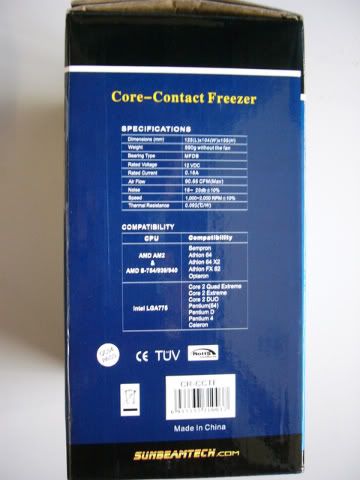
Specification
Dimensions(mm):125(L) × 104(W) × 155(H)
Weight: 590g
Bearing Type: MFDB
Rated Voltage: 12V DC
Rated Current: 0.16A
Air Flow: 90.65 CFM (Max)
Noise:16~20 dBA (+/- 10%)
Speed:1,000~2,000 RPM (+/- 10%)
Life:50,000 hours
Thermal Resistance: 0.092 (C/W)

Compatibility

AMD AM2 & AMD S-754/939/940
-Sempron
-Athlon 64
-Athlon 64 X2
-Athlon FX 62
-Opteron

Intel LGA 775
-Core 2 Quad Extreme
-Core 2 Extreme
-Pentium (64)
-Pentium D
-Pentium 4
-Celeron


Motherboard Compatibility

Motherboard With No Problems
-Abit AN9 32X SLi
-Albatron PXP35
-ASUS P5K-E
-Asus M3A32-MVP Deluxe WiFi
-Asus x48 Rampage Formula
-Asus Striker 2 Extreme
-Biostar P35D2-A7
-Biostar TForce 590 SLi
-DFI DK P35-T2RS
-Foxconn Mars
-Gigabyte P35 DS-3
-Gigabyte GA-MA770-DS3
-Gigabyte EP35-DS3
-Gigabyte EP43-DS3
-Gigabyte EP45 Extreme
-Gigabyte x48-DQ6

Motherboard With Problems
-Asus Formula Maximus 2

Note: for those user who use this cooler please tell me what mobo are u using for me to update the mobo compatibility list. thanks guys


2. Box and Bundle

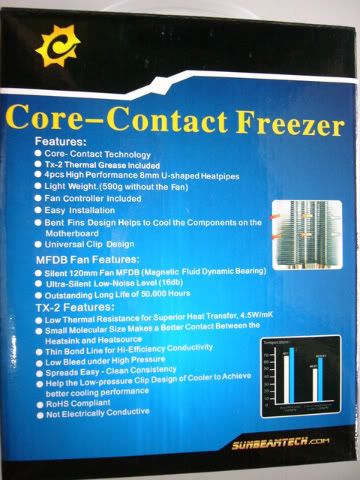
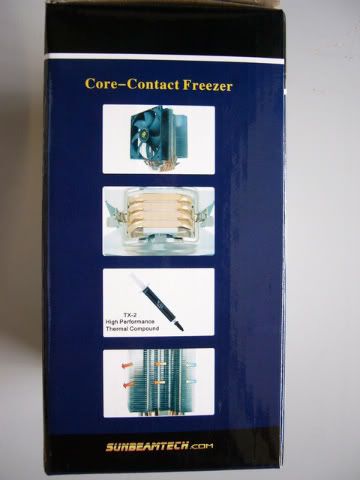
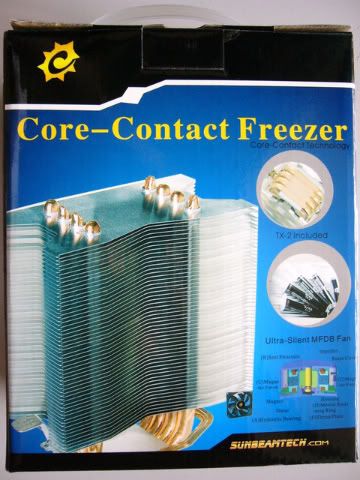
The packaging seems strong and it has an handle for easy carrying. Although the box doesn't look very stylish but on the back of the box has list all the feature of the cooler including the MFDB fan, the heat sink and of course the TX-2 which they provide. Specification of the cooler s then listed on the side along with the compatibility list.

Front and Back
user posted image user posted image

Side

user posted image user posted image

Inside the box

user posted image
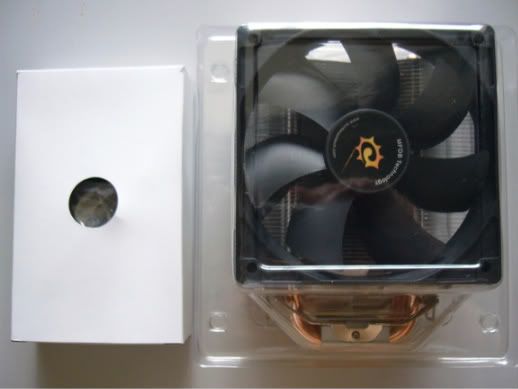
Inside the box, you will see two package which is the accessories box (White) and the heatsink which i think is well protected. So posting your CCF would be very safe laugh.gif .

user posted image

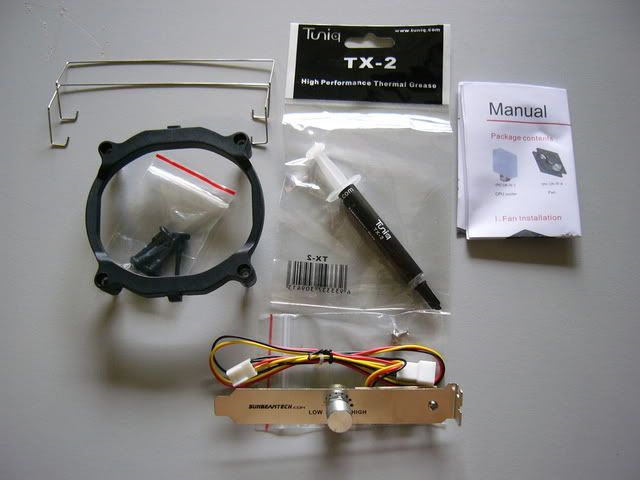
Accessories Includes:
1. Push-pin Bracket
2. Tuniq TX-2
3. Fan Clip
4. Fan Controller
5. Manual

For those who lost the manual, you may refer to the below link:
http://www.sunbeamtech.com/PRODUCTS/cooler...l-2008-05-8.jpg

This post has been edited by ham_revilo: Sep 2 2008, 02:30 PM
TSham_revilo
post Aug 25 2008, 11:32 PM

I
*******
Senior Member
6,583 posts

Joined: Feb 2008


3. Heat sink and Fan

user posted image user posted image

user posted image user posted image
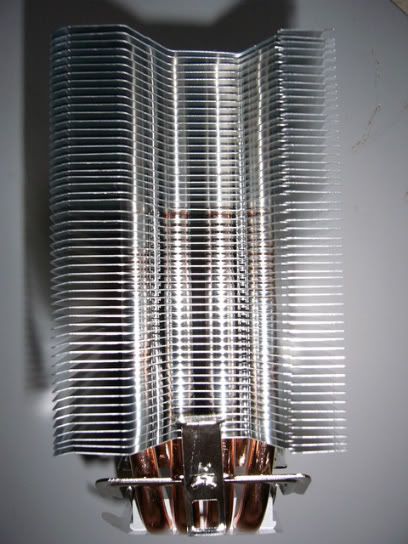
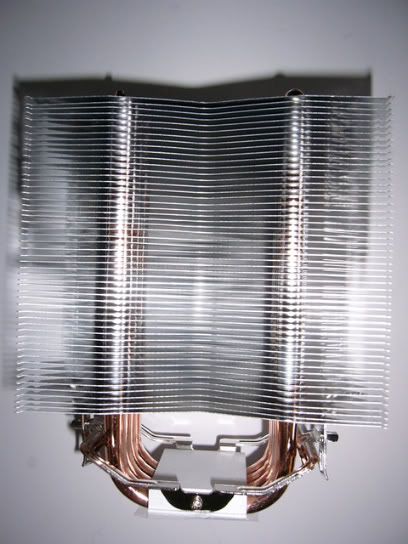
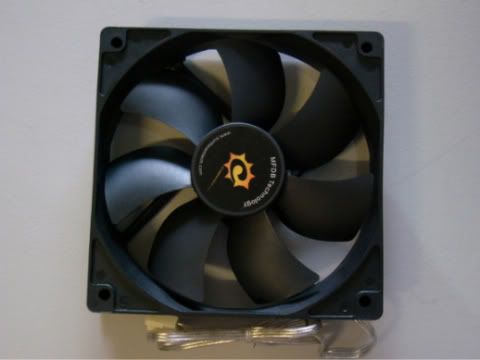
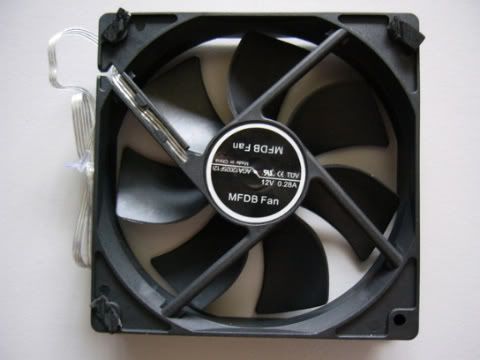
The Magnetic Fluid Dynamic Bearing fan is just amazing. although is look like a cheap fan but it pushes around 90cfm and i personally tested the full blast from the fan which is 2000rpm and the result was just marvelous. There is also the fan controller which is think its useful for silent setup. the speed at 2000rpm produce quite a loud noise but if the speed is reduce to 1200rpm which is lowest using the controller, you wont even notice that the fan is moving laugh.gif


Heatsink Base

user posted image
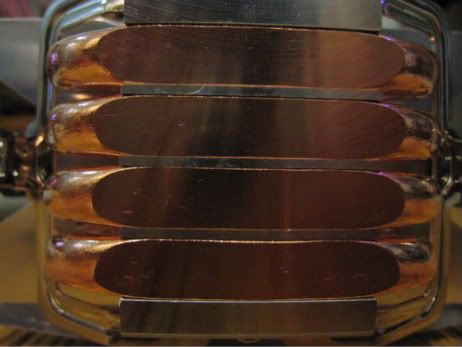
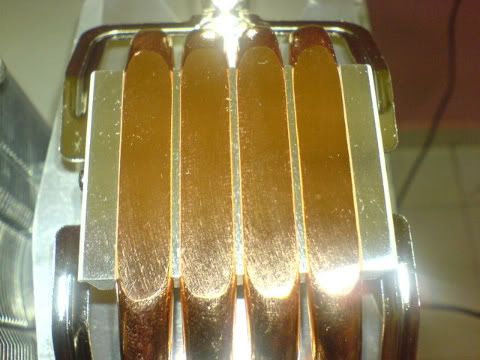
As for the base, it uses HDT technology where the pipe touch processor directly for faster heat transfer from the processor to the fins. What i think make this cooler different from other HDT cooler is that the base of the heatsink is very smooth as though it has mirror finish and it is very flat (No bumps due to the gap between pipes).

user posted image
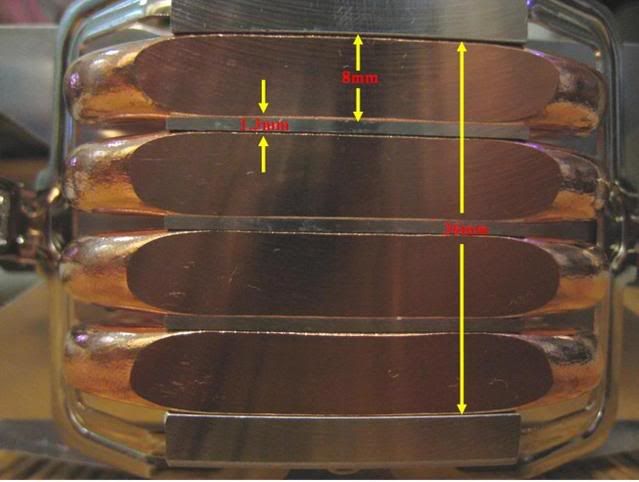
Each pipe has a 8mm diameter the base length is 36mm long like it is shown on the picture above.


Contact Area of the Heatsink Base and Processor

user posted image
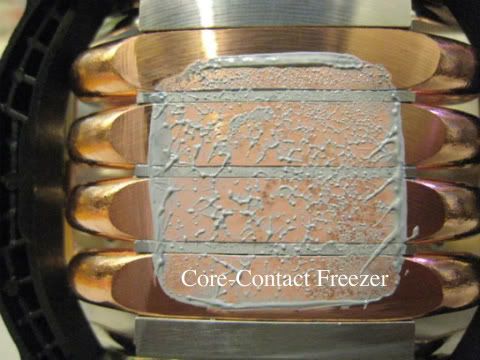
This shows that the contact area of the processor with the base of the CCF. Basically it uses only 3 1/2 of the pipes. Hence, AMD user will certainly gain more advantages of this cooler because AMD processor is a larger than intel processor.


4. Clearance

user posted image
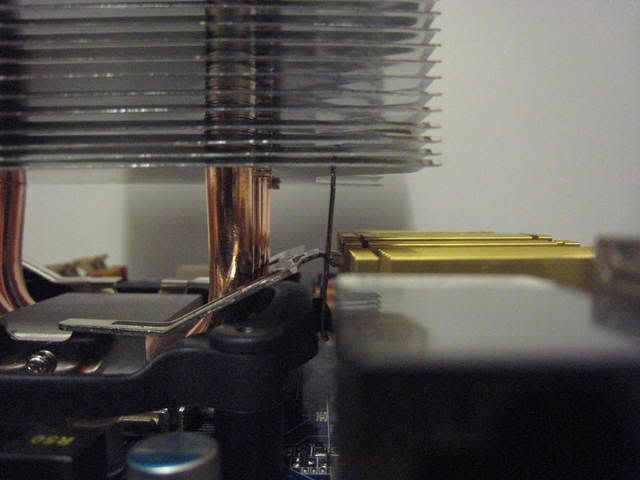
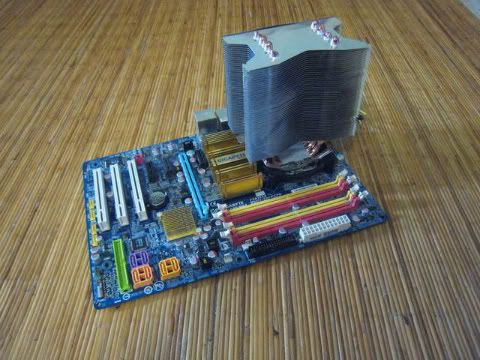
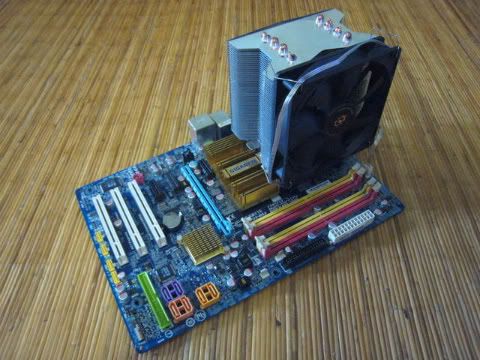
As you can see that the clearance between the north bridge and heat sink. It's only approximately 10mm gap between the heat sink and the north bridge of my Gigabyte P35 DS3 but of course this will differ from other motherboard depending on the height of the north bridge.


user posted image
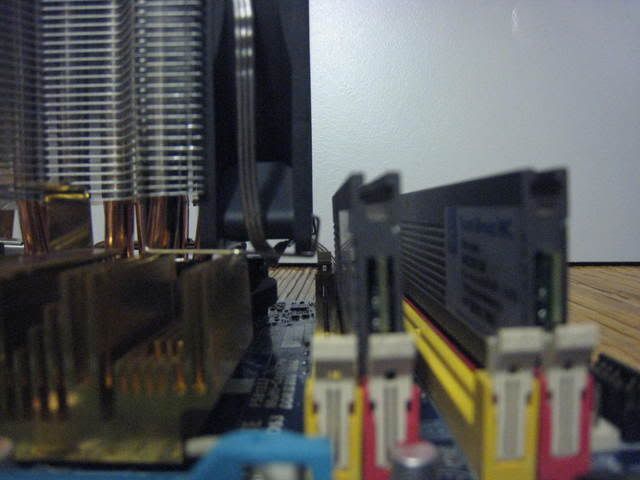
For RAM clearance, it's different from the NB as it clashes with my Ram if i were to put my ram on the other slot (Yellow slot). This is due to P35 DS3 motherboard because their Ram slots are rather closer to the processors.

user posted image
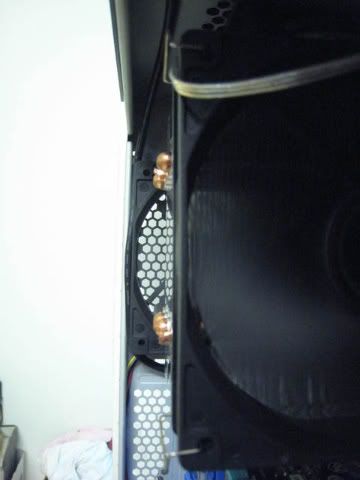
This is the clearance of the CCF and CM690 casing. It seems to be quite a gap there and this cooler should be no problem for most ATX casing.

This post has been edited by ham_revilo: Aug 27 2008, 08:13 PM
TSham_revilo
post Aug 25 2008, 11:33 PM

I
*******
Senior Member
6,583 posts

Joined: Feb 2008


5. Installation and Guide

user posted image
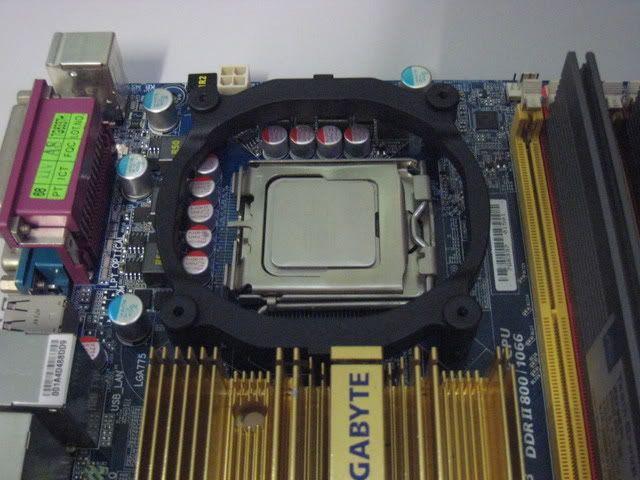
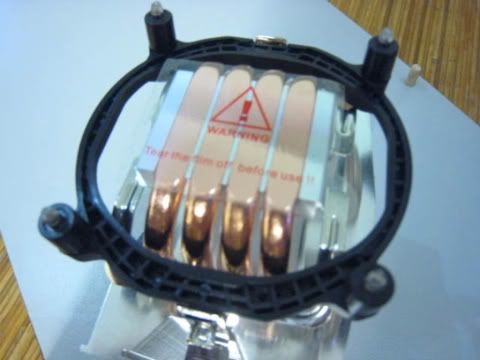
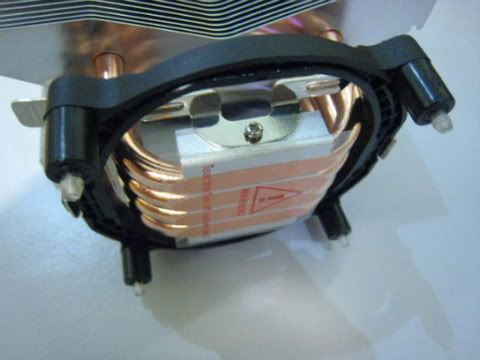
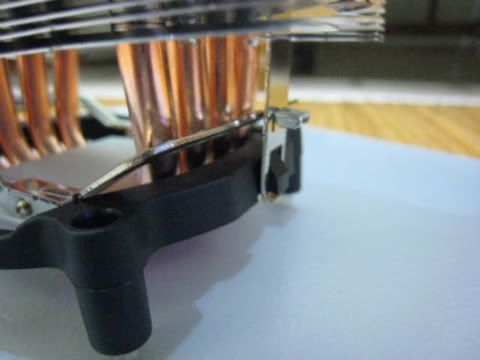
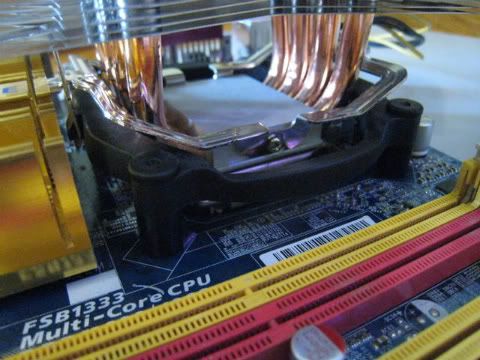
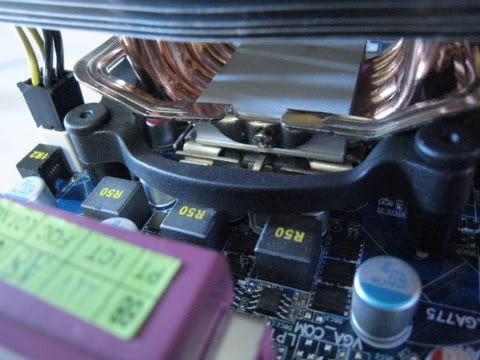
according to the manual, the bracket should be inserted into the motherboard first but i find it hard to hook the heatsink onto the bracket, so for me, i hook the bracket into the heatsink first then only push it into the motherboard using push-pin.

This is how i did it:

user posted image user posted image

user posted image user posted image

user posted image user posted image

user posted image


I firstly put hook the bracket on first on the heatsink, then after applying the TIM, i use the push pins to hold the bracket onto the motherboard. To do that, a lil force is needed to push the heatsink down to the motherboard. So far its still not too hard to install, just a lil force is need. maybe this is to ensure tightness as it will improve contact between the base and the processor. after ensuring the bracket and heatsink is well inserted, the fan is mounted to the heatsink and everything will go back into the casing.

Installation would be easier if it can be mounted without removing the motherboard. For me, i prefer removing motherboard due to lack of space in the casing. All and all installation was quite smooth and easy. i wont considerate it very hard to be mounted but it wasnt too easy too.

This post has been edited by ham_revilo: Feb 18 2009, 02:49 PM
TSham_revilo
post Aug 25 2008, 11:34 PM

I
*******
Senior Member
6,583 posts

Joined: Feb 2008


Xigmatek S1283 Vs Core-Contact Freezer

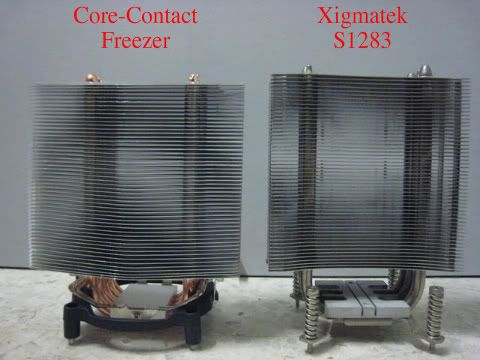
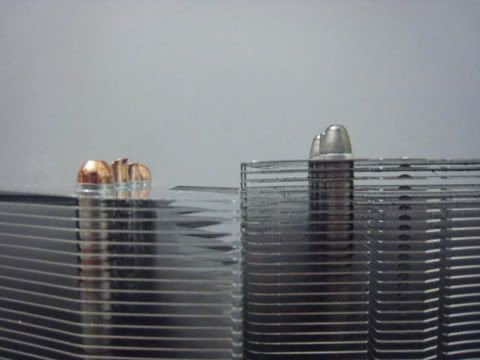
Height With SSkit and Bracket

user posted image user posted image
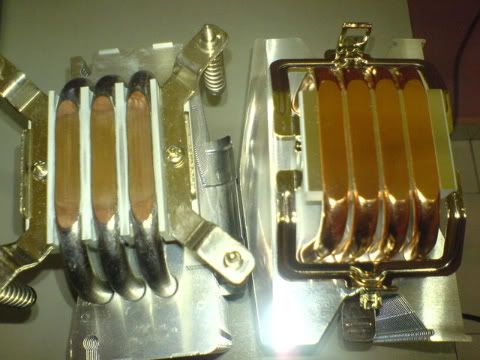
If you look at both the height of the S1283 and CCF, it look almost the same height. but look closer, the xigmatek is a little taller than the CCF. This may help for those user who has smaller casing.


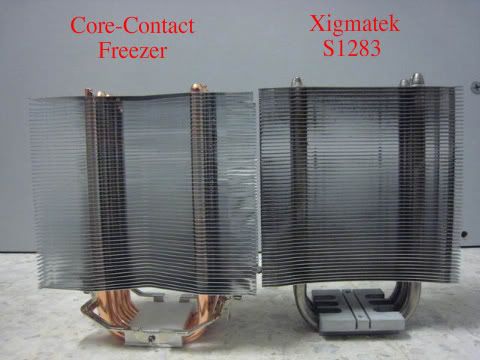
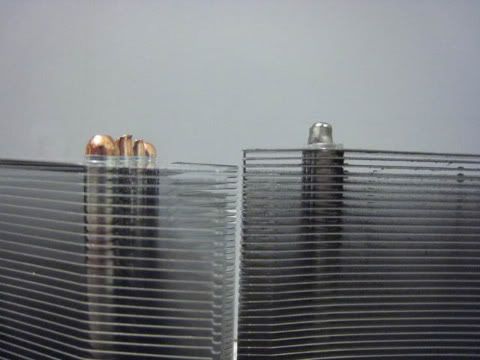
Height WithoutSSkit and Bracket

user posted image user posted image
Even the bracket of the CCF and the sskit of the Xigamtek is removed, still the xigmatek is taller. According to my measurements its difference is approximately, 5-8mm.

Heatsink Base

user posted image user posted image
pics thanks to bro tkh_1001 notworthy.gif

Contact Area

user posted image user posted image
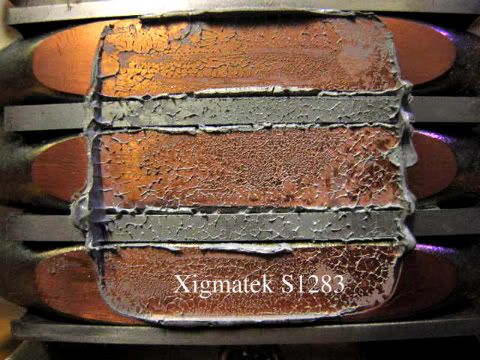
From the picture, this prove that the CCF is more flat compare to Xigmatek as there is no gap line between the pipe on the thermal paste. Take note that this Xigmatek was lapped and its consider very flat but still i think that the CCF is flatter than it. So i think there is no need to lap this cooler. Besides that, Intel contact area is smaller. Anyway AMD test will be done soon. So lets see how AMD gain the advantages of the 4 pipes

Width of Heatsink

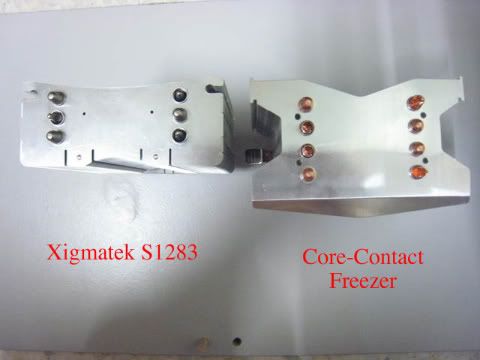
user posted image


Test Bed

Software

1. Windows Vista Ultimate SP1
2. Core Temp (Link)
3. Intel Burn Test (Link)
4. CPU-Z (Link)
5. Everest Ultimate

Note: Why IBT (Intel Burn Test)? Click on the link for more infomation:
http://forum.lowyat.net/topic/766472

Hardware

Processor : Intel E6550
Motherboard : Gigabyte P35-DS3
Memory : Team Xtreem PC-6400
Graphic Card : Gigabyte 8600GT
Power Supply : Cooler Master eXtreme 430watt
Thermal Paste : Tuniq TX-2

This post has been edited by ham_revilo: Feb 18 2009, 02:50 PM
TSham_revilo
post Aug 25 2008, 11:34 PM

I
*******
Senior Member
6,583 posts

Joined: Feb 2008


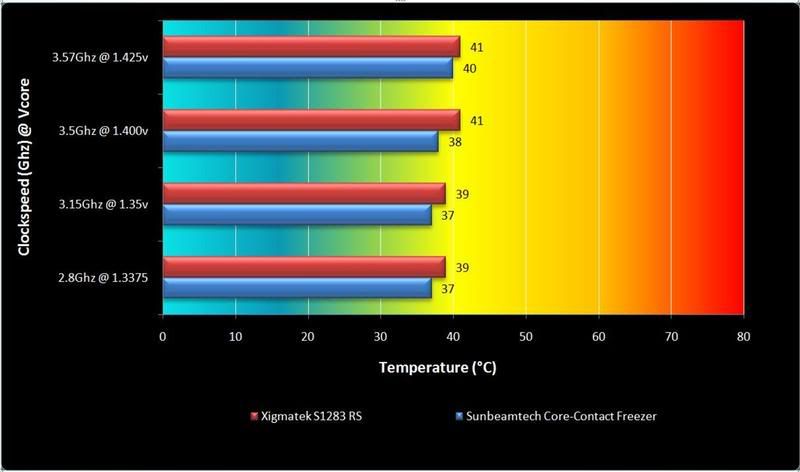
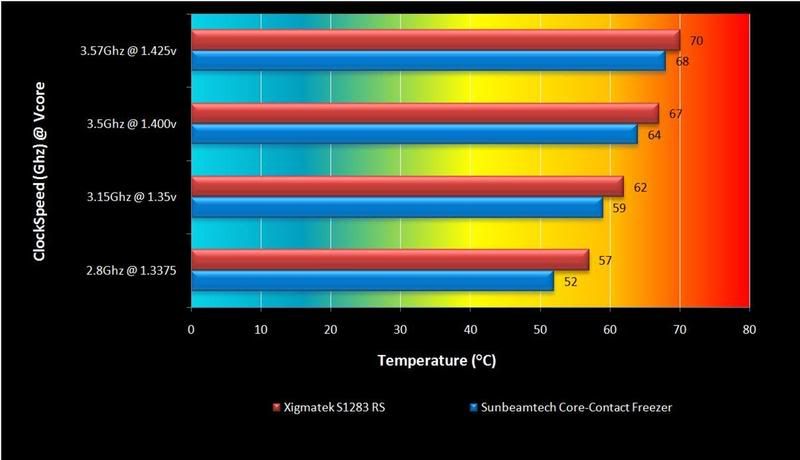
Fan Test Result

Idle
user posted image

On Load
user posted image


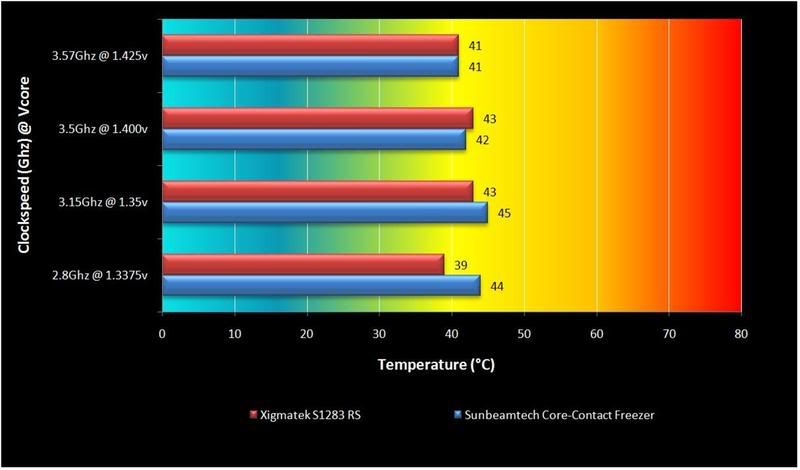
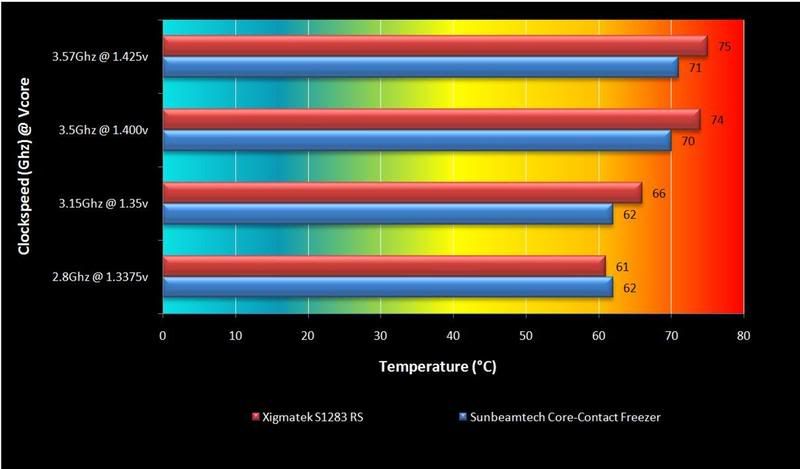
Fanless Test Result

Idle
user posted image

On Load
user posted image


Conclusion
Sunbeamtech has came out with an amazing cooler which is the Core-contact freezer and uses HDT technology. It is an enormous cooler with four 8mm pipes and the base of the cooler is flat and smooth as though it has mirror finish. Besides that, the bundle was just too irresistible. With Tuniq TX-2 (one of the best thermal paste) and a fan controller, that made the CCF even better. For the fan, it spins at 2000rpm producing an amazing 90cfm++ with only at around 30dbA++ noise. It may be a little loud during full blast at 2000rpm but with a fan controller, that wont be an issue anymore. Besides that installation of the fan was made easier with the fan clip.

Although the CCF is much larger than the Xigmatek S1283, but that doesnt matter when is comes to the performance of the CCF compare to the S1283. From the Result the Core-Contact Freezer beat the Xigmatek S1283 at both test. During the fanless test, on idle the CCF lost by a few degree Celsius but it came back to the race and pawned the Xigmatek S1283 on load. From what i tested and seen, the CCF do perform better on higher temp like the RS does but its better that the RS.

Overall the Sunbeamtech Core-Contact Freezer is one amazing CPU cooler. With 4 pipes, it can be use for Intel processor and AMD user will gain more benefit from it. To me, this is the best CPU cooler for the time being. thumbup.gif

Pros smile.gif
-Good bundle (TX-2 and fan controller)
-Quiet fan during low rpm
-High airflow (cfm) during high rpm
-Great performance and value
-Easy installation and replacement fan


Cons sad.gif
-Uses bracket (no spring and screw kit)
-Loud noise during high rpm
-Fiddly installation


Lastly, i would like to thank vincentlaw for his wonderful review layout which i use as a guide notworthy.gif

This post has been edited by ham_revilo: Aug 30 2008, 03:05 PM
TSham_revilo
post Aug 25 2008, 11:35 PM

I
*******
Senior Member
6,583 posts

Joined: Feb 2008


-Reserved for future-

This post has been edited by ham_revilo: Aug 30 2008, 02:54 PM
TSham_revilo
post Aug 25 2008, 11:36 PM

I
*******
Senior Member
6,583 posts

Joined: Feb 2008


-reserved for future-

This post has been edited by ham_revilo: Aug 30 2008, 02:55 PM
TSham_revilo
post Aug 25 2008, 11:36 PM

I
*******
Senior Member
6,583 posts

Joined: Feb 2008


-reserved for future-

This post has been edited by ham_revilo: Aug 30 2008, 02:55 PM
TSham_revilo
post Aug 26 2008, 11:05 PM

I
*******
Senior Member
6,583 posts

Joined: Feb 2008


all got poison by him laugh.gif
TSham_revilo
post Aug 26 2008, 11:34 PM

I
*******
Senior Member
6,583 posts

Joined: Feb 2008


so i guess you are using asus ROG Rampage Mobo? then i'll include it in my list thumbup.gif

anyway i think the capacitor and mosfet will be a problem during installation. luckily for me there is no problem during installation but i dislike using the bracket. its much easier using sskit. but so far there is only 1 mobo that cannot support the bracket which is asus maximus 2...

This post has been edited by ham_revilo: Aug 26 2008, 11:39 PM
TSham_revilo
post Aug 27 2008, 04:39 PM

I
*******
Senior Member
6,583 posts

Joined: Feb 2008


QUOTE(D-Zire @ Aug 27 2008, 09:57 AM)
i was waiting for someone to comment on whether this heatsink will fit nicely into a gigabyte p35 board...thanks for the info...but one question, is it necessary to take out the board to install the heatsink? its quite leceh to take it out as u have to unplug all the power cables, sata, ide, gc card, unscrew mobo....zzz
*
to be honest its easier to take your mobo to install the cooler. that is what i did and i think it will be difficult if you were to install it with the mobo in the casing. but at last you will feel it satify because the performance is surely to be good thumbup.gif

QUOTE(redscott @ Aug 27 2008, 01:36 PM)
Why post another core contact freezer review while there is another same review thread by kaiser_falco?  rclxub.gif Anyway, below is my comment quote from kaiser_falco thread :
» Click to show Spoiler - click again to hide... «


My pc is in a non air conditioned room, so usually the room is very warm. But this cpu heatsink can keep my cpu temp to run at 35-36c. Another great thing is after I improved my case air ventilation, the temperature drop down to 33c-34c. Nice CPU heatsink!  thumbup.gif
*
i wanted to do more detail review on this cooler. hope you dont mind bro smile.gif

anyway mind telling me what mobo are you using?
TSham_revilo
post Aug 27 2008, 05:40 PM

I
*******
Senior Member
6,583 posts

Joined: Feb 2008


QUOTE(hilmiangah @ Aug 27 2008, 05:22 PM)
bro when can u finished this review????
cant wait anymore for the result.....
*
hopefully by tonight coz im still waiting for a xigmatek S1283 bacause mine was already lap.

anyway thanks for waiting bro icon_rolleyes.gif
TSham_revilo
post Aug 28 2008, 12:33 PM

I
*******
Senior Member
6,583 posts

Joined: Feb 2008


QUOTE(D-Zire @ Aug 28 2008, 10:12 AM)
yea thanks for the explanations goldfries...that said, giving much thought i guess i would have to take out the board to install this heatsink if i were to change it from tuniq tower 120 which i'm currently using....so based on ur experience, is it worth upgrading? coz when i run my proc at 4ghz max load temp alredi hitting 70...a bit worried....
*
imo i think the temp difference wont be much. from the sunbeam website, the tuniq 120 lost by 3-6c. but if you wanna give HDT a try then i think its worth it. for me, i think the bundle and performance is worth the price thumbup.gif
TSham_revilo
post Aug 30 2008, 03:53 AM

I
*******
Senior Member
6,583 posts

Joined: Feb 2008


result are out bros... sorry for the late result notworthy.gif
TSham_revilo
post Aug 30 2008, 11:51 AM

I
*******
Senior Member
6,583 posts

Joined: Feb 2008


yeah... its better than xigma.. hopefully all result will be out by todday.. brows.gif
TSham_revilo
post Aug 30 2008, 03:08 PM

I
*******
Senior Member
6,583 posts

Joined: Feb 2008


QUOTE(goldfries @ Aug 30 2008, 12:12 PM)
cheh i thought start the thread because got all results already.
*
sorry bro for the lateness blush.gif

QUOTE(tkh_1001 @ Aug 30 2008, 02:11 PM)
ok.....results for intel quad core is out already...
sorry to have kept u guys waiting too long notworthy.gif notworthy.gif

pls let me know via PM if there is any noobness of mine notworthy.gif
*
yeah rclxm9.gif finally its out...

so now its only AMD result brows.gif
TSham_revilo
post Aug 30 2008, 07:19 PM

I
*******
Senior Member
6,583 posts

Joined: Feb 2008


QUOTE(fesick @ Aug 30 2008, 06:49 PM)
heard that this cooler have problem fit in cm690+biostar 1p45?
*
really??

i look at the mobo i think still have clearance for mounting it lo... but im not too sure too as i dont own that board sad.gif
anyway is it comfirm what you heard is true??
TSham_revilo
post Aug 30 2008, 07:32 PM

I
*******
Senior Member
6,583 posts

Joined: Feb 2008


QUOTE(emy_xvidia @ Aug 30 2008, 06:05 PM)
nice cooler but damn big.. afraid buying then cant be mounted onto my MB later..  sweat.gif
*
erm... may i ask what mobo.. coz so far most of the mobo have no problem with this cooler.. its just that the direction of mounting the heatsink only...

QUOTE(hilmiangah @ Aug 30 2008, 06:34 PM)
finally a result.
the result is good but too bad i already ordered hyper 212...
*
maybe after u tried using hyper 212 then you might wanna considerate this cooler laugh.gif laugh.gif laugh.gif

QUOTE(OC4/3 @ Aug 30 2008, 06:54 PM)
Here is a graph on vcore to temp scaling of Core Contact Freezer vs HDT1283 rclxms.gif
On E6550 Dual Core,HDT1283 scale better while it is opposite on Q9450 icon_rolleyes.gif
*
thanks for that bro notworthy.gif

This post has been edited by ham_revilo: Aug 30 2008, 07:36 PM
TSham_revilo
post Aug 30 2008, 08:29 PM

I
*******
Senior Member
6,583 posts

Joined: Feb 2008


QUOTE(alive88 @ Aug 30 2008, 08:19 PM)
AMD result uploaded.
*
yeah.. finally rclxm9.gif

thanks alot bro alive88.... appreciate your effort on this review notworthy.gif
TSham_revilo
post Aug 31 2008, 02:55 AM

I
*******
Senior Member
6,583 posts

Joined: Feb 2008


QUOTE(xpresside @ Aug 30 2008, 11:22 PM)
im not getting good results with this cooler ><
*
mind telling us more detail? i mean your spec and how you install it and stuff... i hope i can help you bro...

coz this cooler has been review from other sites and mostly they get good result...

5 Pages  1 2 3 > » Top
 

Change to:
| Lo-Fi Version
0.0292sec    0.37    7 queries    GZIP Disabled
Time is now: 4th December 2025 - 05:41 PM