

QUOTE(sniper69 @ Dec 11 2008, 01:33 AM)
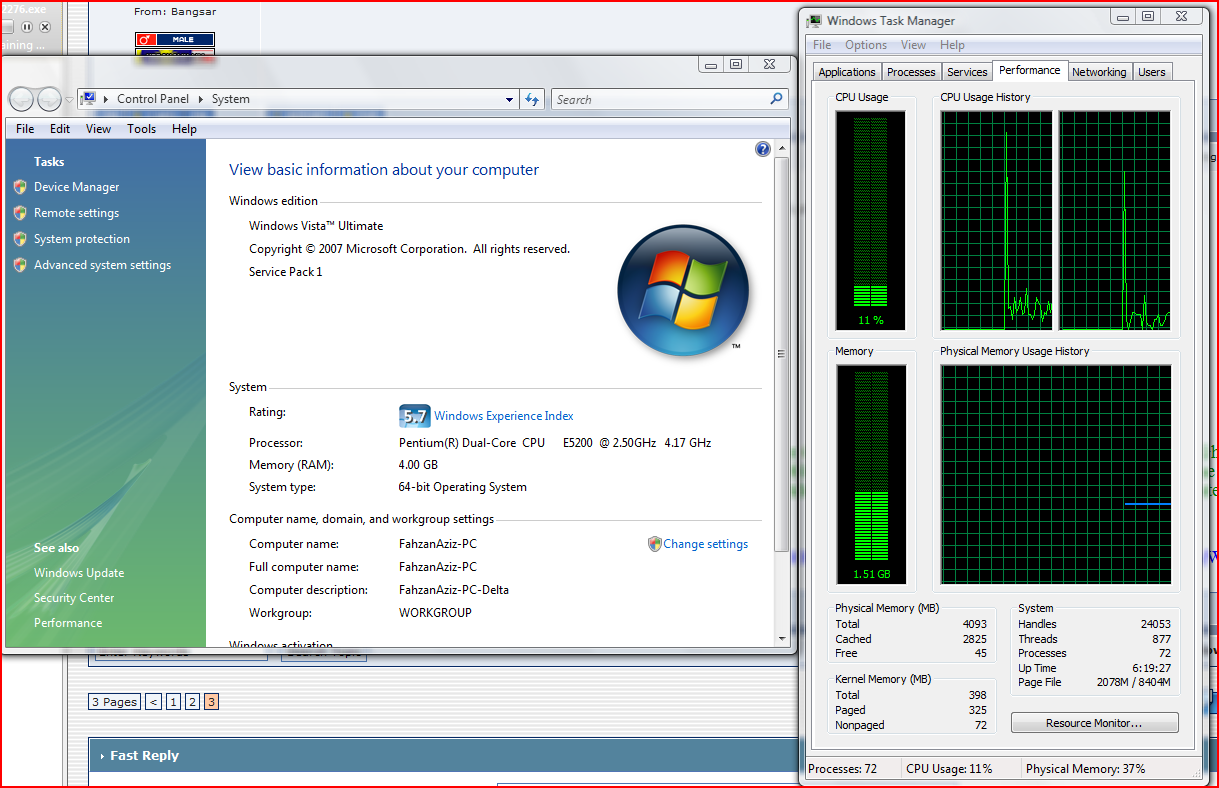
4GB on "Windows Properties" isn't same as in "Task Manager" 

why i see same amount? 4.00gb and total:4000+?? lolz» Click to show Spoiler - click again to hide... «
The 3GB-not-4GB RAM problem
|
|
 Mar 12 2009, 05:14 PM Mar 12 2009, 05:14 PM
|
 
Senior Member
2,654 posts Joined: Dec 2007   
|
QUOTE(sniper69 @ Dec 11 2008, 01:33 AM) 4GB on "Windows Properties" isn't same as in "Task Manager" why i see same amount? 4.00gb and total:4000+?? lolz» Click to show Spoiler - click again to hide... « |
|
|
|
|
|
Mar 12 2009, 10:25 PM
|
 
Moderator
9,275 posts Joined: Jan 2005 From: KL. Best place in Malaysia. Nuff said 
|
because he is using a 64bit system you dum dum
|
|
|
Mar 17 2009, 10:35 AM
|

Senior Member
8,621 posts Joined: Nov 2004
|
Licensed Memory(4GB) in Windows Vista?
 http://www.geoffchappell.com/notes/windows...ense/memory.htm anyone of u got VB to try out? http://benyouhui.it168.com/thread-923593-1-1.html http://www.mobile01.com/topicdetail.php?f=235&t=977163&p=1 |
|
|
Mar 17 2009, 06:49 PM
|
|
Moderator
9,275 posts Joined: Jan 2005 From: KL. Best place in Malaysia. Nuff said
|
I've heard of it during the MS developer's forum. The problem here is
- Whatever people say, softwares does have a hard time writing data to the space above 3.5GB, especially drivers - Graphic Memory will ALWAYS be allocated starting from the last 4GB of the allocated space, thus more often that not, remapping the memory won't really do a thing. |
|
|
Mar 24 2009, 12:55 PM
|

Senior Member
901 posts Joined: Jan 2003 From: Promised Land 
|
i also have this question lingering in my mind for a long time. i understand the engineering behind.
my question is now, is it a waste to buy a memory more than 2 GB? well, let say we have a graphic card with 1Gb of memory (and probably SLI or CF = 2GB). |
|
|
Mar 25 2009, 12:16 AM
|

Senior Member
6,738 posts Joined: Dec 2006 From: Kuala Lumpur, Malaysia | Eau Claire, Wisconsin
|
QUOTE(Ryeeson @ Mar 24 2009, 12:55 PM) i also have this question lingering in my mind for a long time. i understand the engineering behind. Graphics card memory (unless integrated) isn't shared. It's dedicated. Therefore, there's a reason to buy 4GB (not 2GB too little) if your gonna use high-end graphics card with 1GB of dedicated graphics card memory.my question is now, is it a waste to buy a memory more than 2 GB? well, let say we have a graphic card with 1Gb of memory (and probably SLI or CF = 2GB). |
|
|
|
|
|
Mar 25 2009, 02:28 PM
|

Senior Member
952 posts Joined: Jun 2005 From: Cyberjaya
|
I m using 32bit vista ultimate. in my computer properties it show 4GB ram. but y i"dxdiag" it only show 3GB? act i m using 4GB 800MHz...
|
|
|
Mar 25 2009, 10:12 PM
|

Senior Member
2,474 posts Joined: Dec 2006
|
Any version of Windows Vista 32bits with SP1 are able to detect 4GB of RAM, but can't fully utilize it. If so, you need Windows Vista 64bits.
|
|
|
Apr 2 2009, 05:51 PM
|
|
Moderator
9,275 posts Joined: Jan 2005 From: KL. Best place in Malaysia. Nuff said
|
QUOTE(TechnoDude94 @ Mar 25 2009, 12:16 AM) Graphics card memory (unless integrated) isn't shared. It's dedicated. Therefore, there's a reason to buy 4GB (not 2GB too little) if your gonna use high-end graphics card with 1GB of dedicated graphics card memory. Not quite bro. While it IS dedicated,the BIOS has to allocate the memory to the board. Thus as I said above, it uses the mapping for memory starting from the 4GB and will go downwards. This is because in the ye olde days, no one would think even a graphic card will have memory of it's own |
|
|
Apr 14 2009, 03:42 PM
|

Junior Member
119 posts Joined: Apr 2009 From: Rawang
|
u can try download ramdisk software...the software can make the extra ram to become hard disk. u can use this hard disk to store temp file. u also can set how many ram to become ram disk. try search ramdisk from google for detail
|
|
|
Apr 24 2009, 06:27 PM
|

Junior Member
288 posts Joined: Nov 2007
|
hello all pro n ppl in here,
when was the window 7 release date?? Is it stil in beta vers now? |
|
|
Apr 27 2009, 09:47 PM
|

Junior Member
7 posts Joined: Feb 2009
|
So basically, MS Vista 32bit utilize the ram usage max up tp 3.5 only? same like XP?
|
|
|
Apr 27 2009, 11:38 PM
|

Senior Member
1,064 posts Joined: Jul 2008 From: Star Stuff
|
QUOTE(Emja @ Apr 27 2009, 09:47 PM) So basically, MS Vista 32bit utilize the ram usage max up tp 3.5 only? same like XP? yea..as long as your OS is 32-bit it can only utilize that much |
|
|
|
|
|
Apr 29 2009, 01:11 AM
|

Junior Member
101 posts Joined: Dec 2008
|
QUOTE(ethanhan @ Apr 24 2009, 06:27 PM) hello all pro n ppl in here, beta version already past november last year.when was the window 7 release date?? Is it stil in beta vers now? it will release end of this year. |
|
|
May 1 2009, 12:49 AM
|

Validating
38 posts Joined: Apr 2009
|
running 4gb in full speed with 64 bit.. XD
|
|
|
May 2 2009, 01:49 AM
|

Junior Member
76 posts Joined: Mar 2009
|
well, for gaming, 3.5GB or 4 GB ram isnt a matter
 |
|
|
May 12 2009, 11:49 PM
|

Senior Member
1,270 posts Joined: Nov 2008 From: Soviet State of Sarawak Status: Exiled
|
But it seems in XP it shows up only as 3.2GB RAM. Ah well, it's more than enough
 |
|
|
May 15 2009, 07:41 PM
|

Junior Member
292 posts Joined: May 2006
|
I've install Vista Ultimate 32-bit SP1 but in my task manager only reads total 3069MB but I've got 4GB of RAM? Why? Have a dedicated 512MB GC. Why can't I utilize it up to 3.5?
|
|
|
May 16 2009, 01:58 PM
|
 
VIP
15,705 posts Joined: Mar 2005 From: Tg. Rambutan
|
I thought my 3 gfx cards will gobble up tons coz each of my gfx is 768mb. Tri SLI means 2gb plus on teh gfx cards alone, but I still get about 3gb usable. OK lar I guess. Luckily still got 3gb or else I have to go 64bit oredi.
This post has been edited by ianho: May 16 2009, 02:00 PM |
|
|
Jul 8 2009, 11:04 PM
|

Senior Member
1,991 posts Joined: Jan 2003 From: Kalamazoo, MI
|
The amount of RAM on your Gfx card has nothing to do with the amount of space allocated for the MMIO. So you can have 10 Gb Gfx card and it's still okie. You can adjust where's the Limit through the BIOS I believe. It can be ranging from 2.75Gb to 3.5Gb. Pending on what you set.
|
| Change to: |  0.0212sec 0.0212sec
 0.27 0.27
 6 queries 6 queries
 GZIP Disabled GZIP Disabled
Time is now: 5th December 2025 - 06:11 AM |
 Quote
Quote