Welcome Guest ( Log In | Register )

10 Pages  1 2 3 > » Bottom

Outline · [ Standard ] · Linear+

 The 3GB-not-4GB RAM problem

views
     
TSfariz
post Aug 11 2008, 09:09 AM, updated 16y ago

Tan Sri F
Group Icon
VIP
16,825 posts

Joined: Jan 2003
From: Siberia
Problem statement:
I just bought a system with 4GB of physical RAM in it. The BIOS posts 4GB, but Windows tells me that I have anywhere from 2.75 - 3.5GB of RAM. Where is the rest of my RAM?

Summary:
If you are running 32-bit Windows, you must live with it. You will not ever see all 4GB of RAM you've paid for.

If you are running 64-bit Windows, you may have to live with it. Depending on your motherboard's chipset, your system may support memory remapping. If so, you will be able to use all 4GB of RAM.

Detailed:
Due to an architectural decision made long ago, if you have 4GB of physical RAM installed, Windows is only able to report a portion of the physical 4GB of RAM (ranges from ~2.75GB to 3.5GB depending on the devices installed, motherboard's chipset & BIOS).

This behavior is due to "memory mapped IO reservations". Those reservations overlay the physical address space and mask out those physical addresses so that they cannot be used for working memory. This is independent of the OS running on the machine.

Significant chunks of address space below 4GB (the highest address accessible via 32-bit) get reserved for use by system hardware:
  • BIOS – including ACPI and legacy video support
  • PCI bus including bridges etc.
  • PCI Express support will reserve at least 256MB, up to 768MB depending on graphics card installed memory
More detail and source: http://blogs.msdn.com/hiltonl/archive/2007...am-problem.aspx

This post has been edited by fariz: Aug 11 2008, 09:10 AM
linkinstreet
post Aug 11 2008, 09:36 AM

Red Bull Addict
Group Icon
Moderator
9,275 posts

Joined: Jan 2005
From: KL. Best place in Malaysia. Nuff said

QUOTE(fariz @ Aug 11 2008, 09:09 AM)
Problem statement:
I just bought a system with 4GB of physical RAM in it. The BIOS posts 4GB, but Windows tells me that I have anywhere from 2.75 - 3.5GB of RAM. Where is the rest of my RAM?

Summary:
If you are running 32-bit Windows, you must live with it. You will not ever see all 4GB of RAM you've paid for.

If you are running 64-bit Windows, you may have to live with it. Depending on your motherboard's chipset, your system may support memory remapping. If so, you will be able to use all 4GB of RAM.

Detailed:
Due to an architectural decision made long ago, if you have 4GB of physical RAM installed, Windows is only able to report a portion of the physical 4GB of RAM (ranges from ~2.75GB to 3.5GB depending on the devices installed, motherboard's chipset & BIOS).

This behavior is due to "memory mapped IO reservations". Those reservations overlay the physical address space and mask out those physical addresses so that they cannot be used for working memory. This is independent of the OS running on the machine.

Significant chunks of address space below 4GB (the highest address accessible via 32-bit) get reserved for use by system hardware:

  • BIOS – including ACPI and legacy video support
  • PCI bus including bridges etc.
  • PCI Express support will reserve at least 256MB, up to 768MB depending on graphics card installed memory
More detail and source: http://blogs.msdn.com/hiltonl/archive/2007...am-problem.aspx
*

From reports I've read, this is the same as the amount of RAM that the Graphic card has, thus if the Graphic card you are using is an SLi'ed one, with each using 1GB of RAM, be prepared to lose 2GB from the memory addressing space that windows allocated

TSfariz
post Aug 11 2008, 09:42 AM

Tan Sri F
Group Icon
VIP
16,825 posts

Joined: Jan 2003
From: Siberia
QUOTE(linkinstreet @ Aug 11 2008, 09:36 AM)
From reports I've read, this is the same as the amount of RAM that the Graphic card has, thus if the Graphic card you are using is an SLi'ed one, with each using 1GB of RAM, be prepared to lose 2GB from the memory addressing space that windows allocated
*
I'm not sure about that.. but feel free to share more on this subject
da3shou3
post Aug 11 2008, 09:45 AM

<Your New Dark Lord>
******
Senior Member
1,591 posts

Joined: Jan 2003


Good work. Finally a properly documented thread after so many questions and posts about this.

linkinstreet: Slight more than that. Haven't you read the MMIO part? So it's actually at least 2GB you'll be losing, says if you have GC with 2GB memory on it. Not just 2GB. wink.gif
ronaldjoe
post Aug 11 2008, 09:51 AM

Look at all my stars!!
*******
Senior Member
3,569 posts

Joined: Apr 2007
QUOTE(linkinstreet @ Aug 11 2008, 09:36 AM)
From reports I've read, this is the same as the amount of RAM that the Graphic card has, thus if the Graphic card you are using is an SLi'ed one, with each using 1GB of RAM, be prepared to lose 2GB from the memory addressing space that windows allocated
*
Would I have this issue in Vista x64 if I upgrade >4Gb?
da3shou3
post Aug 11 2008, 10:21 AM

<Your New Dark Lord>
******
Senior Member
1,591 posts

Joined: Jan 2003


QUOTE
For Windows Vista to use all 4 GB of memory on a computer that has 4 GB of memory installed, the computer must meet the following requirements:
• The chipset must support at least 8 GB of address space. Chipsets that have this capability include the following:
• Intel 975X
• Intel P965
• Intel 955X on Socket 775
• Chipsets that support AMD processors that use socket F, socket 940, socket 939, or socket AM2. These chipsets include any AMD socket and CPU combination in which the memory controller resides in the CPU.
• The CPU must support the x64 instruction set. The AMD64 CPU and the Intel EM64T CPU support this instruction set.
• The BIOS must support the memory remapping feature. The memory remapping feature allows for the segment of system memory that was previously overwritten by the Peripheral Component Interconnect (PCI) configuration space to be remapped above the 4 GB address line. This feature must be enabled in the BIOS configuration utility on the computer. View your computer product documentation for instructions that explain how to enable this feature. Many consumer-oriented computers may not support the memory remapping feature. No standard terminology is used in documentation or in BIOS configuration utilities for this feature. Therefore, you may have to read the descriptions of the various BIOS configuration settings that are available to determine whether any of the settings enable the memory remapping feature.
• An x64 (64-bit) version of Windows Vista must be used.
Contact the computer vendor to determine whether your computer meets these requirements.

Note When the physical RAM that is installed on a computer equals the address space that is supported by the chipset, the total system memory that is available to the operating system is always less than the physical RAM that is installed. For example, consider a computer that has an Intel 975X chipset that supports 8 GB of address space. If you install 8 GB of RAM, the system memory that is available to the operating system will be reduced by the PCI configuration requirements. In this scenario, PCI configuration requirements reduce the memory that is available to the operating system by an amount that is between approximately 200 MB and approximately 1 GB. The reduction depends on the configuration.


Source: http://support.microsoft.com/kb/929605

Does this answer your question?
linkinstreet
post Aug 11 2008, 12:04 PM

Red Bull Addict
Group Icon
Moderator
9,275 posts

Joined: Jan 2005
From: KL. Best place in Malaysia. Nuff said

QUOTE(da3shou3 @ Aug 11 2008, 09:45 AM)
Good work. Finally a properly documented thread after so many questions and posts about this.

linkinstreet: Slight more than that. Haven't you read the MMIO part? So it's actually at least 2GB you'll be losing, says if you have GC with 2GB memory on it. Not just 2GB. wink.gif
*

yeah, I was just pointing out the "up to 768MB depending on graphics card installed memory" part. Thanx anyways

akagidemon
post Aug 12 2008, 11:40 AM

Casual
***
Junior Member
453 posts

Joined: Nov 2007
From: Between Reality and Fantasy


do you mean that if we installed 4GB of Ram Vista will only recognize 3.5GB only. i had that problem too then i upgraded to sp1, vista sees my ram as 4GB.

user posted image
Snuffykl
post Aug 12 2008, 12:58 PM

**emolified**
*****
Senior Member
835 posts

Joined: Oct 2006
From: Malacca


QUOTE(akagidemon @ Aug 12 2008, 11:40 AM)
do you mean that if we installed 4GB of Ram Vista will only recognize 3.5GB only. i had that problem too then i upgraded to sp1, vista sees my ram as 4GB.

user posted image
*
yes even though vista sees 4gb but actually if u are using 32bits it uses only 3 gb like tis. You can c at ur task manager under performance tab . c the total physical memory loaded.
cwcho83
post Aug 12 2008, 06:49 PM

Getting Started
**
Junior Member
82 posts

Joined: Nov 2004


Hrmm.

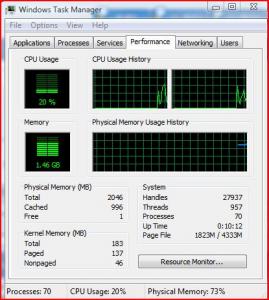
My task manager seems to be reporting some weird available ram readings.

I'm currently have installed 3gb ram in 570sli mobo.

Looks at my screenie below. Is this normal?


Attached thumbnail(s)
Attached Image
akagidemon
post Aug 12 2008, 10:46 PM

Casual
***
Junior Member
453 posts

Joined: Nov 2007
From: Between Reality and Fantasy


QUOTE(cwcho83 @ Aug 12 2008, 06:49 PM)
Hrmm.

My task manager seems to be reporting some weird available ram readings.

I'm currently have installed 3gb ram in 570sli mobo.

Looks at my screenie below. Is this normal?
*
yes i think i'm having the same phenomenon. i've checked with my friends vista ultimate it shows the same characteristic. low free physical memory.
linkinstreet
post Aug 12 2008, 11:33 PM

Red Bull Addict
Group Icon
Moderator
9,275 posts

Joined: Jan 2005
From: KL. Best place in Malaysia. Nuff said

this is because of memory caching. Don't bother, all new OS uses this (Vista, MAC OSX, Unix, etc). It basically optimising unused space on your RAM.
ronaldjoe
post Aug 13 2008, 07:49 PM

Look at all my stars!!
*******
Senior Member
3,569 posts

Joined: Apr 2007
QUOTE(cwcho83 @ Aug 12 2008, 06:49 PM)
Hrmm.

My task manager seems to be reporting some weird available ram readings.

I'm currently have installed 3gb ram in 570sli mobo.

Looks at my screenie below. Is this normal?
*
I have same thing with my setting too.
I am just opening a few FF windows and a BT task...
I only have 325Mb memory left shocking.gif This is not within my expectation sweat.gif
Vista is memory hungry hmm.gif
user posted image

Fariz, noted that...Thanks
QUOTE
If you install 8 GB of RAM, the system memory that is available to the operating system will be reduced by the PCI configuration requirements. In this scenario, PCI configuration requirements reduce the memory that is available to the operating system by an amount that is between approximately 200 MB and approximately 1 GB. The reduction depends on the configuration.


This post has been edited by ronaldjoe: Aug 13 2008, 08:10 PM
TSfariz
post Aug 13 2008, 07:52 PM

Tan Sri F
Group Icon
VIP
16,825 posts

Joined: Jan 2003
From: Siberia
QUOTE(ronaldjoe @ Aug 13 2008, 07:49 PM)
Vista is memory hungry hmm.gif 
*
read the reply above you
linkinstreet
post Aug 13 2008, 08:17 PM

Red Bull Addict
Group Icon
Moderator
9,275 posts

Joined: Jan 2005
From: KL. Best place in Malaysia. Nuff said

Attached Image
Snuffykl
post Aug 14 2008, 02:40 AM

**emolified**
*****
Senior Member
835 posts

Joined: Oct 2006
From: Malacca


jus format and install win vista ultimate 64bits.
Attached Image
astria
post Aug 14 2008, 10:01 PM

an apple a day keeps the doctor away
*********
Senior Member
22,158 posts

Joined: Aug 2008
From: Singapore


user posted image
jaxmarine
post Aug 21 2008, 03:26 PM

Getting Started
**
Junior Member
98 posts

Joined: Apr 2005
From: Bukit Mertajam, Penang


yo guys... i tot i heard a lot about vista 64bits having compatibility issues with programs and even worse, GAMES... it jz happens to crash half-way or doesn't work at all... jz how many of us out there is going to last a full 24-hours without gaming?
astria
post Aug 21 2008, 07:34 PM

an apple a day keeps the doctor away
*********
Senior Member
22,158 posts

Joined: Aug 2008
From: Singapore


QUOTE(jaxmarine @ Aug 21 2008, 03:26 PM)
yo guys... i tot i heard a lot about vista 64bits having compatibility issues with programs and even worse, GAMES... it jz happens to crash half-way or doesn't work at all... jz how many of us out there is going to last a full 24-hours without gaming?
*
no problem for me at all...

games tried:
CnC3: TW and KW
NFS: ProStreet
Crysis
Medal of Honor: Airbourne
R6: Vegas and Vegas2
GRAW
COH (DX10)
World in Conflict
CabalSEA
MapleSEA
Snuffykl
post Aug 22 2008, 08:32 AM

**emolified**
*****
Senior Member
835 posts

Joined: Oct 2006
From: Malacca


QUOTE(jaxmarine @ Aug 21 2008, 03:26 PM)
yo guys... i tot i heard a lot about vista 64bits having compatibility issues with programs and even worse, GAMES... it jz happens to crash half-way or doesn't work at all... jz how many of us out there is going to last a full 24-hours without gaming?
*
that's not true bro. it is stable and fast cuz it fully utilize 4gb ram . for me no problem on my lappy . manage to play Crysis, COD4 ,DMC4 and Assasin Creed.

10 Pages  1 2 3 > » Top
 

Change to:
| Lo-Fi Version
0.0237sec    0.47    6 queries    GZIP Disabled
Time is now: 3rd December 2025 - 02:31 AM