


The 3GB-not-4GB RAM problem
The 3GB-not-4GB RAM problem
|
|
 Jan 14 2010, 11:53 PM Jan 14 2010, 11:53 PM
|
 
Senior Member
2,096 posts Joined: May 2008 
|
Yup..my XP cant fully use it too so planning to upgrade to Windows 7
|
|
|
|
|
|
Jan 23 2010, 04:53 PM
|

Junior Member
85 posts Joined: Feb 2008 From: Klang 
|
Guys, you might want to take look at Geoff Chappell for a different view on the 4GB memory limitation as additional info.
|
|
|
Feb 4 2010, 11:07 AM
|

Senior Member
6,059 posts Joined: Feb 2010 From: Cheras, Kuala Lumpur  
|
With Windows 7 Ultimate 64bit no more Memory limitation issue..
|
|
|
Apr 1 2010, 12:38 AM
|

Junior Member
70 posts Joined: Mar 2010 From: Taman Ria Jaya,Sungai Petani,Kedah Darul Aman.
|
yo dude.. everythings work fine for me.
i play alot of game right now like crysis warhead,left 4 dead 2,COD4,CnC3 : TW and KW,NFS Shift and more..but some online game cant play in 64bit. |
|
|
Apr 15 2010, 10:57 AM
|

Senior Member
1,432 posts Joined: Jul 2007 From: Kuala Lumpur
|
thanks, this thread is very useful
|
|
|
Apr 19 2010, 10:50 PM
|
|
Junior Member
22 posts Joined: Apr 2010
|
Hi, Im new here, I have some problem with my comp, i have install up to 3.5 GB of ram (1 GB X 3 and 512 mb X 1) and my bios system shows only 2559mB of ram, the motherboard that im using it is asua P4P800-X and im using XP-32 bit as my OS, can some one help
 me with it cos i read the manual and it not give much info about it, thanks in advance me with it cos i read the manual and it not give much info about it, thanks in advance |
|
|
|
|
|
May 8 2010, 06:35 PM
|
|
Newbie
2 posts Joined: May 2010
|
There is issue with your bios please reinstall your computer bios in order to get good results or may call your to your technical support they will tell you some better idea.
|
|
|
Jun 1 2010, 11:33 PM
|
|
Junior Member
231 posts Joined: Jun 2005
|
This are all so so wrong guys!!!!! PEA already been around 1995!!!!.. I already write this on other topic, so just quote from there..
QUOTE(MaUi^ @ Jun 1 2010, 11:27 PM) Not really, there is no need to use pure 64 bit os to take advantage of more rams, windows 7 32 bit can optimise more then 4GB ram using PAE technology (http://en.wikipedia.org/wiki/Physical_Address_Extension), PAE are somewhat the same like our 32bit processor that support 64bit code (by extention). Your motherbord/bios need to support PAE and remaping memory address. The other thing you need are the kernel patch to remove 3.xgb ram limit by microsoft, those who are like me that have 4GB ram but windows 7 32bit only see 3.2GB ram usable, can use the patch to fully utilized full 4GB ram, just make sure your motherboard bios detect the correct full 4GB or 8GB of your system ram. This post has been edited by MaUi^: Jun 1 2010, 11:59 PMHere is the patch, its been made my russian and russian language. http://www.filestube.com/a8ac06048c61792003ea/go.html if you cannot download from there just search in google, the file name is 4GB-7600.RTM.x86.04.08.2009.exe When the program open, it just have one button, just click it and after a while it will prompt some black screen to remove the watermark, just press y and it will reboot your windows 7. After that you will have 2 windows boot option and you also can select the old win 7 kernel (just in case), just select the ">128 GB memory" and load your windows 7, check the information page for the ram used. To edit the boot option i recommend program name EasyBCD, you can edit some option of the windows boot manager like default boot option and auto time timer (10 second min). After this some of you might still have a watermark of windows test mode in the right bottom desktop, means mcbuider need to be run again, open cmd in run box then type mcbuilder.exe and enter, this might take a while, after that reboot your system and the watermark will be gone. I tested it out my self with windows 7 ultimate, and its work, I got full 4GB and even try add another 1 stick of 2gb more, so total would be 6gb of rams in windows 7 32bit. Hope I can help you all with this. My windows 7 32-bit with 6GB of RAMS. 
 |
|
|
Jun 27 2010, 09:01 PM
|
|
Senior Member
696 posts Joined: Dec 2009
|
I'm having a serious RAM issue. Win7 64-bit on a laptop, only 1.95 GB usable. What the f***.
|
|
|
Jun 28 2010, 06:57 PM
|

Junior Member
33 posts Joined: May 2010 From: Selangor
|
QUOTE(Fizzy-Fiz @ Jun 27 2010, 09:01 PM) I'm having a serious RAM issue. Win7 64-bit on a laptop, only 1.95 GB usable. What the f***. Total Ram how much? |
|
|
Jul 4 2010, 06:57 AM
|

Senior Member
872 posts Joined: Jun 2007 From: Kuala Lumpur(juz my body,LOl)
|
may be gpu sharing
|
|
|
Aug 10 2010, 09:23 PM
|

Senior Member
973 posts Joined: Jun 2008
|
QUOTE(Snuffykl @ Aug 22 2008, 08:32 AM) that's not true bro. it is stable and fast cuz it fully utilize 4gb ram . for me no problem on my lappy . manage to play Crysis, COD4 ,DMC4 and Assasin Creed. You may not be entirely correct. Whilst Vista 64bit may fully utililize 4GB RAM and be stable in and of itself, the issue here is its interaction with other applications and programs. Most programs are optimized for 32bit windows(if you a software developer you would want to write for the platform with the most users - 32bit operating systems) and that is where the stability issue of 64bit OS is in question. |
|
|
Aug 10 2010, 09:33 PM
|

Senior Member
1,463 posts Joined: Jan 2003 From: Subang Jaya 
|
QUOTE(kenshin84 @ Apr 19 2010, 10:50 PM) Hi, Im new here, I have some problem with my comp, i have install up to 3.5 GB of ram (1 GB X 3 and 512 mb X 1) and my bios system shows only 2559mB of ram, the motherboard that im using it is asua P4P800-X and im using XP-32 bit as my OS, can some one help Your problem is not about the 32-bit or 64-bit limitation here. Some older chipsets have limitations on how much RAM can be detected at the hardware level - high density memory chips were not used at that time, therefore the chipset isn't able to detect all the memory on the RAM sticks. The result is you only get to use a certain amount of memory - in your case 3GB - which is able to be 'seen' by the chipset. me with it cos i read the manual and it not give much info about it, thanks in advance |
|
|
|
|
|
Aug 10 2010, 09:52 PM
|
|
Senior Member
973 posts Joined: Jun 2008
|
Patch to enable win7 32-bit to access 64 GB RAM!
 » Click to show Spoiler - click again to hide... « |
|
|
Aug 11 2010, 10:33 AM
|

Junior Member
311 posts Joined: Nov 2005 From: Kuala Lumpur 
|
Mine's 4GB RAM but system say 3GB usable :/
|
|
|
Aug 20 2010, 03:24 PM
|

Senior Member
1,055 posts Joined: Aug 2009 From: 192.168.0.1
|
QUOTE(KyLe91 @ Aug 11 2010, 10:33 AM) Mine's 4GB RAM but system say 3GB usable :/ 32 bit or 64bit?i mean ur windows version |
|
|
Sep 16 2010, 01:15 AM
|

Junior Member
232 posts Joined: Jan 2003 From: cemetery gates
|
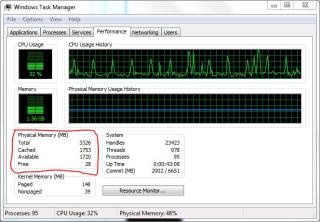
i got some problem with my current setup (after upgraded to 4GB)...
OS: Windows 7 64Bit Ultimate CPU: Opteron 146 (Single Core  ) )Memory: DDR400 1GB x 4 Stix Mobo: DFi Infinity SLI Chipset: nVidia Nforce 4 GFX Card: GeForce 9800GTX+ 512MB DDR3 Problem: Eventhough i'm using 64Bit operating system, the OS still recognized/using without my balance 0.75GB amount of ram... about memory remapping or whatever it calls, how to tweak or set it? 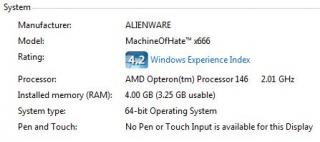
|
|
|
Sep 22 2010, 10:21 PM
|
|
Junior Member
240 posts Joined: Jan 2003 From: Ampang
|
I think everyone was facing this problem also, my pc installed 3GB, it show 800MB =.=
|
|
|
 Sep 23 2010, 02:26 AM Sep 23 2010, 02:26 AM
|
|
Junior Member
232 posts Joined: Jan 2003 From: cemetery gates
|
SOLVED !!!
 
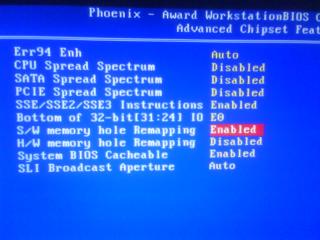
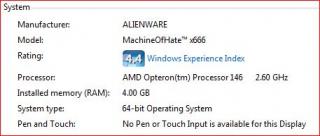

*** my solution... ENABLE the S/W Memory Hole Remapping in BIOS... i dunno if its just me, if i enable both S/W Memory Hole Remapping & H/W Memory Hole Remapping its not gonna work... but then i try enable just the S/W Memory Hole Remapping, start the windows... the system use most of my memory (4094MB)... its more than before (3582MB) and just 2MB for Hardware Reserved... ohhhh i'm so relief!!!  THANX GUYS!  *** Motherboard: DFi Infinity NF4 SLI with Microsoft™ Windows 7 Ultimate 64Bit This post has been edited by DeadGoat666: Sep 23 2010, 02:59 AM |
|
|
Oct 3 2010, 11:43 AM
|

Senior Member
2,173 posts Joined: May 2010
|
Hello folks, need some advice here. Currently I'm running on Windows XP SP2 and using 1 stick of 2GB DDR2 Ram.
I'm planning to get another stick of 2gb ram, but from what I read it wont fully utilized the new 2gb ram. So, I have few questions here. 1. Will I see significant performance improvement if I'm running +-3.5gb ram on Windows XP? 2. Will you guys advice on this upgrade? As I want to use windows XP and not planning on upgrading to win7 anytime soon due to the software that I'm using. Inputs are much welcome  |
| Change to: |  0.0267sec 0.0267sec
 0.21 0.21
 6 queries 6 queries
 GZIP Disabled GZIP Disabled
Time is now: 7th December 2025 - 02:07 AM |
 Quote
Quote