Welcome Guest ( Log In | Register )

Outline · [ Standard ] · Linear+

 Harmony One remote control, Brief review of Logitech's latest remote

views
     
TSterranova
post Jun 30 2008, 10:46 PM, updated 14y ago

Regular
******
Senior Member
1,161 posts

Joined: Jan 2003
Not sure if there’s already an existing thread in here on this. Did a quick search and did not find anything. So thought I’d share my initial impression of the new Logitech Harmony One universal remote control and also a brief comparison to its predecessor (in case anyone is thinking of upgrading to the One).

Having owned and used its predecessor, the Harmony 880/885, setting up the Harmony One is very simple as the remote management software from Logitech automatically imports all the previous settings and configuration from my previous 880 into the One. All except the favourite channels settings though. Bummer.

However, if you’re using a Harmony for the first time, then it may initially be daunting as the web-based software takes some time to familiarise. However, once you get going, it’s really rather simple. Specify your hardware model and the software accesses the Harmony database and retrieves the remote control code for your hardware. If it’s not available or really obscure, your Harmony remote can learn by receiving the IR command from your device’s existing remote. I’ve scattered some sample screenshots of the management software throughout this review.

The form factor of the One beats the 880 hands down. Although slightly longer, the One is more ergonomic, the remote doesn’t feel as slippery as the 880, the hard buttons are better organised, bigger and feels more solid overall. It is slimmer than the 880 though slightly broader at certain parts.

Attached Image

Attached Image

A noteworthy improvement is the accompanying docking / recharging base station. I really hated the 880’s base station as recharging the unit was usually a hit or miss affair. The contact points on the remote needs to be placed with surgical precision (ok, slight exaggeration on my part!) on the charging pins (on the base station) for the unit to recharge. Many a times, a slight nudge or movement would displace the contact points and you find out the next morning that your remote failed to charge. This has happened so many times that it was no longer funny to play the “wake up and see if your remote was charged” game. The One’s docking station is much improved, the One sits firmly in its base when you plonk it down. The LED light at the top turns green when it’s fully charged. A nice addition over the previous version.

Attached Image

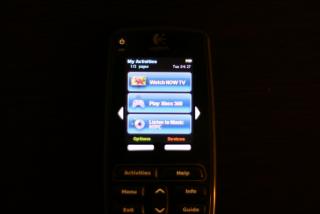
The main enhancement of the One over the 880 is the introduction of a hi-res touch-screen. The only other Harmony remote in the market right now that has touch screen is the Harmony 1000, but that sports a different form factor altogether (the 1000 is a tablet style remote). The pic below may not do the One justice, but I can attest that the new screen on the One is really beautiful, bright and clear and much better than the one found on the 880. There are also 2 context-based soft keys at the bottom and 2 arrow keys on the side of the touch-screen. If there was any complain, it would be that the new screen only affords 3 activities to a single screen whereas the old screen could accommodate 8 activities on one page (however to activate any of the 8 activities requires you to press that tiny button next to the activity, something people with fat fingers like myself may find hard to do).

Attached Image

Attached Image

You can have as many pages of activities as you need on the One. But I’ve read on forums that if you go beyond 6 pages, the remote becomes sluggish. I only use 3 pages, so can’t really comment on that. But heck, I’d take the One any day. smile.gif

Attached Image

Attached Image

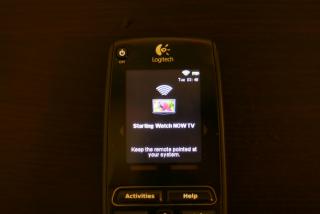
Press the desired Activity on the touch-screen (e.g. Watch Astro TV) will trigger a sequence of pre-defined instructions (e.g. switch on TV, switch on AV Receiver, select input mode on AV Receiver, switch on Astro decoder, switch on air-conditioner!!) all in a single press. Other universal remotes call this a “macro” function, but Logitech calls their macros “Activities”. Different name, same thing.
Attached Image

Attached Image

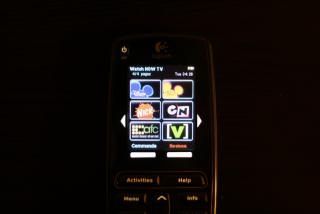
You can customise your favourite channels on the touch screen through the management software.

Attached Image

Attached Image

Attached Image

Another improvement of the One over the 880 : Favourite Channels now can accommodate 4 pages (4 pages x 6 channels = 24 favourite channels) to a single Activity whereas the 880 restricted this to only 2 pages x 8 channels = 16 favourite channels per Activity. Hence, if I wanted to include more channels beyond the 16 channels allocation on the 880, I would have had to create 2 activities e.g. “Watch Astro 1” and “Watch Astro 2”.
Attached Image

Attached Image

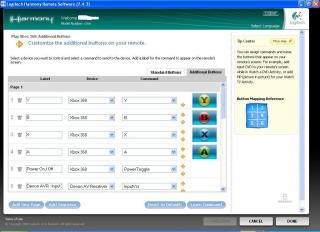
Besides adding your favourite channels on the touchscreen, you can also customise the touchscreen to include functions or buttons not found on the hard keys.
Attached Image

Attached Image

Attached Image

Besides the Activities macros, you can also control each device in your household individually like you would on a normal remote. You do this by going to the Devices function, select the Device of your choice, and carry out the remote function. This would be useful particularly for standalone devices that do not require a sequence of events (e.g. control the air-conditioner, open the electric gate, etc.). The colour scheme on the touchscreen changes to amber when you are in Device mode. In Activity mode, it’s blue. You can also change the color theme in the remote settings page. I chose to stay with the default theme.

Attached Image

Attached Image

Attached Image

Although the 880 has served me well over the years, it’s time to move on. The One is a major improvement over the 880 in many ways, and then some. If there is one complain, it would be that the One’s black glossy mirror finish really shows up finger-print residue. Impressively, included in the package that came with the One is a micro-fiber cloth that does an admirable cleaning job. Kudos to Logitech.


Footnote:
(1) Sorry if the photos are not very good. I’m lousy at handling a camera. *shy*
(2) If this thread doesn’t belong in the Audiophile section, would appreciate if the mods would move this to another section deemed appropriate. Cheers.

This post has been edited by terranova: Jun 30 2008, 11:13 PM
arremie
post Jun 30 2008, 11:01 PM

hmm...
*******
Senior Member
4,865 posts

Joined: Mar 2008
Pergh....remote control also so fancy these days rolleyes.gif
songbo
post Jun 30 2008, 11:14 PM

♥ ▬▬ ҳ̸Ҳ̸ҳ 爽吗 ҳ̸Ҳ̸ҳ ▬▬ ♥
******
Senior Member
1,029 posts

Joined: Jun 2007
From: 千里之外

QUOTE(arremie @ Jun 30 2008, 11:01 PM)
Pergh....remote control also so fancy these days  rolleyes.gif
*
exactly shocking.gif .
i wonder wats the price shocking.gif
justone
post Jul 1 2008, 01:03 AM

justone
******
Senior Member
1,067 posts

Joined: May 2005


arn RM1k?
damn nice, remote wif LCD... drool.gif
aiman04
post Jul 1 2008, 07:46 AM

THX-Certified Geek
*******
Senior Member
2,316 posts

Joined: Jul 2007


Wow, nice! drool.gif

And that's some write up! You got the talent of a reviewer! rclxms.gif

It's my dream to have a universal remote one day. For my AV setup alone, I'm using 6 remotes! (Will be 7 with the possible coming of Velodyne sub) doh.gif (If can get the one Adam Sandler used, even better! tongue.gif )

Terranova, mind to share how much is the remote? And how to get it?

This post has been edited by aiman04: Jul 1 2008, 08:08 AM
mpyw
post Jul 1 2008, 08:20 AM

Look at all my stars!!
*******
Senior Member
3,603 posts

Joined: Feb 2007


Terranova,
Your 880 for sale now brows.gif

was really tempted to get the ONE at one point when they're on promo at $179....but don't think the wife will agree to it as my URC RF20 still less than a year. tongue.gif

i am using the URC RF20 with RF base for my upstairs Astro control..got it for only $71....not as good looking as the Harmony but it get the things done and most importantly...cheap...if you are getting the Remote itself only...it's around $55....but with RF base...your remote can be used anywhere within the range and point to any direction thumbup.gif
JonC
post Jul 1 2008, 11:22 AM

Forever Silenced But The Truth Will Be Told - JFT96
******
Senior Member
1,612 posts

Joined: Jul 2005


Already wanted to get one but the price put me off. sad.gif Aiyoh now got more power poison with this review. sweat.gif Must resist! Must resist!
songbo
post Jul 1 2008, 11:29 AM

♥ ▬▬ ҳ̸Ҳ̸ҳ 爽吗 ҳ̸Ҳ̸ҳ ▬▬ ♥
******
Senior Member
1,029 posts

Joined: Jun 2007
From: 千里之外

QUOTE(JonC @ Jul 1 2008, 11:22 AM)
Already wanted to get one but the price put me off.  sad.gif Aiyoh now got more power poison with this review.  sweat.gif  Must resist! Must resist!
*
same here. if i got vit. M i also wanna buy one.. drool.gif
TSterranova
post Jul 1 2008, 11:42 AM

Regular
******
Senior Member
1,161 posts

Joined: Jan 2003
THanks guys for the kind words. I bought mine for US$199. The price has come down since the launch price of US$250. rclxm9.gif I remember I bought the 880 a few years back for US$250 also.

@ aiman - Best bet is to get it online. Perhaps you can try getting it online here:
http://www.expansys.com.sg/p.aspx?i=162748

Not sure if they deliver to Malaysia, guess you'll have to check with them.

@ mpyw - suggest you get the One over the 880. The price difference (new unit) is marginal only, but worth it. Once you see and use the One, you won't want the 880.

Oh, and forgot to add that the 880/885 is the same model, 880 is the US model and 885 is its EU cousin. 890 is different altogether as it adds an RF (radio frequency) emitter to the unit besides transmitting in IR (infra-red).

This post has been edited by terranova: Jul 1 2008, 11:44 AM
aiman04
post Jul 1 2008, 11:44 AM

THX-Certified Geek
*******
Senior Member
2,316 posts

Joined: Jul 2007


Thanks bro! Will check it out! thumbup.gif


Added on July 1, 2008, 12:25 pmThey do ship to Malaysia, using Fedex. biggrin.gif

This post has been edited by aiman04: Jul 1 2008, 12:25 PM
rx330
post Jul 1 2008, 02:19 PM

10k Club
********
All Stars
11,808 posts

Joined: Jun 2006
poisons come non stop...
TSterranova
post Jul 2 2008, 08:05 PM

Regular
******
Senior Member
1,161 posts

Joined: Jan 2003
@ aiman - u ordered? thumbup.gif how much do they charge for shipping?

@ rx - you should get one. I know you have at least 6 or 7 remotes lying around the house. All replaced by a single One. tongue.gif
mpyw
post Jul 2 2008, 08:59 PM

Look at all my stars!!
*******
Senior Member
3,603 posts

Joined: Feb 2007


I will get one someday...just not now
maybe after i setup the upstairs properly then can get it tongue.gif
aiman04
post Jul 3 2008, 07:48 AM

THX-Certified Geek
*******
Senior Member
2,316 posts

Joined: Jul 2007


QUOTE(terranova @ Jul 2 2008, 08:05 PM)
@ aiman - u ordered?  thumbup.gif how much do they charge for shipping?

@ rx - you should get one. I know you have at least 6 or 7 remotes lying around the house. All replaced by a single One.  tongue.gif
*
Shipping is not bad, SG$26 using Fedex. But my fund is a little short. In fact, never had any fund for it, let's see if I can save some from my subwoofer fund end of this month. sweat.gif
JonC
post Jul 3 2008, 12:45 PM

Forever Silenced But The Truth Will Be Told - JFT96
******
Senior Member
1,612 posts

Joined: Jul 2005


Beli bro, jagan tak beli! tongue.gif brows.gif I might only be able to get a unit later near the end of the year...... my speding on bd aint helping my funding for the remote any bit. blush.gif
rx330
post Jul 3 2008, 01:08 PM

10k Club
********
All Stars
11,808 posts

Joined: Jun 2006
terra, now since i have split the av area, my remotes become less liao, 4 on ground floor, 4 on 1st floor biggrin.gif
aiman04
post Jul 9 2008, 09:34 PM

THX-Certified Geek
*******
Senior Member
2,316 posts

Joined: Jul 2007


Hi guys,

I'm also eyeing Philips Prestigo. Anyone got any comments/experience? How does it compare to this Harmony One?

Thanks! notworthy.gif
pierreye
post Jul 9 2008, 10:09 PM

Regular
******
Senior Member
1,308 posts

Joined: Oct 2004
From: Penang & Ipoh


QUOTE(mpyw @ Jul 1 2008, 08:20 AM)
Terranova,
Your 880 for sale now brows.gif

was really tempted to get the ONE at one point when they're on promo at $179....but don't think the wife will agree to it as my URC RF20 still less than a year. tongue.gif

i am using the URC RF20 with RF base for my upstairs Astro control..got it for only $71....not as good looking as the Harmony but it get the things done and  most importantly...cheap...if you are getting the Remote itself only...it's around $55....but with RF base...your remote can be used anywhere within the range and point to any direction thumbup.gif
*
Where you get URC RF20 for $71 (USD or RM)? I already have a harmony one but need another simpler remote for my living hall. My son and daughter drop my normal remote few times so I need a more rugged and cheaper remote for normal use. Can URC RF20 learn from other remote? Need that to control my aircon, fan and remote lighting system.
tong1774
post Jul 10 2008, 11:20 AM

Regular
******
Senior Member
1,065 posts

Joined: Dec 2004
Nice! But bloody expensive. Even more expensive than 90% of the DVD player on the market. But nice!
mpyw
post Jul 10 2008, 11:27 AM

Look at all my stars!!
*******
Senior Member
3,603 posts

Joined: Feb 2007


QUOTE(pierreye @ Jul 9 2008, 10:09 PM)
Where you get URC RF20 for $71 (USD or RM)? I already have a harmony one but need another simpler remote for my living hall. My son and daughter drop my normal remote few times so I need a more rugged and cheaper remote for normal use. Can URC RF20 learn from other remote? Need that to control my aircon, fan and remote lighting system.
*
got it through Amazon tongue.gif USD71, I think price gone up already, but buying the remote alone will be cheaper, should be less than USD60
have not tested the fan & air-cond but it learn well from my ASSTHROW remote
JiauBoy
post Jul 10 2008, 04:21 PM

Enthusiast
*****
Senior Member
727 posts

Joined: May 2005
From: KL
been eyeing on this sometime back. but amazon dont ship to mal.
if its support bt will b perfect.
TSterranova
post Jul 12 2008, 04:54 PM

Regular
******
Senior Member
1,161 posts

Joined: Jan 2003
QUOTE(aiman04 @ Jul 9 2008, 09:34 PM)
Hi guys,

I'm also eyeing Philips Prestigo. Anyone got any comments/experience? How does it compare to this Harmony One?

Thanks! notworthy.gif
*
Sorry no idea. My usual pitstop for anything to do with remote control is here:
http://www.remotecentral.com/cgi-bin/mboard/forums.cgi

However, even they don't discuss much about the Prestigo, mostly only on the Pronto models.

Googling found this:
http://asia.cnet.com/reviews/home_av/other...9732820p,00.htm


Added on July 12, 2008, 4:56 pm
QUOTE(JiauBoy @ Jul 10 2008, 04:21 PM)
been eyeing on this sometime back. but amazon dont ship to mal.
if its support bt will b perfect.
*
You can use the expansys website i linked earlier. they ship to MY. But yea if only it had bluetooth .....

This post has been edited by terranova: Jul 12 2008, 04:56 PM
aiman04
post Jul 13 2008, 08:23 AM

THX-Certified Geek
*******
Senior Member
2,316 posts

Joined: Jul 2007


Thanks Terranova.

I think I'll wait until they release the RF version of Harmony One. They did the same thing with 880 with the 890 version. I want to be able to use it in my bedroom so I can control my Astro from there. biggrin.gif

Yeah, if it's got bluetooth, that is even better. But that's OK, we can still use IR2BT to use with the PS3, which also registered in the Harmony database now. thumbup.gif

JiauBoy, get it from eXpansys, it's just a lttle or RM700 only including shipping.
kianwee
post Jul 13 2008, 10:09 AM

Cube
*******
Senior Member
6,562 posts

Joined: Jan 2003
Terronova, is the Harmony One prone to scratches?
TSterranova
post Jul 14 2008, 07:27 PM

Regular
******
Senior Member
1,161 posts

Joined: Jan 2003
QUOTE(aiman04 @ Jul 13 2008, 08:23 AM)
Thanks Terranova.

I think I'll wait until they release the RF version of Harmony One. They did the same thing with 880 with the 890 version. I want to be able to use it in my bedroom so I can control my Astro from there. biggrin.gif

Yeah, if it's got bluetooth, that is even better. But that's OK, we can still use IR2BT to use with the PS3, which also registered in the Harmony database now. thumbup.gif
Yeah, I think they should be working on the IR+RF model. I'm just surprised they didn't just add that into the One off the bat, which somewhat disappointed me. Can't be much more expensive to add a RF transmitter, no?

QUOTE(kianwee @ Jul 13 2008, 10:09 AM)
Terronova, is the Harmony One prone to scratches?
*
Not really. If you look carefully at the side profile of one of the photos I posted, only 2 small footprints touches the surface when you place it face up. Also, the back of the One is not made of the glossy black plastic surface, but rather some dark gray matte finishing plastic, which doesn't easily scratch. I'll try to snap a photo of the back to show u.

msiathot
post Oct 29 2008, 08:49 PM

Getting Started
**
Junior Member
131 posts

Joined: Dec 2005
Logitech Malaysia has advertised the universal remote control devices in the Oct issue of HWM. Harmony One's RRP is RM1,099 and I think it's a lot of money to pay for a remote control. It's about half the price of an entry level 32-inch LCD TV.
enriquelee
post Dec 29 2008, 06:26 PM

Don't ask for more, ask for COKE
********
All Stars
10,510 posts

Joined: Jan 2003
From: Atlanta

ANybody knows harmony One can work with Astro Max.
Really feel like owning this little remote.
pierreye
post Dec 29 2008, 10:44 PM

Regular
******
Senior Member
1,308 posts

Joined: Oct 2004
From: Penang & Ipoh


QUOTE(enriquelee @ Dec 29 2008, 06:26 PM)
ANybody knows harmony One can work with Astro Max.
Really feel like owning this little remote.
*
Even it is not supported, it is a learning remote. You can use your existing Astro Max remote to train harmony one. I bought harmony one and harmony 880. It's great as even some of the discrete code such as input command for panasonic tv is supported. The original remote can't even directly switch to HDMI 1 or HDMI 2.

This post has been edited by pierreye: Dec 29 2008, 10:45 PM
enriquelee
post Dec 29 2008, 10:55 PM

Don't ask for more, ask for COKE
********
All Stars
10,510 posts

Joined: Jan 2003
From: Atlanta

Astro max got functions liek recording, future 1 week schedule, internal harddisk access. All these can be learn by harmony?
Anybody try before?

This post has been edited by enriquelee: Dec 29 2008, 10:55 PM
augustinesoh
post Dec 30 2008, 07:02 PM

Getting Started
**
Junior Member
103 posts

Joined: Nov 2006
QUOTE(enriquelee @ Dec 29 2008, 10:55 PM)
Astro max got functions liek recording, future 1 week schedule, internal harddisk access. All these can be learn by harmony?
Anybody try before?
*
I've got the Harmony One and can use it to control all aspects of my Astro Max, no problems. The only downside i can see is that the Harmony doesnt hv the dedicated set of extra GREY directional (up, down, left, right) buttons, which can be found on the original Astro Max remote in addition to the standard set of WHITE directional buttons (as you know, the original Astro Max remote uses the different coloured buttons to control different aspects of the onscreen navigation). What i do is use the hardware directional buttons on the Harmony One as the WHITE directional buttons (which is the default) and configure four additional buttons on the touch screen (labeled as 'Grey Up', 'Grey Down', 'Grey Left' and 'Grey Right') for the GREY directional buttons. A little clunkier but it works.
aiman04
post Dec 30 2008, 11:23 PM

THX-Certified Geek
*******
Senior Member
2,316 posts

Joined: Jul 2007


Bought the Harmony 885 today. Thanks for the heads up Enriquelee. I've been waiting for the RF version of Harmony One since early this year, but when I this baby for RM399, I just couldn't resist anymore. Works well with all my equipment including my new BD35 (Astro need to tweak a little bit).

This iss really cool, especially with the "Activity" macro command, with one touch I'm all set to watch a blu-ray movie, everything's on with proper input settings on the TV and AV receiver. thumbup.gif
ronnt88
post Dec 30 2008, 11:25 PM

Look at all my stars!!
*******
Senior Member
2,353 posts

Joined: Jun 2008
From: D'Pearl of d'Orient


RM399?? Care to share where u got it from?? smile.gif
enriquelee
post Dec 31 2008, 12:33 AM

Don't ask for more, ask for COKE
********
All Stars
10,510 posts

Joined: Jan 2003
From: Atlanta

QUOTE(augustinesoh @ Dec 30 2008, 07:02 PM)
I've got the Harmony One and can use it to control all aspects of my Astro Max, no problems. The only downside i can see is that the Harmony doesnt hv the dedicated set of extra GREY directional (up, down, left, right) buttons, which can be found on the original Astro Max remote in addition to the standard set of WHITE directional buttons (as you know, the original Astro Max remote uses the different coloured buttons to control different aspects of the onscreen navigation). What i do is use the hardware directional buttons on the Harmony One as the WHITE directional buttons (which is the default) and configure four additional buttons on the touch screen (labeled as 'Grey Up', 'Grey Down', 'Grey Left' and 'Grey Right') for the GREY directional buttons. A little clunkier but it works.
*
Such case mean Harmmony 885 couldn't do the grey arrow key in Astro max? Coz it doesn't have a touch screen button. Correct me if i am wrong.


Added on December 31, 2008, 12:34 am
QUOTE(aiman04 @ Dec 30 2008, 11:23 PM)
Bought the Harmony 885 today. Thanks for the heads up Enriquelee. I've been waiting for the RF version of Harmony One since early this year, but when I this baby for RM399, I just couldn't resist anymore. Works well with all my equipment including my new BD35 (Astro need to tweak a little bit).

This iss really cool, especially with the "Activity" macro command, with one touch I'm all set to watch a blu-ray movie, everything's on with proper input settings on the TV and AV receiver. thumbup.gif
*
You are welcome. Enjoy your new toy huh.


Added on December 31, 2008, 12:35 am
QUOTE(ronnt88 @ Dec 30 2008, 11:25 PM)
RM399?? Care to share where u got it from?? smile.gif
*
Go to lowyat IT Hyper or The curve IT Hyper. Register as member 1st, cost u RM10

This post has been edited by enriquelee: Dec 31 2008, 12:35 AM
augustinesoh
post Dec 31 2008, 08:12 AM

Getting Started
**
Junior Member
103 posts

Joined: Nov 2006
QUOTE(enriquelee @ Dec 31 2008, 12:33 AM)
Such case mean Harmmony 885 couldn't do the grey arrow key in Astro max? Coz it doesn't have a touch screen button. Correct me if i am wrong.
I think you can still do so with the earlier Harmony remotes (non-touch screen models) - the earlier models have buttons by the sides of the screen (next to each icon) that allows you to activate/select the corresponding onscreen icon, you just can't select by touching the actual icon onscreen, that's all. Aiman may be able to shed some light on this with his new 'toy'... smile.gif

This post has been edited by augustinesoh: Dec 31 2008, 08:13 AM
enriquelee
post Dec 31 2008, 09:06 AM

Don't ask for more, ask for COKE
********
All Stars
10,510 posts

Joined: Jan 2003
From: Atlanta

QUOTE(augustinesoh @ Dec 31 2008, 08:12 AM)
I think you can still do so with the earlier Harmony remotes (non-touch screen models) - the earlier models have buttons by the sides of the screen (next to each icon) that allows you to activate/select the corresponding onscreen icon, you just can't select by touching the actual icon onscreen, that's all. Aiman may be able to shed some light on this with his new 'toy'... smile.gif
*
I see.
Yeah, hopefully aiman also using Astro Max. Wait for your review oh, bro. biggrin.gif
augustinesoh
post Dec 31 2008, 01:36 PM

Getting Started
**
Junior Member
103 posts

Joined: Nov 2006
QUOTE(enriquelee @ Dec 31 2008, 09:06 AM)
I see.
Yeah, hopefully aiman also using Astro Max. Wait for your review oh, bro. biggrin.gif
*
Terranova (the OP of this thread) has already done a great review of the Harmony One. Only comment i would like to add after a few weeks' use is that sometimes the Logitech Harmony Remote software (which goes online to retrieve and save your settings) can become unbearably slow/sluggish and sometimes loses its login/connection. I read somewhere that this can happen when there's very heavy traffic to the Logitech server (e.g., during peak holiday season in the US). Overall, I'm extremely pleased with the One. It seems that it's even got some kind of smart sensor technology that can tell if a device is already on when you start an activity so it won't accidentally turn it off. Highly recommended. Now i just need to wean my family members from the old jumble of remotes and start using only the One!
TSterranova
post Dec 31 2008, 04:33 PM

Regular
******
Senior Member
1,161 posts

Joined: Jan 2003
QUOTE(enriquelee @ Dec 31 2008, 12:33 AM)
Such case mean Harmmony 885 couldn't do the grey arrow key in Astro max? Coz it doesn't have a touch screen button. Correct me if i am wrong.


You can configure/customise the 880/885's screen buttons to behave any way you like, including as grey arrow keys of your Astro Max.

The only difference is that the One's screen is a touchscreen, which means you press the screen to activate the button (ala iPhone) whereas the 880/885 has a tiny (very tiny for ppl with fat fingers like me) hard button beside each quadrant of the screen to activate the respective function key that appears on the screen. Look at the photos on the first page to see the tiny buttons I'm talking about.

QUOTE(enriquelee @ Dec 29 2008, 10:55 PM)
Astro max got functions liek recording, future 1 week schedule, internal harddisk access. All these can be learn by harmony?
Anybody try before?
*
Yes, almost all (if not all) universal remotes in the market today have this "learning" ability, not just Harmony. So long as you have the original remote, you can make the universal remote learn the functions. What's good about the Harmony is that these codes are stored online on the logitech server, so no worries even if you lose the original remote.

This post has been edited by terranova: Dec 31 2008, 04:59 PM
enriquelee
post Jan 2 2009, 08:48 AM

Don't ask for more, ask for COKE
********
All Stars
10,510 posts

Joined: Jan 2003
From: Atlanta

QUOTE(augustinesoh @ Dec 31 2008, 01:36 PM)
Terranova (the OP of this thread) has already done a great review of the Harmony One. Only comment i would like to add after a few weeks' use is that sometimes the Logitech Harmony Remote software (which goes online to retrieve and save your settings) can become unbearably slow/sluggish and sometimes loses its login/connection. I read somewhere that this can happen when there's very heavy traffic to the Logitech server (e.g., during peak holiday season in the US). Overall, I'm extremely pleased with the One. It seems that it's even got some kind of smart sensor technology that can tell if a device is already on when you start an activity so it won't accidentally turn it off. Highly recommended. Now i just need to wean my family members from the old jumble of remotes and start using only the One!
*
You experience 'loses its login/connection' frequently? But i believe we don't do this kinda update frequent unless we buy anther new device, right?


Added on January 2, 2009, 8:51 am
QUOTE(terranova @ Dec 31 2008, 04:33 PM)
You can configure/customise the 880/885's screen buttons to behave any way you like, including as grey arrow keys of your Astro Max.

The only difference is that the One's screen is a touchscreen, which means you press the screen to activate the button (ala iPhone) whereas the 880/885 has a tiny (very tiny for ppl with fat fingers like me) hard button beside each quadrant of the screen to activate the respective function key that appears on the screen. Look at the photos on the first page to see the tiny buttons I'm talking about.
Yes, almost all (if not all) universal remotes in the market today have this "learning" ability, not just Harmony. So long as you have the original remote, you can make the universal remote learn the functions. What's good about the Harmony is that these codes are stored online on the logitech server, so no worries even if you lose the original remote.
*
Yeah, the buttons seems really small.
One more question, if i don't do the internet update to learn the Astro remote, can i learn it via 'pairing' method directly from the Astro remote?

This post has been edited by enriquelee: Jan 2 2009, 08:51 AM
aiman04
post Jan 2 2009, 09:07 AM

THX-Certified Geek
*******
Senior Member
2,316 posts

Joined: Jul 2007


Morning guys.

Enriquelee, yes you can have the remote to learn any remote, but the setup software is web-based. You need to have connection to the internet every time you want to change something, you have to login with your username.

Overall, I'm really satisfied with the 885. Works very well with all my equipment, including the Astro (need some tweaking though), but sorry, I don't use Astro Max. The buttons should be better on the One, but for the 885's price at RM399, nothing to complain. The One costs over 60% more, at a whopping RM1099. The buttons on the 885 are big enough for me, even the ones on the screen sides.

Even my 4-year-old kid likes the remote, because I put his little brother's pic as the wallpaper.

This post has been edited by aiman04: Jan 2 2009, 09:08 AM
enriquelee
post Jan 2 2009, 10:58 AM

Don't ask for more, ask for COKE
********
All Stars
10,510 posts

Joined: Jan 2003
From: Atlanta

QUOTE(aiman04 @ Jan 2 2009, 09:07 AM)
Morning guys.

Enriquelee, yes you can have the remote to learn any remote, but the setup software is web-based. You need to have connection to the internet every time you want to change something, you have to login with your username.

Overall, I'm really satisfied with the 885. Works very well with all my equipment, including the Astro (need some tweaking though), but sorry, I don't use Astro Max. The buttons should be better on the One, but for the 885's price at RM399, nothing to complain. The One costs over 60% more, at a whopping RM1099. The buttons on the 885 are big enough for me, even the ones on the screen sides.

Even my 4-year-old kid likes the remote, because I put his little brother's pic as the wallpaper.
*
Is that mean after i do the 'pairing' thing, then i just log in to the web page to get it update?
I worry i get the wrong model no. when i choose it manually. Eventhough augustinesoh already recomended which model to select. (Thanks augustinesoh rclxms.gif ) This is due to Astro have too many type of decoders. rclxub.gif
TSterranova
post Jan 2 2009, 01:32 PM

Regular
******
Senior Member
1,161 posts

Joined: Jan 2003
QUOTE(enriquelee @ Jan 2 2009, 08:48 AM)
You experience 'loses its login/connection' frequently? But i believe we don't do this kinda update frequent unless we buy anther new device, right?


You'd probably not use the remote management software that often after you've set it up, unless u add new devices or activities. However, in the initial stages, you'd be using the software very often (and spend hours) to set it up properly and make everything work the way u want it to, set up your favourite channels, customise the soft keys, etc. etc.

Also, sometimes you'd access the software to update the remote's firmware. These are updated periodically, mostly for bug fixes etc.

QUOTE
Yeah, the buttons seems really small.
One more question, if i don't do the internet update to learn the Astro remote, can i learn it via 'pairing' method directly from the Astro remote?
*
Yes, that is what i meant in my reply above. you can make your Harmony learn the old remote via pairing. however, like aiman pointed out, you'd still need to log in and start up the management software on your pc/notebook to do this.

QUOTE(enriquelee @ Jan 2 2009, 10:58 AM)
Is that mean after i do the 'pairing' thing, then i just log in to the web page to get it update?
I worry i get the wrong model no. when i choose it manually. Eventhough augustinesoh already recomended which model to select. (Thanks augustinesoh rclxms.gif ) This is due to Astro have too many type of decoders.  rclxub.gif
*
you log in first, then pair. whatever u want to do to the remote, the only way to access it is via the software and hooking up the remote to the notebook/pc via usb cable (supplied).
enriquelee
post Jan 2 2009, 02:19 PM

Don't ask for more, ask for COKE
********
All Stars
10,510 posts

Joined: Jan 2003
From: Atlanta

QUOTE(terranova @ Jan 2 2009, 01:32 PM)
You'd probably not use the remote management software that often after you've set it up, unless u add new devices or activities. However, in the initial stages, you'd be using the software very often (and spend hours) to set it up properly and make everything work the way u want it to, set up your favourite channels, customise the soft keys, etc. etc.

Also, sometimes you'd access the software to update the remote's firmware. These are updated periodically, mostly for bug fixes etc.
Yes, that is what i meant in my reply above. you can make your Harmony learn the old remote via pairing. however, like aiman pointed out, you'd still need to log in and start up the management software on your pc/notebook to do this.
you log in first, then pair. whatever u want to do to the remote, the only way to access it is via the software and hooking up the remote to the notebook/pc via usb cable (supplied).
*
Thanks for the explaination, bro
Also thanks to aiman04 and augustinesoh

This post has been edited by enriquelee: Jan 2 2009, 02:20 PM
TSterranova
post Jan 2 2009, 03:29 PM

Regular
******
Senior Member
1,161 posts

Joined: Jan 2003
And after you get your Harmony One, go to http://www.iconharmony.com/ to get the brilliant icons of your favourite tv stations, created specifically for the One. I donated to Randy's efforts and he in turn did some customised icons for me. thumbup.gif tongue.gif

enriquelee
post Jan 2 2009, 03:38 PM

Don't ask for more, ask for COKE
********
All Stars
10,510 posts

Joined: Jan 2003
From: Atlanta

QUOTE(terranova @ Jan 2 2009, 03:29 PM)
And after you get your Harmony One, go to http://www.iconharmony.com/ to get the brilliant icons of your favourite tv stations, created specifically for the One. I donated to Randy's efforts and he in turn did some customised icons for me.  thumbup.gif  tongue.gif
*
I don't think i will get One, if buy also only get 885. Unfortunately 8XX only on 'coming soon'. Anyhow, this is a nice point out. Bravo! rclxms.gif rclxms.gif rclxms.gif

Harmony 885 bought. Unfortunately, my house internet down. Can't use it yet. sad.gif

This post has been edited by enriquelee: Jan 5 2009, 09:42 AM
coriandery
post Jan 11 2009, 03:49 AM

Getting Started
**
Junior Member
58 posts

Joined: May 2006
From: Bandar Utama


I just got an 885 and I can't get the remote to control the Astro. Won't turn the Astro on or anything. Tried syncing my Astro remote and didn't make a difference. Anyone got a suggestion?


Added on January 11, 2009, 4:08 amNevermind, it just decided to work now. smile.gif

This post has been edited by coriandery: Jan 11 2009, 04:08 AM
gocitygo
post Jan 11 2009, 11:36 AM

Casual
***
Junior Member
397 posts

Joined: Mar 2008
Bro, mind to share where you got the 885 and how muchie. Thx.

Can this baby control PS3's DVD/Blu Ray?

This post has been edited by gocitygo: Jan 11 2009, 11:37 AM
TSterranova
post Jan 11 2009, 12:09 PM

Regular
******
Senior Member
1,161 posts

Joined: Jan 2003
QUOTE(gocitygo @ Jan 11 2009, 11:36 AM)
Bro, mind to share where you got the 885 and how muchie.  Thx.

Can this baby control PS3's DVD/Blu Ray?
*
PS3 runs on bluetooth, not infra-red. so u can't use the 885 on the ps3 unless u get the IRBT convertor dongle thingy.


Added on January 11, 2009, 12:12 pm
QUOTE(coriandery @ Jan 11 2009, 03:49 AM)
I just got an 885 and I can't get the remote to control the Astro.  Won't turn the Astro on or anything.  Tried syncing my Astro remote and didn't make a difference.  Anyone got a suggestion?


Added on January 11, 2009, 4:08 amNevermind, it just decided to work now. smile.gif
*
fuyooo .... bro cory in da' houze. tongue.gif

if it is still behaving erraticly (not erotically, ya), try adjusting the delay time to make it longer.

This post has been edited by terranova: Jan 11 2009, 12:12 PM
coriandery
post Jan 11 2009, 02:14 PM

Getting Started
**
Junior Member
58 posts

Joined: May 2006
From: Bandar Utama


Gocitygo, got it from All IT at lowyat for RM399. Gotta be a member though.

Terra LOL! It's working fine now. smile.gif I just tried fiddling with some random troubleshooting options and it magically decided to work!

I like how you can have icons logos for your favourite Astro channels. Shame you can't have them for other activities.

It's a bit annoying how the Harmony can't turn on the Wii or PS3. Stupid bluetooth. Thinking about getting a cheapo IR PS3 remote so I have an IR dongle to use with the harmony. Something like this: http://www.dealextreme.com/details.dx/sku.10879 At least then I can control Blu rays (and I think streamed media as well?)
gocitygo
post Jan 11 2009, 04:46 PM

Casual
***
Junior Member
397 posts

Joined: Mar 2008
How about the warranty?

Thanks.

This post has been edited by gocitygo: Jan 11 2009, 05:04 PM
enriquelee
post Jan 12 2009, 02:49 PM

Don't ask for more, ask for COKE
********
All Stars
10,510 posts

Joined: Jan 2003
From: Atlanta

QUOTE(coriandery @ Jan 11 2009, 02:14 PM)
Gocitygo, got it from All IT at lowyat for RM399.  Gotta be a member though.

Terra LOL!  It's working fine now. smile.gif I just tried fiddling with some random troubleshooting options and it magically decided to work!

I like how you can have icons logos for your favourite Astro channels.  Shame you can't have them for other activities.
 
It's a bit annoying how the Harmony can't turn on the Wii or PS3.  Stupid bluetooth.  Thinking about getting a cheapo IR PS3 remote so I have an IR dongle to use with the harmony.  Something like this: http://www.dealextreme.com/details.dx/sku.10879 At least then I can control Blu rays (and I think streamed media as well?)
*
Mind to share how to get icon for favourite Astro channels? i tot they are only for Harmony one
coriandery
post Jan 12 2009, 03:23 PM

Getting Started
**
Junior Member
58 posts

Joined: May 2006
From: Bandar Utama


The same website terranova posted: http://www.iconharmony.com/

Although I made a few myself.
enriquelee
post Jan 12 2009, 05:10 PM

Don't ask for more, ask for COKE
********
All Stars
10,510 posts

Joined: Jan 2003
From: Atlanta

QUOTE(coriandery @ Jan 12 2009, 03:23 PM)
The same website terranova posted: http://www.iconharmony.com/

Although I made a few myself.
*
I tot this only applicable for harmony One.

Wah!!! blink.gif You do your own? notworthy.gif Mind to share?

This post has been edited by enriquelee: Jan 12 2009, 05:14 PM
TSterranova
post Jan 12 2009, 11:00 PM

Regular
******
Senior Member
1,161 posts

Joined: Jan 2003
When I was setting up my 880/885 some years back, I used the icons from the following sites:

http://squareworld.com/harmony/
(this was actually Randy's old site before he created http://www.iconharmony.com/ which now offers icons for the 880/885 as well since the new year)

http://www.lyngsat-logo.com/tvcountry/my.html
(these are specific to those in Malaysia e.g. Astro, TV3, NTV7, etc.; for those not listed here, you can also check out the icons available in other countries that are sharing similar channels e.g. Singapore, Hong Kong, etc. by clicking on the country link or alphabetical link)

http://www.satlogo.com/hi-res/a_1.html

http://www.remotecentral.com/cgi-bin/files...logitechharmony

Hope the newcomers to the Harmony world will find it useful and relevant. If you want to create your own for the 880/885, the fav channel icons are 64x32 pixels.

On another note, have you guys seen the new 1100 remote introduced at the ongoing CES?

Attached Image
Attached Image

http://www.logitech.com/index.cfm/remotes/...s/4708&cl=us,en


Added on January 12, 2009, 11:12 pm
QUOTE(coriandery @ Jan 11 2009, 02:14 PM)
Terra LOL!  It's working fine now. smile.gif I just tried fiddling with some random troubleshooting options and it magically decided to work!

I like how you can have icons logos for your favourite Astro channels.  Shame you can't have them for other activities.
Yes u can. There are various workarounds to do this. What do u have in mind, Cory? Radio stations?

Create a custom activity or choose an activity that has a tv-like device type (e.g. watch tv activity), set up a non-existent tv and power on your fictitious tv, then specify the radio receiver or tuner to change channels, and set up fav channels according to your radio station.

Note that only devices such as tv, cable/satellite stb, vcr, dvd recorder, etc. offers the Favorite Channel feature.

This post has been edited by terranova: Jan 12 2009, 11:12 PM
SUSnordingh
post Jan 12 2009, 11:41 PM

I not 24 hours here...
*******
Senior Member
4,419 posts

Joined: Mar 2006
From: Where did you see me?


Nice remote....

Can someone please check in the software got setting for Sansui RV-2200AV AV receiver remote or not. This is the only remote I still cannot find replacements.

Right now I have 12 remote lying around my house (not including small universal remote I carry in my traveling bag). Plan to combine to 1 device.
enriquelee
post Jan 13 2009, 08:59 AM

Don't ask for more, ask for COKE
********
All Stars
10,510 posts

Joined: Jan 2003
From: Atlanta

QUOTE(terranova @ Jan 12 2009, 11:00 PM)
When I was setting up my 880/885 some years back, I used the icons from the following sites:

http://squareworld.com/harmony/
(this was actually Randy's old site before he created http://www.iconharmony.com/ which now offers icons for the 880/885 as well since the new year)

http://www.lyngsat-logo.com/tvcountry/my.html
(these are specific to those in Malaysia e.g. Astro, TV3, NTV7, etc.; for those not listed here, you can also check out the icons available in other countries that are sharing similar channels e.g. Singapore, Hong Kong, etc. by clicking on the country link or alphabetical link)

http://www.satlogo.com/hi-res/a_1.html

http://www.remotecentral.com/cgi-bin/files...logitechharmony

Hope the newcomers to the Harmony world will find it useful and relevant. If you want to create your own for the 880/885, the fav channel icons are 64x32 pixels.

On another note, have you guys seen the new 1100 remote introduced at the ongoing CES?

Attached Image
Attached Image

http://www.logitech.com/index.cfm/remotes/...s/4708&cl=us,en


Added on January 12, 2009, 11:12 pm

Yes u can. There are various workarounds to do this. What do u have in mind, Cory? Radio stations?

Create a custom activity or choose an activity that has a tv-like device type (e.g. watch tv activity), set up a non-existent tv and power on your fictitious tv, then specify the radio receiver or tuner to change channels, and set up fav channels according to your radio station.

Note that only devices such as tv, cable/satellite stb, vcr, dvd recorder, etc. offers the Favorite Channel feature.
*
Thanks terranova, you are very kind to intro all these web site. thumbup.gif thumbup.gif thumbup.gif
TSterranova
post Jan 13 2009, 10:59 AM

Regular
******
Senior Member
1,161 posts

Joined: Jan 2003
QUOTE(nordingh @ Jan 12 2009, 11:41 PM)
Nice remote....

Can someone please check in the software got setting for Sansui RV-2200AV AV receiver remote or not. This is the only remote I still cannot find replacements.

Right now I have 12 remote lying around my house (not including small universal remote I carry in my traveling bag). Plan to combine to 1 device.
*
Attached Image Attached Image

Waa .... SANSUI ..... haven't heard that in a while. tongue.gif Around the same era as AKAI.
SUSnordingh
post Jan 13 2009, 03:15 PM

I not 24 hours here...
*******
Senior Member
4,419 posts

Joined: Mar 2006
From: Where did you see me?


Thanks terranova.... look like no preset for my avr... must live with manual way at the moments.

There still Sansui sell in the market but mostly China made DVD player with Sansui brand .No more avr/amp now. I saw sell at Audio Phonar warehouse sale last week.

Original Sansui really reliable and sound good.

In South Africa, Sansui still popular... http://www.sansui.co.za/

This post has been edited by nordingh: Jan 13 2009, 03:30 PM
SUSnordingh
post Jan 17 2009, 01:42 AM

I not 24 hours here...
*******
Senior Member
4,419 posts

Joined: Mar 2006
From: Where did you see me?


FYI,

Logitech Harmony 525 - RM275 (free 8GB thumbdrive)
Logitech Harmony 885 - RM399 (normal RM799)

at All IT Hypermarket now.
MusashiX
post Feb 2 2009, 09:57 PM

New Member
*
Junior Member
34 posts

Joined: Mar 2008


just got myself harmony one.. cool stuff.. initial setup takes a while buts it's all worth it. Now it works like a charm. Throw all the other remotes into a box. Too bad it cant control my bluetooth ps3 remote. mebe harmony 1.1 in near future?
SUSnordingh
post Feb 3 2009, 06:07 AM

I not 24 hours here...
*******
Senior Member
4,419 posts

Joined: Mar 2006
From: Where did you see me?


Go to their website, there is one model for PS3 and other devices but not available here yet.

EDIT: Ignore this statements, It was for XBOX360 not PS3.

This post has been edited by nordingh: Feb 3 2009, 12:02 PM
aiman04
post Feb 3 2009, 07:55 AM

THX-Certified Geek
*******
Senior Member
2,316 posts

Joined: Jul 2007


QUOTE(MusashiX @ Feb 2 2009, 09:57 PM)
just got myself harmony one.. cool stuff.. initial setup takes a while buts it's all worth it. Now it works like a charm. Throw all the other remotes into a box. Too bad it cant control my bluetooth ps3 remote. mebe harmony 1.1 in near future?
*
You can buy an IR adapter, or buy an IR remote for PS3 at local gaming shop, called Bluwav Nyko or something like that. But you still can't turn on/off the PS3, have to do it manually and then control other functions with your Harmony.

Or can use an adapter called IR2BT, specially designed for PS3 and allows you to turn on/off with the Harmony. But the cheap version has been discontinued, now they have professional edition with many extra functions for US$150. doh.gif


QUOTE(nordingh @ Feb 3 2009, 06:07 AM)
Go to their website, there is one model for PS3 and other devices but not available here yet.
*
Which one? Can't seems to find it. Does it comes with an IR adapter? Don't think they'll integrate a BT transmitter into the remote.
SUSnordingh
post Feb 3 2009, 12:06 PM

I not 24 hours here...
*******
Senior Member
4,419 posts

Joined: Mar 2006
From: Where did you see me?


QUOTE(aiman04 @ Feb 3 2009, 07:55 AM)
You can buy an IR adapter, or buy an IR remote for PS3 at local gaming shop, called Bluwav Nyko or something like that. But you still can't turn on/off the PS3, have to do it manually and then control other functions with your Harmony.

Or can use an adapter called IR2BT, specially designed for PS3 and allows you to turn on/off with the Harmony. But the cheap version has been discontinued, now they have professional edition with many extra functions for US$150. doh.gif

Which one? Can't seems to find it. Does it comes with an IR adapter? Don't think they'll integrate a BT transmitter into the remote.
*
Ignore my statements, It was for XBOX360 not PS3. I using my phone to reply the post, so I didn't search again. Last time I found it but apparently it was for XBOX. doh.gif sweat.gif

The only solution is to use Bluwav or IR2BT... just like what you said.
MusashiX
post Feb 3 2009, 08:43 PM

New Member
*
Junior Member
34 posts

Joined: Mar 2008


thanks guys for the information. My 360 is collecting dust in the store room for quite sometimes and i feel so reluctant to unpack it.. for ps3 not a problem cos the controller can be used as remote as well. I hardly use my ps3 bluetooth remote anyway... but umm, one touch button for gaming via harmony would be nice.

Harmony One is really a joy to use. Its design is spot on. Ergonomics, long but thin enuff to fit on my small hand but the features are what really matter. One touch starts is really cool. There is a cheaper version of harmony called Harmony 555, What Hi Fi universal remote of the year awards for 2 consecutive years, available only In Europe yes but not here.

One problem was that im not sure how to update the downloaded icon into the remote. Anyone has a clue? (and uhh...yes..im a bit lazy to google for 2day so if anybody willing to share, it would be great!).

...24 hours later, no one answered, so..i guess, got to google as usual.. to be honest, now that i have harmony one, i feel like buying more stuff with remotes so i can fully utilise my harmony .. i know it's silly but still, cant be helped. hehehe rolleyes.gif

This post has been edited by MusashiX: Feb 5 2009, 12:34 AM
TSterranova
post Feb 7 2009, 01:16 AM

Regular
******
Senior Member
1,161 posts

Joined: Jan 2003
@ musashiX - u use the downloaded channel icons when u set up your favourite channels. go into the Favourite Channel settings.

re. your last para, do take note that the Harmony One can only control a limited number of devices (can't remember exactly how many off hand). therefore it is not unlimited. i think u can control up to 20-30 devices iinm.
MusashiX
post Feb 7 2009, 12:00 PM

New Member
*
Junior Member
34 posts

Joined: Mar 2008


QUOTE(terranova @ Feb 7 2009, 01:16 AM)
@ musashiX - u use the downloaded channel icons when u set up your favourite channels. go into the Favourite Channel settings.

re. your last para, do take note that the Harmony One can only control a limited number of devices (can't remember exactly how many off hand). therefore it is not unlimited. i think u can control up to 20-30 devices iinm.
*
harmony one can op up to 15 numbers of devices and thanks for sharing the information.
SUSnordingh
post Mar 22 2009, 07:04 AM

I not 24 hours here...
*******
Senior Member
4,419 posts

Joined: Mar 2006
From: Where did you see me?


QUOTE(MusashiX @ Feb 7 2009, 12:00 PM)
harmony one can op up to 15 numbers of devices and  thanks for sharing the information.
*
Yeah I got Harmony 885 and already use up 13 devices already. I got mine really cheap one... RM220 for 2nd hand one, use less than a year.
TSterranova
post Mar 22 2009, 08:32 AM

Regular
******
Senior Member
1,161 posts

Joined: Jan 2003
Logitech Harmony Adapter for PS3 coming soon. Better late than never. No word on pricing.

Attached Image

Source
SUSnordingh
post Mar 22 2009, 08:41 AM

I not 24 hours here...
*******
Senior Member
4,419 posts

Joined: Mar 2006
From: Where did you see me?


There always a slot for PS3 (maybe delete PS2 setting)...

right now (I mean NOW) adding 1 more device which is WD TV... luckily no need to customize.... just need to add new activities for WD TV.

Check this out (out of stock actually) - ps3toothfairy
http://www.ps3toothfairy.com/

QUOTE
Easy setup using the ps3toothfairy profile in your Harmony remote -- Fully supported by the Logitech Harmony software


This post has been edited by nordingh: Mar 22 2009, 09:04 AM
aiman04
post Apr 17 2009, 11:37 AM

THX-Certified Geek
*******
Senior Member
2,316 posts

Joined: Jul 2007


My Harmony 885 is up for sale. If anyone interested, go here:

http://forum.lowyat.net/index.php?showtopic=1001447
TSterranova
post Apr 20 2009, 07:26 PM

Regular
******
Senior Member
1,161 posts

Joined: Jan 2003
@ aiman - curious to hear your comments comparing the One vs 885. Care to share your views?
bsl555
post Apr 20 2009, 09:41 PM

Look at all my stars!!
*******
Senior Member
8,046 posts

Joined: Jan 2003


Is this thread just about the more expensive models or what?
Me got the affordable 525, software damn slow and a chore to process..pissed!
SUSnordingh
post Apr 21 2009, 09:39 AM

I not 24 hours here...
*******
Senior Member
4,419 posts

Joined: Mar 2006
From: Where did you see me?


QUOTE(bsl555 @ Apr 20 2009, 09:41 PM)
Is this thread just about the more expensive models or what?
Me got the affordable 525, software damn slow and a chore to process..pissed!
*
Bro... how's all your retro stuff... still make it alive and kicking again...

Any model can discuss here... 525 is the black/white LCD right.... never try that before...
bsl555
post Apr 21 2009, 11:29 AM

Look at all my stars!!
*******
Senior Member
8,046 posts

Joined: Jan 2003


QUOTE(nordingh @ Apr 21 2009, 09:39 AM)
Bro... how's all your retro stuff... still make it alive and kicking again...
Any model can discuss here... 525 is the black/white LCD right.... never try that before...
*
I actually still own a Marantz Pronto RC5000 touch remote and software customization with it was GREAT!.
I'm actually beginning to hate this Logitech remote software after some days fooling around and customizing it to my components.

1. The software NEED internet access.
2. The Logitech component database isn't exact or duplicate of your remote, even by model. You can have numerous other buttons and features that may not exist on your component.
3. The software (even when updated to latest) is slow and very slow from step to step. I think it refers everything from Logitech server database.
4. Cannot directly learn from ori remote unless through software.
5. The firmware upgrade feature keeps updating it despite your own is already updated to latest. It doesn't bypass update it found to be latest.

Many other regrets lah..
I think this remote is overhyped!. shakehead.gif
SUSnordingh
post Apr 21 2009, 12:16 PM

I not 24 hours here...
*******
Senior Member
4,419 posts

Joined: Mar 2006
From: Where did you see me?


QUOTE(bsl555 @ Apr 21 2009, 11:29 AM)
I actually still own a Marantz Pronto RC5000 touch remote and software customization with it was GREAT!.
I'm actually beginning to hate this Logitech remote software after some days fooling around and customizing it to my components.

1. The software NEED internet access.
2. The Logitech component database isn't exact or duplicate of your remote, even by model. You can have numerous other buttons and features that may not exist on your component.
3. The software (even when updated to latest) is slow and very slow from step to step. I think it refers everything from Logitech server database.
4. Cannot directly learn from ori remote unless through software.
5. The firmware upgrade feature keeps updating it despite your own is already updated to latest. It doesn't bypass update it found to be latest.

Many other regrets lah..
I think this remote is overhyped!.  shakehead.gif
*
Marantz Pronto to pricey for me...

Here my answer.
1. That's true. When logitech ask me to answer a survey, One of my bad point is the internet requirements.
2. Agree with you. My 10 years old Sony TV remote setting have 10 - 15 more unknown button in Logitech. Take time for me to delete all that.
3. I have told Logitech about this. It's better if can download certain remote database to local for faster update to remote. I think Logitech want to control their database.
4. So far never use this function. But I was hoping to use the remote screen only for learning purpose.
5. That happen to me when try to check for update.

After all setting already 'in' the remote, everything is smooth... I really like the activities button and media button because it simplified the task. No need to press a few button just to change Astro channel. I just ask my 6 years kid to press 1 button to off all my equipments.

Your remote can donate to me if you REALLY HATE it...
bsl555
post Apr 22 2009, 10:09 AM

Look at all my stars!!
*******
Senior Member
8,046 posts

Joined: Jan 2003


QUOTE(nordingh @ Apr 21 2009, 12:16 PM)
Your remote can donate to me if you REALLY HATE it...
*
Do I know you well enough that I should "donate" to you?.. I think not. blink.gif
SUSnordingh
post Apr 22 2009, 10:51 AM

I not 24 hours here...
*******
Senior Member
4,419 posts

Joined: Mar 2006
From: Where did you see me?


I don't really mean that... but we can meet to know each other well... sweat.gif

Actually I got a lot to ask you before about AMP/AVR but forgot already... most of my time at garage sale...
aiman04
post May 12 2009, 08:33 PM

THX-Certified Geek
*******
Senior Member
2,316 posts

Joined: Jul 2007


Logitech Harmony Adapter for PS3 Out Now

Posted May 12, 2009 06:30 AM by Juan Calonge

PlayStation 3 Logitech has finally released one of the accessories most requested by owners of PS3 consoles and Logitech Harmony universal remotes: an infrared-to-Bluetooth adapter with which to operate the PS3 with a Harmony remote. Suggested retail price has been set at $59.99. It is available to buy now in North America, and will come to Europe in July.

The adapter takes the infrared signal from the Harmony remote, and then transmits a Bluetooth (radio frequency) wireless signal that commands the PS3. It works with all Logitech Harmony remotes.

The adapter runs off of an independent AC power plug. Logitech decided against running on USB, as it would use up one of the valuable USB ports, and it wouldn't be possible to power on the PS3 as it is now.

The company also considered making a remote with Bluetooth built in, but they decided they didn't want existing Harmony users to be forced to buy a new remote to operate the PS3, or having this feature restricted to a single Harmony model. With the adapter, any Harmony remote can be used.

Click here to order now at Amazon.com!!

user posted image

Control.

* Works with Logitech® Harmony® remotes: No compatibility worries. Your PLAYSTATION®3 Adapter is designed to work with your Logitech® Harmony® remote.
* Supports all 51 PLAYSTATION®3 commands: Supports all 51 PLAYSTATION®3 commands: Control your DVD and Blu-Ray Disc™ movies, navigate the CrossMediaBar (XMB) and even power your PLAYSTATION®3 on and off without using your game controller.

Convenience.

* Compact, low-profile design: No extra clutter. The adapter blends discreetly into your home-entertainment environment.
* Guided online setup: You connect your Harmony remote to your computer and you’re guided through every step. If you hit a snag, customer support is ready to help.
* Always on, wireless link: This adapter uses AC power and a Bluetooth® wireless connection to communicate with your PLAYSTATION®3. So, your remote works whether your console is on or off. And your valuable USB ports remain available for more other controllers.

Source:
http://www.blu-ray.com/news/?id=2688
http://www.logitech.com/index.cfm/remotes/...s/5732&cl=us,en


Added on May 12, 2009, 8:42 pm
QUOTE(terranova @ Apr 20 2009, 07:26 PM)
@ aiman - curious to hear your comments comparing the One vs 885. Care to share your views?
*
Just what you wrote in the first post. Your review is just spot on.

Basically nicer ergonomic design, better button design and placing, and of course, the most obvious is the touchscreen, with higher resolution which results in very nice graphics/icons. Functionality is the same as the 885.

Now I'm considering this newly released bluetooth adapter for PS3. What's nice is that it's from Logitech itself, not some other third party companies. By using it's power, we can turn on/off the PS (unlike other adapter that uses USB, like the Bluwav Nyko). But the price is too much, will wait until it drops to $30 or lower.

This post has been edited by aiman04: May 12 2009, 08:53 PM
TSterranova
post May 12 2009, 09:17 PM

Regular
******
Senior Member
1,161 posts

Joined: Jan 2003
the ps3 adapter from amazon only ships to usa unfortunately. have to use vpost etc. to get around this. sad.gif

@ aiman - glad u're enjoying the One.
rthj
post May 12 2009, 09:59 PM

Regular
******
Senior Member
1,048 posts

Joined: Aug 2008
Harmony One still selling above RM1k in msia?
robinlim
post May 13 2009, 09:37 AM

vui vẻ và điên
*****
Senior Member
974 posts

Joined: Aug 2008
QUOTE(rthj @ May 12 2009, 09:59 PM)
Harmony One still selling above RM1k in msia?
*
yes, it's sold at a whopping RM1099! sweat.gif
At first I wanted to buy, but end up buying Harmony 885 coz no budget rclxub.gif
v_alex85
post Jun 4 2009, 03:19 AM

New Member
*
Junior Member
21 posts

Joined: Aug 2006


QUOTE(bsl555 @ Apr 21 2009, 11:29 AM)
I actually still own a Marantz Pronto RC5000 touch remote and software customization with it was GREAT!.
I'm actually beginning to hate this Logitech remote software after some days fooling around and customizing it to my components.

1. The software NEED internet access.
2. The Logitech component database isn't exact or duplicate of your remote, even by model. You can have numerous other buttons and features that may not exist on your component.
3. The software (even when updated to latest) is slow and very slow from step to step. I think it refers everything from Logitech server database.
4. Cannot directly learn from ori remote unless through software.
5. The firmware upgrade feature keeps updating it despite your own is already updated to latest. It doesn't bypass update it found to be latest.

Many other regrets lah..
I think this remote is overhyped!.  shakehead.gif
*
Well if it really wanna get rid of this you can sell it to me. pm if interested

Regards
Vinod
attentional
post Jun 13 2009, 09:24 AM

Casual
***
Junior Member
358 posts

Joined: Dec 2007


Anyone knows where I can buy that denon customised remote for denon av receivers?
MusashiX
post Jun 13 2009, 02:05 PM

New Member
*
Junior Member
34 posts

Joined: Mar 2008


i prefer remote to have hard buttons instead of touchscreen. Trust me, hard button make remote control feels more connected. Although synchronization & programming are a little sluggish, i can live with my harmony. After all, nothing is perfect.
jchong
post Jun 15 2009, 09:30 AM

****************
*******
Senior Member
5,989 posts

Joined: Nov 2005
QUOTE(robinlim @ May 13 2009, 09:37 AM)
yes, it's sold at a whopping RM1099!  sweat.gif
*
Is the RM1099 price still current for the Harmony One?

Anybody wanna bulk from either US/UK? The One is much cheaper over there.
SUSnordingh
post Jun 15 2009, 11:17 AM

I not 24 hours here...
*******
Senior Member
4,419 posts

Joined: Mar 2006
From: Where did you see me?


Yes stilll Rm1099 as yesterday at lowyat plaza...
jchong
post Jun 15 2009, 11:24 AM

****************
*******
Senior Member
5,989 posts

Joined: Nov 2005
QUOTE(nordingh @ Jun 15 2009, 11:17 AM)
Yes stilll Rm1099 as yesterday at lowyat plaza...
*
Thanks for the info.
Hwoarang45
post Jun 15 2009, 08:20 PM

Hardcore Gamer
******
Senior Member
1,848 posts

Joined: Jan 2003
From: Boleh Land


i wonder wats the lifespan and durability of these babies, wont wanan accidently trip this 1k remote and end up lcd crack hahahaaa
arremie
post Jun 15 2009, 11:13 PM

hmm...
*******
Senior Member
4,865 posts

Joined: Mar 2008
I was thinking of getting this but my marantz universal remote can control like 80% of the stuff in the house including my ceiling fan so I think I spent the 1k on something else la. Anyway, there's one ebay seller from hongkong selling this for USD155 and free shipping. Might want to check it out if u wanna one.
rthj
post Jun 15 2009, 11:23 PM

Regular
******
Senior Member
1,048 posts

Joined: Aug 2008
Harmony 1100 is the way to go....too bad its like almost 3X the price of One.....cant afford neither..plus my old harmony is still working fine...

This post has been edited by rthj: Jun 15 2009, 11:24 PM
jchong
post Jun 16 2009, 07:50 AM

****************
*******
Senior Member
5,989 posts

Joined: Nov 2005
QUOTE(arremie @ Jun 15 2009, 11:13 PM)
I was thinking of getting this but my marantz universal remote can control like 80% of the stuff in the house including my ceiling fan so I think I spent the 1k on something else la. Anyway, there's one ebay seller from hongkong selling this for USD155 and free shipping. Might want to check it out if u wanna one.
*
Hi, you got the link to this ebay seller?
arremie
post Jun 16 2009, 09:12 AM

hmm...
*******
Senior Member
4,865 posts

Joined: Mar 2008
QUOTE(jchong @ Jun 16 2009, 07:50 AM)
Hi, you got the link to this ebay seller?
*
I saw the other day but now I search no more. Maybe wait a few days n try again in case he list the item again.
Star_Scream
post Jun 16 2009, 10:41 AM

Getting Started
**
Junior Member
138 posts

Joined: Jan 2008
hi.. want to ask..

i planned to get my first harmony but i was wondering which model to take.. currently aiming for the cheapo 525.

why is 525 so much cheaper than 885 and One?? i dun think i would spend extra few hundred bucks if the difference is only on the coloured LCD and rechargable battery..

also, can it control our astro decoder unit? tried to check its compatibility from their websites but i do not have the decoder's model number.. sorry blush.gif

appreciate if someone could help...

P/S: want to use it for LG LCD TV, Astro, Yamaha AVR, WDTV, and KDK ceiling fan..
SUSnordingh
post Jun 16 2009, 10:24 PM

I not 24 hours here...
*******
Senior Member
4,419 posts

Joined: Mar 2006
From: Where did you see me?


525:
4 activity button
non color screen (text only)
use normal AAA battery
cannot customize image for channel (no color mah..)
like normal remote design (boring)

885:
8 activity button
color screen
use rechargeable battery like hp type
cannot customize image for channel like TV3, RTM1(got color mah..)
can set wallpaper and screen saver while charging.
ergonomic design

One:
more advance than 885 with touch screen.

LG LCD TV, Astro, Yamaha AVR, WDTV, and KDK ceiling fan

Some I found:
Attached Image

For LG and Yamaha shouldn't have any problem... For WDTV sure have.. I using now,,,,

when you have the remote... you can try a few model until find the correct setting. Take me 2 whole days to perfect my setting. Now with just pushing few button, I can relax and enjoy my entertainments.

I check here.

This post has been edited by nordingh: Jun 16 2009, 11:05 PM
armourone
post Jun 17 2009, 02:06 AM

Getting Started
**
Junior Member
108 posts

Joined: Oct 2008
From: PJ


waoooohhh cool man
SUSnordingh
post Jun 17 2009, 02:10 AM

I not 24 hours here...
*******
Senior Member
4,419 posts

Joined: Mar 2006
From: Where did you see me?


QUOTE(armourone @ Jun 17 2009, 02:06 AM)
waoooohhh cool man
*
But not sure RMVB player supported or not tongue.gif
Star_Scream
post Jun 17 2009, 08:58 AM

Getting Started
**
Junior Member
138 posts

Joined: Jan 2008
QUOTE(nordingh @ Jun 16 2009, 10:24 PM)
525:
4 activity button
non color screen (text only)
use normal AAA battery
cannot customize image for channel (no color mah..)
like normal remote design (boring)
Many thanx to you! Now i m enlightened...
TSterranova
post Jun 17 2009, 11:05 AM

Regular
******
Senior Member
1,161 posts

Joined: Jan 2003
QUOTE(Hwoarang45 @ Jun 15 2009, 08:20 PM)
i wonder wats the lifespan and durability of these babies, wont wanan accidently trip this 1k remote and end up lcd crack hahahaaa
*
they're pretty solidly built. and the screen is durable. had mine for close to a year now, and it has survived numerous drops from the sofa to a hard floor.


Added on June 17, 2009, 11:11 am
QUOTE(rthj @ Jun 15 2009, 11:23 PM)
Harmony 1100 is the way to go....too bad its like almost 3X the price of One.....cant afford neither..plus my old harmony is still working fine...
*
i would say that the harmony 1000/1100 caters to a different market segment, ie those looking for a tablet remote.

This post has been edited by terranova: Jun 17 2009, 11:11 AM
SUSnordingh
post Jun 17 2009, 01:11 PM

I not 24 hours here...
*******
Senior Member
4,419 posts

Joined: Mar 2006
From: Where did you see me?


My 885 still look good, like new after 1 year.....
Nitrous
post Jun 23 2009, 11:47 AM

Getting Started
**
Junior Member
212 posts

Joined: Jan 2003
Hey guys
I currently have Harmony One remote, which is being used for all IR items in my apartment currently (saves me from walking and pick up remotes from everywhere). It is an excellent remote, though since last week, I was without my remote.

I have just sent my remote in back to the Logitech distributor MCL for warranty claim, as the battery for my Harmony One no longer holds the charge. My remote runs flat after 8 hours of use (non-continuous). I tried to remove the battery to check, but unable to. The battery was so bloated inside the remote's battery compartment, that the battery got stuck in it.

My question is, after the warranty period (FYI, the warranty for Harmony remotes are 2 years), how do i get new batteries for the Harmony one? I tried to ask logitech/MCL if I can purchase additional battery but the answer is no. Anyone knows where I can purhase the Logitech harmony batteries?

Thanks!
Nit
SUSnordingh
post Jun 23 2009, 11:54 AM

I not 24 hours here...
*******
Senior Member
4,419 posts

Joined: Mar 2006
From: Where did you see me?


Daddy eBay got...

http://cgi.ebay.com/Logitech-Harmony-One-1...93%3A1|294%3A50
Nitrous
post Jun 23 2009, 12:34 PM

Getting Started
**
Junior Member
212 posts

Joined: Jan 2003
Hi
Thanks for the reply, but the item is located in US. Would need somewhere around in KL.
AFAIK, lithium batteries are prohibited items to be shipped via mail.

This post has been edited by Nitrous: Jun 23 2009, 12:34 PM
SUSnordingh
post Jun 23 2009, 12:46 PM

I not 24 hours here...
*******
Senior Member
4,419 posts

Joined: Mar 2006
From: Where did you see me?


QUOTE(Nitrous @ Jun 23 2009, 12:34 PM)
Hi
Thanks for the reply, but the item is located in US. Would need somewhere around in KL.
AFAIK, lithium batteries are prohibited items to be shipped via mail.
*
Are you sure about that... then how seller selling HP sent the phone.... I thought all phone use lithium battery now..

Same for notebook...use same battery right...
Nitrous
post Jun 23 2009, 01:00 PM

Getting Started
**
Junior Member
212 posts

Joined: Jan 2003
Hi
Initially I tried to buy the battery from Amazon, and use the Vpost service to get it shipped to KL. However I was advised that lithium batteries are not allowed, the loose ones (i.e. without equipment). Lithium batteries attached together with equipment are allowed though, I don't understand the logic as well.
http://www.vpost.com.sg/helpdesk/prohibitedItems_pop.html

Any idea if I can get the battery locally? Thanks!
TSterranova
post Aug 14 2009, 11:39 PM

Regular
******
Senior Member
1,161 posts

Joined: Jan 2003
The new Harmony 900 is out. RF version of the Harmony One, with an extra row of color-coded hard buttons (esp useful for dvr and stb) & higher resolution lcd.

Logitech website

Gizmodo review

Engadget
ronnt88
post Aug 15 2009, 12:01 AM

Look at all my stars!!
*******
Senior Member
2,353 posts

Joined: Jun 2008
From: D'Pearl of d'Orient


nice.. but retails at $399?? shocking.gif

that's even more expensive than the harmony 1100
mpyw
post Aug 15 2009, 12:04 AM

Look at all my stars!!
*******
Senior Member
3,603 posts

Joined: Feb 2007


QUOTE(ronnt88 @ Aug 15 2009, 12:01 AM)
nice.. but retails at $399?? shocking.gif

that's even more expensive than the harmony 1100
*
no problem for an elite like you..... thumbup.gif thumbup.gif
aiman04
post Aug 15 2009, 09:09 AM

THX-Certified Geek
*******
Senior Member
2,316 posts

Joined: Jul 2007


QUOTE(terranova @ Aug 14 2009, 11:39 PM)
The new Harmony 900 is out. RF version of the Harmony One, with an extra row of color-coded hard buttons (esp useful for dvr and stb) & higher resolution lcd.

Logitech website

Gizmodo review

Engadget
*
Finally, the RF version is out, but it's too late I must say. I already bought a wireless transmitter to watch and control Astro from the bedroom.

It's not too expensive really, the 890 (RF version of 880/885) is already $100 more expensive than the One.
SUSnordingh
post Aug 16 2009, 03:00 PM

I not 24 hours here...
*******
Senior Member
4,419 posts

Joined: Mar 2006
From: Where did you see me?


QUOTE(aiman04 @ Aug 15 2009, 09:09 AM)
Finally, the RF version is out, but it's too late I must say. I already bought a wireless transmitter to watch and control Astro from the bedroom.

It's not too expensive really, the 890 (RF version of 880/885) is already $100 more expensive than the One.
*
I just use the normal signal extender, cheaper cost.

This post has been edited by nordingh: Aug 16 2009, 03:04 PM
robinlim
post Aug 17 2009, 10:01 AM

vui vẻ và điên
*****
Senior Member
974 posts

Joined: Aug 2008
Sorry to hijack this thread a bit
I'm having a problem with my Harmony 885

the remote control can't seem to control my devices well
everytime i use the one switch button to activate the activities
i have to use 'help' button to make sure all the devices are switched to the correct modes
even logitech's troubleshootings can't solve my problem
using the original remotes to let the harmony to learn also the same

anyone has experienced this and is there any solution?
Is this a common problem for all the harmony remotes?
Thanks in advance
TSterranova
post Aug 17 2009, 12:04 PM

Regular
******
Senior Member
1,161 posts

Joined: Jan 2003
Looks like you have to tweak the "timing" settings on the remote.

Need to be a little more precise as to the exact nature of your problem, bro. Don't quite understand, sorry.
robinlim
post Aug 17 2009, 01:28 PM

vui vẻ và điên
*****
Senior Member
974 posts

Joined: Aug 2008
QUOTE(terranova @ Aug 17 2009, 12:04 PM)
Looks like you have to tweak the "timing" settings on the remote.

Need to be a little more precise as to the exact nature of your problem, bro. Don't quite understand, sorry.
*
I have 5 activities on my harmony 885
1) Watch DVD (TV+AVR+DVDP)
2) Watch Astro (TV+AVR+Astro Decoder)
3) Watch BD (TV+AVR+BDP)
4) Watch HD Movies (TV+AVR+WDTV)
5) Listen to CD (AVR+CDP)

There's always problem for activities 1, sometimes 2 & 5
No problem at all for 3 & 4

1) Watch DVD (TV+AVR+DVDP)
TV --> OK
DVDP ---> OK
AVR ---> most problematic, the input mode is correct the time it's on (DVD), but will change to Sat/Cbl after a while, and remains there
Everytime I have to use the 'help' button to correct it back
I've checked the setting of the harmony tonnes of times, it's correct that the input mode is 'DVD'
I just don't understand why it'll switch to other input mode after a while

2) Watch Astro (TV+AVR+Astro Decoder)
TV --> OK
AVR --> OK
Astro Decoder --> Sometimes it'll not turn on, in standby mode; worse case sometimes even pressing 'help' button it won't turn on

5) Listen to CD (AVR+CDP)
CDP --> OK
AVR ---> Switched on, then automatically switched off; input mode is correct

All those problems happened when all the devices are in standby mode, using harmony to switch on the respective devices
if switch between activities most of the time is problem free (except the 'DVD', the problem is always there)

rclxub.gif rclxub.gif
SUSnordingh
post Aug 17 2009, 01:42 PM

I not 24 hours here...
*******
Senior Member
4,419 posts

Joined: Mar 2006
From: Where did you see me?


It's happen to me when I first start to use the remote.

Try to rearrange which one should be turn on first and so on. Sometime like LCDTV or AVR, there is some delay during 'ON' before can change the channel/input.

Hard to explain because different brand different behavior. It's took me 1 week to perfect the setting.
TSterranova
post Aug 17 2009, 03:15 PM

Regular
******
Senior Member
1,161 posts

Joined: Jan 2003
Yep, and also tweak the "timing" settings. you'll find this setting in the logitech software. cannot remember right now (been a while). sorry.

There is a device-delay timing setting and other timing delay settings as well. you may need to prolong the IR blast so that your device has enough time to react to the instructions.

Also, what I did was to add some of the problematic functions (e.g. on/off and input selection) onto the first screen on the lcd. so if my avr does in fact choose the wrong input mode, or cannot on/off, i can just correct it from the first screen off the bat. shouldn't have to need this workaround, i agree, if everything works as it should. but i have it there just in case when it doesnt.

This is a common problem faced by harmony users. no worries. post here if you need further help.

Just curious, are you using one of those new AVRs with the HDMI-CEC feature? Assuming your settings are in fact correct, then I can't explain or figure out why your avr automatically switches from dvd to stl/cable (activity 1) and switches off by itself (activity 5), unless there's some interference from the HDMI-CEC controls.

This post has been edited by terranova: Aug 17 2009, 03:24 PM
aiman04
post Aug 18 2009, 07:36 AM

THX-Certified Geek
*******
Senior Member
2,316 posts

Joined: Jul 2007


That's a common problem Robinlim, but it's not because of the Harmony but rather the behavior of the devices themselves. Some needs longer signal, some slower, and some doesn't want to be turned on first (usually because of HDMI handshake).

My first week, I did alot of tweaking and troubleshotting as well. This problem usually because of timing and delays of the signal, I adjusted mine a few times before finally got it right. Try to do that.


SUSnordingh
post Aug 18 2009, 10:10 AM

I not 24 hours here...
*******
Senior Member
4,419 posts

Joined: Mar 2006
From: Where did you see me?


I configure my remote to switch ON the the TV first, then the AVR and my WDTV (for Movie activities). After that change the TV input if required. If just follow the default, my TV won't change the input correctly if I change the activites before choose 'Movie'.

From time to time, I need to use Help to switch on the AVR. Most probably twice a month.

Some equipment if choose from the database will have extra button/function which is not in use with your equipments. For example, my old Sony TV don't have PIP, but when I choose from database, the PIP function is assign to one the button. Normally I will remove unnecessary function that not use or seldom use to avoid confusing when configuring the remote.
aiman04
post Aug 18 2009, 11:16 AM

THX-Certified Geek
*******
Senior Member
2,316 posts

Joined: Jul 2007


Maybe I'm lucky, never had any problem after the first week of tweaking until now. Even the favorite on the touchscreen works perfectly, just played around with the timing because there are 3 digits to send to change an Astro channel.
TSterranova
post Aug 18 2009, 12:24 PM

Regular
******
Senior Member
1,161 posts

Joined: Jan 2003
And one last thing to add - point the remote in the right direction! tongue.gif

Sometimes the angle lari also will cause the device to not receive the instruction.
SUSnordingh
post Aug 18 2009, 12:28 PM

I not 24 hours here...
*******
Senior Member
4,419 posts

Joined: Mar 2006
From: Where did you see me?


QUOTE(terranova @ Aug 18 2009, 12:24 PM)
And one last thing to add - point the remote in the right direction! tongue.gif

Sometimes the angle lari also will cause the device to not receive the instruction.
*
Point to dinding also can la... rolleyes.gif
robinlim
post Aug 18 2009, 10:12 PM

vui vẻ và điên
*****
Senior Member
974 posts

Joined: Aug 2008
It's happen to me when I first start to use the remote.

Try to rearrange which one should be turn on first and so on. Sometime like LCDTV or AVR, there is some delay during 'ON' before can change the channel/input.

Hard to explain because different brand different behavior. It's took me 1 week to perfect the setting.
*

[/quote]


QUOTE(aiman04 @ Aug 18 2009, 07:36 AM)
That's a common problem Robinlim, but it's not because of the Harmony but rather the behavior of the devices themselves. Some needs longer signal, some slower, and some doesn't want to be turned on first (usually because of HDMI handshake).

My first week, I did alot of tweaking and troubleshotting as well. This problem usually because of timing and delays of the signal, I adjusted mine a few times before finally got it right. Try to do that.
*
I've seen that function in the setting, but never really tried b4
I will give it a try hmm.gif
thanks for the info notworthy.gif

QUOTE(terranova @ Aug 17 2009, 03:15 PM)
Yep, and also tweak the "timing" settings. you'll find this setting in the logitech software. cannot remember right now (been a while). sorry.

There is a device-delay timing setting and other timing delay settings as well. you may need to prolong the IR blast so that your device has enough time to react to the instructions.

Also, what I did was to add some of the problematic functions (e.g. on/off and input selection) onto the first screen on the lcd. so if my avr does in fact choose the wrong input mode, or cannot on/off, i can just correct it from the first screen off the bat. shouldn't have to need this workaround, i agree, if everything works as it should. but i have it there just in case when it doesnt.

This is a common problem faced by harmony users. no worries. post here if you need further help.

Just curious, are you using one of those new AVRs with the HDMI-CEC feature? Assuming your settings are in fact correct, then I can't explain or figure out why your avr automatically switches from dvd to stl/cable (activity 1) and switches off by itself (activity 5), unless there's some interference from the HDMI-CEC controls.
*
may i know what's HDMI-CEC feature?


SUSnordingh
post Aug 19 2009, 02:44 AM

I not 24 hours here...
*******
Senior Member
4,419 posts

Joined: Mar 2006
From: Where did you see me?


QUOTE(robinlim @ Aug 18 2009, 10:12 PM)
I've seen that function in the setting, but never really tried b4
I will give it a try hmm.gif
thanks for the info notworthy.gif
may i know what's HDMI-CEC feature?
*
taken from web:

QUOTE
HDMI CEC (Consumer Electronics Control) promises to control components that are connected via HDMI cables with just one remote. Turning components off and on and one-touch play and record are some of the first features enabled on these initial HDMI CEC home theater offerings. But they often prove to be not so easy. You must set up the HDMI CEC in each component’s menu, and controlling the components can be inconsistent. Plus, each brand has its own nomenclature for menu and action items. But perhaps being forewarned will enable you to be forearmed.

aiman04
post Aug 19 2009, 08:24 AM

THX-Certified Geek
*******
Senior Member
2,316 posts

Joined: Jul 2007


QUOTE(robinlim @ Aug 18 2009, 10:12 PM)
may i know what's HDMI-CEC feature?

*
It's a way to control all your HDMI-connected device to be controlled by one remote. Each brand has it's own name, Panasonic - Viera Linkt, Sony - Bravia Sync, Samsung - Anynet+ etc.

If you're using Harmony, I suggest to turn off all these HDMI-CEC features.

This post has been edited by aiman04: Aug 19 2009, 08:24 AM
robinlim
post Aug 19 2009, 09:56 AM

vui vẻ và điên
*****
Senior Member
974 posts

Joined: Aug 2008
QUOTE(aiman04 @ Aug 19 2009, 08:24 AM)
It's a way to control all your HDMI-connected device to be controlled by one remote. Each brand has it's own name, Panasonic - Viera Linkt, Sony - Bravia Sync, Samsung - Anynet+ etc.

If you're using Harmony, I suggest to turn off all these HDMI-CEC features.
*
All my HDMI connected devices are working flawlessly (BDP and WDTV)
only those non-HDMI connected devices have problems (DVDP - Components, Astro - S-video, CDP - Analogue RCA)
Is it because I'm using HDMI out causing the non-HDMI connected devices to have problems?
SUSnordingh
post Aug 19 2009, 10:32 AM

I not 24 hours here...
*******
Senior Member
4,419 posts

Joined: Mar 2006
From: Where did you see me?


QUOTE(robinlim @ Aug 19 2009, 09:56 AM)
All my HDMI connected devices are working flawlessly (BDP and WDTV)
only those non-HDMI connected devices have problems (DVDP - Components, Astro - S-video, CDP - Analogue RCA)
Is it because I'm using HDMI out causing the non-HDMI connected devices to have problems?
*
Nope, that will not cause your problem. I also using 2 HDMI player (DVD and WDTV).

How your AVR change the input? Got dedicated button for each input or only 1 button will switch one by one. There a lots of different setting between those 2 methods.

Some modern (i mean newest) AVR will have input signal autodetect, that might cause the problem. Say like you watching on WDTV, then someone switch on the BD, the AVR will autoswitch to BD input.

My suggestion is to customise the remote and let AVR be the last to be ON so any device ON will not cause the AVR to autoswitch (if yours have this function).

ps;- all 3 AVR I have belong to classic categories. sweat.gif
ape
post Aug 19 2009, 02:34 PM

Enthusiast
*****
Senior Member
849 posts

Joined: Apr 2006
Hi,

can check with all sifus here how much this baby sell in msia? I plan to order one from australia and it cost me about RM750, izzit worth?
SUSnordingh
post Aug 19 2009, 04:20 PM

I not 24 hours here...
*******
Senior Member
4,419 posts

Joined: Mar 2006
From: Where did you see me?


QUOTE(ape @ Aug 19 2009, 02:34 PM)
Hi,

can check with all sifus here how much this baby sell in msia? I plan to order one from australia and it cost me about RM750, izzit worth?
*
Which one?
Harmony One is RM1K+
Harmony 885 is RM399 (last time)

ape
post Aug 19 2009, 05:08 PM

Enthusiast
*****
Senior Member
849 posts

Joined: Apr 2006
QUOTE(nordingh @ Aug 19 2009, 04:20 PM)
Which one?
Harmony One is RM1K+
Harmony 885 is RM399 (last time)
*
i means harmony one. thanks dude
TSterranova
post Aug 19 2009, 06:54 PM

Regular
******
Senior Member
1,161 posts

Joined: Jan 2003
http://www.expansys.com.sg/d.aspx?i=162748
ape
post Aug 19 2009, 07:42 PM

Enthusiast
*****
Senior Member
849 posts

Joined: Apr 2006
QUOTE(terranova @ Aug 19 2009, 06:54 PM)
tks boss, but very xpensive neh ohmy.gif
aiman04
post Aug 20 2009, 07:33 AM

THX-Certified Geek
*******
Senior Member
2,316 posts

Joined: Jul 2007


QUOTE(terranova @ Aug 19 2009, 06:54 PM)
Bro, I've tried placing order on that website. You know most online merchant does not charge your credit card until they ready to ship? This company charge the full amount immediately after placing order. Even though it says "25+ in-stock, ships in 24-hours" I waited for more tha a week before I finally cancel the order. Wrote many emails, all same excuse about how they keep stock in different region, bla bla bla. Luckily they refunded my money. Curious, I investigated further. Even though there were few satisfied customers, 80% of them had the same problem. So better avoid this website.
craven dusk
post Aug 23 2009, 11:28 PM

Getting Started
**
Junior Member
241 posts

Joined: Jan 2003
Hi,

I was considering to place an order for The One from Amazon USA.

Does it work locally without purchasing additional adapters?

I hope it works right off the bat.
jchong
post Sep 23 2009, 11:26 AM

****************
*******
Senior Member
5,989 posts

Joined: Nov 2005
Hi all, got a friend going for holiday overseas and I'm asking him to buy the Harmony One for me. Price about RM700-something.

Anybody wanna tumpang also?
ronnt88
post Sep 23 2009, 11:35 AM

Look at all my stars!!
*******
Senior Member
2,353 posts

Joined: Jun 2008
From: D'Pearl of d'Orient


jchong.. is there a new harmony one with RF feature?
jchong
post Sep 23 2009, 01:26 PM

****************
*******
Senior Member
5,989 posts

Joined: Nov 2005
I gotta check on that.

Update: ok the Harmony One with RF function is called the Harmony 900. Looks like it just came out recently and price is also quite high, around RM1.3 - 1.4k I think.

This post has been edited by jchong: Sep 23 2009, 01:37 PM
TSterranova
post Sep 23 2009, 02:37 PM

Regular
******
Senior Member
1,161 posts

Joined: Jan 2003
Yes - the main additions of the new Harmony 900 over the One is (1) it has RF and (2) an extra row of 4 colour-coded buttons just below the lcd screen. very useful to have that extra 4 customisable buttons imho. refer post #104 in the previous page.

@ craven dusk - sorry didnt see yr post earlier. yes it will work off the bat. only thing to watch for is (1) amazon US doesnt ship this outside the US, so need to use vpost or some other way (2) the AC adapter may be US voltage & pin.

This post has been edited by terranova: Sep 23 2009, 02:41 PM
jchong
post Sep 23 2009, 03:03 PM

****************
*******
Senior Member
5,989 posts

Joined: Nov 2005
Most equipment actually use IR right? So what is the big advantage of adding in the RF?
ronnt88
post Sep 23 2009, 03:07 PM

Look at all my stars!!
*******
Senior Member
2,353 posts

Joined: Jun 2008
From: D'Pearl of d'Orient


QUOTE(jchong @ Sep 23 2009, 03:03 PM)
Most equipment actually use IR right? So what is the big advantage of adding in the RF?
*
well I want the RF feature so I can control my Astro decoder from the bedroom when my decoder is in the living room. Or u could have all ur electronics hidden behind cabinets & still be able to remotely control them via RF wink.gif
anfieldude
post Sep 23 2009, 03:07 PM

Look at all my stars!!
*******
Senior Member
3,858 posts

Joined: Jan 2008
QUOTE(jchong @ Sep 23 2009, 03:03 PM)
Most equipment actually use IR right? So what is the big advantage of adding in the RF?
*
Does not need to be pointed in the direction, will work thru doors etc.
TSterranova
post Sep 23 2009, 03:10 PM

Regular
******
Senior Member
1,161 posts

Joined: Jan 2003
QUOTE(jchong @ Sep 23 2009, 03:03 PM)
Most equipment actually use IR right? So what is the big advantage of adding in the RF?
*
IR generally requires line of sight and close proximity. RF can go further and pass through walls, floors, cabinets etc. for e.g. in-rack components that may be placed in a separate room or behind the seating position, or behind closed door cabinets.


Added on September 23, 2009, 3:12 pmwah .... triple shot answers. tongue.gif

This post has been edited by terranova: Sep 23 2009, 03:12 PM
anfieldude
post Sep 23 2009, 03:12 PM

Look at all my stars!!
*******
Senior Member
3,858 posts

Joined: Jan 2008
QUOTE(terranova @ Sep 23 2009, 03:10 PM)
IR generally requires line of sight and close proximity. RF can go further and pass through walls, floors, cabinets etc. for e.g. in-rack components that may be placed in a separate room or behind the seating position, or behind closed door cabinets.
*
One thing to note that the Harmony 900 and 1100 removed.

Excerpt from CNET review:

Logitech Harmony 900 does not support the programming of customized multi-step macro commands beyond those of the automatic activity-based menu system.

This is a major drawback. So hold on to your Ones!
TSterranova
post Sep 23 2009, 03:16 PM

Regular
******
Senior Member
1,161 posts

Joined: Jan 2003
QUOTE(anfieldude @ Sep 23 2009, 03:12 PM)
One thing to note that the Harmony 900 and 1100 removed.

Excerpt from CNET review:

Logitech Harmony 900 does not support the programming of customized multi-step macro commands beyond those of the automatic activity-based menu system.

This is a major drawback. So hold on to your Ones!
*
Good point. I didnt realise that feature was removed. But actually, i hardly use this feature even though i know it exists. in what situations would you use this feature? care to share, guys?
anfieldude
post Sep 23 2009, 03:19 PM

Look at all my stars!!
*******
Senior Member
3,858 posts

Joined: Jan 2008
QUOTE(terranova @ Sep 23 2009, 03:16 PM)
Good point. I didnt realise that feature was removed. But actually, i hardly use this feature even though i know it exists. in what situations would you use this feature? care to share, guys?
*
If you want to add sequences that are not part of the fixed macros (Watch TV etc.). Instances where someone would like to add a bunch of functions like turning on lights, pausing movie, preparing room for HT (temperature controls etc).
ronnt88
post Sep 23 2009, 03:22 PM

Look at all my stars!!
*******
Senior Member
2,353 posts

Joined: Jun 2008
From: D'Pearl of d'Orient


QUOTE(anfieldude @ Sep 23 2009, 03:19 PM)
If you want to add sequences that are not part of the fixed macros (Watch TV etc.). Instances where someone would like to add a bunch of functions like turning on lights, pausing movie, preparing room for HT (temperature controls etc).
*
hmm.. guess I need the RF function more than those stated above so the 900 is still a good fit for me.
anfieldude
post Sep 23 2009, 03:24 PM

Look at all my stars!!
*******
Senior Member
3,858 posts

Joined: Jan 2008
QUOTE(ronnt88 @ Sep 23 2009, 03:22 PM)
hmm.. guess I need the RF function more than those stated above so the 900 is still a good fit for me.
*
ronnt88,

I think in ur case, its pretty clear cut that u need the RF. They question is do you go for the 900 or the 1100?
ronnt88
post Sep 23 2009, 03:27 PM

Look at all my stars!!
*******
Senior Member
2,353 posts

Joined: Jun 2008
From: D'Pearl of d'Orient


think the 900 would be better.. 1100 is a little big.. though it's bigger touch screen is very cool, I imagine carrying it around would be a pain in the long run tongue.gif
jchong
post Sep 23 2009, 03:30 PM

****************
*******
Senior Member
5,989 posts

Joined: Nov 2005
Hmm... I can see where the RF functionality would come in handy. However, in my situation it isn't critical since my components are in an open shelf and all in the same room. I'll probably stick to the One.
DrFunk
post Nov 9 2009, 03:44 AM

New Member
*
Junior Member
33 posts

Joined: Jul 2006


Hi guys,

I guess i am refering to the 1100 or the 900 with RF compatibility....

I am using a Bose system which runs on RF so it should work fine with the above remotes.

Since not listed IR devices can be programmed - so that the Harmony will "learn" from the device's remote, can it also "learn" from an RF remote? For example, if my house is connected by a series of RF remote controlled lighting and RF remote dimmers...can i control these by the Harmony?

Thanks:)
SiriuslyCold
post Nov 28 2009, 11:39 PM

Regular
******
Senior Member
1,976 posts

Joined: Jun 2005
From: 55100


Amazon is having a Gold Box deal for this remote... US$100 off which brings it down to US$150 but it's only for a few hours
de_lasoul
post Nov 29 2009, 07:38 PM

On my way
****
Senior Member
624 posts

Joined: Aug 2008
Wonder why they don't ship to my usual address? They don't ship the Harmony One to Malaysia?

Plan to get it via Amazon since it is only US149...
SiriuslyCold
post Nov 29 2009, 09:07 PM

Regular
******
Senior Member
1,976 posts

Joined: Jun 2005
From: 55100


You can ship electronics via vPost http://www.vpost.com/


aspire2oo6
post Nov 29 2009, 11:27 PM

Banned
*********
All Stars
35,468 posts

Joined: Oct 2006

just curious can i control my pc with the default system of Harmony One 885 remote control? it comes with usb right? Can it control my pc windows media player etc etc volume up and volume down kind of stuff or change channel for my pc without buying any extra infra

This post has been edited by aspire2oo6: Nov 29 2009, 11:35 PM
de_lasoul
post Nov 29 2009, 11:46 PM

On my way
****
Senior Member
624 posts

Joined: Aug 2008
QUOTE(aspire2oo6 @ Nov 29 2009, 11:27 PM)
just curious can i control my pc with the default system of Harmony One 885 remote control? it comes with usb right? Can it control my pc windows media player etc etc volume up and volume down kind of stuff or change channel for my pc without buying any extra infra
*
let me know if u wanna get a separate remote control & IR receiver specifically for your Windows Media Player...

i am selling one brand new.. biggrin.gif


Added on December 1, 2009, 4:34 pmAnyone bought the Harmony 900?

This post has been edited by de_lasoul: Dec 1 2009, 04:34 PM
ape
post Jan 11 2010, 10:26 AM

Enthusiast
*****
Senior Member
849 posts

Joined: Apr 2006
I just bought my harmony one and did the setup for last weekend, anyway i have encountered the following problems:

a) I have included my philips htib in the "watch TV" activity, but sometimes it cant on itself, i have to press help then the guy only turn on.

b) Sometimes the favorite channel din work as planned, i have setup assp channel as 811 but harmony one send signal to the decoder as 081 or 81.

c) I cant turn off my panasonic aircon even though i let the harmony one to learn from the original remote.

any bro encountered the above problem?

azbro
post Jan 11 2010, 10:37 AM

Look at all my stars!!
*******
Senior Member
4,403 posts

Joined: Jan 2007
From: Johor Bahru


QUOTE(ape @ Jan 11 2010, 10:26 AM)
I just bought my harmony one and did the setup for last weekend, anyway i have encountered the following problems:

a)  I have included my philips htib in the "watch TV" activity, but sometimes it cant on itself, i have to press help then the guy only turn on.

any bro encountered the above problem?
*
For Philips HTiB..haha...even with the Original Remote control it doesn't 'ON' all the time. Need to push the hardware button on the HTiB. laugh.gif
SUSnordingh
post Jan 11 2010, 11:21 AM

I not 24 hours here...
*******
Senior Member
4,419 posts

Joined: Mar 2006
From: Where did you see me?


Set a delay for Astro... need to go to advance setting. Astro decoder response is slow even using the original remote.
ape
post Jan 11 2010, 03:55 PM

Enthusiast
*****
Senior Member
849 posts

Joined: Apr 2006
QUOTE(nordingh @ Jan 11 2010, 11:21 AM)
Set a delay for Astro... need to go to advance setting. Astro decoder response is slow even using the original remote.
*
Delay set at harmony or astro decoder?
SUSnordingh
post Jan 11 2010, 04:28 PM

I not 24 hours here...
*******
Senior Member
4,419 posts

Joined: Mar 2006
From: Where did you see me?


bro, you cannot do anything on astro decoder.

You must do on the remote.
calvinchin
post May 13 2010, 10:37 PM

Getting Started
**
Junior Member
64 posts

Joined: Jan 2003
From: Cheras, KL


Very interesting topic. I also checked out the Logitec Universal Remote.
It's definately a handy tool if you need to replace the remote for all your existing TV/AV equipment.
I had a 10-year old AV system. The remote has spoiled and I can't find a replacement in the market.
Not even a compatible one as all the "mada-in-china" only supports the more common brands only (such as Astro, Sony, Panasonic models).

So this logitec remote control will definately work, if you're willing to pay the premium.

But the future is HDMI-CEC.
All TV and AV manufacturer are coming-up with HDMI-CEC complaint equipments.
This means you can use the same TV remote to control your other home entertainment equipments such as Blueray player and home theater system. Theoritically, even Astro can be controlled the same way.

However, CEC is not completely 'open' standard yet....so some manufacturers, such as Sony decides to lock-down the equipments to only Sony-compliant equipments only.

But I think the time will soon come where you'd be able to purchase a Universal Remote Control for RM50 and control everything in your living room smile.gif


DarkNite
post May 14 2010, 07:42 AM

ФĻĐ ИΞШB!Ξ
********
All Stars
11,058 posts

Joined: Jun 2008
QUOTE(calvinchin @ May 13 2010, 10:37 PM)
But the future is HDMI-CEC.
All TV and AV manufacturer are coming-up with HDMI-CEC complaint equipments.
*
Hi ya and I thought this guy is going to control our stuff!
user posted image
SUSs3an_looi
post Jun 6 2010, 08:36 PM

ZQOUTLET.COM
*******
Senior Member
2,144 posts

Joined: Apr 2009
From: Bangsar, Kuala Lumpur


I'm interested in this. Can please advise the BEST and CHEAPEST place to buy it?
TSterranova
post Oct 9 2012, 03:42 PM

Regular
******
Senior Member
1,161 posts

Joined: Jan 2003
Logitech has introduced its replacement model for the Harmony One ..... the new Harmony Touch.

Attached Image Attached Image Attached Image

- US$249
- 2.4” swipe and tap touch screen
- backlit buttons
- stores up to 50 favourite channels
- controls up to 15 devices
- program the touchscreen to respond to customized gestures e.g. swiping up or down to control volume
- ability to make tweaks (minor changes e.g. edit activities, change button mapping, and change "delay" speeds) to the Harmony Touch's setup without using a computer (currently we have to sync via our pc/notebooks to make changes)

Downside (my 2 cents):
- expensive
- it controls only via IR. So those in need of RF will still have to rely on the older Harmony 900 or 1100.
- the layout of the hard buttons at the top seem "out of place" and will make these oft-used buttons hard to reach with your thumb (this is THE deal-breaker for me).

http://www.logitech.com/en-us/remotes/univ...s/harmony-touch

http://www.engadget.com/2012/10/03/logitec...uch-remote-249/

http://reviews.cnet.com/remote-controls/lo...7-35477657.html

orangegurl
post Nov 18 2012, 02:00 AM

Enthusiast
*****
Senior Member
874 posts

Joined: Nov 2008
From: hey, im ur sis! not ur bro!


im wondering is the remote can use on my eaget m9...is media player
TSterranova
post Nov 19 2012, 11:41 AM

Regular
******
Senior Member
1,161 posts

Joined: Jan 2003
QUOTE(orangegurl @ Nov 18 2012, 02:00 AM)
im wondering is the remote can use on my eaget m9...is media player
*
The Harmony One, as with most universal remotes of this grade, has a "learning" function which allows it to copy (learn) from existing remote controls if the device is not already on the Logitech database.

So the short answer to your question would be YES.
Kerry1136
post Nov 19 2012, 11:47 AM

One Decade Old
******
Senior Member
1,925 posts

Joined: Feb 2006
From: Petaling Jaya


Been reading a few reviews and I was thinking of going for Harmony One Advanced instead rather than Harmony 900....would that be a good choice? I don't need the RF anyways...

Whats the best price I could get now?
TSterranova
post Nov 19 2012, 12:04 PM

Regular
******
Senior Member
1,161 posts

Joined: Jan 2003
QUOTE(Kerry1136 @ Nov 19 2012, 11:47 AM)
Been reading a few reviews and I was thinking of going for Harmony One Advanced instead rather than Harmony 900....would that be a good choice? I don't need the RF anyways...

Whats the best price I could get now?
*
http://forum.lowyat.net/index.php?showtopi...post&p=27952645

If you don't need RF, then the Harmony One (or One Advanced as it's called now) is sufficient and not worth the extra $ for 900. However, I like the extra row of color-coded hard buttons just above the navigation keys, which I find to be useful. But is that alone worth the price difference? You'll have to decide for yourself. Plus of course the higher res LCD.

No idea about pricing.
Kerry1136
post Nov 25 2012, 12:32 AM

One Decade Old
******
Senior Member
1,925 posts

Joined: Feb 2006
From: Petaling Jaya


Just got the Harmony One....now looking for PS3 adapter and its sooooo hard to find...


Change to:
| Lo-Fi Version
0.1149sec    0.51    6 queries    GZIP Disabled
Time is now: 1st December 2025 - 05:11 PM