Welcome Guest ( Log In | Register )

47 Pages « < 7 8 9 10 11 > » Bottom

Outline · [ Standard ] · Linear+

 The Tomato/Victek's Tomato Firmware Club, Victek himself is here to help you !

views
     
K for Ketamine
post Aug 31 2008, 08:07 AM

Regular
******
Senior Member
1,188 posts

Joined: Sep 2006
QUOTE(Victek @ Aug 31 2008, 07:09 AM)
» Click to show Spoiler - click again to hide... «

*

welcome to Lowyat.Net forum smile.gif
gsan
post Aug 31 2008, 09:39 AM

Electrical RF Engineer
*******
Senior Member
2,471 posts

Joined: Jan 2003

My dl speed is 1.5mbps and upload speed is 512kbps
For the QoS, if I wanna limit each pc to 50kb/s, is it I should put 512kbps?

How to access my modem interface? if the modem ip is 192.168.0.1 and the router ip is 192.168.1.1

another problem...
at first, the pc (192.168.1.3) can surf net and bt, but few minutes later, it can surf net anymore, but bt still running, am I setting wrong?


This post has been edited by gsan: Aug 31 2008, 11:34 AM


Attached thumbnail(s)
Attached Image Attached Image
Victek
post Aug 31 2008, 05:15 PM

New Member
*
Newbie
0 posts

Joined: Aug 2008
QUOTE(gsan @ Aug 31 2008, 09:39 AM)
My dl speed is 1.5mbps and upload speed is 512kbps
For the QoS, if I wanna limit each pc to 50kb/s, is it I should put 512kbps?

How to access my modem interface? if the modem ip is 192.168.0.1 and the router ip is 192.168.1.1

another problem...
at first, the pc (192.168.1.3) can surf net and bt, but few minutes later, it can surf net anymore, but bt still running, am I setting wrong?
*
1st. Read the manual link posted instead of asking, FAQ and answer already exposed...

2nd. In Administration/Scripts/Firewall window box, write:

/usr/sbin/iptables -I POSTROUTING -t nat -o vlan1 -d 192.168.0.0/24 -j MASQUERADE
ip addr add 192.168.0.2/24 dev vlan1 brd +

Save, reboot and check.

3rd. Run TCP patch in the PC, execute TCP Optimizer, and adjust timeouts properly in Advanced/Connection menu in the router.

This post has been edited by Victek: Aug 31 2008, 05:19 PM
gsan
post Aug 31 2008, 07:00 PM

Electrical RF Engineer
*******
Senior Member
2,471 posts

Joined: Jan 2003

QUOTE(Victek @ Aug 31 2008, 05:15 PM)
1st. Read the manual link posted instead of asking, FAQ and answer already exposed...

2nd. In Administration/Scripts/Firewall window box, write:

/usr/sbin/iptables -I POSTROUTING -t nat -o vlan1 -d 192.168.0.0/24 -j MASQUERADE
ip addr add 192.168.0.2/24 dev vlan1 brd +

Save, reboot and check.

3rd. Run TCP patch in the PC, execute TCP Optimizer, and adjust timeouts properly in Advanced/Connection menu in the router.
*
any reference value regarding adjust the timeouts?
TSprasys
post Aug 31 2008, 09:16 PM

Heros Never Die
Group Icon
VIP
12,925 posts

Joined: Mar 2005
From: Kuala Lumpur
Ey Victec , by the way its good to have you here. I hope you'll guide us all in optimising our connection
Andy0625
post Sep 1 2008, 01:10 AM

Certified Newbie
*******
Senior Member
3,910 posts

Joined: Jun 2005
From: Andy @ London.com Status: N/A


QUOTE(Andy0625 @ Aug 30 2008, 10:53 PM)
I'm thinking to get Linksys WRT54GL but what's the differences between DD-WRT and Tomato ?

Where can I download tomato firmware ?

Any other addons like Antenna and etc to include before my actual purchases ?

Thank you.


Added on August 31, 2008, 12:27 amOh yea , WRT54G better or WRT54GL better ?
WRT54G is with 16mb ram , ver 4.
*
Can anyone help me please ?
barry80
post Sep 2 2008, 12:29 AM

Casual
***
Junior Member
490 posts

Joined: Feb 2006
From: Somewhere I belong

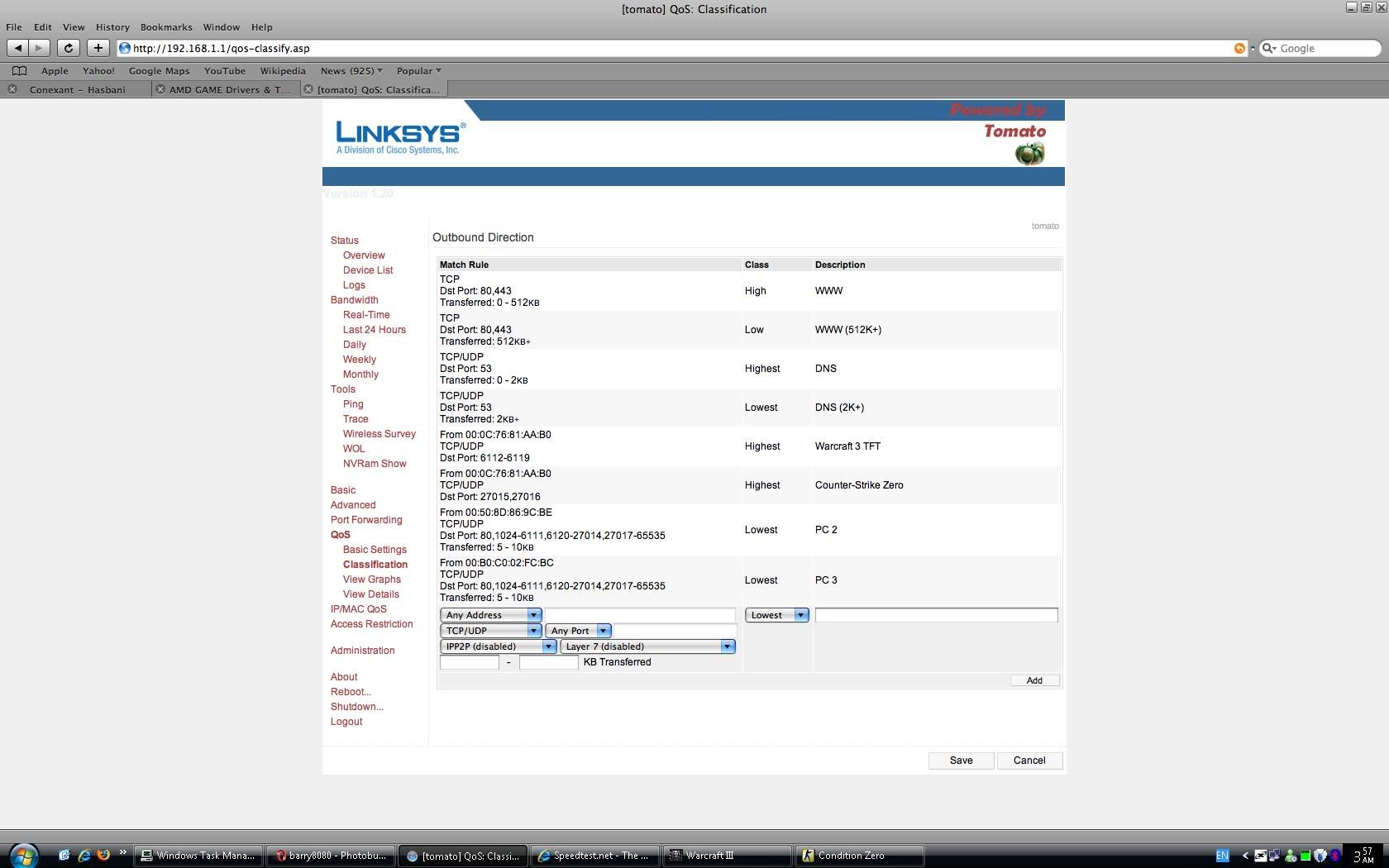
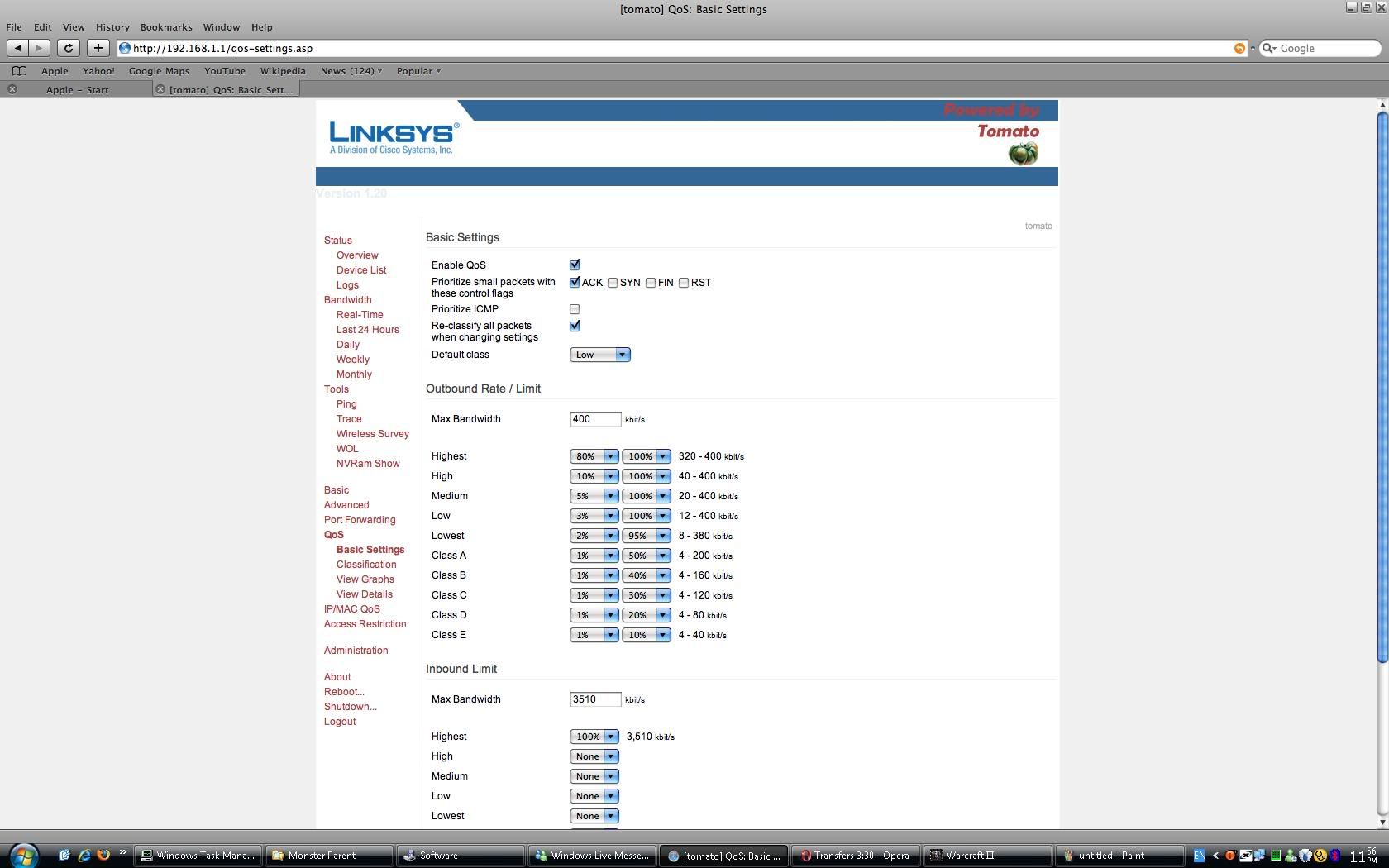
already 3 days monitoring the qos function behavior, so far all those setting i've been setup is quite satisfied. only minor thing is the port range for 27015-27016 is still in "Low" cuz this port range should be "Highest"? hmm.gif

as u can c in the images, i did qos for certain port range like 6112 for warcraft3tft & counter-strike port range 27015-27016 in "Highest". but only port 6112 successfully qos to "Highest" while the port range 27015-27016 qos to "Low" hmm.gif sweat.gif

for this result, warcraft3tft didn't get any high ping & very stable while the counter-strike can't play at all in average pings 200ms+(normaly i can get below 60ms with ip 60.50) doh.gif (xunlei loaded X 2 rigs; streaming radio with 128kbps running smooth)

can anyone help me? icon_question.gif only port range 27015-27016.....what should i do to get this port range to "Highest"? hmm.gif
Images
» Click to show Spoiler - click again to hide... «


This post has been edited by barry80: Sep 2 2008, 12:35 AM
tcmean
post Sep 3 2008, 12:17 AM

On my way
****
Senior Member
561 posts

Joined: Jan 2003
QUOTE(gsan @ Aug 31 2008, 09:39 AM)
another problem...
at first, the pc (192.168.1.3) can surf net and bt, but few minutes later, it can surf net anymore, but bt still running, am I setting wrong?
*
I'm facing this problem too. All things(BT and IMs) are fine except surfing the net using browser. Only rebooting the router helps to solve it.


QUOTE(Victek @ Aug 31 2008, 05:15 PM)
3rd. Run TCP patch in the PC, execute TCP Optimizer, and adjust timeouts properly in Advanced/Connection menu in the router.
*
What is the TCP patch? rclxub.gif Do you mind to explain in detail on how to run these and adjust the timeouts? notworthy.gif
kitsuna
post Sep 3 2008, 05:54 AM

Getting Started
**
Junior Member
101 posts

Joined: Jul 2006


QUOTE(tcmean @ Sep 3 2008, 12:17 AM)
What is the TCP patch?  rclxub.gif  Do you mind to explain in detail on how to run these and adjust the timeouts?  notworthy.gif
*
maybe he means the tcp/ip half-connection patch
barry80
post Sep 6 2008, 04:03 AM

Casual
***
Junior Member
490 posts

Joined: Feb 2006
From: Somewhere I belong

QUOTE(Victek @ Aug 31 2008, 05:15 PM)
1st. Read the manual link posted instead of asking, FAQ and answer already exposed...

2nd. In Administration/Scripts/Firewall window box, write:

/usr/sbin/iptables -I POSTROUTING -t nat -o vlan1 -d 192.168.0.0/24 -j MASQUERADE
ip addr add 192.168.0.2/24 dev vlan1 brd +

Save, reboot and check.

3rd. Run TCP patch in the PC, execute TCP Optimizer, and adjust timeouts properly in Advanced/Connection menu in the router.
*
okay...i got a d-link router modem with ip 10.1.1.1 & can get access with the scripts

/usr/sbin/iptables -I POSTROUTING -t nat -o vlan1 -d 10.1.1.0/24 -j MASQUERADE
ip addr add 10.1.1.2/24 dev vlan1 brd +

another artnet router modem with ip 10.0.0.2 also can get access with the scripts

/usr/sbin/iptables -I POSTROUTING -t nat -o vlan1 -d 10.0.0.0/24 -j MASQUERADE
ip addr add 10.0.0.3/24 dev vlan1 brd +

but only the billion bipac 5112s with ip 192.168.1.254 can't access by the scripts

/usr/sbin/iptables -I POSTROUTING -t nat -o vlan1 -d 192.168.1.0/24 -j MASQUERADE
ip addr add 192.168.1.2/24 dev vlan1 brd +

something wrong with the scripts?

QUOTE
can anyone help me?  only port range 27015-27016.....what should i do to get this port range to "Highest"?
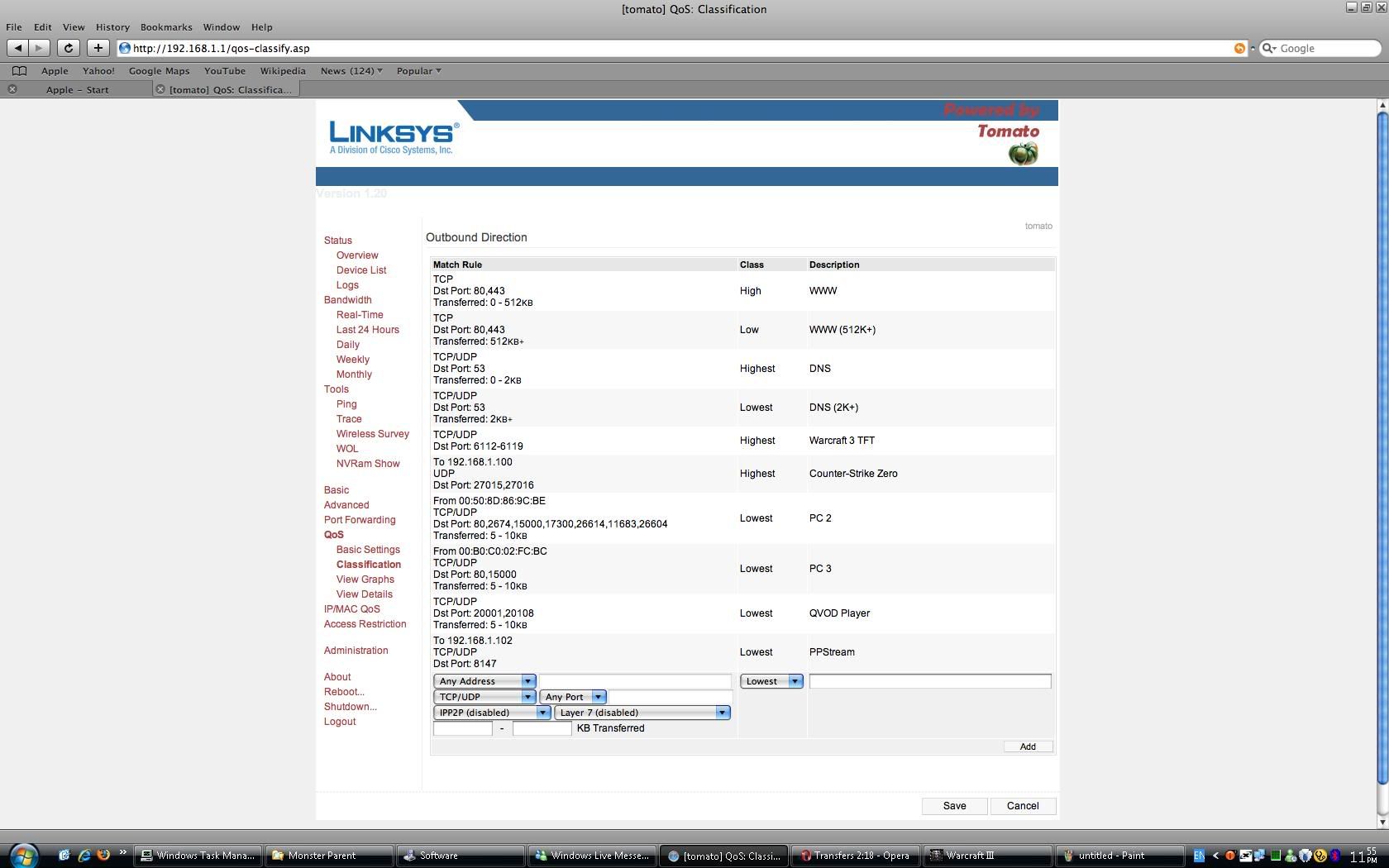

after few days monitoring; editing....i find out the qos for certain port must set with MAC or any address instead of static ip & dhcp assigned ip to make qos really functional!

now the port range 27015-27016 already set to "Highest" thumbup.gif

» Click to show Spoiler - click again to hide... «

kitsuna
post Sep 6 2008, 06:18 AM

Getting Started
**
Junior Member
101 posts

Joined: Jul 2006


QUOTE(barry80 @ Sep 6 2008, 04:03 AM)
but only the billion bipac 5112s with ip 192.168.1.254 can't access by the scripts

/usr/sbin/iptables -I POSTROUTING -t nat -o vlan1 -d 192.168.1.0/24 -j MASQUERADE
ip addr add 192.168.1.2/24 dev vlan1 brd +

something wrong with the scripts?
if not mistaken, modem network ip cannot be same as router network ip

cannot : modem = 192.168.1.x && router = 192.168.1.x
can : modem = 192.168.0.x && router = 192.168.1.x

so need to change different network ip on the router or modem
barry80
post Sep 8 2008, 01:31 AM

Casual
***
Junior Member
490 posts

Joined: Feb 2006
From: Somewhere I belong

QUOTE(kitsuna @ Sep 6 2008, 06:18 AM)
if not mistaken, modem network ip cannot be same as router network ip

cannot : modem = 192.168.1.x && router = 192.168.1.x
can : modem = 192.168.0.x && router = 192.168.1.x

so need to change different network ip on the router or modem
*
do u know how to change the billion bipac 5112s routing table? as u said, from

192.168.1.0 to 192.168.0.0 & ip 192.168.1.254 to 192.168.0.1 ???

a problem happened to me yesterday sweat.gif streamyx down again doh.gif & i can't access my router modem hmm.gif i thought must be the artnet router modem hang already. so, i reboot both of em; linksys router & artnet router modem c whether can enter 10.0.0.2 or not. too bad, it still cannot access. rclxub.gif

luckly streamyx back online today! i try login router modem again. thx god! i successfully login to artnet modem.

i suspect if the router can't get any WAN address from the modem (streamyx down?), the scripts won't work?

» Click to show Spoiler - click again to hide... «

Victek
post Sep 11 2008, 09:08 AM

New Member
*
Newbie
0 posts

Joined: Aug 2008
Scripts work.. but let's do in the logic way for your billion bipac 5112s

Modem IP 192.168.1.1
Linksys LAN IP = 192.168.2.1

The script then should be as you wrote previously.

/usr/sbin/iptables -I POSTROUTING -t nat -o vlan1 -d 192.168.1.0/24 -j MASQUERADE
ip addr add 192.168.1.2/24 dev vlan1 brd +


Done, Bump! tongue.gif

This post has been edited by Victek: Sep 11 2008, 09:12 AM
muok
post Sep 11 2008, 08:03 PM

On my way
****
Junior Member
546 posts

Joined: Jan 2003
From: Within the Solar System
Thanks Victek for the router to modem script! Been looking for it a few years now. tongue.gif
HiT-AbLe
post Sep 17 2008, 06:37 PM

Enthusiast
*****
Senior Member
866 posts

Joined: Jan 2003
Currrently using 1.19 speedmod, and wanna try 1.21 victek, so do I need to reset anything or dierctly flash it instead?
kitsuna
post Sep 17 2008, 08:15 PM

Getting Started
**
Junior Member
101 posts

Joined: Jul 2006


need to reset all the config 1st b4 flashing
gsan
post Sep 28 2008, 05:40 PM

Electrical RF Engineer
*******
Senior Member
2,471 posts

Joined: Jan 2003

anyone try Tomato DualWan mod ?

http://www.chinadsl.net/router/Tomato/tomato1_21_dual.7z

password: chinadsl.net

btw when I telnet my router or modem, it keep on saying that the login is incorrect although I'm key in the right login and password?

This post has been edited by gsan: Sep 30 2008, 11:10 AM
calvin
post Oct 3 2008, 04:16 PM

Tech Enthusiast
******
Senior Member
1,865 posts

Joined: Jan 2003
From: XBOX Live


i'm trying to use my router (flashed to tomato 1.21) as a wireless client to connect to another normal AP Router.. how can this be done ? I've tried switching to wireless client mode and wireless ethernet bridge mode.. doesnt seem to do the trick anyhow wink.gif
mikelanding
post Oct 3 2008, 09:47 PM

Look at all my stars!!
*******
Senior Member
2,865 posts

Joined: Jan 2003


QUOTE(calvin @ Oct 3 2008, 04:16 PM)
i'm trying to use my router (flashed to tomato 1.21) as a wireless client to connect to another normal AP Router.. how can this be done ? I've tried switching to wireless client mode and wireless ethernet bridge mode.. doesnt seem to do the trick anyhow wink.gif
*
I would suggest WDS;
Pls follow the below guide which I did:
http://www.myopenrouter.com/blog/entry/103...omato-Firmware/

Manage to link 2 routers...
calvin
post Oct 3 2008, 11:21 PM

Tech Enthusiast
******
Senior Member
1,865 posts

Joined: Jan 2003
From: XBOX Live


QUOTE(mikelanding @ Oct 3 2008, 09:47 PM)
I would suggest WDS;
Pls follow the below guide which I did:
http://www.myopenrouter.com/blog/entry/103...omato-Firmware/

Manage to link 2 routers...
*
is it a requirement to have both routers to be on third party firmware? unsure.gif

47 Pages « < 7 8 9 10 11 > » Top
 

Change to:
| Lo-Fi Version
0.0294sec    0.53    6 queries    GZIP Disabled
Time is now: 6th December 2025 - 04:16 AM