Welcome Guest ( Log In | Register )

Bump Topic Topic Closed RSS Feed
6 Pages « < 3 4 5 6 >Bottom

Outline · [ Standard ] · Linear+

 Pwnage Your iPhone, Change iphone boot up and recovery image

views
     
frozzbyte
post Apr 14 2008, 07:02 PM

Feeling butthurt lately? Like I care
*******
Senior Member
3,657 posts

Joined: May 2005
U can pwn the phone now .. why need to wait for ver2.0. U just need to pwn once and it stays pwned until u restore with the stock IPSW file. When firmware 2.0 comes out ... we no need to pwn the phone again ... just make the custom IPSW with IPSW builder and restore (i don't know if we can just upgrade) the phone. No need to wait for firmware 2.0 to pwn the phone. The pwn state will last as long as we don't restore with the stock IPSW.
Moonflown
post Apr 14 2008, 07:16 PM

DayDreamer
******
Senior Member
1,036 posts

Joined: Oct 2007
From: Moon
That means you just have to restore IPSW everytime we upgrade firmware? I thought we just need to change bootneuter?
frozzbyte
post Apr 14 2008, 07:44 PM

Feeling butthurt lately? Like I care
*******
Senior Member
3,657 posts

Joined: May 2005
No need. Pwn and bootneuter only need to do once and it stays. If u need to restore back to original setting i.e. u want to send back for warranty ... then u just need to set back bootneuter to default and restore with stock IPSW file. If new firmware comes out ... we just need to make a custom IPSW file with the IPSW builder and restore with it. I'm not sure about upgrading with custom firmware though ... i'll ask around. I know your concern, either we need to restore fresh and loose all data everytime new firmware comes out.

This post has been edited by frozzbyte: Apr 14 2008, 07:46 PM
Moonflown
post Apr 14 2008, 09:32 PM

DayDreamer
******
Senior Member
1,036 posts

Joined: Oct 2007
From: Moon
QUOTE(frozzbyte @ Apr 14 2008, 07:44 PM)
No need. Pwn and bootneuter only need to do once and it stays. If u need to restore back to original setting i.e. u want to send back for warranty ... then u just need to set back bootneuter to default and restore with stock IPSW file. If new firmware comes out ... we just need to make a custom IPSW file with the IPSW builder and restore with it. I'm not sure about upgrading with custom firmware though ... i'll ask around. I know your concern, either we need to restore fresh and loose all data everytime new firmware comes out.
*
Yea that's what I'm worry about. But I heard pwnage will enable users to update directly from itunes.
LaskarCinta
post Apr 23 2008, 01:36 AM

?
******
Senior Member
1,651 posts

Joined: Dec 2006
mmm...i only know bout this today:
WinPwn
btw it's still beta. at least windows users have a way to pwn their iPhone using their box.
frozzbyte
post Apr 23 2008, 01:39 AM

Feeling butthurt lately? Like I care
*******
Senior Member
3,657 posts

Joined: May 2005
Installed it at office computer. Still in early stage and lots of the features are been greyed/disabled but the main features are there. Don't dare to try on my phone since its still in beta test. If got another phone to play then i surely tried this already.
takanor1
post Apr 23 2008, 03:04 AM

Getting Started
**
Junior Member
224 posts

Joined: Jan 2008
hm sorry guys, after reading 5 pages of the posts i still dont get it. what is this pwnage tool? what is firmware2.0? what is custom ipsw? can someone help me out with this?
Moonflown
post Apr 24 2008, 08:08 AM

DayDreamer
******
Senior Member
1,036 posts

Joined: Oct 2007
From: Moon
I've received my iPhone yesterday and unlocked it with pwnage tool. Now it's exactly like I'm using AT&T in US. No problem at all.
hackdplanet
post May 8 2008, 09:41 AM, updated 18y ago

Getting Started
**
Junior Member
91 posts

Joined: May 2008


Today, I just test the latest version of pwnage tool to change
iphone boot up and recovery image. This tool was very easy
to use but the tool is currently for mac only.


Attached Image

Apple logo with retro shade and with my 'nick'... biggrin.gif

Have Fun

This post has been edited by hackdplanet: May 8 2008, 09:44 AM
UnUsUaL
post May 8 2008, 12:06 PM

ah jek
Group Icon
VIP
2,064 posts

Joined: Jan 2003
Topic Merged.
hackdplanet
post May 8 2008, 06:35 PM

Getting Started
**
Junior Member
91 posts

Joined: May 2008


It was easy to enter the recovery mode after Pwnage iPhone.
No need to press and hold home button and power switch,
just press home button and hold it while plugging the usb connector
and it will enter the recovery mode.

If the iPhone was switch off, it will automatic switch on if you place it
on the dock.


frozzbyte
post May 8 2008, 06:43 PM

Feeling butthurt lately? Like I care
*******
Senior Member
3,657 posts

Joined: May 2005
Errr ... u can do that without pwning the phone. Or am I wrong?
hackdplanet
post May 8 2008, 06:50 PM

Getting Started
**
Junior Member
91 posts

Joined: May 2008


QUOTE(frozzbyte @ May 8 2008, 07:43 PM)
Errr ... u can do that without pwning the phone. Or am I wrong?
*
I not sure about it. smile.gif .
Coz i don't notice anything like that after I ziphone it.
Maybe iliberty or other 3rd party app.


BTW, have you receive my PM abt the case??


Thankx

This post has been edited by hackdplanet: May 8 2008, 06:54 PM
frozzbyte
post May 8 2008, 07:52 PM

Feeling butthurt lately? Like I care
*******
Senior Member
3,657 posts

Joined: May 2005
If not mistaken ... u can put the phone to restore mode just by doing so. It doesn't matter what kind of software we use to hack it. Btw I'll be doing the pwning process using the winpwn program this weekend after backing up important stuff.

Yeah I did ... I'll inform u if anything came up with the case.
hackdplanet
post May 8 2008, 09:12 PM

Getting Started
**
Junior Member
91 posts

Joined: May 2008


QUOTE(frozzbyte @ May 8 2008, 08:52 PM)
If not mistaken ... u can put the phone to restore mode just by doing so. It doesn't matter what kind of software we use to hack it. Btw I'll be doing the pwning process using the winpwn program this weekend after backing up important stuff.

Yeah I did ... I'll inform u if anything came up with the case.
*
Thankx.

anyway, i never perform backup for pwning coz i just want to change the boot up and recovery picture.

I need some tips here to make the custom recovery boot picture... dont know y all my custom made recovery
picture fail with pwnage but i make success with the boot up. rclxub.gif


Here the custom boot i just made by pixelmator. i'm not artist so i dont understand how to use photoshop cs3:


Attached Image


thankx to UnUsUaL for the "Bape Apple.png"


and this is the recovery picture that i FAIL with:
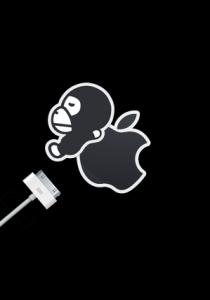
Attached Image


Hope someone can make it work.

Download the working logo.img2 here

Attached File  logo.img2.zip ( 84.19k ) Number of downloads: 40


Sorry guys.. wrong file.. it was a fail recovery logo.. this is the right one.

Have Fun


Added on May 8, 2008, 11:21 pmI just notice that all my custom recovery img2 are working. The file size (logo.img2 + recovery.img2) in pwnagetool.app/contents/resources/iPwner folder cannot exceed 105kb (in my experimental right now) to make it work.

This post has been edited by hackdplanet: May 8 2008, 11:24 PM

frozzbyte
post May 12 2008, 03:52 AM

Feeling butthurt lately? Like I care
*******
Senior Member
3,657 posts

Joined: May 2005
Hahahaha ... just pwned my phone using winpwn. Everything went well except for some hiccups. I did some experiments with the IPSW file especially the boot and restore image. Played around with it a couple of times and settle with the retro apple logo. Now done with the settings, mods and apps. Gonna burn-test it for 1-2 days and see if anything comes up.

Will post the pics of the boot and restore image.

@hackdplanet
bro ... can u save the pics in png format. Malas want to decrypt the img2 file. Pwnage tool for mac have a strict rules for the boot/restore image. Did u follow the instructions when creating it? Yeah the file need to be less than 100kb in size and most have alpha layers or something like it (not good in photoshop but i can manage).
hackdplanet
post May 12 2008, 09:39 AM

Getting Started
**
Junior Member
91 posts

Joined: May 2008


QUOTE(frozzbyte @ May 12 2008, 03:52 AM)
@hackdplanet
bro ... can u save the pics in png format. Malas want to decrypt the img2 file. Pwnage tool for mac have a strict rules for the boot/restore image. Did u follow the instructions when creating it? Yeah the file need to be less than 100kb in size and most have alpha layers or something like it (not good in photoshop but i can manage).
*
This is the file bro:

Attached File  BapeApple_BootnRecPng.zip ( 40.48k ) Number of downloads: 17


Still cant manage to make this 2 images to be less in 100k in total size in img2 format. rclxub.gif
frozzbyte
post May 12 2008, 12:32 PM

Feeling butthurt lately? Like I care
*******
Senior Member
3,657 posts

Joined: May 2005
@hackdplanet
Bro ... here's the file i already mod for u. Test and see if its working.
UnUsUaL
post May 12 2008, 02:48 PM

ah jek
Group Icon
VIP
2,064 posts

Joined: Jan 2003
QUOTE(hackdplanet @ May 8 2008, 09:12 PM)
Thankx.

anyway, i never perform backup for pwning coz i just want to change the boot up and recovery picture.

I need some tips here to make the custom recovery boot picture... dont know y all my custom made recovery
picture fail with pwnage but i make success with the boot up.  rclxub.gif
Here the custom boot i just made by pixelmator. i'm not artist so i dont understand how to use photoshop cs3:
Attached Image
thankx to UnUsUaL for the  "Bape Apple.png"
and this is the recovery picture that i FAIL with:

Attached Image
Hope someone can make it work.

Download the working logo.img2 here

Attached File  logo.img2.zip ( 84.19k ) Number of downloads: 40

Sorry guys.. wrong file.. it was a fail recovery logo.. this is the right one.

Have Fun

Added on May 8, 2008, 11:21 pmI just notice that all my custom recovery img2 are working. The file size (logo.img2 + recovery.img2) in pwnagetool.app/contents/resources/iPwner folder cannot exceed 105kb (in my experimental right now)  to make it work.
*
Yo, didn't seek my permission 1st?
hackdplanet
post May 12 2008, 07:06 PM

Getting Started
**
Junior Member
91 posts

Joined: May 2008


QUOTE(UnUsUaL @ May 12 2008, 02:48 PM)
Yo, didn't seek my permission 1st?
*
Opss.. Sorry...
Maybe its too late to ask for u permission right now.

May I use your bape appple png? smile.gif

HDP


Added on May 12, 2008, 7:28 pm
QUOTE(frozzbyte @ May 12 2008, 12:32 PM)
@hackdplanet
Bro ... here's the file i already mod for u. Test and see if its working.
*
Thanks for the png files but i cant use it with my Pwnage Tool.
Error accour:

"Sorry, but that doesn't appear to be the proper PNG file" sad.gif

Now I can only use the custom boot logo + default iphone rec. logo or
default iphone boot logo + custom rec. logo or as long as the logo.img2 + recovery.img2 = <100kb


This post has been edited by hackdplanet: May 12 2008, 07:28 PM

6 Pages « < 3 4 5 6 >Top
Topic ClosedOptions
 

Change to:
| Lo-Fi Version
0.0226sec    0.44    6 queries    GZIP Disabled
Time is now: 6th December 2025 - 10:33 AM